Page 441 of 741
440
RAV4_OM_OM0R005U_(U)
5-19. Bluetooth® Audio
Select or to Play/Pause.
For details on “Bluetooth
* Audio” screen operation methods, refer to
Basic Audio Operations. ( →P. 394)
For details on how to select a track or album, refer to selecting, fast-
forwarding and reversing tracks/files/songs. ( →P. 405)
*: Bluetooth is a registered trademark of Bluetooth SIG, Inc.
Playing Bluetooth® audio
Page 444 of 741

443
RAV4_OM_OM0R005U_(U)
5-20. Bluetooth® Phone
5
Audio system
Making a call
Display the phone screen. (→P. 441)
Select the “Dial Pad” tab and enter a phone number.
To delete the input phone number, select .
For the first digit, you can enter “+” by selecting “ ∗” for a while.
Press the switch on the steering wheel or select .
You can dial a number from the contact data imported from your cellu-
lar phone. The system has one contac t list for each registered phone.
Up to 2500 contacts may be stored in each contact list.
Display the phone screen. ( →P. 441)
Select “Contacts” tab.
Choose the desired contact to call from the list.
Choose the number and then press the switch on the steering
wheel or select .
You can transfer the phone numbers in a Bluetooth
® phone to the sys-
tem.
Operation methods differ between P BAP (Phone Book Access Profile)
compatible and PBAP incompatible Bluetooth
® phones. If the cellular
phone does not support either PB AP or OPP (Object Push Profile)
service, you cannot transfer contacts.
Once a Bluetooth® phone is registered, you can make a call
using the following procedure:
Dialing
Dialing from the contacts list
When the contact is empty
1
2
3
1
2
3
4
Page 449 of 741

448
RAV4_OM_OM0R005U_(U)
5-20. Bluetooth® Phone
■Release Tones
●A continuous tone signal is a character string that consists of numbers and
the characters p or w. (e.g.056133w0123p#1 ∗)
● When the “p” pause tone is used, the tone data up until the next pause tone
will be automatically sent after 2 seconds have elapsed. When the “w”
pause tone is used, the tone data up until the next pause tone will be a\
uto-
matically sent after a user operation is performed.
● Release tones can be used when automated operation of a phone based
service such as an answering machine or bank phone service is desired. A
phone number with continuous tone signals can be registered in the contact
list.
● Tone data after a “w” pause tone can be operated on voice command during
a call.
Turn the “Handset mode” on to switch from a hands-free call to a cel-
lular phone call.
Turn the “Handset mode” off to switch from a cellular phone call to a
hands-free call.
Select “Transmit Volume”.
Select the desired level for the transmit volume.
Select “OK”.
Press the switch on the steering wheel or select .
To transfer a call
Transmit volume setting
To hang up
1
2
3
Page 450 of 741
RAV4_OM_OM0R005U_(U)
4495-20. Bluetooth® Phone
5
Audio system
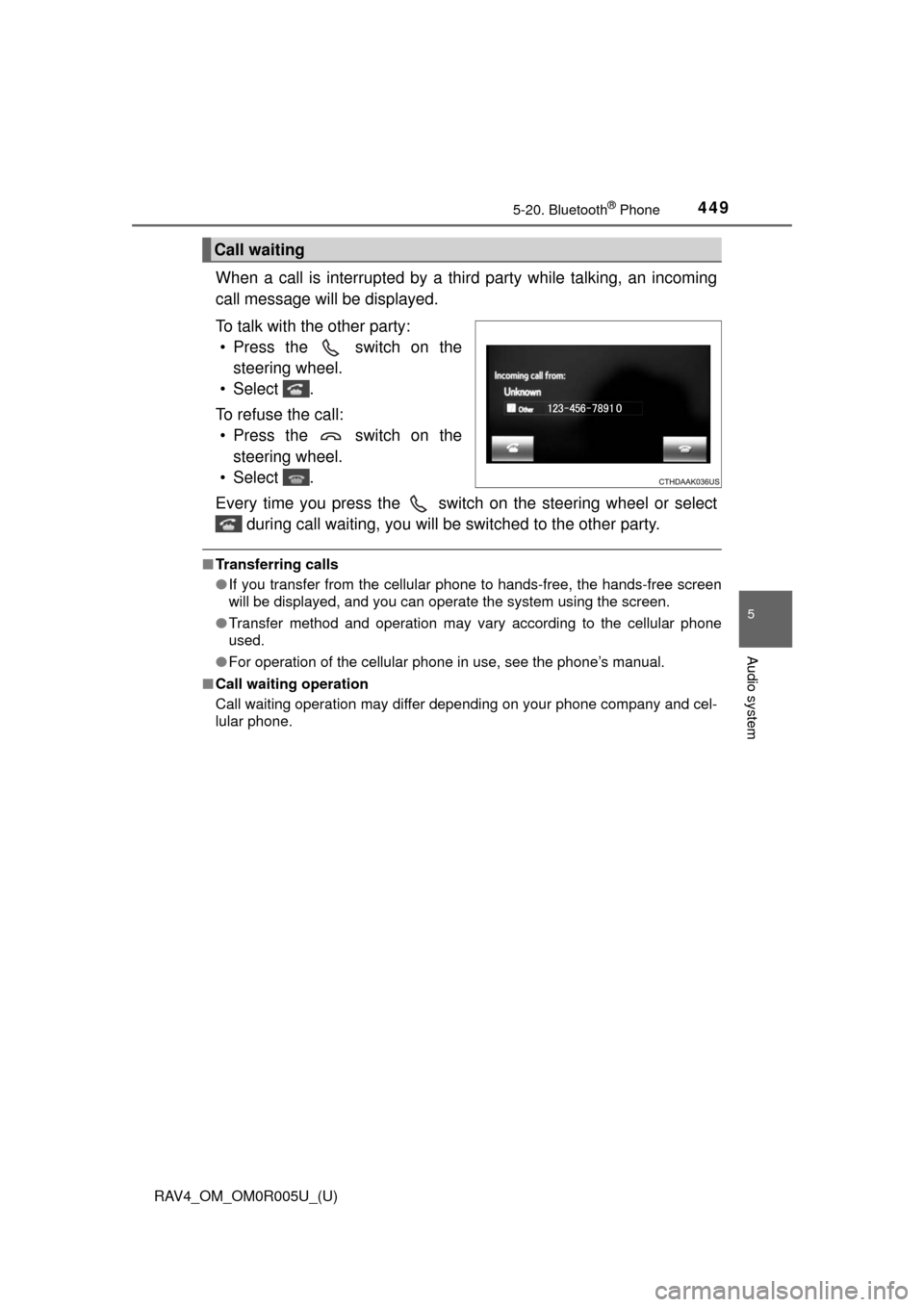
When a call is interrupted by a third party while talking, an incoming
call message will be displayed.
To talk with the other party:• Press the switch on the steering wheel.
• Select .
To refuse the call: • Press the switch on the steering wheel.
• Select .
Every time you press the switch on the steering wheel or select during call waiting, you will be switched to the other party.
■Transferring calls
●If you transfer from the cellular phone to hands-free, the hands-free screen
will be displayed, and you can operate the system using the screen.
● Transfer method and operation may vary according to the cellular phone
used.
● For operation of the cellular phone in use, see the phone’s manual.
■ Call waiting operation
Call waiting operation may differ depending on your phone company and cel-
lular phone.
Call waiting
Page 452 of 741
RAV4_OM_OM0R005U_(U)
4515-20. Bluetooth® Phone
5
Audio system
■Receiving a message
●Depending on the cellular phone used for receiving messages, or its regis-
tration status with the navigation system, some information may not be dis-
played.
● The pop up screen is separately available for incoming e-mail and SMS/
MMS messages under the following conditions:
E-mail:
• “Incoming E-mail Display” is set to “Full Screen”. ( →P. 466)
• “E-mail Notification Popup” is set to on. ( →P. 466)
SMS/MMS:
• “Incoming SMS/MMS Display” is set to “Full screen”. (→P. 466)
• “SMS/MMS Notification Popup” is set to on. ( →P. 466)
Page 455 of 741
454
RAV4_OM_OM0R005U_(U)
5-20. Bluetooth® Phone
Calls can be made to an e-mail/SMS/MMS message sender’s phone
number.Display the “Message Inbox” screen. ( →P. 450)
Select the desired message.
Select .
Check that the “Call” screen is displayed.
■Calling from a number within a message
Calls can be made to a number identified in a message’s text area.
This operation cannot be performed while driving.
Display the “Message Inbox” screen. ( →P. 450)
Select the desired message.
Select the text area.
Select corresponding to the desired number.
Check that the “Call” screen is displayed.
■Calling from the incoming message screen → P. 449
Calling the message sender
1
2
3
4
1
2
3
4
5
Page 460 of 741
RAV4_OM_OM0R005U_(U)
4595-21. Phonebook
5
Audio system
Operation methods differ between PBAP compatible and PBAP
incompatible but OPP compatible Bluetooth® phones.
If your cellular phone is neither PBAP nor OPP compatible, the con-
tacts cannot be transferred.
■For PBAP compatible Bluetooth® Phones
Select “Update Contacts from Phone”.
Check that a confirmation scr een is displayed when the opera-
tion is complete.
This operation may be unnecessary depending on the type of cellular
phone.
Depending on the type of cellular phone, OBEX authentication may be
required when transferring contact data. Enter “1234” into the
Bluetooth
® phone.
If another Bluetooth
® device is connected when transferring contact
data, depending on the phone, the connected Bluetooth® device may
need to be disconnected.
Depending on the type of Bluetooth
® phone being connected, it may be
necessary to perform additional steps on the phone.
Update contacts from phone
1
2
Page 461 of 741

460
RAV4_OM_OM0R005U_(U)
5-21. Phonebook
■For PBAP incompatible but OPP compatible Bluetooth®
PhonesSelect “Update Contacts from Phone”.
Transfer the contact data to the system using a Bluetooth
®
phone.
This operation may be unnecessary depending on the type of cellular
phone.
Depending on the type of cellular phone, OBEX authentication may be
required when transferring contact data. Enter “1234” into the
Bluetooth
® phone.
To cancel this function, select “Cancel”.
Check that a confirmation scr een is displayed when the opera-
tion is complete.
■Updating the contacts in a different way (From the “Call His-
tory” screen)
For PBAP compatible Bluetooth
® phones, this functi on is available
when “Automatic Contact/History Transfer” is set to off. ( →P. 458)
Display the phone screen. (→ P. 441)
Select the “Call History” tab and select a contact not yet regis-
tered in the contact list.
Select “Update Contact”.
Select the desired contact.
Select a phone type for the phone number.
1
2
3
1
2
3
4
5