Page 328 of 741
327
RAV4_OM_OM0R005U_(U)
5-1. Basic Operations
5
Audio system
Using the steering wheel audio switches
Vo l u m e
Radio mode:
Selects a radio station
CD mode:
Selects a track and file (MP3
and WMA)
Bluetooth
® audio mode:
Selects a track and album
iPod mode:
Selects a song
USB memory mode:
Selects a file and folder
Power on, select audio source
Some audio features can be c ontrolled using the switches on
the steering wheel.
Operation may differ depending on the type of audio system or
navigation system. For details, refer to the manual provided with
the audio system or navigation system.
1
2
3
Page 329 of 741
328
RAV4_OM_OM0R005U_(U)
5-1. Basic Operations
Press the “MODE” switch when the audio system is turned off.
Press the “MODE” switch when the audio system is turned on. The
audio source changes as follows each time the button is pressed. If a
mode cannot be used, it will be skipped.
AM→FM1→FM2 →CD mode →iPod or USB memory →
Bluetooth
® audio →AUX
Press the “+” switch to increase the volume and the “-” switch to
decrease the volume.
Hold down the switch to continue increasing or decreasing the volume.
Press and hold the “MODE” switch.
To cancel, press and hold the switch again.
Press the “MODE” switch to select the radio mode.
Press the “ ∧” or “ ∨” switch to select a preset station.
To scan for receivable stations, press and hold the switch until you hear a
beep.
Turning on the power
Changing the audio source
Adjusting the volume
Silencing a sound
Selecting a radio station
1
2
Page 330 of 741
RAV4_OM_OM0R005U_(U)
3295-1. Basic Operations
5
Audio system
Press the “MODE” switch to select the CD, Bluetooth® audio, iPod
or USB memory mode.
Press the “ ∧” or “ ∨” switch to select the desired track/file or song.
Press the “MODE” switch to select Bluetooth
® audio mode.
Press and hold the “ ∧” or “∨ ” switch until you hear a beep.
Press the “MODE” switch to se lect CD or USB memory mode.
Press and hold the “ ∧” or “∨ ” switch until you hear a beep.
Selecting a track/file or song
Selecting an album
Selecting a folder (MP3 and WMA or USB memory)
WARNING
■To reduce the risk of an accident
Exercise care when operating the audio switches on the steering wheel.
1
2
1
2
1
2
Page 331 of 741
330
RAV4_OM_OM0R005U_(U)
5-1. Basic Operations
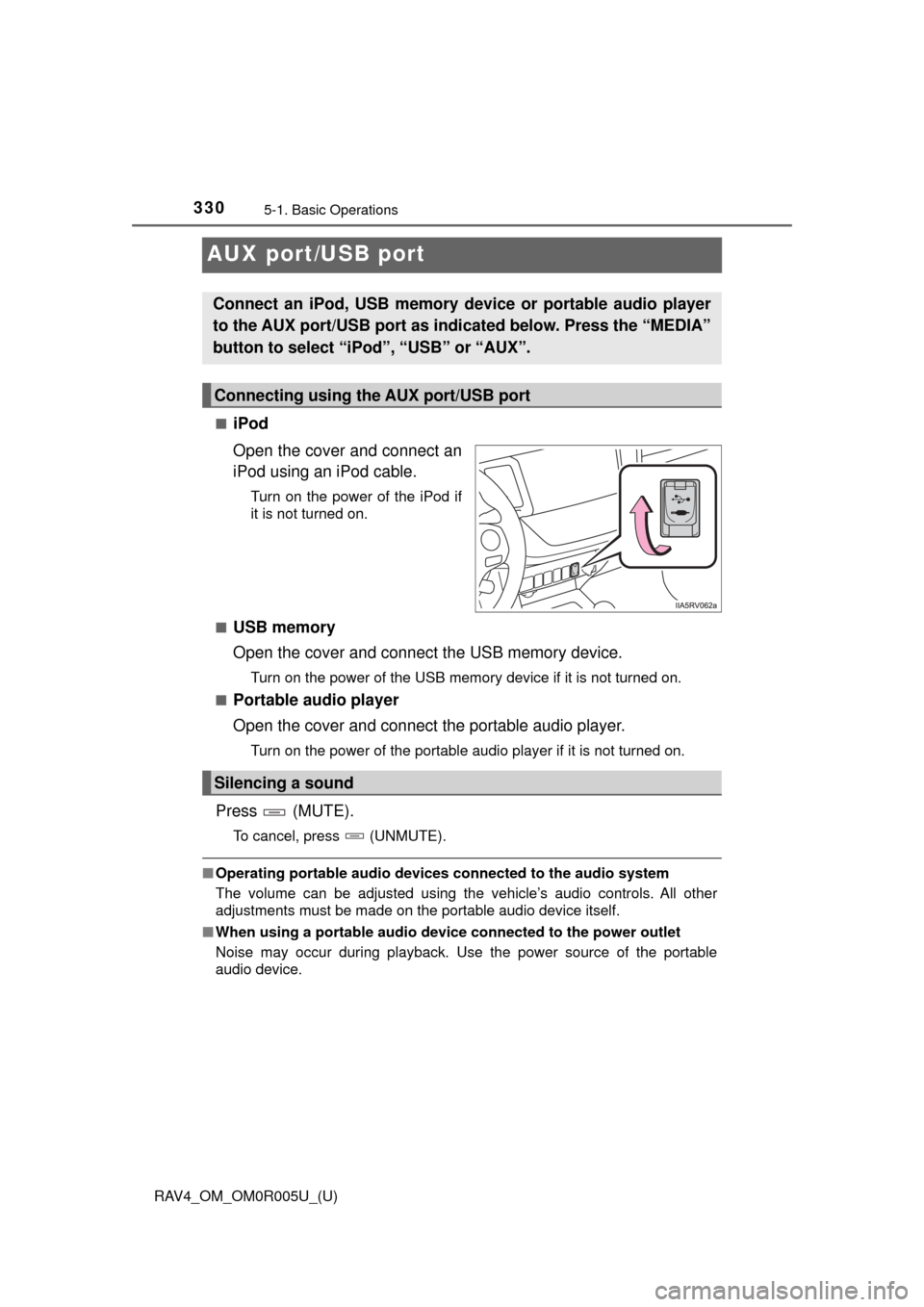
AUX port/USB port
■iPod
Open the cover and connect an
iPod using an iPod cable.
Turn on the power of the iPod if
it is not turned on.
■
USB memory
Open the cover and connect the USB memory device.
Turn on the power of the USB memory device if it is not turned on.
■
Portable audio player
Open the cover and connect the portable audio player.
Turn on the power of the portable audio player if it is not turned on.
Press (MUTE).
To cancel, press (UNMUTE).
■ Operating portable audio devices connected to the audio system
The volume can be adjusted using the vehicle’s audio controls. All other
adjustments must be made on the portable audio device itself.
■ When using a portable audio devi ce connected to the power outlet
Noise may occur during playback. Use the power source of the portable
audio device.
Connect an iPod, USB memory device or portable audio player
to the AUX port/USB port as indi cated below. Press the “MEDIA”
button to select “iPo d”, “USB” or “AUX”.
Connecting using the AUX port/USB port
Silencing a sound
Page 332 of 741
RAV4_OM_OM0R005U_(U)
3315-1. Basic Operations
5
Audio system
WARNING
■While driving
Do not connect a device or operate the device controls.
Page 335 of 741
334
RAV4_OM_OM0R005U_(U)
5-3. Using the radio
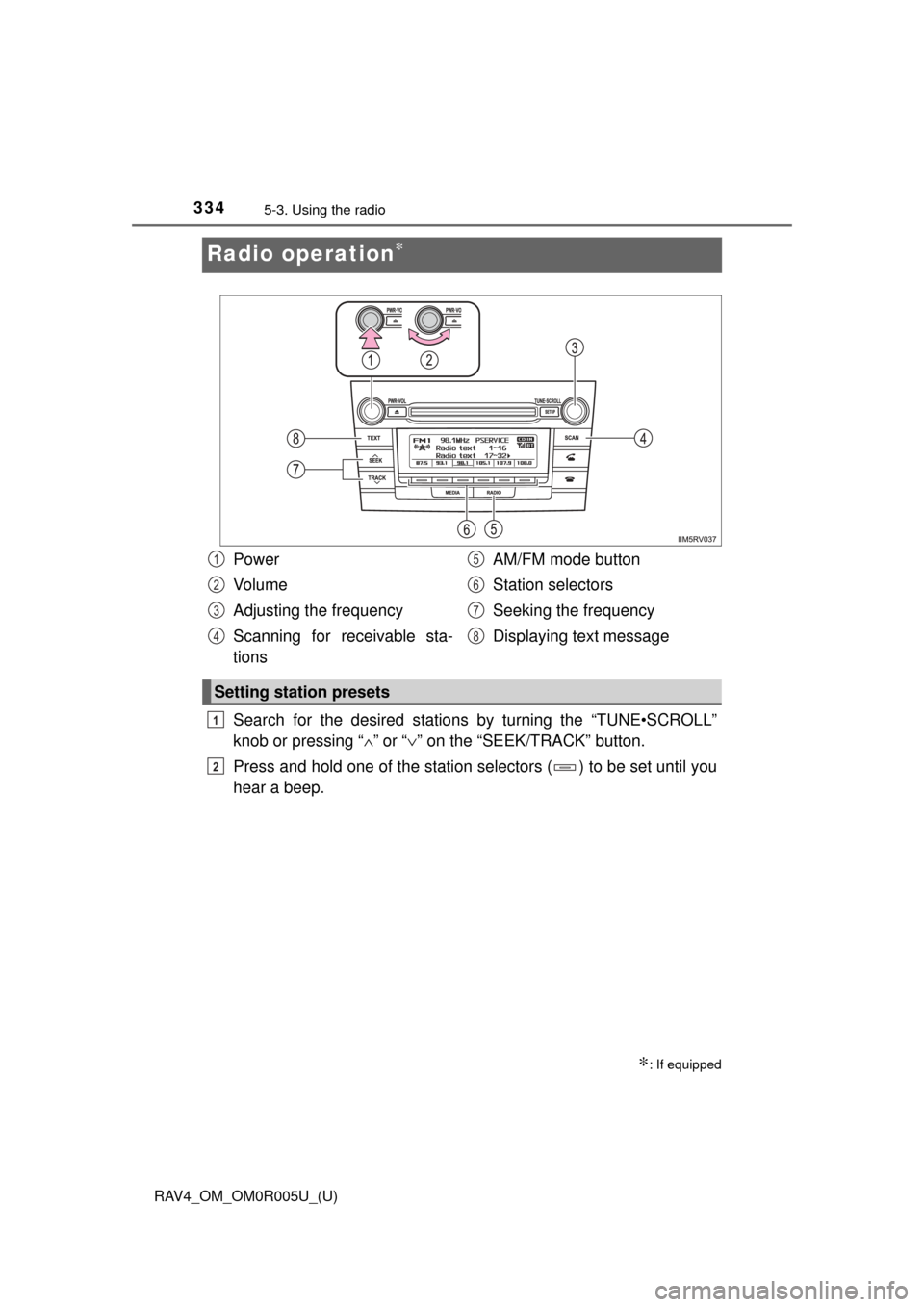
Radio operation∗
Search for the desired stations by turning the “TUNE•SCROLL”
knob or pressing “ ∧”
or “ ∨” on the “SEEK/TRACK” button.
Press and hold one of the station selectors ( ) to be set until you
hear a beep.
∗: If equipped
Power
Vo l u m e
Adjusting the frequency
Scanning for receivable sta-
tions AM/FM mode button
Station selectors
Seeking the frequency
Displaying text message
Setting station presets
1
2
3
4
5
6
7
8
1
2
Page 337 of 741
336
RAV4_OM_OM0R005U_(U)
5-4. Playing an audio CD and MP3/WMA discs
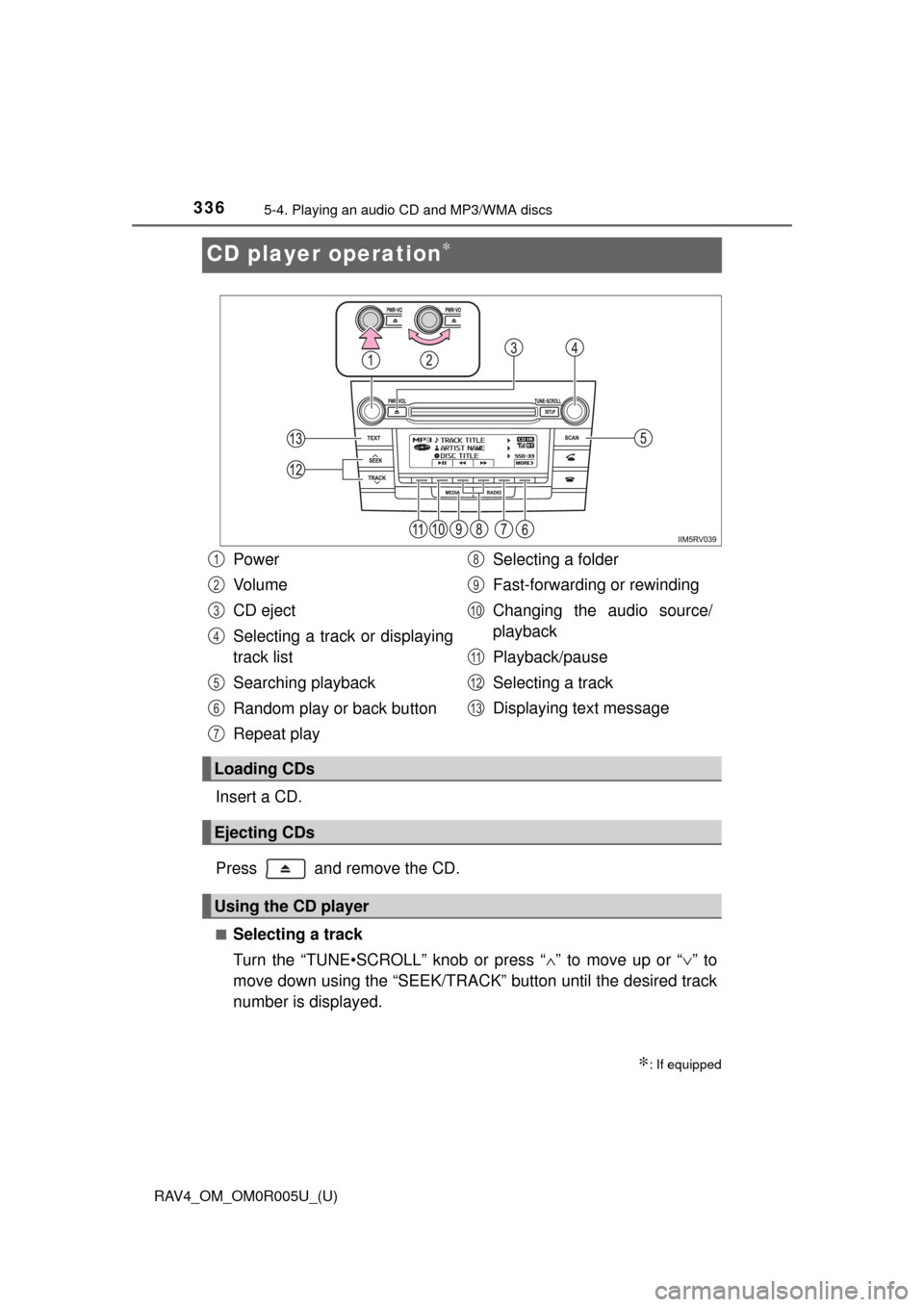
CD player operation∗
Insert a CD.
Press and remove the CD.
■Selecting a track
Turn the “TUNE•SCROLL” knob or press “∧” to move up or “ ∨” to
move down using the “SEEK/TRACK” button until the desired track
number is displayed.
∗: If equipped
Power
Vo l u m e
CD eject
Selecting a track or displaying
track list
Searching playback
Random play or back button
Repeat play Selecting a folder
Fast-forwarding or rewinding
Changing the audio source/
playback
Playback/pause
Selecting a track
Displaying text message
Loading CDs
Ejecting CDs
Using the CD player
1
2
3
4
5
6
7
8
9
10
11
12
13
Page 341 of 741
340
RAV4_OM_OM0R005U_(U)
5-4. Playing an audio CD and MP3/WMA discs
■Display
Depending on the contents recorded, the characters may not be displayed
properly or may not be displayed at all.
■ Error messages
If an error message is displayed, refer to the following table and take the
appropriate measures. If the problem is not rectified, take the vehicle to your
Toyota dealer.
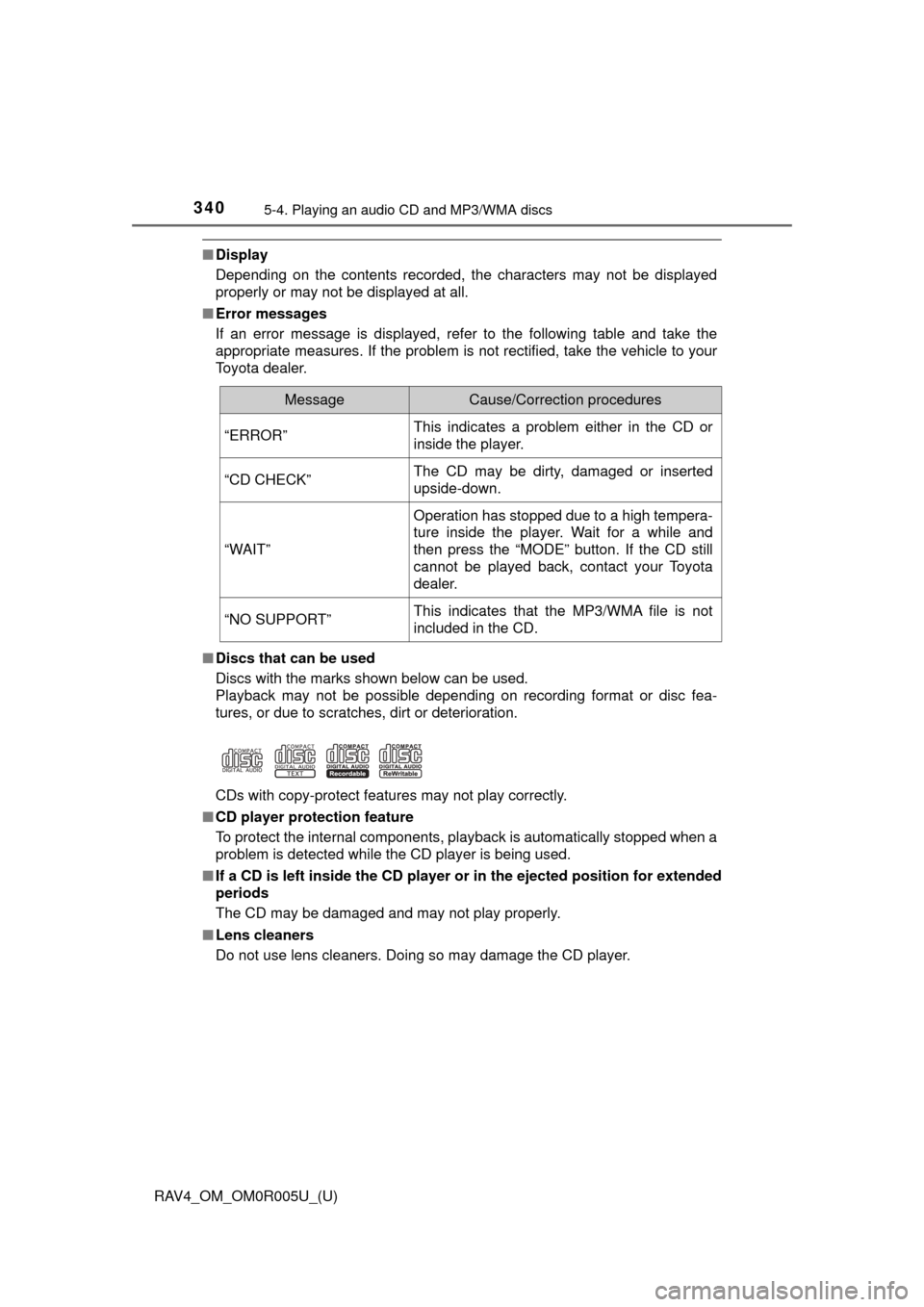
■ Discs that can be used
Discs with the marks shown below can be used.
Playback may not be possible depending on recording format or disc fea-
tures, or due to scratches, dirt or deterioration.
CDs with copy-protect features may not play correctly.
■ CD player protection feature
To protect the internal components, playback is automatically stopped when a
problem is detected while the CD player is being used.
■ If a CD is left inside the CD player or in the ejected position for extended
periods
The CD may be damaged and may not play properly.
■ Lens cleaners
Do not use lens cleaners. Doing so may damage the CD player.
MessageCause/Correction procedures
“ERROR”This indicates a problem either in the CD or
inside the player.
“CD CHECK”The CD may be dirty, damaged or inserted
upside-down.
“WAIT”
Operation has stopped due to a high tempera-
ture inside the player. Wait for a while and
then press the “MODE” button. If the CD still
cannot be played back, contact your Toyota
dealer.
“NO SUPPORT”This indicates that the MP3/WMA file is not
included in the CD.