Page 268 of 741
268
RAV4_OM_OM0R005U_(U)
4-5. Using the driving support systems
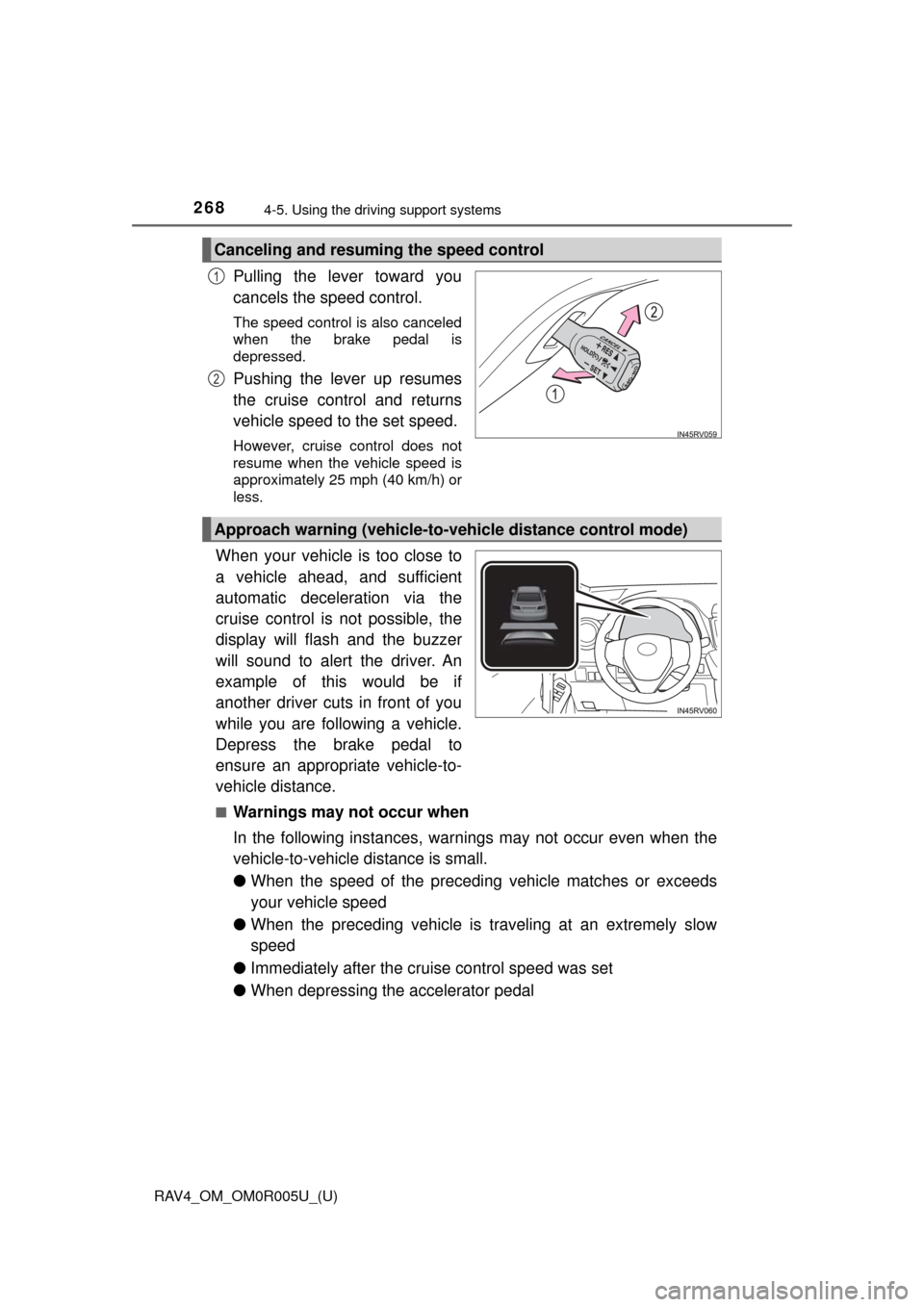
Pulling the lever toward you
cancels the speed control.
The speed control is also canceled
when the brake pedal is
depressed.
Pushing the lever up resumes
the cruise control and returns
vehicle speed to the set speed.
However, cruise control does not
resume when the vehicle speed is
approximately 25 mph (40 km/h) or
less.
When your vehicle is too close to
a vehicle ahead, and sufficient
automatic deceleration via the
cruise control is not possible, the
display will flash and the buzzer
will sound to alert the driver. An
example of this would be if
another driver cuts in front of you
while you are following a vehicle.
Depress the brake pedal to
ensure an appropriate vehicle-to-
vehicle distance.
■Warnings may not occur when
In the following instances, warnings may not occur even when the
vehicle-to-vehicle distance is small.
●When the speed of the preceding vehicle matches or exceeds
your vehicle speed
● When the preceding vehicle is traveling at an extremely slow
speed
● Immediately after the cruise control speed was set
● When depressing the accelerator pedal
Canceling and resuming the speed control
1
2
Approach warning (vehicle-to-vehicle distance control mode)
Page 269 of 741

RAV4_OM_OM0R005U_(U)
2694-5. Using the driving support systems
4
Driving
When constant speed control mode is selected, your vehicle will main-
tain a set speed without controllin g the vehicle-to-vehicle distance.
Select this mode only when vehicle-to-vehicle distance control mode
does not function co rrectly due to a dirty radar sensor, etc.
With the cruise control off,
press and hold the “ON-OFF”
button for 1.5 seconds or more.
Immediately after the “ON-OFF”
button is pressed, the radar cruise
control indicator will come on.
Afterwards, it switches to the cruise
control indicator.
Switching to constant speed con-
trol mode is only possible when
operating the lever with the cruise
control off.
Accelerate or decelerate, with
accelerator pedal operation, to
the desired vehicle speed
(above approximately 30 mph
[50 km/h]) and push the lever
down to set the speed.
Cruise control “SET” indicator
will come on.
The vehicle speed at the moment the lever is released becomes the set
speed.
Adjusting the speed setting: →P. 266
Canceling and resuming the speed setting: →P. 268
Selecting constant speed control mode
1
2
Page 270 of 741

270
RAV4_OM_OM0R005U_(U)
4-5. Using the driving support systems
■Dynamic radar cruise control can be set when
●The shift lever is in D or range 4 or higher of S has been selected.
● Range 4 or higher of D has been selected by using the paddle shift switch.
(Vehicles with paddle shift switches)
● Vehicle speed is above approximately 30 mph (50 km/h).
■ Accelerating after setting the vehicle speed
The vehicle can be accelerated normally. After acceleration, the set speed
resumes. However, during vehicle-to-vehicle distance control mode, the vehi-
cle speed may decrease below the set speed in order to maintain the dis-
tance to the preceding vehicle.
■ Automatic cancelation of vehicle-t o-vehicle distance control mode
Vehicle-to-vehicle distance control mode is automatically canceled in the fol-
lowing situations:
● Actual vehicle speed falls below approximately 25 mph (40 km/h).
● VSC is activated.
● TRAC is activated for a period of time.
● When the VSC or TRAC system is turned off.
● The sensor cannot detect correctly because it is covered in some way.
● Pre-collision braking is activated.
If vehicle-to-vehicle distance control mode is automatically canceled for any
other reason, there may be a malfunction in the system. Contact your Toyota
dealer.
■ Automatic cancelation of co nstant speed control mode
Constant speed control mode is automatically canceled in the following situa-
tions:
● Actual vehicle speed is more than approximately 10 mph (16 km/h) below
the set vehicle speed.
● Actual vehicle speed falls below approximately 25 mph (40 km/h).
● VSC is activated.
● TRAC is activated for a period of time.
● When the VSC or TRAC system is turned off.
● Pre-collision braking is activated.
If constant speed control mode is automatically canceled for any other rea-
son, there may be a malfunction in the system. Contact your Toyota dealer.
■ Warning messages and buzzers for dynamic radar cruise control
Warning messages and buzzers are used to indicate a system malfunction or
to inform the driver of the need for caution while driving.
If a warning message is shown on the multi-information display, read the
message and follow the instructions.
Page 271 of 741
RAV4_OM_OM0R005U_(U)
2714-5. Using the driving support systems
4
Driving
■When the sensor may not be correctly detecting the vehicle ahead
In the case of the following and depending on the conditions, operate the
brake pedal when deceleration of the system is insufficient or operate the
accelerator pedal when acceleration is required.
As the sensor may not be able to correctly detect these types of vehicles, the
approach warning ( →P. 268) may not be activated.
● Vehicles that cut in suddenly
● Vehicles traveling at low speeds
● Vehicles that are not moving in the same lane
● Vehicles with small rear ends (trailers with no load on board etc.)
● Motorcycles traveling in the same lane
● When water or snow thrown up by the surrounding vehicles hinders the
detecting of the sensor
●When your vehicle is pointing upwards
(caused by a heavy load in the luggage
compartment, etc.)
● Preceding vehicle has an extremely high
ground clearance
Page 272 of 741
272
RAV4_OM_OM0R005U_(U)
4-5. Using the driving support systems
■Conditions under which the vehicle -to-vehicle distance control mode
may not function correctly
In the case of the following conditions, operate the brake pedal (or accelera-
tor pedal, depending on the situation) as necessary.
As the sensor may not be able to correctly detect vehicles ahead, the system
may not operate properly.
● When the vehicle ahead of you decelerates suddenly
●
When the road curves or when the lanes
are narrow
● When steering wheel operation or your
position in the lane is unstable
Page 275 of 741

RAV4_OM_OM0R005U_(U)
2754-5. Using the driving support systems
4
Driving
■Cruise control can be set when
●The shift lever is in D or range 4 or higher of S has been selected.
● Range 4 or higher of D has been selected by using the paddle shift. (Vehi-
cles with paddle shift switch)
● Vehicle speed is above approximately 25 mph (40 km/h).
■ Accelerating after setting the vehicle speed
●The vehicle can be accelerated normally. After acceleration, the set speed
resumes.
● Even without canceling the cruise control, the set speed can be increased
by first accelerating the vehicle to the desired speed and then pushing the
lever down to set the new speed.
■ Automatic cruise co ntrol cancelation
Cruise control will stop maintaining the vehicle speed in any of the following
situations.
● Actual vehicle speed falls more than approximately 10 mph (16 km/h) below
the preset vehicle speed.
At this time, the memorized set speed is not retained.
● Actual vehicle speed is below approximately 25 mph (40 km/h).
● VSC is activated.
● TRAC is activated for a period of time.
● When the VSC or TRAC system is turned off.
■ If the warning message for the crui se control is shown on the multi-
information display
Press the “ON-OFF” button once to deactivate the system, and then press
the button again to reactivate the system.
If the cruise control speed cannot be set or if the cruise control cancels imme-
diately after being activated, there may be a malfunction in the cruise control
system. Have the vehicle inspected by your Toyota dealer.
Page 277 of 741
277
RAV4_OM_OM0R005U_(U)
4-5. Using the driving support systems
4
Driving
Intuitive parking assist∗
Front corner sensors (if
equipped)
Front center sensors (if
equipped)
Rear corner sensors
Rear center sensors
4 sensor type
Press the switch.
When on, the indicator light comes
on to inform the driver that the sys-
tem is operational.
∗: If equipped
The distance from your vehicle to nearby obstacles when paral-
lel parking or maneuvering into a garage is measured by the
sensors and communicated via the indicator or displays, and a
buzzer. Always check the surroundi ng area when using this sys-
tem.
Types of sensors
1
2
3
4
Turning intuitive parking assist on/off
Page 278 of 741
278
RAV4_OM_OM0R005U_(U)
4-5. Using the driving support systems
8 sensor type
Press or of the meter control switches and select on
the multi-information display.
Press or of the meter control switches and select ,
and then press .
The will be displayed to inform the driver that the system is opera-
tional.
When the sensors detect an obstacle, the following indicator or dis-
plays inform the driver of the po sition and distance to the obstacle.
Intuitive parking assist i ndicator (4 sensor type)
Vehicle indicator
Rear corner indicator
Rear center indicator
Multi-information display (8 sensor type)
Front corner sensor operation
Front center sensor operation
Rear corner sensor operation
Rear center sensor operation
Display
1
2
1
2
3
1
2
3
4


