2017 TOYOTA RAV4 Eco
[x] Cancel search: EcoPage 258 of 741
258
RAV4_OM_OM0R005U_(U)
4-5. Using the driving support systems
■Operation conditions of each function
●Lane departure alert function
This function operates when all of the following conditions are met.
• LDA is turned on.
• Vehicle speed is approximately 32 mph (50 km/h) or more.
• System recognizes white (yellow) lines.
• Width of traffic lane is approximately 9.8 ft. (3 m) or more.
• Turn signal lever is not operated.
• Vehicle is driven on a straight road or around a gentle curve with a radius
of more than approximately 492 ft. (150 m).
• No system malfunctions are detected. (→P. 626)
● Steering control function
This function operates when all of the following conditions are met in addi-
tion to the operation conditions for the lane departure alert function.
• Setting for “Steering Assist” in on the multi-information display is
set to “On”. ( →P. 695)
• Vehicle is not accelerated or decelerated by a fixed amount or more.
• Steering wheel is not operated with a steering force level suitable for changing lanes.
• ABS, VSC, TRAC and PCS are not operating.
• TRAC or VSC is not turned off.
● Vehicle sway warning
This function operates when all of the following conditions are met.
• Setting for “Sway Warning” in on the multi-information display is set
to “On”. (→P. 695)
• Vehicle speed is approximately 32 mph (50 km/h) or more.
• Width of traffic lane is approximately 9.8 ft. (3 m) or more.
• No system malfunctions are detected. (→P. 626)
■ Temporary cancellation of functions
When operation conditions are no longer met, a function may be temporarily\
canceled. However, when the operation conditions are met again, operation
of the function is automatically restored. (→P. 258)
■ Steering control function
Depending on the vehicle speed, lane departure situation, road conditions,
etc., the driver may not feel the function is operating or the function may not
operate at all.
■ Lane departure alert function
The warning buzzer may be difficult to hear due to external noise, audio play-
back, etc.
■ Hands off steering wheel alert
When the system determines that the driver has removed his hands from the
steering wheel while the steering control function is operating, a warning
message is displayed on the multi-information display and the buzzer
sounds.
Page 259 of 741

RAV4_OM_OM0R005U_(U)
2594-5. Using the driving support systems
4
Driving
■White (yellow) lines are only on one side of road
The LDA system will not operate for the side on which white (yellow) lines
could not be recognized.
■ Conditions in which functions may not operate properly
In the following situations, the camera sensor may not detect white (yellow)
lines and various functions may not operate normally.
●There are shadows on the road that run parallel with, or cover, the white
(yellow) lines.
● The vehicle is driven in an area without white (yellow) lines, such as in front
of a tollgate or checkpoint, or at an intersection, etc.
● The white (yellow) lines are cracked, “Botts’ dots”, “Raised pavement
marker” or stones are present.
● The white (yellow) lines cannot be seen or are difficult to see due to sand,
etc.
● The vehicle is driven on a road surface that is wet due to rain, puddles, etc.
● The traffic lines are yellow (which may be more difficult to recognize than
lines that are white).
● The white (yellow) lines cross over a curb, etc.
● The vehicle is driven on a bright surface, such as concrete.
● The vehicle is driven on a surface that is bright due to reflected light, etc.
● The vehicle is driven in an area where the brightness changes suddenly,
such as at the entrances and exits of tunnels, etc.
● Light from the headlights of an oncoming vehicle, the sun, etc. enters the
camera.
● The vehicle is driven where the road diverges, merges, etc.
● The vehicle is driven on a slope.
● The vehicle is driven on a road which tilts left or right, or a winding road.
● The vehicle is driven on an unpaved or rough road.
● The vehicle is driven around a sharp curve.
● The traffic lane is excessively narrow or wide.
● The vehicle is extremely tilted due to carrying heavy luggage or having
improper tire pressure.
● The distance to the preceding vehicle is extremely short.
● The vehicle is moving up and down a large amount due to road conditions
during driving (poor roads or road seams).
● The headlight lenses are dirty and emit a faint amount of light at night, or the
beam axis has deviated.
● The vehicle is struck by a crosswind.
● The vehicle has just changed lanes or crossed an intersection.
● Snow tires, etc. are equipped.
Page 265 of 741
RAV4_OM_OM0R005U_(U)
2654-5. Using the driving support systems
4
Driving
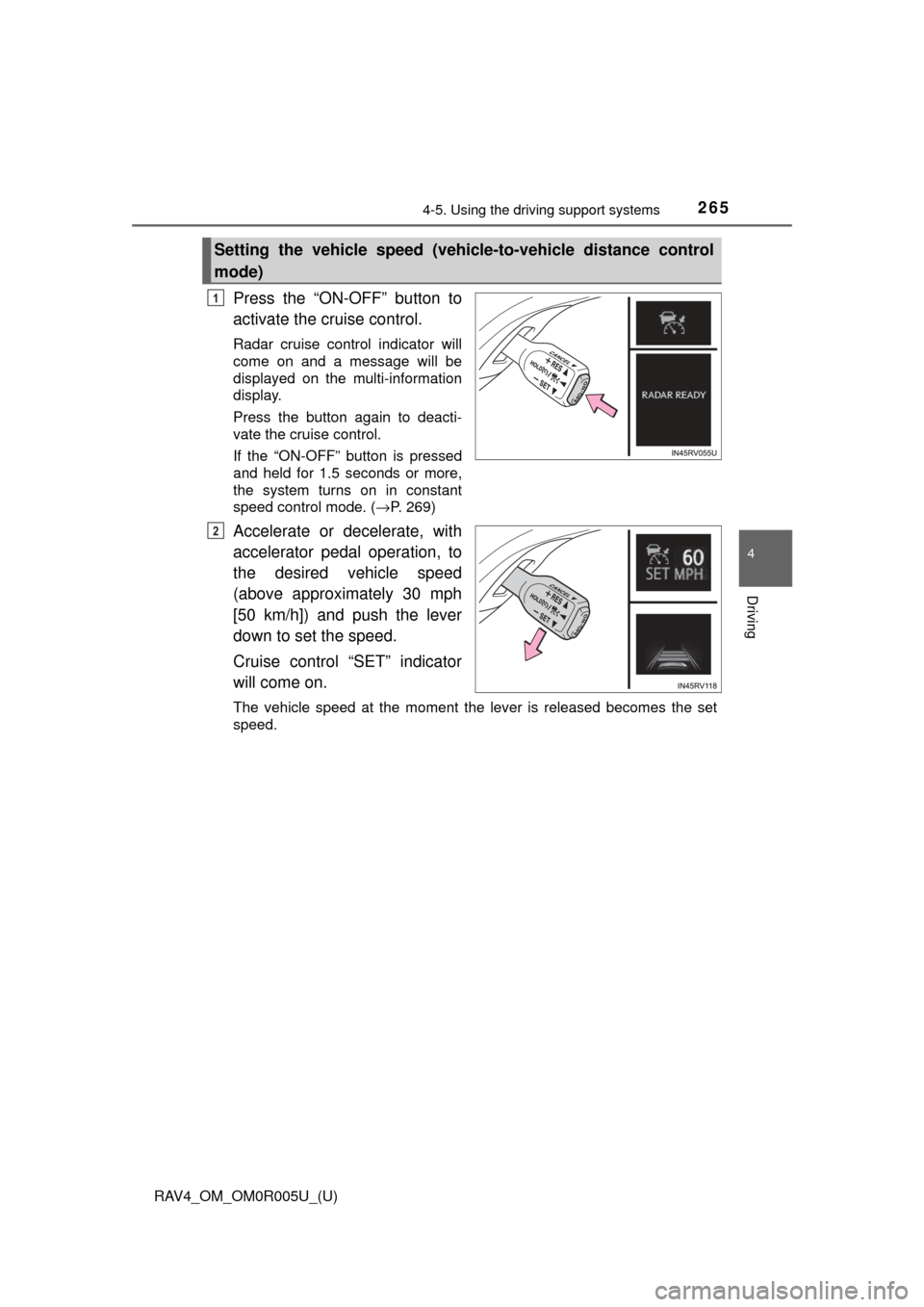
Press the “ON-OFF” button to
activate the cruise control.
Radar cruise control indicator will
come on and a message will be
displayed on the multi-information
display.
Press the button again to deacti-
vate the cruise control.
If the “ON-OFF” button is pressed
and held for 1.5 seconds or more,
the system turns on in constant
speed control mode. ( →P. 269)
Accelerate or decelerate, with
accelerator pedal operation, to
the desired vehicle speed
(above approximately 30 mph
[50 km/h]) and push the lever
down to set the speed.
Cruise control “SET” indicator
will come on.
The vehicle speed at the moment the lever is released becomes the set
speed.
Setting the vehicle speed (vehicle-to-vehicle distance control
mode)
1
2
Page 269 of 741

RAV4_OM_OM0R005U_(U)
2694-5. Using the driving support systems
4
Driving
When constant speed control mode is selected, your vehicle will main-
tain a set speed without controllin g the vehicle-to-vehicle distance.
Select this mode only when vehicle-to-vehicle distance control mode
does not function co rrectly due to a dirty radar sensor, etc.
With the cruise control off,
press and hold the “ON-OFF”
button for 1.5 seconds or more.
Immediately after the “ON-OFF”
button is pressed, the radar cruise
control indicator will come on.
Afterwards, it switches to the cruise
control indicator.
Switching to constant speed con-
trol mode is only possible when
operating the lever with the cruise
control off.
Accelerate or decelerate, with
accelerator pedal operation, to
the desired vehicle speed
(above approximately 30 mph
[50 km/h]) and push the lever
down to set the speed.
Cruise control “SET” indicator
will come on.
The vehicle speed at the moment the lever is released becomes the set
speed.
Adjusting the speed setting: →P. 266
Canceling and resuming the speed setting: →P. 268
Selecting constant speed control mode
1
2
Page 273 of 741

273
RAV4_OM_OM0R005U_(U)
4-5. Using the driving support systems
4
Driving
Cruise control∗
Use the cruise control to maintain a set speed without depressing the
accelerator pedal.
Indicators
Indicators and set speed
Cruise control switch
Press the “ON-OFF” button to
activate the cruise control.
Cruise control indicator will be dis-
played on the multi-information dis-
play.
Press the button again to deacti-
vate the cruise control.
Accelerate or decelerate the
vehicle to the desired speed
(above approximately 25 mph
[40 km/h]), and push the lever
down to set the speed.
Cruise control “SET” indicator and
set speed will be displayed on the
multi-information display.
The vehicle speed at the moment
the lever is released becomes the
set speed.
∗: If equipped
Summary of functions
1
2
3
Setting the vehicle speed
1
2
Page 284 of 741

284
RAV4_OM_OM0R005U_(U)
4-5. Using the driving support systems
●The following situations may occur during use:
• Depending on the shape of the obstacle and other factors, the detection
distance may shorten, or detection may be impossible.
• Obstacles may not be detected if they are too close to the sensor.
• There will be a short delay between obstacle detection and indicator. Even at slow speeds, there is a possibility that the obstacle will come
within the sensor’s detection areas before the indicator comes on and the
warning beep sounds.
• Thin posts or objects lower than the sensor may not be detected when approached, even if they have been detected once.
• It might be difficult to hear beeps due to the volume of audio system or air flow noise of the air conditioning system.
■ When the system malfunctions
4 sensor type
● If the vehicle indicator remains on while the rear corner and rear center indi-
cators flash and the malfunction beep sounds for approximately 7 seconds,
have the vehicle inspected by your Toyota dealer.
● If the vehicle indicator and the rear corner and rear center indicators flash
and the malfunction beep sounds for approximately 7 seconds, clean the
sensors with soft cloth.
8 sensor type
A message is displayed on the multi-information display: →P. 627
■ Customization
Setting of buzzer volume can be changed.
(Customizable features
→P. 700)
■ Certification (Canada only)
This ISM device complies with Canadian ICES-001.
Page 294 of 741
294
RAV4_OM_OM0R005U_(U)
4-5. Using the driving support systems
WARNING
■When using the rear view monitor system
The rear view monitor system is a supplemental device intended to assist
the driver when backing up. When backing up, be sure to check visually
behind and all around the vehicle before proceeding.
Observe the following precautions to avoid an accident that could result in
death or serious injuries.
● Never depend on the rear view monitor system entirely when backing up.
The image and the position of the guide lines displayed on the screen may
differ from the actual state.
Use caution, just as you would when backing up any vehicle.
● Be sure to back up slowly, depressing the brake pedal to control vehicle
speed.
● The instructions given are only guide lines.
When and how much to turn the steering wheel will vary according to traf-
fic conditions, road surface conditions, vehicle condition, etc. when park-
ing. It is necessary to be fully aware of this before using the rear view
monitor system.
● When parking, be sure to check that the parking space will accommodate
your vehicle before maneuvering into it.
● Do not use the rear view monitor system in the following cases:
• On icy or slick road surfaces, or in snow
• When using tire chains or the compact spare tire (if equipped)
• When the back door is not closed completely
• On roads that are not flat or straight, such as curves or slopes.
● In low temperatures, the screen may darken or the image may become
faint. The image could distort when the vehicle is moving, or you may
become unable to see the image on the screen. Be sure to check direct
visually and with the mirrors all around the vehicle before proceeding.
● If the tire sizes are changed, the position of the fixation guide lines dis-
played on the screen may change.
● The camera uses a special lens. The distances between objects and
pedestrians that appear in the image displayed on the screen will differ
from the actual distances. ( →P. 289)
Page 298 of 741

298
RAV4_OM_OM0R005U_(U)
4-5. Using the driving support systems
Outside rear view mirror indicators
Blind Spot Monitor function:
When a vehicle is detected in the blind spot, the outside rear view mirror
indicator comes on while the turn signal lever is not operated. If the turn
signal lever is operated toward the detected side, the outside rear view
mirror indicator flashes.
Rear Cross Traffic Alert function:
When a vehicle approaching from the right or left rear of the vehicle is
detected, the outside rear view mirror indicators flash.
Rear Cross Traffic Alert buzzer (Rear Cross Traffic Alert function
only)
When a vehicle approaching from the right or left rear of the vehicle is
detected, a buzzer sounds from behind the left-hand rear seat.
Press or of the meter control switches and select on
the multi-information display.
Press or of the meter control switches and select ,
and then press .
■The outside rear view mirror indicators visibility
When under strong sunlight, the outside rear view mirror indicator may be dif-
ficult to see.
■ Rear Cross Traffic Alert buzzer hearing
Rear Cross Traffic Alert function may be difficult to hear over loud noises
such as high audio volume.
■ When there is a malfunction in the Blind Spot Monitor system
If a system malfunction is detected due to any of the following reasons, the
warning messages will be displayed: ( →P. 630, 632)
● There is a malfunction with the sensors
● The sensors have become dirty
● The outside temperature is extremely high or low
● The sensor voltage has become abnormal
Turning the Blind Spot Monitor system on/off
2
3
1
2