2017 TOYOTA RAV4 Eco
[x] Cancel search: EcoPage 233 of 741

RAV4_OM_OM0R005U_(U)
2334-5. Using the driving support systems
4
Driving
The pre-collision system is equipp ed with a sophisticated computer
that will record cert ain data, such as:
• Accelerator status
• Brake status
• Vehicle speed
• Operation status of the pre-collision system functions
• Information (such as the distanc e and relative speed between your
vehicle and the vehicle ahead or other objects)
• Images from the camera sensor (available only when the pre-colli-
sion braking function or the pre-collision brake assist function was
operating)
• The pre-collision system does not record conversations, sounds or
images of the inside of the vehicle.
● Data usage
Toyota may use the data recorded in this computer to diagnose
malfunctions, conduct research and development, and improve
quality.
Toyota will not disclose the recor ded data to a third party except:
• With the consent of the vehicle owner or with the consent of the lessee if the vehicle is leased
• In response to an official request by the police, a court of law or a
government agency
• For use by Toyota in a lawsuit
• For research purposes where the data is not tied to a specific vehicle or vehicle owner
● Recorded images can be erased using a specialized device. The
image recording function can be disabled. However, if the function
is disabled, data from when the pre-collisio n system operates will
not be available.
Vehicle data recording
Page 241 of 741
RAV4_OM_OM0R005U_(U)
2414-5. Using the driving support systems
4
Driving
WARNING
■Limitations of the pre-collision system
● The driver is solely responsible for safe driving. Always drive safely, taking
care to observe your surroundings.
Do not use the pre-collision system instead of normal braking operations
under any circumstances. This system will not prevent collisions or lessen
collision damage or injury in every situation. Do not overly rely on this sys-
tem. Failure to do so may lead to an accident, resulting in death or serious
injury.
● Although this system is designed to help avoid a collision or help reduce
the impact of the collision, its effectiveness may change according to vari-
ous conditions, therefore the system may not always be able to achieve
the same level of performance.
Read the following conditions carefully. Do not overly rely on this system
and always drive carefully.
• Conditions under which the system may operate even if there is no pos-
sibility of a collision: →P. 247
• Conditions under which the system may not operate properly: →P. 249
● Do not attempt to test the operation of the pre-collision system yourself, as
the system may not operate properly, possibly leading to an accident.
■ Pre-collision braking
● When the pre-collision braking function is operating, a large amount of
braking force will be applied.
● If the vehicle is stopped by the operation of the pre-collision braking func-
tion, the pre-collision braking func tion operation will be canceled after
approximately 2 seconds. Depress the brake pedal as necessary.
● The pre-collision braking function may not operate if certain operations are
performed by the driver. If the accelerator pedal is being depressed
strongly or the steering wheel is being turned, the system may determine
that the driver is taking evasive action and possibly prevent the pre-colli-
sion braking function from operating.
● In some situations, while the pre-collision braking function is operating,
operation of the function may be canceled if the accelerator pedal is
depressed strongly or the steering wheel is turned and the system deter-
mines that the driver is taking evasive action.
● If the brake pedal is being depressed, the system may determine that the
driver is taking evasive action and possibly delay the operation timing of
the pre-collision braking function.
Page 245 of 741
RAV4_OM_OM0R005U_(U)
2454-5. Using the driving support systems
4
Driving
■Operational conditions
Availability of the pedestrian detection function and pre-collision braking func-
tion depend on the region in which the vehicle was sold. (For specific coun-
tries/areas: →P. 239)
Read the following for details:
Region A
(The pedestrian detection function is available)
The pre-collision system is enabled and the system determines that the pos-
sibility of a frontal collision wi th a vehicle or pedestrian is high.
Each function is operational at the following speeds:
● Pre-collision warning:
• Vehicle speed is between approximately 7 and 110 mph (10 and 180 km/h).
(For detecting a pedestrian, vehicle speed is between approximately 7 and
50 mph [10 and 80 km/h].)
• The relative speed between your vehicle and the vehicle or pedestrian ahead is approximately 7 mph (10 km/h) or more.
● Pre-collision brake assist:
• Vehicle speed is between approximately 19 and 110 mph (30 and
180 km/h). (For detecting a pedestrian, vehicle speed is between approx-
imately 19 and 50 mph [30 and 80 km/h].)
• The relative speed between your vehicle and the vehicle or pedestrian ahead is approximately 19 mph (30 km/h) or more.
● Pre-collision braking:
• Vehicle speed is between approximately 7 and 110 mph (10 and 180 km/h).
(For detecting a pedestrian, vehicle speed is between approximately 7 and
50 mph [10 and 80 km/h].)
• The relative speed between your vehicle and the vehicle or pedestrian
ahead is approximately 7 mph (10 km/h) or more.
The system may not operate in the following situations:
● If a battery terminal has been disconnected and reconnected and then the
vehicle has not been driven for a certain amount of time
● If the shift lever is in R
● If VSC is disabled (only the pre-collision warning function will be opera-
tional)
● If the PCS warning light is flashing or illuminated
Page 246 of 741
246
RAV4_OM_OM0R005U_(U)
4-5. Using the driving support systems
Region B
(The pedestrian detection function is not available)
The pre-collision system is enabled and the system determines that the pos-
sibility of a frontal collision with a vehicle is high.
Each function is operational at the following speeds:
● Pre-collision warning:
• Vehicle speed is between approximately 10 and 110 mph (15 and
180 km/h).
• The relative speed between your vehicle and the vehicle ahead is approximately 7 mph (10 km/h) or more.
● Pre-collision brake assist:
• Vehicle speed is between approximately 19 and 110 mph (30 and
180 km/h).
• The relative speed between your vehicle and the vehicle ahead is
approximately 19 mph (30 km/h) or more.
● Pre-collision braking:
• Vehicle speed is between approximately 10 and 110 mph (15 and
180 km/h).
• The relative speed between your vehicle and the vehicle ahead is approximately 7 mph (10 km/h) or more.
The system may not operate in the following situations:
● If a battery terminal has been disconnected and reconnected and then the
vehicle has not been driven for a certain amount of time
● If the shift lever is in R
● If VSC is disabled (only the pre-collision warning function will be opera-
tional)
● If the PCS warning light is flashing or illuminated
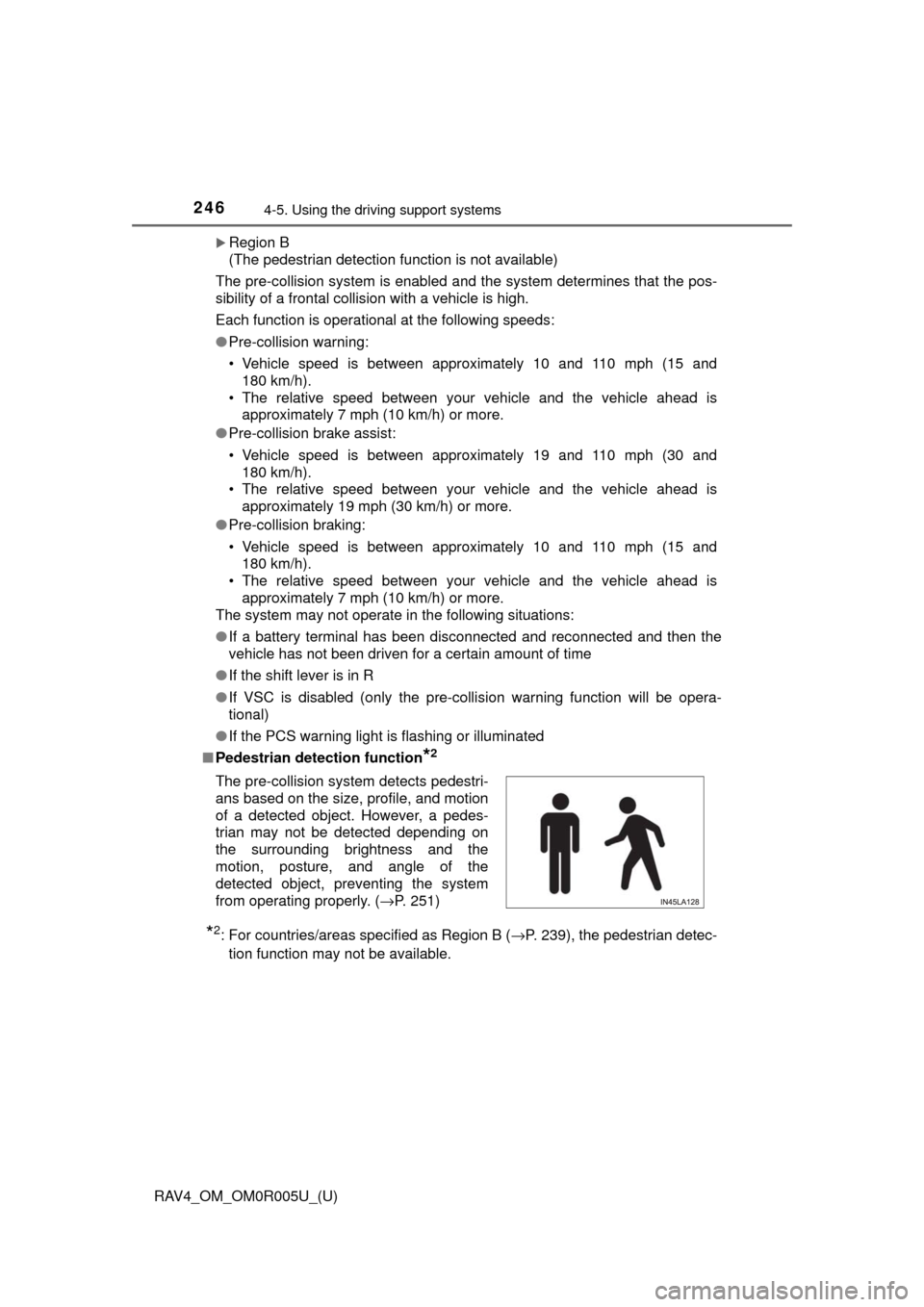
■ Pedestrian detection function
*2
*2: For countries/areas specified as Region B ( →P. 239), the pedestrian detec-
tion function may not be available.
The pre-collision system detects pedestri-
ans based on the size, profile, and motion
of a detected object. However, a pedes-
trian may not be detected depending on
the surrounding brightness and the
motion, posture, and angle of the
detected object, preventing the system
from operating properly. (
→P. 251)
Page 250 of 741

250
RAV4_OM_OM0R005U_(U)
4-5. Using the driving support systems
• If the sun or other light is shining directly on a vehicle ahead
• If a vehicle cuts in front of your vehicle or emerges from beside a vehicle
• If a vehicle ahead makes an abrupt maneuver (such as sudden swerving,
acceleration or deceleration)
• When suddenly cutting behind a preceding vehicle
• When driving in inclement weather such as heavy rain, fog, snow or a sandstorm
• When the vehicle is hit by water, snow, dust, etc. from a vehicle ahead
• When driving through steam or smoke
• When driving in a place where the surrounding brightness changes sud- denly, such as at the entrance or exit of a tunnel
• When a very bright light, such as the sun or the headlights of oncoming traffic, shines directly into the camera sensor
• When the surrounding area is dim, such as at dawn or dusk, or while at night or in a tunnel
• After the engine has started the vehicle has not been driven for a certain
amount of time
• While making a left/right turn and for a few seconds after making a left/ right turn
• While driving on a curve and for a few seconds after driving on a curve
• If your vehicle is skidding
• If the wheels are misaligned
• If a wiper blade is blocking the camera sensor
• The vehicle is wobbling.
• The vehicle is being driven at extremely high speeds.
• When driving on a hill
• If the radar sensor or camera sensor is misaligned • When a vehicle ahead is not directly in front of your vehicle
• If the front of the vehicle is raised or lowered
Page 252 of 741

252
RAV4_OM_OM0R005U_(U)
4-5. Using the driving support systems
■If the PCS warning light flashes a nd a warning message is displayed on
the multi-information display
The pre-collision system may be tem porarily unavailable or there may be a
malfunction in the system.
● In the following situations, the warning light will turn off, the message will
disappear and the system will become operational when normal operating
conditions return:
• When the radar sensor or camera sensor or the area around either sen-
sor is hot, such as in the sun
• When the radar sensor or camera sensor or the area around either sen- sor is cold, such as in an extremely cold environment
• When the radar sensor or front grille emblem is dirty or covered with
snow, etc.
• When the part of the windshield in front of the camera sensor is fogged up or covered with condensation or ice (Defogging the windshield: →P. 4 8 5 ,
493)
• If the camera sensor is obstructed, such as when the hood is open or a sticker is attached to the windshield near the camera sensor
● If the PCS warning light continues to flash or the warning message does not
disappear, the system may be malfunctioning. Have the vehicle inspected
by your Toyota dealer immediately.
■ If VSC is disabled
●If VSC is disabled ( →P. 310), the pre-collision brake assist and pre-collision
braking functions are also disabled.
● The PCS warning light will turn on and “VSC Turned Off Pre-Collision Brake
System Unavailable” will be displayed on the multi-information display.
Page 253 of 741

253
RAV4_OM_OM0R005U_(U)
4-5. Using the driving support systems
4
Driving
LDA (Lane Departure Al ert with steering
control)
∗
When driving on highways and freeways with white (yellow) lines, this
function alerts the driver when th e vehicle might depart from its lane
and provides assistance by operatin g the steering wheel to keep the
vehicle in its lane.
The LDA system recognizes visi-
ble white (yellow) lines with the
camera sensor on the upper por-
tion of the front windshield.
◆Lane departure alert function
When the system determines
that the vehicle might depart
from its lane, a warning is dis-
played on the multi-information
display and the warning buzzer
sounds to alert the driver.
When the warning buzzer
sounds, check the surrounding
road situation and carefully
operate the steering wheel to
move the vehicle back to the
center of the lane.
∗: If equipped
Summary of functions
Functions included in LDA system
Page 257 of 741
RAV4_OM_OM0R005U_(U)
2574-5. Using the driving support systems
4
Driving
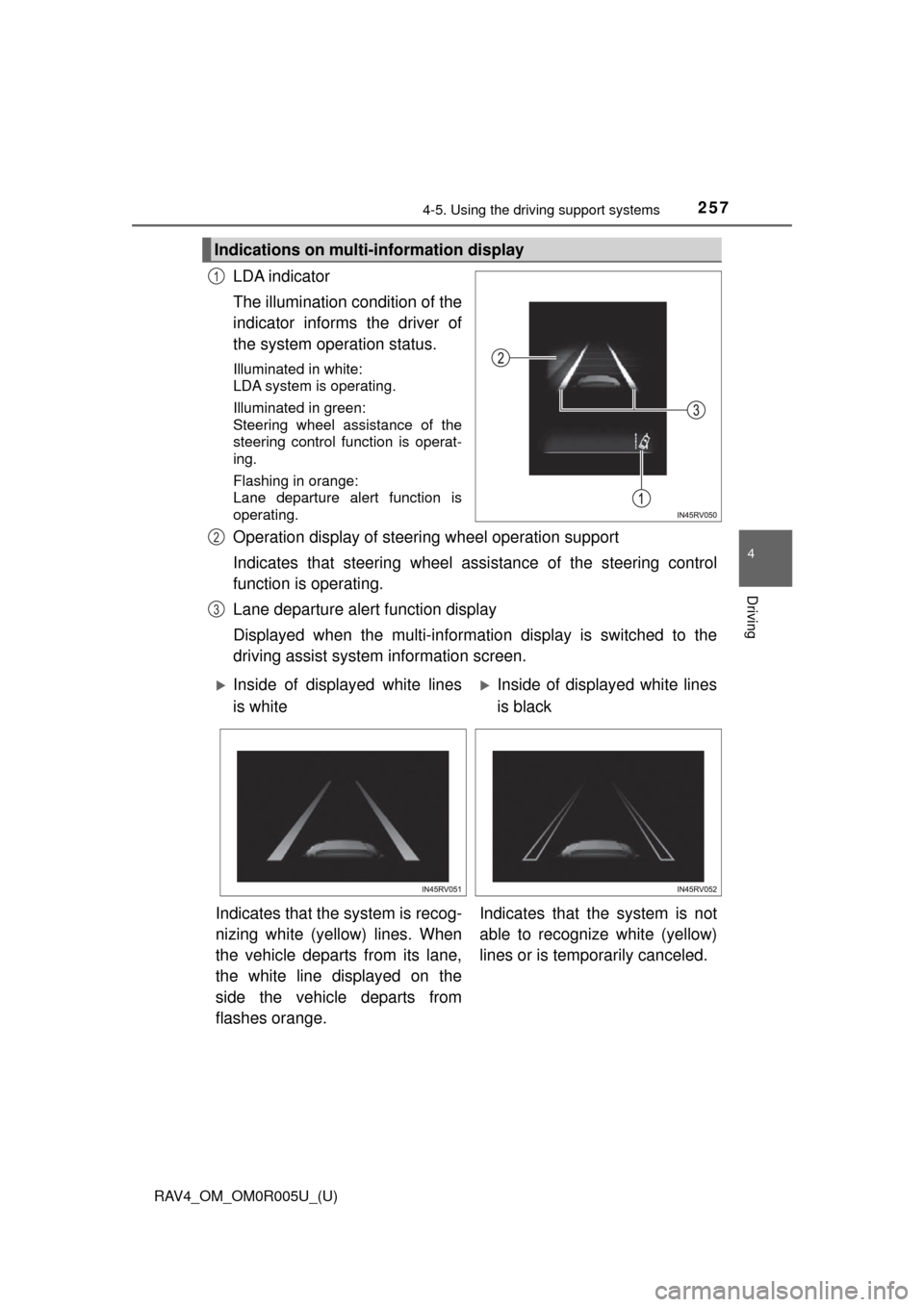
LDA indicator
The illumination condition of the
indicator informs the driver of
the system operation status.
Illuminated in white:
LDA system is operating.
Illuminated in green:
Steering wheel assistance of the
steering control function is operat-
ing.
Flashing in orange:
Lane departure alert function is
operating.
Operation display of steering wheel operation support
Indicates that steering wheel assi stance of the steering control
function is operating.
Lane departure alert function display
Displayed when the multi-informatio n display is switched to the
driving assist system information screen.
Indications on multi-information display
1
2
3
Inside of displayed white lines
is whiteInside of displayed white lines
is black
Indicates that the system is recog-
nizing white (yellow) lines. When
the vehicle departs from its lane,
the white line displayed on the
side the vehicle departs from
flashes orange. Indicates that t
he system is not
able to recognize white (yellow)
lines or is temporarily canceled.