Page 194 of 784
194
PRIUS PRIME_OM_OM47A88U_(U)
3. Instrument cluster
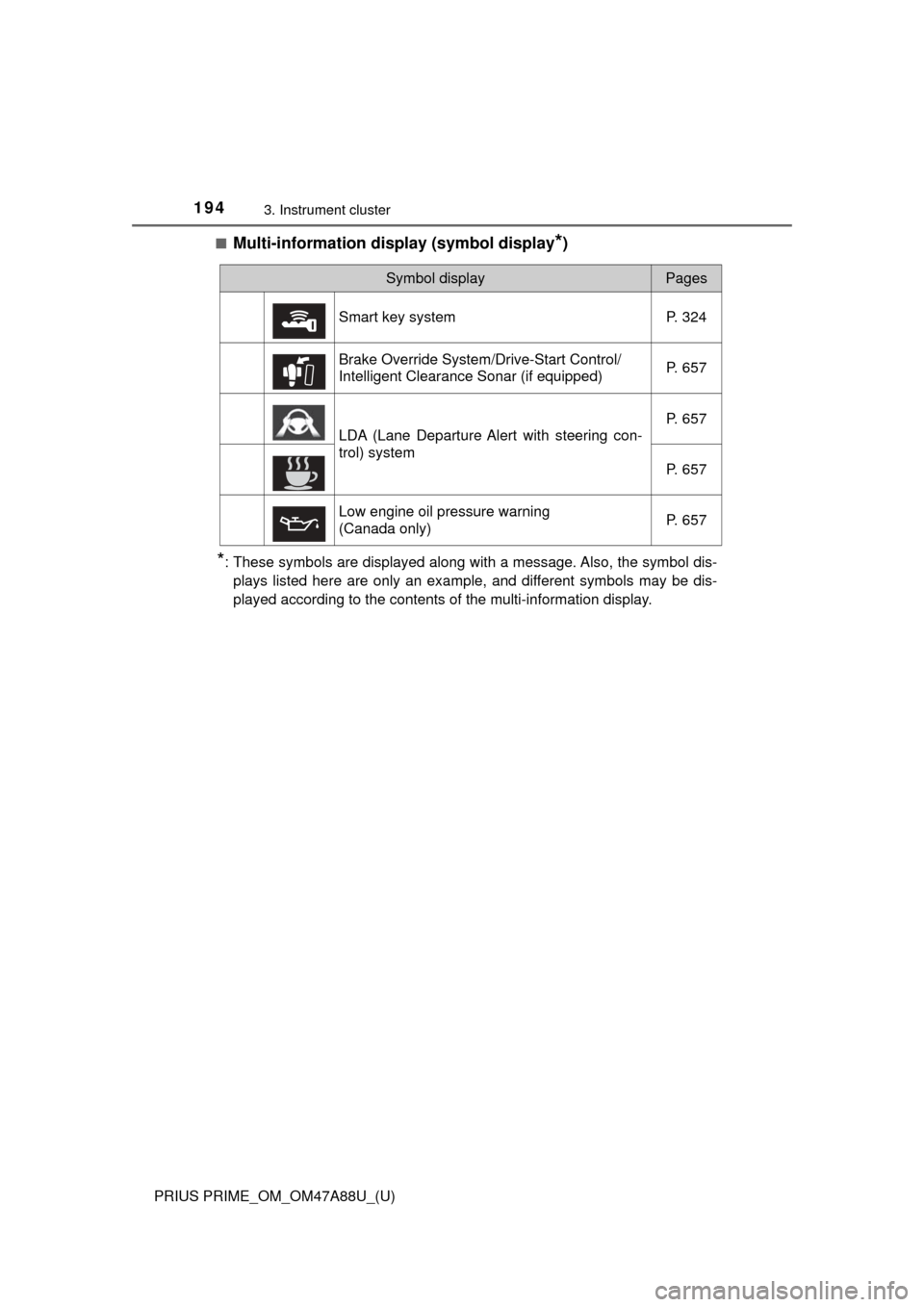
■Multi-information display (symbol display*)
*: These symbols are displayed along with a message. Also, the symbol dis-plays listed here are only an example, and different symbols may be dis-
played according to the contents of the multi-information display.
Symbol displayPages
Smart key system P. 324
Brake Override System/Drive-Start Control/
Intelligent Clearance Sonar (if equipped) P. 657
LDA (Lane Departure Alert with steering con-
trol) systemP. 657
P. 657
Low engine oil pressure warning
(Canada only) P. 657
Page 200 of 784
200
PRIUS PRIME_OM_OM47A88U_(U)
3. Instrument cluster
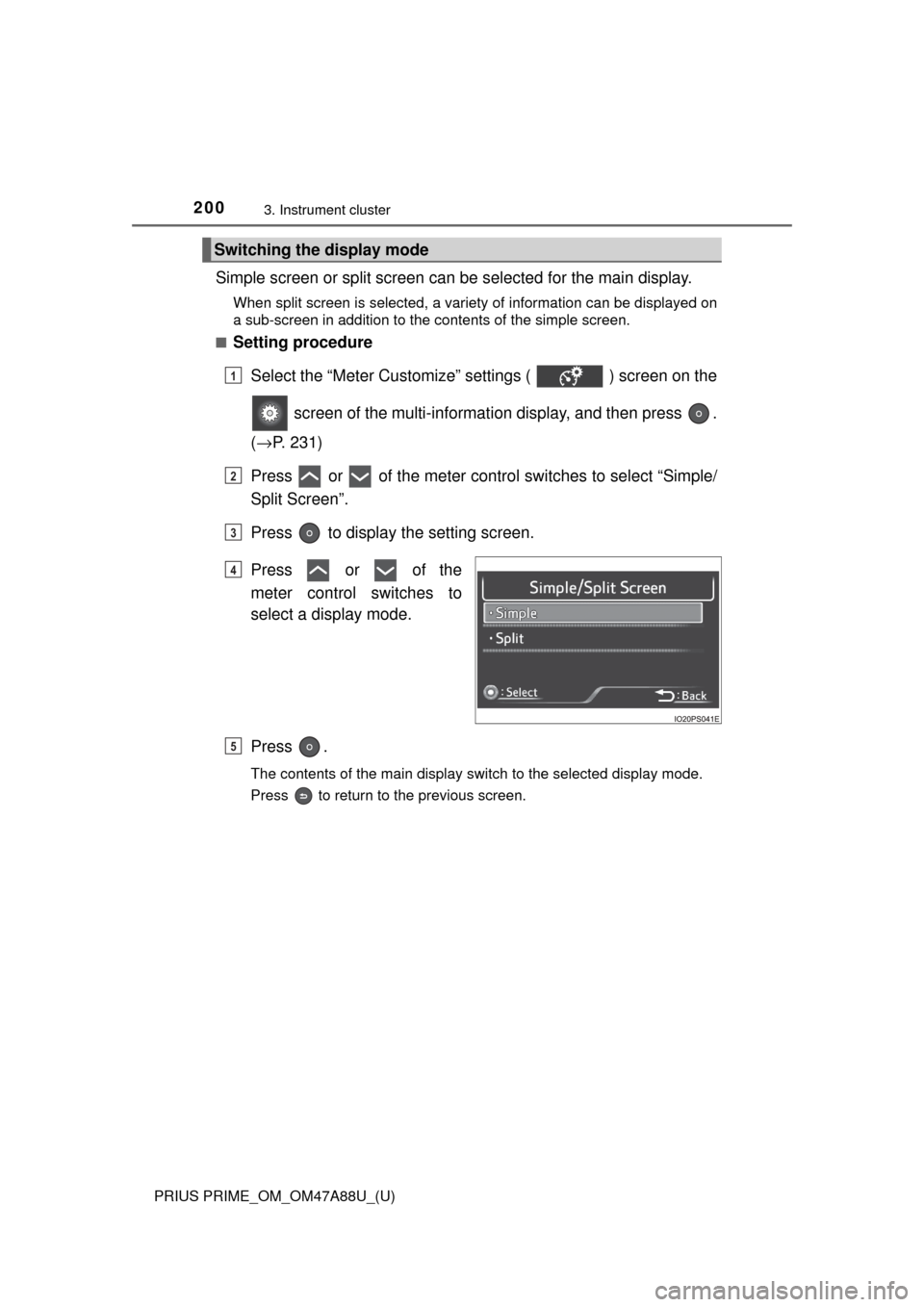
Simple screen or split screen can be selected for the main display.
When split screen is selected, a variety of information can be displayed on
a sub-screen in addition to the contents of the simple screen.
■
Setting procedure
Select the “Meter Customize” settings ( ) screen on the
screen of the multi-informat ion display, and then press .
( → P. 231)
Press or of the meter contro l switches to select “Simple/
Split Screen”.
Press to display the setting screen.
Press or of the
meter control switches to
select a display mode.
Press .
The contents of the main display switch to the selected display mode.
Press to return to the previous screen.
Switching the display mode
1
2
3
4
5
Page 205 of 784
205
PRIUS PRIME_OM_OM47A88U_(U)
3. Instrument cluster
3
Instrument cluster
Multi-information display
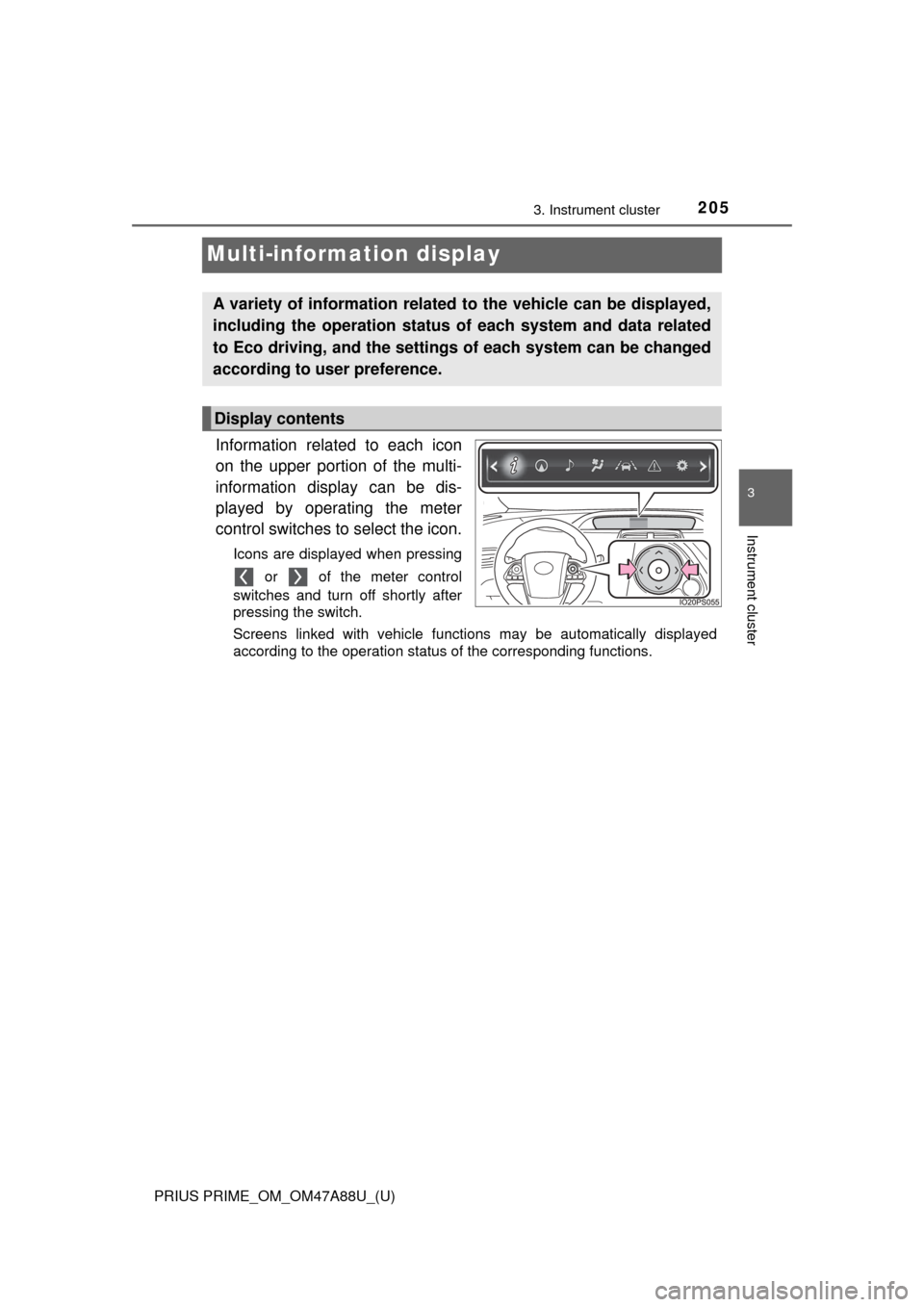
Information related to each icon
on the upper portion of the multi-
information display can be dis-
played by operating the meter
control switches to select the icon.
Icons are displayed when pressing or of the meter control
switches and turn off shortly after
pressing the switch.
Screens linked with vehicle functions may be automatically displayed
according to the operation status of the corresponding functions.
A variety of information related to the vehicle can be displayed,
including the operation status of each system and data related
to Eco driving, and the settings of each system can be changed
according to user preference.
Display contents
Page 210 of 784
210
PRIUS PRIME_OM_OM47A88U_(U)
3. Instrument cluster
◆Hybrid System Indicator
The display changes according to accelerator pedal operation and
displays the current driving status and energy regeneration status.
The display contents of the Hybrid System Indicator are different in EV
mode and HV mode.
The Hybrid System Indicator can be displayed on the sub-screen of the
main display (→P. 202) and the head-up display (if equipped)
( →P. 239).
■
How to read the display
In EV mode
Charge area
Shows that energy is being recovered via the regenerative charging.
EV driving area
Shows that the vehicle is driven using only the electric motor (traction
motor).
Gasoline engine running area
Shows that the gasoline engine is used as auxiliary power.
Eco area
Shows that the vehicle is being driven in an Eco-friendly manner.
Changed within the “ECO Accelerator Guidance” range. ( →P. 213)
*1
Head-up display
(if equipped)
Sub-screen
Multi-information
display
1
2
3
4
Page 212 of 784
212
PRIUS PRIME_OM_OM47A88U_(U)
3. Instrument cluster
In HV mode
Charge area
Shows that energy is being recovered via the regenerative charging.
Eco area
Shows that the vehicle is being driven in an Eco-friendly manner.
Changed within the “ECO Accelerator Guidance” range. (
→P. 213)*1
Power area
Shows that an Eco-friendly driving range is being exceeded (during full
power driving etc.)
Hybrid Eco area*2
Shows that gasoline engine power is not being used very often.
The gasoline engine will automatically stop and restart under various
conditions.
EV indicator*1, 3
The EV indicator comes on when the vehicle is driven using only the
electric motor (traction motor) or the gasoline engine is stopped.
Hybrid battery (traction battery) status
→P. 216
Eco score
→P. 214
EV driving range
→P. 239
Head-up display (if equipped)
Sub-screen
Multi-information
display
1
2
3
4
5
6
7
8
Page 217 of 784

PRIUS PRIME_OM_OM47A88U_(U)
2173. Instrument cluster
3
Instrument cluster
■Remaining charge amount warning of hybrid battery (traction battery)
●While driving, when the remaining charge amount of the hybrid battery (trac-
tion battery) drops below a fixed amount, the buzzer sounds intermittently. If
the remaining charge amount drops further, the buzzer sounds continuously.
● When a warning message is shown on the multi-information display and the
buzzer sounds, follow the instructions displayed on the screen to perform
troubleshooting.
■ About the Eco score
●After starting off, Eco score display does not start until the vehicle speed
exceeds approximately 12 mph (20 km/h).
● In addition to the vehicle driving status, the Eco score also evaluates the air
conditioning system usage condition ( →P. 228). The score displayed when
the hybrid system stops is the total result of the driving status after the
hybrid system starts and the air conditioning usage condition.
■ “EV Distance” and “EV Energy” display
The rate at which the “EV Distance” and “EV Energy” remaining amount
decreases depends on the driving conditions of the vehicle. Also, the “EV
Distance” and “EV Energy” remaining amount may decrease due to system
power consumption even though the vehicle is not being driven.
■ Predictive Efficient Drive (Pre dictive Deceleration Support)
(vehicles with 11.6-inch display)
When a predictive deceleration support point registered in the navigation sys-
tem is approached, the system turns off the Eco accelerator guide and
encourages the driver to reduce excessive acceleration.
For details about Predictive Efficient Dr ive (Predictive Deceleration Support),
refer to the “NAVIGATION SYSTEM OWNER’S MANUAL”.
Page 225 of 784
PRIUS PRIME_OM_OM47A88U_(U)
2253. Instrument cluster
3
Instrument cluster
Displays a compass linked with
the navigation system. Also, when
the navigation system is perform-
ing intersection guidance during
destination guidance, the inter-
section guidance is also displayed
on the multi-information display.
The illustration is only an example
and may differ from the actual
screen.
For details on how to set the destination and switch the map direction,
refer to the “NAVIGATION SYSTEM OWNER’S MANUAL”.
The information about the cur-
rently selected audio source is
displayed.
The illustration is only an example
and may differ from the actual
screen.
To switch the audio source, press
to display the audio source
selection screen, press or
of the meter control switches and
select the desired audio source,
and then press .
To stop audio source selection, press on the audio source selection
screen.
Navigation system-linked display
Audio system-linked display
Page 228 of 784

228
PRIUS PRIME_OM_OM47A88U_(U)
3. Instrument cluster
■Eco score (A/C score)
The current air conditioning system usage status is evaluated in 5
levels to determine whether it is Eco-friendly.
The evaluation changes according to the air conditioning system
usage status. When the power switch is turned off, the current total
driving score
*1 and advice*2 related to using the air conditioning
system are displayed. ( →P. 184)
Low score
*3
High score
Avoiding excessive use of the
air conditioning system and
using the air conditioning sys-
tem at the appropriate setting
according to the ambient tem-
perature and number of passen-
gers and with the S-FLOW
mode ( ) and “CLIMATE
CONTROL” will result in a high
evaluation.
*1: The Eco score (A/C score) is not evaluated for approximately 1 minute after the power switch is turned to ON mode.
*2: This advice may not be displayed depending on the situation.
*3: For items not evaluated with an Eco score (A/C score), the displayreads 0.
■ Operating switches of the air c onditioning system operation panel
● The pop-up display function that displays when the air conditioning settings
are changed using the air conditioning system switches can be turned off in
the “Meter Customize” settings. ( →P. 233)
1
2
●When the air conditioning system
switches are operated to change the air
conditioning settings while a screen
other than the air conditioning system
settings screen is displayed on the multi-
information display, a pop-up display for
the air conditioning settings contents is
displayed. However, air conditioning
system settings cannot be changed on
the pop-up display.