2017 TOYOTA PRIUS PRIME multi information display
[x] Cancel search: multi information displayPage 101 of 784

PRIUS PRIME_OM_OM47A88U_(U)
1012-1. Plug-in hybrid system
2
Plug-in hybrid system
The distance that can be driven in EV mode varies significantly
depending on how the vehicle is driven, road conditions, the weather,
the outside temperature, usage cond itions of electrical components
and the number of occupants.
The distance that can be driven in EV mode can be extended if the fol-
lowing is performed:
● Maintain a safe distance from the vehicle in front and avoid unnec-
essary acceleration and deceleration
● Accelerate and decelerate the v ehicle as smoothly as possible
● Drive at moderate speeds as much as possible and maintain a con-
stant speed
● Set the air conditioning to a moderate temperature and turn the “A/C”
switch (
*1 • *2) off when it is not needed
● Use tires of the specified size and maintain the specified tire pres-
sure
● Use the EV/HV mode selection switch to drive in HV mode when
driving on a highway
Electricity consumption will increa se substantially when driving on a
highway in EV mode.
● Do not add unnecessary weight to the vehicle
*1: Vehicles with 7-inch display
*2: Vehicles with 11.6-inch display
The following indicate that charging has been carried out properly.
●The charging indicator turns off
● The Hybrid battery (traction battery ) status indicators illuminate for
approximately 15 seconds. ( →P. 104)
● “Charging Complete” is displayed on the multi-information display
when starting off ( →P. 130)
Regardless of the type of power source or whether the charging timer
function is used, charging is completed if the above can be confirmed.
Charging-related messages: →P. 175
Tips for extending the EV driving range
Display when charging is completed
Page 106 of 784

106
PRIUS PRIME_OM_OM47A88U_(U)
2-2. Charging
The illumination/flashing pattern
changes to inform the user of the
charging status in the following
ways.
*1: Flashes for approximately 15 seconds.
*2: Flashes for approximately 10 seconds.
■Charging indicator
When a system malfunction occurs while charging or using the Remote Air
Conditioning System, the charging indicator rapidly flashes for approximately
10 seconds, and then turns off.
If this occurs, the next time the hybrid system is started, a message is dis-
played on the multi-information display. When a message is displayed, follow
the instructions displayed on the screen.
Charging indicator
Illumination/flashing
patternVehicle condition
Illuminated
• Charging is in progress
• Charging is possible
• “Traction Battery Heater” ( →P. 126) is operating
• “Traction Battery Cooler” ( →P. 127) is operating
Flashing
(normally)
*1When charge schedule is registered ( →P. 147) and
charging cable is connected to vehicle
Rapidly flashing*2When charging cannot be carried out due to mal-
function in a power source or the vehicle etc.
( →P. 171)
Not illuminated
• Charging connector is not inserted into charging
inlet
• When the charging timer ( →P. 147) is on standby
• When charging is completed
Page 118 of 784
118
PRIUS PRIME_OM_OM47A88U_(U)
2-2. Charging
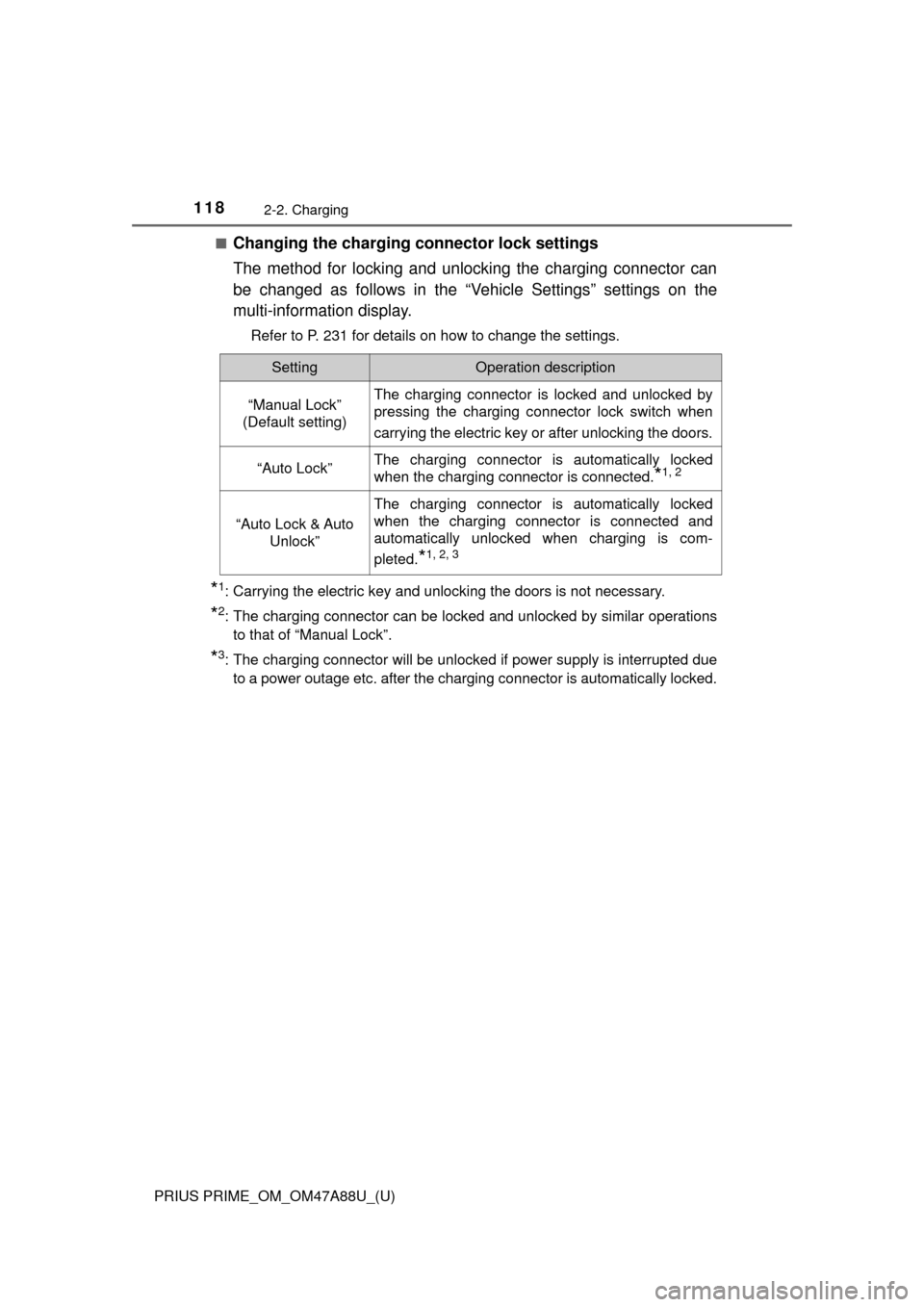
■Changing the charging connector lock settings
The method for locking and unlocking the charging connector can
be changed as follows in the “Vehicle Settings” settings on the
multi-information display.
Refer to P. 231 for details on how to change the settings.
*1: Carrying the electric key and unlocking the doors is not necessary.
*2: The charging connector can be locked and unlocked by similar operationsto that of “Manual Lock”.
*3: The charging connector will be unlocked if power supply is interrupted dueto a power outage etc. after the charging connector is automatically locked.
SettingOperation description
“Manual Lock”
(Default setting)The charging connector is locked and unlocked by
pressing the charging connector lock switch when
carrying the electric key or after unlocking the doors.
“Auto Lock”The charging connector is automatically locked
when the charging connector is connected.
*1, 2
“Auto Lock & Auto Unlock”
The charging connector is automatically locked
when the charging connector is connected and
automatically unlocked when charging is com-
pleted.
*1, 2, 3
Page 123 of 784
PRIUS PRIME_OM_OM47A88U_(U)
1232-2. Charging
2
Plug-in hybrid system
■The charging environment
For safe charging, the following charging equipment and settings are recom-
mended.
●Weatherproof outlet
When charging outdoors, connect the plug to a weatherproof outlet, and
ensure that the plug remains waterproof while the plug is connected.
● Dedicated circuit
• To reduce the risk of fire, connect only to an at least 15A branch circuit
with an over-current protection in accordance with the National Electric
Code, ANSI/NFPA 70.
• To reduce the risk of electric shock when working with the plug, connect to a outlet with a Ground-Fault Circuit- Interrupter (GFCI) or that has an
Earth Leakage Circuit Breaker installed.
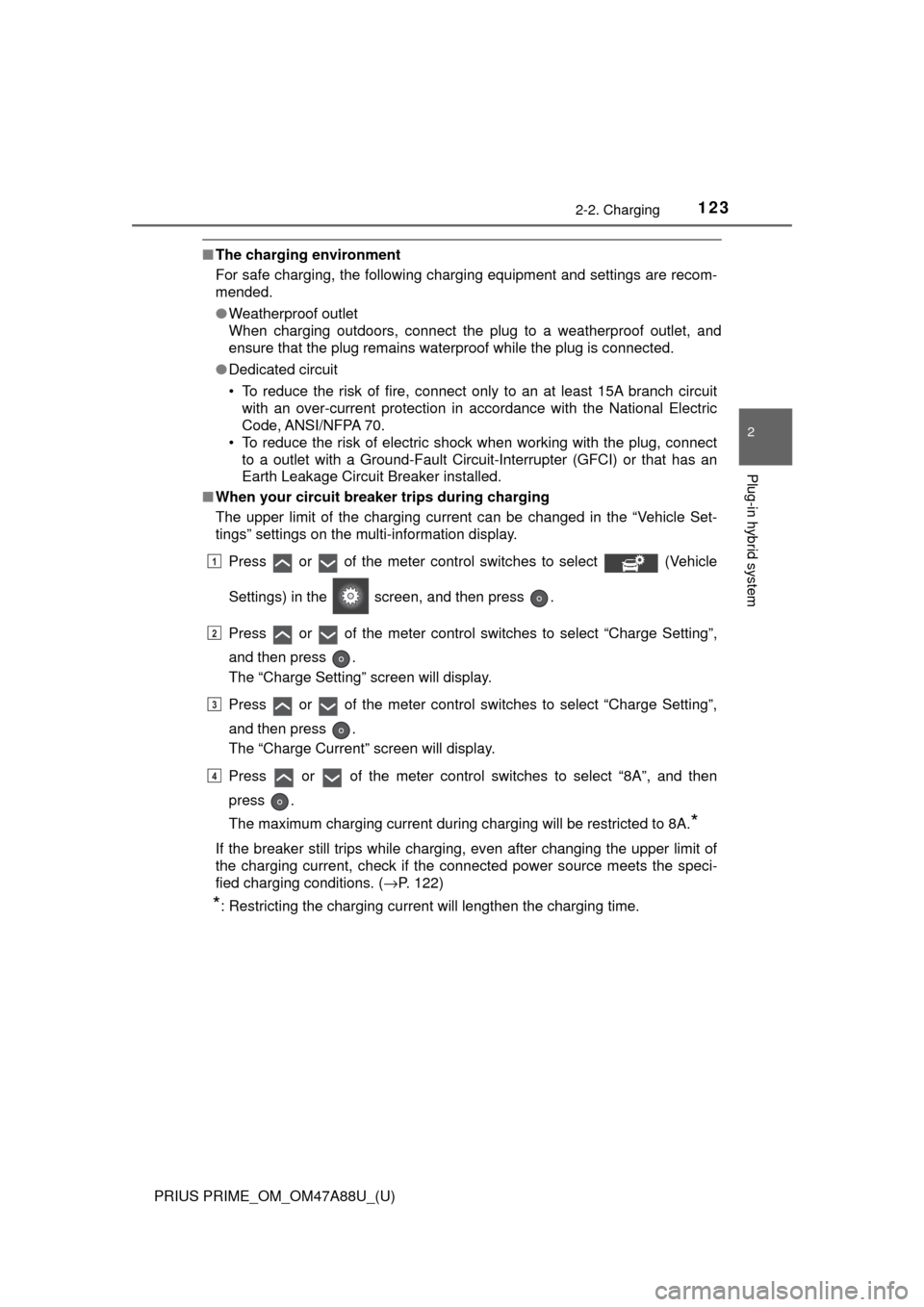
■ When your circuit breaker trips during charging
The upper limit of the charging current can be changed in the “Vehicle Set-
tings” settings on the multi-information display.
Press or of the meter control switches to select (Vehicle
Settings) in the screen, and then press .
Press or of the meter control switches to select “Charge Setting”,
and then press .
The “Charge Setting” screen will display.
Press or of the meter control switches to select “Charge Setting”,
and then press .
The “Charge Current” screen will display.
Press or of the meter control switches to select “8A”, and then
press .
The maximum charging current during charging will be restricted to 8A.
*
If the breaker still trips while charging, even after changing the upper limit of
the charging current, check if the connected power source meets the speci-
fied charging conditions. ( →P. 122)
*: Restricting the charging current will lengthen the charging time.
1
2
3
4
Page 127 of 784

PRIUS PRIME_OM_OM47A88U_(U)
1272-2. Charging
2
Plug-in hybrid system
■Hybrid battery (traction battery) warming control (Alaska and
Canada only)
This control operates after the charging cable remains connected to
the vehicle for 3 days and “Traction Battery Heater” automatically
stops. It automatically insulates th e hybrid battery (traction battery)
in extremely low temperatures.
● This control stops 31 days after the charging cable is connected,
even if it is still co nnected to the vehicle.
● When this control operates, timer charging settings are ignored
and charging starts immediately.
■“Traction Battery Cooler”
When the hybrid battery (traction ba ttery) is hot, this function pro-
tects it by using the vehicle ai r conditioning to cool it before
charging is carried out.
When the hybrid battery (trac-
tion battery) is above a certain
temperature and the power
switch is turned off, a check
screen is displayed on the
multi-information display that
indicates whether “Traction Bat-
tery Cooler” is implemented.
When “No” is selected, the hybrid battery (traction battery) cooling sys-
tem does not operate.
■ “Traction Battery Heater”
●“Traction Battery Heater” may operate when charging is not being per-
formed.
● When “Traction Battery Heater” is operating, the charging indicator illumi-
nates.
● When “Traction Battery Heater” is operating during charging, the charging
time may be longer than normal.
● If the outside temperature becomes high while “Traction Battery Heater” is
operating, charging may complete earlier than the “Departure” time set.
(→P. 147)
● “Traction Battery Heater” can be turned on and off in the “Vehicle Settings”
settings on the multi-information display. ( →P. 732)
Page 128 of 784

128
PRIUS PRIME_OM_OM47A88U_(U)
2-2. Charging
■“Traction Battery Cooler”
●When the hybrid battery (traction battery) is above a certain temperature
and the power switch is turned off, a check screen is displayed on the multi-
information display that indicates whether “Traction Battery Cooler” is imple-
mented. Approximately 5 minutes after selecting “Yes” on this screen, sys-
tem operation becomes possible.
● When charging starts, “Traction Battery Cooler” only operates if the hybrid
battery (traction battery) temperature is hot.
● The charging indicator is illuminated while “Traction Battery Cooler” is on
standby or operating.
● “Traction Battery Cooler” is implem ented for a maximum of approximately
30 minutes. However, when the “Departure” time is set ( →P. 147) and there
is not sufficient time between the current time and the time that charging will
complete, “Traction Battery Cooler” operation time may become shorter.
● When there is a small amount of remaining charge in the hybrid battery
(traction battery), even if the hybrid battery (traction battery) is hot, “Traction
Battery Cooler” may not be implemented.
● When the following operations are performed while “Traction Battery Cooler”
is operating, the hybrid battery (traction battery) cooling operation stops.
• A door is opened
• The hood is opened
• The power switch is turned to any mode other than off
• The shift position is changed to any position other than P
• The Remote Air Conditioning System is operated ( →P. 509)
• “Charge Now” is implemented ( →P. 156, 165)
• The amount of remaining charge in the hybrid battery (traction battery) is
below a certain amount
● When the power switch is turned off, a check screen is displayed on the
multi-information display that indicates whether “Traction Battery Cooler” is
implemented. This check screen can be turned on and off in the “Meter Cus-
tomize” settings on the multi-information display ( →P. 234). However, when
the check screen is set to “Off”, “Traction Battery Cooler” is no longer oper-
ates.
● “Traction Battery Cooler” uses the power of the hybrid battery (traction bat-
tery) and external power source.
• While “Traction Battery Cooler” is operating, the amount of the remaining
charge of the hybrid battery (traction battery) increases and decreases in
a certain range, and does not increase as in normal charging.
• The operation of “Traction Battery Cooler” is recognized as charging by a
charging equipment. The charging equipment that calculates the fee
according to charging time causes a charging fee.
Page 130 of 784
130
PRIUS PRIME_OM_OM47A88U_(U)
2-2. Charging
■Searching charging stations (vehicles with 11.6-inch display)
After applying to Entune, it is possible to use the smartphone application to
search the nearby charging stations.
For details about Entune, refer to http://www.toyota.com/entune/.
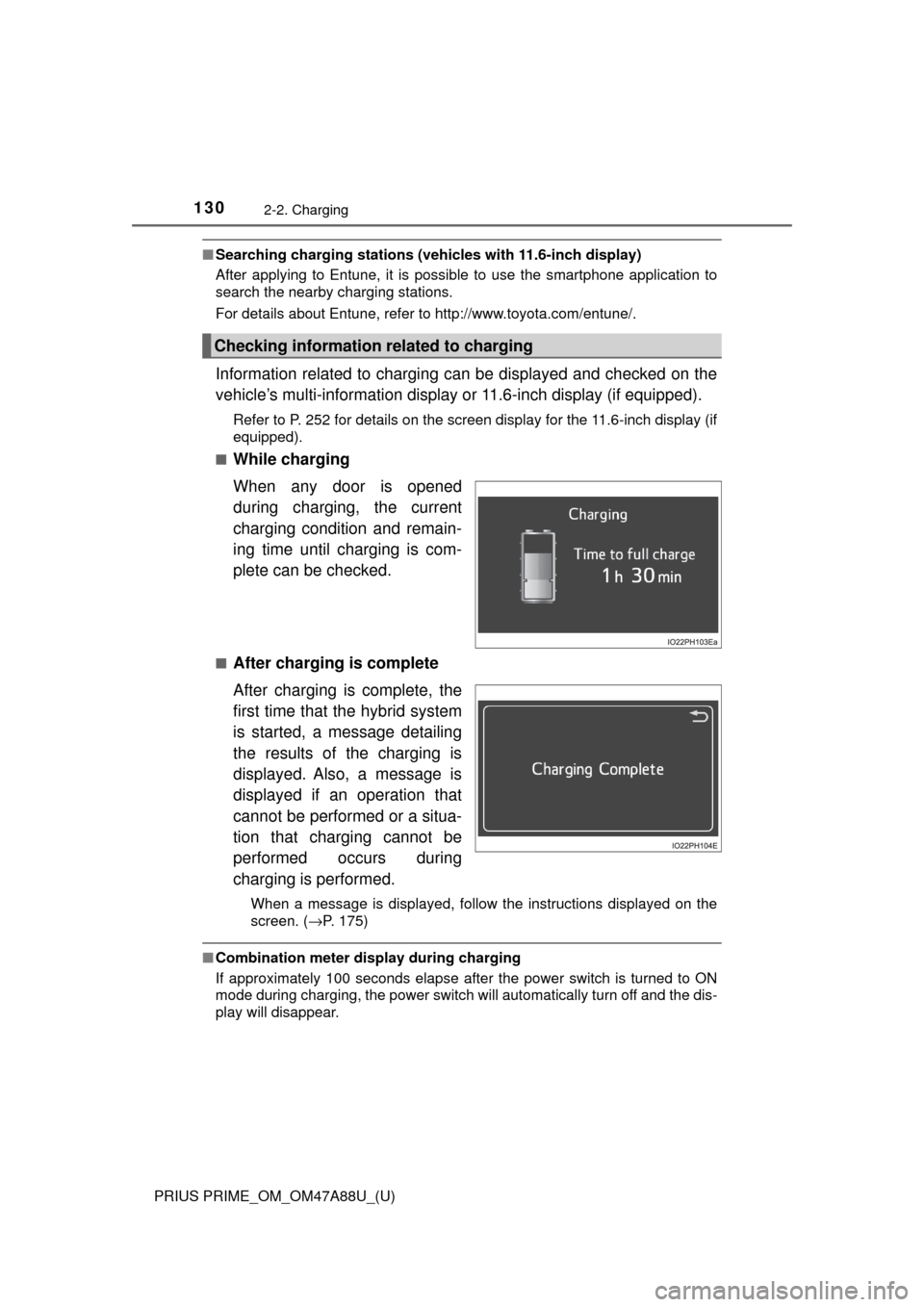
Information related to charging can be displayed and checked on the
vehicle’s multi-information display or 11.6-inch display (if equipped).
Refer to P. 252 for details on the screen display for the 11.6-inch display (if
equipped).
■
While charging
When any door is opened
during charging, the current
charging condition and remain-
ing time until charging is com-
plete can be checked.
■After charging is complete
After charging is complete, the
first time that the hybrid system
is started, a message detailing
the results of the charging is
displayed. Also, a message is
displayed if an operation that
cannot be performed or a situa-
tion that charging cannot be
performed occurs during
charging is performed.
When a message is displayed, follow the instructions displayed on the
screen. ( →P. 175)
■Combination meter display during charging
If approximately 100 seconds elapse after the power switch is turned to ON
mode during charging, the power switch will automatically turn off and the dis-
play will disappear.
Checking information related to charging
Page 139 of 784

PRIUS PRIME_OM_OM47A88U_(U)
1392-2. Charging
2
Plug-in hybrid system
■During charging
●The surface of the CCID (Charging Circuit Interrupting Device) may become
hot, but this does not indicate a malfunction.
● Depending on radio wave conditions, interference may be heard on the
radio.
● The current charging condition and the estimated time until charging will
complete can be checked on the multi-information display or 11.6-inch dis-
play (if equipped). ( →P. 130)
● During charging, the hybrid battery (traction battery) status indicator illumi-
nates and flashes, and changes according to the charging amount.
(→P. 104)
■ If the charging indicator flashes after connecting the charging cable
The charge schedule ( →P. 147) is registered and charging cannot be per-
formed immediately. To cancel chargi ng using the timer and start charging
immediately, perform any of the following procedures.
● Turn “Charge Now” on ( →P. 156, 165)
● While the charging indicator is flashing, remove and reconnect the charging
connector within 5 seconds
■ When the charging connector cannot be inserted into the charging inlet
(vehicles with smart lid & connector locking system)
→P. 1 1 9