Page 148 of 784
148
PRIUS PRIME_OM_OM47A88U_(U)
2-2. Charging
■Turning “Charge Now” on and off
If even one charge schedule is registered, charging does not start
until the set time, even if the charging cable is connected to the
vehicle. To start charging immedi ately without changing the charge
schedule setting, turn “Charge Now” on to temporarily cancel the
charge schedule and enable charging immediate after connecting
the charging cable.
■Changing “Next Charging Event”*1
It is possible to temporarily set the time of the next scheduled
charge without changing the registered repeated setting.
*2
*1: The “Next Charging Event” refers to the closest charge schedule from the
current time among the registered charge schedules. Timer charging is
performed based on the “Next Charging Event”.
*2: When “Next Charging Event” is changed, the current charge schedule willbe temporarily ignored and charging will not be carried out until the time
specified by “Next Charging Event”. (For example, when “Next Charging
Event” is set for 2 days later, even if items are registered on the charge
schedule, charging will not be carried out until the time specified by “Next
Charging Event”.)
The charge schedule can be reg-
istered on the multi-information
display or 11.6-inch display (if
equipped).
● Multi-information display opera-
tion: →P. 151
● 11.6-inch display operation (if
equipped): →P. 160
Registering the charge schedule
Page 151 of 784
PRIUS PRIME_OM_OM47A88U_(U)
1512-2. Charging
2
Plug-in hybrid system
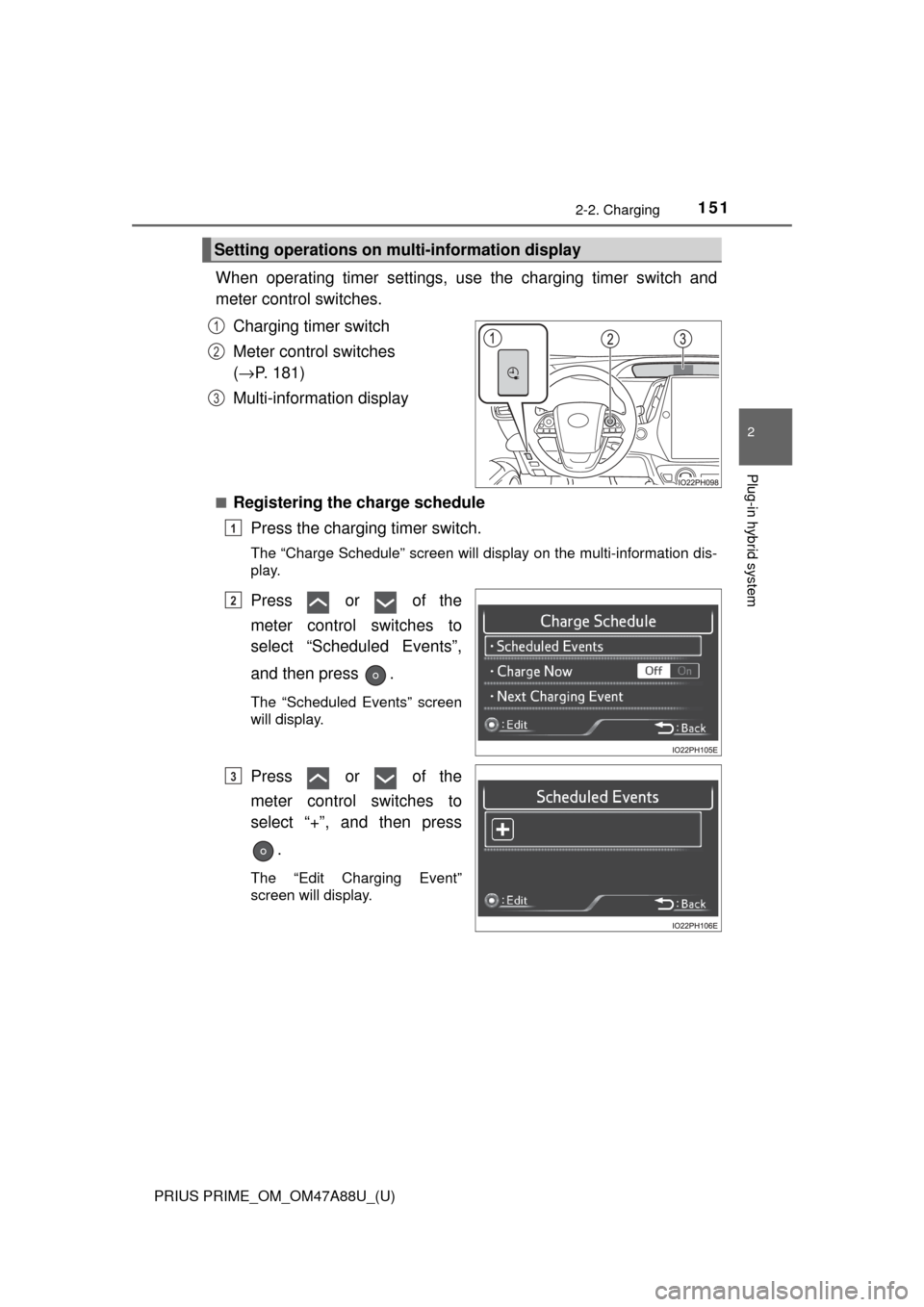
When operating timer settings, use the charging timer switch and
meter control switches.
Charging timer switch
Meter control switches
(→ P. 181)
Multi-information display
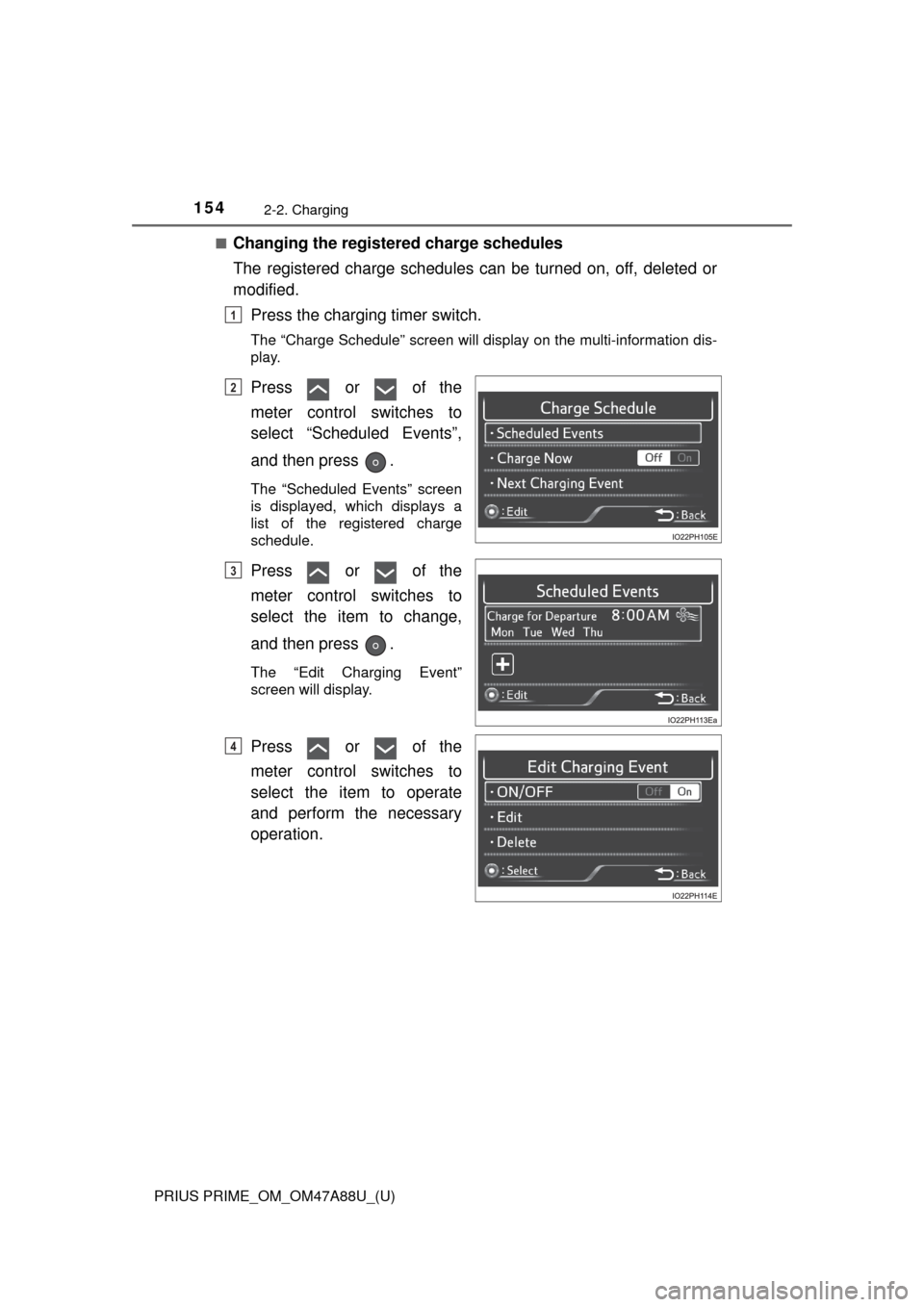
■Registering the charge schedule Press the charging timer switch.
The “Charge Schedule” screen will display on the multi-information dis-
play.
Press or of the
meter control switches to
select “Scheduled Events”,
and then press .
The “Scheduled Events” screen
will display.
Press or of the
meter control switches to
select “+”, and then press
.
The “Edit Charging Event”
screen will display.
Setting operations on mult i-information display
1
2
3
1
2
3
Page 154 of 784
154
PRIUS PRIME_OM_OM47A88U_(U)
2-2. Charging
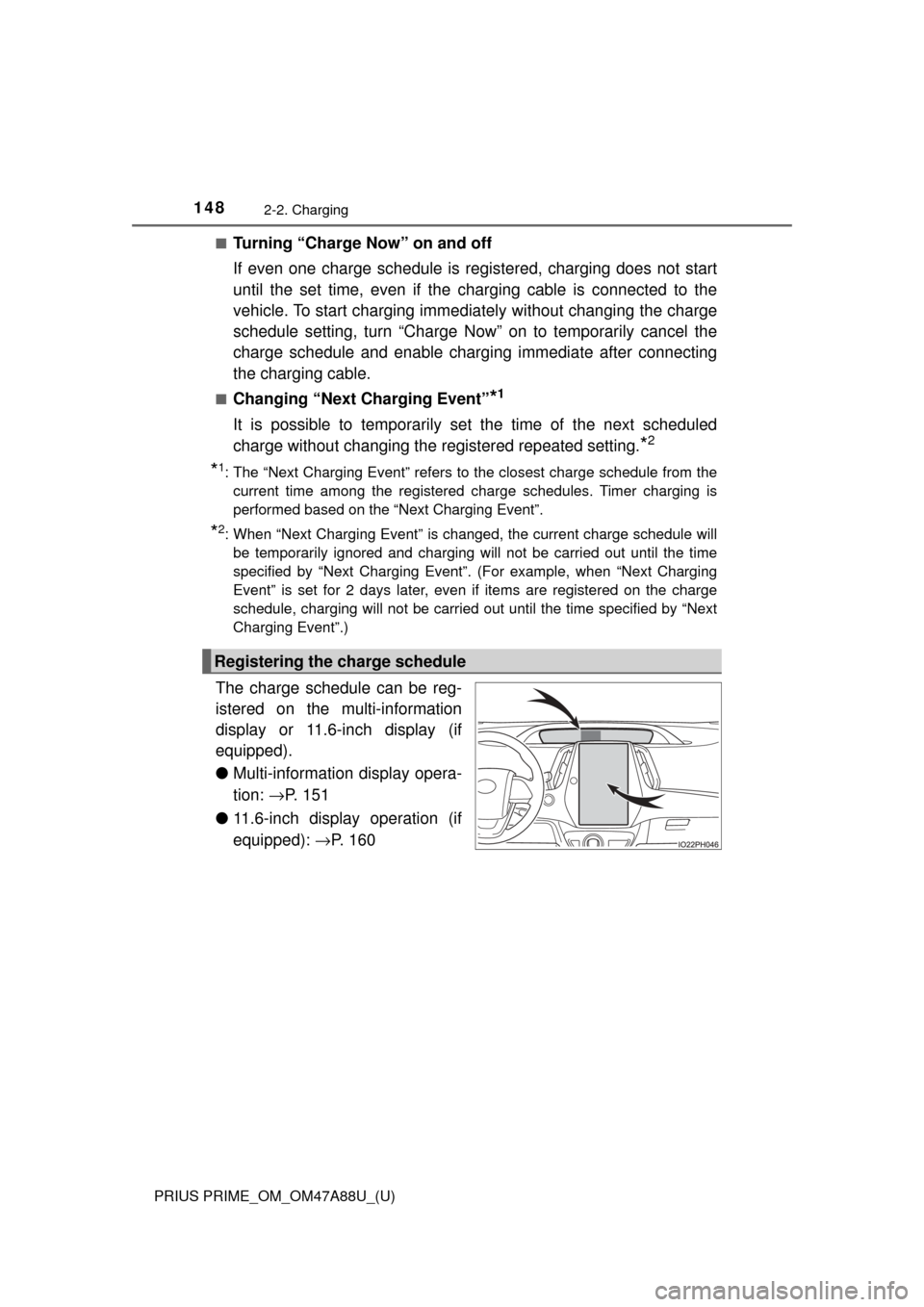
■Changing the registered charge schedules
The registered charge schedules can be turned on, off, deleted or
modified.Press the charging timer switch.
The “Charge Schedule” screen will display on the multi-information dis-
play.
Press or of the
meter control switches to
select “Scheduled Events”,
and then press .
The “Scheduled Events” screen
is displayed, which displays a
list of the registered charge
schedule.
Press or of the
meter control switches to
select the item to change,
and then press .
The “Edit Charging Event”
screen will display.
Press or of the
meter control switches to
select the item to operate
and perform the necessary
operation.
1
2
3
4
Page 156 of 784
156
PRIUS PRIME_OM_OM47A88U_(U)
2-2. Charging
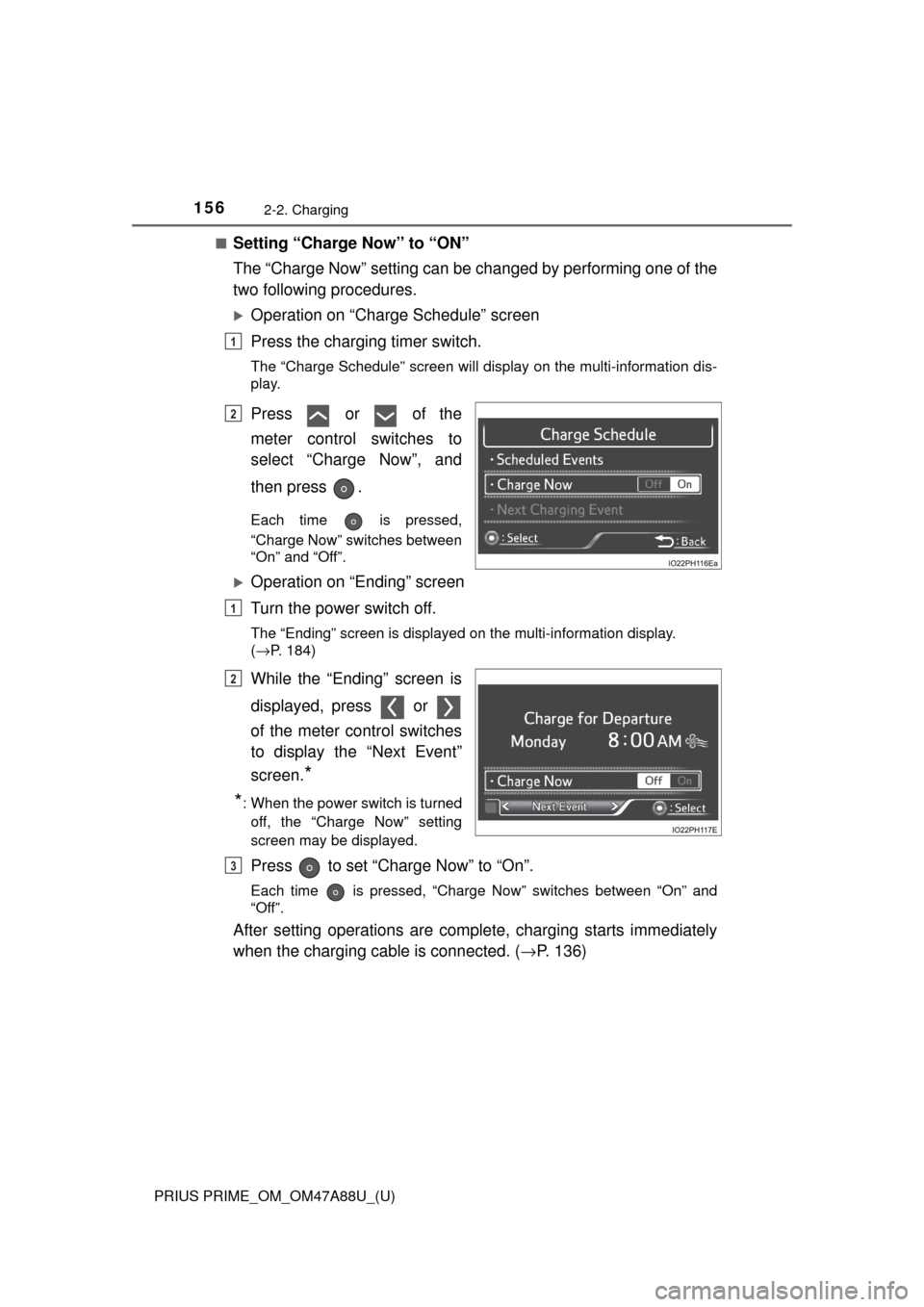
■Setting “Charge Now” to “ON”
The “Charge Now” setting can be changed by performing one of the
two following procedures.
Operation on “Charge Schedule” screen
Press the charging timer switch.
The “Charge Schedule” screen will display on the multi-information dis-
play.
Press or of the
meter control switches to
select “Charge Now”, and
then press .
Each time is pressed,
“Charge Now” switches between
“On” and “Off”.
Operation on “Ending” screen
Turn the power switch off.
The “Ending” screen is displayed on the multi-information display.
(→P. 184)
While the “Ending” screen is
displayed, press or
of the meter control switches
to display the “Next Event”
screen.
*
*
: When the power switch is turned off, the “Charge Now” setting
screen may be displayed.
Press to set “Charge Now” to “On”.
Each time is pressed, “Charge Now” switches between “On” and
“Off”.
After setting operations are complete, charging starts immediately
when the charging cable is connected. ( →P. 136)
1
2
1
2
3
Page 157 of 784

PRIUS PRIME_OM_OM47A88U_(U)
1572-2. Charging
2
Plug-in hybrid system
■Changing “Next Charging Event”*
*
: When “Charge Now” is set to “On” etc., it is not possible to change the reg- istered “Next Charging Event”.
Press the charging timer switch.
The “Charge Schedule” screen will display on the multi-information dis-
play.
Press or of the
meter control switches to
select “Next Charging
Event”, and then press .
The “Edit Next Charging Event”
screen will display.
Press or of the
meter control switches to
select the item to change,
and then press .
Change the registered settings
in accordance with the following
table.
1
2
3
SettingOperation
Charging Mode/Time
Operate , , and of the meter control
switches to set the charging mode (“Start” or
“Departure”) and charging start (or departure) time.
After changing the settings, press to return the
previous screen.
“Day”
Operate or of the meter control switches to
select the day to carry out charging according to the
timer.
After changing the setting, press to return the
previous screen.
“Climate Prep”
This can be set when the charging mode is set to
“Departure”. Each time is pressed, air condition-
ing-linked operation switches between “On” and
“Off”.
Page 158 of 784
158
PRIUS PRIME_OM_OM47A88U_(U)
2-2. Charging
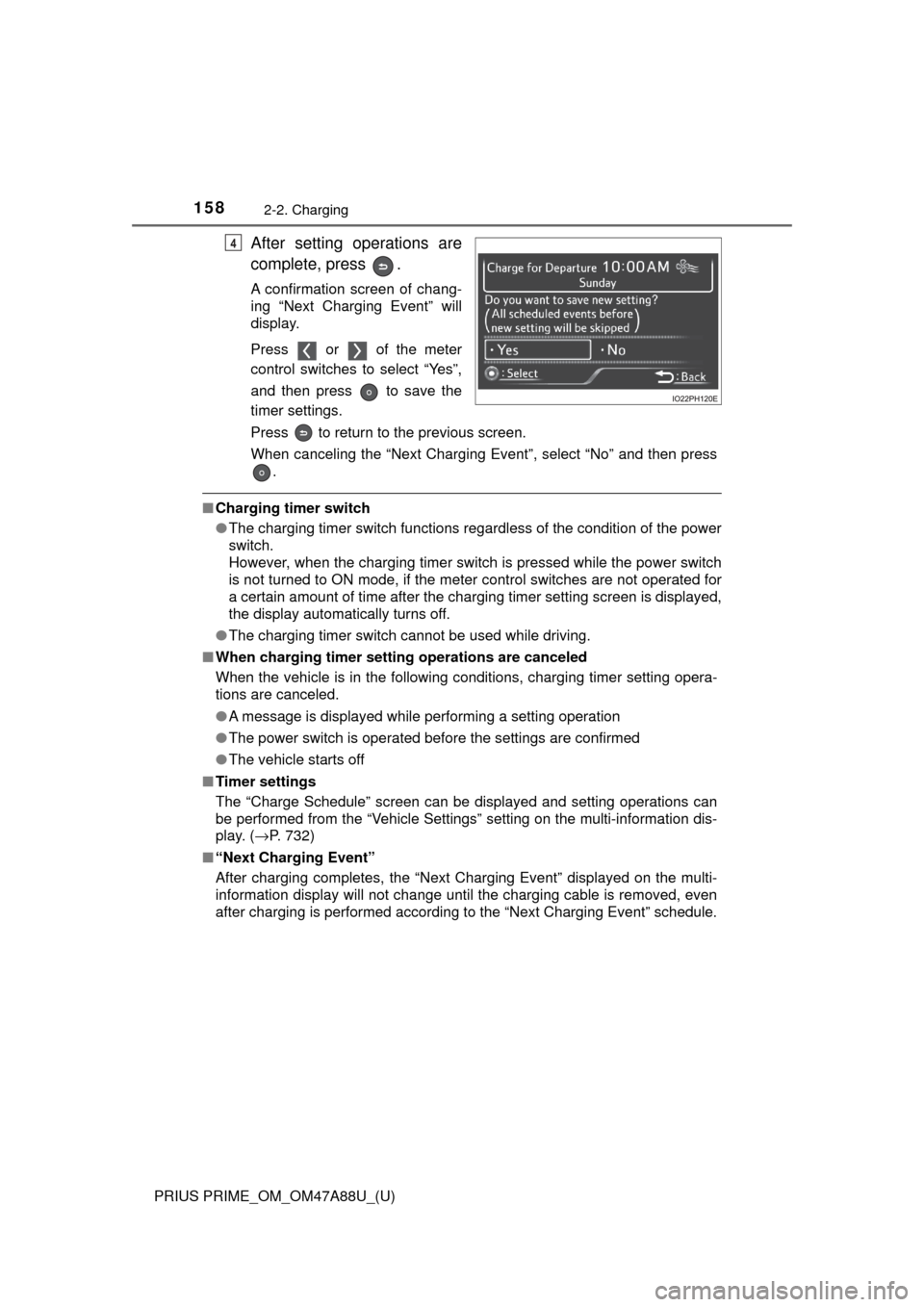
After setting operations are
complete, press .
A confirmation screen of chang-
ing “Next Charging Event” will
display.
Press or of the meter
control switches to select “Yes”,
and then press to save the
timer settings.
Press to return to the previous screen.
When canceling the “Next Charging Event”, select “No” and then press.
■Charging timer switch
●The charging timer switch functions regardless of the condition of the power
switch.
However, when the charging timer switch is pressed while the power switch
is not turned to ON mode, if the meter control switches are not operated for
a certain amount of time after the charging timer setting screen is displayed,
the display automatically turns off.
● The charging timer switch cannot be used while driving.
■ When charging timer setting operations are canceled
When the vehicle is in the following conditions, charging timer setting opera-
tions are canceled.
●A message is displayed while performing a setting operation
● The power switch is operated before the settings are confirmed
● The vehicle starts off
■ Timer settings
The “Charge Schedule” screen can be displayed and setting operations can
be performed from the “Vehicle Settings” setting on the multi-information dis-
play. ( →P. 732)
■ “Next Charging Event”
After charging completes, the “Next Charging Event” displayed on the multi-
information display will not change until the charging cable is removed, even
after charging is performed according to the “Next Charging Event” schedule.
4
Page 170 of 784

170
PRIUS PRIME_OM_OM47A88U_(U)
2-2. Charging
When normal charging cannot be carried
out
Refer to the following table and carry out the appropriate correction
procedure.
When charging does not start, even though the normal proce-
dure is followed, check each of the following items.
If a message is shown on the multi- information display, also refer to
P. 175.
When normal charging cannot be carried out
Likely causeCorrection procedure
The power source indicator on the CCID (Charging Circuit Interrupting
Device) does not illuminate, even though the plug is connected to an
external power source.
Plug is not properly connected to
outletCheck that the plug is properly con-
nected to the outlet.
Power is outAfter power is restored, carry out the
charging procedure again.
Building breaker is tripped and
power is cut off
Check that the breaker is connected
and if there is no malfunction, check
if the vehicle can be charged
through another outlet.
If charging is possible, the first outlet
may have a malfunction. Contact the
building or facility manager, or an
electrician.
Short circuit between CCID
(Charging Circuit Interrupting
Device) and plugImmediately stop charging and con-
tact your Toyota dealer.
Page 171 of 784

PRIUS PRIME_OM_OM47A88U_(U)
1712-2. Charging
2
Plug-in hybrid system
*: Refer to P. 106 for details regarding charging indicator illumination andflashing.
The error warning indicator on the CCID (Charging Circuit Interrupting
Device) flashes.
Electrical leakage detection function
or self- diagnostic function operates
and power is cut off
When the voltage is insufficient, the
error warning indicator may flash
when there is noise interference.
Perform a reset and connect to a
proper power source. ( →P. 110)
If charging does not start, immedi-
ately stop charging and contact your
Toyota dealer.
Charging indicator does not illuminate, even though charging connector
is connected.
The plug is not properly connected
to the outletCheck whether the plug is properly
connected to the outlet.
Charging connector is not securely
connected to charging inlet
Check the connection status of the
charging connector.
If the charging indicator does not
illuminate, even though the charging
connector is securely connected,
there may be a malfunction in the
system. Immediately stop charging
and contact your Toyota dealer.
Hybrid battery (traction battery) is
already fully chargedWhen the hybrid battery (traction
battery) is fully charged, charging is
not performed.
The charging equipment does not
operatePlease contact the facility manager
when there is a problem with
charging equipment.
Charging indicator flashes and charging cannot be carried out.
When charging indicator slowly
flashes
*:
Charge schedule is registered
When you wish to charge according
to the timer, wait until the set time.
To immediately start charging, set
“Charge Now” to “On”.
( → P. 156, 165)
When charging indicator rapidly
flashes
*:
Malfunction occurred in an external
power source or the vehicle
Start the hybrid system and follow
the instructions displayed by the
message on the multi-information
display. ( →P. 175)
Likely causeCorrection procedure