Page 347 of 784
PRIUS PRIME_OM_OM47A88U_(U)
3475-3. Operating the lights and wipers
5
Driving
■Temporarily lowering sensor sensitivity
The sensitivity of the sensor can be temporarily lowered.
Turn the power switch off while the following conditions are met.
• The headlight switch is in or .
• The headlight switch lever is in high beam position.
• Automatic High Beam switch is on.
Turn the power switch to ON mode.
Within 30 seconds after step , repeat pulling the headlight switch lever to
the original position then pushing it to the high beam position quickly 10
times, then leave the lever in high beam position.
If the sensitivity is changed, the Automatic High Beam indicator is turn on
and off 3 times.
Automatic High Beam (headlights) may turn on even the vehicle is stopped.
■ If “Headlight System Ma lfunction Visit Your Dealer” is displayed on the
multi-information display
The system may be malfunctioning. Have the vehicle inspected by your Toy-
ota dealer.
1
2
32
4
Page 358 of 784
358
PRIUS PRIME_OM_OM47A88U_(U)
5-4. Refueling
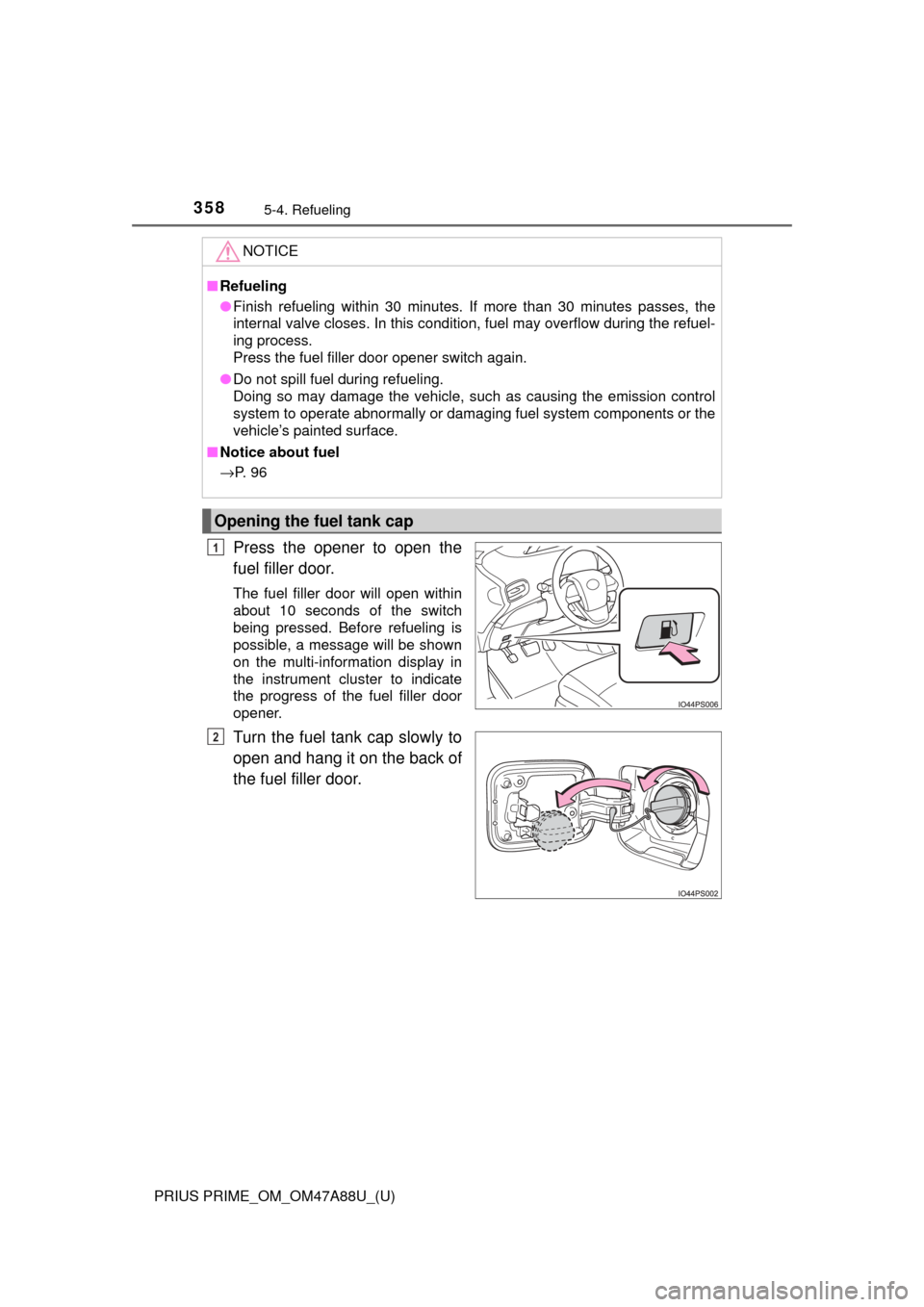
Press the opener to open the
fuel filler door.
The fuel filler door will open within
about 10 seconds of the switch
being pressed. Before refueling is
possible, a message will be shown
on the multi-information display in
the instrument cluster to indicate
the progress of the fuel filler door
opener.
Turn the fuel tank cap slowly to
open and hang it on the back of
the fuel filler door.
NOTICE
■Refueling
● Finish refueling within 30 minutes. If more than 30 minutes passes, the
internal valve closes. In this condition, fuel may overflow during the refuel-
ing process.
Press the fuel filler door opener switch again.
● Do not spill fuel during refueling.
Doing so may damage the vehicle, such as causing the emission control
system to operate abnormally or damaging fuel system components or the
vehicle’s painted surface.
■ Notice about fuel
→ P. 9 6
Opening the fuel tank cap
1
2
Page 369 of 784

369
PRIUS PRIME_OM_OM47A88U_(U)
5-5. Using the driving support systems
5
Driving
PCS (Pre-Collision System)
◆Pre-collision warning
When the system determines
that the possibility of a frontal
collision is high, a buzzer will
sound and a warning message
will be displayed on the multi-
information display to urge the
driver to take evasive action.
The pre-collision system uses a radar sensor and camera sen-
sor to detect vehicles and pedest rians in front of your vehicle.
When the system determines that the possibility of a frontal col-
lision with a vehicle or pedestrian is high, a warning operates to
urge the driver to take evasive action and the potential brake
pressure is increased to help the dr iver avoid the collision. If the
system determines that the possibi lity of a frontal collision with
a vehicle or pedestrian is extremely high, the brakes are auto-
matically applied to help avoid the collision or help reduce the
impact of the collision.
The pre-collision system can be disabled/enabled and the warning
timing can be changed. ( →P. 373)
Page 373 of 784
PRIUS PRIME_OM_OM47A88U_(U)
3735-5. Using the driving support systems
5
Driving
■Enabling/disabling th e pre-collision system
The pre-collision system can be enabled/disabled on the
screen ( →P. 231) of the multi-information display.
The system is automatically enabled each time the power switch is
turned to ON mode.
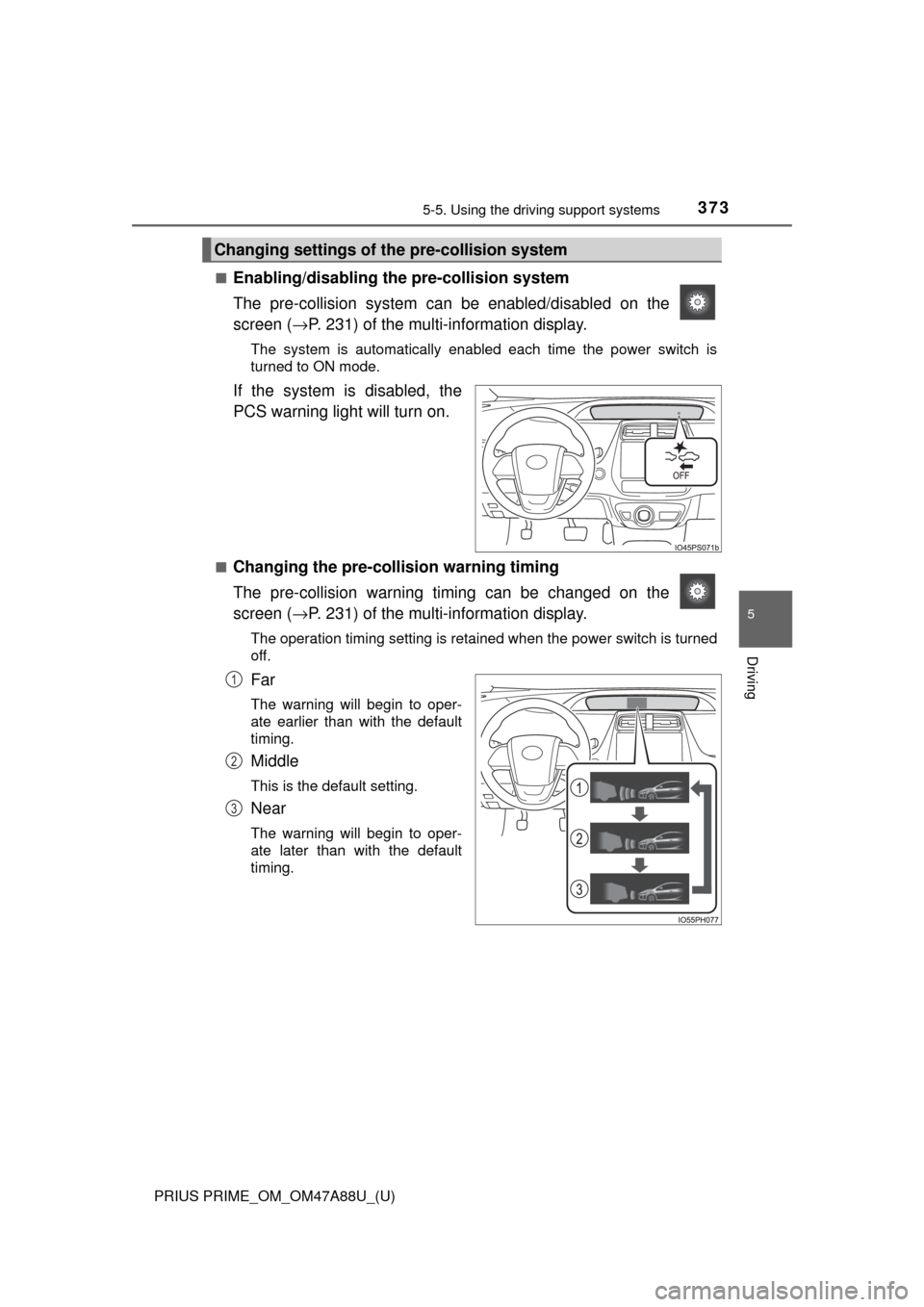
If the system is disabled, the
PCS warning light will turn on.
■Changing the pre-colli sion warning timing
The pre-collision warning ti ming can be changed on the
screen ( →P. 231) of the multi-information display.
The operation timing setting is retained when the power switch is turned
off.
Far
The warning will begin to oper-
ate earlier than with the default
timing.
Middle
This is the default setting.
Near
The warning will begin to oper-
ate later than with the default
timing.
Changing settings of th e pre-collision system
1
2
3
Page 380 of 784

380
PRIUS PRIME_OM_OM47A88U_(U)
5-5. Using the driving support systems
■If the PCS warning light flashes a nd a warning message is displayed on
the multi-information display
The pre-collision system may be tem porarily unavailable or there may be a
malfunction in the system.
● In the following situations, the warning light will turn off, the message will
disappear and the system will become operational when normal operating
conditions return:
• When the radar sensor or camera sensor or the area around either sen-
sor is hot, such as in the sun
• When the radar sensor or camera sensor or the area around either sen- sor is cold, such as in an extremely cold environment
• When the radar sensor or front grille emblem is dirty or covered with
snow, etc.
• When the part of the windshield in front of the camera sensor is fogged up or covered with condensation or ice
(Defogging the windshield: →P. 491, 501)
• If the camera sensor is obstructed, such as when the hood is open or a sticker is attached to the windshield near the camera sensor
● If the PCS warning light continues to flash or the warning message does not
disappear, the system may be malfunctioning. Have the vehicle inspected
by your Toyota dealer immediately.
■ If VSC is disabled
●If VSC is disabled ( →P. 478), the pre-collision brake assist and pre-collision
braking functions are also disabled.
● The PCS warning light will turn on and “VSC Turned Off Pre-Collision Brake
System Unavailable” will be displayed on the multi-information display.
Page 381 of 784
381
PRIUS PRIME_OM_OM47A88U_(U)
5-5. Using the driving support systems
5
Driving
LDA (Lane Departure Al ert with steering
control)
When driving on highways and freeways with white (yellow) lines, this
function alerts the driver when th e vehicle might depart from its lane
and provides assistance by operatin g the steering wheel to keep the
vehicle in its lane.
The LDA system recognizes visi-
ble white (yellow) lines with the
camera sensor on the upper por-
tion of the front windshield.
◆Lane departure alert function
When the system determines
that the vehicle might depart
from its lane, a warning is dis-
played on the multi-information
display and the warning buzzer
sounds to alert the driver.
When the warning buzzer
sounds, check the surrounding
road situation and carefully
operate the steering wheel to
move the vehicle back to the
center of the lane.
Summary of functions
Functions included in LDA system
Page 382 of 784
382
PRIUS PRIME_OM_OM47A88U_(U)
5-5. Using the driving support systems
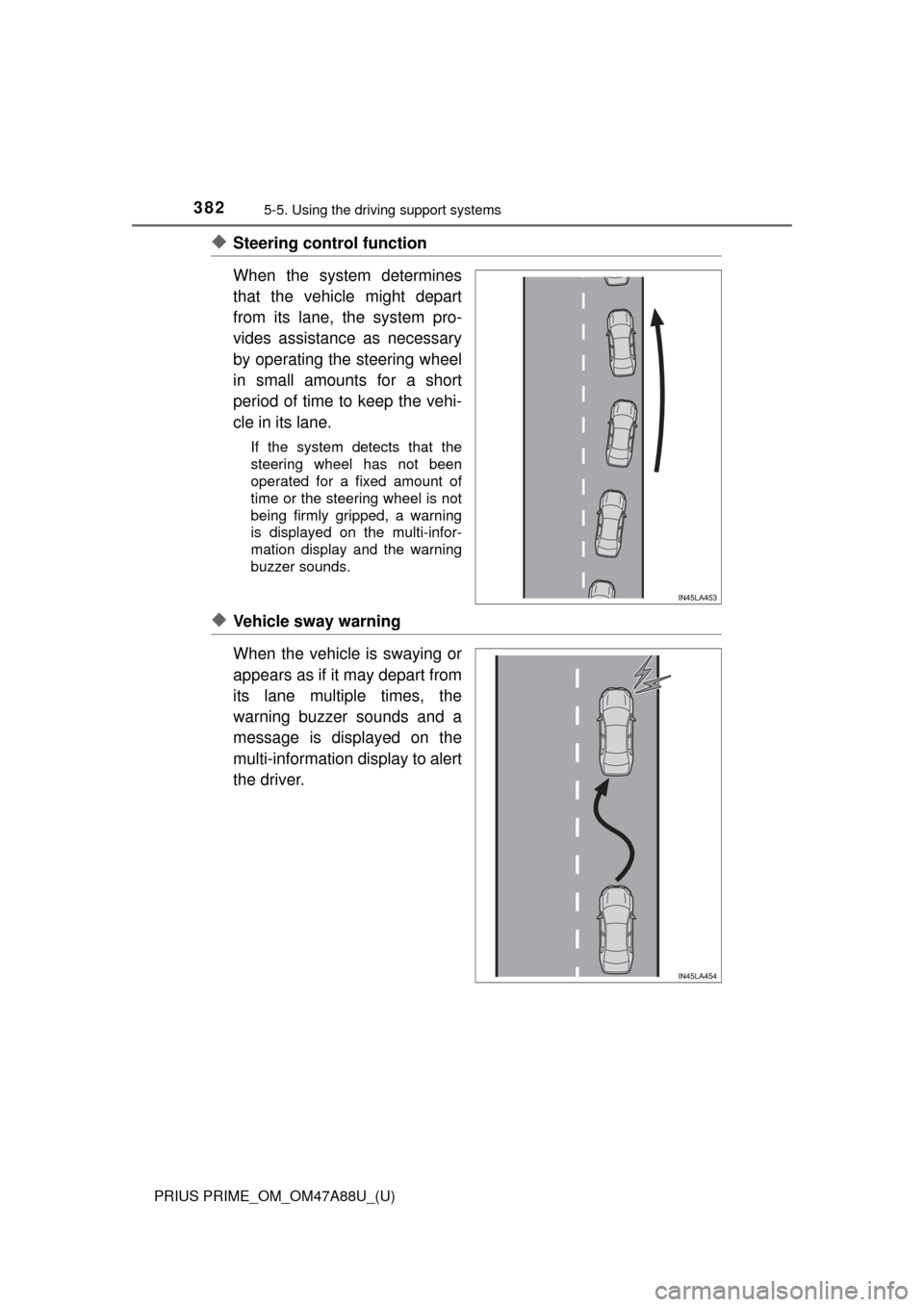
◆Steering control function
When the system determines
that the vehicle might depart
from its lane, the system pro-
vides assistance as necessary
by operating the steering wheel
in small amounts for a short
period of time to keep the vehi-
cle in its lane.
If the system detects that the
steering wheel has not been
operated for a fixed amount of
time or the steering wheel is not
being firmly gripped, a warning
is displayed on the multi-infor-
mation display and the warning
buzzer sounds.
◆Vehicle sway warning
When the vehicle is swaying or
appears as if it may depart from
its lane multiple times, the
warning buzzer sounds and a
message is displayed on the
multi-information display to alert
the driver.
Page 384 of 784
384
PRIUS PRIME_OM_OM47A88U_(U)
5-5. Using the driving support systems
Press the LDA switch to turn the
LDA system on.
The LDA indicator illuminates and
a message is displayed on the
multi-information display.
Press the LDA switch again to turn
the LDA system off.
When the LDA system is turned on
or off, operation of the LDA system
continues in the same condition
the next time the hybrid system is
started.
WARNING
■Preventing LDA system malfunctio ns and operations performed by
mistake
● Do not modify the headlights or place stickers, etc., on the surface of the
lights.
● Do not modify the suspension etc. If the suspension etc. needs to be
replaced, contact your Toyota dealer.
● Do not install or place anything on the hood or grille. Also, do not install a
grille guard (bull bars, kangaroo bar, etc.).
● If your windshield needs repairs, contact your Toyota dealer.
Turning LDA system on