2017 TOYOTA PRIUS PRIME multi information display
[x] Cancel search: multi information displayPage 446 of 784

446
PRIUS PRIME_OM_OM47A88U_(U)
5-5. Using the driving support systems
The guidance screen is displayed on the multi-information display.
Assistance level indicator
Displays a gauge indicating the
level until the vehicle’s stopping
position/the position at which assist
control ends.
Stop display
When illuminated, depress the
brake pedal and stop the vehicle at
once.
Operation display area
Displays the operating condition of the Simple Advanced Parking Guid-
ance System.
Advice display
Follow the instructions on the display and perform any indicated opera-
tions. As an example, the illustration shows the display indicating it is nec-
essary to depress the brake pedal in order to control the vehicle speed and
to confirm the safety of your surroundings.
S-APGS switch icon
Displayed when the assist mode can be changed and the system can be
turned off or on using the S-APGS switch.
Steering wheel auto operation display
Displays when the steering wheel auto operation is being performed.
Intuitive parking assist display/do or position (open/close) display
→P. 421
■S-APGS indicator inside the meter ( →P. 192)
This indicator illuminates when the steering wheel auto operation is being
performed by the Simple Advanced Parking Guidance System. After control
ends, the indicator blinks for a short period of time and then turns off.
■ Intuitive parking assist pop-up display
While the Simple Advanced Parking Guidance System is operating, if the
intuitive parking assist detects an obstacle, the intuitive parking assist display
automatically pops up on the guidance screen ( →P. 421), regardless of
whether the intuitive parking assist is on or off. ( →P. 420)
Guidance screen
1
2
3
4
5
6
7
Page 449 of 784
PRIUS PRIME_OM_OM47A88U_(U)
4495-5. Using the driving support systems
5
Driving
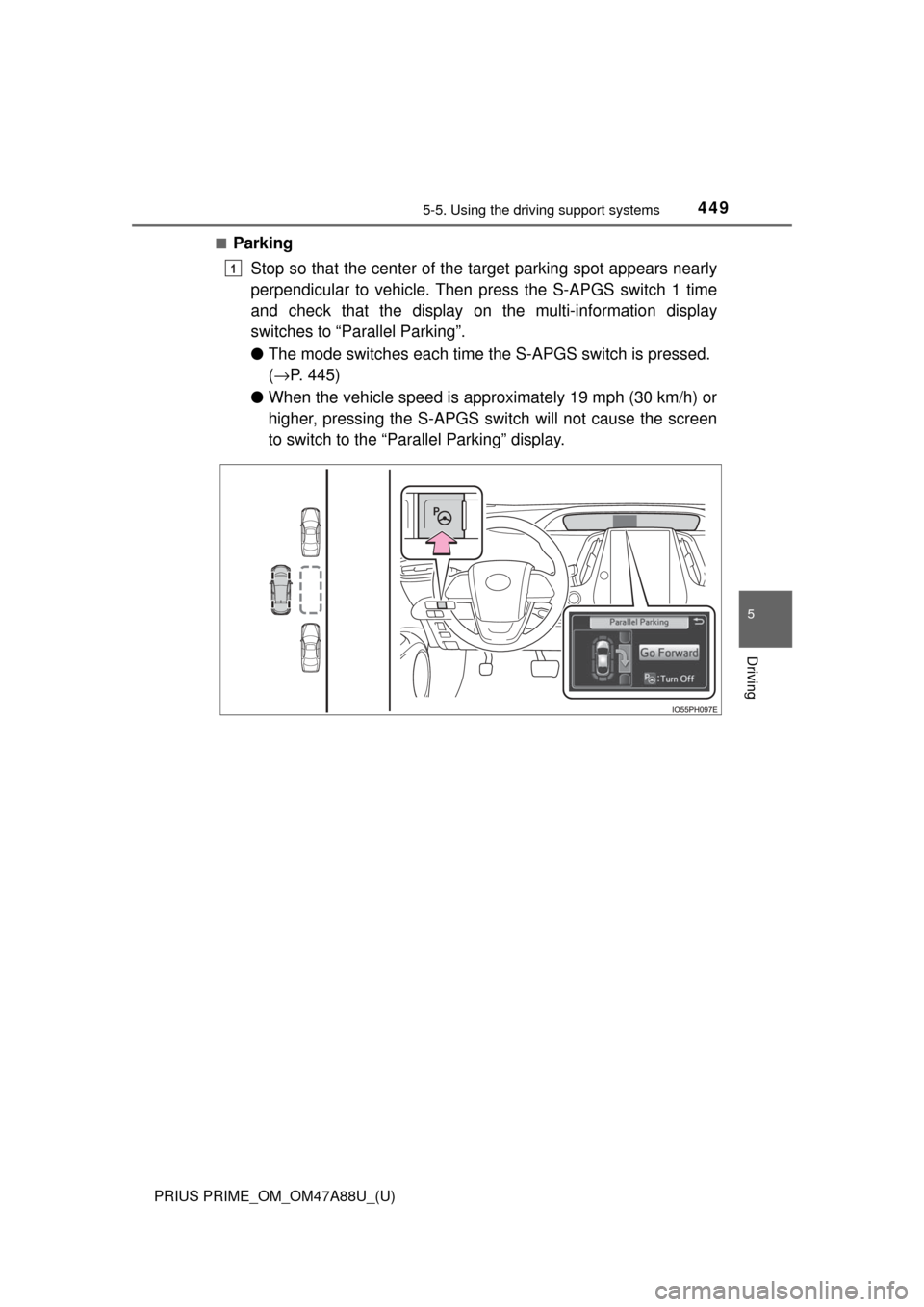
■Parking
Stop so that the center of the target parking spot appears nearly
perpendicular to vehicle. Then press the S-APGS switch 1 time
and check that the display on the multi-information display
switches to “Par allel Parking”.
● The mode switches each time t he S-APGS switch is pressed.
( → P. 445)
● When the vehicle speed is approximately 19 mph (30 km/h) or
higher, pressing the S-APGS swit ch will not cause the screen
to switch to the “Parallel Parking” display.
1
Page 453 of 784
PRIUS PRIME_OM_OM47A88U_(U)
4535-5. Using the driving support systems
5
Driving
When the vehicle is almost entirely within the target parking spot,
a high-pitched beep is emitted and the stop display is shown on
the display, stop the vehicle.
This completes the parallel parking assist mode.
● After stopping, feel free to maneuver the vehicle to reach the
desired parking spot.
● Be sure to back up while checking the area to the front and
rear of the vehicle directly and by using the mirrors.
■Parallel parking assist mode operating conditions
●In order to operate the parallel parking assist mode correctly, drive slowly (at
a speed at which the vehicle can be quickly stopped) parallel to the road (or
shoulder) while maintaining a distance of approximately 3 ft. (1 m) to any
parked vehicles.
● The function cannot be used when the vehicle speed is approximately
19 mph (30 km/h) or higher.
● The front side sensors and rear side sensors are used to detect parked
vehicles and determine the parking spot. Therefore, when detection is not
possible ( →P. 475), guidance is not issued.
● If there are no parked vehicles, the parking spot cannot be determined.
Therefore, the parallel parking assist mode cannot be operated.
● If unable to detect the environment surrounding the parking space, the par-
allel parking assist mode may not be able to operate.
● Guidance will continue until the vehicle speed meets or exceeds approxi-
mately 19 mph (30 km/h) or the function is turned off using the S-APGS
switch.
■ Timing for pressing the S-APGS switch
In the following cases, the assist mode may also operate during the steps
taken to park using the parallel parking assist mode. However, in these
cases, conduct parking procedures according to the information on the multi-
information display.
●In step the S-APGS switch is pressed after already passing over the tar-
get parking spot.
If the vehicle is not stopped in step , pressing the S-APGS switch 1 time
while the vehicle is in motion allows you to select “Parallel Parking” and
proceed directly to step .
● The vehicle is moved up to the position in step without the S-APGS
switch being pressed. Then the S-APGS switch is pressed after having
changed the shift position to R.
12
1
1
2
3
Page 456 of 784

456
PRIUS PRIME_OM_OM47A88U_(U)
5-5. Using the driving support systems
■Using the exit parallel park ing assist mode to depart
With the shift position in P, press the S-APGS switch and check
that the display on the multi-information display switches to “Exit
Parallel Parking”.
Operate the turn signal lever ( →P. 336) to select whether you
would like to depart to the left or right.
If there are any obstacles in the direction the vehicle is departing in, the
system determines that it is not possible to depart, and assist control is
stopped.
When the shift position is changed to R (or D) according to the
advice display on the screen ( →P. 446), a high-pitched beep is
emitted and assist control will start.
Step and onward is for cases in which the advice display shows “Shift
to [R]” after operating the turn signal lever to select a departure direc-
tion.
● When the steering wheel auto operation starts, the steering
wheel auto operation display ( →P. 446) and assistance level
indicator ( →P. 446) will be shown in the display area.
● To stop assist control, press the S-APGS switch.
Assume an ordinary posture for backing up, rest your hands
lightly on the steering wheel wi thout applying any force, directly
confirm the safety of the area to the rear and around the vehicle
and slowly back up while adjusti ng your speed by depressing the
brake pedal.
● When backing up too quickly, a sharp beeping sound is emit-
ted and assist control is stopped. ( →P. 469)
1
2
3
4
4
Page 461 of 784
PRIUS PRIME_OM_OM47A88U_(U)
4615-5. Using the driving support systems
5
Driving
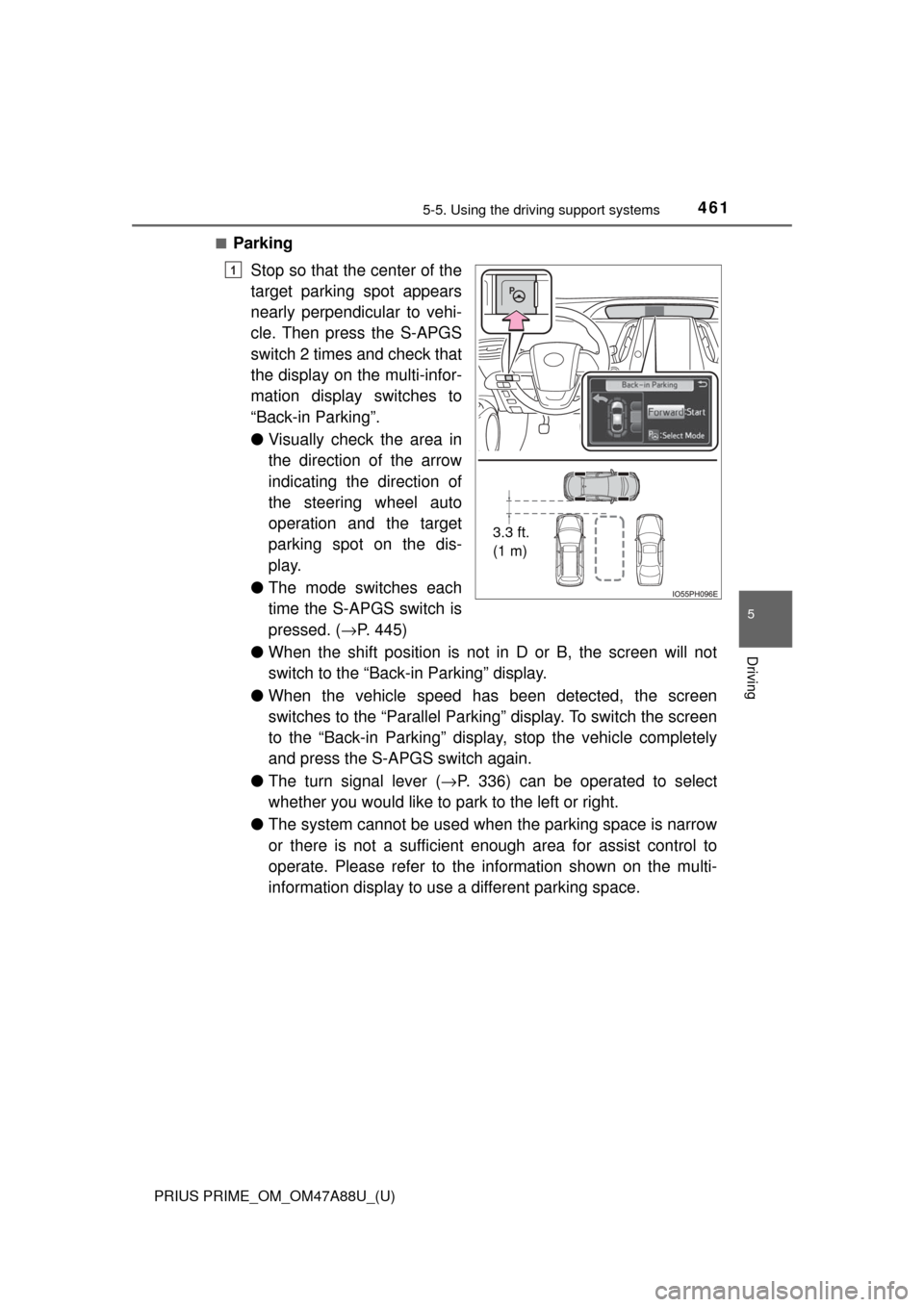
■Parking
Stop so that the center of the
target parking spot appears
nearly perpendicular to vehi-
cle. Then press the S-APGS
switch 2 times and check that
the display on the multi-infor-
mation display switches to
“Back-in Parking”.
●Visually check the area in
the direction of the arrow
indicating the direction of
the steering wheel auto
operation and the target
parking spot on the dis-
play.
● The mode switches each
time the S-APGS switch is
pressed. ( →P. 445)
● When the shift position is not in D or B, the screen will not
switch to the “Back- in Parking” display.
● When the vehicle speed has been detected, the screen
switches to the “Parallel Parking” display. To switch the screen
to the “Back-in Parking” display, stop the vehicle completely
and press the S-APGS switch again.
● The turn signal lever ( →P. 336) can be operated to select
whether you would like to park to the left or right.
● The system cannot be used when the parking space is narrow
or there is not a sufficient enough area for assist control to
operate. Please refer to the information shown on the multi-
information display to use a different parking space.
3.3 ft.
(1 m)
1
Page 466 of 784
466
PRIUS PRIME_OM_OM47A88U_(U)
5-5. Using the driving support systems
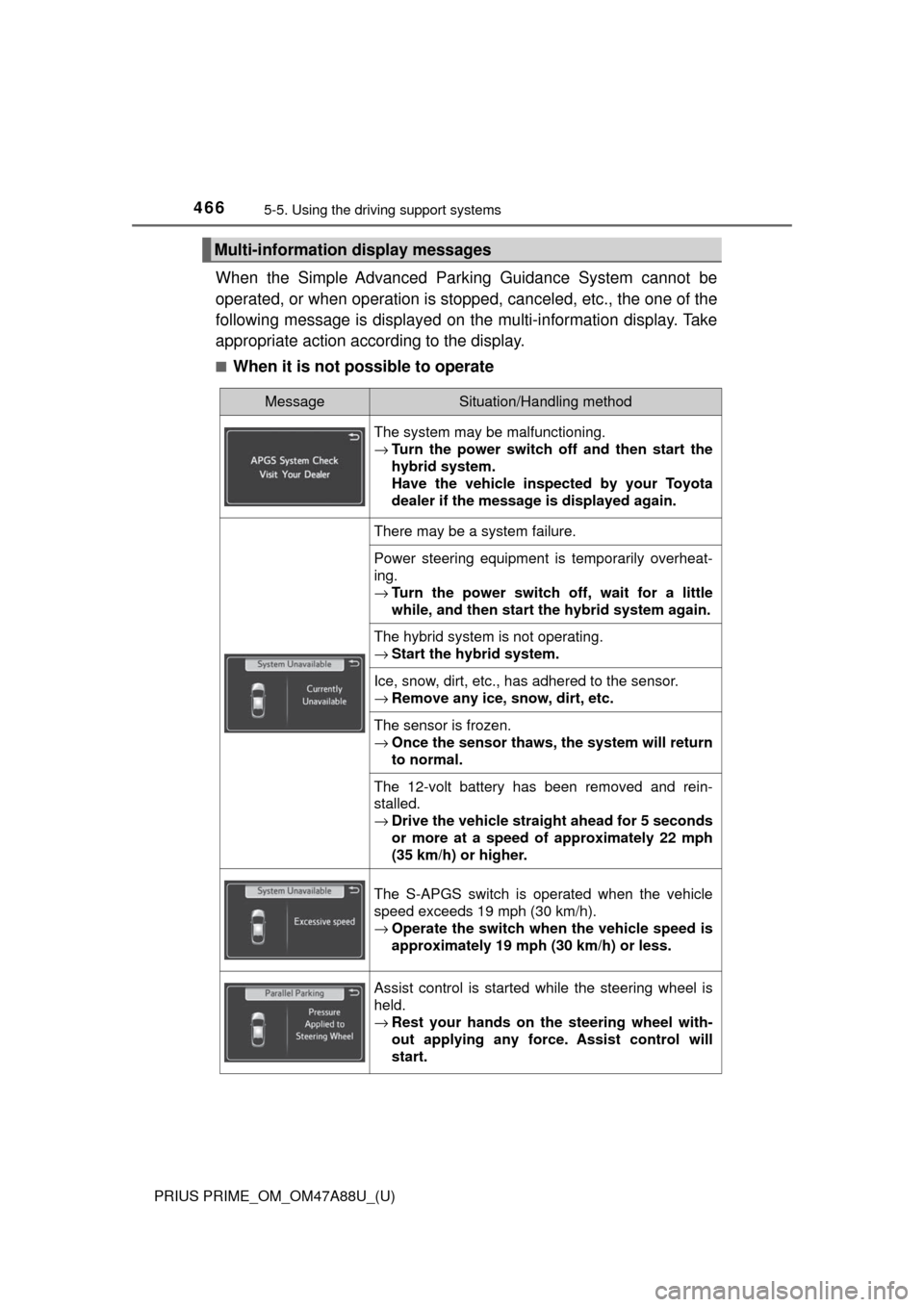
When the Simple Advanced Park ing Guidance System cannot be
operated, or when operation is stopped, canceled, etc., the one of the
following message is displayed on the multi-information display. Take
appropriate action according to the display.
■When it is not possible to operate
Multi-information display messages
MessageSituation/Handling method
The system may be malfunctioning.
→ Turn the power switch off and then start the
hybrid system.
Have the vehicle inspected by your Toyota
dealer if the message is displayed again.
There may be a system failure.
Power steering equipment is temporarily overheat-
ing.
→Turn the power switch off, wait for a little
while, and then start the hybrid system again.
The hybrid system is not operating.
→Start the hybrid system.
Ice, snow, dirt, etc., has adhered to the sensor.
→Remove any ice, snow, dirt, etc.
The sensor is frozen.
→Once the sensor thaws, the system will return
to normal.
The 12-volt battery has been removed and rein-
stalled.
→Drive the vehicle straight ahead for 5 seconds
or more at a speed of approximately 22 mph
(35 km/h) or higher.
The S-APGS switch is operated when the vehicle
speed exceeds 19 mph (30 km/h).
→Operate the switch when the vehicle speed is
approximately 19 mph (30 km/h) or less.
Assist control is started while the steering wheel is
held.
→Rest your hands on the steering wheel with-
out applying any force. Assist control will
start.
Page 473 of 784
PRIUS PRIME_OM_OM47A88U_(U)
4735-5. Using the driving support systems
5
Driving
WARNING
●Do not rely solely upon the Simple Advanced Parking Guidance System.
As with unequipped vehicles, move forward and back up carefully while
directly confirming the safety of your surroundings and the area to the rear
of the vehicle.
● Do not back up while viewing the multi-information display. Backing up
while only viewing the monitor screen may cause a collision or lead to an
accident, as the image displayed on the monitor screen may differ from
actual conditions. Make sure to visually check the surrounding areas and
the area to the rear of the vehicle with and without the mirror while backing
up.
● Drive slowly while adjusting your speed by depressing the brake pedal
when backing up or moving forward.
● If it seems the vehicle may make contact with a pedestrian, another vehi-
cle or any other obstacles, stop the vehicle by depressing the brake pedal,
and then press the S-APGS switch to turn off the system.
● Use the system in a parking lot with a flat surface.
● Observe the following precautions, as the steering wheel automatically
turns during use.
• There is risk of a necktie, scarf, your arm, etc. being caught on the
steering wheel. Please do not allow your upper body to be close to the
steering wheel. Also, do not allow children close to the steering wheel.
• There is a possibility of injury when the steering wheel turns if you have long fingernails.
• In case of an emergency, stop the vehicle by depressing the brake pedal, and then press the S-APGS switch to turn off the system.
● Always confirm that there is appropriate space before attempting to park
the vehicle and operate the system.
Page 478 of 784

478
PRIUS PRIME_OM_OM47A88U_(U)
5-5. Using the driving support systems
■Turning off both TRAC and VSC systems
To turn the TRAC and VSC systems off, press and hold for more than
3 seconds while the vehicle is stopped.
The VSC OFF indicator light will come on and the “Traction Control Turned
Off” will be shown on the multi-information display.
*
Press again to turn the systems back on.
*: Pre-collision brake assist and pre-collision braking will also be disabled.
The PCS warning light will come on and the message will be shown on the
multi-information display. ( →P. 654)
■ When the message is displayed on th e multi-information display show-
ing that TRAC has been disable d even if has not been pressed
TRAC cannot be operated. Contact your Toyota dealer.
■ Sounds and vibrations caused by the ABS, brake assist, VSC, TRAC and
hill-start assist control systems
●A sound may be heard from the engine compartment when the brake pedal
is depressed repeatedly, when the hybrid system is started or just after the
vehicle begins to move. This sound does not indicate that a malfunction has
occurred in any of these systems.
● Any of the following conditions may occur when the above systems are
operating. None of these indicates that a malfunction has occurred.
• Vibrations may be felt through the vehicle body and steering.
• A motor sound may be heard also after the vehicle comes to a stop.
■ ECB operating sound
ECB operating sound may be heard in the following cases, but it does not
indicate that a malfunction has occurred.
●Operating sound heard from the engine compartment when the brake pedal
is operated.
● Motor sound of the brake system heard from the front part of the vehicle
when the driver’s door is opened.
● Operating sound heard from the engine compartment when one or two min-
utes passed after the stop of the hybrid system.
■ EPS operation sound
When the steering wheel is operated, a motor sound (whirring sound) may be
heard. This does not indicate a malfunction.