2017 SUBARU FORESTER led
[x] Cancel search: ledPage 118 of 634

!Opening rear gate
1) Rear gate opener button
Carry the access key, and press the rear
gate opener button. Only the rear gate will
be unlocked and opened. Also, an elec-
tronic chirp will sound twice and the
hazard warning flashers will flash twice. !
Locking with the door lock
sensor1) Door lock sensor
Carry the access key, close all doors
including the rear gate and touch the door
lock sensor on the door handle. All doors
including the rear gate will be locked. Also,
an electronic chirp will sound once and the
hazard warning flashers will flash once.
NOTE
After touching the door lock sensor to
lock all of the doors (including the rear
gate), if you touch the door lock sensor
once more to attempt the lock opera-
tion without first unlocking the doors,
nothing will happen, even if the door
lock sensor is touched. In this case,
perform the unlocking operation once first. You can then touch the door lock
sensor to lock the doors.
!Locking with the rear lock button
1) Rear lock button
Carry the access key, close all doors
including the rear gate and press the rear
lock button. The rear gate and all doors
will be locked. Also, an electronic chirp will
sound once and the hazard warning
flashers will flash once.
! Power saving function
The keyless access function will be
disabled in the following cases to protect
the access key battery and the vehicle
battery.
. Case 1 : When the keyless access
function and the remote keyless entry
Keys and doors/Keyless access with push –button start system
–CONTINUED –2-15
Page 120 of 634
&Disabling keyless access
function
WARNING
If you wear an implanted pacemaker
or an implanted defibrillator, per-
form the procedure described in
“By operating the driver ’sdoor ”
F 2-18 to disable the keyless access
function. If you perform the proce-
dure described in “By operating the
access key ”F 2-17, the operation of
an implanted pacemaker or im-
planted defibrillator may be affected
by the radio waves from the trans-
mitter antenna.
When the vehicle is not going to be used
for a long time, or when you choose not to
use the keyless access function, the
keyless access function can be disabled.
NOTE
. The locking and unlocking function
by the remote keyless entry system is
not disabled.
. The setting can also be changed at
SUBARU dealers. For more details,
contact a SUBARU dealer.
. To start the engine while the func-
tions are disabled, perform the proce- dure described in
“Starting engine ”
F 9-18.
. We recommend that you disable the
keyless access functions under the
following conditions.
–When the vehicle is not going to
be used for an extended period of
time
– When the keyless access func-
tions are not going to be used
! Disabling functions
! By operating the access key
If you have registered a PIN code for PIN
Code Access, you can disable the keyless
access function by operating the access
key. For details about registering a PIN
code, refer to “Registering a PIN code”
F 2-20.
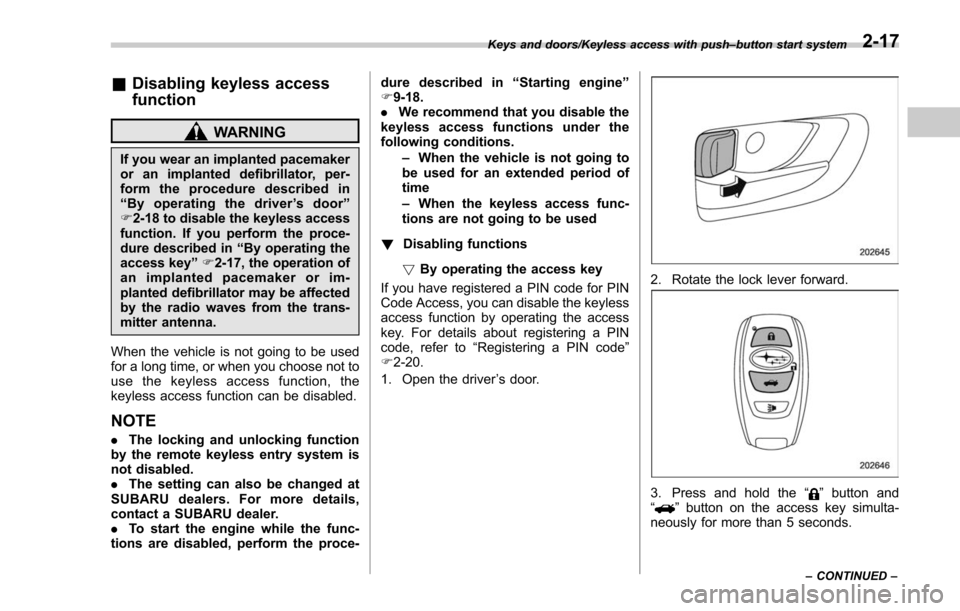
1. Open the driver ’s door.
2. Rotate the lock lever forward.
3. Press and hold the “”button and
“” button on the access key simulta-
neously for more than 5 seconds.
Keys and doors/Keyless access with push –button start system
–CONTINUED –2-17
Page 121 of 634
Keys and doors/Keyless access with push–button start system
! By operating the driver ’s door
A chirp sound will be heard, and the
function will be disabled.
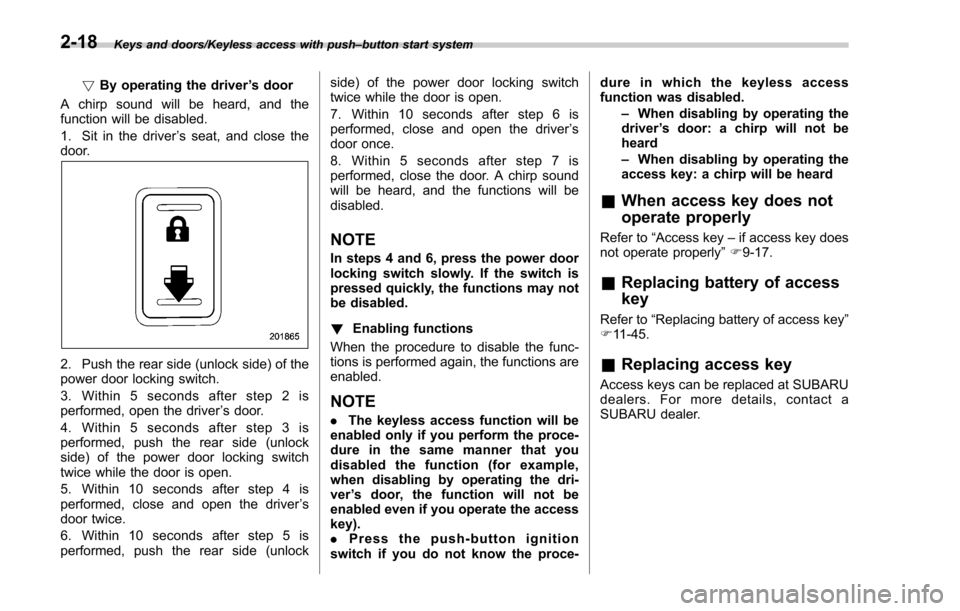
1. Sit in the driver ’s seat, and close the
door.
2. Push the rear side (unlock side) of the
power door locking switch.
3. Within 5 seconds after step 2 is
performed, open the driver ’s door.
4. Within 5 seconds after step 3 is
performed, push the rear side (unlock
side) of the power door locking switch
twice while the door is open.
5. Within 10 seconds after step 4 is
performed, close and open the driver ’s
door twice.
6. Within 10 seconds after step 5 is
performed, push the rear side (unlock side) of the power door locking switch
twice while the door is open.
7. Within 10 seconds after step 6 is
performed, close and open the driver
’s
door once.
8. Within 5 seconds after step 7 is
performed, close the door. A chirp sound
will be heard, and the functions will be
disabled.
NOTE
In steps 4 and 6, press the power door
locking switch slowly. If the switch is
pressed quickly, the functions may not
be disabled.
! Enabling functions
When the procedure to disable the func-
tions is performed again, the functions are
enabled.
NOTE
. The keyless access function will be
enabled only if you perform the proce-
dure in the same manner that you
disabled the function (for example,
when disabling by operating the dri-
ver ’s door, the function will not be
enabled even if you operate the access
key).
. Press the push-button ignition
switch if you do not know the proce- dure in which the keyless access
function was disabled.
–When disabling by operating the
driver ’s door: a chirp will not be
heard
– When disabling by operating the
access key: a chirp will be heard
& When access key does not
operate properly
Refer to “Access key –if access key does
not operate properly ”F 9-17.
& Replacing battery of access
key
Refer to “Replacing battery of access key ”
F 11-45.
& Replacing access key
Access keys can be replaced at SUBARU
dealers. For more details, contact a
SUBARU dealer.
2-18
Page 123 of 634

Keys and doors/PIN Code Access (models with“keyless access with push –button start system ”)
& Registering a PIN code
! Preparation
1. Close all doors and the rear gate.
2. Press and hold the “
”button on the
access key. Then all doors and the rear
gate will be locked.
3. Keep the “
”button pressed, and
press the rear lock button within 5
seconds after step 2.
4. Press and hold the above button for
more than 5 seconds. Then a chirp will
sound.
5. Release the “
”button and the rear
lock button.
6. Press the “
”button on the access key
while the chirp sounds.
Then the chirp will stop and the prepara-
tion is complete.
NOTE
If you do not press the “”button on
the access key, the chirp will sound for
30 seconds. In this case, the prepara-
tion for registering a PIN code does not
complete even if the chirp stops. !
Registration
For example, to register “32468 ”as the
PIN code, perform the following proce-
dure.
1. Press the rear lock button three times.
2. After a buzzer (ding) sounds once,
press the rear lock button twice.
3. After a buzzer (ding) sounds once,
press the rear lock button four times.
4. After a buzzer (ding) sounds once,
press the rear lock button six times.
5. After a buzzer (ding) sounds once,
press the rear lock button eight times.
6. Perform steps 1 to 5 again within
approximately 30 seconds after the buz-
zer starts sounding intermittently.
7. All doors and the rear gate that have
been unlocked will be locked. Then the
PIN code will be registered.NOTE
. If you make an error during the
registration procedure, open the dri-
ver ’s door and then close it. Then, start
over from the procedure described in
“ Preparation ”.
. To protect your vehicle from theft,
you cannot register a string of the
same five numbers together, such as
“ 00000 ”, nor “12345 ”as a PIN code.
. Do not register your vehicle license plate number or simple numbers such
as
“11122 ”or “12121 ”as a PIN code.
Doing so will increase the risk of
vehicle theft.
. When you try to register “22222 ”,
the registered PIN code will be deleted.
You cannot unlock the doors by PIN
Code Access until a new code is
registered.
. After registering a new PIN code,
make sure that you can unlock the
doors using the PIN code.
. When you delete the PIN code while
the keyless access function is dis-
abled, the keyless access function will
be enabled.
. Reregister the PIN code in the
following case.
–when you forget the PIN code
– when you want to change the PIN
code
2-20
Page 125 of 634
Keys and doors/Remote keyless entry system
l’utilisateur de l ’appareil doit accepter
tout brouillage radioélectrique subi,
même si le brouillage est susceptible
d ’en compromettre le fonctionnement.
For models with “keyless access with
push-button start system ”, the access
key is used as the transmitter for the
remote keyless entry system. For models
without “keyless access with push-button
start system” , the transmitter for the
remote keyless entry system is located
inside the key head.
The remote keyless entry system has the
following functions.
. Locking and unlocking the doors (and
rear gate) without a key
. Unlocking the rear gate without a key
. Sounding a panic alarm
. Arming and disarming the alarm sys-
tem. For detailed information, refer to
“Alarm system ”F 2-25.
The operable distance of the remote
keyless entry system is approximately 30
feet (10 meters). However, this distance
will vary depending on environmental
conditions. The system ’s operable dis-
tance will be shorter in areas near a
facility or electronic equipment emitting
strong radio waves such as a power plant,
broadcast station, TV tower, or remote controller of home electronic appliances.
NOTE
.
For models with “keyless access
with push-button start system ”,the
remote keyless entry system will not
be activated when the push-button
ignition switch is in any position other
than the “OFF ”position.
. For models without “keyless access
with push-button start system ”,the
remote keyless entry system will not
be activated when the key is inserted in
the ignition switch.
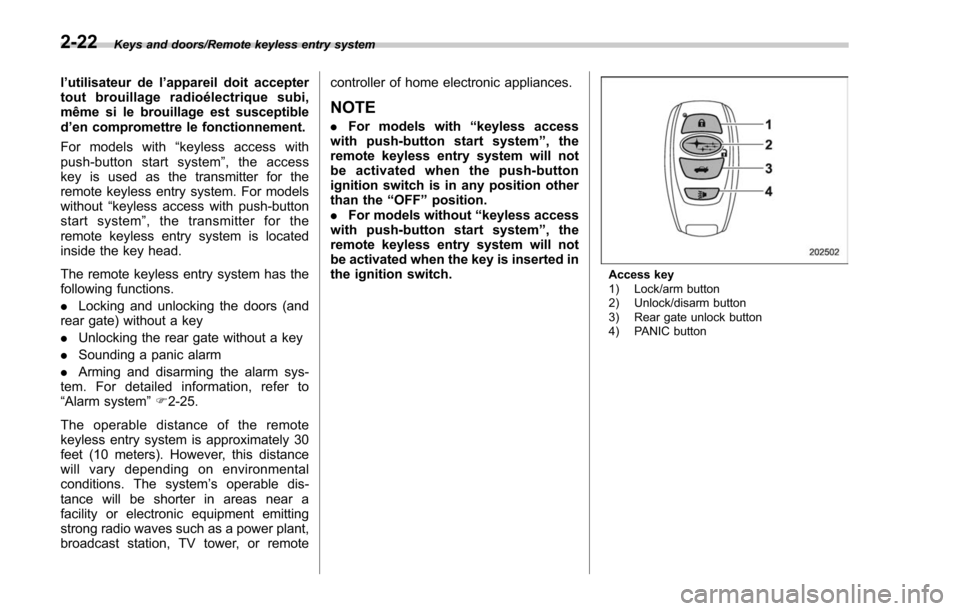
Access key
1) Lock/arm button
2) Unlock/disarm button
3) Rear gate unlock button
4) PANIC button
2-22
Page 136 of 634

one-touch auto up/down function will
not operate. Refer to“Initialization of
power window ”F 2-38.
The power windows operate only when
the ignition switch is in the “ON”position.
& Power window operation by
driver
! Driver ’s side power window
switches
1) Lock switch
2) For driver ’s window (with one-touch auto
up and down feature)
3) For front passenger ’s window (with one-
touch auto up and down feature) (if
equipped)
4) For rear left window
5) For rear right window
All door windows can be controlled by the
power window switch cluster at the driver
side door.
! Operating the driver ’s window
1) Automatically open/close
2) Open/close
To open:
Press the switch down lightly and hold it.
The window will open as long as the
switch is held.
NOTE
If you continue to hold the AUTO
switch in the down position after the
window has been fully opened, the
circuit breaker may activate for a short
time and the window may not operate.
Allow several seconds for the system to reset without touching the switch,
and the window will begin to operate
normally on its own.
This switch also has a one-touch auto
down feature that allows the window to be
opened fully without holding the switch.
Press the switch down until it clicks and
release it, and the window will fully open.
To stop the window halfway, pull the
switch up lightly.
To close:
Pull the switch up lightly and hold it. The
window will close as long as the switch is
held.
NOTE
If you continue to hold the AUTO
switch in the up position after the
window has fully closed, the circuit
breaker may open and the system may
not operate. After several seconds, the
window will be able to be opened by
holding the switch down until it is fully
opened. The AUTO function will not
operate. The window can be raised by
pulling up on the switch several times
until the window is fully closed.
To reset to normal operation, initialize
the power window to reactivate the
one-touch auto up/down function. Re-
fer to
“Initialization of power window ”
Keys and doors/Windows
–CONTINUED –2-33
Page 139 of 634
Keys and doors/Windows
!Locking the passengers ’windows
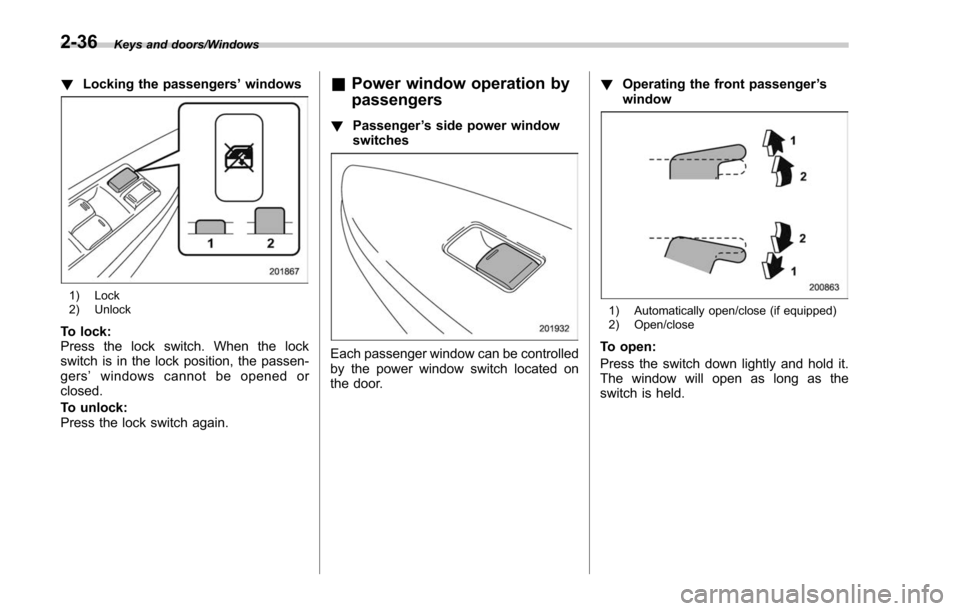
1) Lock
2) Unlock
To lock:
Press the lock switch. When the lock
switch is in the lock position, the passen-
gers ’windows cannot be opened or
closed.
To unlock:
Press the lock switch again.
& Power window operation by
passengers
! Passenger ’s side power window
switches
Each passenger window can be controlled
by the power window switch located on
the door. !
Operating the front passenger ’s
window
1) Automatically open/close (if equipped)
2) Open/close
To open:
Press the switch down lightly and hold it.
The window will open as long as the
switch is held.
2-36
Page 147 of 634

Keys and doors/Rear gate
from approximately 12 in (30 cm) or
more from the completely closed posi-
tion.
.Before closing the rear gate in step
4, it is possible to register the height
many times through step 3. Therefore,
the registered height can easily be fine-
tuned.
Retrieval of the rear gate height:
To open the rear gate and stop it at the
registered height, perform the following
procedure.
1. Press the memory switch to select the
ON status.
2. Press and hold any of the power rear
gate switches.
Even if any of the power rear gate
switches are pressed and held while the
memory switch is in the OFF status, you
can stop it at the registered height by
pressing the memory switch to select the
ON status before the rear gate reaches
the registered height.
NOTE
. The rear gate will open to the
position that is stored in the memory
function even if the rear gate is opened
by the reverse function.
. If the rear gate is opened manually
while the memory function is activated, you cannot close it by pressing the
power rear gate button on the rear gate.
To close it, press the other power rear
gate button or close it manually.
!
Reverse function
WARNING
.Do not let parts of your body be
caught intentionally to operate
the reverse function. If the re-
verse function does not operate
for some reason, this may lead to
serious injury or accidents.
. The reverse function may not
operate if foreign objects are
caught in the rear gate just
before it closes completely. Be
careful not to catch your fingers
and other body parts.
. The reverse function may not
operate depending on the object
shape and the manner in which it
was caught. Be careful not to
catch your fingers and other
body parts.
CAUTION
. If the reverse function is operated
3 times consecutively, automatic
opening and closing of the power
rear gate function will be can-
celed and the rear gate can be
opened and closed normally.
Whether the rear gate opens or
closes depends on the rear gate
height when automatic operation
is ceased. Be careful that the rear
gate does not hit anyone ’s head
or face, etc. and that fingers and
baggage, etc. are not caught in it.
. Take care not to damage the
touch sensors. Otherwise, the
reverse function may cease to
operate.
If, while opening or closing using power
rear gate, the rear gate catches persons
or baggage or hits an obstacle, an
electronic chirp will sound 3 times and
the rear gate will operate as follows.
When opening the rear gate: The rear
gate will automatically close.
When closing the rear gate: The rear
gate will automatically open.
2-44