2017 SUBARU FORESTER led
[x] Cancel search: ledPage 153 of 634

Instruments and controls
Cruise control indicator light (if equipped).......... 3-32
Cruise control set indicator light (if equipped) ......................................................... 3-32
Automatic headlight beam leveler warning light (if equipped) ......................................................... 3-32
Steering Responsive Headlight warning light/ Steering Responsive Headlight OFF indicator
light (if equipped) ............................................. 3-33
Front fog light indicator light (if equipped) .......... 3-33
Headlight indicator light (if equipped) ................. 3-33
X-mode indicator light (if equipped) .................... 3-33
Hill descent control indicator light (if equipped) ......................................................... 3-33
Steering responsive fog lights warning indicator/ Steering responsive fog lights OFF indicator (if
equipped) ......................................................... 3-33
BSD/RCTA warning indicator (if equipped) .......... 3-33
BSD/RCTA OFF indicator (if equipped) ................ 3-34
RAB warning light (if equipped) .......................... 3-34
RAB OFF indicator light (if equipped) .................. 3-34
Information display (Mexico-spec. models) ...... 3-34Outside temperature indicator............................ 3-34
Driving information display ................................. 3-35
Clock ................................................................. 3-38
Multi information display (models with type
B combination meter) ..................................... 3-39
Basic operation.................................................. 3-40
Welcome screen and Good-bye screen ............... 3-40
Warning screen .................................................. 3-41
Basic screens .................................................... 3-41
Menu screens .................................................... 3-42
Multi function display (if equipped) .................. 3-44Basic operation................................................. 3-45
Welcome screen ................................................ 3-45
Ending screen ................................................... 3-46
Self-check screen .............................................. 3-46
Interruption screen ............................................ 3-48
Basic screens .................................................... 3-48
Selection screen ................................................ 3-56
Date and time settings ....................................... 3-59
Image quality and volume settings ..................... 3-66
Screen settings. ................................................. 3-68
Maintenance settings ......................................... 3-76
Driving history registration ................................. 3-79
Car settings ....................................................... 3-80
Initialize ............................................................. 3-90
Light control switch ........................................... 3-93Headlights......................................................... 3-93
High/low beam change (dimmer) ... ..................... 3-95
Headlight flasher ............................................... 3-98
Daytime running light system ............................. 3-98
Steering Responsive Headlight (SRH) (if
equipped) ........................................................ 3-99
SRH OFF switch ................................................ 3-99
Turn signal lever .............................................. 3-100One-touch lane changer ................................... 3-101
Illumination brightness control ....................... 3-101
Headlight beam leveler (if equipped) ............. 3-102
Automatic headlight beam leveler (models with
LED headlights) ............................................. 3-102
Page 158 of 634

&Switching power status
1) Operation indicator
2) Push-button ignition switch
The power is switched every time the
push-button ignition switch is pressed.
1. Carry the access key, and sit in the
driver ’s seat.
2. Shift the select lever into the “P ”
position.
3. Press the push-button ignition switch
without depressing the brake pedal. Every
time the button is pressed, the power is
switched in the sequence of “OFF ”,
“ACC ”,“ON ”and “OFF ”. When the engine
is stopped and the push-button ignition
switch is in “ACC”or “ON ”, the operation
indicator on the push-button ignition
switch illuminates in orange.
Power status Indicator color Operation
OFF Turned off Power is turned
off.
ACC Orange The following
systems can be used:
audio and ac-
cessory power
outlet.
ON Orange
(while engine is stopped) All electrical
systems can be
used.
Turned off
(while engine is
running)
CAUTION
.When the push-button ignition
switch is left in “ON ”or “ACC ”
for a long time, it may result in
vehicle battery discharge.
. Do not spill drinks or other
liquids on the push-button igni-
tion switch. It may cause a mal-
function.
. Do not touch the push-button
ignition switch with a hand soiled
with oil or other contaminants. It
may cause a malfunction.
. If the push-button ignition switch does not operate smoothly, stop
the operation. Contact a
SUBARU dealer immediately.
. If the push-button ignition switch
does not illuminate even when
the instrument panel illumination
is turned on, have the vehicle
inspected at a SUBARU dealer.
. If the vehicle was left in the hot
sun for a long time, the surface of
the push-button ignition switch
may get hot. Be careful not to
burn yourself.
NOTE
. When operating the push-button
ignition switch, firmly press it all the
way.
. If the push-button ignition switch is
pressed quickly, the power may not
turn on or off.
. If the indicator light on the push-
button ignition switch flashes in green
when the push-button ignition switch is
pressed, steering is locked. When this
occurs, press the push-button ignition
switch while turning the steering wheel
left and right.
Instruments and controls/Push –button ignition switch (models with push –button start system)
–CONTINUED –3-7
Page 162 of 634
position.
The trip meter shows the distance that the
vehicle has been driven since you last set
it to zero.
If you press the trip knob when the ignition
switch is in the“LOCK”/ “OFF”or “ACC ”
position, the odometer/trip meter will light
up. It is possible to switch between the A
trip meter and B trip meter indications
while the odometer/trip meter is lit up. If
you do not press the trip knob within 10
seconds of illumination of the odometer/
trip meter, the odometer/trip meter will turn
off.
Also, if you open and close the driver ’s
door within 10 seconds of illumination of
the odometer/trip meter, the odometer/trip
meter will turn off.
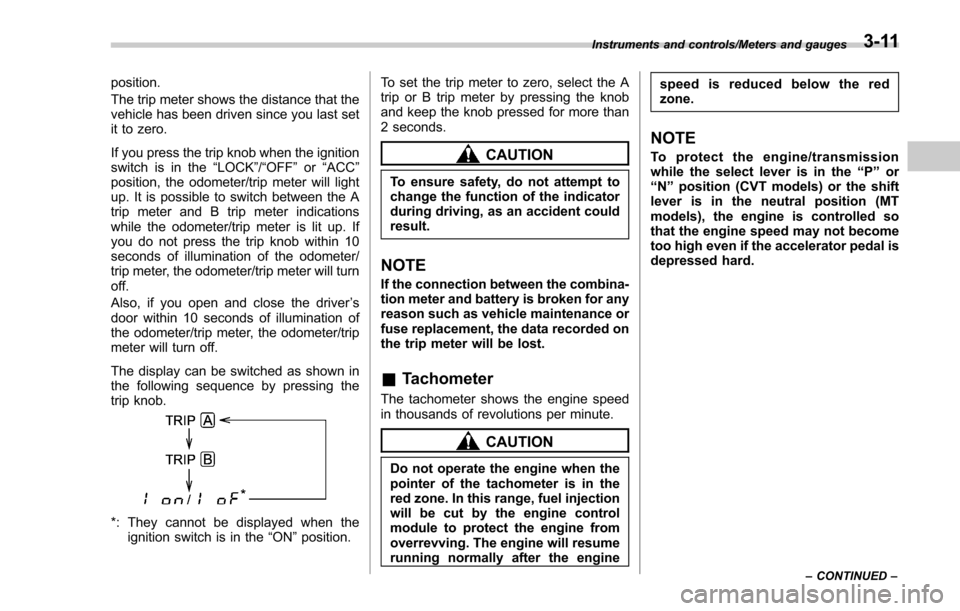
The display can be switched as shown in
the following sequence by pressing the
trip knob.
*: They cannot be displayed when the ignition switch is in the “ON ”position. To set the trip meter to zero, select the A
trip or B trip meter by pressing the knob
and keep the knob pressed for more than
2 seconds.
CAUTION
To ensure safety, do not attempt to
change the function of the indicator
during driving, as an accident could
result.
NOTE
If the connection between the combina-
tion meter and battery is broken for any
reason such as vehicle maintenance or
fuse replacement, the data recorded on
the trip meter will be lost.
&
Tachometer
The tachometer shows the engine speed
in thousands of revolutions per minute.
CAUTION
Do not operate the engine when the
pointer of the tachometer is in the
red zone. In this range, fuel injection
will be cut by the engine control
module to protect the engine from
overrevving. The engine will resume
running normally after the engine speed is reduced below the red
zone.
NOTE
To protect the engine/transmission
while the select lever is in the
“P ” or
“ N ” position (CVT models) or the shift
lever is in the neutral position (MT
models), the engine is controlled so
that the engine speed may not become
too high even if the accelerator pedal is
depressed hard.
Instruments and controls/Meters and gauges
–CONTINUED –3-11
Page 167 of 634

Instruments and controls/Warning and indicator lights
&Front passenger ’s frontal
airbag ON and OFF indica-
tors
ON /: Front passenger ’s frontal airbag ON
indicator
/: Front passenger ’s frontal airbag OFF
indicator
The front passenger ’s frontal airbag ON
and OFF indicators show you the status of
the front passenger ’s SRS frontal airbag.
The indicators are located next to the
clock in the center portion of the dash-
board.
When the ignition switch is turned to the
“ ON ”position, both the ON and OFF
indicators illuminate for 6 seconds during
which time the system is checked. Follow-
ing the system check, both indicators turn
off for 2 seconds. After that, one of the indicators illuminates depending on the
status of the front passenger
’s SRS frontal
airbag determined by the SUBARU ad-
vanced frontal airbag system monitoring.
If the front passenger ’s SRS frontal airbag
is activated, the passenger ’s frontal airbag
ON indicator will illuminate while the OFF
indicator will remain off.
If the front passenger ’s SRS frontal airbag
is deactivated, the passenger ’sfrontal
airbag ON indicator will remain off while
the OFF indicator will illuminate.
With the ignition switch turned to the “ON ”
position, if both the ON and OFF indica-
tors remain illuminated or off simulta-
neously even after the system check
period, the system is malfunctioning.
Contact your SUBARU dealer immedi-
ately for an inspection.&CHECK ENGINE warn-
ing light/Malfunction in-
dicator light
CAUTION
If the CHECK ENGINE light illumi-
nates while you are driving, have
your vehicle checked/repaired by
your SUBARU dealer as soon as
possible. Continued vehicle opera-
tion without having the emission control system checked and re-
paired as necessary could cause
serious damage, which may not be
covered by your vehicle
’s warranty.
If this light illuminates steadily or blinks
while the engine is running, it may indicate
that there is a problem or potential
problem somewhere in the emission con-
trol system.
! If the light illuminates steadily
If the light illuminates steadily while driving
or does not turn off after the engine starts,
an emission control system malfunction
has been detected.
You should have your vehicle checked by
an authorized SUBARU dealer immedi-
ately.
NOTE
This light also illuminates when the fuel
filler cap is not tightened until it clicks.
If you have recently refueled your vehicle,
the cause of the CHECK ENGINE warning
light/malfunction indicator light illuminating
could be a loose or missing fuel filler cap.
Remove the cap and retighten it until it
clicks. Make sure nothing is interfering
with the sealing of the cap. Tightening the
cap will not make the CHECK ENGINE
warning light/malfunction indicator light
3-16
Page 175 of 634

Instruments and controls/Warning and indicator lights
At this time, there will be more resis-
tance when steering. However this is
not a malfunction. Normal steering
force will be restored after the steering
wheel is not operated for a while and
the power steering control system has
an opportunity to cool down. However,
if the power steering is operated in a
non-standard way which causes power
assist limitation to occur too fre-
quently, that may result in a malfunc-
tion of the power steering control
system.
&Vehicle Dynamics
Control warning light/
Vehicle Dynamics Con-
trol operation indicator
light
!Vehicle Dynamics Control warning
light
CAUTION
The Vehicle Dynamics Control sys-
tem provides its ABS control
through the electrical circuit of the
ABS. Accordingly, if the ABS is
inoperative, the Vehicle Dynamics
Control system becomes unable to provide ABS control. As a result, the
Vehicle Dynamics Control system
also becomes inoperative, causing
the warning light to illuminate.
Although both the Vehicle Dynamics
Control system and ABS are inop-
erative in this case, the ordinary
functions of the brake system are
still available. You will be safe while
driving with this condition, but drive
carefully and have your vehicle
checked at a SUBARU dealer as
soon as possible.
NOTE
.
If the electrical circuit of the Vehicle
Dynamics Control system itself mal-
functions, the warning light only illumi-
nates. At this time, the ABS (Anti-lock
Brake System) remains fully opera-
tional.
. The warning light illuminates when
the electronic control system of the
ABS/Vehicle Dynamics Control system
malfunctions.
The Vehicle Dynamics Control system is
probably inoperative under any of the
following conditions. Have your vehicle
checked at a SUBARU dealer immedi-
ately.
. The warning light does not illuminate when the ignition switch is turned to the
“ON
”position.
. The warning light illuminates while the
vehicle is running.
NOTE
If the warning light behavior is as
described in the following examples,
the Vehicle Dynamics Control system
may be considered normal.
. The warning light illuminates when
the ignition switch is turned to the
“ ON ”position and turns off approxi-
mately 2 seconds after the engine has
started.
. The warning light illuminates right
after the engine is started but turns off
immediately, remaining off.
. The warning light illuminates after
the engine has started and turns off
while the vehicle is subsequently being
driven.
. The warning light illuminates during
driving, but it turns off immediately and
remains off.
. The warning light illuminates when
the engine has stalled and continues to
illuminate after the engine has been
restarted. However, it will turn off once
the vehicle starts moving.
3-24
Page 181 of 634
Instruments and controls/Warning and indicator lights
&Security indicator light
This indicator light shows the status of the
alarm system. It also indicates operation
of the immobilizer system.
!Alarm system
It blinks to show the driver the operational
status of the alarm system. For detailed
information, refer to “Alarm system ”F 2-
25.
! Immobilizer system
The security indicator light starts blinking
in the following conditions.
For models with “keyless access with
push-button start system ”:
. Immediately after the push-button igni-
tion switch is turned to the “OFF”position.
. Immediately after the driver ’s door is
opened or closed when all of the following
conditions are met.
–The push-button ignition switch is in
the “ON ”or “ACC ”position.
– The access key is outside the
vehicle.
– The engine is not running.
In the event that the push-button ignition
switch is pressed to turn it on or to start
the engine carrying an unauthorized key
(for example, the key is unregistered or
the ID code does not match), the power is not switched to
“ON ”and the security
indicator light continues blinking.
For models without “keyless access
with push-button start system ”:
. Approximately 60 seconds after the
ignition switch is turned from the “ON ”
position to the “ACC”or “LOCK ”position.
. Immediately after the key is pulled out.
If the indicator light does not blink in the
above conditions, it may indicate that
immobilizer system may be malfunction-
ing. Contact your nearest SUBARU dealer
immediately.
In the event that an unauthorized key (for
example, an unauthorized duplicate) is
used to start the engine, the security
indicator light illuminates. For details
about the immobilizer system, refer to
“Immobilizer ”F 2-3.
NOTE
. The security indicator light remains
off in the following conditions. It means
that the matching of the ID code is
completed and the immobilizer system
is deactivated, and it does not indicate
a malfunction.
Models with “keyless access with
push-button start system ”:
– while the engine is running
– the push-button ignition switch
has been turned to the “ON ”or
“ ACC” position and the driver ’s
door has not been opened or closed
Models without “keyless access
with push-button start system ”:
– while the engine is running
– for approximately 60 seconds
after the ignition switch is turned
from the “ON ”position to the
“ ACC ”or “LOCK ”position
– when the ignition switch is in the
“ ON ”position
. Even if a malfunction occurs, such
as if the security indicator light flashes
irregularly, it will not affect the func-
tionality of the immobilizer system.
3-30
Page 191 of 634
Instruments and controls/Multi information display (models with type B combination meter)
5) Select lever/gear position indicator (refer to“Select lever/gear position indicator
(CVT models) ”F 3-31.)
6) Odometer (refer to “Odometer ”F 3-10.)/
double trip meter (refer to “Double trip
meter ”F 3-10.)
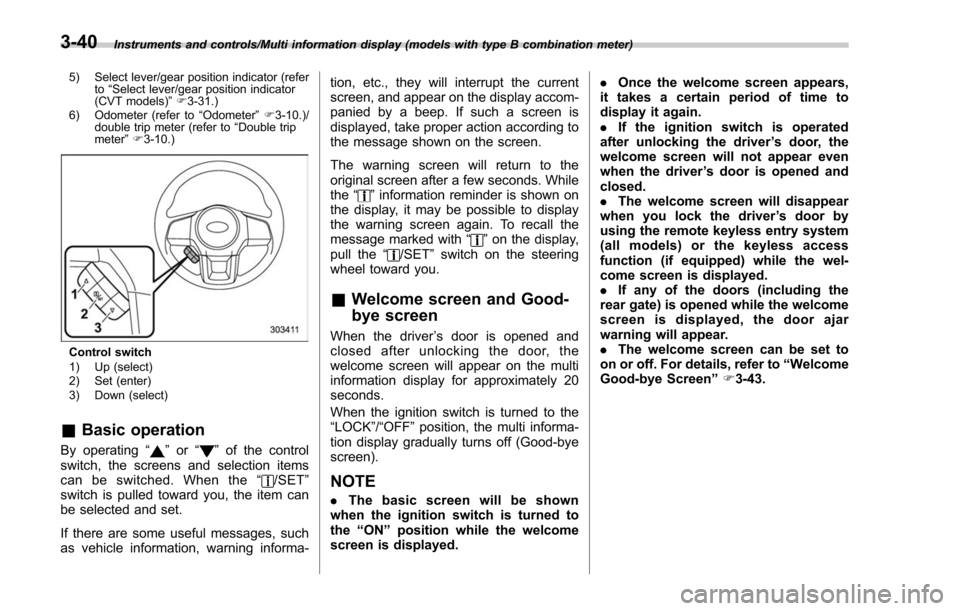
Control switch
1) Up (select)
2) Set (enter)
3) Down (select)
& Basic operation
By operating “”or “”of the control
switch, the screens and selection items
can be switched. When the “
/SET”
switch is pulled toward you, the item can
be selected and set.
If there are some useful messages, such
as vehicle information, warning informa- tion, etc., they will interrupt the current
screen, and appear on the display accom-
panied by a beep. If such a screen is
displayed, take proper action according to
the message shown on the screen.
The warning screen will return to the
original screen after a few seconds. While
the
“
”information reminder is shown on
the display, it may be possible to display
the warning screen again. To recall the
message marked with “
”on the display,
pull the “/SET”switch on the steering
wheel toward you.
& Welcome screen and Good-
bye screen
When the driver ’s door is opened and
closed after unlocking the door, the
welcome screen will appear on the multi
information display for approximately 20
seconds.
When the ignition switch is turned to the
“LOCK”/ “OFF ”position, the multi informa-
tion display gradually turns off (Good-bye
screen).
NOTE
. The basic screen will be shown
when the ignition switch is turned to
the “ON ”position while the welcome
screen is displayed. .
Once the welcome screen appears,
it takes a certain period of time to
display it again.
. If the ignition switch is operated
after unlocking the driver ’s door, the
welcome screen will not appear even
when the driver ’s door is opened and
closed.
. The welcome screen will disappear
when you lock the driver ’s door by
using the remote keyless entry system
(all models) or the keyless access
function (if equipped) while the wel-
come screen is displayed.
. If any of the doors (including the
rear gate) is opened while the welcome
screen is displayed, the door ajar
warning will appear.
. The welcome screen can be set to
on or off. For details, refer to “Welcome
Good-bye Screen ”F 3-43.
3-40
Page 245 of 634

Instruments and controls/Light control switch
“”position: auto on/off headlights (if
equipped)
When the ignition switch is in the “ON ”
position, the instrument panel illumination,
headlights, parking lights, front side mar-
ker lights, rear side marker lights, tail lights
and license plate lights are automatically
on or off depending on the level of the
ambient light.
“
” position
The headlights are all off.
NOTE
The sensitivity of the auto on/off head-
lights can be changed by a SUBARU
dealer. Consult your SUBARU dealer
for details. Also, for models with a multi
function display, the setting can be
changed using the display. For details,
refer to “Auto light sensor sensitivity
setting ”F 3-85.
! Welcome lighting function (if
equipped)
The welcome lighting function turns on the
low beam headlights for smooth ap-
proaching to or exiting from the vehicle
at night or in a dark place.
The function is activated while all of the
following conditions are met.
. The light control switch is in the “AUTO
”position
. It is dark enough to turn on the auto on/
off headlights
When approaching:
While the welcome lighting function is
activated, the low beam headlights will
automatically illuminate when unlocking
the doors (including the rear gate) by
using the remote keyless entry system.
The low beam headlights will remain
illuminated for 30 seconds
*1and then turn
off. However, if any of the following
operations is performed, the low beam
headlights will turn off.
. The doors are locked.
. The light control switch is turned to a
position other than “AUTO”.
. The ignition switch is turned to the “ON”
position.
When exiting:
While the welcome lighting function is
activated, the low beam headlights will
remain illuminated even when either of the
following operations is performed.
. Thepush-buttonignitionswitchis
turned to the “OFF”status (models with
“keyless access with push-button start
system ”)
. The key is pulled out from the ignition switch (models without
“keyless access
with push-button start system ”)
The low beam headlights will turn off
under any of the following conditions.
. 3 minutes have passed since the low
beam headlights were illuminated by the
welcome lighting function.
. 30 seconds have passed since the
door is opened and closed.
*1
. The light control switch is turned to a
position other than “AUTO”.
. The locking procedure is performed
twice. When performing the unlocking
procedure after performing the locking
procedure, perform the locking procedure
twice again.
*1: The setting for the period of time in which
the low beam headlights remain on by the
welcome lighting function can be changed by a
SUBARU dealer. Contact your SUBARU dealer
for details.
3-94