Page 56 of 306
54
Electronic air conditioning (with display screen)
This system operates only with the engine running.
1Air intake / Air recirculation
2 Temperature.
3 Air conditioning.
4 Faster air conditioning.
5 Air distribution.
6 A ir f low.
Air intake / Air recirculation
Recirculation of the interior air isolates the
passenger compartment from exterior odours
and fumes.
As soon as possible, deactivate the function to
avoid the quality of the air from deteriorating
and mist forming.
F
P
ress the button to prevent
fresh air from entering and
recirculate the interior air. The
indicator light illuminates in the
display screen to confirm this. F
P
ress the button again to allow
fresh outside air to enter. The
indicator light goes off from the
display screen to confirm this.
Temperature
F Press these buttons (red for hot and blue for cold), to
adjust the temperature to your
requirements.
The temperature bars come on or go off
progressively on the display.
Ease of use and comfort
Page 57 of 306
55
Air conditioning
Switching on
F Press this button, its indicator light appears on the display.
Switching off
F Press this button again, the indicator light goes off.
Switching the system off could result in
discomfort (humidity, condensation).
Faster air conditioning
This button activates rapid cooling of the air in
the passenger compartment.
Switching on
F Press this button, its indicator light appears in the display.
Switching off
F Press this button again, its indicator light goes off.
Air distribution
F Press this button repeatedly to direct the air flow towards:
-
w
indscreen and side windows
(demisting or defrosting),
-
w
indscreen, side windows and
air vents,
-
w
indscreen, side windows, air
vents and foot wells,
-
w
indscreen, side windows and
foot wells,
-
f
oot wells,
-
a
ir vents and foot wells,
-
a
ir vents.
3
Ease of use and comfort
Page 58 of 306
56
Air flow
F Press this button to increase air
f low.
The air flow bars come on progressively. F
P
ress this button to decrease
air f low.
The air flow bars go off progressively.
Deactivating the system
Avoid driving for long periods with the
system deactivated (risk of misting and
deterioration of air quality). F
P
ress this button (of the air flow)
until all the bars in the display
are of f.
This action deactivates all functions of the air
conditioning system.
The thermal comfort is no longer controlled. A
slight flow of air can still be felt, resulting from
the for ward movement of the vehicle. Pressing the button (of the air flow)
again reactivates the system.
Ease of use and comfort
Page 59 of 306

57
Front demist - defrost
These markings on the control panel indicate the control positions for rapid demisting or defrosting of the windscreen and side windows.
With the heating /
ventilation system
F Put the temperature and air flow controls to the dedicated marked position.
F
P
ut the air intake control to the "Exterior air
intake" position (manual control moved to
the right).
F
P
ut the air distribution control to the
"Windscreen" position.
With the manual air
conditioning system
(without screen)
F Put the temperature and air flow controls to the dedicated marked position.
F
P
ut the air intake control to the "Exterior air
intake" position (manual control moved to
the right).
F
P
ut the air distribution control to the
"Windscreen" position.
F
S
witch on the air conditioning by pressing
the appropriate button; the lighting of the
associated control comes on.
With the electronic air
conditioning system
(with screen)
F Press this button.
The light in the button comes on.
F
P
ress this button again to switch
it of f.
The light in the button goes off.
3
Ease of use and comfort
Page 60 of 306

58
Rear screen demist - defrost
The control button is located on the heating / ventilation or air conditioning system
control panel.
Switching on
Demisting - defrosting of the rear screen can
only function when the engine is running.F
P
ress this button to demist /
defrost the rear screen and
(depending on version) the
door mirrors. The indicator
light associated with the button
comes on. The demisting/defrosting switches off
automatically to prevent an excessive
consumption of current.
Switching off
F The front defrosting operation
can be stopped before it turns
off automatically by pressing the
button again.
The indicator light associated with the button
goes off.
Turn off the defrosting of the rear window
and the side mirrors (depending on
the version) as soon as you consider it
necessary.
Because lower energy consumption
reduces fuel consumption.
Heated lower windscreen
(Depending on the country of sale.)
In cold conditions, the heated rear window
switch also allows the lower windscreen to be
heated, so as to free the wiper blades when
frozen to the glass by frost or snow.
The function is active when the ambient
temperature is below 0°C.
Ease of use and comfort
Page 62 of 306
60
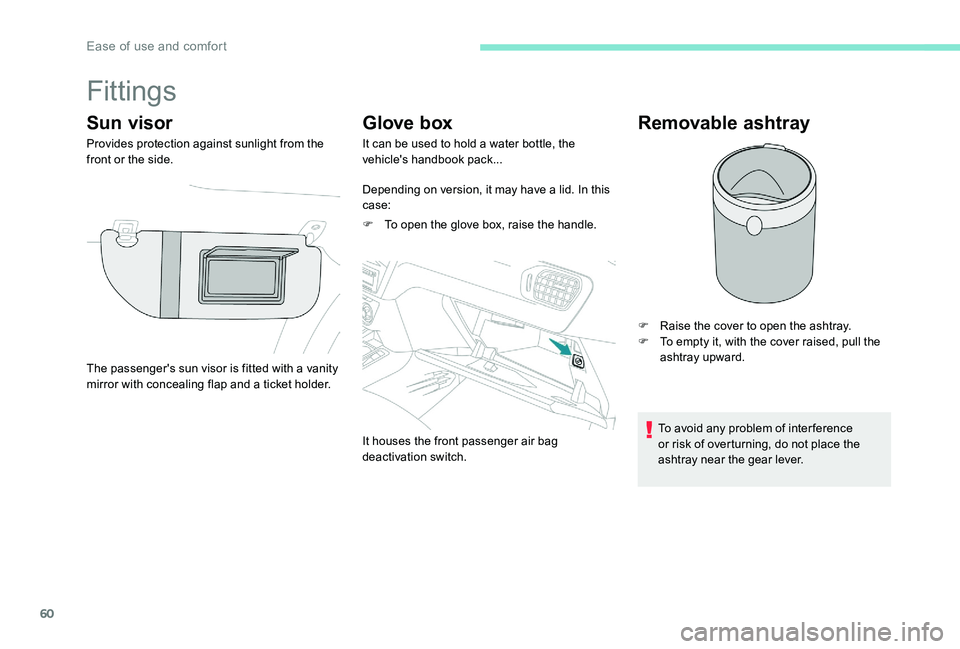
Fittings
Sun visor
Provides protection against sunlight from the
front or the side.
Glove box
It can be used to hold a water bottle, the
vehicle's handbook pack...
Depending on version, it may have a lid. In this
case:
F
T
o open the glove box, raise the handle.
It houses the front passenger air bag
deactivation switch.
Removable ashtray
F Raise the cover to open the ashtray.
F T o empty it, with the cover raised, pull the
ashtray upward.
To avoid any problem of inter ference
or risk of overturning, do not place the
ashtray near the gear lever.
The passenger's sun visor is fitted with a vanity
mirror with concealing flap and a ticket holder.
Ease of use and comfort
Page 64 of 306

62
USB port
A USB port is located on the central console.
It allows the connection of portable devices
such as iPod
® type digital audio players or USB
memory sticks.
It reads the audio files and sends them to your
audio system to be played through the vehicle's
speakers.
You can manage these files using the audio
system control panel and display them in the
screen.
When the USB port is used, the portable
device charges automatically.
While charging, a message is displayed if the
current drawn by the portable device exceeds
the power rating of the vehicle's port.
Cigarette lighter / 12 V
accessory socket
F To use the cigarette lighter, press it in and wait a few seconds until it pops out
automatically.
F
T
o connect a 12 V accessory (max. power:
120 W), remove the cigarette lighter and
connect the appropriate adapter.
You can use this socket to connect a telephone
charger, a bottle warmer...
After use, put the cigarette lighter back into
place straight away. The connection of an electrical device
not approved by PEUGEOT
, such as a
USB charger, may adversely affect the
operation of vehicle electrical systems,
causing faults such as poor telephone
reception or inter ference with displays in
the screens.
Ease of use and comfort
Page 66 of 306

64
Lighting control
In some climate conditions (low
temperature, humidity), the presence
of mist on the internal sur face of the
headlamp and rear lamp glass is normal;
this disappears a few minutes after the
lights are switched on.
Selection ring for main lighting
mode
Lighting off (ignition off) / Daytime
running lights (engine running).
Turn the ring to align the desired symbol with
the marking.
Side lights only.
Dipped or main beam headlights.
Dipping the headlights
Pull the lever to switch the lighting
between dipped and main beam
headlights.
Display
Illumination of the corresponding indicator
light in the instrument panel confirms that the
lighting selected is on.
Fog light selection ring
The fog lights operate with the dipped and main
beam headlights.
Rear fog light only
F To switch it on, turn the ring for wards.
F T o switch it off, turn the ring backwards.
In the lighting off and side lights modes, the
driver can switch on the main beam headlights
temporarily ("headlight flash") by keeping the
lever pulled.
Lighting and visibility