2017 NISSAN QUEST steering
[x] Cancel search: steeringPage 328 of 520
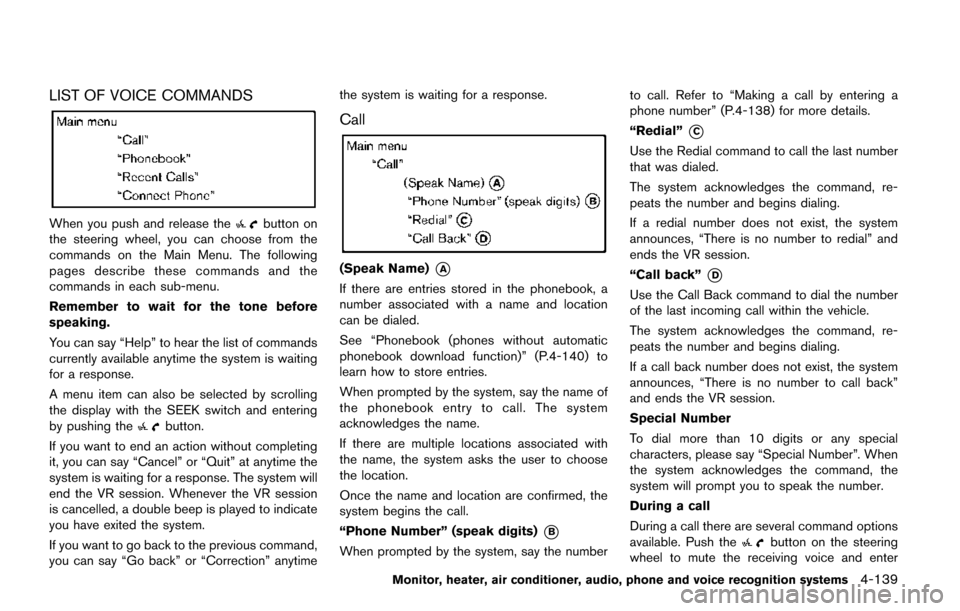
LIST OF VOICE COMMANDS
When you push and release thebutton on
the steering wheel, you can choose from the
commands on the Main Menu. The following
pages describe these commands and the
commands in each sub-menu.
Remember to wait for the tone before
speaking.
You can say “Help” to hear the list of commands
currently available anytime the system is waiting
for a response.
A menu item can also be selected by scrolling
the display with the SEEK switch and entering
by pushing the
button.
If you want to end an action without completing
it, you can say “Cancel” or “Quit” at anytime the
system is waiting for a response. The system will
end the VR session. Whenever the VR session
is cancelled, a double beep is played to indicate
you have exited the system.
If you want to go back to the previous command,
you can say “Go back” or “Correction” anytime the system is waiting for a response.
Call
(Speak Name)*A
If there are entries stored in the phonebook, a
number associated with a name and location
can be dialed.
See “Phonebook (phones without automatic
phonebook download function)” (P.4-140) to
learn how to store entries.
When prompted by the system, say the name of
the phonebook entry to call. The system
acknowledges the name.
If there are multiple locations associated with
the name, the system asks the user to choose
the location.
Once the name and location are confirmed, the
system begins the call.
“Phone Number” (speak digits)
*B
When prompted by the system, say the number
to call. Refer to “Making a call by entering a
phone number” (P.4-138) for more details.
“Redial”
*C
Use the Redial command to call the last number
that was dialed.
The system acknowledges the command, re-
peats the number and begins dialing.
If a redial number does not exist, the system
announces, “There is no number to redial” and
ends the VR session.
“Call back”
*D
Use the Call Back command to dial the number
of the last incoming call within the vehicle.
The system acknowledges the command, re-
peats the number and begins dialing.
If a call back number does not exist, the system
announces, “There is no number to call back”
and ends the VR session.
Special Number
To dial more than 10 digits or any special
characters, please say “Special Number”. When
the system acknowledges the command, the
system will prompt you to speak the number.
During a call
During a call there are several command options
available. Push the
button on the steering
wheel to mute the receiving voice and enter
Monitor, heater, air conditioner, audio, phone and voice recognition systems4-139
Page 330 of 520
number.
“Delete Entry”
*B
Use the Delete Entry command to delete one
entry from the phonebook. After the system
acknowledges a command, say the name to
delete or say “List Names” to choose an entry.
“List Names”
*C
Use the List Names command to hear all the
names in the phonebook. The system recites the
phonebook entries but does not include the
actual phone numbers. When playback of the
list is complete, the system returns to the main
menu.
Playback of the list can be stopped at any time
by pushing the
button on the steering
wheel. The system ends the VR session.
Phonebook (phones with automatic
phonebook download function)
NOTE:
Phonebook commands are not available
when the vehicle is moving.
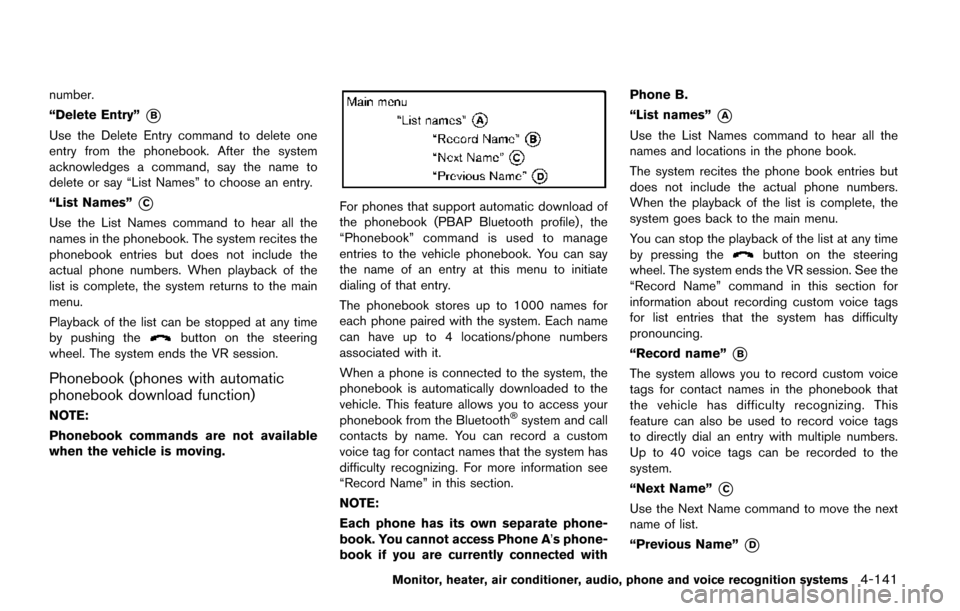
For phones that support automatic download of
the phonebook (PBAP Bluetooth profile) , the
“Phonebook” command is used to manage
entries to the vehicle phonebook. You can say
the name of an entry at this menu to initiate
dialing of that entry.
The phonebook stores up to 1000 names for
each phone paired with the system. Each name
can have up to 4 locations/phone numbers
associated with it.
When a phone is connected to the system, the
phonebook is automatically downloaded to the
vehicle. This feature allows you to access your
phonebook from the Bluetooth
Šsystem and call
contacts by name. You can record a custom
voice tag for contact names that the system has
difficulty recognizing. For more information see
“Record Name” in this section.
NOTE:
Each phone has its own separate phone-
book. You cannot access Phone A ’s phone-
book if you are currently connected with Phone B.
“List names”
*A
Use the List Names command to hear all the
names and locations in the phone book.
The system recites the phone book entries but
does not include the actual phone numbers.
When the playback of the list is complete, the
system goes back to the main menu.
You can stop the playback of the list at any time
by pressing the
button on the steering
wheel. The system ends the VR session. See the
“Record Name” command in this section for
information about recording custom voice tags
for list entries that the system has difficulty
pronouncing.
“Record name”
*B
The system allows you to record custom voice
tags for contact names in the phonebook that
the vehicle has difficulty recognizing. This
feature can also be used to record voice tags
to directly dial an entry with multiple numbers.
Up to 40 voice tags can be recorded to the
system.
“Next Name”
*C
Use the Next Name command to move the next
name of list.
“Previous Name”
*D
Monitor, heater, air conditioner, audio, phone and voice recognition systems4-141
Page 336 of 520
charge cellular phones.
. If the hands-free phone system seems to be
malfunctioning, see “Troubleshooting guide”
in this section. You can also visit www.
nissanusa.com/bluetooth for troubleshoot-
ing help.
. Some cellular phones or other devices may
cause interference or a buzzing noise to
come from the audio system speakers.
Storing the device in a different location
may reduce or eliminate the noise.
. Refer to the cellular phone Owner’s Manual
regarding the telephone charges, cellular
phone antenna and body, etc.
REGULATORY INFORMATION
FCC Regulatory information
.CAUTION: To maintain compliance with
FCC’s RF exposure guidelines, use only
the supplied antenna. Unauthorized antenna,
modification, or attachments could damage
the transmitter and may violate FCC regula-
tions.
. Operation is subject to the following two
conditions:
1) this device may not cause interference
and
2) this device must accept any interference, including interference that may cause undesired operation of the device
IC Regulatory information
.
Operation is subject to the following two
conditions: (1) this device may not cause
interference, and (2) this device must accept
any interference, including interference that
may cause undesired operation of the
device.
. This Class B digital apparatus meets all
requirements of the Canadian Interference-
Causing Equipment Regulations.
BluetoothŠtrademark
BluetoothŠis a trademark owned
by Bluetooth SIG, Inc., and
licensed to Visteon Corporation.
USING THE SYSTEM
The Voice Recognition system allows hands-
free operation of the BluetoothŠPhone System.
If the vehicle is in motion, some commands may
not be available so full attention may be given to
vehicle operation.
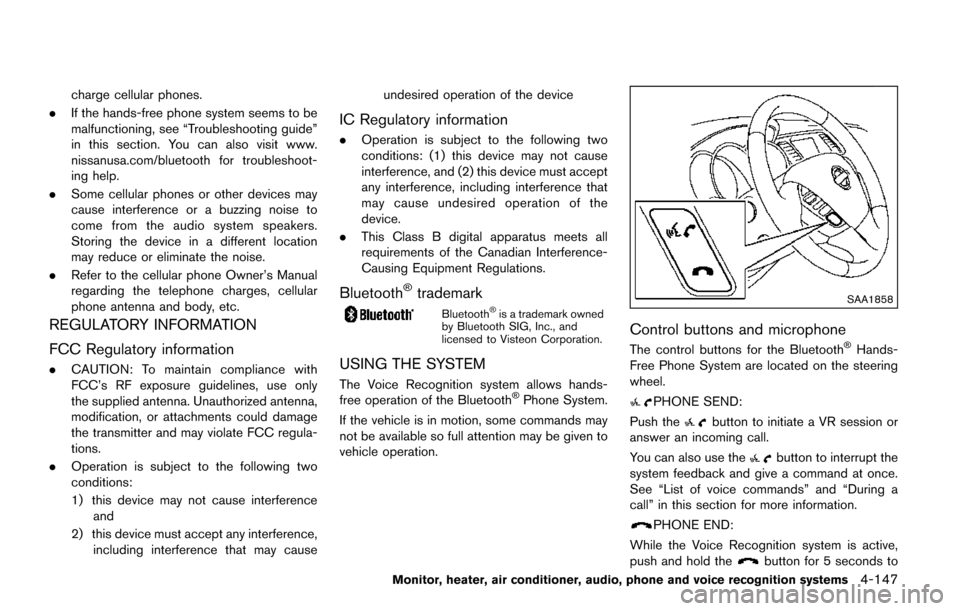
SAA1858
Control buttons and microphone
The control buttons for the BluetoothŠHands-
Free Phone System are located on the steering
wheel.
PHONE SEND:
Push the
button to initiate a VR session or
answer an incoming call.
You can also use the
button to interrupt the
system feedback and give a command at once.
See “List of voice commands” and “During a
call” in this section for more information.
PHONE END:
While the Voice Recognition system is active,
push and hold the
button for 5 seconds to
Monitor, heater, air conditioner, audio, phone and voice recognition systems4-147
Page 337 of 520
4-148Monitor, heater, air conditioner, audio, phone and voice recognition systems
quit the Voice Recognition system at any time.
Microphone:
Microphone is located near the map lights.
Manual control:
While using the Voice Recognition system, it is
possible to select menu options by using the
steering wheel controls instead of speaking
voice commands. To activate manual control
mode, push the
button on the steering
wheel to access the phone menu and then tilt
the tuning switch (
or) up or down.
The manual control mode does not allow dialing
a phone number by digits. The user may select
an entry from the Phonebook or Recent Calls
lists. To reactivate Voice Recognition, exit the
manual control mode by pushing and holding the
button. At that time, pushing thebutton
will start the Hands Free Phone System.
Choosing a language
You can interact with the BluetoothŠHands-
Free Phone System using several languages
that are available. For operations to change the
language, see “Audio main operation” (P.4-78).
Changing voice feedback volume
If you want to adjust the volume of the voice
feedback, push the volume control switch on the
steering wheel while being provided with feed-
back. You can also use the VOL (volume) control
knob on the audio unit.
Initialization
When the ignition switch is placed in the ACC
or ON position, the Voice Recognition system is
initialized, which takes a few seconds. If the
button is pushed before the initialization com-
pletes, the system will announce “Hands-free
phone system not ready” and will not react to
voice commands.
Connecting procedure:
NOTE:
The connecting procedure must be per-
formed when the vehicle is stationary. If
the vehicle starts moving during the pro-
cedure, the procedure will be cancelled.
You can register up to 5 different Bluetooth
Š
cellular phones in the in-vehicle phone module.
However, you can talk on only one cellular phone
at a time. To connect a phone to the Bluetooth
ŠHands-
Free Phone System;
1. Push the ENTER/SETTING button.
2. Use the TUNE·SCROLL control knob to select “Bluetooth” and then push the
ENTER/SETTING button.
3. Select “Add Phone” and then push the ENTER/SETTING button.
4. When a message with a PIN appears on the screen, operate the Bluetooth
Šphone to
enter the PIN.
The connecting procedure varies according to
each phone. See the phone’s Owner’s Manual
for details.
Giving voice commands
To operate voice recognition, push and release
thebutton located on the steering wheel.
After the tone sounds, speak a command.
The command given is picked up by the
microphone, and voice feedback is given when
the command is accepted.
. If you need to hear the available commands
for the current menu again, say “Help” and
the system will repeat them.
. If a command is not recognized, the system
announces, “Command not recognized.
Please try again.” Make sure the command
Page 338 of 520
is said exactly as prompted by the system
and repeat the command in a clear voice.
. If you want to go back to the previous
command, you can say “Go back” or
“Correction” any time the system is waiting
for a response.
. You can cancel a command when the
system is waiting for a response by saying,
“Cancel” or “Quit.” The system announces
“Cancel” and ends the VR session. You can
also push and hold the
button on the
steering wheel for 5 seconds at any time to
end the VR session. Whenever the VR
session is cancelled, a double beep is
played to indicate you have exited the
system.
. If you want to adjust the volume of the voice
feedback, push the (
-or+) button
on the steering wheel while being provided
with feedback. You can also use the radio
volume control knob.
Voice Prompt Interrupt:
In most cases you can interrupt the voice
feedback to speak the next command by
pushing the
button on the steering wheel.
After interrupting the system, wait for a beep
before speaking your command. One Shot Call:
To use the system faster, you may speak the
second level commands with the main menu
command on the main menu. For example, push
the
button and after the tone say, “Call
Redial”.
Operating tips:
To get the best performance out of the Voice
Recognition system, observe the following:
. Keep the interior of the vehicle as quiet as
possible. Close the windows to eliminate
surrounding noises (traffic noises, vibration
sounds, etc.) , which may prevent the system
from recognizing voice commands correctly.
. Wait until the tone sounds before speaking a
command. Otherwise, the command will not
be received properly.
. Start speaking a command within 5 seconds
after the tone sounds.
. Speak in a natural voice without pausing
between words.
Voice commands
Voice commands can be used to operate the
BluetoothŠHands-Free Phone System. Push
thebutton and say “Phone” to bring up the
phone command menu. The available options
are:
. Call
. Phonebook
. Recent Calls
. Messaging (if so equipped)
. Select Phone
Call:
For more information on the “Call” command,
see “Making a call” (P.4-151).
Phonebook:
The following commands are available under
“Phonebook”:
. (A Name)
Say a name in the phonebook to bring up a
list of options for that phonebook entry. The
system will say the name it interpreted
based on the voice command provided. If
the name is incorrect, say “Correction” to
hear another name.
Once the correct phonebook entry is
identified, say “Dial” to dial the number or
“Send Text” to send a text message to that
Monitor, heater, air conditioner, audio, phone and voice recognition systems4-149
Page 342 of 520
prompt for the number of the desired
custom message. For more information on
setting and managing custom text mes-
sages, see “Bluetooth
Šsettings” (P.4-153) .
Reading a received text message:
1. Push the
button.
2. Say “Messaging”.
3. Say “Read Text”.
The text message, sender and delivery time are
shown on the screen. Use the tuning switch on
the steering wheel to scroll through all text
messages if more than one are available. Push
the
button to exit the text message screen.
Push thebutton to access the following
options for replying to the text message:
. Call Back
Speak this command to call the sender of
the text message using the Bluetooth
Š
Hands-Free Phone System.
. Send Text
Speak this command to send a text mes-
sage response to the sender of the text
message.
. Read Text
Speak this command to read the text
message again. .
Previous Text
Speak this command to move to the
previous text message (if available) .
. Next Text
Speak this command to move to the next
text message (if available) .
NOTE:
Text messages are only displayed if the
vehicle speed is less than 5 MPH (8 km/h) .
BluetoothŠsettings
To access and adjust the settings for the
BluetoothŠHands-Free Phone System:
1. Push the SETTING button.
2. Use the TUNE·FOLDER knob to select “Bluetooth” and then push the ENTER/
SETTING button:
.Bluetooth
Select “On” or “Off” to turn the vehicle’s
Bluetooth
Šsystem on or off.
.Add PhoneTo connect a phone to the system, see
“Initialization” (P.4-148) .
.Delete PhoneSelect to delete a phone from the
displayed list. The system will ask to
confirm before deleting the phone.
.Replace PhoneSelect to replace a phone from the
displayed list. When a selection is made,
the system will ask to confirm before
proceeding. The recorded phonebook for
the phone being deleted will be saved as
long as the new phone’s phonebook is
the same as the old phone’s phonebook.
.Select PhoneSelect to connect to a previously con-
nected phone from the displayed list.
.Phonebook DownloadSelect to turn on or off the automatic
download of a connected phone’s pho-
nebook.
.Show Incoming CallsSelect “Driver Only” to have incoming
call information displayed only in the
vehicle information display. Select “Both”
to have incoming call information dis-
played in both the vehicle information
display and the center display screen
.Text MessageSelect to turn on or off the vehicle’s text
messaging feature.
.New Text SoundSelect to adjust the volume of the sound
that plays when a new text is received by
a phone connected to the Bluetooth
Š
Hands-Free Phone System. The setting
all the way to the left indicates that the
new text sound will be muted.
Monitor, heater, air conditioner, audio, phone and voice recognition systems4-153
Page 346 of 520
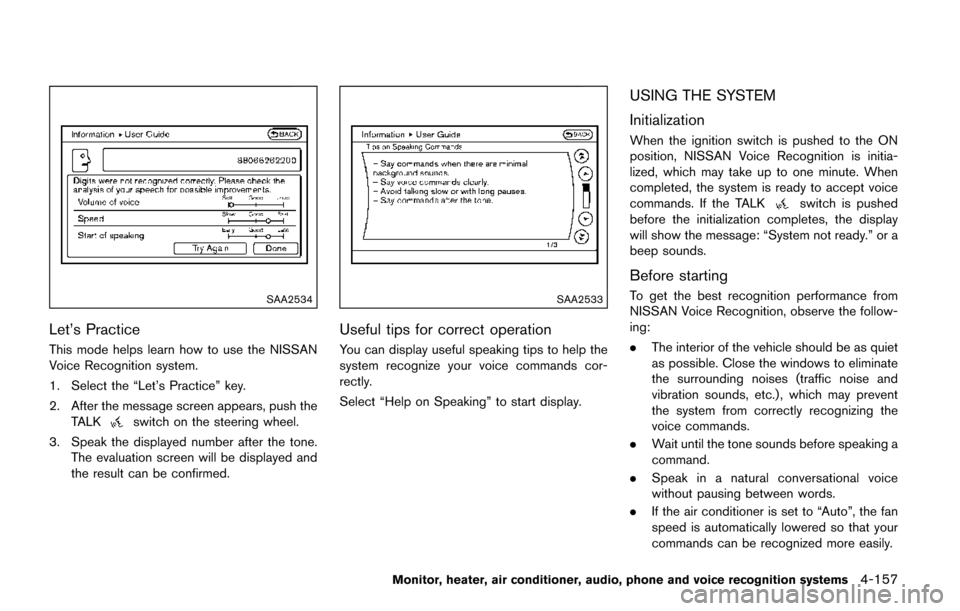
SAA2534
Let’s Practice
This mode helps learn how to use the NISSAN
Voice Recognition system.
1. Select the “Let’s Practice” key.
2. After the message screen appears, push theTALK
switch on the steering wheel.
3. Speak the displayed number after the tone. The evaluation screen will be displayed and
the result can be confirmed.
SAA2533
Useful tips for correct operation
You can display useful speaking tips to help the
system recognize your voice commands cor-
rectly.
Select “Help on Speaking” to start display.
USING THE SYSTEM
Initialization
When the ignition switch is pushed to the ON
position, NISSAN Voice Recognition is initia-
lized, which may take up to one minute. When
completed, the system is ready to accept voice
commands. If the TALK
switch is pushed
before the initialization completes, the display
will show the message: “System not ready.” or a
beep sounds.
Before starting
To get the best recognition performance from
NISSAN Voice Recognition, observe the follow-
ing:
. The interior of the vehicle should be as quiet
as possible. Close the windows to eliminate
the surrounding noises (traffic noise and
vibration sounds, etc.) , which may prevent
the system from correctly recognizing the
voice commands.
. Wait until the tone sounds before speaking a
command.
. Speak in a natural conversational voice
without pausing between words.
. If the air conditioner is set to “Auto”, the fan
speed is automatically lowered so that your
commands can be recognized more easily.
Monitor, heater, air conditioner, audio, phone and voice recognition systems4-157
Page 347 of 520
4-158Monitor, heater, air conditioner, audio, phone and voice recognition systems
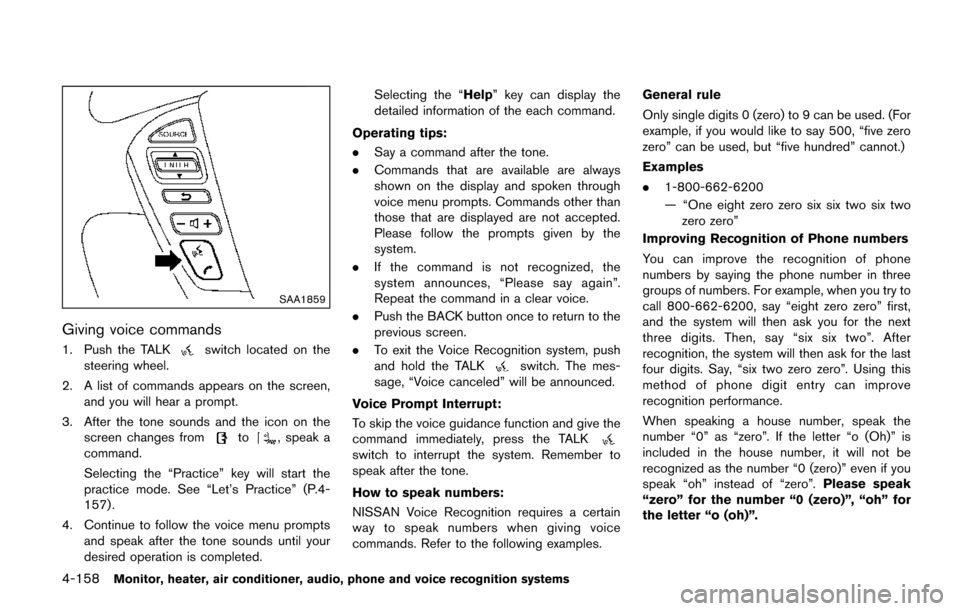
SAA1859
Giving voice commands
1. Push the TALKswitch located on the
steering wheel.
2. A list of commands appears on the screen, and you will hear a prompt.
3. After the tone sounds and the icon on the screen changes from
to, speak a
command.
Selecting the “Practice” key will start the
practice mode. See “Let’s Practice” (P.4-
157) .
4. Continue to follow the voice menu prompts and speak after the tone sounds until your
desired operation is completed. Selecting the “Help” key can display the
detailed information of the each command.
Operating tips:
. Say a command after the tone.
. Commands that are available are always
shown on the display and spoken through
voice menu prompts. Commands other than
those that are displayed are not accepted.
Please follow the prompts given by the
system.
. If the command is not recognized, the
system announces, “Please say again”.
Repeat the command in a clear voice.
. Push the BACK button once to return to the
previous screen.
. To exit the Voice Recognition system, push
and hold the TALK
switch. The mes-
sage, “Voice canceled” will be announced.
Voice Prompt Interrupt:
To skip the voice guidance function and give the
command immediately, press the TALK
switch to interrupt the system. Remember to
speak after the tone.
How to speak numbers:
NISSAN Voice Recognition requires a certain
way to speak numbers when giving voice
commands. Refer to the following examples. General rule
Only single digits 0 (zero) to 9 can be used. (For
example, if you would like to say 500, “five zero
zero” can be used, but “five hundred” cannot.)
Examples
.
1-800-662-6200
— “One eight zero zero six six two six two
zero zero”
Improving Recognition of Phone numbers
You can improve the recognition of phone
numbers by saying the phone number in three
groups of numbers. For example, when you try to
call 800-662-6200, say “eight zero zero” first,
and the system will then ask you for the next
three digits. Then, say “six six two”. After
recognition, the system will then ask for the last
four digits. Say, “six two zero zero”. Using this
method of phone digit entry can improve
recognition performance.
When speaking a house number, speak the
number “0” as “zero”. If the letter “o (Oh)” is
included in the house number, it will not be
recognized as the number “0 (zero)” even if you
speak “oh” instead of “zero”. Please speak
“zero” for the number “0 (zero)”, “oh” for
the letter “o (oh)”.