2017 NISSAN QUEST steering
[x] Cancel search: steeringPage 348 of 520
Send digits using dial tone:
.Press the TALK
switch during a phone
call.
. The menu will be launched and you will be
provided with the following guidance:
"Please say the digits to dial".
. After guidance, say the digits of the number
you want to send. After this, the digits that
have been recognized will be read out.
. If you press the ENTER button on the
steering wheel or on the multi-function
controller, the selected digits will be sent.
Monitor, heater, air conditioner, audio, phone and voice recognition systems4-159
Page 351 of 520
4-162Monitor, heater, air conditioner, audio, phone and voice recognition systems
Voice command examples
To use the NISSAN Voice Recognition function,
speaking one command is sometimes sufficient,
but at other times it is necessary to speak two or
more commands. As examples, some additional
basic operations by voice commands are
described here.
For navigation system commands, see the
separate Navigation System Owner’s Manual.
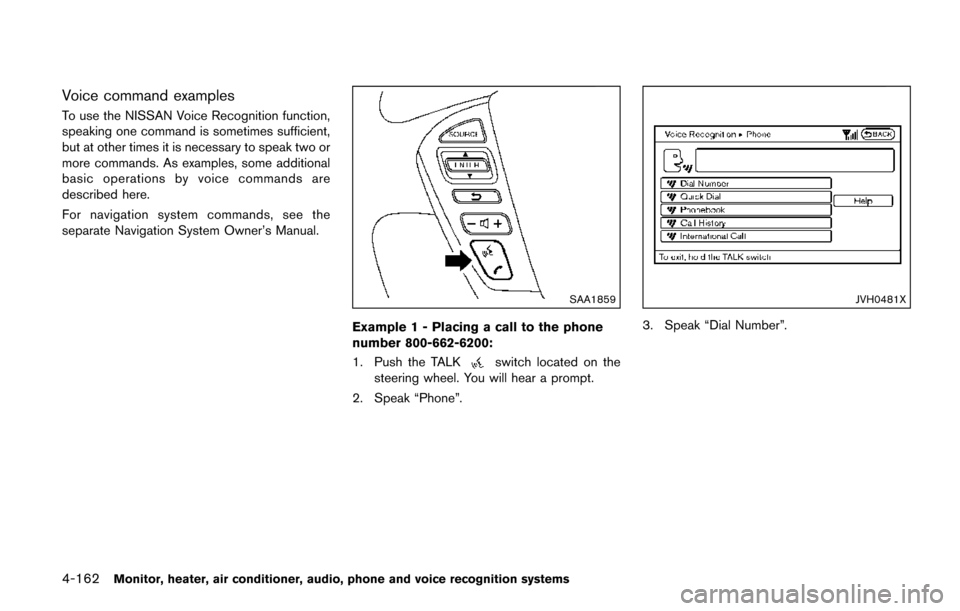
SAA1859
Example 1 - Placing a call to the phone
number 800-662-6200:
1. Push the TALK
switch located on the
steering wheel. You will hear a prompt.
2. Speak “Phone”.
JVH0481X
3. Speak “Dial Number”.
Page 353 of 520
4-164Monitor, heater, air conditioner, audio, phone and voice recognition systems
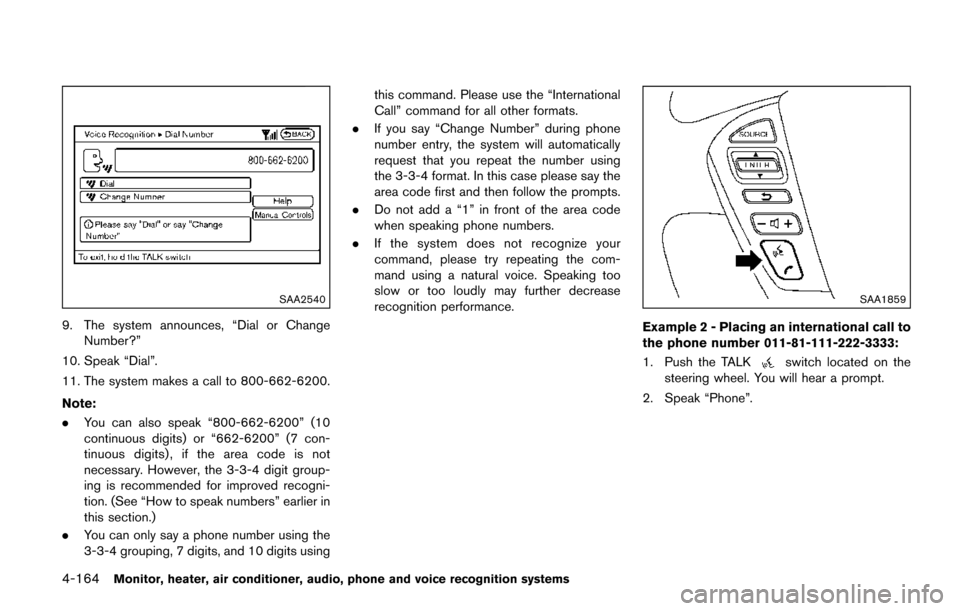
SAA2540
9. The system announces, “Dial or ChangeNumber?”
10. Speak “Dial”.
11. The system makes a call to 800-662-6200.
Note:
. You can also speak “800-662-6200” (10
continuous digits) or “662-6200” (7 con-
tinuous digits) , if the area code is not
necessary. However, the 3-3-4 digit group-
ing is recommended for improved recogni-
tion. (See “How to speak numbers” earlier in
this section.)
. You can only say a phone number using the
3-3-4 grouping, 7 digits, and 10 digits using this command. Please use the “International
Call” command for all other formats.
. If you say “Change Number” during phone
number entry, the system will automatically
request that you repeat the number using
the 3-3-4 format. In this case please say the
area code first and then follow the prompts.
. Do not add a “1” in front of the area code
when speaking phone numbers.
. If the system does not recognize your
command, please try repeating the com-
mand using a natural voice. Speaking too
slow or too loudly may further decrease
recognition performance.
SAA1859
Example 2 - Placing an international call to
the phone number 011-81-111-222-3333:
1. Push the TALK
switch located on the
steering wheel. You will hear a prompt.
2. Speak “Phone”.
Page 364 of 520
.Speak in a natural voice without pausing
between words.
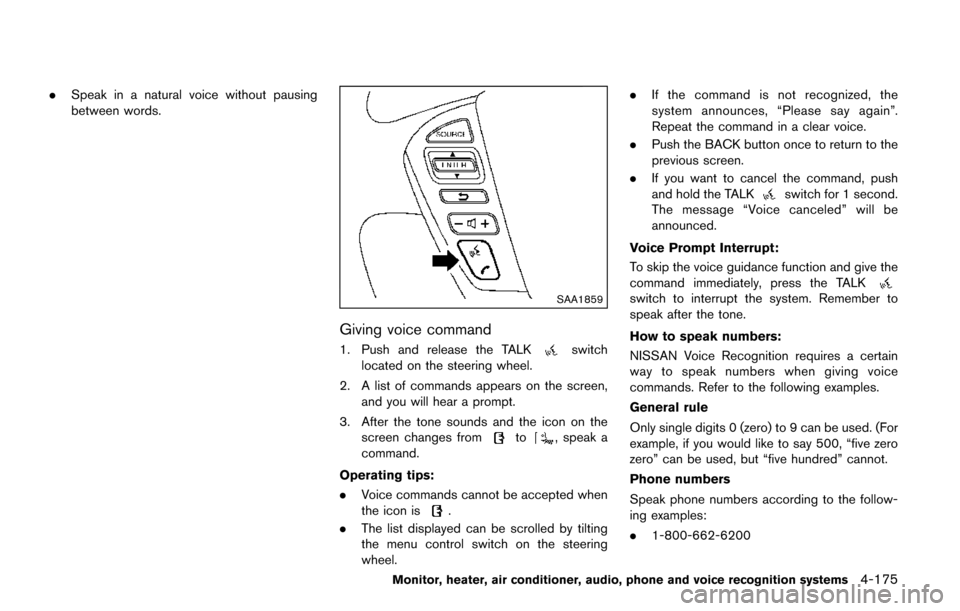
SAA1859
Giving voice command
1. Push and release the TALKswitch
located on the steering wheel.
2. A list of commands appears on the screen, and you will hear a prompt.
3. After the tone sounds and the icon on the screen changes from
to, speak a
command.
Operating tips:
. Voice commands cannot be accepted when
the icon is
.
. The list displayed can be scrolled by tilting
the menu control switch on the steering
wheel. .
If the command is not recognized, the
system announces, “Please say again”.
Repeat the command in a clear voice.
. Push the BACK button once to return to the
previous screen.
. If you want to cancel the command, push
and hold the TALK
switch for 1 second.
The message “Voice canceled” will be
announced.
Voice Prompt Interrupt:
To skip the voice guidance function and give the
command immediately, press the TALK
switch to interrupt the system. Remember to
speak after the tone.
How to speak numbers:
NISSAN Voice Recognition requires a certain
way to speak numbers when giving voice
commands. Refer to the following examples.
General rule
Only single digits 0 (zero) to 9 can be used. (For
example, if you would like to say 500, “five zero
zero” can be used, but “five hundred” cannot.
Phone numbers
Speak phone numbers according to the follow-
ing examples:
. 1-800-662-6200
Monitor, heater, air conditioner, audio, phone and voice recognition systems4-175
Page 365 of 520
4-176Monitor, heater, air conditioner, audio, phone and voice recognition systems
— “Dial one eight zero zero six six two sixtwo zero zero.”
Note 1: For the best voice recognition phone
dialing results, say phone numbers as single
digits.
Note 2: You cannot say 555-6000 as “five five
five six thousands”.
Note 3: When speaking a house number, speak
the number “0” as “ zero”. If the letter “o ( Oh)” is
included in the house number, it will not be
recognized as the number “0 (zero)” even if you
speak “oh” instead of “ zero”. Please speak
“zero” for the number “0 (zero)”, “oh” for the
letter “o (oh)”.
Send digits using dial tone:
. Press the TALK
switch during a phone
call.
. The menu will be launched and you will be
provided with the following guidance:
"Please say the digits to dial".
. After guidance, say the digits of the number
you want to send. After this, the digits that
have been recognized will be read out.
. If you press the ENTER button on the
steering wheel or on the multi-function
controller, the selected digits will be sent.
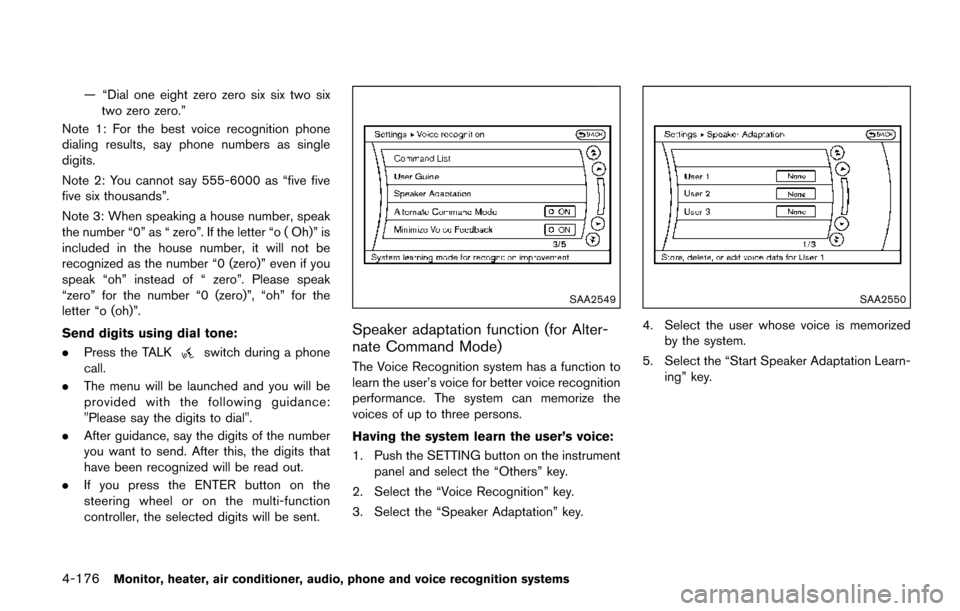
SAA2549
Speaker adaptation function (for Alter-
nate Command Mode)
The Voice Recognition system has a function to
learn the user’s voice for better voice recognition
performance. The system can memorize the
voices of up to three persons.
Having the system learn the user’s voice:
1. Push the SETTING button on the instrument
panel and select the “Others” key.
2. Select the “Voice Recognition” key.
3. Select the “Speaker Adaptation” key.
SAA2550
4. Select the user whose voice is memorized by the system.
5. Select the “Start Speaker Adaptation Learn- ing” key.
Page 370 of 520
5 Starting and driving
Precautions when starting and driving ................................ 5-2Exhaust gas (carbon monoxide) ...................................... 5-2
Three-way catalyst .............................................................. 5-3
Tire Pressure Monitoring System (TPMS) .................... 5-3
Avoiding collision and rollover ......................................... 5-6
Off-road recovery ................................................................ 5-7
Rapid air pressure loss ...................................................... 5-7
Drinking alcohol/drugs and driving ................................. 5-8
Push-button ignition switch .................................................... 5-8 Operating range for engine start function .................... 5-9
Push-button ignition switch operation ........................... 5-9
Push-button ignition switch positions ......................... 5-10
Emergency engine shut off ............................................ 5-10
Intelligent Key battery discharge .................................. 5-11
Before starting the engine ................................................... 5-11
Starting the engine ................................................................ 5-12
Driving the vehicle ................................................................. 5-13 Continuously Variable Transmission (CVT) ................ 5-13
Parking brake ........................................................................\
.. 5-16
Blind Spot Warning (BSW) (if so equipped) ................. 5-17
BSW system operation .................................................. 5-19
How to enable/disable the BSW system .................. 5-19
BSW system limitations ................................................. 5-20
BSW driving situations ................................................... 5-21
System temporarily unavailable ..................................... 5-24 System malfunction ....................................................... 5-24
System maintenance ..................................................... 5-25
Cruise control ........................................................................\
. 5-25
Precautions on cruise control ..................................... 5-25
Cruise control operations ............................................ 5-26
Break-in schedule ................................................................. 5-27
Fuel efficient driving tips ..................................................... 5-27
Increasing fuel economy ...................................................... 5-28
Parking/parking on hills ........................................................ 5-29
Hydraulic pump electric power steering ......................... 5-30
Brake system ........................................................................\
.. 5-30 Braking precautions ...................................................... 5-30
Parking brake break-in .................................................. 5-31
Anti-lock Braking System (ABS) ............................... 5-31
Vehicle Dynamic Control (VDC) system ......................... 5-32
Cold weather driving ............................................................ 5-34
Freeing a frozen door lock ........................................... 5-34
Anti-freeze ........................................................................\
5-34
Battery ........................................................................\
....... 5-34
Draining of coolant water ............................................. 5-34
Tire equipment ................................................................ 5-34
Special winter equipment ............................................ 5-34
Driving on snow or ice ................................................. 5-35
Engine block heater (if so equipped) ....................... 5-35
Page 373 of 520
5-4Starting and driving
pressure telltale.
Your vehicle has also been equipped with a
TPMS malfunction indicator to indicate when the
system is not operating properly. The TPMS
malfunction indicator is combined with the low
tire pressure telltale. When the system detects a
malfunction, the telltale will flash for approxi-
mately one minute and then remain continuously
illuminated. This sequence will continue upon
subsequent vehicle start-ups as long as the
malfunction exists. When the malfunction indi-
cator is illuminated, the system may not be able
to detect or signal low tire pressure as intended.
TPMS malfunctions may occur for a variety of
reasons, including the installation of replace-
ment or alternate tires or wheels on the vehicle
that prevent the TPMS from functioning properly.
Always check the TPMS malfunction telltale
after replacing one or more tires or wheels on
your vehicle to ensure that the replacement or
alternate tires and wheels allow the TPMS to
continue to function properly.
Additional information
.Since the spare tire is not equipped with the
TPMS, the TPMS does not monitor the tire
pressure of the spare tire.
. The TPMS will activate only when the
vehicle is driven at speeds above 16 MPH
(25 km/h) . Also, this system may not detect a sudden drop in tire pressure (for example a
flat tire while driving) .
. The low tire pressure warning light does not
automatically turn off when the tire pressure
is adjusted. After the tire is inflated to the
recommended pressure, the vehicle must be
driven at speeds above 16 MPH (25 km/h)
to activate the TPMS and turn off the low tire
pressure warning light. Use a tire pressure
gauge to check the tire pressure.
. The CHECK TIRE PRESSURE warning also
appears on the vehicle information display
when the low tire pressure warning light is
illuminated and low tire pressure is detected.
The CHECK TIRE PRESSURE warning
turns off when the low tire pressure warning
light turns off.
The CHECK TIRE PRESSURE warning
appears each time the ignition switch is
placed in the ON position as long as the low
tire pressure warning light remains illumi-
nated.
The CHECK TIRE PRESSURE warning
does not appear if the low tire pressure
warning light illuminates to indicate a TPMS
malfunction.
. Tire pressure rises and falls depending on
the heat caused by the vehicle’s operation
and the outside temperature. Do not reduce the tire pressure after driving because the
tire pressure rises after driving. Low outside
temperature can lower the temperature of
the air inside the tire which can cause a
lower tire inflation pressure. This may cause
the low tire pressure warning light to
illuminate. If the warning light illuminates in
low ambient temperature, check the tire
pressure for all four tires.
For additional information, see “Low tire pres-
sure warning light” (P.2-14) and “Tire Pressure
Monitoring System (TPMS)” (P.6-3) .
WARNING
. If the low tire pressure warning light
illuminates while driving, avoid sud-
den steering maneuvers or abrupt
braking, reduce vehicle speed, pull
off the road to a safe location and
stop the vehicle as soon as possi-
ble. Driving with under-inflated tires
may permanently damage the tires
and increase the likelihood of tire
failure. Serious vehicle damage
could occur and may lead to an
accident and could result in serious
personal injury. Check the tire pres-
sure for all four tires. Adjust the tire
Page 375 of 520
5-6Starting and driving
tions: (1) this device may not cause inter-
ference, and (2) this device must accept
any interference, including interference
that may cause undesired operation of
the device.
TPMS with Easy Fill Tire Alert
When adding air to an under-inflated tire, the
TPMS with Easy Fill Tire Alert provides visual
and audible signals outside the vehicle to help
you inflate the tires to the recommended COLD
tire pressure.
Vehicle set-up:
1. Park the vehicle in a safe and level place.
2. Apply the parking brake and place the shiftlever in the P (Park) position.
3. Place the ignition switch in the ON position. Do not start the engine.
Operation:
1. Add air to the tire.
2. Within a few seconds, the hazard indicators will start flashing.
3. When the designated pressure is reached, the horn beeps once and the hazard
indicators stop flashing.
4. Perform the above steps for each tire.
.If the tire is over-inflated to more than approximately 4 psi (30 kPa) , the horn
beeps and the hazard indicators flash 3
times. To correct the pressure, push the
core of the valve stem on the tire briefly to
release pressure. When the pressure
reaches the designated pressure, the
horn beeps once.
.If the hazard indicator does not flash
within approximately 15 seconds after
starting to inflate the tire, it indicates that
the TPMS with Easy Fill Tire Alert is not
operating.
.The TPMS will not activate the Easy FillTire Alert under the following conditions:
— If there is interference from an external device or transmitter
— The air pressure from the inflation device is not sufficient to inflate the tire
— There is a malfunction in the TPMS system
— There is a malfunction in the horn or hazard indicators
— The identification code of the tire pres- sure sensor is not registered to the
system
— The battery of the tire pressure sensor is low
.If the TPMS with Easy Fill Tire Alert doesnot operate due to TPMS interference,
move the vehicle about 1 m (3 ft)
backward or forward and try again.
If the TPMS with Easy Fill Tire Alert is not
working, use a tire pressure gauge.
AVOIDING COLLISION AND ROLL-
OVER
WARNING
Failure to operate this vehicle in a safe
and prudent manner may result in loss
of control or an accident.
Be alert and drive defensively at all times. Obey
all traffic regulations. Avoid excessive speed,
high speed cornering, or sudden steering
maneuvers, because these driving practices
could cause you to lose control of your vehicle.
As with any vehicle, a loss of control could
result in a collision with other vehicles or
objects, or cause the vehicle to rollover,
particularly if the loss of control causes the
vehicle to slide sideways. Be attentive at all
times, and avoid driving when tired. Never drive
when under the influence of alcohol or drugs
(including prescription or over-the-counter
drugs which may cause drowsiness) . Always