2017 NISSAN QUEST ECO mode
[x] Cancel search: ECO modePage 156 of 520
CAUTION
Always carry the mechanical key in-
stalled in the key.
VALET HAND-OFF
When you have to leave a key with a valet, give
them the Intelligent Key itself after removing the
mechanical key to protect your belongings.
To prevent the glove box from being opened
during valet hand-off, follow the procedures
below.
1. Remove the mechanical key from the In-telligent Key.
2. Lock the glove box with the mechanical key.
3. Hand the Intelligent Key to the valet, keeping the mechanical key in your pocket or bag.
Insert the mechanical key into the Intelligent
Key when you retrieve your vehicle.
For glove box lock, see “Storage” (P.2-44) .
WARNING
. Always have the doors locked while
driving. Along with the use of seat
belts, this provides greater safety in
the event of an accident by helping
to prevent persons from being
thrown from the vehicle. This also
helps keep children and others from
unintentionally opening the doors,
and will help keep out intruders.
. Before opening any door, always
look for and avoid oncoming traffic.
. To help avoid risk of injury or death
through unintended operation of
the vehicle and or its systems,
including entrapment in windows
or inadvertent door lock activation,
do not leave children, people who
require the assistance of others or
pets unattended in your vehicle.
Additionally, the temperature inside
a closed vehicle on a warm day can
quickly become high enough to
cause a significant risk of injury or
death to people and pets.
SPA2527-B
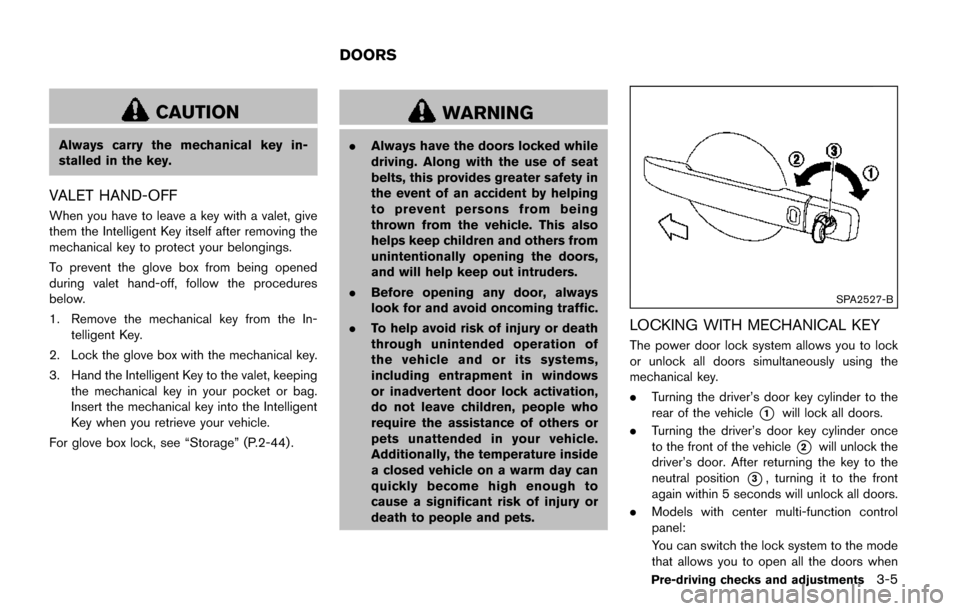
LOCKING WITH MECHANICAL KEY
The power door lock system allows you to lock
or unlock all doors simultaneously using the
mechanical key.
.Turning the driver’s door key cylinder to the
rear of the vehicle
*1will lock all doors.
. Turning the driver’s door key cylinder once
to the front of the vehicle
*2will unlock the
driver’s door. After returning the key to the
neutral position
*3, turning it to the front
again within 5 seconds will unlock all doors.
. Models with center multi-function control
panel:
You can switch the lock system to the mode
that allows you to open all the doors when
Pre-driving checks and adjustments3-5
DOORS
Page 162 of 520
— When you need to keep the sliding dooropen for a period of time.
— When washing the vehicle or performing any maintenance work.
SPA2071
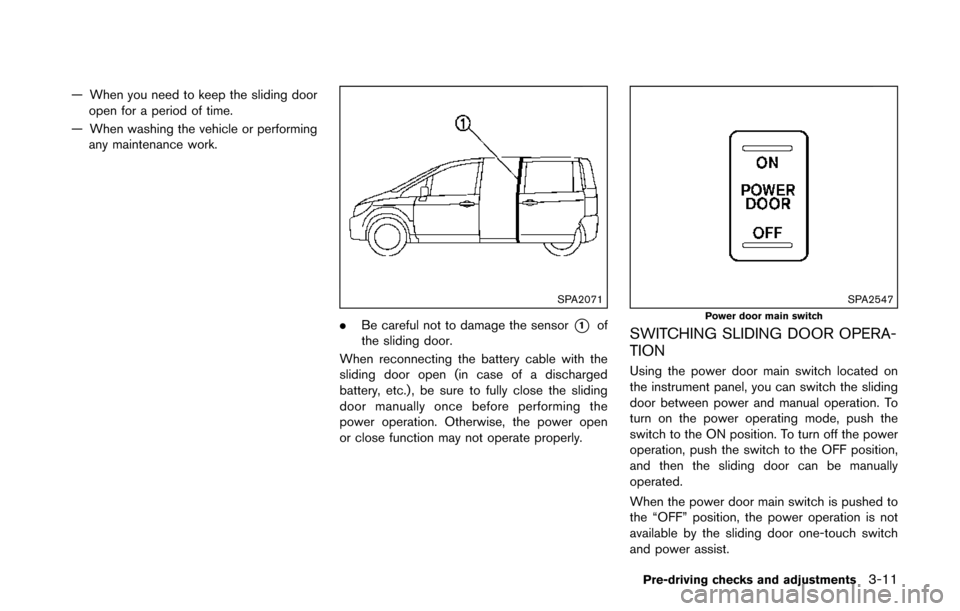
. Be careful not to damage the sensor*1of
the sliding door.
When reconnecting the battery cable with the
sliding door open (in case of a discharged
battery, etc.) , be sure to fully close the sliding
door manually once before performing the
power operation. Otherwise, the power open
or close function may not operate properly.
SPA2547
Power door main switch
SWITCHING SLIDING DOOR OPERA-
TION
Using the power door main switch located on
the instrument panel, you can switch the sliding
door between power and manual operation. To
turn on the power operating mode, push the
switch to the ON position. To turn off the power
operation, push the switch to the OFF position,
and then the sliding door can be manually
operated.
When the power door main switch is pushed to
the “OFF” position, the power operation is not
available by the sliding door one-touch switch
and power assist.
Pre-driving checks and adjustments3-11
Page 173 of 520
3-22Pre-driving checks and adjustments
SPA2850
Type C (if so equipped)
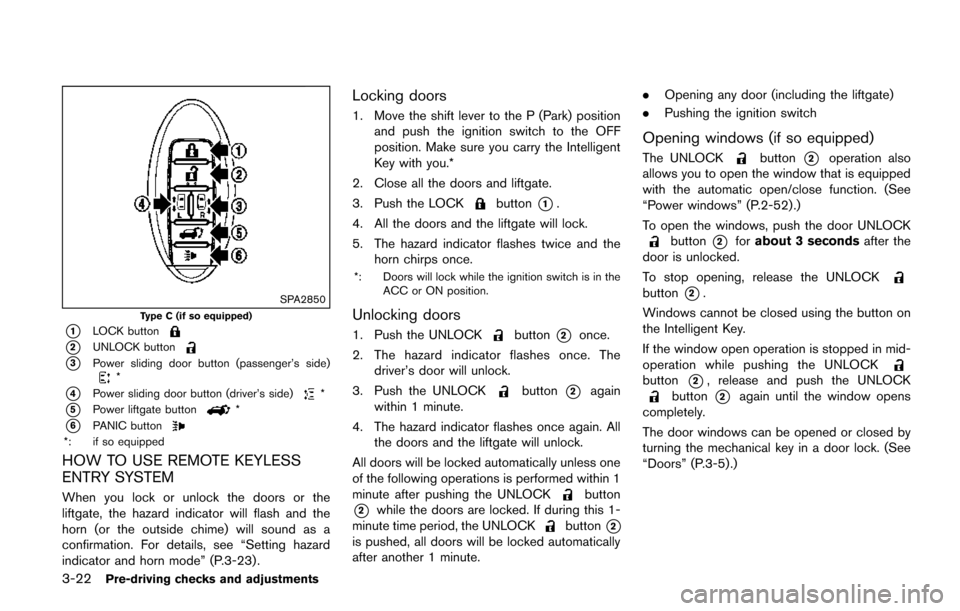
*1LOCK button
*2UNLOCK button
*3Power sliding door button (passenger’s side)*
*4Power sliding door button (driver’s side)*
*5Power liftgate button*
*6PANIC button*: if so equipped
HOW TO USE REMOTE KEYLESS
ENTRY SYSTEM
When you lock or unlock the doors or the
liftgate, the hazard indicator will flash and the
horn (or the outside chime) will sound as a
confirmation. For details, see “Setting hazard
indicator and horn mode” (P.3-23) .
Locking doors
1. Move the shift lever to the P (Park) positionand push the ignition switch to the OFF
position. Make sure you carry the Intelligent
Key with you.*
2. Close all the doors and liftgate.
3. Push the LOCK
button*1.
4. All the doors and the liftgate will lock.
5. The hazard indicator flashes twice and the horn chirps once.
*: Doors will lock while the ignition switch is in the
ACC or ON position.
Unlocking doors
1. Push the UNLOCKbutton*2once.
2. The hazard indicator flashes once. The driver’s door will unlock.
3. Push the UNLOCK
button*2again
within 1 minute.
4. The hazard indicator flashes once again. All the doors and the liftgate will unlock.
All doors will be locked automatically unless one
of the following operations is performed within 1
minute after pushing the UNLOCK
button
*2while the doors are locked. If during this 1-
minute time period, the UNLOCKbutton*2
is pushed, all doors will be locked automatically
after another 1 minute. .
Opening any door (including the liftgate)
. Pushing the ignition switch
Opening windows (if so equipped)
The UNLOCKbutton*2operation also
allows you to open the window that is equipped
with the automatic open/close function. (See
“Power windows” (P.2-52).)
To open the windows, push the door UNLOCK
button*2for about 3 seconds after the
door is unlocked.
To stop opening, release the UNLOCK
button*2.
Windows cannot be closed using the button on
the Intelligent Key.
If the window open operation is stopped in mid-
operation while pushing the UNLOCK
button*2, release and push the UNLOCKbutton*2again until the window opens
completely.
The door windows can be opened or closed by
turning the mechanical key in a door lock. (See
“Doors” (P.3-5).)
Page 174 of 520
Opening/closing power sliding door (if
so equipped)
To open/close the sliding door, push the power
sliding door button
*3or*4on the Intelligent
Key for about 1 second. The power sliding door
will automatically open/close.
If the power sliding door button
*3or*4is
pushed while the sliding door is being opened or
closed, the sliding door will reverse.
Opening/closing liftgate (if so equipped)
To open/close the liftgate, push the power
liftgatebutton*5on the Intelligent Key
for more than 1 second.
The liftgate will automatically open/close.
The hazard indicator flashes 4 times and the
outside chime sounds for approximately 3
seconds.
If the power liftgate
button*5is pushed
while the liftgate is being opened or closed, the
liftgate will reverse.
Using panic alarm
If you are near your vehicle and feel threatened,
you can activate the alarm according to the
following procedure to call attention.
1. Push the PANIC
button*6for more
than 1 second. 2. The theft warning alarm will sound and the
headlights will flash for 25 seconds.
3. The panic alarm stops under either of the following conditions.
.It has run for 25 seconds, or.Any of the buttons is pushed. (Note: thePANICbutton*6should be
pushed for more than 1 second.)
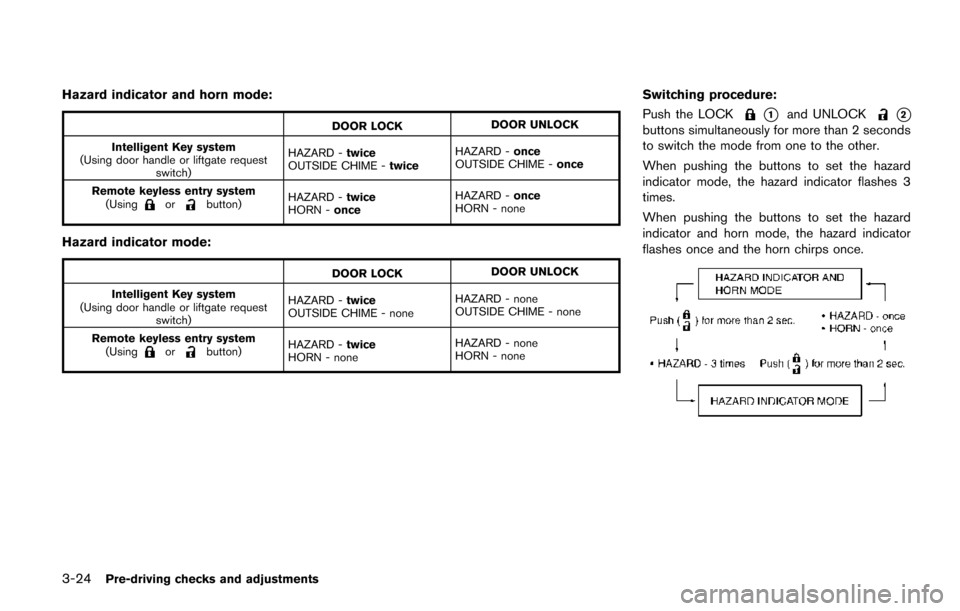
Setting hazard indicator and horn mode
This vehicle is set in hazard indicator and horn
mode when you first receive the vehicle.
In hazard indicator and horn mode, when the
LOCK
button*1is pushed, the hazard
indicator flashes twice and the horn chirps once.
When the UNLOCK
button*2is pushed,
the hazard indicator flashes once.
If horns are not necessary, the system can be
switched to the hazard indicator mode.
In hazard indicator mode, when the LOCK
button*1is pushed, the hazard indicator
flashes twice. When the UNLOCKbutton
*2is pushed, neither the hazard indicator nor
the horn operates.
Pre-driving checks and adjustments3-23
Page 175 of 520
3-24Pre-driving checks and adjustments
Hazard indicator and horn mode:
DOOR LOCKDOOR UNLOCK
Intelligent Key system
(Using door handle or liftgate request switch) HAZARD -
twice
OUTSIDE CHIME - twiceHAZARD -
once
OUTSIDE CHIME - once
Remote keyless entry system (Using
orbutton) HAZARD -
twice
HORN - once HAZARD -
once
HORN - none
Hazard indicator mode:
DOOR LOCK DOOR UNLOCK
Intelligent Key system
(Using door handle or liftgate request switch) HAZARD -
twice
OUTSIDE CHIME - none HAZARD - none
OUTSIDE CHIME - none
Remote keyless entry system (Using
orbutton) HAZARD -
twice
HORN - none HAZARD - none
HORN - none
Switching procedure:
Push the LOCK
*1and UNLOCK*2
buttons simultaneously for more than 2 seconds
to switch the mode from one to the other.
When pushing the buttons to set the hazard
indicator mode, the hazard indicator flashes 3
times.
When pushing the buttons to set the hazard
indicator and horn mode, the hazard indicator
flashes once and the horn chirps once.
Page 179 of 520
3-28Pre-driving checks and adjustments
Power open
When the liftgate is fully closed, the liftgate will
fully open automatically by:
.pushing the power liftgate switch
*Aon the
instrument panel for more than 1 second
. pushing the liftgate opener switch
*B
.pushing the power liftgate button*Con the
Intelligent Key for more than 1 second
The hazard flashes 4 times and the outside
chime sounds when the liftgate starts opening.
NOTE:
The liftgate can be opened by the power
liftgate switch
*Aor the liftgate button
*Ceven if the liftgate is locked or
the power door main switch is in the OFF
position. The liftgate will unlock and open.
Power close
When the liftgate is fully opened, the liftgate will
fully close automatically by:
. pushing the power liftgate switch
*Aon the
instrument panel for more than 1 second
. pushing the power liftgate switch
*Don the
lower part of the liftgate
. pushing the liftgate button
*Con the
Intelligent Key for more than 1 second
The hazard flashes 4 times and the outside
chime sounds when the liftgate starts closing.
Reverse function
The power liftgate will reverse immediately if one
of the following actions is performed during
power open or power close.
. pushing the power liftgate switch
*Aon the
instrument panel
. pushing the liftgate switch
*Don the lower
part of the liftgate
. pushing the liftgate button
*Con the
Intelligent Key.
The outside chime sounds when the liftgate
starts to reverse.
Auto reverse function
The auto-reverse function enables the liftgate to
automatically reverse when something is caught
in the liftgate as it is opening or closing. When
the control unit detects an obstacle, the liftgate
will reverse and return to the full open or full
close position.
If a second obstacle is detected, the liftgate
motion will stop and the drive motor will
disengage. The liftgate will enter the manual
mode.
A pinch sensor is mounted on each side of the
liftgate. If an object is detected by the pinch
sensor during power close, the liftgate will
reverse and return to the full open position
immediately. NOTE:
If the pinch sensor is damaged or removed,
the power close function will not operate.
WARNING
There is a small distance immediately
before the closed position that cannot
be detected. Make sure that all passen-
gers keep their hands, etc., clear from
the liftgate opening before closing the
liftgate.
Manual mode
If power operation is not available, the liftgate
can be operated manually. Power operation may
not be available if multiple obstacles have been
detected in a single power cycle or if the battery
voltage is low. When the power door main
switch is in the OFF position, the liftgate can be
opened manually by pushing the liftgate opener
switch. If the power liftgate opener switch is
pushed during power open or close, the power
operation will be canceled and the liftgate can
be operated manually.
Page 180 of 520
SPA2853
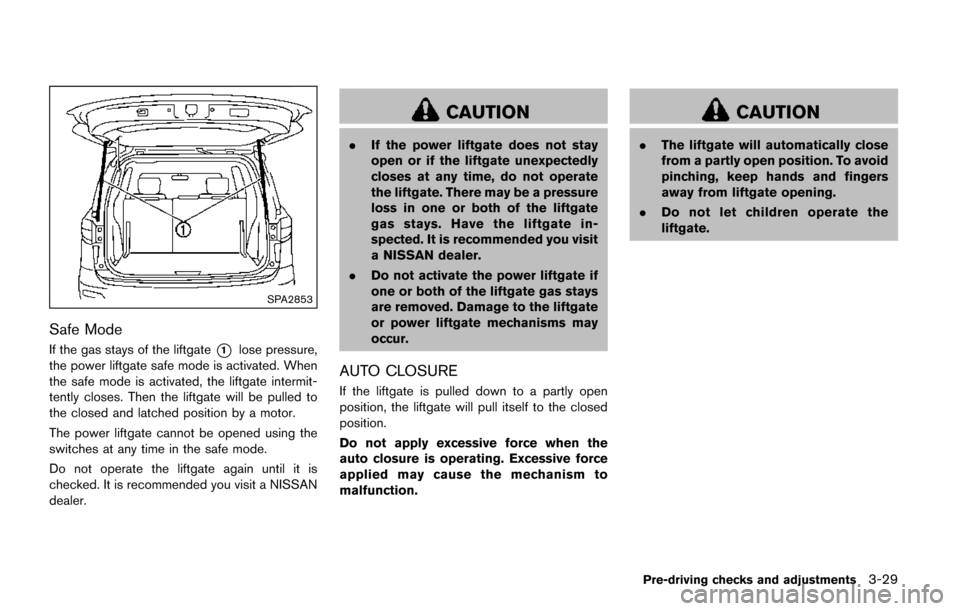
Safe Mode
If the gas stays of the liftgate*1lose pressure,
the power liftgate safe mode is activated. When
the safe mode is activated, the liftgate intermit-
tently closes. Then the liftgate will be pulled to
the closed and latched position by a motor.
The power liftgate cannot be opened using the
switches at any time in the safe mode.
Do not operate the liftgate again until it is
checked. It is recommended you visit a NISSAN
dealer.
CAUTION
. If the power liftgate does not stay
open or if the liftgate unexpectedly
closes at any time, do not operate
the liftgate. There may be a pressure
loss in one or both of the liftgate
gas stays. Have the liftgate in-
spected. It is recommended you visit
a NISSAN dealer.
. Do not activate the power liftgate if
one or both of the liftgate gas stays
are removed. Damage to the liftgate
or power liftgate mechanisms may
occur.
AUTO CLOSURE
If the liftgate is pulled down to a partly open
position, the liftgate will pull itself to the closed
position.
Do not apply excessive force when the
auto closure is operating. Excessive force
applied may cause the mechanism to
malfunction.
CAUTION
.The liftgate will automatically close
from a partly open position. To avoid
pinching, keep hands and fingers
away from liftgate opening.
. Do not let children operate the
liftgate.
Pre-driving checks and adjustments3-29
Page 188 of 520
settings. (See “Vehicle information and settings
(models with center multi-function control pa-
nel)” (P.4-10) .)
Initialize entry/exit function
If the battery cable is disconnected, or if the fuse
opens, the entry/exit function will not work
though this function was set on before. In such
a case, after connecting the battery or replacing
with a new fuse, open and close the driver’s
door more than two times after the ignition
switch is placed in the LOCK position from the
ON position. The entry/exit function will be
activated.
JVP0248X
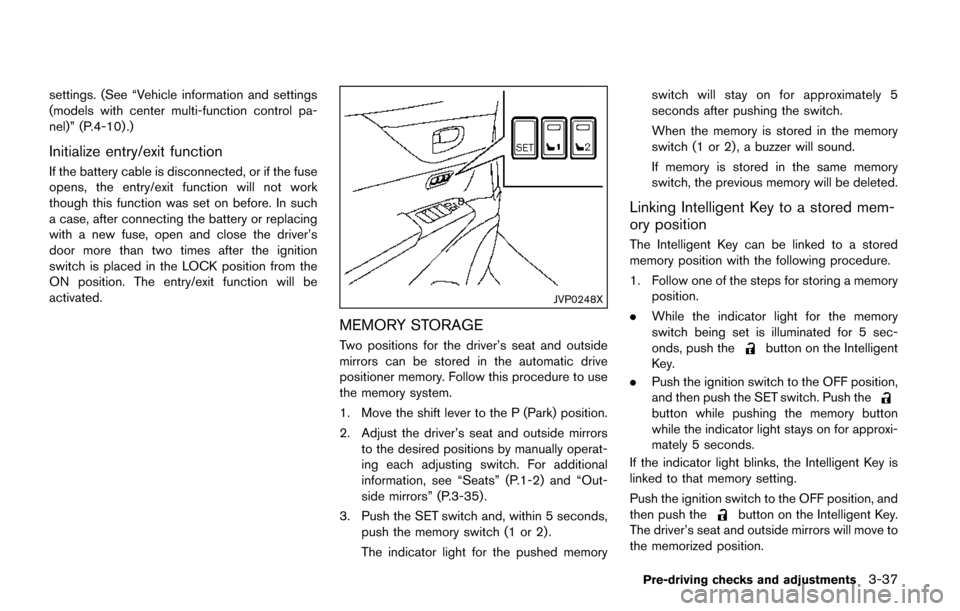
MEMORY STORAGE
Two positions for the driver’s seat and outside
mirrors can be stored in the automatic drive
positioner memory. Follow this procedure to use
the memory system.
1. Move the shift lever to the P (Park) position.
2. Adjust the driver’s seat and outside mirrorsto the desired positions by manually operat-
ing each adjusting switch. For additional
information, see “Seats” (P.1-2) and “Out-
side mirrors” (P.3-35) .
3. Push the SET switch and, within 5 seconds, push the memory switch (1 or 2) .
The indicator light for the pushed memory switch will stay on for approximately 5
seconds after pushing the switch.
When the memory is stored in the memory
switch (1 or 2) , a buzzer will sound.
If memory is stored in the same memory
switch, the previous memory will be deleted.
Linking Intelligent Key to a stored mem-
ory position
The Intelligent Key can be linked to a stored
memory position with the following procedure.
1. Follow one of the steps for storing a memory
position.
. While the indicator light for the memory
switch being set is illuminated for 5 sec-
onds, push the
button on the Intelligent
Key.
. Push the ignition switch to the OFF position,
and then push the SET switch. Push the
button while pushing the memory button
while the indicator light stays on for approxi-
mately 5 seconds.
If the indicator light blinks, the Intelligent Key is
linked to that memory setting.
Push the ignition switch to the OFF position, and
then push the
button on the Intelligent Key.
The driver’s seat and outside mirrors will move to
the memorized position.
Pre-driving checks and adjustments3-37