2017 NISSAN JUKE fuel
[x] Cancel search: fuelPage 102 of 416
blinking and remain on.
Have the vehicle inspected. It is recom-
mended you visit a NISSAN dealer for this
service. You do not need to have your
vehicle towed to the dealer.
CAUTION
Continued vehicle operation without
having the emission control system
and/or CVT system checked and re-
paired as necessary could lead to poor
driveability, reduced fuel economy, and
possible damage to the emission con-
trol system.
Security indicator light
The light blinks when the ignition switch is in the
ACC, OFF or LOCK position. This function
indicates the security system equipped on the
vehicle is operational.
If the security system is malfunctioning, this light
will remain on while the ignition switch is in the
ON position. For additional information, see
“Security systems” (P.2-33) .
Turn signal/hazard indicator lights
The light flashes when the turn signal switch
lever or hazard switch is turned on.
Vehicle Dynamic Control (VDC) off
indicator light
When the ignition switch is in the “ON” position,
the Vehicle Dynamic Control (VDC) off indicator
light illuminates and then turns off.
The light comes on when the Vehicle Dynamic
Control (VDC) off switch is pushed to OFF. This
indicates that the VDC system and traction
control system are not operating.
AUDIBLE REMINDERS
Key reminder chime
A chime will sound if the driver side door is
opened while the ignition switch is pushed to
the ACC position.
Make sure the ignition switch is pushed to the
OFF position, and take the Intelligent Key with
you when leaving the vehicle.
Light reminder chime
The light reminder chime will sound when the
driver side door is opened with the headlight
switch in the
orposition, and the
ignition switch is in the ACC, OFF or LOCK
position.
Turn the light switch off when you leave the
vehicle.
Brake pad wear warning
The disc brake pads have audible wear warn-
ings. When a brake pad requires replacement, it
will make a high pitched scraping sound when
the vehicle is in motion. This scraping sound will
first occur only when the brake pedal is
depressed. After more wear of the brake pad,
the sound will always be heard even if the brake
pedal is not depressed. Have the brakes
checked as soon as possible if the warning
sound is heard.
Parking brake reminder chime
The parking brake reminder chime will sound if
the vehicle is driven at more than 4 MPH (7
km/h) with the parking brake applied. Stop the
vehicle and release the parking brake.
Instruments and controls2-23
Page 111 of 416

2-32Instruments and controls
JVI1165X
Daily Reset
Records of up to the past 4 days of fuel
consumption can be shown on the display.
Weekly Reset
Records of up to the past 4 weeks of each
week’s fuel consumption can be shown on the
display.NOTE:
When the clock is not set, the ECO
information (daily and weekly) cannot be
used.
Reset at Start
Records of up to the past 4 times of each time of
ignition switch ON fuel consumption can be
shown on the display.
Manual Reset
Records of up to the past 4 times of resetting
fuel consumption can be shown on the display.
The displayed ECO INFO can be reset by
pushing the ENTER button for longer than 1
second.
Page 136 of 416

3 Pre-driving checks and adjustments
Keys ........................................................................\
...................... 3-2Intelligent Keys ..................................................................... 3-2
Doors ........................................................................\
.................... 3-4
Locking with key .................................................................. 3-4
Locking with inside lock knob .......................................... 3-4
Locking with power door lock switch ............................ 3-5
Automatic door locks ......................................................... 3-5
Child safety rear door lock ............................................... 3-6
Intelligent Key system .............................................................. 3-6 Intelligent Key operating range ........................................ 3-8
Door locks/unlocks precaution ........................................ 3-8
Intelligent Key operation .................................................... 3-9
Battery saver system ....................................................... 3-10
Warning lights and audible reminders ........................ 3-10
Troubleshooting guide ..................................................... 3-11
How to use remote keyless entry function ................ 3-12 Hood ........................................................................\
................. 3-15
Liftgate ........................................................................\
............. 3-16
Front side and rear unique parts (NISMO models) ..... 3-17
Fuel-filler door ........................................................................\
3-18
Opening the fuel-filler door ......................................... 3-18
Fuel-filler cap .................................................................. 3-18
Tilt steering column .............................................................. 3-20 Tilt operation ................................................................... 3-20
Sun visors ........................................................................\
........ 3-21
Mirrors ........................................................................\
............. 3-21
Inside mirror ..................................................................... 3-21
Outside mirrors ............................................................... 3-22
Vanity mirror ..................................................................... 3-23
Page 153 of 416
3-18Pre-driving checks and adjustments
SPA2336
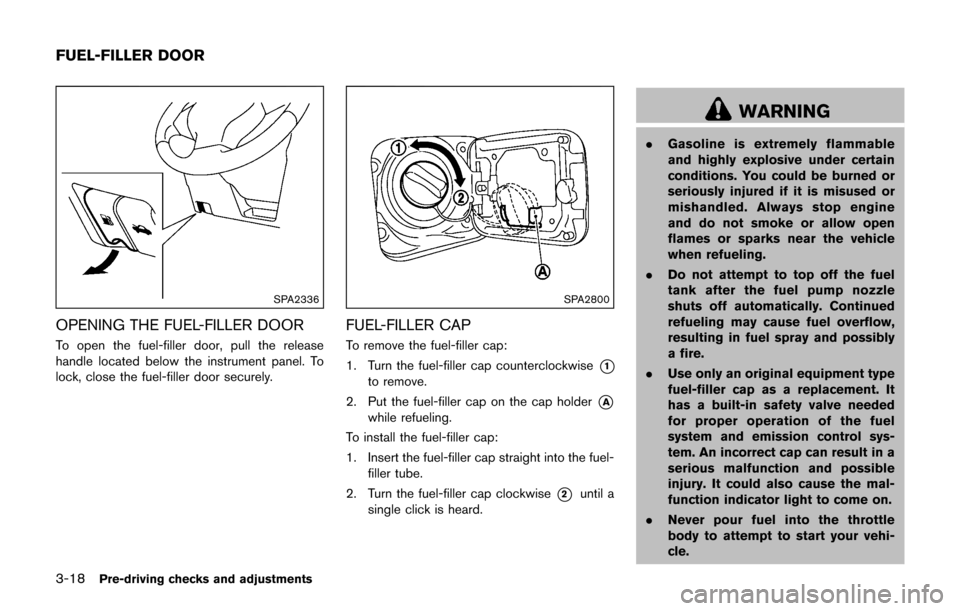
OPENING THE FUEL-FILLER DOOR
To open the fuel-filler door, pull the release
handle located below the instrument panel. To
lock, close the fuel-filler door securely.
SPA2800
FUEL-FILLER CAP
To remove the fuel-filler cap:
1. Turn the fuel-filler cap counterclockwise
*1
to remove.
2. Put the fuel-filler cap on the cap holder
*A
while refueling.
To install the fuel-filler cap:
1. Insert the fuel-filler cap straight into the fuel- filler tube.
2. Turn the fuel-filler cap clockwise
*2until a
single click is heard.
WARNING
. Gasoline is extremely flammable
and highly explosive under certain
conditions. You could be burned or
seriously injured if it is misused or
mishandled. Always stop engine
and do not smoke or allow open
flames or sparks near the vehicle
when refueling.
. Do not attempt to top off the fuel
tank after the fuel pump nozzle
shuts off automatically. Continued
refueling may cause fuel overflow,
resulting in fuel spray and possibly
a fire.
. Use only an original equipment type
fuel-filler cap as a replacement. It
has a built-in safety valve needed
for proper operation of the fuel
system and emission control sys-
tem. An incorrect cap can result in a
serious malfunction and possible
injury. It could also cause the mal-
function indicator light to come on.
. Never pour fuel into the throttle
body to attempt to start your vehi-
cle.
FUEL-FILLER DOOR
Page 154 of 416
.Do not fill a portable fuel container
in the vehicle or trailer. Static elec-
tricity can cause an explosion of
flammable liquid, vapor or gas in
any vehicle or trailer. To reduce the
risk of serious injury or death when
filling portable fuel containers:
— Always place the container on
the ground when filling.
— Do not use electronic devices when filling.
— Keep the pump nozzle in contact with the container while you are
filling it.
— Use only approved portable fuel containers for flammable liquid.
CAUTION
. If fuel is spilled on the vehicle body,
flush it away with water to avoid
paint damage.
. Insert the cap straight into the fuel-
filler tube, then tighten until the
fuel-filler cap clicks. Failure to tight-
en the fuel-filler cap properly may cause the
malfunction indicator
light (MIL) to illuminate. If the
light illuminates because the fuel-
filler cap is loose or missing, tighten
or install the cap and continue to
drive the vehicle. The
light
should turn off after a few driving
trips. If the
light does not turn
off after a few driving trips, have the
vehicle inspected. It is recom-
mended you visit a NISSAN dealer
for this service.
For additional information, see
“Malfunction Indicator Light (MIL)”
(P.2-22) .
. The LOOSE FUEL CAP warning
message will be displayed if the
fuel-filler cap is not properly tigh-
tened. It may take a few driving trips
for the message to be displayed.
Failure to tighten the fuel-filler cap
properly after the LOOSE FUEL CAP
warning message is displayed may
cause the
Malfunction Indicator
Light (MIL) to illuminate.
SPA2809
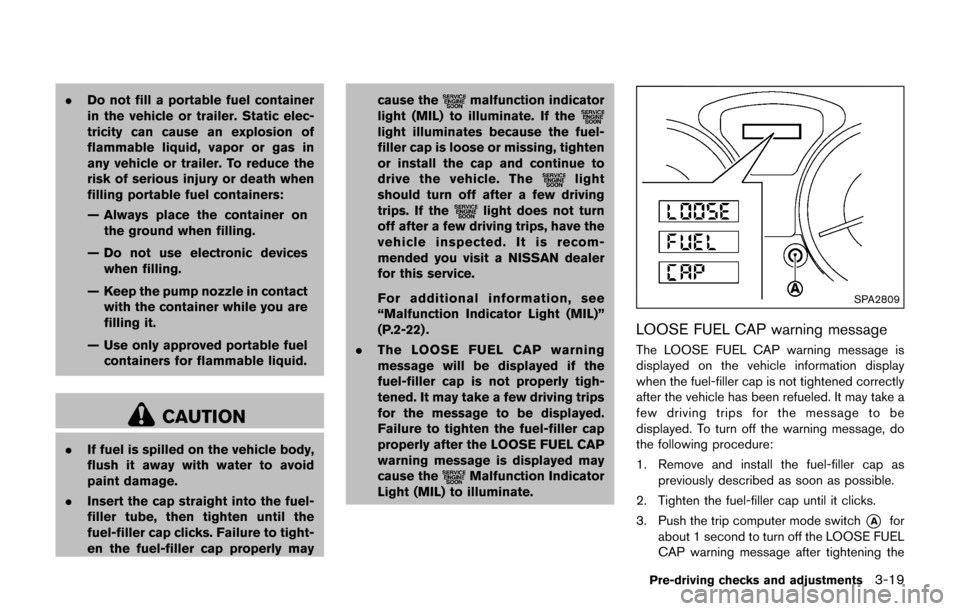
LOOSE FUEL CAP warning message
The LOOSE FUEL CAP warning message is
displayed on the vehicle information display
when the fuel-filler cap is not tightened correctly
after the vehicle has been refueled. It may take a
few driving trips for the message to be
displayed. To turn off the warning message, do
the following procedure:
1. Remove and install the fuel-filler cap as
previously described as soon as possible.
2. Tighten the fuel-filler cap until it clicks.
3. Push the trip computer mode switch
*Afor
about 1 second to turn off the LOOSE FUEL
CAP warning message after tightening the
Pre-driving checks and adjustments3-19
Page 155 of 416
3-20Pre-driving checks and adjustments
fuel cap.
WARNING
Do not adjust the steering wheel while
driving. You could lose control of your
vehicle and cause an accident.
SPA2808
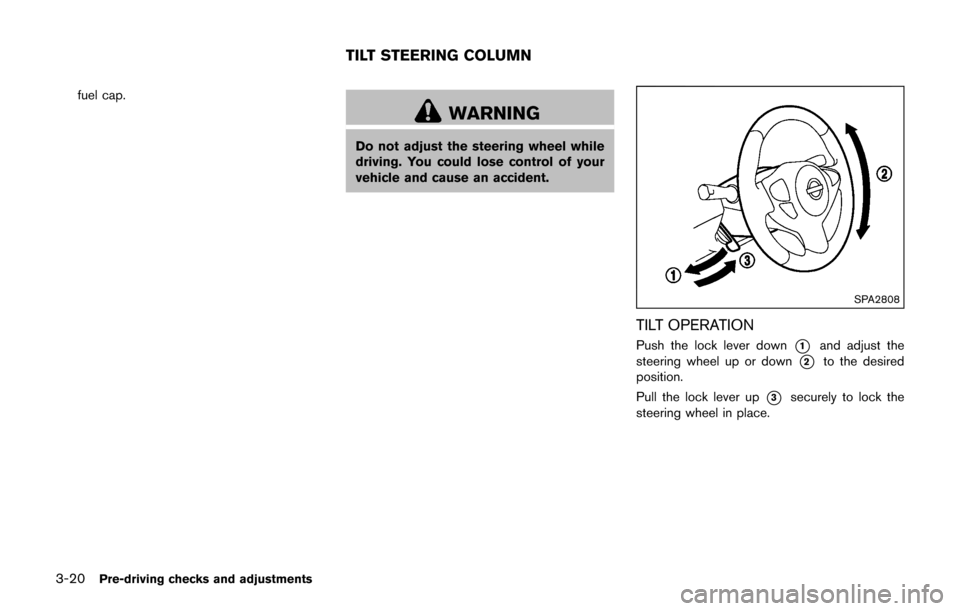
TILT OPERATION
Push the lock lever down*1and adjust the
steering wheel up or down
*2to the desired
position.
Pull the lock lever up
*3securely to lock the
steering wheel in place.
TILT STEERING COLUMN
Page 170 of 416
SAA3475
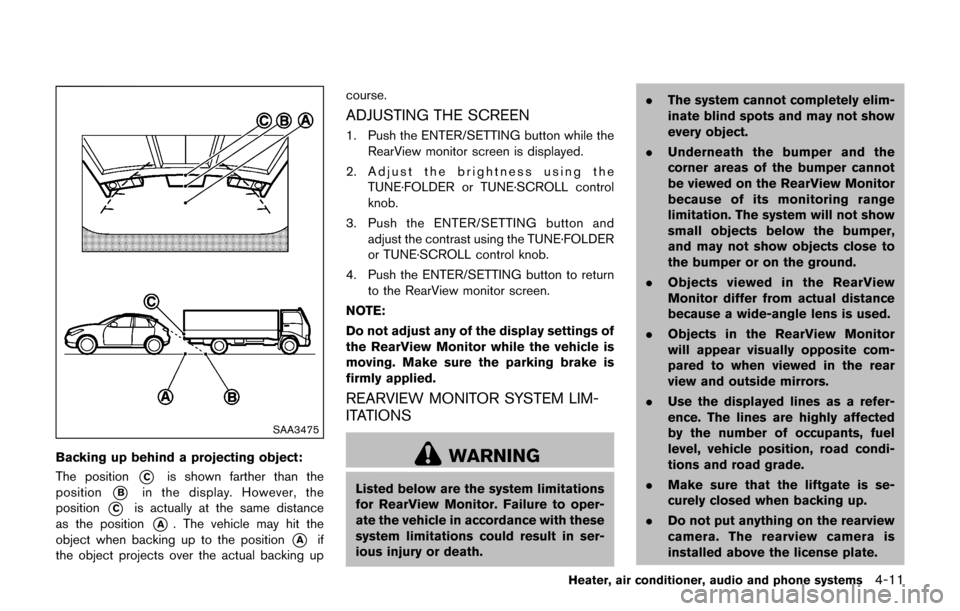
Backing up behind a projecting object:
The position
*Cis shown farther than the
position
*Bin the display. However, the
position
*Cis actually at the same distance
as the position
*A. The vehicle may hit the
object when backing up to the position
*Aif
the object projects over the actual backing up course.
ADJUSTING THE SCREEN
1. Push the ENTER/SETTING button while the
RearView monitor screen is displayed.
2. Adjust the brightness using the TUNE·FOLDER or TUNE·SCROLL control
knob.
3. Push the ENTER/SETTING button and adjust the contrast using the TUNE·FOLDER
or TUNE·SCROLL control knob.
4. Push the ENTER/SETTING button to return to the RearView monitor screen.
NOTE:
Do not adjust any of the display settings of
the RearView Monitor while the vehicle is
moving. Make sure the parking brake is
firmly applied.
REARVIEW MONITOR SYSTEM LIM-
ITATIONS
WARNING
Listed below are the system limitations
for RearView Monitor. Failure to oper-
ate the vehicle in accordance with these
system limitations could result in ser-
ious injury or death. .
The system cannot completely elim-
inate blind spots and may not show
every object.
. Underneath the bumper and the
corner areas of the bumper cannot
be viewed on the RearView Monitor
because of its monitoring range
limitation. The system will not show
small objects below the bumper,
and may not show objects close to
the bumper or on the ground.
. Objects viewed in the RearView
Monitor differ from actual distance
because a wide-angle lens is used.
. Objects in the RearView Monitor
will appear visually opposite com-
pared to when viewed in the rear
view and outside mirrors.
. Use the displayed lines as a refer-
ence. The lines are highly affected
by the number of occupants, fuel
level, vehicle position, road condi-
tions and road grade.
. Make sure that the liftgate is se-
curely closed when backing up.
. Do not put anything on the rearview
camera. The rearview camera is
installed above the license plate.
Heater, air conditioner, audio and phone systems4-11
Page 174 of 416
Available views
WARNING
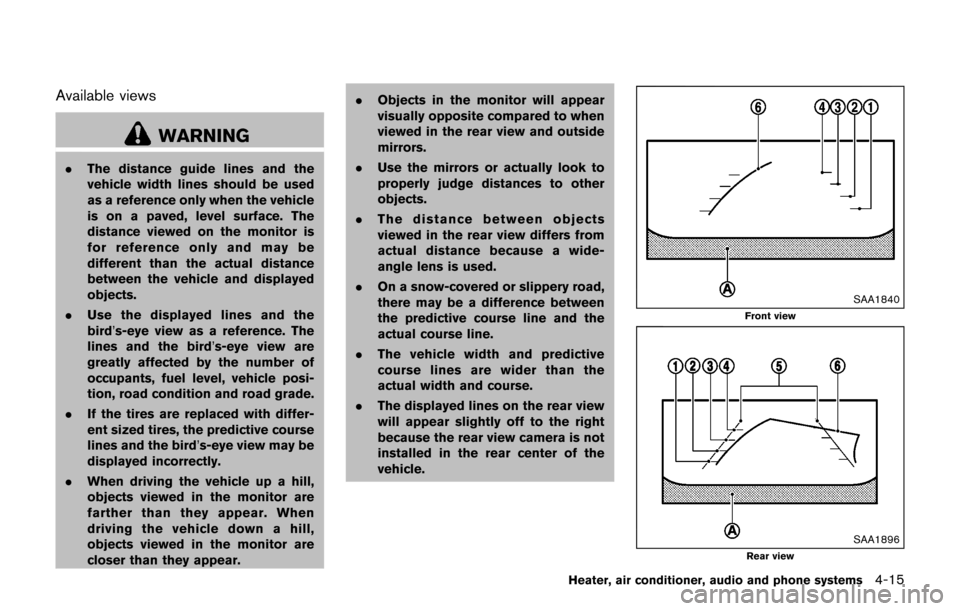
.The distance guide lines and the
vehicle width lines should be used
as a reference only when the vehicle
is on a paved, level surface. The
distance viewed on the monitor is
for reference only and may be
different than the actual distance
between the vehicle and displayed
objects.
. Use the displayed lines and the
bird’s-eye view as a reference. The
lines and the bird’s-eye view are
greatly affected by the number of
occupants, fuel level, vehicle posi-
tion, road condition and road grade.
. If the tires are replaced with differ-
ent sized tires, the predictive course
lines and the bird’s-eye view may be
displayed incorrectly.
. When driving the vehicle up a hill,
objects viewed in the monitor are
farther than they appear. When
driving the vehicle down a hill,
objects viewed in the monitor are
closer than they appear. .
Objects in the monitor will appear
visually opposite compared to when
viewed in the rear view and outside
mirrors.
. Use the mirrors or actually look to
properly judge distances to other
objects.
. The distance between objects
viewed in the rear view differs from
actual distance because a wide-
angle lens is used.
. On a snow-covered or slippery road,
there may be a difference between
the predictive course line and the
actual course line.
. The vehicle width and predictive
course lines are wider than the
actual width and course.
. The displayed lines on the rear view
will appear slightly off to the right
because the rear view camera is not
installed in the rear center of the
vehicle.
SAA1840
Front view
SAA1896Rear view
Heater, air conditioner, audio and phone systems4-15