2017 NISSAN ARMADA Meter
[x] Cancel search: MeterPage 464 of 614
WARNING
.Do not attempt to raise two wheels
off the ground and shift the trans-
mission to any drive or reverse
position with the engine running.
Doing so may result in drivetrain
damage or unexpected vehicle
movement which could result in
serious vehicle damage or personal
injury.
. Do not attempt to test a 4WD
equipped vehicle on a 2-wheel dy-
namometer or similar equipment
even if the other two wheels are
raised off the ground. Make sure
you inform test facility personnel
that your vehicle is equipped with
4WD before it is placed on a dy-
namometer. Using the wrong test
equipment may result in drivetrain
damage or unexpected vehicle
movement which could result in
serious vehicle damage or personal
injury.
CAUTION
.Do not drive the vehicle in the 4HI or
4LO position on dry hard surface
roads. Driving on dry, hard surfaces
in 4HI or 4LO may cause unneces-
sary noise, tire wear and increased
fuel consumption.
If the Four-Wheel Drive (4WD) warn-
ing light turns on when driving on
dry hard surface roads:
— in the 4HI position, shift the
4WD shift switch to AUTO.
— in the 4LO position, stop the vehicle and shift the transmis-
sion lever to the N (Neutral)
position with the brake pedal
depressed and shift the 4WD
shift switch to AUTO.
If the 4WD warning light is still
on after the above operation,
have your vehicle checked as
soon as possible. It is recom-
mended you visit a NISSAN
dealer for this service.
. The transfer case may be damaged
if you continue driving with the 4WD warning light blinking.
See “On-pavement and off-road driving precau-
tions” (P.5-9) for other precautions for offroad
driving.
NISSAN ALL-MODE 4WDŠSYSTEM
The all mode 4WD system provides 3 positions
(AUTO, 4HI and 4LO) , so you can select the
desired drive mode according to the driving
conditions.
Starting and driving5-123
NISSAN ALL-MODE 4WDŠ(if so
equipped)
Page 469 of 614
5-128Starting and driving
.Never shift the 4WD shift switch
between 4L and 4H while driving.
. Engine idling speed is high while
warming up the engine. Be espe-
cially careful when starting or driv-
ing on slippery surfaces with the
4WD shift switch in AUTO.
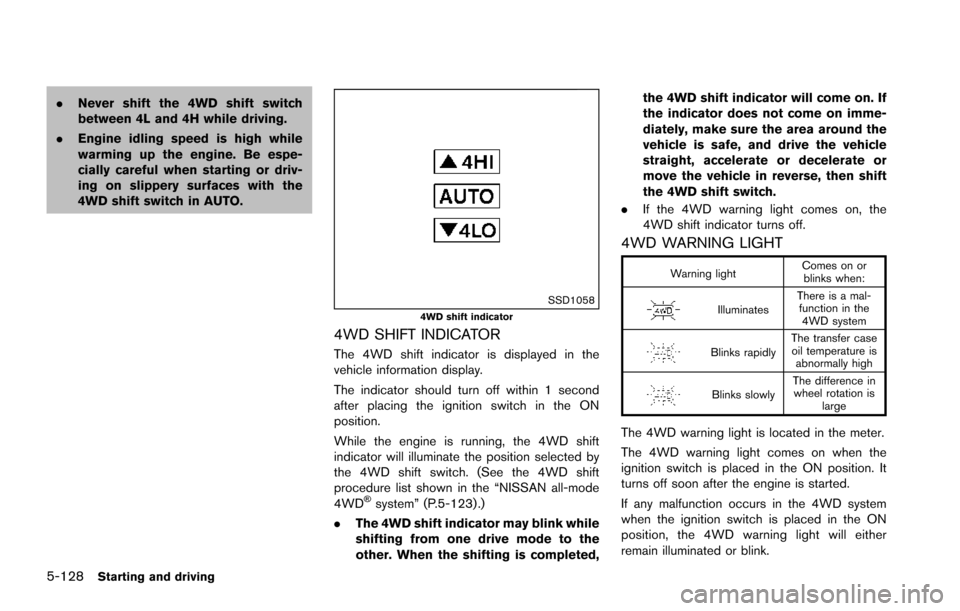
SSD10584WD shift indicator
4WD SHIFT INDICATOR
The 4WD shift indicator is displayed in the
vehicle information display.
The indicator should turn off within 1 second
after placing the ignition switch in the ON
position.
While the engine is running, the 4WD shift
indicator will illuminate the position selected by
the 4WD shift switch. (See the 4WD shift
procedure list shown in the “NISSAN all-mode
4WD
Šsystem” (P.5-123) .)
. The 4WD shift indicator may blink while
shifting from one drive mode to the
other. When the shifting is completed, the 4WD shift indicator will come on. If
the indicator does not come on imme-
diately, make sure the area around the
vehicle is safe, and drive the vehicle
straight, accelerate or decelerate or
move the vehicle in reverse, then shift
the 4WD shift switch.
. If the 4WD warning light comes on, the
4WD shift indicator turns off.
4WD WARNING LIGHT
Warning light Comes on or
blinks when:
Illuminates There is a mal-
function in the 4WD system
Blinks rapidly The transfer case
oil temperature is abnormally high
Blinks slowly The difference in
wheel rotation is large
The 4WD warning light is located in the meter.
The 4WD warning light comes on when the
ignition switch is placed in the ON position. It
turns off soon after the engine is started.
If any malfunction occurs in the 4WD system
when the ignition switch is placed in the ON
position, the 4WD warning light will either
remain illuminated or blink.
Page 470 of 614
If the 4WD warning light comes on, the 4WD
shift indicator turns off.
High-temperature transfer case oil makes the
4WD warning light blink rapidly (about twice per
second) . If the warning light blinks rapidly during
operation, stop the vehicle in a safe place
immediately. Then if the light turns off after a
while, you can continue driving.
A large difference between the diameters of
front and rear wheels will make the 4WD
warning light blink slowly (about once per two
seconds) . Change the 4WD shift switch to
AUTO and do not drive fast.
CAUTION
.If the 4WD warning light comes on
or blinks slowly during operation or
rapidly after stopping the vehicle for
a while, have your vehicle checked
as soon as possible. It is recom-
mended you visit a NISSAN dealer
for this service.
. Shifting between 4HI and 4LO is not
recommended when the 4WD warn-
ing light turns on.
. When the 4WD warning light comes
on, the 2WD mode may be engaged even if the 4WD shift switch is in
AUTO or 4H. Be especially careful
when driving. If corresponding parts
are malfunctioning, the 4WD mode
will not be engaged even if the 4WD
shift switch is shifted.
. Do not drive the vehicle in the 4HI or
4LO position on dry hard surface
roads. Driving on dry, hard surfaces
in 4HI or 4LO may cause unneces-
sary noise, tire wear and increased
fuel consumption.
If the 4WD warning light turns on
when driving on dry hard surface
roads:
— in the AUTO or 4HI position, shift
the 4WD shift switch to AUTO.
— in the 4LO position, stop the vehicle and shift the transmis-
sion shift lever to the N (Neutral)
position and shift the 4WD shift
switch to AUTO.
. If the 4WD warning light is still on
after the above operation, have your
vehicle checked as soon as possi-
ble. It is recommended you visit a
NISSAN dealer for this service. .
The transfer case may be damaged
if you continue driving with the
warning light blinking.
Starting and driving5-129
Page 471 of 614
5-130Starting and driving
WARNING
.Never rely solely on the hill start
assist system to prevent the vehicle
from moving backward on a hill.
Always drive carefully and atten-
tively. Depress the brake pedal
when the vehicle is stopped on a
steep hill. Be especially careful
when stopped on a hill on frozen
or muddy roads. Failure to prevent
the vehicle from rolling backwards
may result in a loss of control of the
vehicle and possible serious injury
or death.
. The hill start assist system is not
designed to hold the vehicle at a
standstill on a hill. Depress the
brake pedal when the vehicle is
stopped on a steep hill. Failure to
do so may cause the vehicle to roll
backwards and may result in a
collision or serious personal injury.
. The hill start assist system may not
prevent the vehicle from rolling
backwards on a hill under all load
or road conditions. Always be pre-
pared to depress the brake pedal to prevent the vehicle from rolling
backwards. Failure to do so may
result in a collision or serious per-
sonal injury.
The hill start assist system automatically keeps
the brakes applied to help prevent the vehicle
from rolling backwards in the time it takes the
driver to release the brake pedal and apply the
accelerator when the vehicle is stopped on a hill.
The hill start assist system will operate auto-
matically under the following conditions:
. The transmission is shifted to a forward or
reverse gear.
. The vehicle is stopped completely on a hill
by applying the brake.
The maximum holding time is 2 seconds. After 2
seconds the vehicle will begin to roll back and
the hill start assist system will stop operating
completely.
The hill start assist system will not operate when
the transmission is shifted to the N (Neutral) or P
(Park) position or on a flat and level road.
When the Vehicle Dynamic Control (VDC)
warning light illuminates in the meter, the hill
start assist system will not operate. (See
“Warning lights, indicator lights and audible
reminders” (P.2-10).)
HILL START ASSIST SYSTEM
Page 473 of 614
5-132Starting and driving
so the vehicle will move away from the
center of the road if it moves.
4. Push the ignition switch to the OFF position.
SIC4474
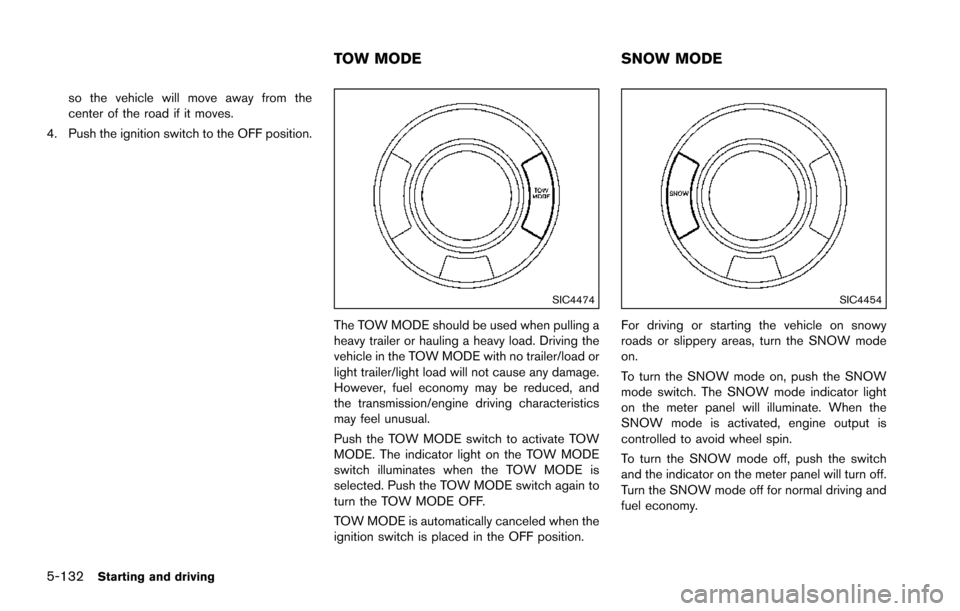
The TOW MODE should be used when pulling a
heavy trailer or hauling a heavy load. Driving the
vehicle in the TOW MODE with no trailer/load or
light trailer/light load will not cause any damage.
However, fuel economy may be reduced, and
the transmission/engine driving characteristics
may feel unusual.
Push the TOW MODE switch to activate TOW
MODE. The indicator light on the TOW MODE
switch illuminates when the TOW MODE is
selected. Push the TOW MODE switch again to
turn the TOW MODE OFF.
TOW MODE is automatically canceled when the
ignition switch is placed in the OFF position.
SIC4454
For driving or starting the vehicle on snowy
roads or slippery areas, turn the SNOW mode
on.
To turn the SNOW mode on, push the SNOW
mode switch. The SNOW mode indicator light
on the meter panel will illuminate. When the
SNOW mode is activated, engine output is
controlled to avoid wheel spin.
To turn the SNOW mode off, push the switch
and the indicator on the meter panel will turn off.
Turn the SNOW mode off for normal driving and
fuel economy.
TOW MODE SNOW MODE
Page 511 of 614
7-4Appearance and care
washing with water, wipe clean with a dry, soft
cloth and dry completely. When there is
chemical or tire wax, or dirt such as an antifreeze
agent on the surface, wash them with water as
soon as possible.
CAUTION
.The surfaces of the wheels use a
different coating process than typi-
cal aluminum alloy wheels. Do not
use aluminum alloy wheel cleaners
or abrasive cleaners to clean the
wheels. Using such cleaners could
damage the wheel surfaces.
. Do not use an automatic car wash if
the vehicle is equipped with bright
wheels. The wheel coating may be
damaged.
. Do not use a brush to wash the
wheels if the vehicle is equipped
with bright wheels. The wheel coat-
ing may be damaged.
CHROME PARTS
Clean chrome parts regularly with a non-
abrasive chrome polish to maintain the finish.
TIRE DRESSING
NISSAN does not recommend the use of tire
dressings. Tire manufacturers apply a coating to
the tires to help reduce discoloration of the
rubber. If a tire dressing is applied to the tires, it
may react with the coating and form a com-
pound. This compound may come off the tire
while driving and stain the vehicle paint.
If you choose to use a tire dressing, take the
following precautions:
.Use a water-based tire dressing. The coat-
ing on the tire dissolves more easily with an
oil-based tire dressing.
. Apply a light coat of tire dressing to help
prevent it from entering the tire tread/
grooves (where it would be difficult to
remove) .
. Wipe off excess tire dressing using a dry
towel. Make sure the tire dressing is
completely removed from the tire tread/
grooves.
. Allow the tire dressing to dry as recom-
mended by tire dressing manufacturer. Occasionally remove loose dust from the interior
trim, plastic parts and seats using a vacuum
cleaner or soft bristled brush. Wipe the vinyl and
leather surfaces with a clean, soft cloth dam-
pened in mild soap solution, then wipe clean
with a dry soft cloth.
Regular care and cleaning is required in order to
maintain the appearance of the leather.
Before using any fabric protector, read the
manufacturer’s recommendations. Some fabric
protectors contain chemicals that may stain or
bleach the seat material.
Use a cloth dampened only with water, to clean
the meter and gauge lens.
WARNING
Do not use water or acidic cleaners (hot
steam cleaners) on the seat. This can
damage the seat or occupant classifica-
tion sensors. This can also affect the
operation of the air bag system and
result in serious personal injury.
CLEANING INTERIOR
Page 512 of 614
CAUTION
.Never use benzine, thinner, or any
similar material.
. For cleaning, use a soft cloth, dam-
pened with water. Never use a rough
cloth, alcohol, benzine, thinner or
any kind of solvent or paper towel
with a chemical cleaning agent.
They will scratch or cause discolora-
tion to the lens.
. Do not spray any liquid such as
water on the meter lens. Spraying
liquid may cause the system to
malfunction.
. Small dirt particles can be abrasive
and damaging to the leather sur-
faces and should be removed
promptly. Do not use saddle soap,
car waxes, polishes, oils, cleaning
fluids, solvents, detergents or am-
monia-based cleaners as they may
damage the leather’s natural finish.
. Only use fabric protectors approved
by NISSAN.
. Do not use glass or plastic cleaner
on meter or gauge lens covers. It may damage the lens cover.AIR FRESHENERS
Most air fresheners use a solvent that could
affect the vehicle interior. If you use an air
freshener, take the following precautions:
.
Hanging-type air fresheners can cause
permanent discoloration when they contact
vehicle interior surfaces. Place the air
freshener in a location that allows it to hang
free and not contact an interior surface.
. Liquid-type air fresheners typically clip on
the vents. These products can cause
immediate damage and discoloration when
spilled on interior surfaces.
Carefully read and follow the manufacturer’s
instructions before using air fresheners.
FLOOR MATS
WARNING
To avoid potential pedal interference
that may result in a collision, injury or
death:
. NEVER place a floor mat on top of
another floor mat in the driver front
position or install them upside
down or backwards. .
Use only genuine NISSAN floor
mats or equivalent floor mats that
are specifically designed for use in
your vehicle model and model year.
. Properly position the mats in the
floorwell using the floor mat posi-
tioning hooks. See “Floor mat in-
stallation” (P.7-6) .
. Make sure the floor mat does not
interfere with pedal operation.
. Periodically check the floor mats to
make sure they are properly in-
stalled.
. After cleaning the vehicle interior,
check the floor mats to make sure
they are properly installed.
The use of genuine NISSAN floor mats can
extend the life of your vehicle carpet and make it
easier to clean the interior. Mats should be
maintained with regular cleaning and replaced if
they become excessively worn.
Appearance and care7-5
Page 549 of 614
8-34Do-it-yourself
SDI1575Example
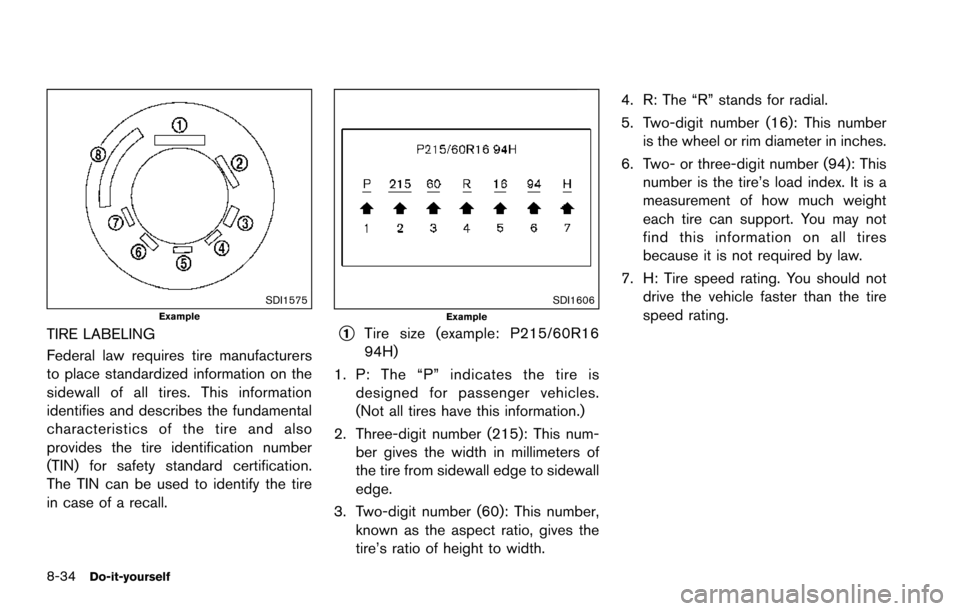
TIRE LABELING
Federal law requires tire manufacturers
to place standardized information on the
sidewall of all tires. This information
identifies and describes the fundamental
characteristics of the tire and also
provides the tire identification number
(TIN) for safety standard certification.
The TIN can be used to identify the tire
in case of a recall.
SDI1606Example
*1Tire size (example: P215/60R16
94H)
1. P: The “P” indicates the tire isdesigned for passenger vehicles.
(Not all tires have this information.)
2. Three-digit number (215): This num- ber gives the width in millimeters of
the tire from sidewall edge to sidewall
edge.
3. Two-digit number (60): This number, known as the aspect ratio, gives the
tire’s ratio of height to width. 4. R: The “R” stands for radial.
5. Two-digit number (16): This number
is the wheel or rim diameter in inches.
6. Two- or three-digit number (94): This number is the tire’s load index. It is a
measurement of how much weight
each tire can support. You may not
find this information on all tires
because it is not required by law.
7. H: Tire speed rating. You should not drive the vehicle faster than the tire
speed rating.