2017 NISSAN ARMADA Meter
[x] Cancel search: MeterPage 93 of 614
2-4Instruments and controls
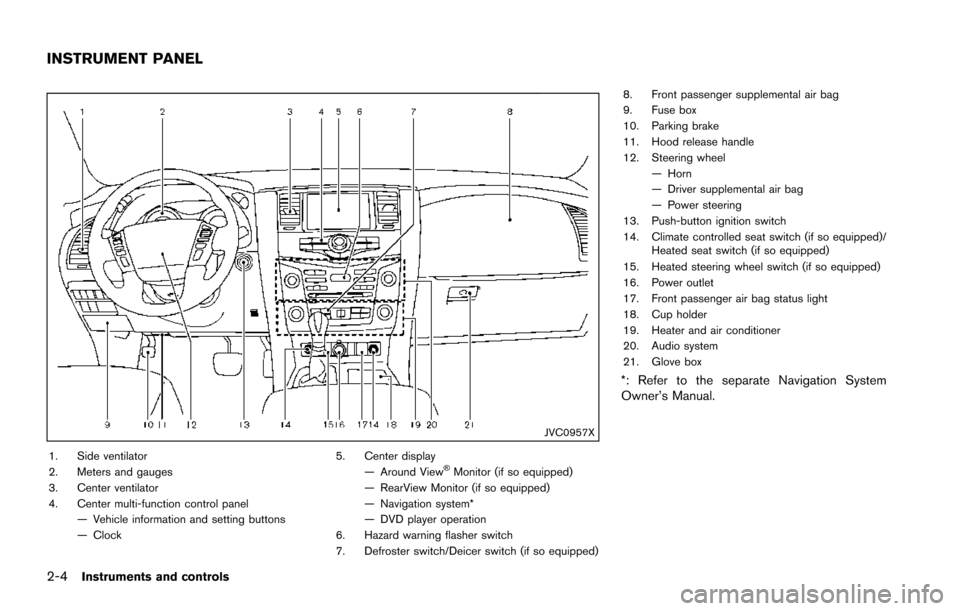
JVC0957X
1. Side ventilator
2. Meters and gauges
3. Center ventilator
4. Center multi-function control panel— Vehicle information and setting buttons
— Clock 5. Center display
— Around ViewŠMonitor (if so equipped)
— RearView Monitor (if so equipped)
— Navigation system*
— DVD player operation
6. Hazard warning flasher switch
7. Defroster switch/Deicer switch (if so equipped) 8. Front passenger supplemental air bag
9. Fuse box
10. Parking brake
11. Hood release handle
12. Steering wheel
— Horn
— Driver supplemental air bag
— Power steering
13. Push-button ignition switch
14. Climate controlled seat switch (if so equipped)/ Heated seat switch (if so equipped)
15. Heated steering wheel switch (if so equipped)
16. Power outlet
17. Front passenger air bag status light
18. Cup holder
19. Heater and air conditioner
20. Audio system
21. Glove box
*: Refer to the separate Navigation System
Owner’s Manual.
INSTRUMENT PANEL
Page 94 of 614
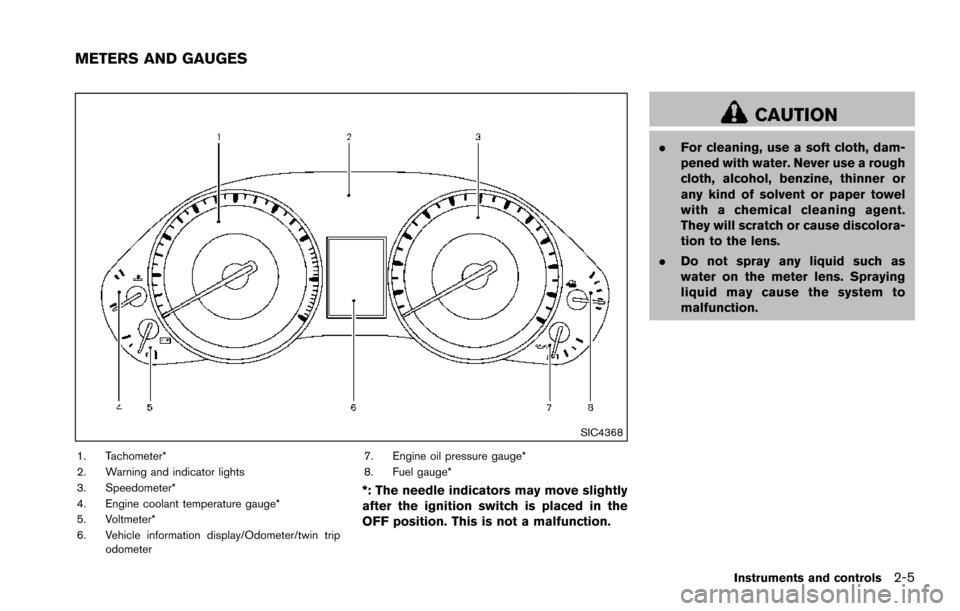
SIC4368
1. Tachometer*
2. Warning and indicator lights
3. Speedometer*
4. Engine coolant temperature gauge*
5. Voltmeter*
6. Vehicle information display/Odometer/twin tripodometer 7. Engine oil pressure gauge*
8. Fuel gauge*
*: The needle indicators may move slightly
after the ignition switch is placed in the
OFF position. This is not a malfunction.
CAUTION
.
For cleaning, use a soft cloth, dam-
pened with water. Never use a rough
cloth, alcohol, benzine, thinner or
any kind of solvent or paper towel
with a chemical cleaning agent.
They will scratch or cause discolora-
tion to the lens.
. Do not spray any liquid such as
water on the meter lens. Spraying
liquid may cause the system to
malfunction.
Instruments and controls2-5
METERS AND GAUGES
Page 95 of 614
2-6Instruments and controls
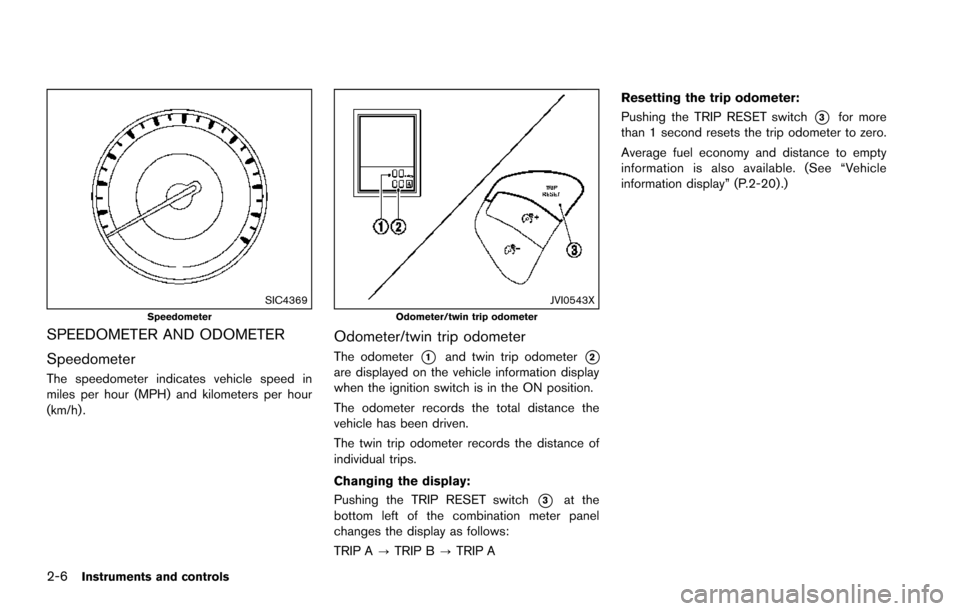
SIC4369Speedometer
SPEEDOMETER AND ODOMETER
Speedometer
The speedometer indicates vehicle speed in
miles per hour (MPH) and kilometers per hour
(km/h) .
JVI0543XOdometer/twin trip odometer
Odometer/twin trip odometer
The odometer*1and twin trip odometer*2are displayed on the vehicle information display
when the ignition switch is in the ON position.
The odometer records the total distance the
vehicle has been driven.
The twin trip odometer records the distance of
individual trips.
Changing the display:
Pushing the TRIP RESET switch
*3at the
bottom left of the combination meter panel
changes the display as follows:
TRIP A ?TRIP B ?TRIP A Resetting the trip odometer:
Pushing the TRIP RESET switch
*3for more
than 1 second resets the trip odometer to zero.
Average fuel economy and distance to empty
information is also available. (See “Vehicle
information display” (P.2-20) .)
Page 96 of 614
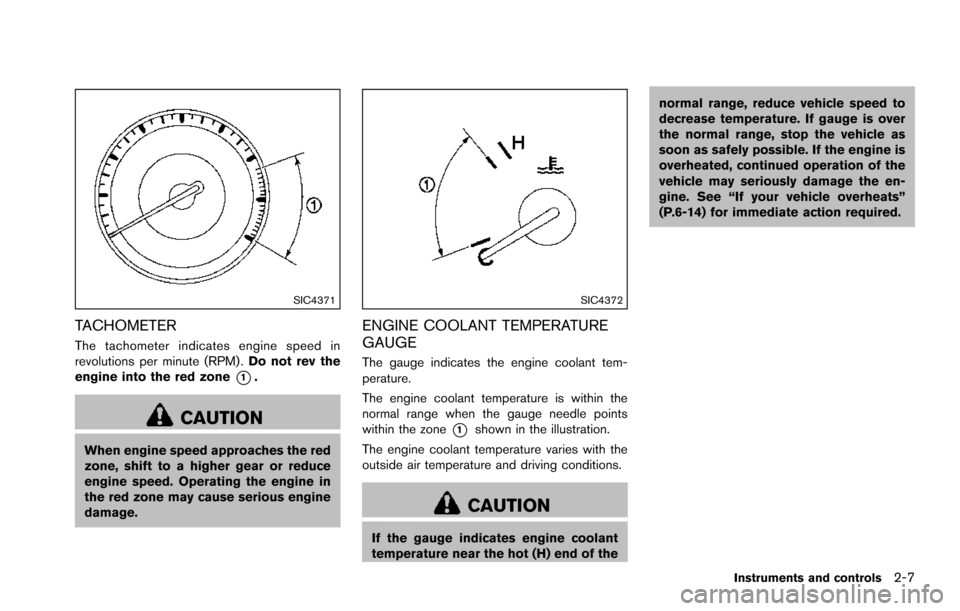
SIC4371
TACHOMETER
The tachometer indicates engine speed in
revolutions per minute (RPM) .Do not rev the
engine into the red zone
*1.
CAUTION
When engine speed approaches the red
zone, shift to a higher gear or reduce
engine speed. Operating the engine in
the red zone may cause serious engine
damage.
SIC4372
ENGINE COOLANT TEMPERATURE
GAUGE
The gauge indicates the engine coolant tem-
perature.
The engine coolant temperature is within the
normal range when the gauge needle points
within the zone
*1shown in the illustration.
The engine coolant temperature varies with the
outside air temperature and driving conditions.
CAUTION
If the gauge indicates engine coolant
temperature near the hot (H) end of the normal range, reduce vehicle speed to
decrease temperature. If gauge is over
the normal range, stop the vehicle as
soon as safely possible. If the engine is
overheated, continued operation of the
vehicle may seriously damage the en-
gine. See “If your vehicle overheats”
(P.6-14) for immediate action required.
Instruments and controls2-7
Page 98 of 614
dipstick to check the oil level. (See
“Engine oil” (P.8-6) .)
. If the gauge needle does not move
with the proper amount of engine
oil, have the vehicle checked. It is
recommended you visit a NISSAN
dealer for this service. Continued
vehicle operation in such a condi-
tion could cause serious damage to
the engine.
SIC4376
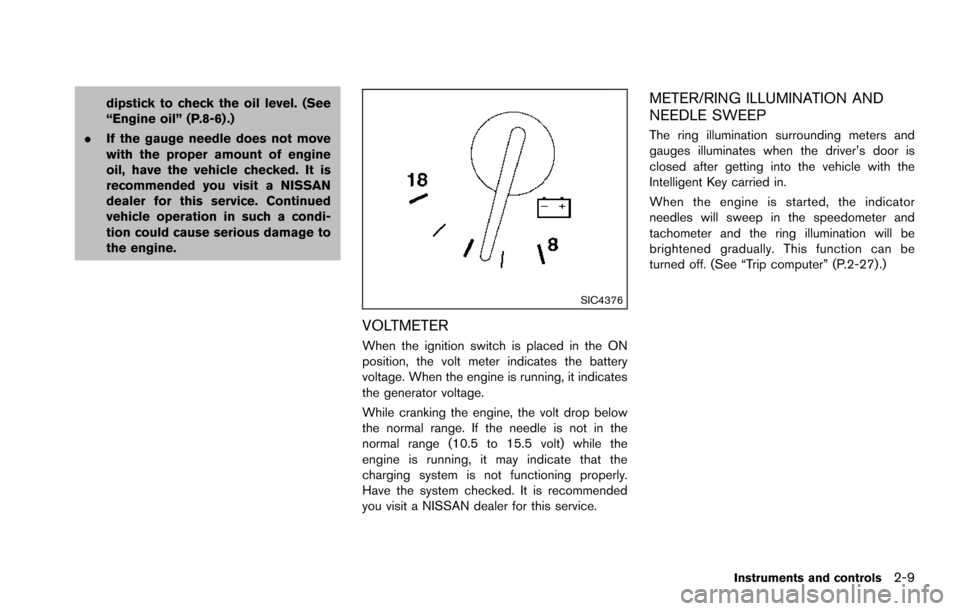
VOLTMETER
When the ignition switch is placed in the ON
position, the volt meter indicates the battery
voltage. When the engine is running, it indicates
the generator voltage.
While cranking the engine, the volt drop below
the normal range. If the needle is not in the
normal range (10.5 to 15.5 volt) while the
engine is running, it may indicate that the
charging system is not functioning properly.
Have the system checked. It is recommended
you visit a NISSAN dealer for this service.
METER/RING ILLUMINATION AND
NEEDLE SWEEP
The ring illumination surrounding meters and
gauges illuminates when the driver’s door is
closed after getting into the vehicle with the
Intelligent Key carried in.
When the engine is started, the indicator
needles will sweep in the speedometer and
tachometer and the ring illumination will be
brightened gradually. This function can be
turned off. (See “Trip computer” (P.2-27) .)
Instruments and controls2-9
Page 100 of 614
CHECKING LIGHTS
With all doors closed, apply the parking brake,
fasten the seat belts and place the ignition
switch in the ON position without starting the
engine. The following lights (if so equipped) will
come on:
,or,,,,,
The following lights (if so equipped) will come
on briefly and then go off:
,or,,,,,,,,
If any light does not come on or operates in a
way other than described, it may indicate a
burned-out bulb and/or a system malfunction. It
is recommended you have the system checked
by a NISSAN dealer.
Some indicators and warnings are also dis-
played on the vehicle information display be-
tween the speedometer and tachometer. (See
“Vehicle information display” (P.2-20) .)
WARNING LIGHTS
orAnti-lock Braking System
(ABS) warning light
When the ignition switch is in the ON position,
the Anti-lock Braking System (ABS) warning
light illuminates and then turns off. This indicates
the ABS is operational.
If the ABS warning light illuminates while the
engine is running, or while driving, it may
indicate the ABS is not functioning properly.
Have the system checked. It is recommended
you visit a NISSAN dealer for this service.
If an ABS malfunction occurs, the anti-lock
function is turned off. The brake system then
operates normally, but without anti-lock assis-
tance. (See “Brake system” (P.5-136) .)
Automatic Transmission (AT) check
warning light
When the ignition switch is placed in the ON
position, the light comes on for 2 seconds. If the
light comes on at any other time, it may indicate
the transmission is not functioning properly. It is
recommended you visit a NISSAN dealer to
check and repair the transmission.
Automatic Transmission (AT) oil
temperature warning light
This light illuminates when the Automatic Trans-
mission (AT) oil temperature is too high. If the
light illuminates while driving, reduce the vehicle
speed as soon as safely possible until the light
turns off.
CAUTION
Continued vehicle operation when the
AT oil temperature warning light is on
may damage the AT.
Automatic Transmission (AT) park
warning light (4WD models)
This light indicates that the Automatic Transmis-
sion (AT) parking function is not engaged. If the
transfer control is not secured in any driving
position while the AT shift lever is in the “P”
(Park) position, the transmission will disengage
and the wheels will not lock.
If the AT park warning light illuminates
with the shift lever in the P (Park) position,
shift the Four-Wheel Drive (4WD) shift
switch to the AUTO, 4H or 4L position
again with the shift lever in the N (Neutral)
Instruments and controls2-11
Page 102 of 614
ping distance and braking will re-
quire greater pedal effort as well as
pedal travel.
. If the brake fluid level is below the
minimum or MIN mark on the brake
fluid reservoir, do not drive until the
brake system has been checked. It
is recommended you visit a NISSAN
dealer for this service.
Charge warning light
If the light comes on while the engine is running,
it may indicate the charging system is not
functioning properly. Turn the engine off and
check the alternator belt. If the belt is loose,
broken, missing or if the light remains on, have
your vehicle serviced immediately. It is recom-
mended you visit a NISSAN dealer for this
service.
CAUTION
Do not continue driving if the alternator
belt is loose, broken or missing.
Distance Control Assist (DCA)
system warning light (orange; if so
equipped)
This light comes on if there is a malfunction in
the Distance Control Assist (DCA) system.
If the warning light illuminates, park the vehicle in
a safe place. Turn the engine off, restart the
engine, resume driving and turn on the DCA
system again.
If it is not possible to turn on the system or
the warning light stays on, it may indicate
that the system is malfunctioning.
Although the vehicle is still driveable
under normal conditions, have the vehicle
checked. It is recommended you visit a
NISSAN dealer for this service.
See “Distance Control Assist (DCA)” (P.5-91) .
Engine oil pressure warning light
This light warns of low engine oil pressure. If the
light flickers or comes on during normal driving,
pull off the road in a safe area, stop the engine
immediately and call a NISSAN dealer or other
authorized repair shop.
The engine oil pressure warning light is
not designed to indicate a low oil level.
Use the dipstick to check the oil level. (See
“Engine oil” (P.8-6).)
CAUTION
Running the engine with the engine oil
pressure warning light on could cause
serious damage to the engine almost
immediately. Such damage is not cov-
ered by warranty. Turn off the engine as
soon as it is safe to do so.
Four-Wheel Drive (4WD) warning
light (4WD models)
Thewarning light comes on when the
ignition switch is placed in the ON position. It
turns off soon after the engine is started.
If the 4WD system malfunctions, or the diameter
of the front and the rear wheels are different, the
warning light will either remain illuminated or
blink. (See “NISSAN all-mode 4WD
Š” (P.5-
123) .)
CAUTION
. If the warning light comes on while
driving there may be a malfunction
in the 4WD system. Reduce the
vehicle speed and have your vehicle
checked as soon as possible. It is
Instruments and controls2-13
Page 109 of 614
2-20Instruments and controls
Vehicle Dynamic Control (VDC) off
indicator light
When the ignition switch is in the ON position,
the Vehicle Dynamic Control (VDC) off indicator
light illuminates and then turns off.
The light comes on when the VDC off switch is
pushed to OFF. This indicates that the VDC
system is not operating.
When the 4L position is selected with the Four-
Wheel Drive (4WD) shift switch, the VDC
system is disabled and the VDC off indicator
light illuminates. (4WD models)
For additional information, see “Vehicle Dynamic
Control (VDC) system” (P.5-138) .
AUDIBLE REMINDERS
Key reminder chime
A chime will sound if the driver side door is
opened while the ignition switch is placed in the
ACC position. Make sure the ignition switch is
placed in the OFF position, and take the
Intelligent Key with you when leaving the vehicle.
Light reminder chime
A chime will sound when the driver side door is
opened with the light switch in theorposition and the ignition switch in the ACC, OFF
or LOCK position.
Turn the light switch off when you leave the
vehicle.
Parking brake reminder chime
The chime will sound if the vehicle is driven at
more than 4 MPH (7 km/h) with the parking
brake applied. Stop the vehicle and release the
parking brake.
Brake pad wear warning
The disc brake pads have audible wear warn-
ings. When a brake pad requires replacement, it
will make a high pitched scraping sound when
the vehicle is in motion. This scraping sound will
first occur only when the brake pedal is
depressed. After more wear of the brake pad,
the sound will always be heard even if the brake
pedal is not depressed. Have the brakes
checked as soon as possible if the warning
sound is heard.
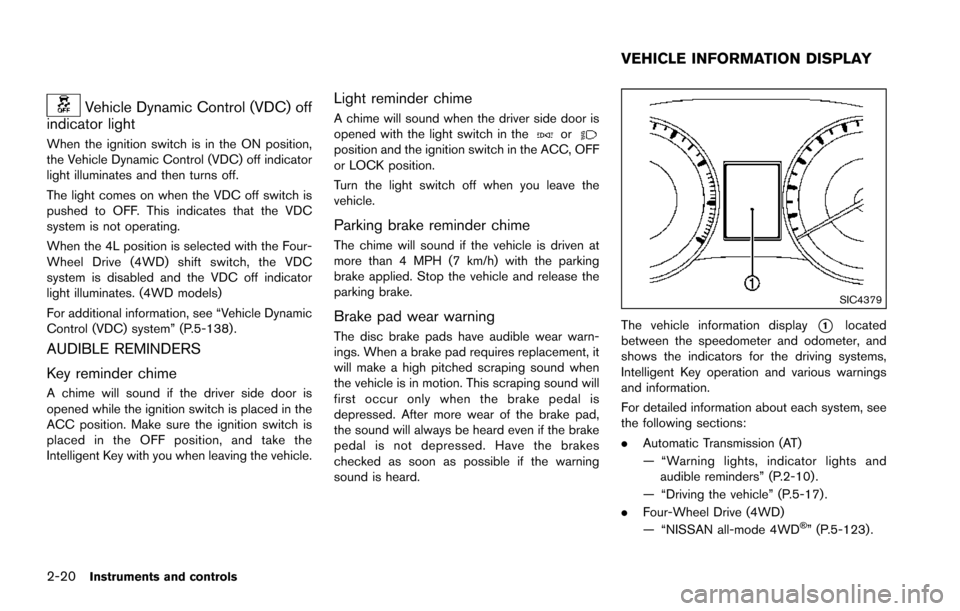
SIC4379
The vehicle information display*1located
between the speedometer and odometer, and
shows the indicators for the driving systems,
Intelligent Key operation and various warnings
and information.
For detailed information about each system, see
the following sections:
. Automatic Transmission (AT)
— “Warning lights, indicator lights and
audible reminders” (P.2-10) .
— “Driving the vehicle” (P.5-17) .
. Four-Wheel Drive (4WD)
— “NISSAN all-mode 4WD
Š” (P.5-123).
VEHICLE INFORMATION DISPLAY