2017 NISSAN ARMADA 4WD
[x] Cancel search: 4WDPage 421 of 614
5-80Starting and driving
.The chime sounds.
. The vehicle ahead detection and set dis-
tance indicator blink.
The warning chime may not sound in some
cases when there is a short distance between
vehicles. Some examples are:
. When the vehicles are traveling at the same
speed and the distance between vehicles is
not changing
. When the vehicle ahead is traveling faster
and the distance between vehicles is
increasing
. When a vehicle cuts in near your vehicle
The warning chime will not sound when:
. Your vehicle approaches other vehicles that
are parked or moving slowly.
. The accelerator pedal is depressed, over-
riding the system.
NOTE:
The approach warning chime may sound
and the system display may blink when the
radar sensor detects objects on the side of
the vehicle or on the side of the road. This
may cause the ICC system to decelerate or
accelerate the vehicle. The radar sensor
may detect these objects when the vehicle
is driven on winding roads, narrow roads,
hilly roads or when entering or exiting a curve. In these cases you will have to
manually control the proper distance
ahead of your vehicle.
Also, the sensor sensitivity can be affected by
vehicle operation (steering maneuver or driving
position in the lane) or traffic or vehicle condition
(for example, if a vehicle is being driven with
some damage) .
Automatic cancellation
A chime sounds under the following conditions
and the control is automatically canceled.
.
When the vehicle ahead is not detected and
your vehicle is traveling below the speed of
15 MPH (24 km/h)
. When the system judges the vehicle is at
standstill
. When the shift lever is not in the D (Drive) or
manual shift mode
. When the parking brake is applied
. When the SNOW mode switch is pushed
on.
. When the 4WD shift switch is in the 4H or
4L position (for 4WD models)
. When the VDC system is turned off
. When ABS or VDC (including the traction
control system) operates .
When distance measurement becomes im-
paired due to adhesion of dirt or obstruction
to the sensor
. When a wheel slips
. When the radar signal is temporarily inter-
rupted
Vehicle-to-vehicle distance control mode
limitations
WARNING
Listed below are the system limitations
for the ICC system. Failure to operate
the vehicle in accordance with these
system limitations could result in ser-
ious injury or death.
.The system is primarily intended for
use on straight, dry, open roads with
light traffic. It is not advisable to use
the system in city traffic or con-
gested areas.
. This system will not adapt automa-
tically to road conditions. This sys-
tem should be used in evenly
flowing traffic. Do not use the
system on roads with sharp curves,
or on icy roads, in heavy rain or in
fog.
Page 426 of 614
System temporarily unavailable
Condition A:
Under the following conditions, the ICC system
is automatically canceled. The chime will sound
and the system will not be able to be set.
.When the VDC is turned off
. When the ABS or VDC operates
. When a tire slips
. When the SNOW mode switch is pushed
on
. When the 4WD shift switch is in the 4H or
4L position (for 4WD models)
. When the radar signal is temporarily inter-
rupted
Action to take:
When the conditions listed above are no longer
present, turn the system off using the MAIN
switch
*2. Turn the ICC system back on to use
the system.
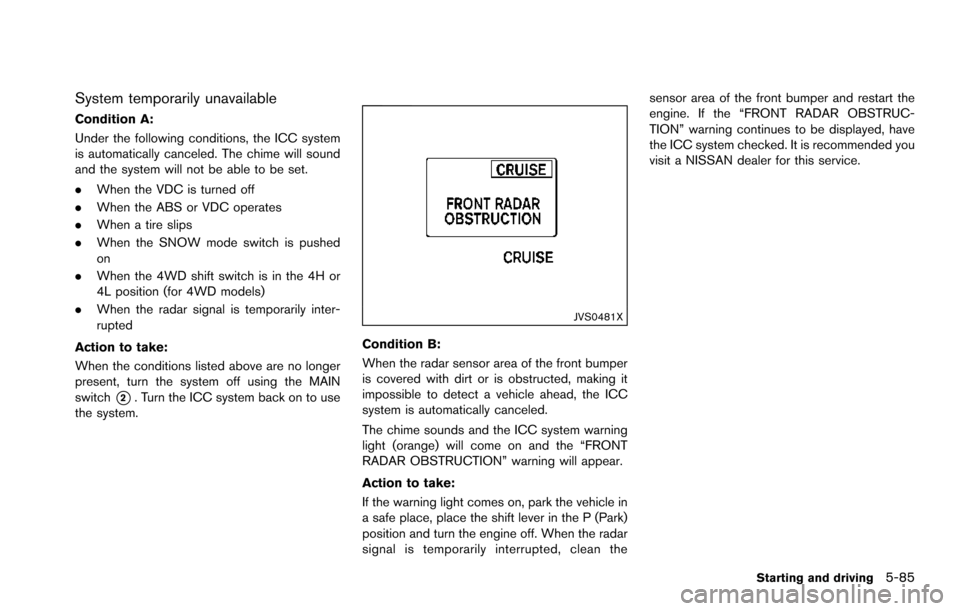
JVS0481X
Condition B:
When the radar sensor area of the front bumper
is covered with dirt or is obstructed, making it
impossible to detect a vehicle ahead, the ICC
system is automatically canceled.
The chime sounds and the ICC system warning
light (orange) will come on and the “FRONT
RADAR OBSTRUCTION” warning will appear.
Action to take:
If the warning light comes on, park the vehicle in
a safe place, place the shift lever in the P (Park)
position and turn the engine off. When the radar
signal is temporarily interrupted, clean the sensor area of the front bumper and restart the
engine. If the “FRONT RADAR OBSTRUC-
TION” warning continues to be displayed, have
the ICC system checked. It is recommended you
visit a NISSAN dealer for this service.
Starting and driving5-85
Page 444 of 614
.When the VDC or ABS (including the
traction control system) operates
. When the SNOW mode switch is ON (To
use the DCA system, turn off the SNOW
mode switch, then turn on the dynamic
driver assistance switch
*2.)
For details about the SNOW mode switch,
see “SNOW mode switch” (P.2-47).
. When the 4WD shift switch is in the 4H or
4L position (for 4WD models)
. When the radar signal is temporarily inter-
rupted
Action to take:
When the conditions listed above are no longer
present, turn the system off with the dynamic
driver assistance switch
*2. Turn the DCA
system back on to use the system.
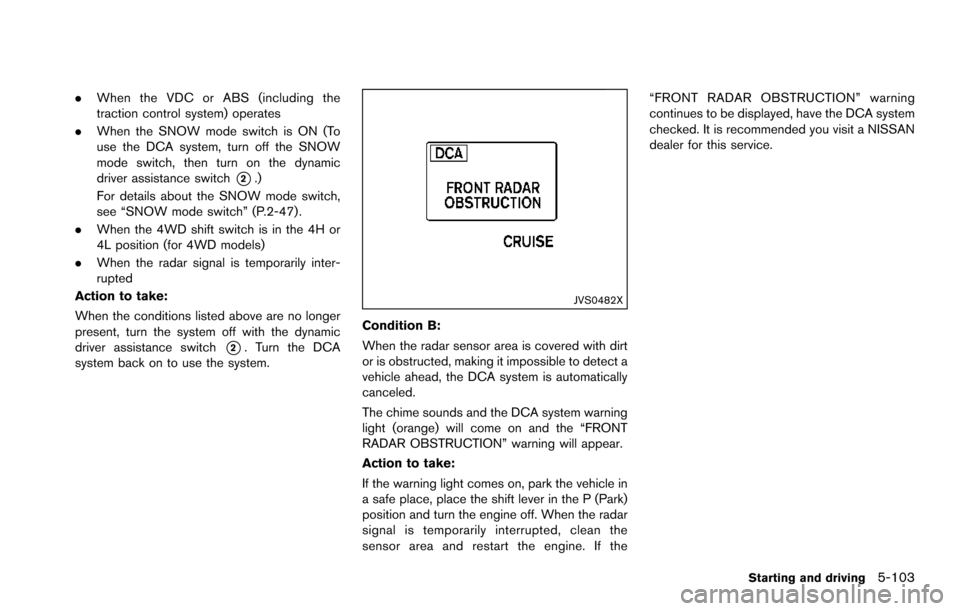
JVS0482X
Condition B:
When the radar sensor area is covered with dirt
or is obstructed, making it impossible to detect a
vehicle ahead, the DCA system is automatically
canceled.
The chime sounds and the DCA system warning
light (orange) will come on and the “FRONT
RADAR OBSTRUCTION” warning will appear.
Action to take:
If the warning light comes on, park the vehicle in
a safe place, place the shift lever in the P (Park)
position and turn the engine off. When the radar
signal is temporarily interrupted, clean the
sensor area and restart the engine. If the “FRONT RADAR OBSTRUCTION” warning
continues to be displayed, have the DCA system
checked. It is recommended you visit a NISSAN
dealer for this service.
Starting and driving5-103
Page 464 of 614
WARNING
.Do not attempt to raise two wheels
off the ground and shift the trans-
mission to any drive or reverse
position with the engine running.
Doing so may result in drivetrain
damage or unexpected vehicle
movement which could result in
serious vehicle damage or personal
injury.
. Do not attempt to test a 4WD
equipped vehicle on a 2-wheel dy-
namometer or similar equipment
even if the other two wheels are
raised off the ground. Make sure
you inform test facility personnel
that your vehicle is equipped with
4WD before it is placed on a dy-
namometer. Using the wrong test
equipment may result in drivetrain
damage or unexpected vehicle
movement which could result in
serious vehicle damage or personal
injury.
CAUTION
.Do not drive the vehicle in the 4HI or
4LO position on dry hard surface
roads. Driving on dry, hard surfaces
in 4HI or 4LO may cause unneces-
sary noise, tire wear and increased
fuel consumption.
If the Four-Wheel Drive (4WD) warn-
ing light turns on when driving on
dry hard surface roads:
— in the 4HI position, shift the
4WD shift switch to AUTO.
— in the 4LO position, stop the vehicle and shift the transmis-
sion lever to the N (Neutral)
position with the brake pedal
depressed and shift the 4WD
shift switch to AUTO.
If the 4WD warning light is still
on after the above operation,
have your vehicle checked as
soon as possible. It is recom-
mended you visit a NISSAN
dealer for this service.
. The transfer case may be damaged
if you continue driving with the 4WD warning light blinking.
See “On-pavement and off-road driving precau-
tions” (P.5-9) for other precautions for offroad
driving.
NISSAN ALL-MODE 4WDŠSYSTEM
The all mode 4WD system provides 3 positions
(AUTO, 4HI and 4LO) , so you can select the
desired drive mode according to the driving
conditions.
Starting and driving5-123
NISSAN ALL-MODE 4WDŠ(if so
equipped)
Page 465 of 614
5-124Starting and driving
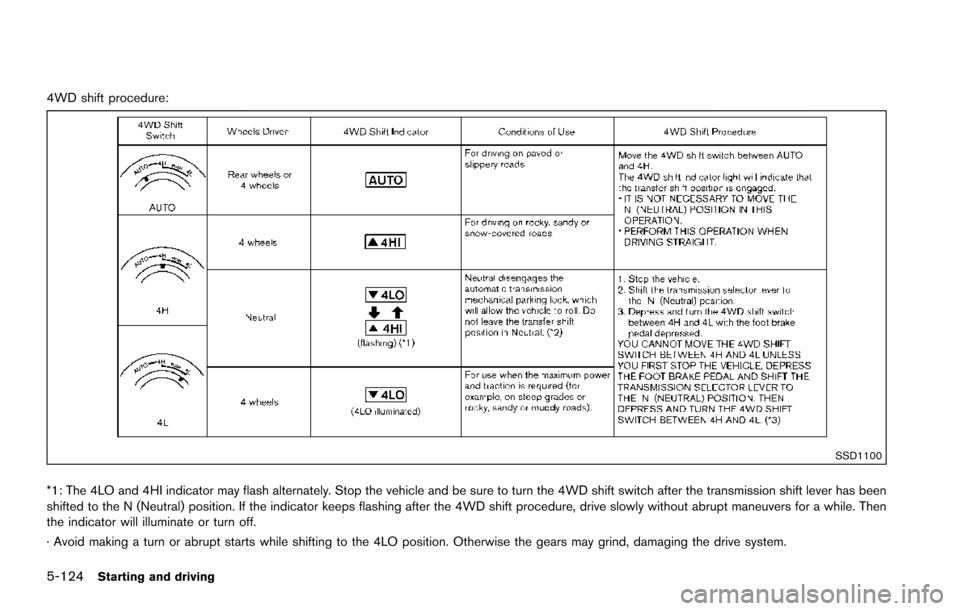
4WD shift procedure:
SSD1100
*1: The 4LO and 4HI indicator may flash alternately. Stop the vehicle and be sure to turn the 4WD shift switch after the transmission shift lever has been
shifted to the N (Neutral) position. If the indicator keeps flashing after the 4WD shift procedure, drive slowly without abrupt maneuvers for a while. Then
the indicator will illuminate or turn off.
· Avoid making a turn or abrupt starts while shifting to the 4LO position. Otherwise the gears may grind, damaging the drive system.
Page 466 of 614
*2: While changing in and out of the 4LO position, the engine must be running. Otherwise, the shift will not take place and the 4LO indicator will not be on
or flashing.
*3: Make sure that the 4LO indicator turns on when shifting the 4WD shift switch to the 4L position. The Vehicle Dynamic Control (VDC) off indicator light
will also turn on when 4L is selected. (See “Vehicle Dynamic Control (VDC) system” (P.5-138) .)
Starting and driving5-125
Page 467 of 614
5-126Starting and driving
The 4WD shift switch is used to select the 4WD
mode depending on the driving conditions.
There are 3 types of drive modes available,
AUTO, 4HI and 4LO.
The 4WD shift switch electronically controls the
transfer case operation. Rotate the switch to
move between each mode, AUTO, 4H and 4L.
You must depress the 4WD shift switch to
select 4L, and the vehicle MUST be sta-
tionary and the shift lever in the N (Neutral)
position when changing into or out of 4L.
WARNING
.When parking, apply the parking
brake before stopping the engine
and make sure that the 4WD shift
indicator is on and the ATP warning
light turns off. Otherwise, the vehi-
cle could unexpectedly move even if
the automatic transmission is in the
P (Park) position.
. The 4LO and 4HI indicators must
stop blinking and the 4LO or 4HI
indicator must remain illuminated or
turn off before shifting the trans-
mission into gear. If the shift lever is
shifted from the N (Neutral) position
to any other gear while the 4LO and 4HI indicators are blinking alter-
nately, the vehicle may move unex-
pectedly.
CAUTION
.
Never shift the 4WD shift switch
between 4L and 4H while driving.
. The 4HI position provides greater
traction. Avoid excessive speed, as
it will cause increased fuel con-
sumption and higher oil tempera-
tures, and could damage drivetrain
component. Speeds over 62 MPH
(100 km/h) in 4HI is not recom-
mended.
. The 4LO position provides maxi-
mum traction. Avoid raising vehicle
speed excessively, as the maximum
speed is approximately 31 MPH (50
km/h) .
. When driving straight, shift the 4WD
shift switch to the AUTO or 4H
position. Do not move the 4WD shift
switch when making a turn or rever-
sing. .
Do not shift the 4WD shift switch
(between AUTO and 4H) while driv-
ing on steep downhill grades. Use
the engine brake and low automatic
transmission gears for engine brak-
ing.
. Do not operate the 4WD shift switch
(between AUTO and 4H) with the
rear wheels spinning.
. Do not drive on dry hard surface
roads in the 4HI or 4LO position.
Driving on dry hard surfaces in 4HI
or 4LO may cause unnecessary
noise and tire wear. NISSAN recom-
mends driving in the AUTO position
under these conditions.
. The 4WD transfer case may not be
shifted between 4HI and 4LO at low
ambient temperatures and the 4LO
and 4HI indicators may blink even
when the 4WD shift switch is
shifted. After driving for a while
you can change the 4WD shift
switch between 4H and 4L.
Page 468 of 614
When driving on rough roads,
.Drive carefully according to the road surface
conditions.
When the vehicle is stuck,
. Place stones or wooden blocks under the
tires to free the vehicle.
. Set the 4WD shift switch to 4H or 4L.
. If it is difficult to free the vehicle, repeat
forward and backward movement to in-
crease the movement.
. If the vehicle is stuck deep in mud, tire
chains may be effective.
CAUTION
.Do not spin the tires excessively.
Tires will sink deep into the mud,
making it difficult to free the vehi-
cle.
. Avoid shifting gears with the engine
running at high speeds as this may
cause malfunction.
SSD1048
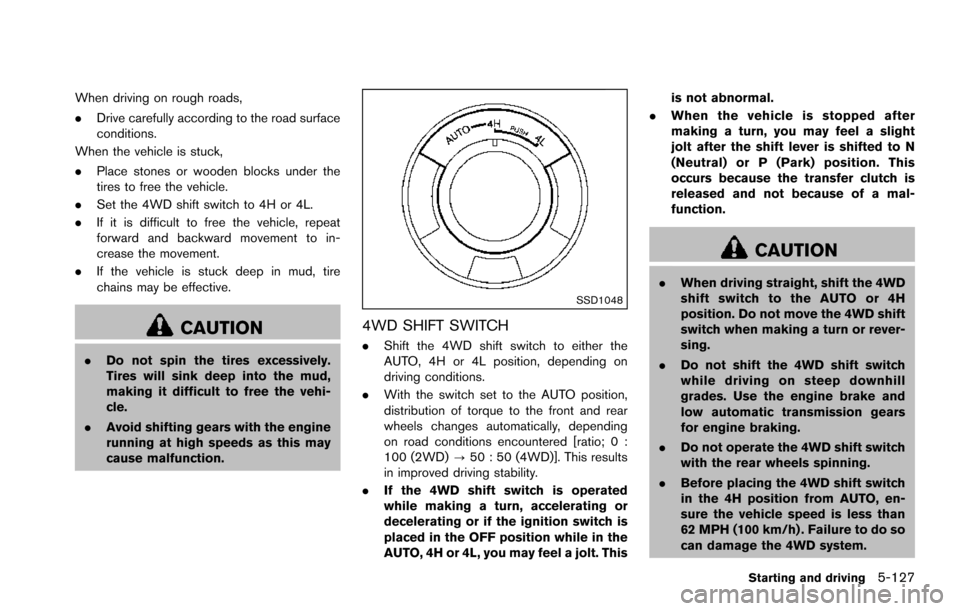
4WD SHIFT SWITCH
.Shift the 4WD shift switch to either the
AUTO, 4H or 4L position, depending on
driving conditions.
. With the switch set to the AUTO position,
distribution of torque to the front and rear
wheels changes automatically, depending
on road conditions encountered [ratio; 0 :
100 (2WD) ?50 : 50 (4WD)]. This results
in improved driving stability.
. If the 4WD shift switch is operated
while making a turn, accelerating or
decelerating or if the ignition switch is
placed in the OFF position while in the
AUTO, 4H or 4L, you may feel a jolt. This is not abnormal.
. When the vehicle is stopped after
making a turn, you may feel a slight
jolt after the shift lever is shifted to N
(Neutral) or P (Park) position. This
occurs because the transfer clutch is
released and not because of a mal-
function.
CAUTION
.When driving straight, shift the 4WD
shift switch to the AUTO or 4H
position. Do not move the 4WD shift
switch when making a turn or rever-
sing.
. Do not shift the 4WD shift switch
while driving on steep downhill
grades. Use the engine brake and
low automatic transmission gears
for engine braking.
. Do not operate the 4WD shift switch
with the rear wheels spinning.
. Before placing the 4WD shift switch
in the 4H position from AUTO, en-
sure the vehicle speed is less than
62 MPH (100 km/h) . Failure to do so
can damage the 4WD system.
Starting and driving5-127