2017 NISSAN ARMADA change wheel
[x] Cancel search: change wheelPage 348 of 614
and all tires are properly inflated, it
is recommended you consult a
NISSAN dealer.
. Since the spare tire is not equipped
with the TPMS, when a spare tire is
mounted or a wheel is replaced, the
TPMS will not function and the low
tire pressure warning light will flash
for approximately 1 minute. The
light will remain on after 1 minute.
Have your tires replaced and/or
TPMS system reset as soon as
possible. It is recommended you
visit a NISSAN dealer for these
services.
. Replacing tires with those not ori-
ginally specified by NISSAN could
affect the proper operation of the
TPMS.
. Do not inject any tire liquid or
aerosol tire sealant into the tires,
as this may cause a malfunction of
the tire pressure sensors.CAUTION
.The TPMS may not function properly
when the wheels are equipped with
tire chains or the wheels are buried
in snow.
. Do not place metalized film or any
metal parts (antenna, etc.) on the
windows. This may cause poor re-
ception of the signals from the tire
pressure sensors, and the TPMS will
not function properly.
Some devices and transmitters may temporarily
interfere with the operation of the TPMS and
cause the low tire pressure warning light to
illuminate. Some examples are:
. Facilities or electric devices using similar
radio frequencies are near the vehicle.
. If a transmitter set to similar frequencies is
being used in or near the vehicle.
. If a computer (or similar equipment) or a DC/
AC converter is being used in or near the
vehicle.
Low tire pressure warning light may illuminate in
the following cases.
. If the vehicle is equipped with a wheel and
tire without TPMS. .
If the TPMS has been replaced and the ID
has not been registered.
. If the wheel is not originally specified by
NISSAN.
FCC Notice:
For USA:
This device complies with Part 15 of the
FCC Rules. Operation is subject to the
following two conditions: (1) This device
may not cause harmful interference, and
(2) this device must accept any interfer-
ence received, including interference that
may cause undesired operation.
Note: Changes or modifications not ex-
pressly approved by the party responsible
for compliance could void the user’s
authority to operate the equipment.
For Canada:
This device complies with Industry Canada
licence-exempt RSS standard(s) . Opera-
tion is subject to the following two condi-
tions: (1) this device may not cause
interference, and (2) this device must
accept any interference, including interfer-
ence that may cause undesired operation
of the device.
Starting and driving5-7
Page 351 of 614
5-10Starting and driving
WARNING
The following actions can increase the
chance of losing control of the vehicle if
there is a sudden loss of tire air
pressure. Losing control of the vehicle
may cause a collision and result in
personal injury.
.The vehicle generally moves or pulls
in the direction of the flat tire.
. Do not rapidly apply the brakes.
. Do not rapidly release the accelera-
tor pedal.
. Do not rapidly turn the steering
wheel.
1. Remain calm and do not overreact.
2. Maintain a firm grip on the steering wheel with both hands and try to hold a straight
course.
3. When appropriate, slowly release the accel- erator pedal to gradually slow the vehicle.
4. Gradually steer the vehicle to a safe location off the road and away from traffic if possible.
5. Lightly apply the brake pedal to gradually stop the vehicle. 6. Turn on the hazard warning flashers and
either contact a roadside emergency service
to change the tire or see “Changing a flat
tire” (P.6-4) .
DRINKING ALCOHOL/DRUGS AND
DRIVING
WARNING
Never drive under the influence of
alcohol or drugs. Alcohol in the blood-
stream reduces coordination, delays
reaction time and impairs judgement.
Driving after drinking alcohol increases
the likelihood of being involved in an
accident injuring yourself and others.
Additionally, if you are injured in an
accident, alcohol can increase the se-
verity of the injury.
NISSAN is committed to safe driving. However,
you must choose not to drive under the influence
of alcohol. Every year thousands of people are
injured or killed in alcohol-related accidents.
Although the local laws vary on what is
considered to be legally intoxicated, the fact is
that alcohol affects all people differently and
most people underestimate the effects of
alcohol. Remember, drinking and driving don’t mix! And
that is true for drugs, too (over-the-counter,
prescription, and illegal drugs) . Don’t drive if
your ability to operate your vehicle is impaired by
alcohol, drugs, or some other physical condition.
DRIVING SAFETY PRECAUTIONS
Your NISSAN is designed for both normal and
off-road use. However, avoid driving in deep
water or mud as your NISSAN is mainly
designed for leisure use, unlike a conventional
off-road vehicle.
Remember that Two-Wheel Drive (2WD) mod-
els are less capable than Four-Wheel Drive
(4WD) models for rough road driving and
extrication when stuck in deep snow, mud, or
the like.
Please observe the following precautions:
WARNING
.
Drive carefully when off the road
and avoid dangerous areas. Every
person who drives or rides in this
vehicle should be seated with their
seat belt fastened. This will keep
you and your passengers in position
when driving over rough terrain.
Page 364 of 614
WARNING
Failure to follow the warnings and
instructions for proper use of the LDW
and LDP systems could result in serious
personal injury or death.
.The LDW and LDP systems will not
prevent loss of control. It is the
driver’s responsibility to stay alert,
drive safely, keep the vehicle in the
traveling lane, and be in control of
the vehicle at all times.
. The LDP system may activate if you
change lanes without first activating
your turn signal or, for example, if a
construction zone directs traffic to
cross an existing lane marker. If this
occurs, you may need to apply
corrective steering to complete your
lane change.
. Because the LDP system may not
activate under the road, weather,
and lane marker conditions de-
scribed in this section, it may not
activate every time your vehicle
begins to leave its lane and you will
need to apply corrective steering. .
Lane Departure Warning (LDW) system
— warns the driver with a warning light and
chime that the vehicle is beginning to
leave the driving lane.
. Lane Departure Prevention (LDP) system
— warns the driver with a warning light and
chime, and helps assist the driver to
return the vehicle to the center of the
traveling lane by applying the brakes to
the left or right wheels individually (for a
short period of time) .
JVS0907X
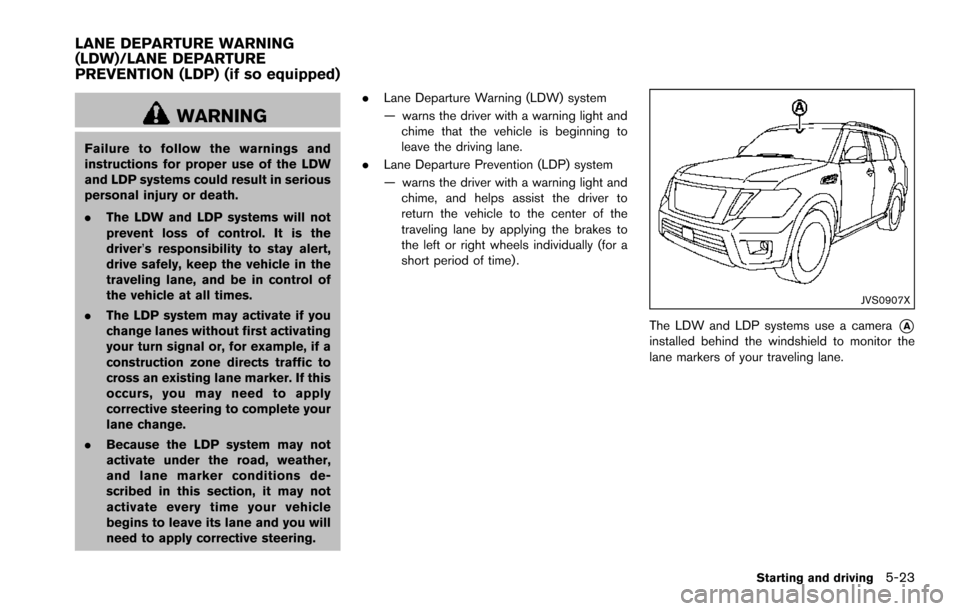
The LDW and LDP systems use a camera*Ainstalled behind the windshield to monitor the
lane markers of your traveling lane.
Starting and driving5-23
LANE DEPARTURE WARNING
(LDW)/LANE DEPARTURE
PREVENTION (LDP) (if so equipped)
Page 368 of 614
NOTE:
.The LDP system is not designed to
work when you operate the lane
change signal and change traveling
lanes in the direction of the signal.
(The LDP system will become operable
again approximately 2 seconds after
the lane change signal is turned off.)
. The LDP braking assist will not operate
or will stop operating and only a
warning chime will sound under the
following conditions.
—When the brake pedal is depressed.
— When the steering wheel is turned
as far as necessary for the vehicle to
change lanes.
— When the accelerator pedal is de-
pressed while brake control assist is
provided.
— When the ICC, DCA, BSI, BSW,
PFCW or FEB warnings sound.
— When the hazard warning flashers
are operated.
— When driving on a curve at a high
speed.
. While the LDP system is operating, you
may hear a sound of brake operation.
This is normal and indicates that the
LDP system is operating properly.
JVS0881X
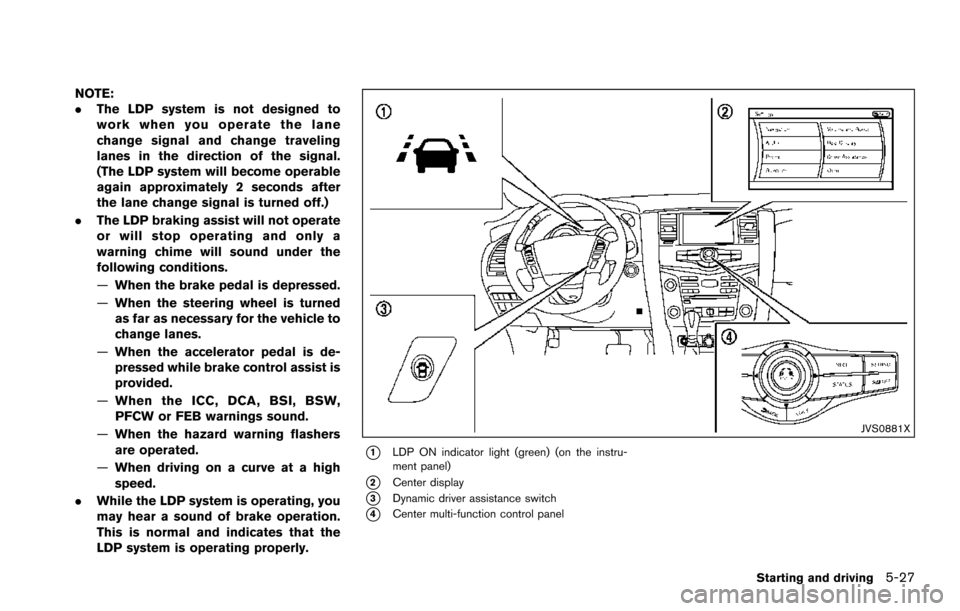
*1LDP ON indicator light (green) (on the instru-
ment panel)
*2Center display
*3Dynamic driver assistance switch
*4Center multi-function control panel
Starting and driving5-27
Page 389 of 614
5-48Starting and driving
.The radar sensors may not be able
to detect and activate BSI when
certain objects are present such as:
— Pedestrians, bicycles, animals.
— Vehicles such as motorcycles,
low height vehicles, or high
ground clearance vehicles.
— Vehicles remaining in the detec- tion zone when you accelerate
from a stop.
— Oncoming vehicles.
— A vehicle merging into an adja- cent lane at a speed approxi-
mately the same as your vehicle.
— A vehicle approaching rapidly from behind.
— A vehicle which your vehicle overtakes rapidly.
— A vehicle that passes through the detection zone quickly.
. The radar sensor’s detection zone is
designed based on a standard lane
width. When driving in a wider lane,
the radar sensors may not detect
vehicles in an adjacent lane. When
driving in a narrow lane, the radar sensors may detect vehicles driving
two lanes away.
. The radar sensors are designed to
ignore most stationary objects,
however objects such as guardrails,
walls, foliage and parked vehicles
may occasionally be detected. This
is a normal operation condition.
. The camera may not detect lane
markers in the following situations
and the BSI system may not operate
properly.
— On roads where there are multi-
ple parallel lane markers; lane
markers that are faded or not
painted clearly; yellow painted
lane markers; non-standard lane
markers; lane markers covered
with water, dirt, snow, etc.
— On roads where discontinued lane markers are still detect-
able.
— On roads where there are sharp curves.
— On roads where there are shar- ply contrasting objects, such as
shadows, snow, water, wheel
ruts, seams or lines remaining after road repairs.
— On roads where the traveling lane merges or separates.
— When the vehicle’s traveling di- rection does not align with the
lane markers.
— When traveling close to the vehicle in front of you, which
obstructs the lane camera unit
detection range.
— When rain, snow or dirt adheres to the windshield in front of a
lane camera unit.
— When the headlights are not bright due to dirt on the lens or
if aiming is not adjusted prop-
erly.
— When strong light enters a lane camera unit. (For example: light
directly shines on the front of
the vehicle at sunrise or sunset.)
— When a sudden change in brightness occurs. (For example:
when the vehicle enters or exits
a tunnel or under a bridge.)
Page 414 of 614
SSD0254
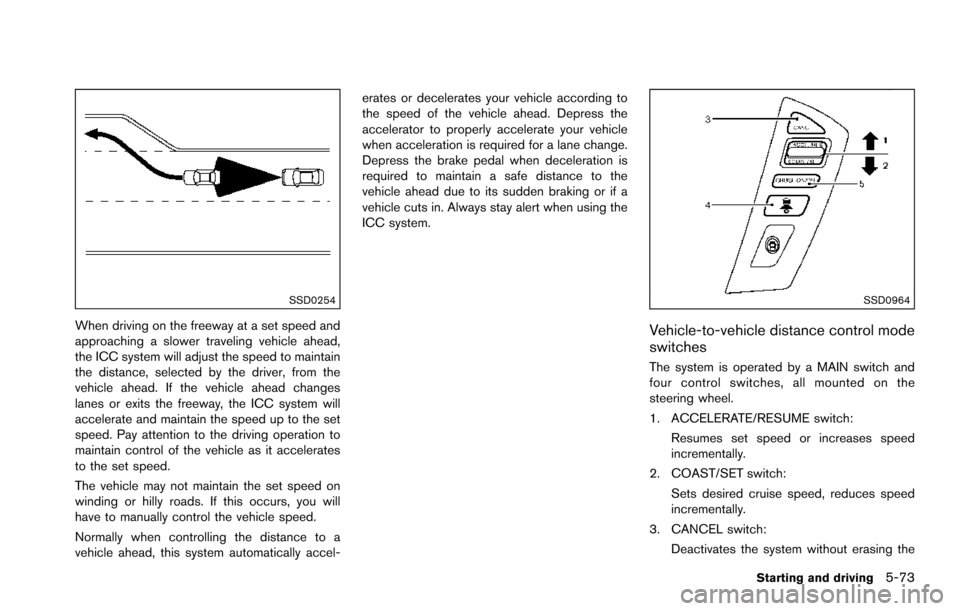
When driving on the freeway at a set speed and
approaching a slower traveling vehicle ahead,
the ICC system will adjust the speed to maintain
the distance, selected by the driver, from the
vehicle ahead. If the vehicle ahead changes
lanes or exits the freeway, the ICC system will
accelerate and maintain the speed up to the set
speed. Pay attention to the driving operation to
maintain control of the vehicle as it accelerates
to the set speed.
The vehicle may not maintain the set speed on
winding or hilly roads. If this occurs, you will
have to manually control the vehicle speed.
Normally when controlling the distance to a
vehicle ahead, this system automatically accel-erates or decelerates your vehicle according to
the speed of the vehicle ahead. Depress the
accelerator to properly accelerate your vehicle
when acceleration is required for a lane change.
Depress the brake pedal when deceleration is
required to maintain a safe distance to the
vehicle ahead due to its sudden braking or if a
vehicle cuts in. Always stay alert when using the
ICC system.
SSD0964
Vehicle-to-vehicle distance control mode
switches
The system is operated by a MAIN switch and
four control switches, all mounted on the
steering wheel.
1. ACCELERATE/RESUME switch:
Resumes set speed or increases speed
incrementally.
2. COAST/SET switch:
Sets desired cruise speed, reduces speed
incrementally.
3. CANCEL switch: Deactivates the system without erasing the
Starting and driving5-73
Page 463 of 614
5-122Starting and driving
.Recirculating the cool air in the cabinwhen the A/C is on reduces cooling load.
4. Drive at economical speeds and distances.
.Observing the speed limit and not ex- ceeding 60 MPH (97 km/h) (where
legally allowed) can improve fuel effi-
ciency due to reduced aerodynamic
drag.
.Maintaining a safe following distancebehind other vehicles reduces unneces-
sary braking.
.Safely monitoring traffic to anticipatechanges in speed permits reduced brak-
ing and smooth acceleration changes.
.Select a gear range suitable to road conditions.
5. Use cruise control.
.Using cruise control during highway driving helps maintain a steady speed.
.Cruise control is particularly effective in providing fuel savings when driving on
flat terrains.
6. Plan for the shortest route.
.Utilize a map or navigation system to determine the best route to save time.
7. Avoid idling.
.Shutting off your engine when safe for stops exceeding 30-60 seconds saves fuel and reduces emissions.
8. Buy an automated pass for toll roads.
.Automated passes permit drivers to use special lanes to maintain cruising speed
through the toll and avoid stopping and
starting.
9. Winter warm up.
.Limit idling time to minimize impact to fuel economy.
.Vehicles typically need no more than 30seconds of idling at start-up to effectively
circulate the engine oil before driving.
.Your vehicle will reach its ideal operatingtemperature more quickly while driving
versus idling.
10. Keeping your vehicle cool.
.Park your vehicle in a covered parking area or in the shade whenever possible.
.When entering a hot vehicle, opening thewindows will help to reduce the inside
temperature faster, resulting in reduced
demand on your A/C system. .
Keep your engine tuned up.
. Follow the recommended scheduled main-
tenance.
. Keep the tires inflated to the correct
pressure. Low tire pressure increases tire
wear and lowers fuel economy.
. Keep the wheels in correct alignment.
Improper alignment increases tire wear and
lowers fuel economy.
. Use the recommended viscosity engine oil.
(See “Engine oil and oil filter recommenda-
tion” (P.10-6) .)
INCREASING FUEL ECONOMY
Page 467 of 614
5-126Starting and driving
The 4WD shift switch is used to select the 4WD
mode depending on the driving conditions.
There are 3 types of drive modes available,
AUTO, 4HI and 4LO.
The 4WD shift switch electronically controls the
transfer case operation. Rotate the switch to
move between each mode, AUTO, 4H and 4L.
You must depress the 4WD shift switch to
select 4L, and the vehicle MUST be sta-
tionary and the shift lever in the N (Neutral)
position when changing into or out of 4L.
WARNING
.When parking, apply the parking
brake before stopping the engine
and make sure that the 4WD shift
indicator is on and the ATP warning
light turns off. Otherwise, the vehi-
cle could unexpectedly move even if
the automatic transmission is in the
P (Park) position.
. The 4LO and 4HI indicators must
stop blinking and the 4LO or 4HI
indicator must remain illuminated or
turn off before shifting the trans-
mission into gear. If the shift lever is
shifted from the N (Neutral) position
to any other gear while the 4LO and 4HI indicators are blinking alter-
nately, the vehicle may move unex-
pectedly.
CAUTION
.
Never shift the 4WD shift switch
between 4L and 4H while driving.
. The 4HI position provides greater
traction. Avoid excessive speed, as
it will cause increased fuel con-
sumption and higher oil tempera-
tures, and could damage drivetrain
component. Speeds over 62 MPH
(100 km/h) in 4HI is not recom-
mended.
. The 4LO position provides maxi-
mum traction. Avoid raising vehicle
speed excessively, as the maximum
speed is approximately 31 MPH (50
km/h) .
. When driving straight, shift the 4WD
shift switch to the AUTO or 4H
position. Do not move the 4WD shift
switch when making a turn or rever-
sing. .
Do not shift the 4WD shift switch
(between AUTO and 4H) while driv-
ing on steep downhill grades. Use
the engine brake and low automatic
transmission gears for engine brak-
ing.
. Do not operate the 4WD shift switch
(between AUTO and 4H) with the
rear wheels spinning.
. Do not drive on dry hard surface
roads in the 4HI or 4LO position.
Driving on dry hard surfaces in 4HI
or 4LO may cause unnecessary
noise and tire wear. NISSAN recom-
mends driving in the AUTO position
under these conditions.
. The 4WD transfer case may not be
shifted between 4HI and 4LO at low
ambient temperatures and the 4LO
and 4HI indicators may blink even
when the 4WD shift switch is
shifted. After driving for a while
you can change the 4WD shift
switch between 4H and 4L.