2017 MITSUBISHI OUTLANDER SPORT ignition
[x] Cancel search: ignitionPage 199 of 399
Electric rear window defogger switch 5-136 Features and controls
5
N00523700373
The rear window defogger can be used when the engine is running.
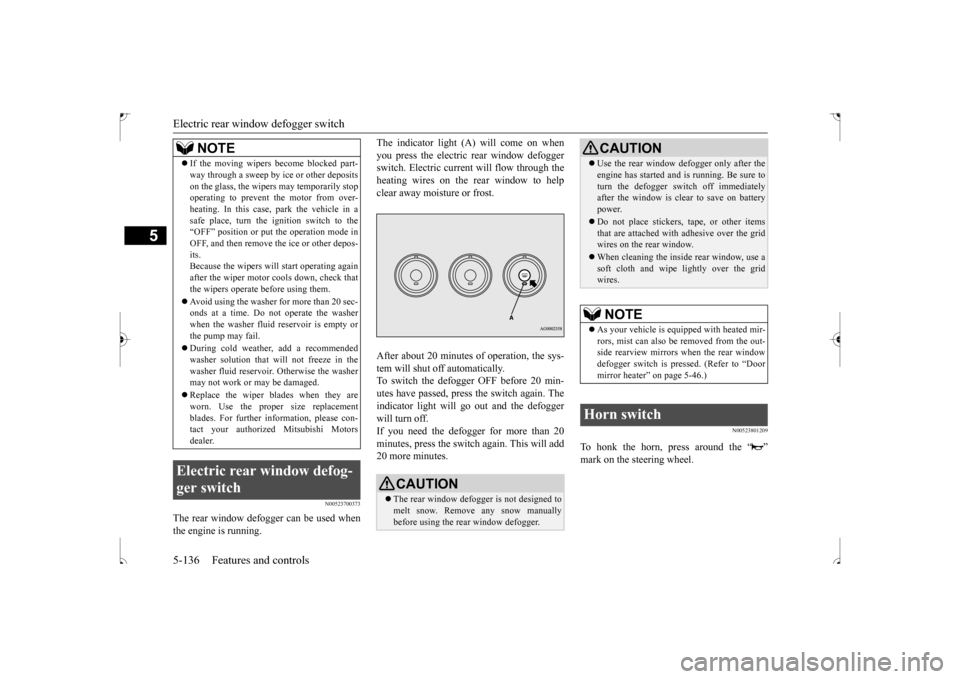
The indicator light (A) will come on when you press the electric rear window defogger switch. Electric current will flow through the heating wires on the rear window to helpclear away moisture or frost. After about 20 minutes of operation, the sys- tem will shut off automatically.To switch the defogger OFF before 20 min-utes have passed, press the switch again. The indicator light will go out and the defogger will turn off.If you need the defogger for more than 20 minutes, press the switch again. This will add 20 more minutes.
N00523801209
To honk the horn, press around the “ ”mark on the steering wheel.
If the moving wipers become blocked part- way through a sweep by ice or other deposits on the glass, the wipers may temporarily stop operating to prevent the motor from over- heating. In this case, park the vehicle in asafe place, turn the ignition switch to the “OFF” position or put the operation mode in OFF, and then remove the ice or other depos-its. Because the wipers will start operating again after the wiper motor cools down, check thatthe wipers operate before using them. Avoid using the washer for more than 20 sec- onds at a time. Do not operate the washer when the washer fluid reservoir is empty or the pump may fail. During cold weather, add a recommended washer solution that will not freeze in thewasher fluid reservoir. Otherwise the washer may not work or may be damaged. Replace the wiper blades when they are worn. Use the proper size replacement blades. For further information, please con-tact your authorized Mitsubishi Motors dealer.
Electric rear window defog- ger switch
NOTE
CAUTION The rear window defogger is not designed to melt snow. Remove any snow manually before using the rear window defogger.
Use the rear window defogger only after the engine has started and is running. Be sure to turn the defogger switch off immediately after the window is clear to save on battery power. Do not place stickers, tape, or other items that are attached with adhesive over the gridwires on the rear window. When cleaning the inside rear window, use a soft cloth and wipe lightly over the grid wires.NOTE
As your vehicle is equipped with heated mir- rors, mist can also be removed from the out-side rearview mirrors when the rear window defogger switch is pressed. (Refer to “Door mirror heater” on page 5-46.)
Horn switch
CAUTION
BK0239500US.book
136 ページ 2016年5月13日 金曜日 午前8時53分
Page 200 of 399
Link System (if so equipped) Features and controls 5-137
5
N00563701141
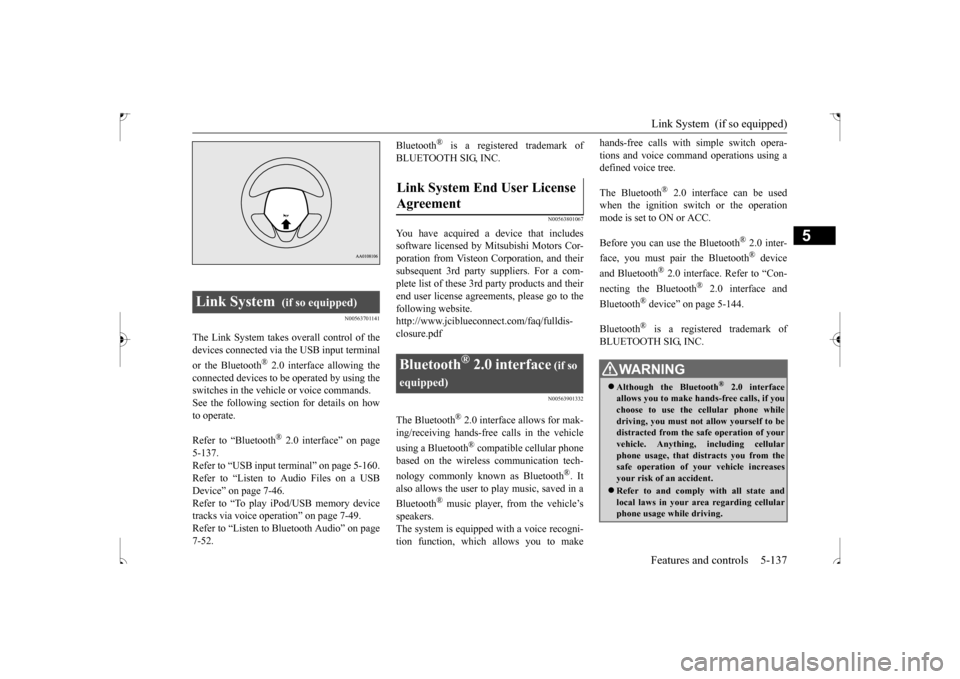
The Link System takes overall control of the devices connected via the USB input terminal or the Bluetooth
® 2.0 interface allowing the
connected devices to be operated by using theswitches in the vehicle or voice commands.See the following section for details on how to operate. Refer to “Bluetooth
® 2.0 interface” on page
5-137.Refer to “USB input terminal” on page 5-160. Refer to “Listen to Audio Files on a USB Device” on page 7-46.Refer to “To play iPod/USB memory device tracks via voice operation” on page 7-49. Refer to “Listen to Bluetooth Audio” on page7-52.
Bluetooth
® is a registered trademark of
BLUETOOTH SIG, INC.
N00563801067
You have acquired a device that includes software licensed by Mitsubishi Motors Cor- poration from Visteon Corporation, and theirsubsequent 3rd party suppliers. For a com-plete list of these 3rd party products and their end user license agreements, please go to the following website.http://www.jciblueconnect.com/faq/fulldis- closure.pdf
N00563901332
The Bluetooth
® 2.0 interface allows for mak-
ing/receiving hands-free calls in the vehicle using a Bluetooth
® compatible cellular phone
based on the wireless communication tech- nology commonly known as Bluetooth
®. It
also allows the user to
play music, saved in a
Bluetooth
® music player, from the vehicle’s
speakers.The system is equipped with a voice recogni- tion function, which allows you to make
hands-free calls with simple switch opera- tions and voice command operations using a defined voice tree. The Bluetooth
® 2.0 interface can be used
when the ignition switch or the operationmode is set to ON or ACC. Before you can use the Bluetooth
® 2.0 inter-
face, you must pair the Bluetooth
® device
and Bluetooth
® 2.0 interface. Refer to “Con-
necting the Bluetooth
® 2.0 interface and
Bluetooth
® device” on page 5-144.
Bluetooth
® is a registered trademark of
BLUETOOTH SIG, INC.
Link System
(if so equipped)
Link System End User License Agreement
Bluetooth
® 2.0 interface
(if so
equipped)
WA R N I N G Although the Bluetooth
® 2.0 interface
allows you to make hands-free calls, if you choose to use the cellular phone while driving, you must not allow yourself to bedistracted from the safe operation of your vehicle. Anything, including cellular phone usage, that distracts you from thesafe operation of your vehicle increases your risk of an accident. Refer to and comply with all state and local laws in your area regarding cellular phone usage while driving.
BK0239500US.book
137 ページ 2016年5月13日 金曜日 午前8時53分
Page 201 of 399
Bluetooth® 2.0 interface (if so equipped) 5-138 Features and controls
5
Steering control switch and microphone
P.5-138 Voice recognition function
P.5-140
Useful voice commands
P.5-140
Speaker enrollment function
P.5-142
Connecting the Bluetooth
® 2.0 interface and
the Bluetooth
® device
P.5-144
Operating a music player connected via Blue- tooth
® P.5-150
How to make or receive hands-free calls
P.5-150 Phonebook function
P.5-153
N00564001167
Press this button to increase the volume.
NOTE
If the ignition switch or the operation mode is left in ACC, the accessory power will automatically turn off after a certain period of time and you will no longer be able to use the Bluetooth
® 2.0 interface. The accessory
power comes on again if the ignition switch or the engine switch is operated. Refer to “ACC power auto-cutout function” on page5-47. The Bluetooth
® 2.0 interface cannot be used
if the Bluetooth
® device has a dead battery
or the device power is turned off. Hands-free calls will not be possible if your phone does not have service available. If you place the Bluetooth
® device in the
luggage compartment, you may not be able to use the Bluetooth
® 2.0 interface.
Some Bluetooth
® devices are not compatible
with the Bluetooth
® 2.0 interface.
You can confirm the Link System software version by pressing the HANG-UP button 3times (press and hold 2 times and then press briefly) within 10 seconds.
For details of the Bluetooth
® 2.0 interface,
refer to the following web site:[For vehicles sold in U.S.A.] You can see to access the Mitsubishi Motors North America website.[For vehicles sold in Canada and MEXICO] You can see to access via the Mitsubishi Motors website.Please read and agree to the “Warning about Links to the Web Sites of Other Companies”. The websites mentioned above may connectyou to websites other
than the Mitsubishi
Motors website. http://www.mitsubishi-motors.com/en/prod-ucts/index.html Software updates by cellular phone/digital audio device manufacturers may change/alter device connectivity.NOTE
Steering control switch and microphone
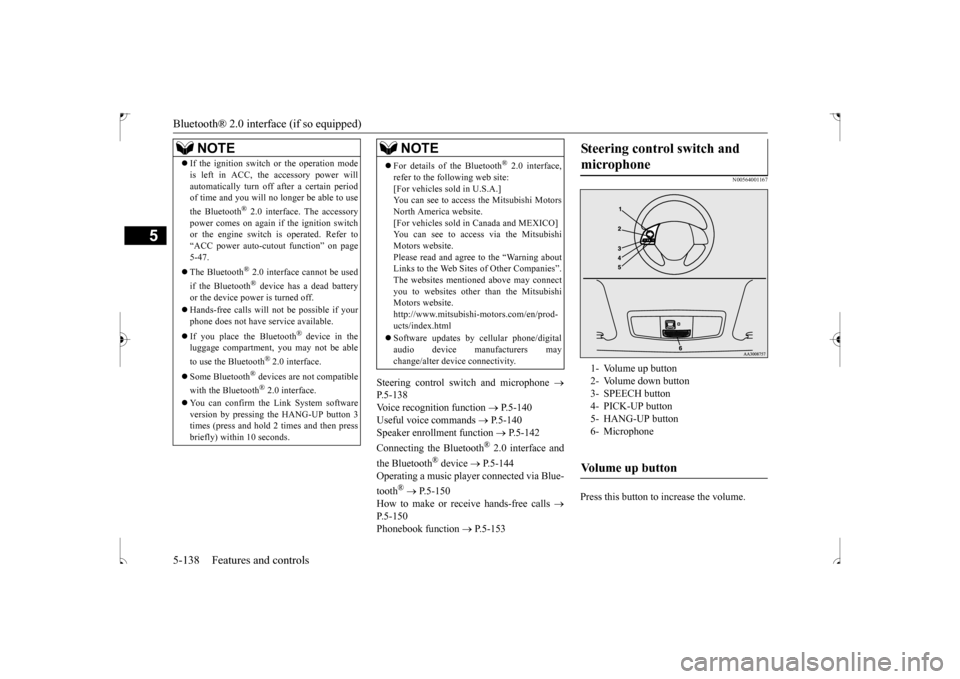
1- Volume up button 2- Volume down button3- SPEECH button 4- PICK-UP button 5- HANG-UP button6- MicrophoneVolume up button
BK0239500US.book
138 ページ 2016年5月13日 金曜日 午前8時53分
Page 204 of 399

Bluetooth® 2.0 interface (if so equipped)
Features and controls 5-141
5
N00564401057
There are 2 cancel functions. If you are at the main menu, say “Cancel” to exit from the Bluetooth
® 2.0 interface.
If you are anywhere else within the system, say “Cancel” to return to the main menu.
N00564501045
The Bluetooth
® 2.0 interface is equipped
with a confirmation function. With the confirmation function activated, you are given more opportunities than normal toconfirm a command when making various settings to the Bluetooth
® 2.0 interface. This
allows you to decrease the possibility that asetting is accidentally changed. The confirmation function can be turned on or off by following the steps below. 1. Press the SPEECH button (except for vehicles with Mitsubishi Multi-Commu- nication System) or PICK-UP button (for vehicles with Mitsubishi Multi-Commu-nication System).
2. Say “Setup.” 3. Say “Confirmation prompts.” 4. The voice guide will say “Confirmation prompts are
N00564601150
It is possible to use a passcode as a security function by setting a passcode of your choice for the Bluetooth
® 2.0 interface.
When the security function is turned on, it is necessary to make a voice input of a 4-digit passcode in order to use all functions of the Bluetooth
® 2.0 interface, except when receiv-
ing calls. Use the following procedure to turn on the security function by setting a passcode. 1. Press the SPEECH button (except for vehicles with Mits
ubishi Multi-Commu-
nication System) or PICK-UP button (forvehicles with Mits
ubishi Multi-Commu-
nication System).
2. Say “Setup.” 3. Say “Passcode.” 4. The voice guide will say “Passcode is dis- abled. Would you like to enable it?”Answer “Yes.” Answer “No” to cancel the setting of the passcode and return to the main menu. 5. The voice guide will say “Please say a 4- digit passcode. Remember this passcode. It will be required to use this system.” Say a 4-digit number which you want toset as a passcode. 6. For confirmation purposes, the voice guide will say “Passcode <4-digit pass-code>. Is this correct?” Answer “Yes.” Answer “No” to return to the passcode input in Step 5. 7. When the registration of the passcode is completed, the voice guide will say “Pass- code is enabled” and the system willreturn to the main menu.
Canceling
NOTE
You can return to the previous menu by say- ing “Go Back.” (if so equipped)
Confirmation function setting
Security function
Setting the passcode
NOTE
Passcode will be required to access the sys- tem after the next ignition cycle.
BK0239500US.book
141 ページ 2016年5月13日 金曜日 午前8時53分
Page 205 of 399

Bluetooth® 2.0 interface (if so equipped) 5-142 Features and controls
5
If a passcode has been set and the security function is enabled, the voice guide will say “Hands-free system is locked. State the pass- code to continue” when the SPEECH button(except for vehicles with Mitsubishi Multi- Communication System) or PICK-UP button (for vehicles with Mi
tsubishi Multi-Commu-
nication System) is pressed to enter voice rec- ognition mode. Say the 4-digit passcode number to enter the passcode. If the entered passcode is wrong, the voice guide will say “<4-digit passcode>, Incorrect passcode. Please try again.” Enter the correctpasscode.
Use the following procedure to turn off the security function by disabling the passcode. 1. Press the SPEECH button (except for vehicles with Mitsubishi Multi-Commu-nication System) or PICK-UP button (for vehicles with Mitsubishi Multi-Commu- nication System).2. Say “Setup.” 3. Say “Passcode.” 4. The voice guide will say “Passcode isenabled. Would you like to disable it?” Answer “Yes.” Answer “No” to cancel the disabling ofthe passcode and return to the main menu. 5. When the disabling of the passcode is completed, the voice guide will say “Pass-code is disabled” and the system will return to the main menu.
N00564701021
The Bluetooth
® 2.0 interface can use the
speaker enrollment function to create a voicemodel for one person per language. This makes it easier for the Bluetooth
® 2.0
interface to recognize voice commands saidby you. You can turn a voice model registered with the speaker enrollment function on and offwhenever you want.
N00564801123
It takes about 2 to 3 minutes to complete thespeaker enrollment process.To ensure the best results, run through the process while in the driver’s seat, in an envi- ronment that is as quiet as possible (whenthere is no rain or strong winds and the vehi- cle windows are closed). Please turn off your phone while in speaker enrollment to preventinterruption of the process. Use the following procedure for speaker enrollment.
It is required for a little time after engine stop that the entered passcode is actually recorded in the system. If the ignition switch or the operation mode is made to ACC or ON or the engine isstarted immediately after engine stop, there is a case when the entered passcode is not recorded in the system. At this time, pleasetry to enter the passcode again.
Entering the passcode
NOTE
You can reenter the passcode as many times as you want. NOTE
If you have forgotten your passcode, say “Cancel” to quit the voice input mode and then check with an authorized Mitsubishi Motors dealer.
Disabling the passcode
NOTE
System must be unlocked to disable the pass- code.NOTE
Speaker enrollment function
Speaker enrollment
BK0239500US.book
142 ページ 2016年5月13日 金曜日 午前8時53分
Page 215 of 399

Bluetooth® 2.0 interface (if so equipped) 5-152 Features and controls
5
5. If only 1 telephone number is registered under the name you just said, the voice guide will proceed to Step 6. If 2 or more telephone numbers are regis-tered that match the name you just said, the voice guide will say “Would you like to call
6. The voice guide will say “Calling
You can redial the last number called, based on the history of dialed calls in the paired cel- lular phone.Use the following procedure to redial. 1. Press the SPEECH button (except for vehicles with Mitsubishi Multi-Commu- nication System) or PICK-UP button (forvehicles with Mitsubishi Multi-Commu- nication System). 2. Say “Redial.”
N00565700018
During a call, press the SPEECH button toenter voice recognition mode, then say
“
N00565801058
If an incoming phone call is received whilethe ignition switch is in the “ACC” or “ON”position, the audio system will be automati- cally turned on and switched to the incoming call, even when the audio system was origi-nally off. The voice guide announcement for the incoming call will be emitted from the frontpassenger’s seat speaker. If the CD player or radio was playing when the incoming call was received, the audio sys-tem will mute the sound from the CD player or radio and emit only the incoming call. To receive the call, press the PICK-UP buttonon the steering wheel control switch. When the call is over,
the audio system will
return to its previous state.
NOTE
If the name you selected has matching data in the vehicle phonebook but no telephone number is registered under the selected loca-tion, the voice guide will say “{home/work/mobile/other} not found for
NOTE
When the confirmation function is on, the system will check if the name and location of the receiver are correct. If the name is cor-rect, answer “Yes.” To change the name or location to call, answer “No.” The system will return to Step3.
RedialingSend function
Receiving calls
BK0239500US.book
152 ページ 2016年5月13日 金曜日 午前8時53分
Page 223 of 399
USB input terminal (if so equipped) 5-160 Features and controls
5
The term “IC:” before the radio certification number only signifies that Industry Canada technical specifications were met.The antenna used for this transmitter must notbe co-located or operating in conjunction with any other antenna or transmitter. End- users and installers must be provided withinstallation instructio
ns and transmitter oper-
ating conditions for satisfying RF exposure compliance.FCC Notice: This equipment has been tested and found to comply with the limits for a Class B digital device, pursuant to part 15 ofthe FCC Rules. These limits are designed to provide reasonable protection against harmful interference in a residential installation.This equipment generates, uses and can radi- ate radio frequency energy and, if not installed and used in accordance with theinstructions, may cause harmful interference to radio communications. However, there is no guarantee that interfer-ence will not occur in a particular installation. If this equipment does cause harmful interfer- ence to radio or television reception, whichcan be determined by turning the equipment
off and on, the user is encouraged to try to correct the interference by one or more of the following measures: Reorient or relocate the receiving antenna. Increase the separation between the equipment and receiver. Connect the equipment into an outlet on a circuit different from that to which thereceiver is connected. Consult the dealer or an experienced radio/TV technician for help.
ICES Notice: This Class B digital apparatus complies with Canadian ICES-003.
N00566401123
N00566701139
You can connect your USB memory device or iPod
* to play music files stored in the USB
memory device or iPod. This section explains how to connect andremove a USB memory device or iPod. See the following section for details on how to play music files. Refer to “Listen to an iPod” on page 7-44. Refer to “Listen to Audio Files on a USBDevice” on page 7-46. Refer to “To play iPod/USB memory device tracks via voice operation” on page 7-49. * : “iPod” is a registered trademark of Apple Inc. in the United States and other countries.
N00566800090
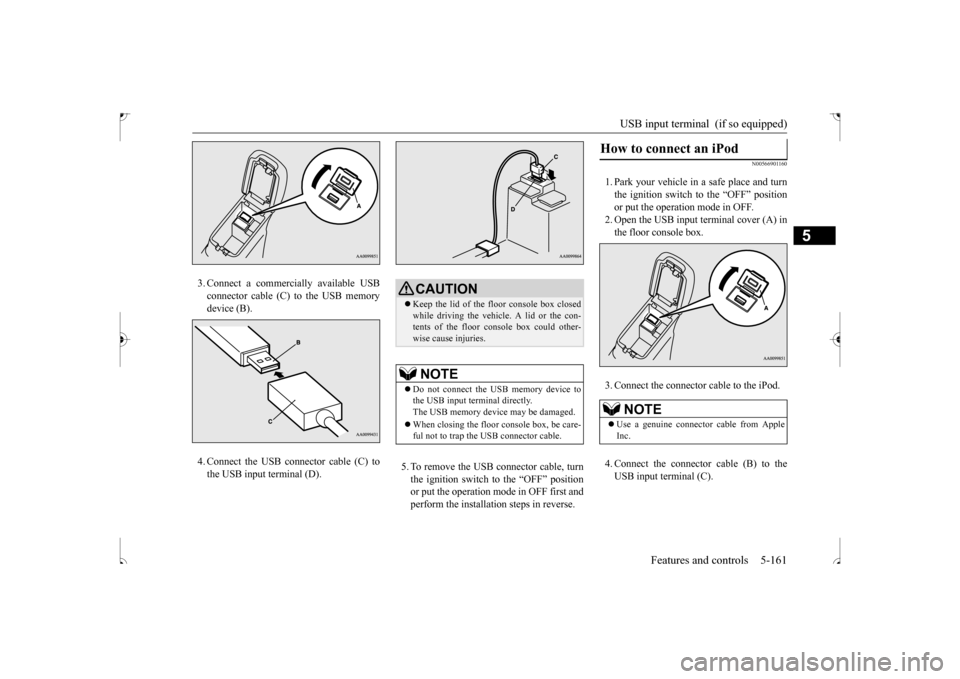
1. Park your vehicle in a safe place and turnthe ignition switch to the “OFF” positionor put the operation mode in OFF. 2. Open the USB input terminal cover (A) in the floor console box.
CAUTION Changes or modifications made to this equipment not expressly approved by the manufacturer may void the FCC authoriza- tion to operate this equipment.
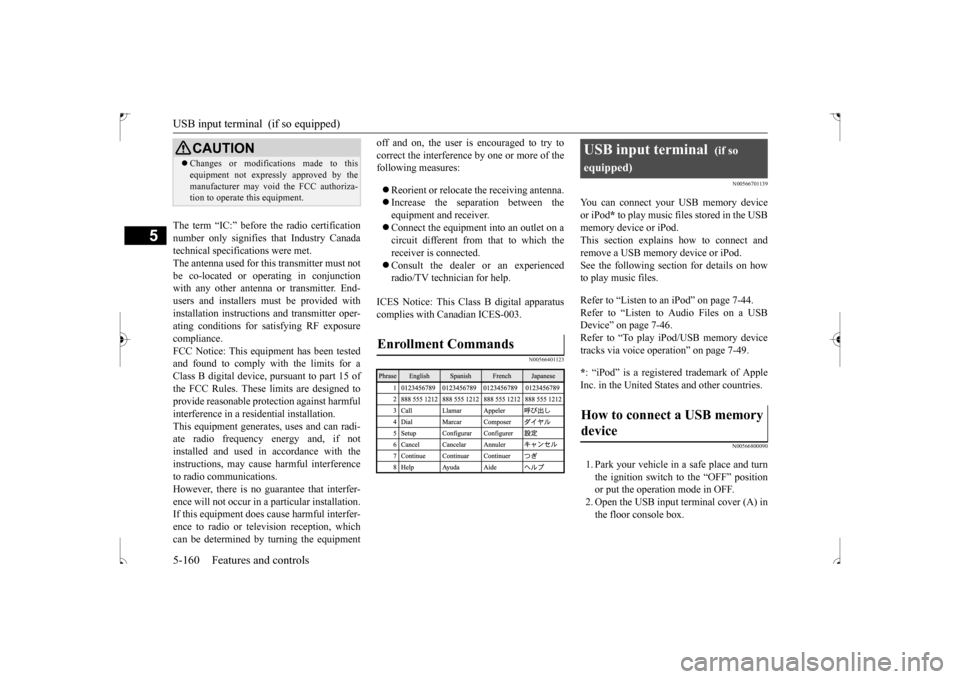
Enrollment Commands
USB input terminal
(if so
equipped)How to connect a USB memory device
BK0239500US.book
160 ページ 2016年5月13日 金曜日 午前8時53分
Page 224 of 399
USB input terminal (if so equipped)
Features and controls 5-161
5
3. Connect a commercially available USB connector cable (C)
to the USB memory
device (B). 4. Connect the USB connector cable (C) to the USB input terminal (D).
5. To remove the USB connector cable, turn the ignition switch to the “OFF” position or put the operation mode in OFF first and perform the installation steps in reverse.
N00566901160
1. Park your vehicle in a safe place and turnthe ignition switch to the “OFF” position or put the operation mode in OFF. 2. Open the USB input terminal cover (A) inthe floor console box. 3. Connect the connector cable to the iPod. 4. Connect the connector cable (B) to the USB input terminal (C).
CAUTION Keep the lid of the floor console box closed while driving the vehicle. A lid or the con- tents of the floor console box could other-wise cause injuries.NOTE
Do not connect the USB memory device to the USB input terminal directly.The USB memory device may be damaged. When closing the floor console box, be care- ful not to trap the USB connector cable.
How to connect an iPod
NOTE
Use a genuine connector cable from Apple Inc.
BK0239500US.book
161 ページ 2016年5月13日 金曜日 午前8時53分