2017 MITSUBISHI OUTLANDER SPORT ignition
[x] Cancel search: ignitionPage 261 of 399

Manual air conditioning-T
ype 1 (if so equipped)
7-4 Comfort controls
7
N00730301370
N00730500258 N00736500175
When the ignition switch or the operation mode is in ON, select the blower speed by turning the blower speed selection dial.Turning the dial clockwise will increase the blower speed; turning the dial counterclock- wise will decrease it. When the dial is set tothe “OFF” position, all fan-driven airflow will stop.
N00736600222
Turn the temperature control dial clockwise to make the air warmer. Turn it counterclock-wise to make the air cooler.
Manual air conditioning- Ty p e 1
(if so equipped)
CAUTION The engine speed may increase when the air conditioning is operating.With an increased engine speed, a continu- ously variable transmission (CVT) vehicle will creep to a greater degree than with alower engine speed. Fully depress the brake pedal to prevent the vehicle from creeping.
Control panel
A- Temperature control dial B- Air selection switch C- Blower speed selection dialD- Air conditioning switch E- Mode selection dial F-
Electric rear window defogger switch
P.5-136
Blower speed selection dial
Temperature control dial
BK0239500US.bo
ok 4 ページ 2016年5月13日 金曜日 午前8時53分
Page 267 of 399
Manual air conditioning-T
ype 2 (if so equipped)
7-10 Comfort controls
7
N00736500188
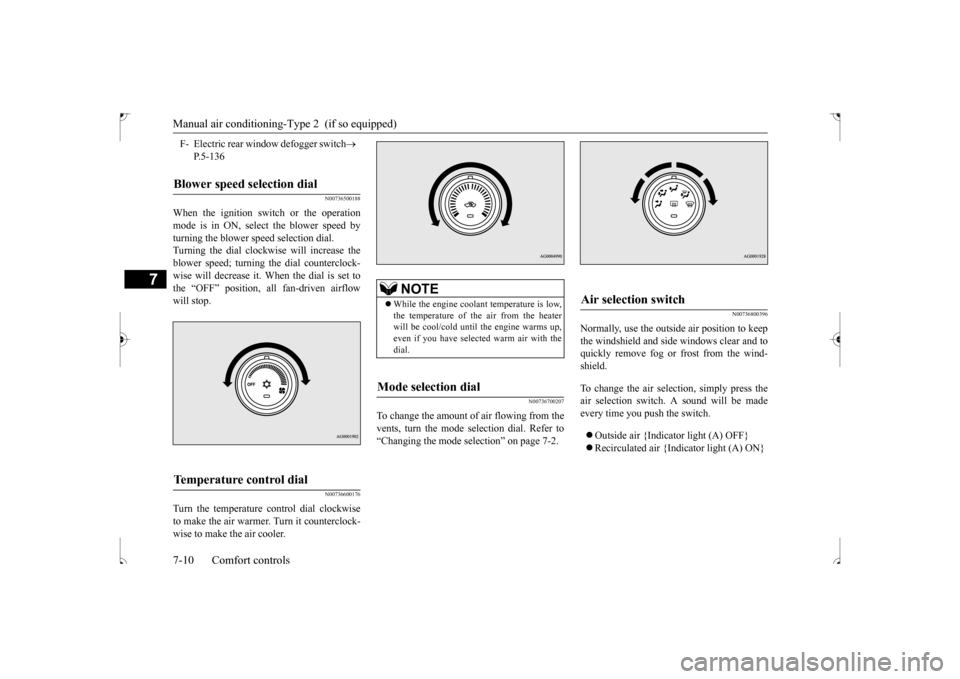
When the ignition switch or the operation mode is in ON, select the blower speed by turning the blower speed selection dial. Turning the dial clockwise will increase theblower speed; turning the dial counterclock-wise will decrease it. When the dial is set to the “OFF” position, all fan-driven airflow will stop.
N00736600176
Turn the temperature control dial clockwiseto make the air warmer. Turn it counterclock-wise to make the air cooler.
N00736700207
To change the amount of
air flowing from the
vents, turn the mode selection dial. Refer to “Changing the mode selection” on page 7-2.
N00736800396
Normally, use the outside air position to keepthe windshield and side windows clear and toquickly remove fog or frost from the wind- shield. To change the air selection, simply press the air selection switch. A sound will be made every time you push the switch. Outside air {Indicator light (A) OFF} Recirculated air {Indicator light (A) ON}
F- Electric rear window defogger switch
P.5-136
Blower speed selection dial
Temperature control dial
NOTE
While the engine coolant temperature is low, the temperature of the air from the heater will be cool/cold until the engine warms up,even if you have selected warm air with the dial.
Mode selection dial
Air selection switch
BK0239500US.bo
ok 10 ページ 2016年5月13日 金曜日 午前8時53分
Page 272 of 399
Automatic air conditioning-Type1 (if so equipped)
Comfort controls 7-15
7
N00736900153
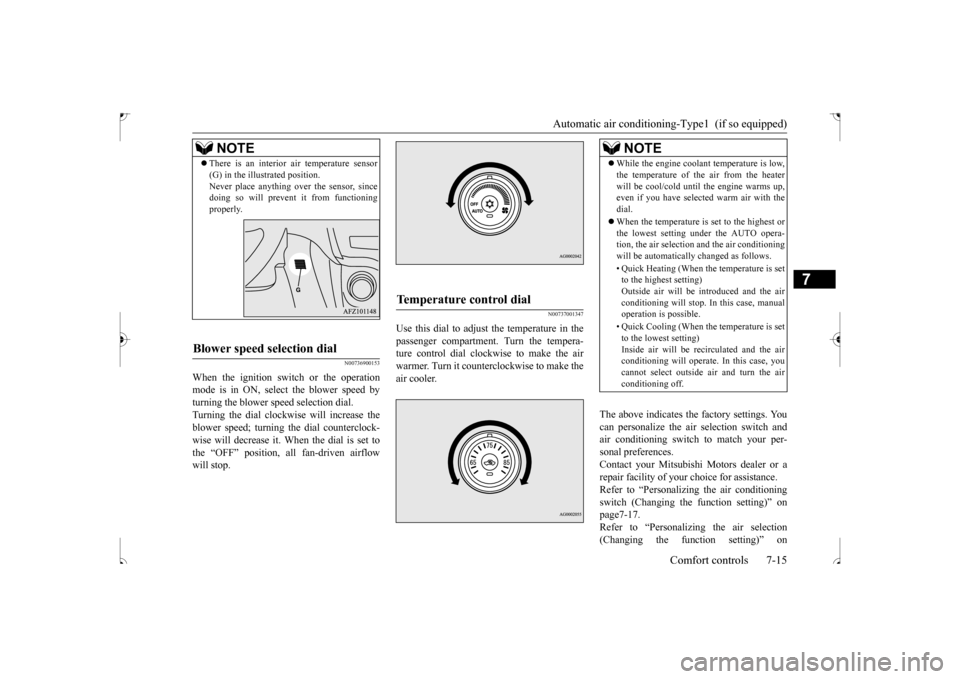
When the ignition switch or the operation mode is in ON, select the blower speed by turning the blower speed selection dial.Turning the dial clockwise will increase the blower speed; turning the dial counterclock- wise will decrease it. When the dial is set tothe “OFF” position, all fan-driven airflow will stop.
N00737001347
Use this dial to adjust the temperature in the passenger compartment. Turn the tempera-ture control dial clockwise to make the air warmer. Turn it counterclockwise to make the air cooler.
The above indicates the factory settings. You can personalize the air selection switch and air conditioning switch to match your per-sonal preferences. Contact your Mitsubishi Motors dealer or a repair facility of your choice for assistance.Refer to “Personalizing the air conditioning switch (Changing the function setting)” on page7-17.Refer to “Personalizing the air selection (Changing the function setting)” on
NOTE
There is an interior air temperature sensor (G) in the illustrated position. Never place anything over the sensor, since doing so will prevent it from functioning properly.
Blower speed selection dial
Temperature control dial
NOTE
While the engine coolant temperature is low, the temperature of the air from the heater will be cool/cold until the engine warms up, even if you have selected warm air with the dial. When the temperature is set to the highest or the lowest setting under the AUTO opera-tion, the air selection and the air conditioning will be automatically changed as follows. • Quick Heating (When the temperature is set to the highest setting) Outside air will be introduced and the airconditioning will stop. In this case, manual operation is possible. • Quick Cooling (When the temperature is set to the lowest setting) Inside air will be recirculated and the airconditioning will operate. In this case, you cannot select outside air and turn the air conditioning off.
BK0239500US.bo
ok 15 ページ 2016年5月13日 金曜日 午前8時53分
Page 277 of 399
Automatic air conditioning
-Type2 (if so equipped)
7-20 Comfort controls
7
N00711801611
N00736900166
When the ignition switch or the operation mode is in ON, select the blower speed by turning the blower speed selection dial.Turning the dial clockwise will increase the blower speed; turning the dial counterclock- wise will decrease it. When the dial is set tothe “OFF” position, all fan-driven airflow will stop.
N00737000308
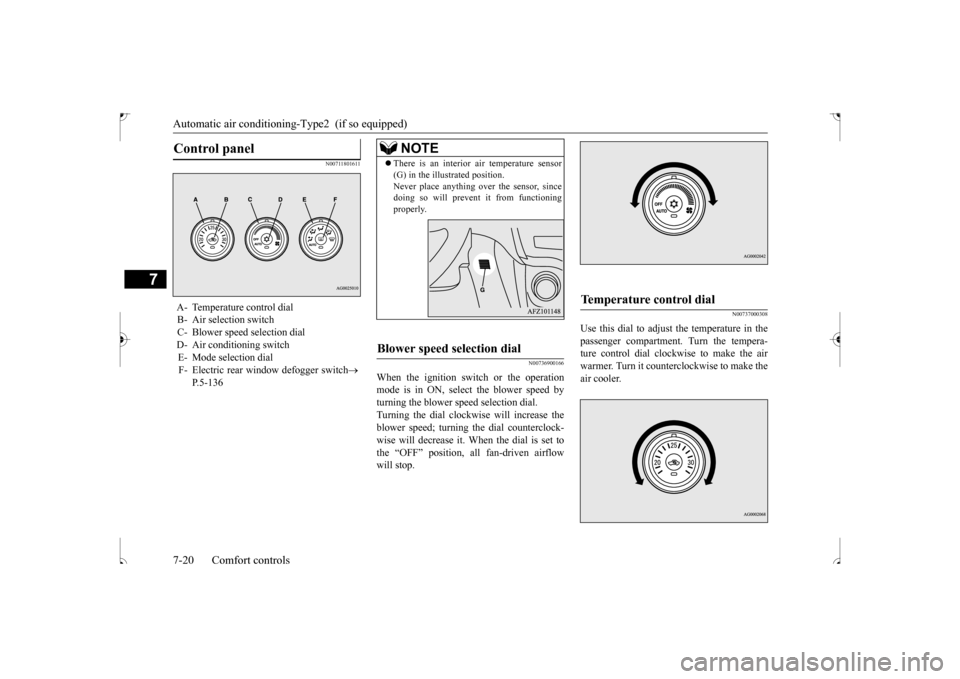
Use this dial to adjust the temperature in the passenger compartment. Turn the tempera-ture control dial clockwise to make the air warmer. Turn it counterclockwise to make the air cooler.
Control panel
A- Temperature control dial B- Air selection switch C- Blower speed selection dialD- Air conditioning switch E- Mode selection dial F- Electric rear window defogger switch
P.5-136
NOTE
There is an interior air temperature sensor (G) in the illustrated position. Never place anything over the sensor, since doing so will prevent it from functioning properly.
Blower speed selection dial
Temperature control dial
BK0239500US.bo
ok 20 ページ 2016年5月13日 金曜日 午前8時53分
Page 282 of 399
Air purifier
Comfort controls 7-25
7
3. When running the air conditioning, make sure the air intake, which is located in front of the windshield, is free of obstruc- tions such as leaves. Leaves collected inthe air-intake chamber may reduce air flow and plug the water drains.
If the air conditioning seems less effective than usual, the cause might be a refrigerantleak. Have the system inspected by your authorized Mitsubishi Motors dealer or a repair facilityof your choice.
The air conditioning should be operated for at least five minutes each week, even in coldweather. This includes the quick defrosting mode. Operating the air condition system weekly maintains lubrication of the compres-sor internal parts to keep the air conditioning in the best operating condition.
N00733800151
The air conditioning system is equipped withan air filter to remove pollen and dust.
The air filter’s ability to collect pollen and dirt is reduced as it becomes dirty, so replace it periodically. For the maintenance interval, refer to the “WARRANTY AND MAINTE-NANCE MANUAL”.
N00734302115
The audio system can only be used when the ignition switch or the operation mode is in ON or ACC.
Air conditioning system refrig- erant and lubricant recommen-dations
CAUTION The air conditioning system in your vehicle must be charged with the refrigerant HFC- 134a and the lubricant SUN-PAG56. Use of any other refrigerant or lubricant will cause severe damage and may require replac-ing your vehicle’s entire air conditioning system. The release of refrigerant into the atmo-sphere is not recommended. The new refrigerant HFC-134a in your vehi- cle is designed not to harm the earth’s ozonelayer. However, it may contribute slightly to global warming. It is recommended that the old refrigerant besaved and recycled for future use.
During a long period of disuse Air purifier
NOTE
Operation in certain conditions such as driv- ing on a dusty road and frequent use of the air conditioning can lead to reduction of ser-vice life of the filter.
When you feel that the
air flow is lower than normal or when the windshield or windows start to fog up easily,replace the air filter. Contact your Mitsubishi Motors dealer or a repair facility of your choice for assistance.
AM/FM radio/CD player
(if
so equipped)
BK0239500US.bo
ok 25 ページ 2016年5月13日 金曜日 午前8時53分
Page 283 of 399
AM/FM radio/CD player (if so equipped) 7-26 Comfort controls
7
N00715000021
This product supports audio playback from iPod/iPhone devices, however dif- fering versions mean that playback cannot be guaranteed. Please be aware that depending on the iPod/iPhone model or version, operation may differ.
N00715200023
If the product becomes dirty, wipe with a soft cloth. If very dirty, use a soft cloth dipped in neutral detergent diluted in water, and then wrung out. Do not use benzene, thin-ners, or other chemical wipes. This may harm the surface.
N00715300082
Product names and other proper names are the trademarks or registered trade-marks of their respective owners. Furthermore, even if there is no specific denotation of trademarks or registeredtrademarks, these are to be observed in their entirety. “Made for iPod”, “Made for iPhone” mean that an electronic accessory has been designed to connect specifically to iPod or iPhone, respectively, and has beencertified by the developer to meet Appleperformance standards. iPhone, iPod, iPod classic, iPod nano, and iPod touch are trademarks of Apple Inc.,registered in the U.S. and other countries. Apple is not responsib
le for the operation
of this device or its compliance withsafety and regulatory standards.
NOTE
To listen to the audio system while the engine is not running, turn the ignition switch to the “ACC” position or put the oper- ation mode in ACC. If the ignition switch or the operation modeis left in ACC, the accessory power will automatically turn off after a certain period of time and you will no longer be able to usethe audio system. The accessory power comes on again if the ignition switch or the engine switch is operated with it in the“ACC” position. Refer to “ACC power auto- cutout function” on page 5-18 and 5-47. If a cellular phone is used inside the vehicle, it may create noise in the audio equipment. This does not mean that anything is wrongwith your audio equipment. In such a case, use the cellular phone at a place as far away as possible from the audio equipment. If foreign objects or water get into the audio equipment, or if sm
oke or a strange odor
comes from it, immediately turn off the audio system and have it checked at an authorized Mitsubishi Motors dealer or arepair facility of your choice. Never try to repair it yourself. Avoid using the audio sys- tem until it is inspected by a qualified per- son. If the audio system is damaged by foreign objects, water, or fire, have the system checked by a qualified Mitsubishi Motorstechnician.
The audio amplifier (if so equipped) is located under the front right seat. Do not subject the amplifier to a strong impact. It could damage the amplifier or malfunc-tioning could result.
Important Points on Usage
iPod/iPhone Playback Function
(if
so equipped)How to Clean
NOTE
Trademarks
NOTE
iPod and iTunes licensing allows individual users to privately reproduce and play back non- copyrighted material as well as material that may be legally copied and reproduced.Infringement of copyright is prohibited.
BK0239500US.bo
ok 26 ページ 2016年5月13日 金曜日 午前8時53分
Page 303 of 399
Listen to Audio Files on a USB Device 7-46 Comfort controls
7
Play back the album in a random order (tracks in any order on the album). Search categories or track names, and select a track. 1. Turn the /SEL key to select the cate- gory. 2. Press the /SEL key. Categories or tracks within the selected category aredisplayed. 3. Turn the /SEL key to select the cate- gory or track. 4. Press the /SEL key. Repeat steps 1 to 4, and search for tracks. Select the track, and press the /SEL key to play.
N00717400087
By connecting commercially-available USB devices such as USB memory to this product,you can play back audio files through the product.
NOTE
Pressing again will cancel.
Search Tracks
NOTE
While the category (1st level) is selected, press the 6 key to cancel track search mode.
If there is no operation for 10 seconds after selecting the category, then track search mode will be cancelled. Select the category, and hold down the
/SEL key to start playback from the first
track in that category. While the track is selected, press the 6 key to return to the previous operation. While the track is selected, hold down the 6 key to cancel track search mode. If there is no operation for five seconds after selecting the track, that file is played back. iPod operations such as selecting a track will cancel track search mode.
Listen to Audio Files on a USB Device
CAUTION Do not leave the USB device unattended in the vehicle. Never hold these devices in your hand to operate while driving, as this is dangerous.NOTE
Do not use hard discs, card readers, or mem- ory readers, as damage may occur to these or to the data contained therein. If these are erroneously connected, then turn the ignition switch to the “LOCK” position or put theoperation mode in OFF, then remove. Because of the risk of data loss, it is recom- mended that files be backed up. No guarantee is made as regards damage to the USB device, nor regarding loss or dam- age to data contained therein. Depending on how the devices are handled, audio files being damaged or lost, therefore it is recommended that data be backed up.NOTE
Digital audio players that support the mass storage class specifications can be con- nected. For details regarding the types of USB devices that can be connected and the types of files that can be played back in vehicles with a Bluetooth
® 2.0 interface, refer to
“Types of connectable devices and supportedfile specifications” on page 5-162. Regarding how to connect USB devices, refer to “How to connect a USB memory device” on page 5-160.CAUTION
BK0239500US.bo
ok 46 ページ 2016年5月13日 金曜日 午前8時53分
Page 319 of 399
Clock (if so equipped) 7-62 Comfort controls
7
N00755001192
The time is displayed when the ignition switch or the operation mode is in ON or ACC.
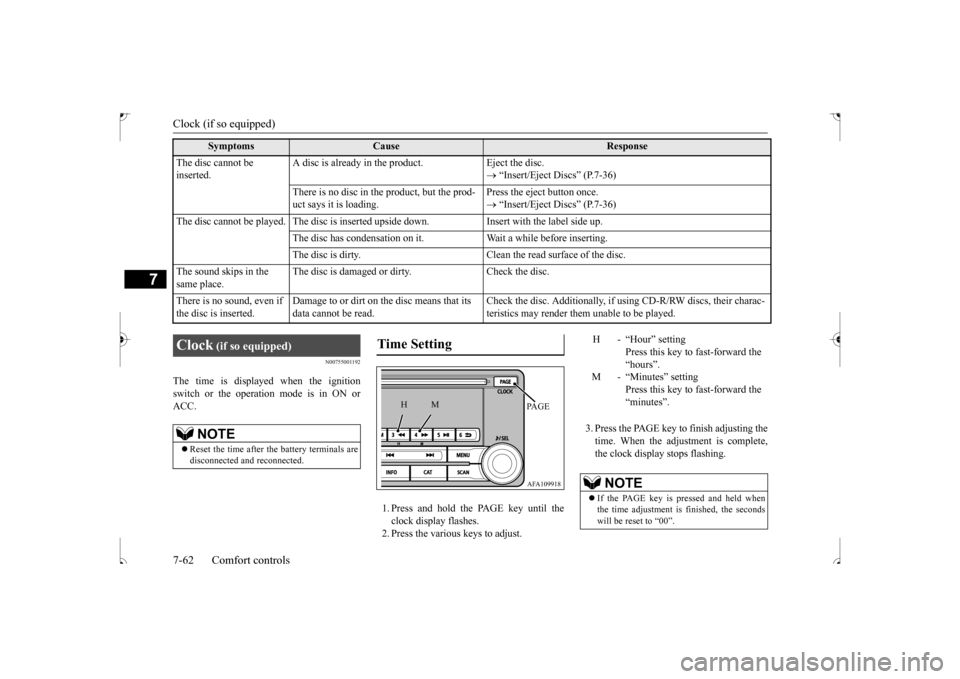
1. Press and hold the PAGE key until the clock display flashes.2. Press the various keys to adjust.
3. Press the PAGE key to finish adjusting the time. When the adjustment is complete,the clock display stops flashing.
The disc cannot be inserted.
A disc is already in the product. Eject the disc.
“Insert/Eject Discs” (P.7-36)
There is no disc in the product, but the prod- uct says it is loading.
Press the eject button once. “Insert/Eject Discs” (P.7-36)
The disc cannot be played. The disc is inserted upside down. Insert with the label side up.
The disc has condensation on it. W
ait a while before inserting.
The disc is dirty. Clean the read surface of the disc.
The sound skips in the same place.
The disc is damaged or dirty. Check the disc.
There is no sound, even if the disc is inserted.
Damage to or dirt on the disc means that its data cannot be read.
Check the disc. Additionally, if using CD-R/RW discs, their charac- teristics may render them unable to be played.
Symptoms
Cause
Response
Clock
(if so equipped)
NOTE
Reset the time after the battery terminals are disconnected and reconnected.
Time Setting
AFA109918PA G E
M
H
H - “Hour” setting
Press this key to fast-forward the“hours”.
M - “Minutes” setting
Press this key to fast-forward the“minutes”.
NOTE
If the PAGE key is pressed and held when the time adjustment is finished, the seconds will be reset to “00”.
BK0239500US.bo
ok 62 ページ 2016年5月13日 金曜日 午前8時53分