2017 MERCEDES-BENZ S-Class MAYBACH park assist
[x] Cancel search: park assistPage 36 of 382
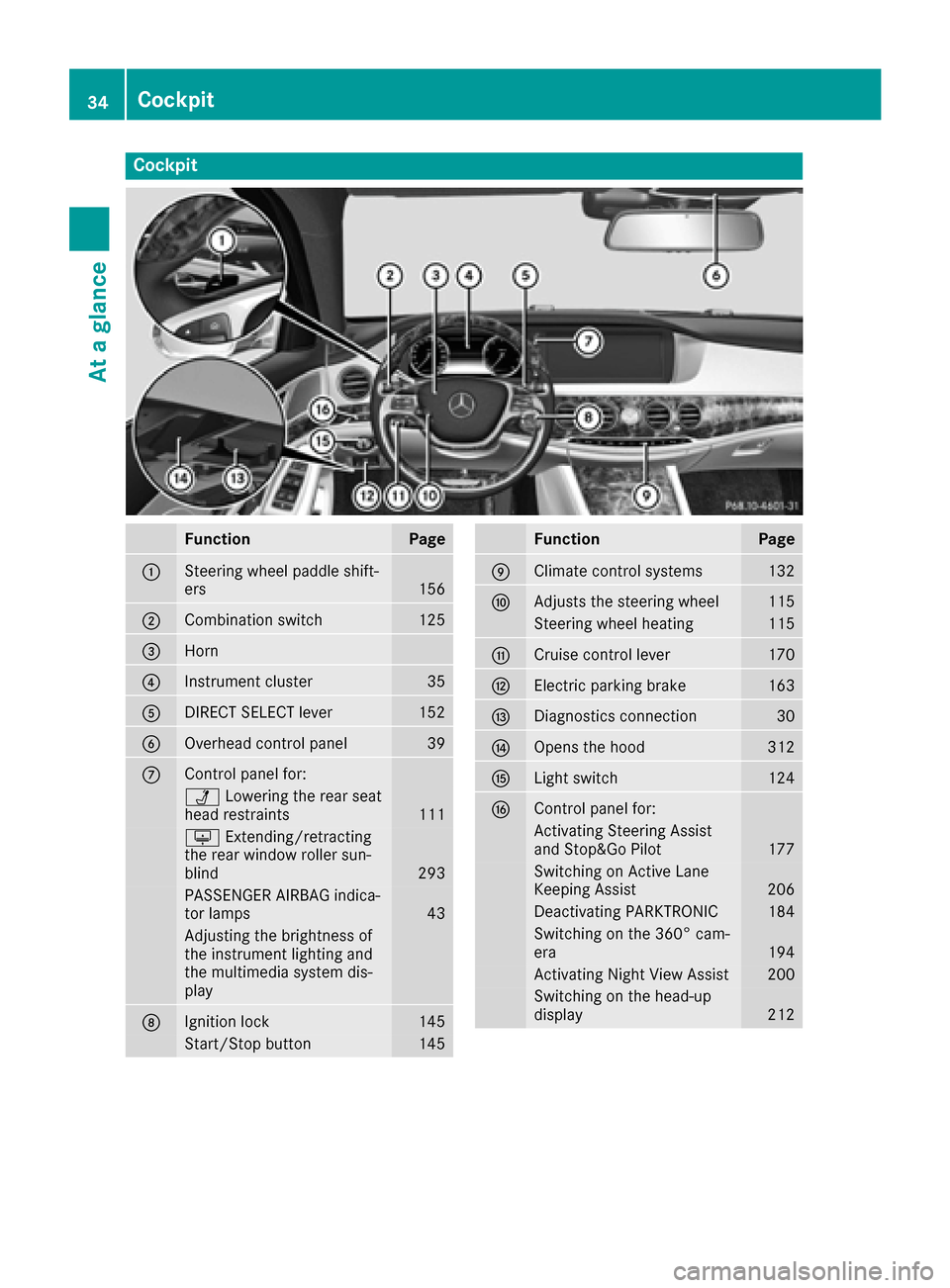
Cockpit
FunctionPage
:Steering wheel paddle shift-
ers156
;Combination switch125
=Horn
?Instrument cluster35
ADIRECT SELECT lever152
BOverhead control panel39
CControl panel for:
ÜLowering the rear seat
head restraints111
u Extending/retracting
the rear window roller sun-
blind
293
PASSENGER AIRBAG indica-
tor lamps43
Adjusting the brightness of
the instrument lighting and
the multimedia system dis-
play
DIgnition lock145
Start/Stop button145
FunctionPage
EClimate control systems132
FAdjusts the steering wheel115
Steering wheel heating115
GCruise control lever170
HElectric parking brake163
IDiagnostics connection30
JOpens the hood312
KLight switch124
LControl panel for:
Activating Steering Assist
and Stop&Go Pilot177
Switching on Active Lane
Keeping Assist206
Deactivating PARKTRONIC184
Switching on the 360° cam-
era194
Activating Night View Assist200
Switching on the head-up
display212
34Cockpit
At a glance
Page 60 of 382

PRE-SAFE®takes the following measures
depending on the hazardous situation detected:
Rthe front seat belts are pre-tensioned.
Rif the vehicle skids, the side windows and the
panorama roof with power tilt/sliding panel
are closed.
Rthe front-passenger seat is adjusted if it is in
an unfavorable position.
Rfor vehicles with electrically adjustable rear
seats: the outer rear seats are adjusted if they
are in an unfavorable position.
Rvehicles with a multicontour seat: the air pres-
sure in the side bolsters of the seat backrest
is increased.
Rvehicles with seat belt extenders: the seat
belts of the outer rear seats are pre-ten-
sioned.
If the hazardous situation passes without result-
ing in an accident, PRE-SAFE
®slackens the belt
pre-tensioning. On vehicles with multicontour
seats, the air pressure in the side bolsters is
reduced again. All settings made by PRE-SAFE
®
can then be reversed.
If the seat belt pre-tensioning is not reduced:
XMove the seat backrest or seat back slightly
when the vehicle is stationary.
The seat belt pre-tensioning is reduced and
the locking mechanism is released.
The seat-belt adjustment is an integral part of
the PRE-SAFE
®convenience function. Informa-
tion about the convenience function can be
found under "Belt adjustment" (
Ypage 47).
PRE-SAFE®PLUS (anticipatory occu-
pant protection system PLUS)
Introduction
PRE-SAFE®PLUS is only available in vehicles
with the Driving Assistance package.
Using the radar sensor system, PRE-SAFE
®
PLUS is able to detect that a head-on or rear-end
collision is imminent. In certain hazardous sit-
uations, PRE-SAFE
®PLUS takes pre-emptive
measures to protect the vehicle occupants.
Important safety notes
The intervention of PRE-SAFE®PLUS cannot
prevent an imminent collision.
The driver is not warned when PRE-SAFE
®PLUS
intervenes.
PRE-SAFE
®PLUS does not intervene if the vehi-
cle is backing up.
When driving, or when parking or exiting a park-
ing space with assistance from Active Parking
Assist, PRE-SAFE
®PLUS will not apply the
brakes.
Function
PRE-SAFE®PLUS intervenes in certain situa-
tions if the radar sensor system detects an
imminent head-on or rear-end collision.
PRE-SAFE
®PLUS takes the following measures
depending on the hazardous situation detected:
Rif the radar sensor system detects that a
head-on collision is imminent, the seat belts
are pre-tensioned.
Rif the radar sensor system detects that a rear-
end collision is imminent:
-the brake pressure is increased if the driver
applies the brakes when the vehicle is sta-
tionary.
-the seat belts are pre-tensioned.
The PRE-SAFE®PLUS braking application is can-
celed:
Rif the accelerator pedal is depressed when a
gear is engaged
Rif the risk of a collision passes or is no longer
detected
Rif DISTRONIC PLUS indicates an intention to
pull away
If the hazardous situation passes without result-
ing in an accident, the original settings are
restored.
Automatic measures after an acci-
dent
Immediately after an accident, the following
measures are implemented, depending on the
type and severity of the impact:
Rthe hazard warning lamps are activated
Rthe emergency lighting is activated
Rthe vehicle doors are unlocked
58Occupant safety
Safety
Page 69 of 382

GWARNING
If BAS is malfunctioning, the braking distance
in an emergency braking situation is
increased. There is a risk of an accident.
In an emergency braking situation, depress
the brake pedal with full force. ABS prevents
the wheels from locking.
Brakes
XKeep the brake pedal firmly depressed until
the emergency braking situation is over.
ABS prevents the wheels from locking.
The brakes will function as usual once you
release the brake pedal. BAS is deactivated.
BAS PLUS (Brake Assist System
PLUS) with Cross-Traffic Assist
General information
BAS PLUS can help you to minimize the risk of a collision with a vehicle or a pedestrian and
reduce the effects of such a collision. If BAS
PLUS detects a danger of collision, you are
assisted when braking.
iPay attention to the important safety notes
in the "Driving safety systems" section
(
Ypage 66).
BAS PLUS is only available in vehicles with the
Driving Assistance Plus package.
For BAS PLUS to assist you when driving, the
radar sensor system and the camera system
must be operational.
With the help of a sensor system and a camera
system, BAS PLUS can detect obstacles:
Rthat are in the path of your vehicle for an
extended period of time
Rthat cross the path of your vehicle
In addition, pedestrians in the path of your vehi-
cle can be detected.
BAS PLUS detects pedestrians by using typical
characteristics such as the body contours and
posture of a person standing upright.
If the radar sensor system or the camera system
is malfunctioning, BAS PLUS functions are
restricted or no longer available. The brake sys-
tem is still available with complete brake boost-
ing effect and BAS.
iObserve the restrictions described in the
"Important safety notes" section
(
Ypage 67).
Important safety notes
GWARNING
BAS PLUS cannot always clearly identify
objects and complex traffic situations.
In such cases, BAS PLUS may:
Rintervene unnecessarily
Rnot intervene
There is a risk of an accident.
Always pay careful attention to the traffic sit- uation and be ready to brake. Terminate the
intervention in a non-critical driving situation.
GWARNING
BAS PLUS cannot always clearly identify peo- ple, this is especially the case if they are mov-
ing. BAS PLUS cannot intervene in these
cases. There is a risk of an accident.
Always pay careful attention to the traffic sit-
uation and be ready to brake.
GWARNING
BAS PLUS does not react:
Rto small people, e.g. children
Rto animals
Rto oncoming vehicles
Rwhen cornering
As a result, BAS PLUS may not intervene in all
critical situations. There is a risk of an acci-
dent.
Always pay careful attention to the traffic sit- uation and be ready to brake.
In the event of snowfall or heavy rain, the rec-
ognition can be impaired.
Recognition by the radar sensor system is also
impaired if:
Rthere is dirt on the sensors or anything else
covering the sensors
Rthere is interference by other radar sources
Rthere are strong radar reflections, for exam-
ple in parking garages
Driving safety systems67
Safety
Z
Page 70 of 382

Ra narrow vehicle is traveling in front, e.g. a
motorbike
Ra vehicle is traveling in front on a different line
Rvehicles quickly move into the radar sensor
system detection range
Recognition by the camera system is also
impaired in the event of:
Rdirt on the camera or if the camera is covered
Rglare on the camera system, e.g. from the sun being low in the sky
Rdarkness
Ror if:
-pedestrians move quickly, e.g. into the path
of the vehicle
-the camera system no longer recognizes a
pedestrian as a person due to special cloth-ing or other objects
-a pedestrian is concealed by other objects
-the typical outline of a person is not distin-
guishable from the background
Following damage to the front end of the vehicle,
have the configuration and operation of the
radar sensors checked at a qualified specialist
workshop. This also applies to collisions at slow
speeds where there is no visible damage to the
front of the vehicle.
Following damage to the windshield, have the
configuration and operation of the camera sys-
tem checked at a qualified specialist workshop.
Function
To avoid a collision, BAS PLUS calculates the
brake force necessary if:
Ryou approach an obstacle, and
RBAS PLUS has detected a risk of collision
When driving at a speed
under20 mph(30 km/h): if you depress the
brake pedal, BAS PLUS is activated. The
increase in brake pressure will be carried out at the last possible moment.
When driving at a speed
above20 mph(30 km/h) : if you depress the
brake pedal sharply, BAS PLUS automatically
raises the brake pressure to a value adapted to
the traffic situation.
BAS PLUS provides braking assistance in haz-
ardous situations with vehicles in front within a
speed range between 4 mph (7 km/h) and
155 mph (250km/ h). At speeds of up to approximately 44 mph
(70 km/h), BAS PLUS can react to:
Rstationary objects in the path of your vehicle,
e.g. stopped or parked vehicles
Rpedestrians in the path of your vehicle
Robstacles crossing your path, which move in
the detection range of the sensors and are
recognized by them
iIf BAS PLUS demands particularly high brak-
ing force, preventative passenger protection
measures (PRE-SAFE
®) are activated simulta-
neously (Ypage 57).
XKeep the brake pedal depressed until the
emergency braking situation is over.
ABS prevents the wheels from locking.
BAS P
LUS is deactivated and the brakes func-
tion as usual, if:
Ryou release the brake pedal.
Rthere is no longer a risk of collision.
Rno obstacle is detected in front of your vehi-
cle.
Ryou depress the accelerator pedal.
Ryou activate kickdown.
COLLISION PREVENTION ASSIST
PLUS
General information
COLLISION PREVENTION ASSIST PLUS consists
of a distance warning function with an autono-
mous braking function and Adaptive Brake
Assist.
COLLISION PREVENTION ASSIST PLUS can help
you to minimize the risk of a front-end collision
with a vehicle ahead or reduce the effects of
such a collision.
If COLLISION PREVENTION ASSIST PLUS
detects that there is a risk of a collision, you will
be warned visually and acoustically. If you do not
react to the visual and audible collision warning,
autonomous braking can be initiated in critical
situations. If you apply the brake yourself in a
critical situation, the COLLISION PREVENTION
ASSIST PLUS adaptive Brake Assist assists you.
68Driving safety systems
Safety
Page 71 of 382

Important safety notes
In particular, thedetection of obstacles can be
impaired if:
Rthere is dirt on th esensor sor anythin gelse
covering th esensor s
Rthere is snow or heav yrain
Rthere is interferenc eby other radar source s
Rthere are strongradar reflections, for exam-
ple in parking garages
Ra narrow vehicl eis traveling in front, e.g. a
motorbike
Ra vehicl eis traveling in fron ton adifferen tlin e
Rthevehicl eis ne wor after aservic eon th e
COLLISION PREVENTION ASSIST PLU Ssys-
te m
Observ eth enote sin th esection on breaking -
in (
Ypage 144).
Followin gdamag eto th efron ten dof th evehicle,
have th econfiguration and operation of th e
radar sensor checke dat aqualified specialist
workshop. This also applie sto collision sat slow
speeds wher ethere is no visible damag eto th e
fron tof th evehicle.
Activating/deactivating
The COLLISION PREVENTION ASSIST PLU Sis
automatically active after switching on th eigni-
tion .
You can activat eor deactivat eCOLLISION PRE -
VENTION ASSIST PLU Sin th eon-board com-
puter (
Ypage 222). When deactivated, th edis-
tance warning function and th eautonomous
braking function are also deactivated.
If COLLISION PREVENTION ASSIST PLU Sis
deactivated, th eæ symbol appear sin th e
assistanc egraphic sdisplay.
Distance warning function
Gene ral inform ation
iObserveth e"Importan tsafet ynotes" sec -
tion for driving safet ysystems (Ypage 66).
The distanc ewarning function can help you to
minimiz eth eris kof afront-en dcollision wit h a
vehicl eahead or reduce th eeffects of suc h a
collision .
Wit hth ehelp of th eradar sensor system, th e
distanc ewarning function can detec tobstacles
that are in th epat hof your vehicl efor an exten-
ded period of time. If th
edistanc ewarning function detects that
there is aris kof acollision ,you will be warned
visually and acoustically.
Starting at aspee dof approximately 4mph
(7 km/ h),the distance warning function warns
you if you rapidly approach a vehicle in front. An
intermittent warning tone will then sound, and
the · distance warning lamp will light up in
the instrument cluster.
Up to a speed of approximately 44 mph
(70 km/h), the distance warning function can
also react to stationary obstacles, such as stop-
ped or parked vehicles.
Important safety notes
GWARNING
The distance warning function does not react:
Rto people or animals
Rto oncoming vehicles
Rto crossing traffic
Rwhen cornering
Thus, the distance warning function cannot
provide a warning in all critical situations.
There is a risk of an accident.
Always pay careful attention to the traffic sit-
uation and be ready to brake.
GWARNING
The distance warning function cannot always
clearly identify objects and complex traffic
situations.
In such cases, the distance warning function
may:
Rgive an unnecessary warning
Rnot give a warning
There is a risk of an accident.
Always pay careful attention to the traffic sit-
uation and do not rely solely on the distance
warning function.
XBrake immediately in order to increase the
distance from the vehicle in front.
or
XTake evasive action, provided it is safe to do
so.
Driving safet ysystem s69
Safety
Z
Page 77 of 382

Following damage to the windshield, have the
configuration and operation of the camera sys-
tem checked at a qualified specialist workshop.
Function
XTo activate/deactivate:activate or deacti-
vate PRE-SAFE®Brake in the on-board com-
puter (Ypage 223).
If the PRE-SAFE®Brake is not activated, the
æ symbol appears in the multifunction dis-
play.
Starting at a speed of around 4 mph (7 km/h),
this function warns you if you rapidly approach a
vehicle in front. An intermittent warning tone
will then sound and the ·distance warning
lamp will light up in the instrument cluster.
XBrake immediately to defuse the situation.
or
XTake evasive action provided it is safe to do
so.
PRE-SAFE
®Brake can also brake the vehicle
automatically under the following conditions:
Rthe driver and front passenger have their seat belts fastened
Rthe vehicle speed is between approximately
4 mph (7 km/h) and 124 mph (200 km/h)
At speeds of up to approximately 44 mph
(70 km/h) PRE-SAFE
®Brake can also detect:
Rstationary objects in the path of your vehicle,
e.g. stopped or parked vehicles
Rpedestrians in the path of your vehicle
iIf there is an increased risk of a collision,
preventive passenger protection measures
(PRE-SAFE
®) are triggered (Ypage 57).
If the risk of collision with the vehicle in front
remains and you do not brake, take evasive
action or accelerate significantly, the vehicle
may perform automatic emergency braking, up
to the point of full brake application. Automatic
emergency braking is not performed until imme-
diately prior to an immi nent a
ccident.
You can prevent the intervention of the PRE-
SAFE
®Brake at any time by:
Rdepressing the accelerator pedal further.
Ractivating kickdown.
Rreleasing the brake pedal. The braking action of PRE-SAFE
®Brake is ended
automatically if:
Ryou maneuver to avoid the obstacle.
Rthere is no longer a risk of collision.
Rthere is no longer an obstacle detected in
front of your vehicle.
STEER CONTROL
General information
STEER CONTROL helps you by transmitting a
noticeable steering force to the steering wheel
in the direction required for vehicle stabilization.
This steering assistance is provided in particular if:
Rboth right wheels or both left wheels are on a
wet or slippery road surface when you brake
Rthe vehicle starts to skid
Important safety notes
iObserve the "Important safety notes" sec-
tion (Ypage 66).
No steering support is provided from STEER
CONTROL, if:
RESP®is deactivated
RESP®is malfunctioning
Rthe steering is faulty
Power steering will, however, continue to func-
tion.
Protection against theft
Immobilizer
The immobilizer prevents your vehicle from
being started without the correct SmartKey.
XTo activate with the SmartKey: remove the
SmartKey from the ignition lock.
XTo activate with KEYLESS-GO start-func-
tion or KEYLESS-GO: switch the ignition off
and open the driver's door.
XTo deactivate: switch on the ignition.
When leaving the vehicle, always take the
SmartKey with you and lock the vehicle. Anyone
can start the engine if a valid SmartKey has been
left inside the vehicle.
Protection against theft75
Safety
Z
Page 150 of 382
Rthe panic alarm is not activated
Rthe hazard warning lamps are switched off
Rthe hood is closed.
Rthe doors are closed and locked
Rthe windows and sliding sunroof are closed
Also make sure that:
Rthe fuel tank is sufficiently filled
Rthe starter battery is sufficiently charged
GWARNING
Limbs could be crushed or trapped if the
engine is started unintentionally during ser-
vice or maintenance work. There is a risk of
injury.
Always secure the engine against uninten-
tional starting before carrying out mainte-
nance or repair work.
Make sure that the engine cannot be started via
your smartphone before carrying out mainte-
nance or repairs. You can prevent an engine
start via your smartphone, for example, if you:
Rswitch on the hazard warning lamps
Rdo not lock the doors
Ropen the hood
Pulling away
General notes
GWARNING
If the engine speed is above the idling speed
and you engage transmission position Dor R,
the vehicle could pull away suddenly. There is
a risk of an accident.
When engaging transmission position Dor R,
always firmly depress the brake pedal and do not simultaneously accelerate.
Depress the accelerator carefully when pulling
away.
The vehicle locks centrally once you have pulled
away. The locking knobs in the doors drop down.
You can open the doors from the inside at any
time.
You can also deactivate the automatic locking
feature (
Ypage 84). It is only possible to shift the transmission from
position
Pto the desired position if you depress
the brake pedal. Only then is the parking lock
released.
If you do not depress the brake pedal, the
DIRECT SELECT lever can still be moved but the
parking lock remains engaged.
iUpshifts take place at higher engine speeds
after a cold start. This helps the catalytic con-
verter to reach its operating temperature
more quickly.
Information on the automatic release of the
electric parking brake (
Ypage 164).
Hill start assist
Hill start assist helps you when pulling away for-
wards or in reverse on an uphill gradient. It holds
the vehicle for a short time after you have
removed your foot from the brake pedal. This
gives you enough time to move your foot from
the brake pedal to the accelerator pedal and to
depress it before the vehicle begins to roll.
GWARNING
After a short time, hill start assist will no lon-
ger brake your vehicle and it could roll away.
There is a risk of an accident and injury.
Therefore, quickly move your foot from the
brake pedal to the accelerator pedal. Never
leave the vehicle when it is held by hill start
assist.
Hill start assist is not active if:
Ryou are pulling away on a level road or on a
downhill gradient.
Rthe transmission is in position i.
Rthe electric parking brake is applied.
RESP®is malfunctioning.
ECO start/stop function
Introduction
Hybrid vehicles: observe the notes on the ECO
start/stop function in the separate operating
instructions.
The ECO start/stop function switches the
engine off automatically if the vehicle is stopped
under certain conditions.
148Driving
Dr iving an d parking
Page 159 of 382
Automa tic drive program S
Drive program Sis characterized by th efollow-
ing :
Rsport yengin esettings.
Rth evehicl epulls away in first gear .
Rtheautomatic transmission shifts up later.
The fuel consumption possibl ybein ghigher
as aresult of th elater automatic transmission
shif tpoints .
Manual drive program M
Genera lnotes
In this drive program ,you can briefl ychang e
gear yourself by usin gth esteering whee lpaddl e
shifters. The transmission mus tbe in position D.
You can activat emanual drive program Min th e
E (C in Mercedes-AM Gvehicles) and Sauto -
matic drive programs.
Mercedes-AMG vehicles: as well as temporary
drive program M,you can also activat eperma-
nent drive program M.Further information
about permanen tdrive program M
(
Ypage 158).
Acti vating
XShift th etransmission to position D.
XPull thelef tor right steering whee lpaddl e
shifte r (Ypage 156).
Manual drive program Mis temporarily acti-
vated.
All vehicles (excep tMercedes-AMG vehi-
cles: )Mand the selected gear appear in the
multifunction display.
Shifting gears
If you pull on the left or right steering wheel
paddle shifter, the automatic transmission
switches to manual drive program Mfor a limi-
ted amount of time. Depending on which steer-
ing wheel paddle shifter is pulled, the automatic
transmission immediately shifts into the next
gear down or up, if permitted.
XTo shift up: pull the right-hand steering wheel
paddle shifter (Ypage 156).
The automatic transmission shifts up to the
next gear.
If the maximum engine speed on the currently
engaged gear is reached and you c
ontinue to
accelerate, the automatic transmission auto- matically shifts up in order to prevent engine
damage.
Mercedes-AMG vehicles:
the automatic
transmission will not shift up to the next gear when the engine speed is very low.
XTo shift down: pull on the left-hand steering
wheel paddle shifter (Ypage 156).
The automatic transmission shifts down to
the next gear.
If the engine exceeds the maximum engine
speed when shifting down, the automatic
transmission protects against engine damage
by not shifting down.
Automatic down shifting occurs when coast-
ing.
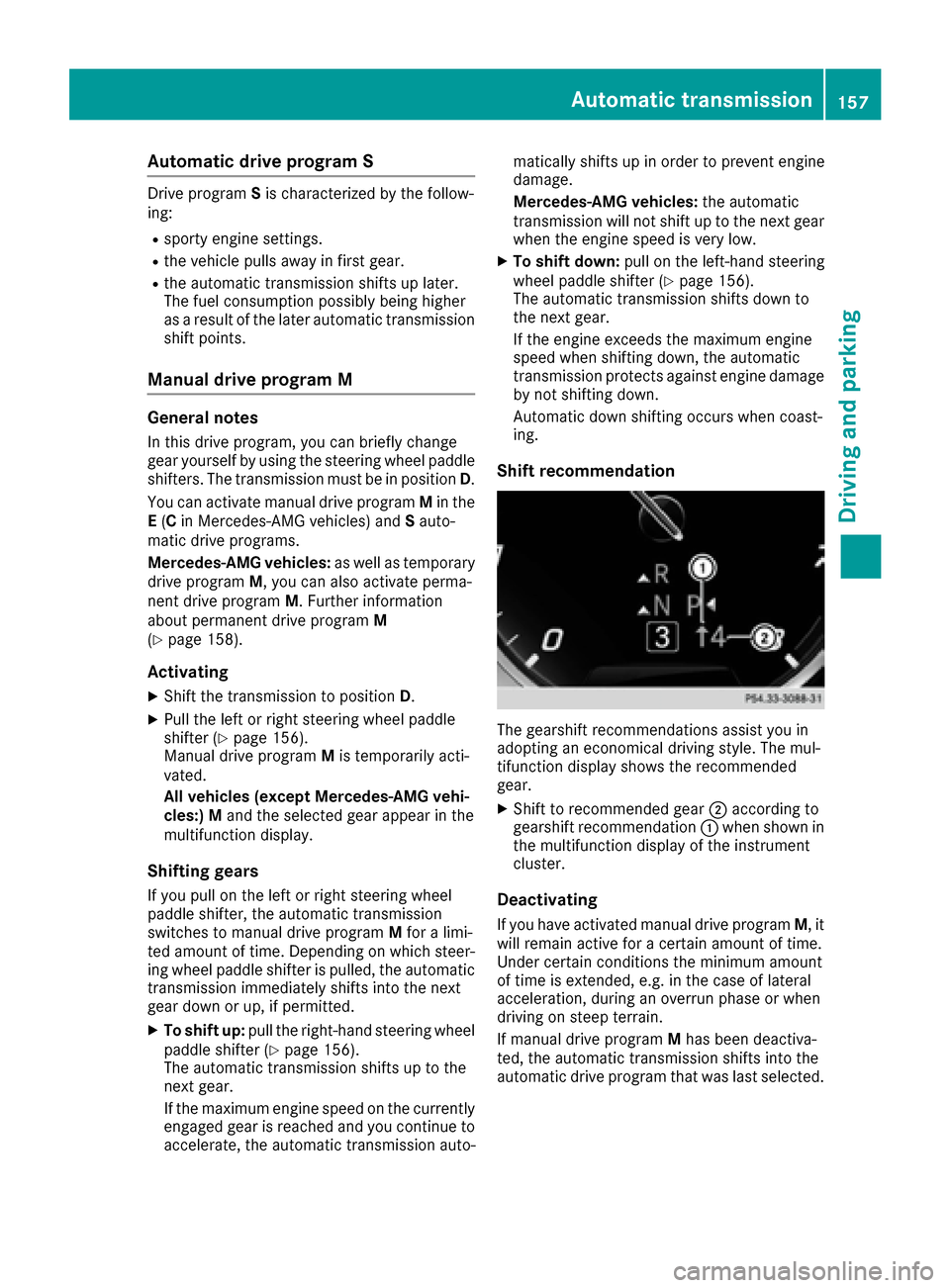
Shift recommendation
The gearshift recommendations assist you in
adopting an economical driving style. The mul-
tifunction display shows the recommended
gear.
XShift to recommended gear ;according to
gearshift recommendation :when shown in
the multifunction display of the instrument
cluster.
Deactivating
If you have activated manual drive program M, it
will remain active for a certain amount of time.
Under certain conditions the minimum amount
of time is extended, e.g. in the case of lateral
acceleration, during an overrun phase or when
driving on steep terrain.
If manual drive program Mhas been deactiva-
ted, the automatic transmission shifts into the
automatic drive program that was last selected.
Automatic transmission157
Driving and parking
Z