2017 MERCEDES-BENZ S-Class MAYBACH park assist
[x] Cancel search: park assistPage 162 of 382
If you or others come into contact with fuel,
observe the following:
RWash away fuel from skin immediately
using soap and water.
RIf fuel comes into contact with your eyes,
immediately rinse them thoroughly with
clean water. Seek medical assistance with-
out delay.
RIf fuel is swallowed, seek medical assis-
tance without delay. Do not induce vomit-
ing.
RImmediately change out of clothing which
has come into contact with fuel.
GWARNING
Electrostatic buildup can create sparks and
ignite fuel vapors. There is a risk of fire and
explosion.
Always touch the vehicle body before opening
the fuel filler flap or touching the fuel pump
nozzle. Any existing electrostatic buildup is
thereby discharged.
Do not get into the vehicle again during the refu-
eling process. Otherwise, electrostatic charge
could build up again.
!Do not use diesel to refuel vehicles with a
gasoline engine. Do not switch on the ignition
if you accidentally refuel with the wrong fuel.
Otherwise, the fuel will enter the fuel system. Even small amounts of the wrong fuel could
result in damage to the fuel system and the
engine. Notify a qualified specialist workshop
and have the fuel tank and fuel lines drained
completely.
!Overfilling the fuel tank could damage the
fuel system.
!Take care not to spill any fuel on painted
surfaces. You could otherwise damage the
paintwork.
!Use a filter when adding fuel from a fuel can.
The fuel lines and/or the fuel injection system
could otherwise be blocked by particles from
the fuel can.
If you overfill the fuel tank, fuel could spray out
when the fuel pump nozzle is removed. For further information on fuel and fuel quality
(
Ypage 372).
Refueling
General information
Pay attention to the important safety notes
(Ypage 159).
Hybrid vehicles: observe the notes on refueling
in the separate operating instructions.
If you unlock/lock the vehicle from the outside,
the fuel filler flap also unlocks/locks.
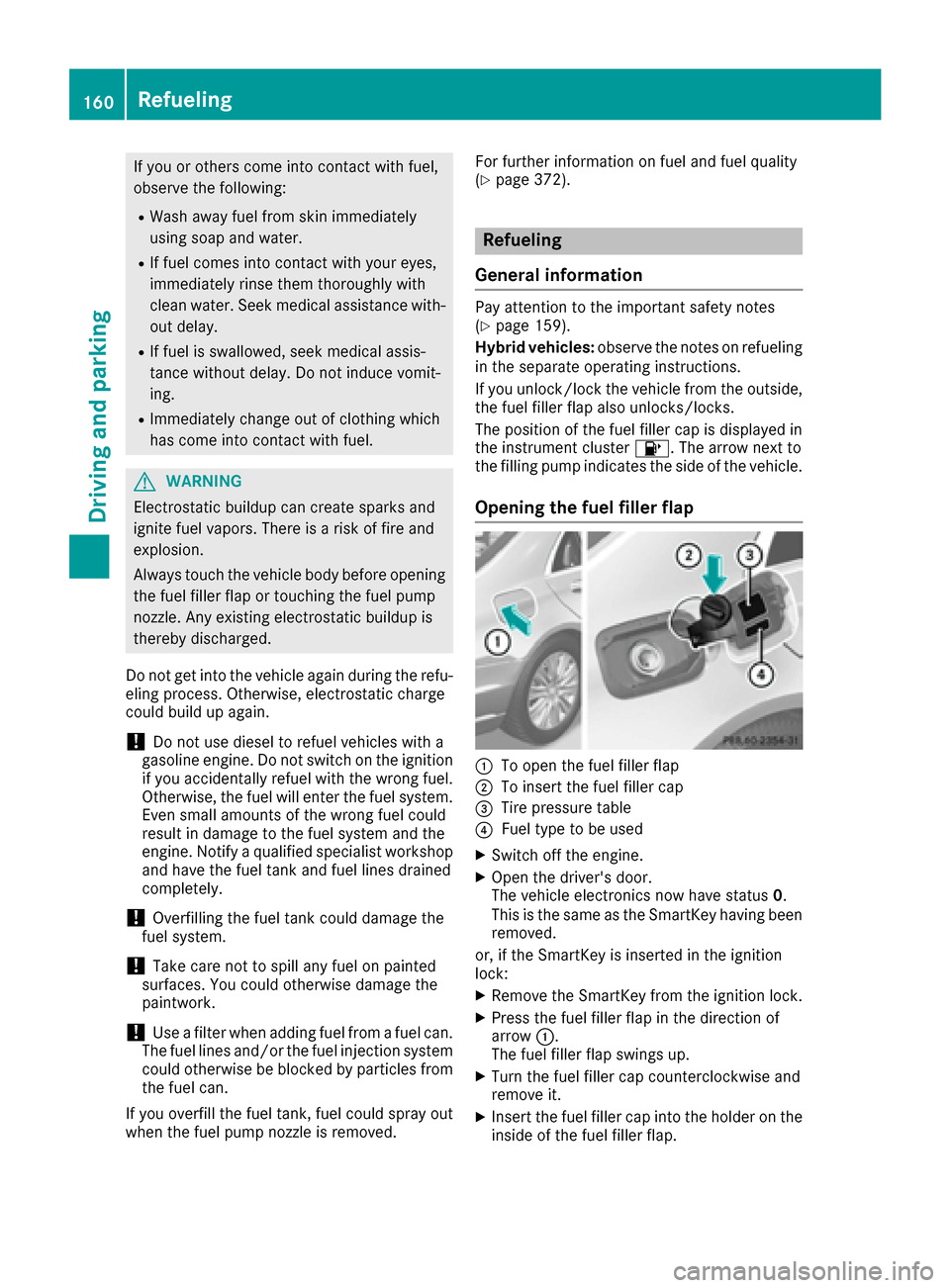
The position of the fuel filler cap is displayed in
the instrument cluster 8. The arrow next to
the filling pump indicates the side of the vehicle.
Opening the fuel filler flap
:To open the fuel filler flap
;To insert the fuel filler cap
=Tire pressure table
?Fuel type to be used
XSwitch off the engine.
XOpen the driver's door.
The vehicle electronics now have status 0.
This is the same as the SmartKey having been
removed.
or, if the SmartKey is inserted in the ignition
lock:
XRemove the SmartKey from the ignition lock.
XPress the fuel filler flap in the direction of
arrow :.
The fuel filler flap swings up.
XTurn the fuel filler cap counterclockwise and
remove it.
XInsert the fuel filler cap into the holder on the
inside of the fuel filler flap.
160Refueling
Driving and parking
Page 167 of 382
Observe the legal requirements for the country
in which you are driving. Some jurisdictions pro-
hibit the driver from using a mobile phone while
driving a vehicle.
If you make a call while driving, always use
hands-free mode. Only operate the telephone
when the traffic situation permits. If you are
unsure, pull over to a safe location and stop
before operating the telephone.
Bear in mind that at a speed of only 30 mph
(approximately 50 km/h), the vehicle covers a
distance of 44 ft (approximately 14m)per sec-
ond.
Drive sensibly – save fuel
Observe the following tips to save fuel:
XThe tires should always be inflated to the rec-
ommended tire pressure.
XRemove unnecessary loads.
XRemove roof racks when they are not needed.
XWarm up the engine at low engine speeds.
XAvoid frequent acceleration or braking.
XHave all maintenance work carried out as
indicated by the service intervals in the Main-
tenance Booklet or by the service interval dis-
play.
Fuel consumption also increases when driving in cold weather, in stop-start traffic and in hilly ter-
rain.
Drinking and driving
GWARNING
Drinking and driving and/or taking drugs and driving are very dangerous combinations.
Even a small amount of alcohol or drugs can
affect your reflexes, perceptions and judg-
ment.
The possibility of a serious or even fatal acci-
dent is greatly increased when you drink or
take drugs and drive.
Do not drink or take drugs and drive or allow
anyone to drive who has been drinking or tak-
ing drugs.
Emission control
GWARNING
Combustion engines emit poisonous exhaust
gases such as carbon monoxide. Inhaling
these exhaust gases leads to poisoning. There
is a risk of fatal injury. Therefore never leave
the engine running in enclosed spaces with-
out sufficient ventilation.
Certain engine systems are designed to keep
the level of poisonous components in exhaust
fumes within legal limits.
These systems only work at peak efficiency if
they are serviced exactly in accordance with the
manufacturer's specifications. Always have
work on the engine carried out at a qualified
specialist workshop . Mercedes-Benz recom-
mends that you use an authorized Mercedes-
Benz Center for this purpose. In particular, work
relevant to safety or on safety-related systems
must be carried out at a qualified specialist
workshop.
The engine settings must not be changed under any circumstances. Furthermore, all specific
service work must be carried out at regular
intervals and in accordance with the Mercedes-
Benz service requirements. Details can be found in the Maintenance Booklet.
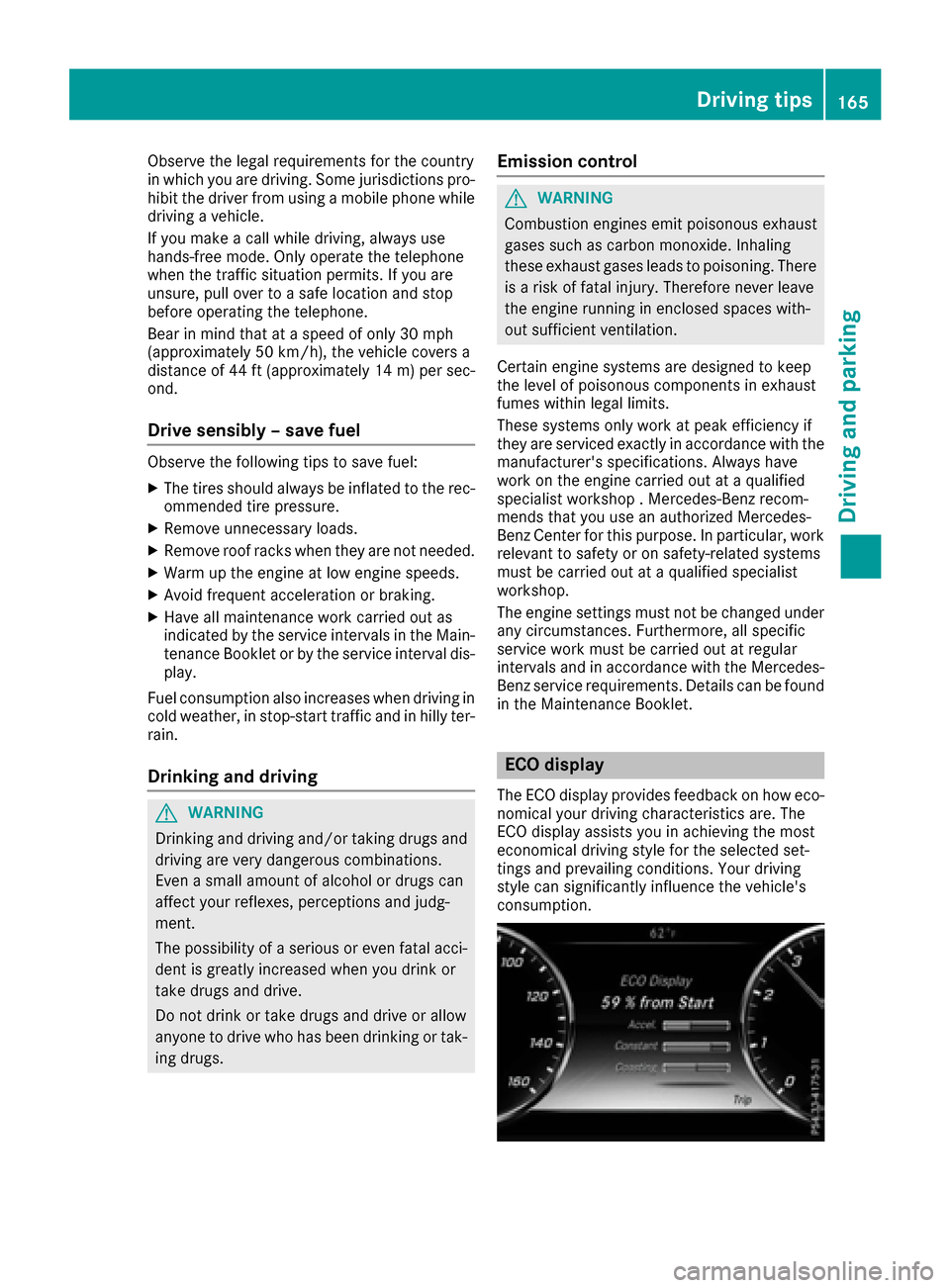
ECO display
The ECO display provides feedback on how eco-
nomical your driving characteristics are. The
ECO display assists you in achieving the most
economical driving style for the selected set-
tings and prevailing conditions. Your driving
style can significantly influence the vehicle's
consumption.
Driving tips165
Driving and parking
Z
Page 169 of 382

!Depressing the brake pedal constantly
results in excessive and premature wear to
the brake pads.
If the brakes have been subjected to a heavy
load, do not stop the vehicle immediately. Drive
on for a short while. This allows the airflow to
cool the brakes more quickly.
Wet roads
If you have driven for a long time in heavy rain
without braking, there may be a delayed reac-
tion from the brakes when braking for the first
time. This may also occur after the vehicle has
been washed or driven through deep water.
You have to depress the brake pedal more
firmly. Maintain a greater distance from the
vehicle in front.
After driving on a wet road or having the vehicle
washed, brake firmly while paying attention to
the traffic conditions. This will warm up the
brake discs, thereby drying them more quickly
and protecting them against corrosion.
Limited braking performance on salt-
treated roads
If you drive on salted roads, a layer of salt resi-
due may form on the brake discs and brake
pads. This can result in a significantly longer
braking distance.
RIn order to prevent any salt build-up, apply the
brakes occasionally while paying attention to
the traffic conditions.
RCarefully depress the brake pedal and the
beginning and end of a journey.
RMaintain a greater distance to the vehicle
ahead.
Servicing the brakes
!The brake fluid level may be too low, if:
Rif the red brake warning lamp lights up in
the instrument cluster and
Ryou hear a warning tone while the engine is
running
Observe additional warning messages in the
multifunction display.
The brake fluid level may be too low due to
brake pad wear or leaking brake lines. Have the brake system checked immediately.
Consult a qualified specialist workshop to
arrange this.
!Vehicles with 4MATIC: function or per-
formance tests may only be carried out on a 2-
axle dynamometer. If you wish to operate the
vehicle on such a dynamometer, please con-
sult a qualified specialist workshop in
advance. You could otherwise damage the
drive train or the brake system.
!Vehicles with 4MATIC: the ESP®system
operates automatically. The engine and the
ignition must therefore be switched off (the
SmartKey must be in position 0or 1in the
ignition lock or the Start/Stop button must be
in position 0or 1) if the electric parking brake
is tested on a brake dynamometer.
Braking triggered automatically by ESP
®may
cause severe damage to the brake system.
!Vehicles without 4MATIC: the ESP®sys-
tem operates automatically. The engine and
the ignition must therefore be switched off
(the SmartKey must be in position 0or 1in the
ignition lock or the Start/Stop button must be
in position 0or 1) if:
Rthe electric parking brake is tested using a
brake dynamometer.
Rthe vehicle is towed with one axle raised.
Braking triggered automatically by ESP®may
cause severe damage to the brake system.
All checks and maintenance work on the brake
system must be carried out at a qualified spe-
cialist workshop.
Have brake pads installed and brake fluid
replaced at a qualified specialist workshop.
If the brake system has only been subject to
moderate loads, you should test the functional-
ity of your brakes at regular intervals.
Information on BAS (Brake Assist) (
Ypage 66)
and BAS PLUS (Brake Assist PLUS) (Ypage 67).
For safety reasons, Mercedes-Benz recom-
mends only installing the following brake disks
and brake pads/linings:
Rbrake disks that have been approved by
Mercedes-Benz
Rbrake pads/linings that have been approved
by Mercedes-Benz or that are of an equivalent
standard of quality
Other brake disks or brake pads/linings can
compromise the safety of your vehicle.
Driving tips167
Driving and parking
Z
Page 171 of 382
GDANGER
If th eexhaust pipe is blocke dor adequate
ventilation is no tpossible, poisonous gase s
suc has carbon monoxide (CO) may ente rth e
vehicle. This is th ecase, e.g. if th evehicl e
become strapped in snow. There is aris kof
fatal injury.
If you leav eth eengin eor th eauxiliary heating
running, mak esur eth eexhaust pipe and area
around th evehicl eare clear of snow. To
ensur ean adequate supply of fresh air, open a
window on th eside of th evehicl ethat is no t
facing int oth ewind.
Hav eyour vehicl ewinter-proofe dat aqualified
specialist workshop at th eonset of winter.
Drive particularly carefully on slipper yroa dsur -
faces. Avoid sudden acceleration ,steering and
braking maneuvers .Do no tuse th ecruise con-
trol or DISTRONI CPLUS.
If th evehicl ethreaten sto skid or canno tbe
stoppe dwhen moving at low speed:
XShift th etransmission to position N.
The outside temperature indicator is no t
designed to serve as an ice-warning device and
is therefor eunsuitable for that purpose .
Changes in th eoutside temperature are dis-
played after ashort delay.
Indicate dtemperatures jus tabov eth efreezing
poin tdo no tguarantee that th eroa dsurfac eis
free of ice .The roa dmay s
till be icy, especially in
wooded area sor on bridges .
You should pay special attention to roa dcondi-
tion swhen temperatures are around freezing
point.
Fo rmor einformation on drivin gwit hsnow
chains, see (
Ypage 345).
Fo rmor einformation on drivin gwit hsummer
tires ,see (
Ypage 345).
Observ eth enote sin th e"Winte roperation "sec -
tion (
Ypage 345).
Driving systems
Mercedes-Benz Intelligent Drive
Mercedes-Ben zIntelligent Drive stand sfor inno-
vative driver assistanc eand safet ysystems
whic henhance comfort and support th edriver in critical situations. Wit
hthese intelligen tco-ordi -
nated systems Mercedes-Ben zhas set amile -
ston eon th epat htoward sautonomous driving.
Mercedes-Ben zIntelligent Drive embraces all
elements of active and passive safet yin on ewell
though tout system –for th esafet yof th evehi-
cle occupant sand that of other roa dusers.
Further information on drivin gsafet ysystems
(
Ypage 65).
Cruise control
Gene ral notes
Cruis econtrol maintains aconstan troa dspeed
for you. It brakes automatically in order to avoid
exceedin gth eset speed. Change int o alower
gear in goo dtime on lon gand steep downhill
gradients .This is especially important if th e
vehicl eis laden .By doin gso, you will mak euse
of th ebraking effec tof th eengine. This relieves
th eload on th ebrak esystem and prevents th e
brakes from overheating and wearing to o
quickly.
You can use cruise control if you wan tto drive at
a steady speed for aprolonged period of time.
You can store any roa dspeed abov e20 mph
(30 km/h).
Import ant safety notes
If you fail to adapt your drivin gstyle, cruise con-
trol can neither reduce th eris kof an acciden t
no roverride th elaws of physics .Cruis econtrol
canno ttak eint oaccoun tth eroad, traffic and
weather conditions. Cruis econtrol is only an
aid. You are responsibl efor maintainin g asafe
distanc eto th evehicl ein front, for vehicl e
speed, for braking in goo dtime and for stayin gin
lane.
Do no tuse cruise control :
Rin roadand traffic condition swhic hdo no t
allow you to maintai n aconstan tspeed, e.g. in
heav ytraffic or on windin groads
Ron slipper yroa dsurfaces. Braking or accel-
erating could caus eth edrive wheels to lose
traction and th evehicl ecould then skid
Rwhen there is poor visibility, e.g. due to fog ,
heav yrain or snow
If there is achang eof drivers, advise th ene w
driver of th espeed stored.
Driving systems169
Driving and parking
Z
Page 174 of 382

Continue todrive carefully and beready to
brake, inparticular when warned to dosoby
DI ST RONIC PLU S.
GWARNING
DI ST RONIC PLUS brakes your veh icle with up
to 50 %of the maximum possible deceleration.
If this braking force is insufficient, DISTRONIC
PLUS warns you visually and audibly. There is a risk of an accident.
In such cases, apply the brakes yourself and
try to take evasive action.
!When DISTRONIC PLUS or the HOLD func-
tion is activated, the vehicle brakes automat-
ically in certain situations.
To avoid damage to the vehicle, deactivate
DISTRONIC PLUS and the HOLD function in
the following or similar situations:
Rwhen towing the vehicle
Rin the car wash
DISTRONIC PLUS can neither reduce the risk of
an accident if you fail to adapt your driving style
nor override the laws of physics. DISTRONIC
PLUS cannot take account of road, weather and traffic conditions. DISTRONIC PLUS is only an
aid. You are responsible for maintaining a safe
distance to the vehicle in front, for vehicle
speed, for braking in good time and for staying in
lane.
Do not use DISTRONIC PLUS:
Rin road and traffic conditions which do not
allow you to maintain a constant speed, e.g. in
heavy traffic or on winding roads
Ron slippery road surfaces. Braking or accel-
erating could cause the drive wheels to lose
traction and the vehicle could then skid
Rwhen there is poor visibility, e.g. due to fog,
heavy rain or snow
DISTRONIC PLUS may not detect narrow vehi-
cles driving in front, e.g. motorcycles, or vehi-
cles driving on a different line.
In particular, the detection of obstacles can be
impaired if:
Rthere is dirt on the sensors or anything else
covering the sensors
Rthere is snow or heavy rain
Rthere is interference by other radar sources
Rthere are strong radar reflections, for exam-
ple, in parking garages
If DISTR
ONIC PLUS no longer detects a vehicle
in front, DISTRONIC PLUS may unexpectedly
accelerate the vehicle to the stored speed.
This speed may:
Rbe too high if you are driving in a filter lane or an exit lane
Rbe so high in the right lane that you pass vehi-cles driving on the left (left-hand drive coun-
tries)
Rbe so high in the left lane that you pass vehi-
cles driving on the right (right-hand drive
countries)
If there is a change of drivers, advise the new
driver of the speed stored.
Cruise control lever
:Activates or increases speed
;Activates or reduces speed
=Deactivates DISTRONIC PLUS
?Activates at the current speed/last stored
speed
ASets a specified minimum distance
Activating DISTRONIC PLUS
Activation conditions
To activate DISTRONIC PLUS, the following con-
ditions must be fulfilled:
Rthe engine must be started. It may take up to two minutes after pulling away before
DISTRONIC PLUS is operational.
Rthe electric parking brake must be released.
RESP®must be activated, but not intervening
at present.
RActive Parking Assist must not be activated.
172Driving systems
Driving and parking
Page 177 of 382
last speed stored after you have finished over-
taking.
Setting a specified minimum distance
You can set the specified minimum distance for
DISTRONIC PLUS by varying the time span
between one and two seconds. With this func-
tion, you can set the minimum distance that
DISTRONIC PLUS maintains to the vehicle in
front, depending on the driving speed. You can
see this distance in the multifunction display
(
Ypage 175).
Make sure that you maintain the minimum dis-
tance to the vehicle in front as required by law.
Adjust the distance to the vehicle in front if nec-
essary.
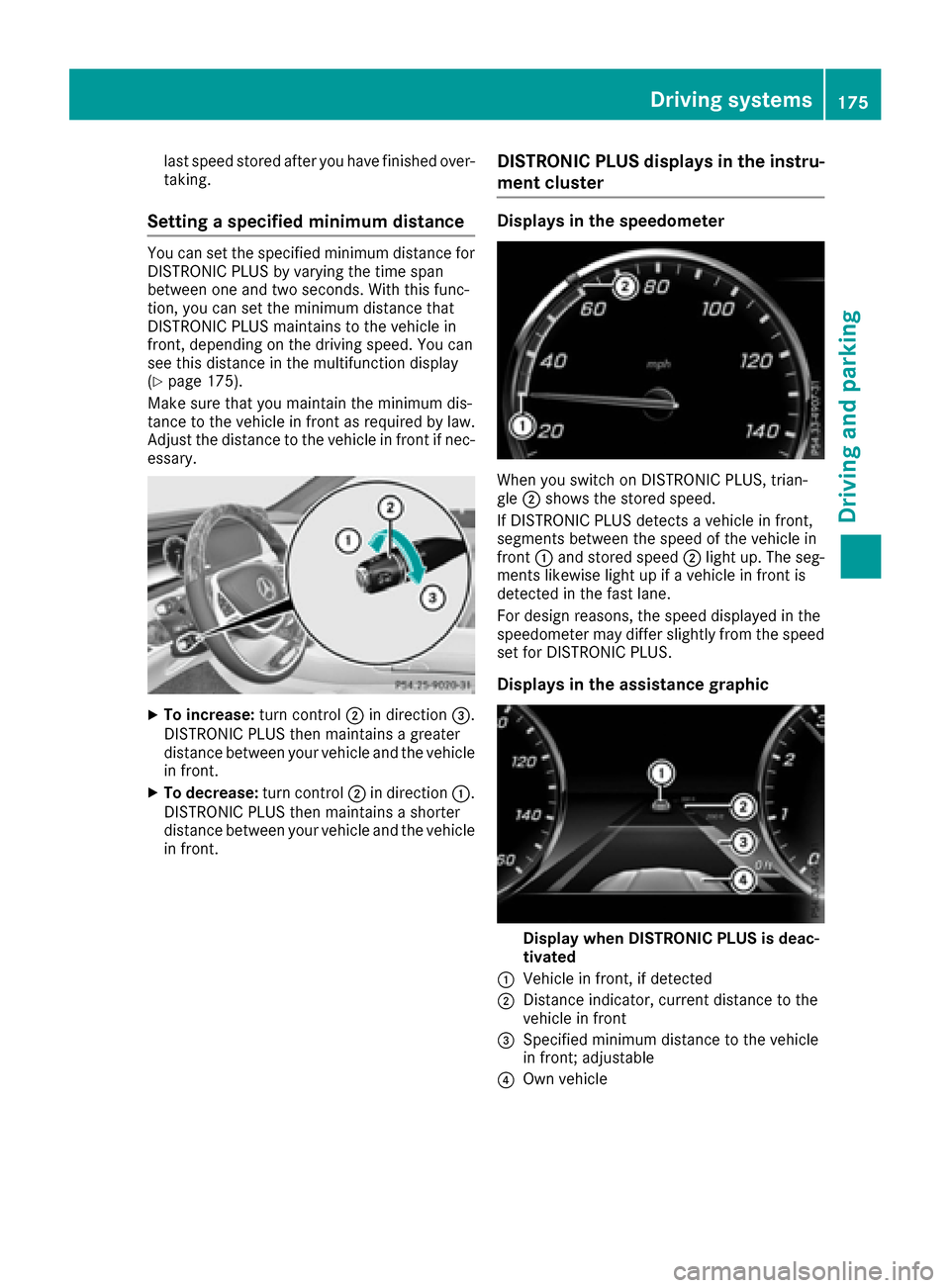
XTo increase: turn control;in direction =.
DISTRONIC PLUS then maintains a greater
distance between your vehicle and the vehicle
in front.
XTo decrease: turn control;in direction :.
DISTRONIC PLUS then maintains a shorter
distance between your vehicle and the vehicle
in front.
DISTRONIC PLUS displays in the instru-
ment cluster
Displays in the speedometer
When you switch on DISTRONIC PLUS, trian-
gle ;shows the stored speed.
If DISTRONIC PLUS detects a vehicle in front,
segments between the speed of the vehicle in
front :and stored speed ;light up. The seg-
ments likewise light up if a vehicle in front is
detected in the fast lane.
For design reasons, the speed displayed in the
speedometer may differ slightly from the speed
set for DISTRONIC PLUS.
Displays in the assistance graphic
Display when DISTRONIC PLUS is deac-
tivated
:Vehicle in front, if detected
;Distance indicator, current distance to the
vehicle in front
=Specified minimum distance to the vehicle
in front; adjustable
?Own vehicle
Driving systems175
Driving and parking
Z
Page 178 of 382
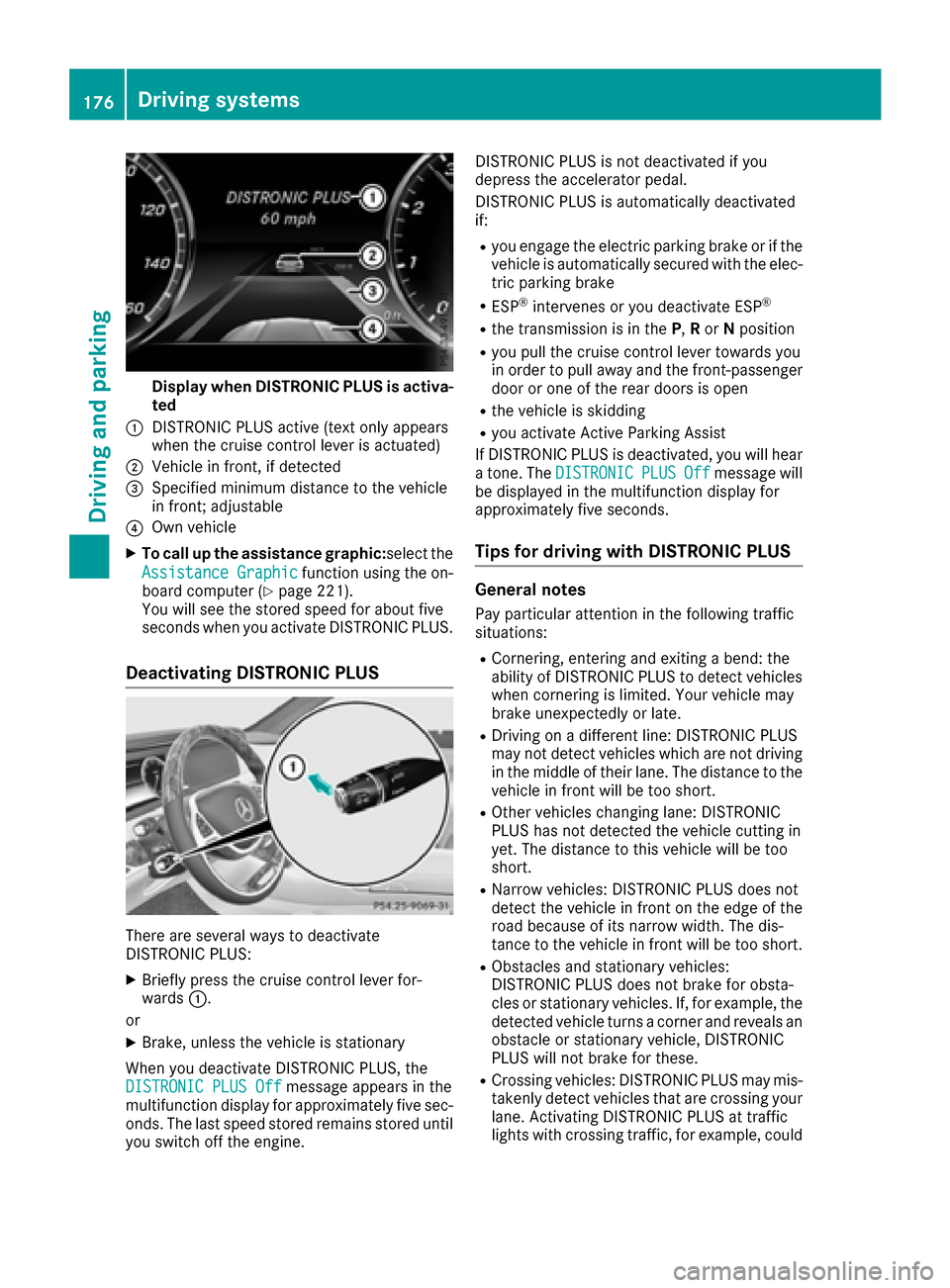
Display when DISTRONIC PLUS is activa-
ted
:DISTRONI CPLU Sactive (tex tonly appear s
when th ecruise control lever is actuated)
;Vehicl ein front, if detecte d
=Specifiedminimum distanc eto th evehicl e
in front; adjustable
?Own vehicl e
XTo call up th eassistanc egraphic:s electth e
Assistanc eGraphi c
function usin gth eon -
boar dcomputer (Ypage 221).
You will see th estore dspeed for about fiv e
seconds when you activat eDISTRONI CPLUS.
Deactivating DISTRONIC PLUS
There are several ways to deactivat e
DISTRONI CPLUS:
XBriefly press th ecruise control lever for -
ward s:.
or
XBrake ,unless th evehicl eis stationary
Whe nyou deactivat eDISTRONI CPLUS, th e
DISTRONIC PLU SOff
message appear sin th e
multifunction display for approximately fiv esec -
onds. The last speed store dremain sstore duntil
you switch off th eengine. DISTRONI
CPLU Sis no tdeactivated if you
depress th eaccelerato rpedal .
DISTRONI CPLU Sis automatically deactivated
if:
Ryou engage th eelectric parking brak eor if th e
vehicl eis automatically secured wit hth eelec -
tric parking brak e
RESP®intervenes or you deactivat eES P®
Rthetransmission is in th eP, Ror Nposition
Ryou pull th ecruise control lever toward syou
in order to pull away and th efront-passenger
door or on eof th erear door sis open
Rth evehicl eis skiddin g
Ryou activat eActive Parking Assis t
If DISTRONI CPLU Sis deactivated, you will hear
a tone .The DISTRONIC
PLUSOffmessage will
be displayed in th emultifunction display for
approximately fiv eseconds.
Tips for driving with DISTRONIC PLUS
Genera lnotes
Pay particular attention in th efollowin gtraffic
situations:
RCornering ,enterin gand exiting abend: th e
abilit yof DISTRONI CPLU Sto detec tvehicles
when cornering is limited. Your vehicl emay
brak eunexpectedly or late.
RDrivin gon adifferen tline: DISTRONI CPLU S
may no tdetec tvehicles whic hare no tdrivin g
in th emiddle of their lane. The distanc eto th e
vehicl ein fron twill be to oshort .
ROther vehicles changing lane: DISTRONI C
PLU Shas no tdetecte dth evehicl ecutting in
yet .The distanc eto this vehicl ewill be to o
short .
RNarrow vehicles: DISTRONI CPLU Sdoes no t
detec tth evehicl ein fron ton th eedge of th e
roa dbecause of it snarrow width. The dis-
tance to th evehicl ein fron twill be to oshort .
RObstacles and stationary vehicles:
DISTRONI CPLU Sdoes no tbrak efor obsta-
cle sor stationary vehicles. If ,for example, th e
detecte dvehicl eturns acorner and reveals an
obstacle or stationary vehicle, DISTRONI C
PLU Swill no tbrak efor these .
RCrossingvehicles: DISTRONI CPLU Smay mis -
takenly detec tvehicles that are crossing your
lane. Activating DISTRONI CPLU Sat tra
ffic
lights wit hcrossing traffic, for example, could
176Driving systems
Driving and parking
Page 179 of 382
cause your vehicle to pull away unintention-
ally.
In such situations, brake if necessary.
DISTRONIC PLUS is then deactivated.
DISTRONIC PLUS with Steering Assist
and Stop&Go Pilot
General notes
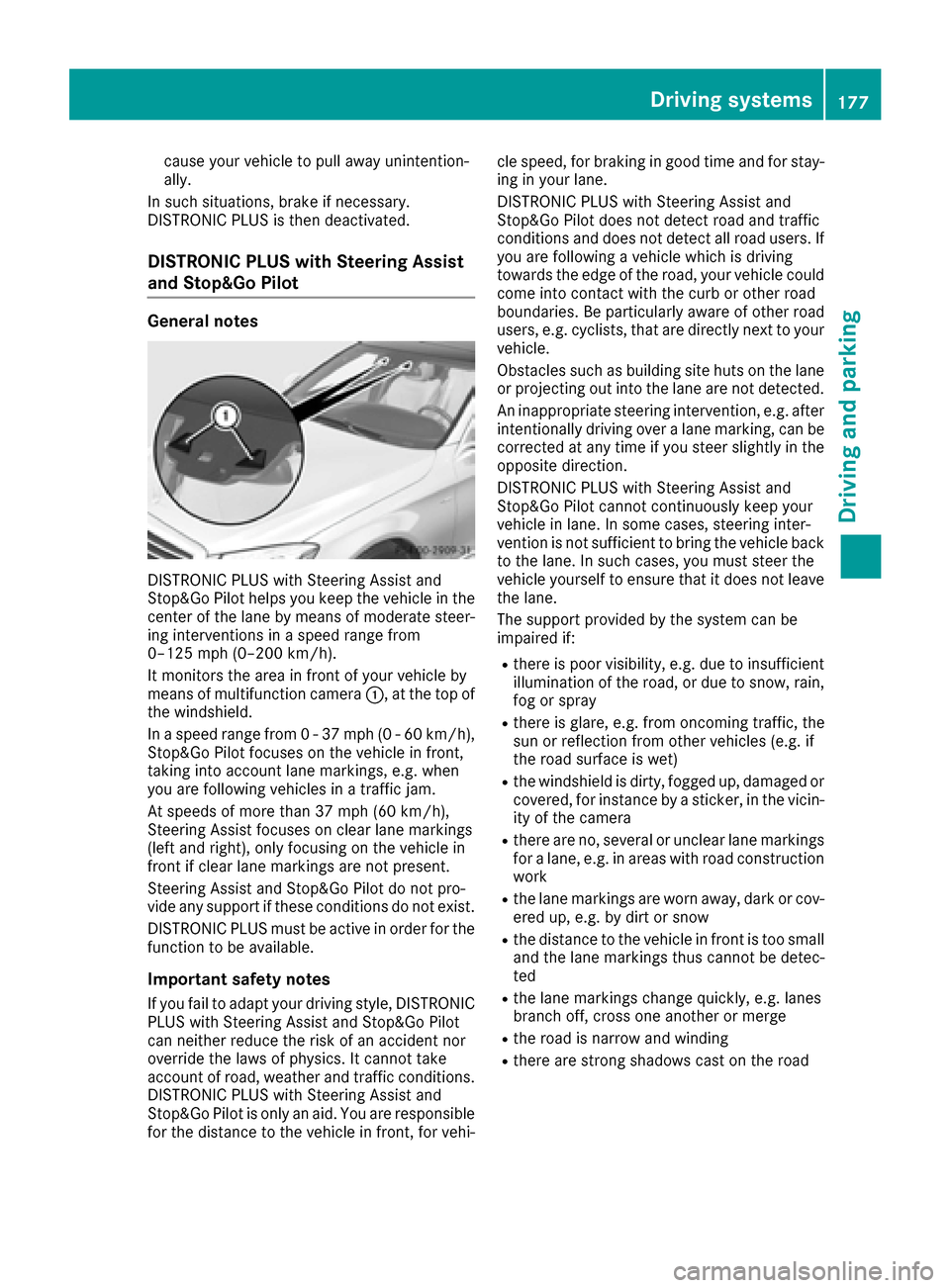
DISTRONIC PLUS with Steering Assist and
Stop&Go Pilot helps you keep the vehicle in the
center of the lane by means of moderate steer-
ing interventions in a speed range from
0–125 mph (0–200 km/h).
It monitors the area in front of your vehicle by
means of multifunction camera :, at the top of
the windshield.
In a speed range from 0 - 37 mph (0 - 60 km/h),
Stop&Go Pilot focuses on the vehicle in front,
taking into account lane markings, e.g. when
you are following vehicles in a traffic jam.
At speeds of more than 37 mph (60 km/h),
Steering Assist focuses on clear lane markings
(left and right), only focusing on the vehicle in
front if clear lane markings are not present.
Steering Assist and Stop&Go Pilot do not pro-
vide any support if these conditions do not exist.
DISTRONIC PLUS must be active in order for the
function to be available.
Important safety notes
If you fail to adapt your driving style, DISTRONIC
PLUS with Steering Assist and Stop&Go Pilot
can neither reduce the risk of an accident nor
override the laws of physics. It cannot take
account of road, weather and traffic conditions.
DISTRONIC PLUS with Steering Assist and
Stop&Go Pilot is only an aid. You are responsible
for the distance to the vehicle in front, for vehi- cle speed, for braking in good time and for stay-
ing in your lane.
DISTRONIC PLUS with Steering Assist and
Stop&Go Pilot does not detect road and traffic
conditions
and d
oes not detect all road users. If
you are following a vehicle which is driving
towards the edge of the road, your vehicle could
come into contact with the curb or other road
boundaries. Be particularly aware of other road
users, e.g. cyclists, that are directly next to your
vehicle.
Obstacles such as building site huts on the lane
or projecting out into the lane are not detected.
An inappropriate steering intervention, e.g. after intentionally driving over a lane marking, can be
corrected at any time if you steer slightly in the
opposite direction.
DISTRONIC PLUS with Steering Assist and
Stop&Go Pilot cannot continuously keep your
vehicle in lane. In some cases, steering inter-
vention is not sufficient to bring the vehicle backto the lane. In such cases, you must steer the
vehicle yourself to ensure that it does not leave
the lane.
The support provided by the system can be
impaired if:
Rthere is poor visibility, e.g. due to insufficient
illumination of the road, or due to snow, rain,
fog or spray
Rthere is glare, e.g. from oncoming traffic, the
sun or reflection from other vehicles (e.g. if
the road surface is wet)
Rthe windshield is dirty, fogged up, damaged or
covered, for instance by a sticker, in the vicin-
ity of the camera
Rthere are no, several or unclear lane markings
for a lane, e.g. in areas with road constru ction
w
ork
Rthe lane markings are worn away, dark or cov-
ered up, e.g. by dirt or snow
Rthe distance to the vehicle in front is too small
and the lane markings thus cannot be detec-
ted
Rthe lane markings change quickly, e.g. lanes
branch off, cross one another or merge
Rthe road is narrow and winding
Rthere are strong shadows cast on the road
Driving systems177
Driving and parking
Z