2017 MERCEDES-BENZ G-Class cooling
[x] Cancel search: coolingPage 8 of 286

C
CaliforniaImportant notic efor retail cus-
tomersa nd lessees .......................... 24
Callin gupam alfunction
see Display messages
Camera
see Rear view camera
Care
Car wash ........................................ 231
Carpet s......................................... .237
Chrome parts. ................................ 23 5
Disp lay. ..........................................2 36
Exhaus tpipe. ................................. 235
Exterior lights ................................ 234
General notes ................................ 231
Interior ...........................................2 36
Matte finish ................................... 233
Paint .............................................. 233
Plastic trim ....................................2 36
Power washer ................................ 232
Rea rview camera .......................... 235
Roo flining ...................................... 237
Seat belt. ....................................... 237
Seat cover ..................................... 236
Selector lever. ............................... 236
Sensors ......................................... 234
Steering wheel. .............................. 236
Trimp ieces. ................................... 236
Washing by hand ........................... 232
Wheels. .......................................... 233
Window s........................................ 234
Wipe rblade s.................................. 234
Woode ntrim .................................. 236
Carg ocom partmentc over
Important safety notes .................. 209
Installing/removing ....................... 209
Notes/howtou se......................... 209
Opening and closing ...................... 209
Carg ocom partmente nlargement
Important safety notes .................. 206
Carg otie dow nrings ......................... 209
CD
see also Digital Operator's Man-
ual.................................................. 198
CD player/CD changer (on-board
computer) .......................................... 162 Cente
rc
ons
ole
Lower section .................................. 35
Overview .......................................... 34
Upper section .................................. 34
Central locking
Automati cloc king (on-board com-
puter) ............................................. 166
Locking/unlocking (SmartKey). ....... 63
Changeofa ddress.............................. 25
Changeofo wnership.......................... 25
Changin gbulbs
Standing lamp (rear) ........................ 91
Changin ggears .................................. 112
Child
Restraint system .............................. 50
Child seat
BabySmart™ ai rbag deactivation
system ............................................. 53
Forward-facing restraint system ...... 55
LATCH-typ e(ISOFIX) child seat
anchors ............................................ 51
On the front-passenger seat. ........... 54
Problem (malfunction) ..................... 55
Rearward-facing restraint system .... 54
Top Tether ....................................... 52
Child-proof locks
Important safety notes .................... 56
Rear doors ....................................... 56
Children
Specia lseatb eltr etractor ............... 50
Childrenint he vehicle
Important safety notes .................... 49
Chrome parts (cleaning instruc-
tions) .................................................. 235
Cigarette lighter ................................ 212
Cleaning
Mirror turn signal ........................... 234
Trailer tow hitch ............................. 235
Climate control
Controlling automaticall y................. 98
Cooling with ai rdehumidifica tion ..... 97
Defrosting the window s................... 99
Defrosting the windshield ................ 99
Dual-zone automatic climate con-
trol ................................................... 95
ECO start/stop function .................. 97
Important safety notes .................... 95
6Index
Page 9 of 286

Indicator lamp .................................. 97
Maximumcooling .............................9 9
Notes on using dual-zone auto-
matic climate control ....................... 96
Overview of systems ........................ 95
Problemw ith the rear window
defroster ........................................ 100
Problems with "cooling with air
dehumidification" .............................9 7
Refrigerant .................................... .280
Refrigerant filling capacity ............. 281
Setting the ai rdistribution ...............9 8
Setting the ai rvents ...................... 101
Setting the airflow ........................... 98
Setting the temperature .................. 98
Switching air-recirculation mode
on/off. ........................................... 101
Switching on/off. ............................. 97
Switching residua lheato n/off. ..... 101
Switching the rearw indow
defroster on/off. ........................... 100
Switching the ZONE function
on/off. ............................................. 99
Windshield defroster ........................ 99
Cockpit
Overview .......................................... 31
COMAND
Switching on/off. .......................... 199
see separate operating instructions
COMAND display
Cleaning ......................................... 236
Combination switch ............................ 87
Connecting aUSB device
see also Digital Operator's Man-
ua l.................................................. 198
Consumptions tatistics (on-board
computer) .......................................... 160
Controller ........................................... 199
Controllin gspeed
see DISTRONIC PLUS
Convenience closin gfeature .............. 70
Convenience opening feature ............ 70
Coolant (engine)
Checking the level ......................... 229
Displa ymessage ............................ 176
Filling capacity ............................... 280
Notes. ............................................ 279 Temperature (on-board com-
puter) ............................................. 167
Temperature gaug
e........................ 158
Warning la mp ................................. 194
C
ooling
see Climate control
Copyright ............................................. 29
Cruise control
Cruis econtrol lever ....................... 131
Deactivating ................................... 132
Driving system ............................... 131
Function/note s............................. 131
Generaln otes ................................ 131
Important safety notes .................. 131
Resuming the storeds peed ........... 132
Setting aspeed .............................. 132
Storing and maintaining current
speed ............................................. 131
Cup holder
Center console .............................. 210
Important safety notes .................. 210
Rear compartment ......................... 210
D
Datasee Technical data
Daytime runnin glamps
Displa ymessage ............................ 176
Switching on/off( on-board com-
puter) ............................................. 165
Switching on/off( switch) ................ 85
Delayed switch-off
Exterior lighting (on-board com-
puter) ............................................. 165
Interior lighting .............................. 166
Diagnostic sconnection ...................... 27
Differential locks
Disengaging ................................... 149
Engaging ........................................ 148
Front axl e...................................... 149
Genera lnotes ................................ 147
Rear axl e........................................ 149
Terrai n........................................... 147
Transferc ase. ................................ 149
Digital Operator's Manual
Help. ................................................ 22
Introduction ..................................... 22
Index7
Page 97 of 286
Overview of the climatecontrol sys-
tem
General notes
Observe the settings recommended on the fol-
lowing pages. The windows could otherwise fog
up.
To preventt he windows from fogging up:
Rswitch off climate control only briefly
Rswitch on air-recirculation mode only briefly
Rswitch on the cooling with air dehumidifica-
tion function
Ractivatethe "Windshield defrosting" function
briefly, if required
Climate control regulates the temperature and
the humidity in the vehicle interior and filters
undesirable substances out of the air.
The "Cooling with air dehumidification "function
is only available when the engine is running.
Optimum operation is only achieved when the
side windows and the sliding sunroof are closed. The climatic comfort deteriorates whilst the slid-
ing sunroof is open. Set the temperature man-
ually if the sliding sunroof is open.
The residual heat function can only be activated
or deactivated with the ignition switched off
(
Ypage 101).
The integrated filter can filter out most particles
of dust and completely filters out pollen. Aclog-
ged filter reduces the amount of air supplied to
the vehicle interior. Depending on the operating
conditions and environmental influences, the
interval for replacing the filter may be shorter
than specified.
iVentilate the vehicle for abrief period during
warm weather, e.g. using the convenience
opening feature (
Ypage 70). This will speed
up the cooling process and the desired vehi-
cle interior temperature will be reached more
quickly.
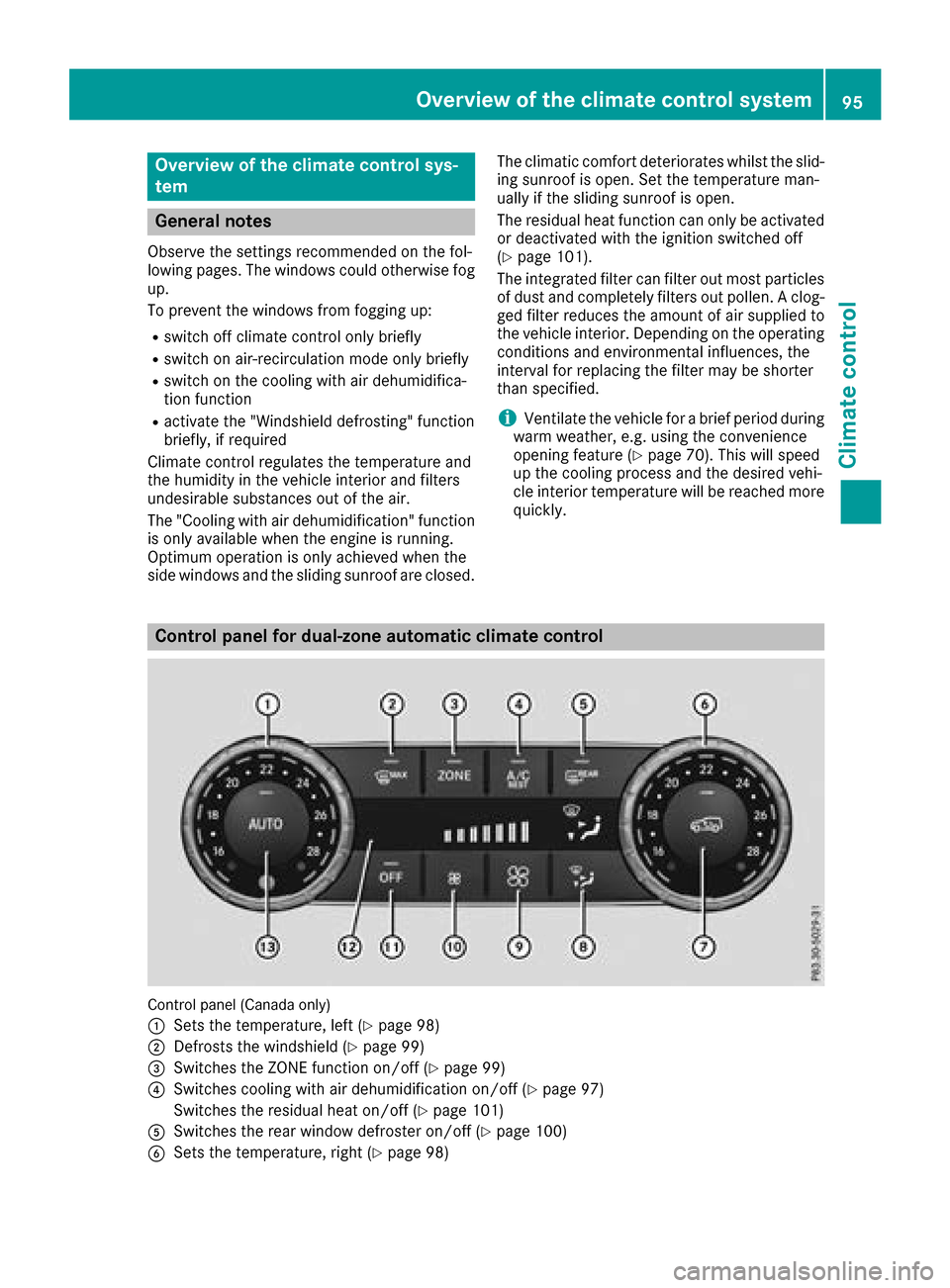
Control panel for dual-zone automatic climat econtrol
Control panel (Canada only)
:
Setst he temperature, left (Ypage 98)
;Defrosts the windshield (Ypage 99)
=Switches the ZONE function on/off (Ypage 99)
?Switches cooling with air dehumidification on/off (Ypage 97)
Switches the residual heat on/off (
Ypage 101)
ASwitches the rear window defroster on/off (Ypage 100)
BSetst he temperature, right (Ypage 98)
Overview of thec limatecontrol system95
Climatec ontrol
Page 98 of 286
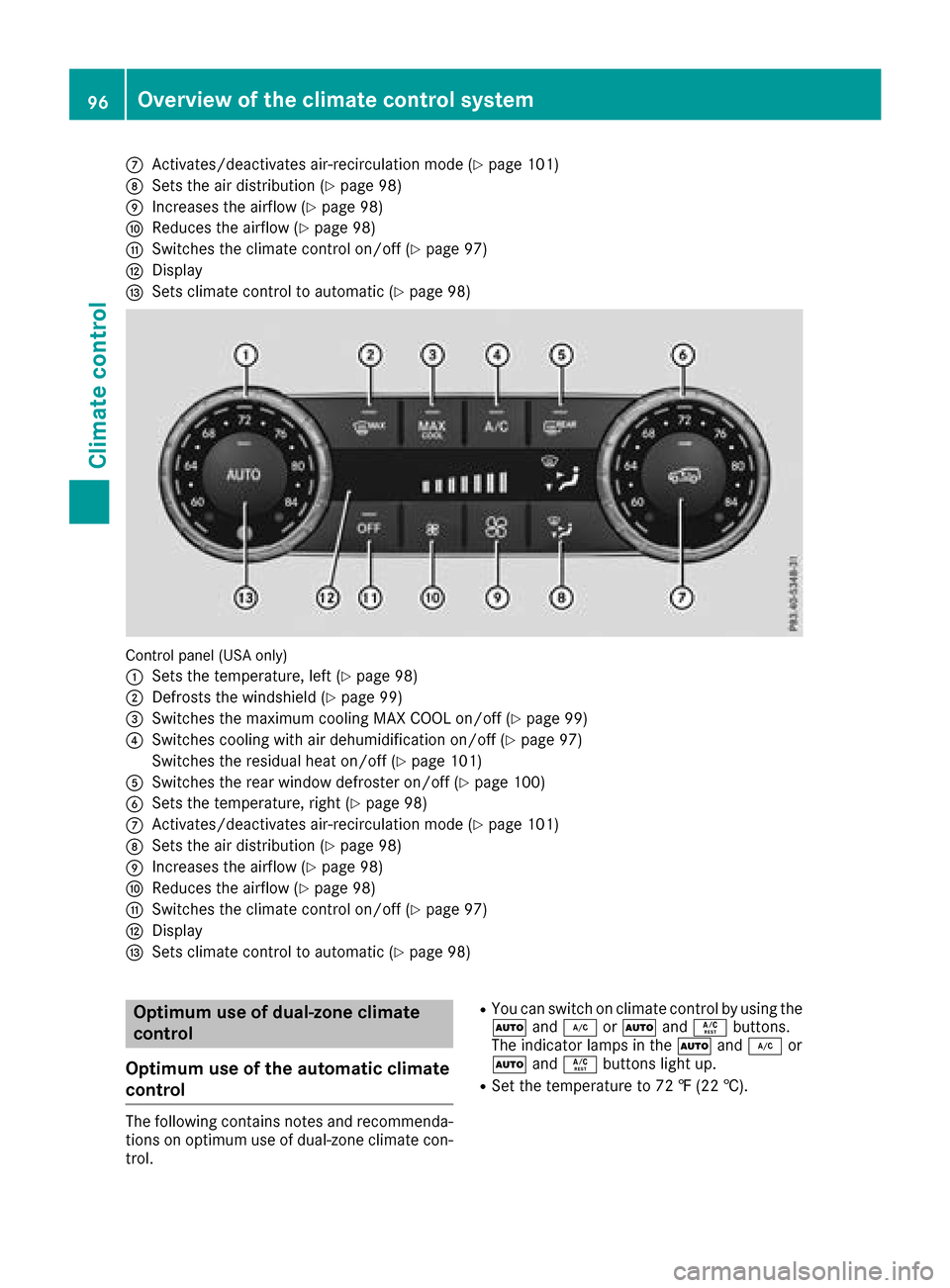
CActivates/deactivates air-recirculation mode(Ypage 101)
DSets the airdistributio n(Ypage 98)
EIncreases the airflow (Ypage 98)
FReduces the airflow (Ypage 98)
GSwitchest he climate controlo n/off (Ypage 97)
HDisplay
ISets climate controltoa utomatic (Ypage 98)
Control panel (US Aonly)
:
Sets the temperature ,lef t(Ypage 98)
;Defrosts the windshield (Ypage 99)
=Switchest he maximu mcooling MAX COOL on/off (Ypage 99)
?Switchesc ooling with ai rdehumidifica tion on/off (Ypage 97)
Switchest he residualheato n/off (
Ypage 101)
ASwitchest he rearwindo wd efroster on/off (Ypage 100)
BSets the temperature ,right (Ypage 98)
CActivates/deactivates air-recirculation mode(Ypage 101)
DSets the ai rdistributio n(Ypage 98)
EIncreases the airflow (Ypage 98)
FReduces the airflow (Ypage 98)
GSwitchest he climate controlo n/off (Ypage 97)
HDisplay
ISets climate controltoa utomatic (Ypage 98)
Optimum use of dual-zon eclimate
control
Optimum use of the automatic climate
control
The following contains notes and recommenda-
tions on optimu museof dual-zone climate con-
trol.
RYo uc an switch on climate controlbyu sing the
à and¿ orà andÁ buttons.
The indicator lamps in the Ãand¿ or
à andÁ buttons light up.
RSet the temperature to 72 ‡(22 †).
96Overvie wofthe climate controls ystem
Climate control
Page 99 of 286

ROnly use the "Windshield defrosting" function
briefly until the windshieldisclear again.
ROnly use air-recirculation mode briefly, e.g. if
there are unpleasant outside odors or when in
at unnel. The windows could otherwise fog up,
since no fresh air is drawn into the vehicle in
air-recirculation mode.
ECO start/stop function
During automatic engine switch-off, the climate
control system only operates at areduced capa-
city. If you require the full climate control output,
you can switch off the ECO start/stop function
by pressing the ECO button (
Ypage 106).
Operating the climate control system
Activates/deactivates climate con-
trol
General notes
When the climate control is switched off, the air
supply and air circulation are also switched off. The windows could fog up. Therefore, switch off
climate control only briefly.
Activate climate control primarily using the
à button (
Ypage 98).
Activating/deactivating
XTurn the SmartKey to position 2in the igni-
tion lock (Ypage 104).
XTo activate: press theÃbutton.
The indicator lamp in the Ãbutton lights
up. Airflow and air distribution are set to auto-
matic mode.
XTo deactivate: press the^button.
The indicator lamp in the ^button lights
up.
Switchingc ooling with air dehumidification on/off
General notes
If you deactivate the "Cooling with air-dehumidification" function, the air inside the vehicle will not
be cooled. The air inside the vehicle will also not be dehumidified. The windows can fog up more
quickly. Therefore, only deactivate the "Cooling with air-dehumidification" function briefly.
The "Cooling with air dehumidification" function is only available when the engine is running.
The air inside the vehicle is cooled and dehumidified according to the temperature selected.
Condensation may drip from the underside of the vehicle when it is in cooling mode. This is normal
and not asign that there is amalfunction.
Activating/deactivating
XTo activate: press theÁbutton.
The indicator lamp in the Ábutton lights up.
XTo deactivate: press theÁbutton.
The indicator lamp in the Ábutton goes out. The "Cooling with air dehumidification" function
has adelayed switch-off feature.
Problems with the "Cooling with air dehumidification" function
!If the cooling with air dehumidification does not switch on, it is possible that the climate control
system has lost coolant.
Have the cooling with air dehumidification checked at aqualified specialist workshop.
Operating the climatec ontrol system97
Climatecontrol
Page 100 of 286
ProblemPossible causes/consequences andMSolutions
The indicator lamp in the
¿orÁ button
flashes three times or
remains off. The "Cool-
ing with air dehumidifi-
cation" function cannot
be switched on.Cooling with air dehumidification has been deactivated due to amal-
function.
XVisit aqualified specialist workshop.
Setting climate control to automatic
General notes
In automatic mode, the set temperature is main-
tained at aconstant level. The system automat-
ically regulates the temperature of the dis-
pensed air, the airflow and the air distribution.
Automatic mode works best when cooling with
air dehumidification is also activated. If neces-
sary, cooling with air dehumidification can be
deactivated.
Automatic control
XTurn the SmartKey to position 2in the igni-
tion lock (Ypage 104).
XSet the desired temperature.
XTo activate: press theÃbutton.
The indicator lamp in the Ãbutton lights
up. Automatic air distribution and airflow are
activated.
XTo deactivate: press the_button.
or
XPress the IorK button.
The indicator lamp in the Ãbutton goes
out.
XTo switch to manualm ode:press the_
button.
Setting the temperature
Differentt emperatures can be set for the driv-
er's and front-passenger sides.
XTurn the SmartKey to position 2in the igni-
tion lock (Ypage 104).
XAdjust control :orB (Ypage 95) to the
desired temperature.
Only change the temperature settingins mall
increments. Start at 72 ‡(22 †).
Setting the air distribution
Air distribution settings
P Directsa ir through the center and side air
vents
O Directsa ir through the footwell air vents
S Directsa ir through the center, side and
footwell vents
¯ Directsa ir through the defroster vents
b Canada only: directs the airflow through
the defroster, center and side air vents.
a Directsa ir through the defroster and
footwell vents
_ Canada only: directs the airflow through
the defroster, center and footwell air
vents.
Setting
XTurn the SmartKey to position 2in the igni-
tion lock (Ypage 104).
XPress the _button repeatedly until the
desired symbol appears in the display.
Setting the airflow
XTurn the SmartKey to position 2in the igni-
tion lock (Ypage 104).
XTo increase: press theKbutton.
XTo reduce: press theIbutton.
iThe airflow from the rear-compartment
ventsa nd the center ventsist he same.
98Operating the climate control system
Climatecontrol
Page 101 of 286
Switching the ZONE function on/off
XTo switch on:press theábutton.
The indicator lamp in the ábutton lights
up.
The temperature settingf or the driver's side
is not adopted for the front-passenger side
and the rear compartment. The temperature
for the front-passenger side and the rear com-
partment is set separately.
XTo switch off: press theábutton.
The indicator lamp in the ábutton goes
out.
The temperature settingf or the driver's side
is adopted for the front-passenger side and
the rear compartment.
Defrosting the windshield
General notes
You can use this function to defrost the wind-
shield or to defrost the inside of the windshield
and the side windows.
Switch off the "Windshield defrosting" function
as soon as the windshield is clear again.
Activating/deactivating
XTurn the SmartKey to position 2in the igni-
tion lock (Ypage 104).
XTo activate: press the¬button.
The indicator lamp in the ¬button lights
up.
The climate control system switches to the
following functions:
Rcooling with air dehumidification on
Rhigh airflow
Rhigh temperature
Rair distribution to the windshield and front
side windows
Rair-recirculation mode off
XTo deactivate: press the¬button.
The indicator lamp in the ¬button goes
out. The previously selected settings are
restored. The cooling with air dehumidifica-
tion function remains on. Air-recirculation
mode remains deactivated.
Activating/deactivating MAX COOL
maximum cooling
The MAX COOL function is only available in vehi- cles for the USA.
MAX COOL is only operational when the engine
is running.
XTo activate: press theÙbutton.
The indicator lamp in the button lights up.
XTo deactivate: press theÙbutton.
The indicator lamp in the Ùbutton goes
out. The previously selected settings are
restored.
When you activate MAX COOL, the following
functions are also switched on:
Rmaximum cooling
Rmaximum airflow
Rair-recirculation mode
Defrosting the windows
Windows fogged up on the inside
XActivate the Ácooling with air dehumidi-
fication function.
XActivate the Ãautomatic mode.
XIf the windows continue to fog up, activate the
"Windshield defrosting" function (Ypage 99).
iYou should only select this settingu ntil the
windshield is clear again.
Windows fogged up on the outside
XSwitch on the windshield wipers (Ypage 92).
XPress the _button repeatedly until the
P orO symbol appears in the display.
iYou should only select this settingu ntil the
windshield is clear again.
iIf you clean the windows regularly,t hey do
not fog up so quickly.
Activating/deactivating windshield
heating
GWARNING
Any accumulation of snow and ice should be
removed from the windshield before driving.
Operating the climate control system99
Climatec ontrol
Z
Page 103 of 286
Switching air-recirculation mode
on/off
General notes
If you switch on air-recirculation mode, the win-
dows can fog up more quickly, in particular at
low temperatures. Only use air-recirculation
mode briefly to prevent the windows from fog-
ging up.
Activating/deactivating
XTurn the SmartKey to position 2in the igni-
tion lock (Ypage 104).
XTo activate: press thedbutton.
The indicator lamp in the dbutton lights
up.
iAir-recirculation mode is automatically acti-
vated at high levels of pollution or at high out-
side temperatures. When air-recirculation
mode is activated automatically, the indicator
lamp in the dbutton is not lit.
Outside air is added after about 30 minutes.
XTo deactivate: press thedbutton.
The indicator lamp in the dbutton goes
out.
iAir-recirculation mode switches off auto-
matically:
Rafter approximately five minutes at outside
temperatures below approximately 41 ‡
Rafter approximately five minutes if cooling
with air dehumidification is deactivated
Rafter approximately 30 minutes at outside
temperatures above approximately 41 ‡
(5 †)
Switching the residual heat on or off
General notes
The residual heat function is only available on
vehicles for Canada.
It is possible to make use of the residual heat of
the engine to continue heating the stationary
vehicle for up to 30 minutes after the engine has
been switched off. The heating time depends on the set interior temperature.
Activating/deactivating
XTurn the SmartKey to position gin the igni-
tion lock (Ypage 104) or remove it.
XTo activate: press theÁbutton.
The indicator lamp in the Ábutton lights
up.
iThe blower will run at alow speed regardless
of the airflow setting.
iIf you activate the residual heat function at
high temperatures, only the ventilation will be
activated.
XTo deactivate: press theÁbutton.
The indicator lamp in the Ábutton goes
out.
Residual heat is deactivated automatically:
Rafter approximately 30 minutes
Rwhen the ignition is switched on
Rif the battery voltage drops
Rif the coolant temperature is too low
Air vents
Important safety notes
GWARNING
Very hot or very cold air can flow from the air
vents. This could result in burns or frostbitei n
the immediate vicinity of the air vents. There
is ar isk of injury.
Make sure that all vehicle occupants always
maintain asufficient distance to the air out-
lets. If necessary, redirect the airflow to
another area of the vehicle interior.
In order to ensure the direct flow of fresh air
through the air ventsi nto the vehicle interior,
please observe the following notes:
Rkeep the air inlet between the windshield and
the hood free of blockages, such as ice, snow or leaves.
Rnever cover the air ventsora ir intake grilles in
the vehicle interior.
iFor virtually draft-free ventilation, adjust the
sliders of the air ventstot he center position.
iIf the automatic climate control constantly
differs from the set temperature or if unde-
Air vents101
Climatec ontrol
Z