2017 MERCEDES-BENZ G-Class reset
[x] Cancel search: resetPage 84 of 286
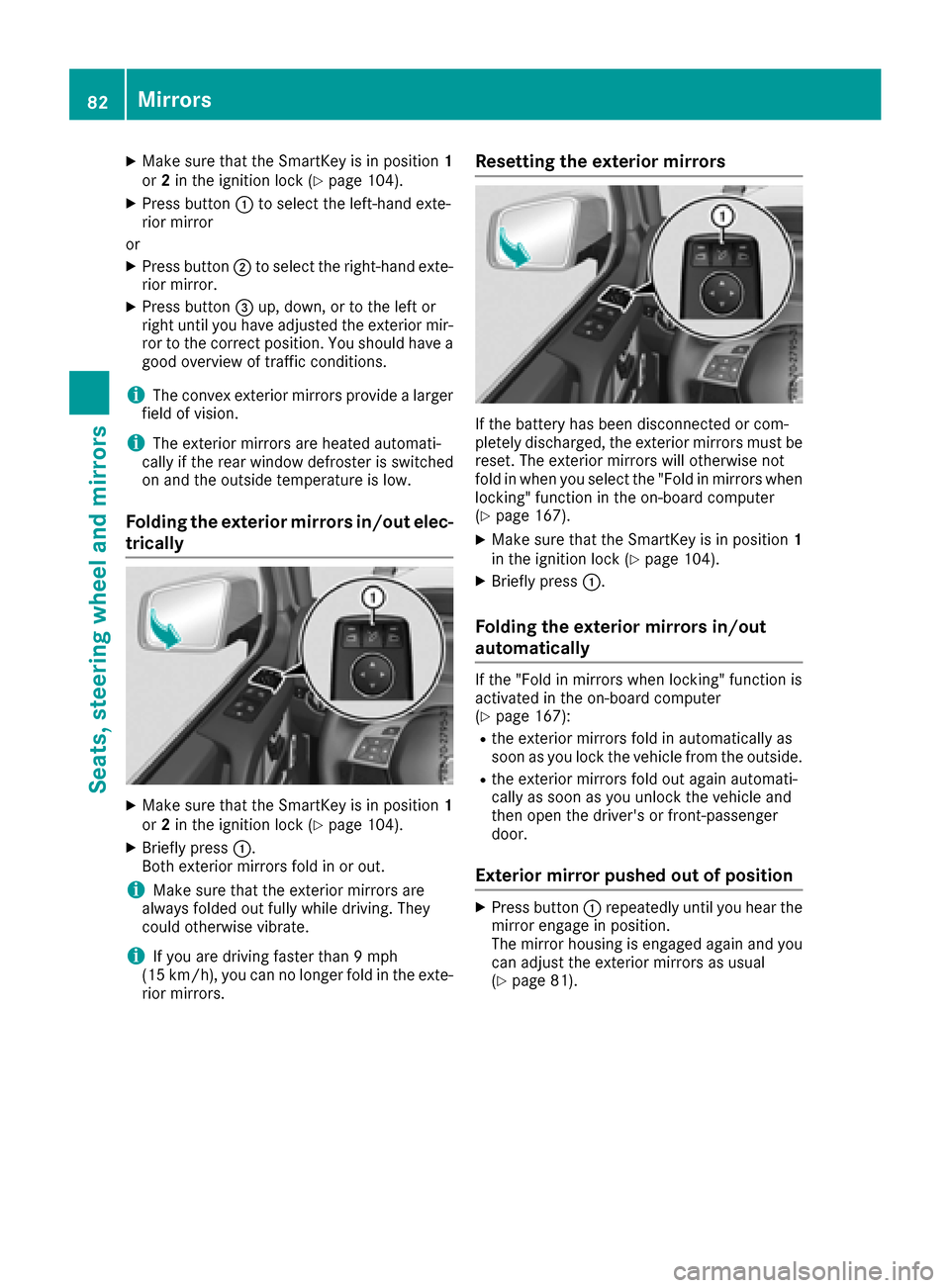
XMake sure that the SmartKey is in position1
or 2in the ignition lock (Ypage 104).
XPress button :to select the left-hand exte-
rior mirror
or
XPress button ;to select the right-hand exte-
rior mirror.
XPress button =up, down, or to the left or
right until you have adjusted the exterior mir- ror to the correct position. You should have a
good overview of traffic conditions.
iThe convex exterior mirrors provide alarger
field of vision.
iThe exterior mirrors are heated automati-
cally if the rear window defroster is switched
on and the outside temperature is low.
Folding the exterior mirrors in/out elec-
trically
XMake sure that the SmartKey is in position 1
or 2in the ignition lock (Ypage 104).
XBriefly press :.
Both exterior mirrors fold in or out.
iMake sure that the exterior mirrors are
always folded out fully while driving. They
could otherwise vibrate.
iIf you are driving faster than 9mph
(15 km/h), you can no longer fold in the exte-
rior mirrors.
Resetting the exterior mirrors
If the battery has been disconnected or com-
pletely discharged, the exterior mirrors must be
reset. The exterior mirrors will otherwise not
fold in when you select the "Fold in mirrors when
locking" function in the on-board computer
(
Ypage 167).
XMake sure that the SmartKey is in position 1
in the ignition lock (Ypage 104).
XBriefly press :.
Folding the exterior mirrors in/out
automatically
If the "Fold in mirrors when locking" function is
activated in the on-board computer
(
Ypage 167):
Rthe exterior mirrors fold in automatically as
soon as you lock the vehicle from the outside.
Rthe exterior mirrors fold out again automati-
cally as soon as you unlock the vehicle and
then open the driver's or front-passenger
door.
Exterior mirror pushed out of position
XPress button :repeatedly until you hear the
mirror engage in position.
The mirror housing is engaged again and you
can adjust the exterior mirrors as usual
(
Ypage 81).
82Mirrors
Seats, steering wheela nd mirrors
Page 85 of 286
Automa tica nti-glar emirror s
The rear-view mirror and th eexter iorm irror on
th ed river's side automatically go int oanti-glare
mod eif:
Rthei gnition is switched on and
Rinciden tligh tfro mh eadlamp sstrikes th esen-
sor in th erear-view mirror
iThe mirror sdonotgo int oanti-glare mod eif
revers egear is engage doriftheinterior light-
ing is switched on .
Parking position for th eexteri or mir-
ror on thef ront-passenger side
Setting/stori ng theparki ng position
Usin grevers egear
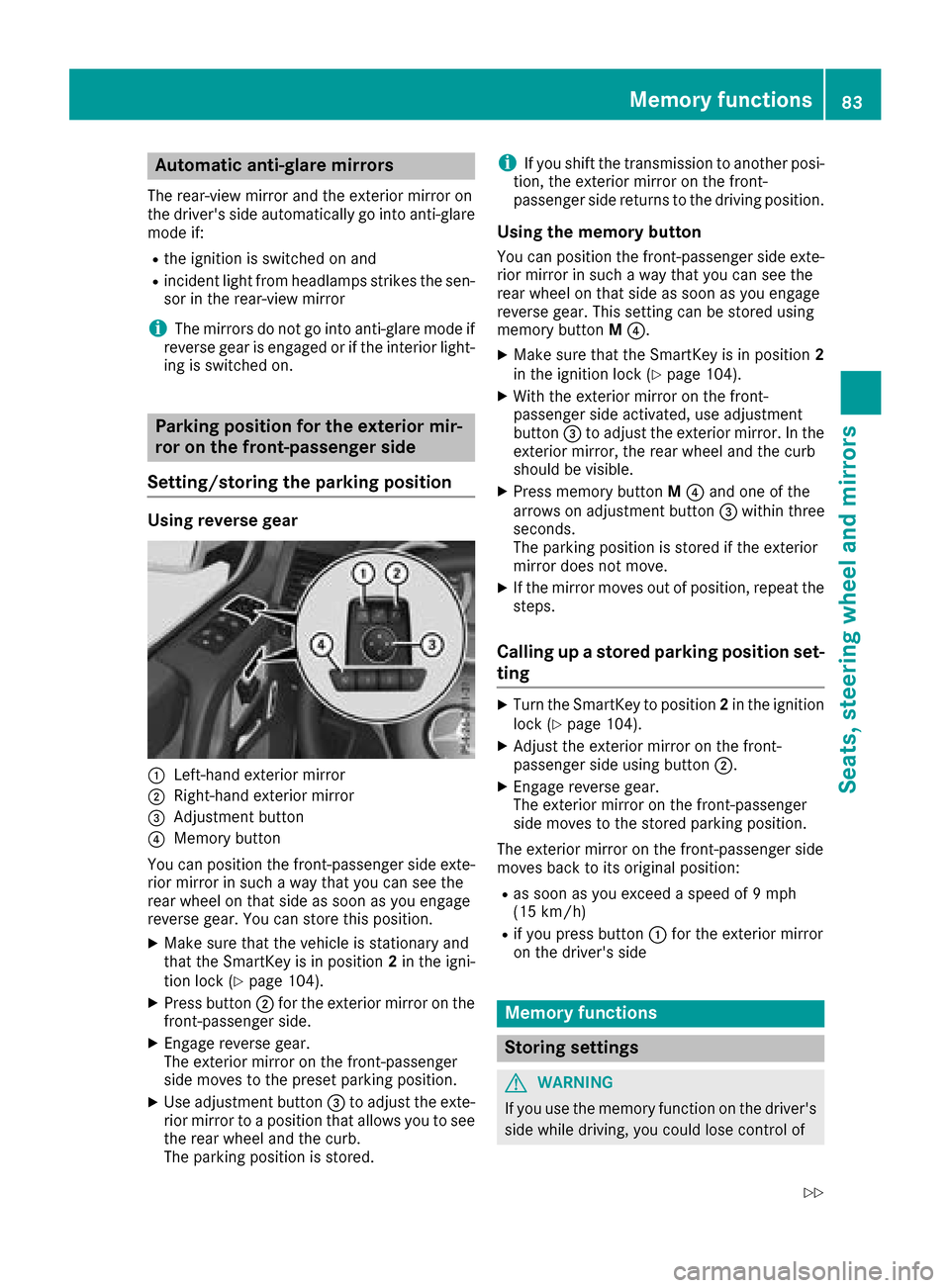
:Left-han dexter iorm irror
;Right-hand exterio rmirror
=Adjustmen tbutto n
?Memory butto n
You can position th efront-pa ssenger side exte -
rio rm irror in suc haway that you can see th e
rear whee lonthats ide as soo nasyou engage
revers egear .You can store this position .
XMakesuret hatthe vehicl eisstationary and
that th eSmartKey is in position 2in th eigni-
tion loc k(
Ypage 104).
XPress butto n; for th eexter iorm irror on th e
front-passenger side .
XEngage reversegear .
The exterio rmirror on th efront-pa ssenger
side moves to th epreset parking position .
XUse adjustmentbutto n= to adjust th eexte-
rio rm irror to aposition that allows you to see
th er ear whee land th ecurb.
The parking position is stored.
iIf you shif tthe transmission to another posi-
tion ,the exterio rmirror on th efront -
passenger side return stothedrivin gposition .
Usingthe memory button
You can position th efront-pa ssenger side exte -
rio rm irror in suc haway that you can see th e
rear whee lonthats ide as soo nasyou engage
revers egear .This setting can be store dusing
memory butto nM ?.
XMak esuret hatthe SmartKey is in position 2
in thei gnition loc k(Ypage 104).
XWiththe exterio rmirror on th efront -
passenger side activated, use adjustmen t
butto n= to adjust th eexter iorm irror .Int he
exterio rmirror ,the rear whee land th ecurb
should be visible.
XPress memory butto nM ? and on eofthe
arrows on adjustmen tbutto n= within three
seconds.
The parking position is store diftheexterio r
mirror does no tmove.
XIf th emirror moves out of position ,repeat th e
steps.
Calling up astoredp arki ng position set-
ting
XTurn th eSma rtKey to position 2in th eignition
loc k(Ypage 104).
XAdjus tthe exterio rmirror on th efront -
passenger side usin gbutto n;.
XEngage revers egear .
The exterio rmirror on th efront-pa ssenger
side moves to th estoredp arking position .
The exterio rmirror on th efront-pa ssenger side
moves bac ktoitsoriginal position :
Ras soonasyou exceed aspee dof9 mph
(15 km/h)
Rif you press butto n: for th eexter iorm irror
on th edriver's side
Mem oryfunctions
Stori ng settings
GWARNIN G
If you use th ememory function on th edriver's
side while driving, you could lose control of
Memoryf unctions83
Seats ,steering wheel and mirrors
Z
Page 86 of 286
the vehicleasaresultoft he adjustments
being made .There is ariskofana ccident.
Onlyu sethe memory functio nonthe driver's
side when the vehicl eisstationary.
GWARNING
When the memory functio nadjusts the seat or
steering wheel, yo uand othe rvehicl eoccu-
pants –particularly children –could become
trapped .There is ariskofi njury.
Whil ethe memory functio nism aking adjust-
ments ,makes uret hatnoo ne hasa ny body
parts in the swee pofthe seat or steering
wheel. If somebod ybecome strapped ,imm e-
diately release the memory functio nposit ion
button. The adjustment proces sisstopped.
GWARNING
Childre ncould become trapped if theya cti-
vate the memory function, particularly when
unattended .There is ariskofi njury.
When leaving the vehicle, always take the
SmartKeyw ithy ou and lock the vehicle. Never
leav echildren unsupervised in the vehicle.
With the memory function, yo ucan stor eupto
threed ifferent settings, e.g .for threed ifferent
people.
The following setting sarestored as asingle
memory preset:
Rpositio nofthe seat, backrest and head
restraint
Rdriver's side :steering whee lposit ion
Rdriver's side :posit ionoft he exterio rmirrors
on the driver's and front-passenge rsides
XMake sure thatt he SmartKeyisinp osition 2
(Ypage 104 )orthatthe respectiv edooris
open.
XAdjust the seat (Ypage 76 )and hea drestraint
(Ypage 76).
XOn the driver'ss ide,adjus tthe steering wheel
(Ypage 80 )and the exterio rmirrors
(Ypage 81).
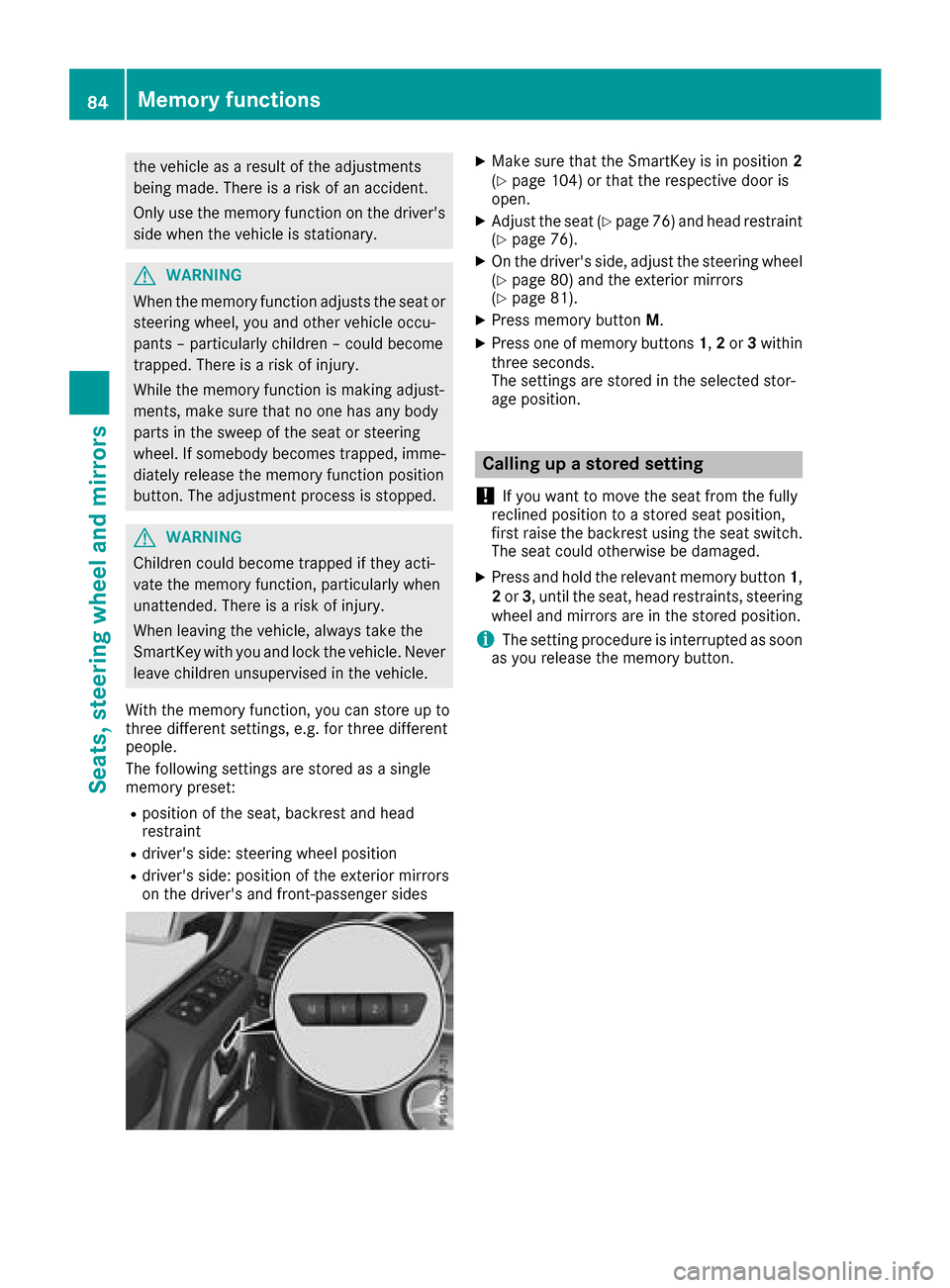
XPress memory button M.
XPress one of memory buttons 1,2 or 3within
threes econds.
The settings are stored in the selecte dstor-
ag ep osition.
Calling up astored setting
!
If yo uwanttom ove the sea tfrom the fully
recline dposition toas tored sea tposition,
first raise the backres tusing the sea tswitch.
The sea tcould otherwise be damaged.
XPress and hol dthe relevant memory button 1,
2 or 3,u nti lthe seat, hea drestraints, steering
whee land mirrors are in the stored position.
iThe setting procedur eisinterruptedass oon
as yo urelease the memory button.
84Memory functions
Seats, steering wheel andmirrors
Page 89 of 286
the ignition, the automatic headlamp cleaning
systemisreset and counting is resumed from0 .
Combination switch
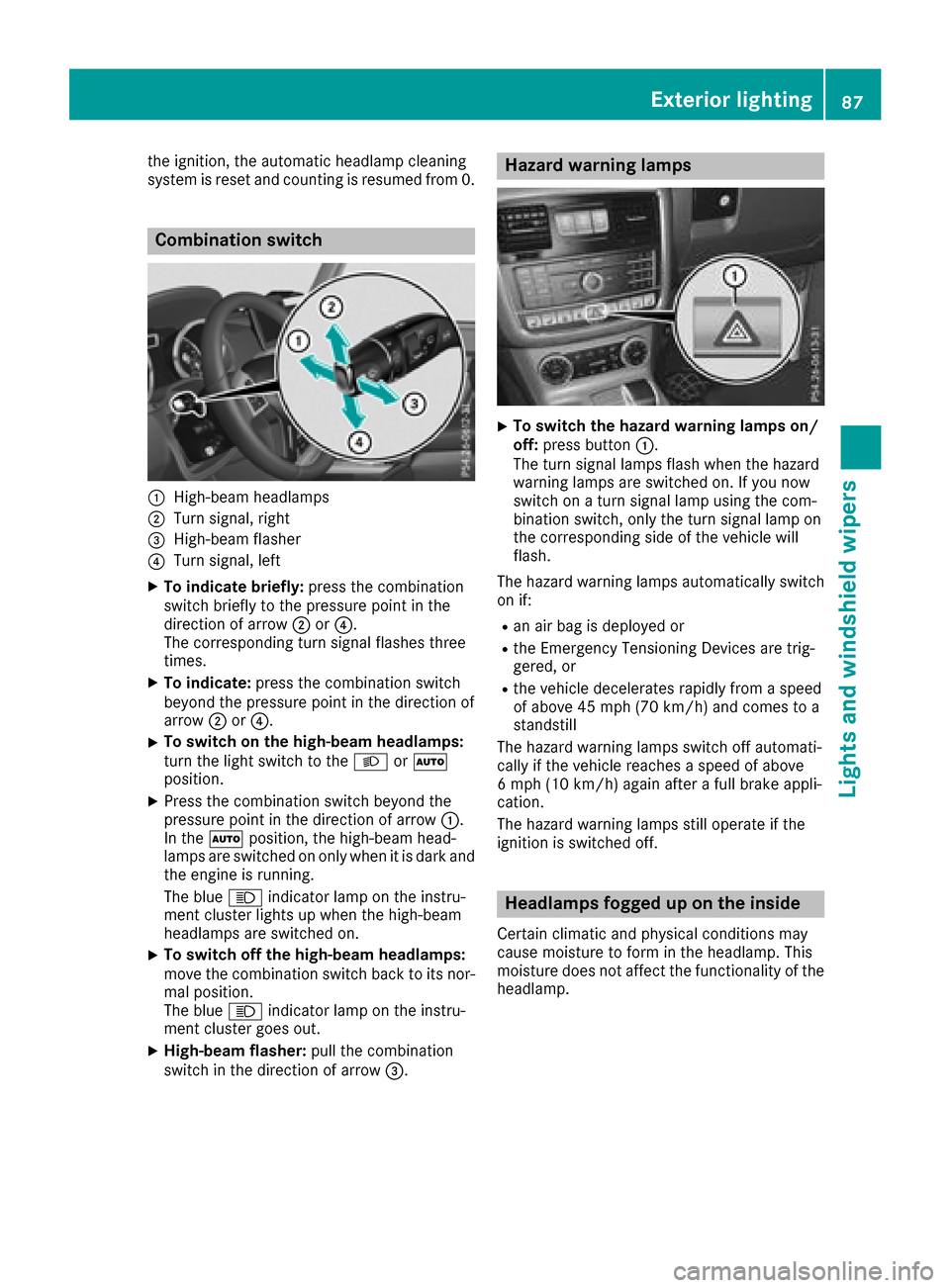
:High-beamheadlam ps
;Turn signal, right
=High-bea mflasher
?Turn signal, left
XTo indicate briefly: press the combination
switch briefl ytothe pressure point in the
direction of arrow ;or?.
The corresponding tur nsigna lflashe sthree
times.
XTo indicate: press the combinatio nswitch
beyond the pressure point in the direction of
arrow ;or?.
XTo switc honthe high-beam headlamps:
tur nthe light switch to the LorÃ
position.
XPress the combinatio nswitch beyond the
pressure point in the direction of arrow :.
In the Ãposition, the high-beam head-
lamps ar eswitched on onl ywhenitisd arka nd
the engine is running.
The blue Kindicator lamp on the instru-
ment clusterl ights up when the high-beam
headlamps ar eswitched on.
XTo switc hoffthe high-beam headlamps:
mov ethe combinatio nswitch back to its nor-
malp osition.
The blue Kindicator lamp on the instru-
ment clusterg oeso ut.
XHigh-beam flasher: pull the combination
switch in the direction of arrow =.
Hazard warning lamps
XTo switchthe hazard warning lamp son/
off: press button :.
The tur nsigna llam ps flash when the hazard
warning lamps ar eswitched on. If yo unow
switch on aturns igna llam pu sing the com-
bination switch ,onlyt he tur nsigna llam po n
the corresponding side of the vehicl ewill
flash.
The hazar dwarning lamps automaticall yswitch
on if:
Ran ai rbag is deployed or
Rthe Emergency Tensioning Devices ar etrig-
gered ,or
Rthe vehicl edecelerates rapidl yfromas peed
of above 45 mph (70 km/h )and come stoa
standstill
Th eh azardw arning lamps switch off automati-
cally if the vehicl ereache saspeed of above
6m ph (10 km/h )again after afullb rake appli-
cation.
Th eh azardw arning lamps still operate if the
ignition is switched off.
Headlamps fogged up on the inside
Certain climatic and physica lconditions may
cause moisture to for minthe headlamp. This
moisture does not affect the functionality of the
headlamp.
Exterior lighting87
Lights and windshield wiper s
Z
Page 160 of 286
Coolanttemperatur egauge
GWARNING
Opening th ehood when th eengineiso ver-
heated or when there is afireint heengine
compartmen tcoul de xpose you to hot gases
or other servic eproducts. Thereisar isko f
injury.
Let an overheate denginec ooldown before
opening th ehood.Ift here is afireint he
enginec ompartment, keep th ehood closed
and contac tthe fired epartment.
!Ad isplay message is shown if th ecoolant
temperatur eistoohigh.
If th ecoolant temperatur eisover
do no tcontinue driving
.
The engine will otherwise be damaged.
The coolant temperatur egage is in th einstru-
men tcluste ront heright-hands ide (
Ypage 32).
Under normal operatin gconditionsa nd withthe
specifie dcoolant level, th ecoolant temperature
may ris eto
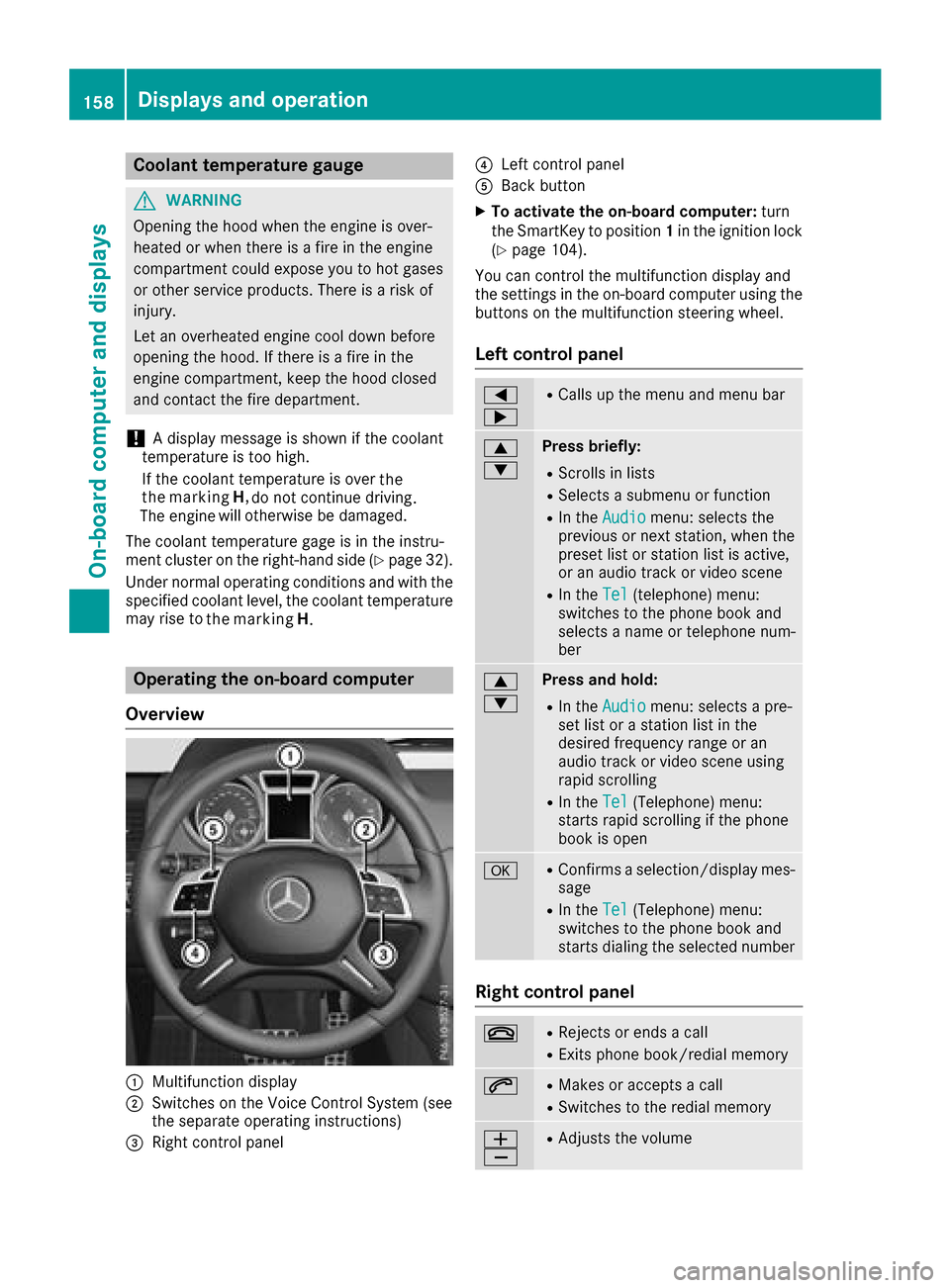
Operatin gthe on-boar dcomputer
Overview
:Multifunction display
;Switches on th eVoiceC ontrol Syste m(see
th es eparate operatin ginstructions)
=Right control panel
?Leftc ontrol panel
ABackbutton
XTo activate th eon-boar dcomputer: turn
th eS ma rtKey to position 1in th eignition lock
(
Ypage 104).
You can control th emultifunction display and
th es ettings in th eon-board computer usingt he
buttons on th emultifunction steering wheel.
Left control panel
=
;RCalls up th emenua nd men ubar
9
:Press briefly:
RScroll sinlists
RSelect sasubmenuorf unction
RIn theAudiomenu: select sthe
previous or next station, when the
preset list or statio nlist is active,
or an audio track or vide oscene
RIn the Tel(telephone )menu:
switches to th ephoneb ook and
selects anam eort elephone num-
ber
9
:Press and hold:
RIn the Audiomenu: selects apre-
set list or astatio nlist in the
desired frequency range or an
audio track or vide oscene using
rapid scrolling
RIn the Tel(Telephone) menu:
start srapid scrolling if th ephone
book is open
aRConfirms aselection/display mes-
sage
RIn the Tel(Telephone) menu:
switches to th ephoneb ook and
start sdialingt heselecte dnumber
Right control panel
~RReject sorendsac all
RExits phoneb ook/redial memory
6RMakes or acceptsac all
RSwitches to theredial memory
W
XRAdjusts th evolume
158Displays and operation
On-boardc omputer and displays
the marking
H
. the
the marking H,
Page 162 of 286
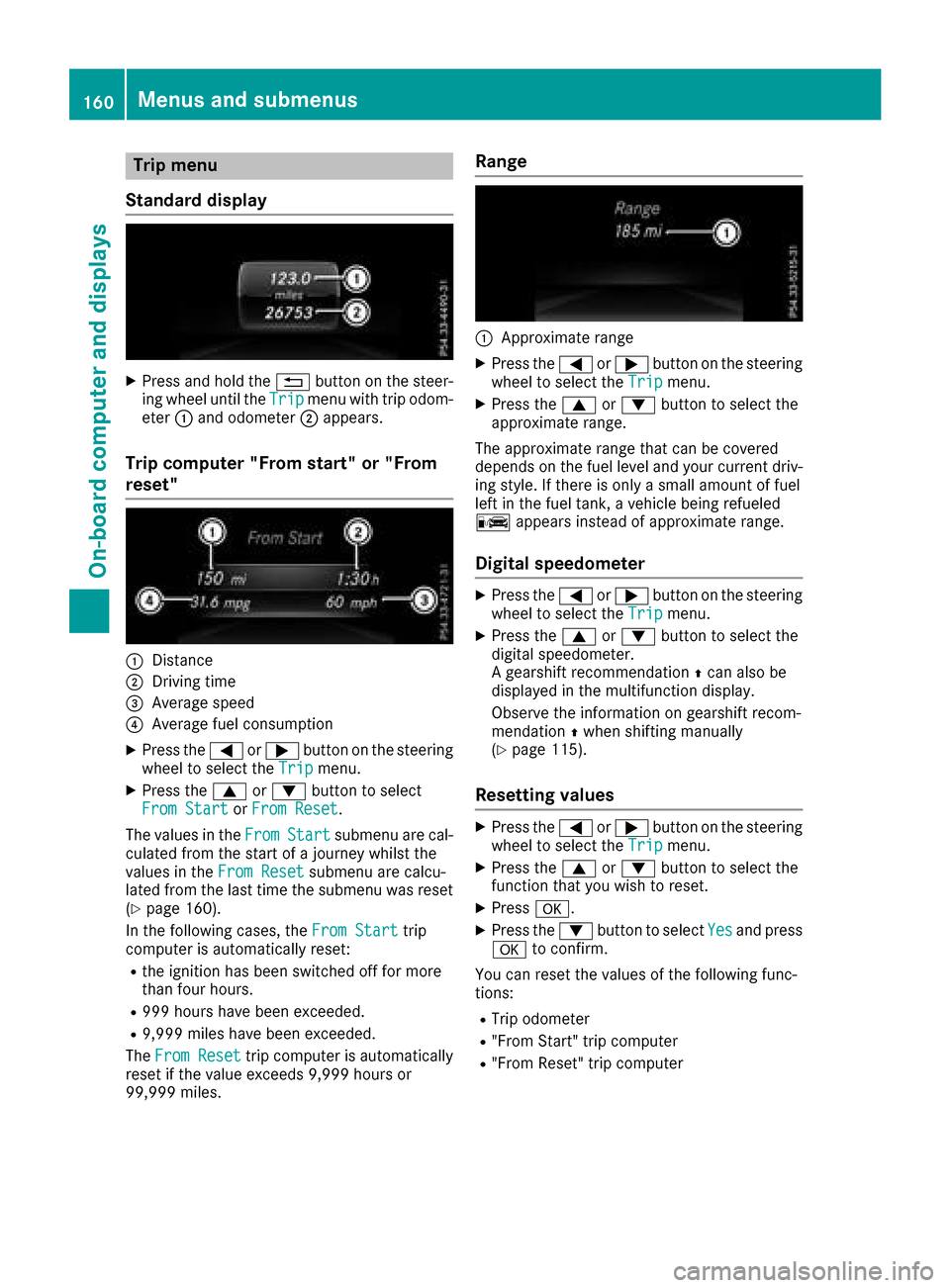
Trip menu
Standard display
XPress and hol dthe % button on the steer-
ing whee lunti lthe Tripmenu with trip odom-
eter :and odometer ;appears.
Trip computer" From start" or "From
reset"
:Distance
;Driving time
=Averag espeed
?Averag efuelconsumption
XPress the =or; button on the steering
whee ltoselect the Tripmenu.
XPress the 9or: button to select
FromS tartorFromR eset.
The values in the From
Startsubmenu arecal-
culate dfromt he start of ajourney whilst the
values in the FromReset
submenu ar ecalcu-
lated fromt he last time the submenu wa sreset
(
Ypage 160).
In the following cases, the FromStart
trip
compute risautomaticall yreset:
Rthe ignition hasb eens witched off for more
thanf ourh ours.
R999 hours have been exceeded.
R9,999 miles have been exceeded.
The FromR eset
trip compute risautomatically
reset if the valu eexceed s9,999 hours or
99,999 miles.
Range
:Approximate range
XPress the =or; button on the steering
whee ltoselect the Tripmenu.
XPress the 9or: button to select the
approximate range.
The approximate range thatc an be covered
depends on the fuel level and your current driv-
ing style .Ifthere is onl yasmall amount of fuel
left in the fuel tank, avehicl ebeing refueled
C appear sinstea dofa pproximate range.
Digital speedometer
XPress the =or; button on the steering
whee ltoselect the Tripmenu.
XPress the 9or: button to select the
digital speedometer.
Ag ears hift recommendation Zcan also be
displaye dinthe multifunctio ndisplay .
Observe the informatio nongearshift recom-
mendation Zwhen shifting manually
(
Ypage 115).
Resetting values
XPress the =or; button on the steering
whee ltoselect the Tripmenu.
XPress the 9or: button to select the
functio nthaty ouwish to reset.
XPress a.
XPress the :button to select Yesand press
a to confirm.
Yo uc an reset the values of the following func-
tions:
RTri po dometer
R"From Start" trip computer
R"From Reset" trip computer
160Menus and submenus
On-board computer and displays
Page 164 of 286
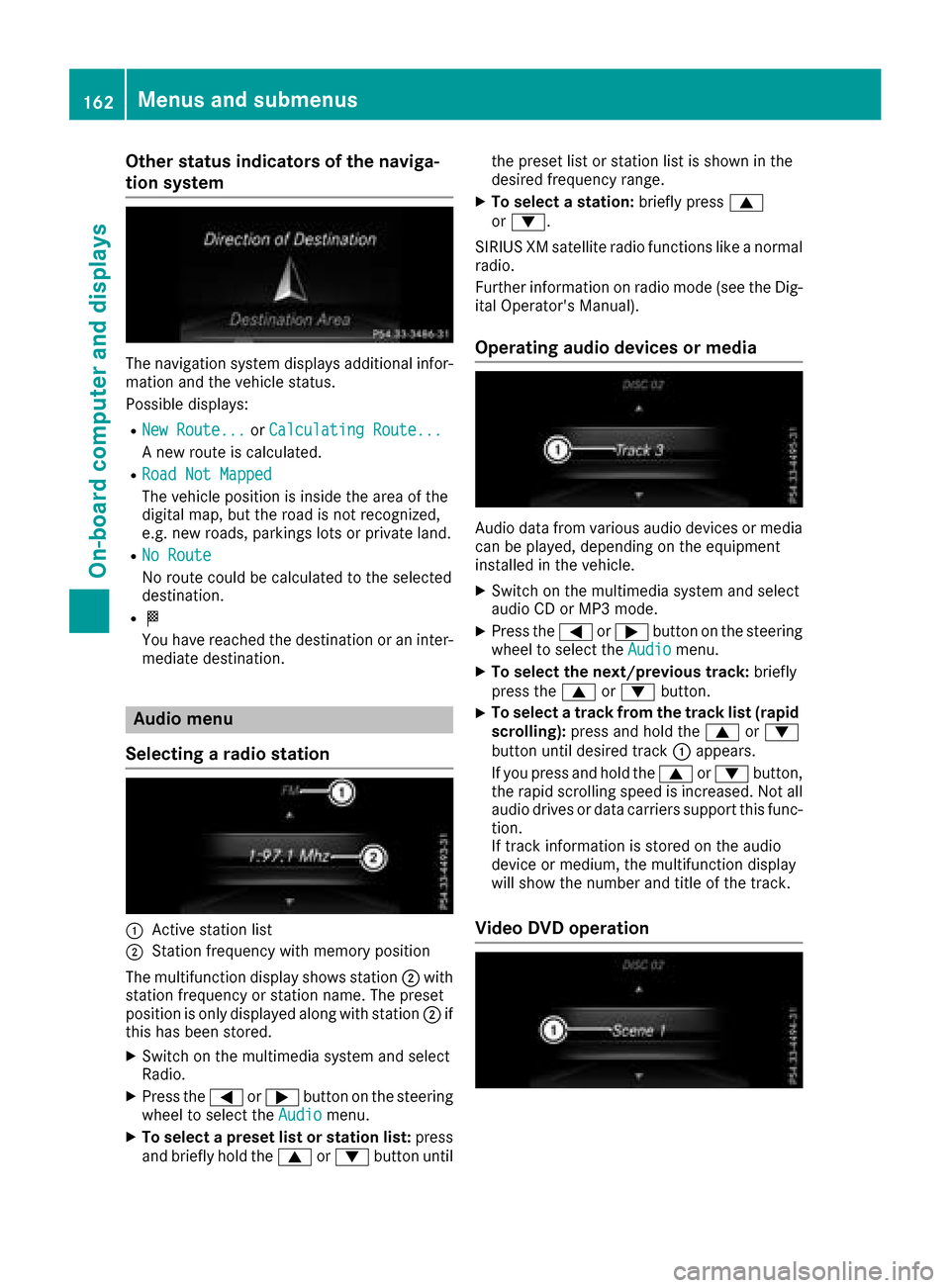
Other status indicatorsofthe naviga-
tion system
The navigation system displays additional infor- mation and the vehicle status.
Possible displays:
RNew Route...or Calculating Route...
An ew route is calculated.
RRoad Not Mapped
The vehicle position is inside the area of the
digital map, but the road is not recognized,
e.g. new roads, parking slots or private land.
RNo Route
No route could be calculated to the selected
destination.
RO
You have reached the destination or an inter-
mediate destination.
Audio menu
Selecting aradio station
:Active station list
;Station frequenc ywith memory position
The multifunction display shows station ;with
station frequenc yorstation name. The preset
position is only displayed along with station ;if
this has been stored.
XSwitc hont he multimedia system and select
Radio.
XPress the =or; button on the steering
wheel to select the Audiomenu.
XTo selectapreset list or station list: press
and briefly hold the 9or: button until the preset list or station list is shown in the
desired frequenc
yrange.
XTo select astation: briefly press 9
or :.
SIRIUS XM satellite radio function slike anormal
radio.
Further information on radio mode (see the Dig-
ital Operator's Manual).
Operating audio devices or media
Audio data from various audio devices or media
can be played, depending on the equipment
installed in the vehicle.
XSwitc hont he multimedia system and select
audio CD or MP3 mode.
XPress the =or; button on the steering
wheel to select the Audiomenu.
XTo select the next/previous track: briefly
press the 9or: button.
XTo select atrack from the track list (rapid
scrolling): press and hold the 9or:
button until desired track :appears.
If you press and hold the 9or: button,
the rapid scrollin gspeed is increased. Not all
audio drives or data carriers support this func-
tion.
If trac kinformation is stored on the audio
device or medium, the multifunction display
will show the number and title of the track.
Video DVD operation
162Menus and submenus
On-boardc omputer and displays
Page 165 of 286
XSwitch on the multimediasystem and select
video DVD.
XPress the =or; button on the steering
wheel to select the Audiomenu.
XTo select the next or previous scene:
brieflypress the 9or: button.
XTo select ascene from the scen elist
(rapi dscrolling): press and holdt he9
or : button unti ldesire dscene :has
bee nreached.
TV operation
The preset position is only displayed along with
channel :if this hasb eens tored. You can store
TV channels in the multimedi asystem.
XSwitch on the multimedi asystem and select
TV.
XPress the =or; button on the steering
wheel to select the Audiomenu.
XTo selectastored channel: brieflypress the
9 or: button.
XTo select achanne lfrom the channe llist:
press and brieflyh oldthe9 or: but-
ton.
Telephone menu
Introduction
GWARNING
If yo uoperate information systems and com-
munication equipment integrate dinthe vehi-
cle whil edriving ,you will be distracted from
traffic conditions .You could also lose control
of the vehicle. There is ariskofana ccident.
Only operate the equipment when the traffic
situation permits .Ifyouare not sure that this
is possible ,parkt he vehicl epayin gattention
to traffic conditions and operate the equip-
ment when the vehicl eisstationary. Whent
elephoning, yo umusto bserve the legal
requirements for the country in which yo uare
currently driving.
XSwitch on the mobil ephone (se ethe manu-
facturer’so perating instructions).
XSwitch on the multimedi asystem (se ethe
Digital Operator's Manual)
XEstablish aBluetooth®connection to the mul-
timedi asystem (se ethe Digital Operator's
Manual).
XPress the =or; button on the steering
wheel to select the Telmenu.
You will see one of the following display mes-
sages in the multifunction display:
RPhoneR EADYor the name of the network
provider: the mobil ephone hasf oundanet-
work and is ready to receive.
RPhoneNoS ervice:there is no network
available or the mobil ephone is searching for
an etwork.
Accepting acall
If someone calls yo uwheny ou are in the Telmenu,adisplay message appears in the multi-
function display.
You can accept acallata ny time regardless of
the menu selected.
XPress the 6button on the steering wheel
to accept an incoming call.
Rejecting or endin gacall
XPress the ~button on the steering wheel.
You can end or reject acalle ve nify ouare not in
the Tel
menu.
Dialing anumberf rom the phon ebook
XPress the =or; button on the steering
wheel to select the Telmenu.
XPress9, :ora to switch to the
phone book.
XAuthorize access to the phone boo konthe
phone.
Menus and submenus163
On-board computer and displays
Z