2017 MERCEDES-BENZ E43AMG lock
[x] Cancel search: lockPage 113 of 482
mobile phonereacts and from thech arging
symbol in the multimedia sy stem displa y.
Malfunctions during thech arging process are
shown in the multimedia sy stem displa y.
% Toclean, mat 1can be remo ved.
Installing/removing floor mats
&
WARNING Risk of accident due to
objects in the driver's foot we ll
Objects in the driver's foot we ll may impede
pedal tr avel or block a depressed pedal.
This jeopardizes the operating and road
saf etyof theve hicle.
#Stow all objects in theve hicle securely
so that they cannot getinto the driver's
fo ot we ll.
#Alw ays ins tallth efloor mats securely
and as prescribed in order toensure
th at there is alw ays suf ficient room for
th e pedals.
#Do not use loose floor mats and do not
place floor mats on top of one ano ther.
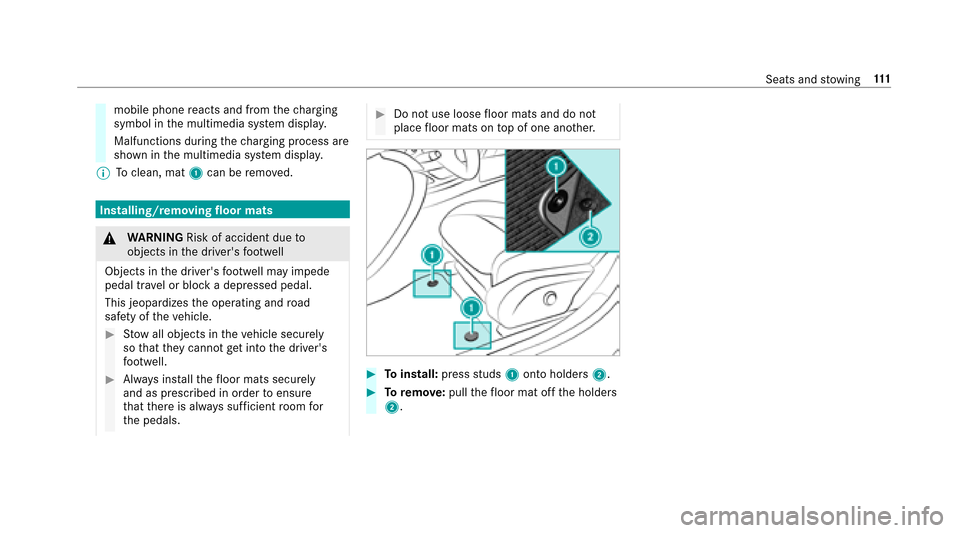
#To install: pressstuds 1onto holders 2.
#Toremo ve:pull thefloor mat off the holders
2.
Seats and stowing 111
Page 121 of 482
Installingthe wiper blades
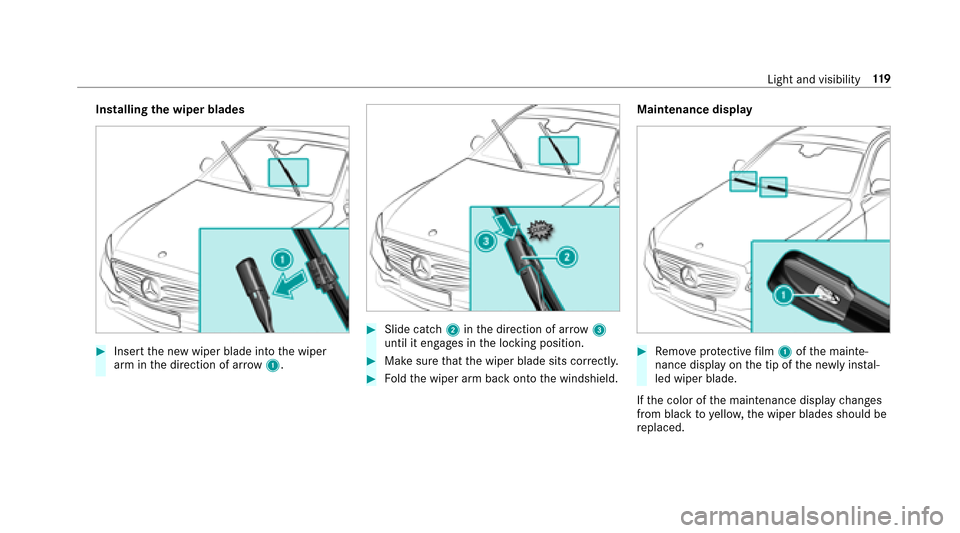
#Insert the new wiper blade into the wiper
arm in the direction of ar row1.
#Slide catch 2inthe direction of ar row 3
until it engages in the locking position.
#Make sure that the wiper blade sits cor rectly.
#Fo ldthe wiper arm back onto the windshield. Maintenance display
#Re
mo veprotective film 1 ofthe mainte‐
nance display on the tip of the newly ins tal‐
led wiper blade.
If th e color of the maintenance display changes
from black to yellow, the wiper blades should be
re placed.
Light and visibility 11
9
Page 131 of 482
Driving
Switching on the po wer supp lyor ignition
using thest art/s top button
&
WARNING Risk of accident and injury
due tochildren left unatte nded inthe
ve hicle
If ch ildren are left unatte nded intheve hicle,
th ey could:
ROpen doo rs,th ereby endangering other
persons or road users
RGet out of theve hicle and be hit by
oncoming traf fic
ROperate vehicle equipment
In addition, thech ildren could also set the
ve hicle in motion, forex ample, by:
RRe leasing the parking brake
RShifting the transmission out of park
position j
RStarting the engine.
#Ne ver lea vechildren and animals unat‐
te nded in theve hicle.
#When leaving theve hicle, alw aysta ke
th e SmartK eywith you and lock the
ve hicle.
#Ke ep the SmartK eyout of there ach of
ch ildren.
&
WARNING Risk ofexhaust gas poisoning
Combustion engines emit poisonous exhaust
ga ses such as carbon monoxide. Inhaling
th ese exhaust gases causes poisoning.
#Ne ver lea vethe engine running in an
enclosed space wi thout suf ficient venti‐
lation.
& WARNING Risk offire caused byflam‐
mable material on theex haust sy stem
Flammable materials brought in byeither ani‐
mals or environmen tal influences may ignite
if th ey come into contact wi thhot parts of
th e engine or exhaust sy stem.
#Therefore, check regularly that there
are no flammable materials in the
engine compartment or on theex haust
sy stem.
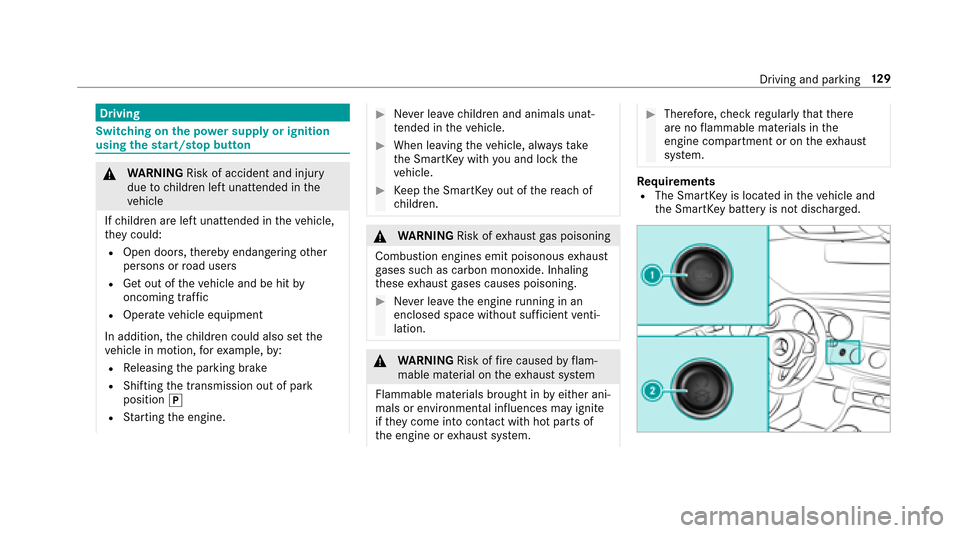
Re quirementsRThe SmartK eyis located in theve hicle and
th e SmartK eybattery is not dischar ged.
Driving and parking 12
9
Page 133 of 482

#Always secure the engine against unin‐
te ntional starting before car rying out
maintenance or repair work.
Re quirementsRPark position jis selected.
RThe anti- theft alarm sy stem is not armed.
RThe panic alarm is not armed.
RThe hazard warning lights are switched off.
RThe engine hood is closed.
RThe doors are closed and loc ked.
RThe windo wsand sliding sunro of are closed.
#Start theve hicle using the smartphone:RAf tereve ryvehicle start, the engine runs for
te n minu tes.
RYo u can car ryout a maximum of two consec‐
utive starting attem pts.
RYo u can stop theve hicle again at any time.
RFu rther information can be found inthe
smartphone app. Securing
the engine against starting before
car rying out maintenance or repair work:
#Switch on the hazard warning lights.
or
#Un lock the doors.
or
#Open a side window or the sliding sunroof.
St arting theve hicle in emer gency operation
mode
If th eve hicle cannot be star ted, the3ODFH WKH
.H\ LQ WKH 0DUNHG 6SDFH 6HH 2SHUDWRU
V 0DQXDO
display message appears in the multifunction
displa y.
#Make sure that mar ked space 2is em pty.
#Re mo veSmartK ey1 from theke yring.
#Place Smart Key1 in mar ked space 2.
The vehicle will start af ter a short while.
If yo ure mo veSmartK ey1 from mar ked
space 2the engine continues running. For
fur ther vehicle starts ho wever,SmartK ey1
must be located in mar ked space 2during
th e entire journe y.
#Have SmartK ey1 checked at a qualified
specialist workshop.
If th eve hicle does not star t:
#Lea veSmartK ey1 in mar ked space 2.
#Depress the brake pedal and start theve hicle
using thest art/ stop button.
% You can also switchon the po wer supp lyor
th e ignition with thest art/ stop button.
Driving and parking 13
1
Page 134 of 482

Notes on breaking-in a new vehicle
To preser vethe engine during thefirs t
1, 000 miles (1,500 km):
RDrive at varying road speeds and engine
speeds.
RDrive in drive program Cor E.
RChange up before theta ch ome ter needle is
Ô ofthewa yto there d area of theta ch ome‐
te r.
RDo not shi ftdown a gear manually in order to
brake.
RAv oid overstraining theve hicle, e.g. driving at
full thro ttle.
RDo not depress the accelera tor pedal be yond
th e pressure point (kickdown).
ROnly increase the engine speed gradually and
accelera tetheve hicle tofull speed af ter
1, 000 miles (1,500 km).
This also applies when the engine or parts of the
driv etra in ha vebeen replaced. Please also obser
vethefo llowing running-in
no tes:
RIn cer tain driving and driving saf etysy stems,
th e sensors adjust automatically while a cer‐
ta in dis tance is being driven af terth eve hicle
has been delivered or af terre pairs. Full sys‐
te m ef fectiveness is not achie ved until the
end of this teach-in process.
RBrake linings, brake discs and tires that are
either new or ha vebeen replaced only ach‐
ie ve optimum braking ef fect and grip af ter
se veral hundred kilom eters of driving. Com‐
pensate forth ere duced braking ef fect by
applyin
g greaterfo rc eto the brake pedal.
Driving tips
&
WARNING Risk of accident due to
objects in the driver's foot we ll
Objects in the driver's foot we ll may impede
pedal tra vel or block a depressed pedal.
This jeopardizes the operating and road
saf etyof theve hicle.
#Stow all objects in theve hicle securely
so that they cannot getinto the driver's
fo ot we ll.
#Ensure floor mats and carpets cannot
slip and pr ovide suf ficient room forth e
pedals.
#Do not lay multiple floor mats or car‐
pets on top of one ano ther.
&
WARNING Risk of accident due to
unsuit ablefoot we ar
Operation of the pedals may be restricted
due tounsuit ablefoot we ar such as:
RShoes with platfo rmsoles
RShoes with high heels
RSlippers
#When driving alw ayswe ar suitable
shoes in order tobe able tooperate the
pedals safel y.
132
Driving and pa rking
Page 139 of 482
Configuring drive program I
Multimedia sy stem:
,9HKLFOH.e '<1$0,&
6(/(&7.,QGLYLGXDO
#Select the individual setting.
Displaying vehicle data
Multimedia sy stem:
,9HKLFOH.e '<1$0,& 6(/(&7
#Select 9HKLFOH 'DWD.
Displaying engine data
Multimedia sy stem:
,9HKLFOH.e '<1$0,& 6(/(&7
#Select (QJLQH 'DWD.
% The values for engine output and engine tor‐
qu e may deviate from the nominal values.
Items that can influence this are, forex am‐
ple:
REngine speed
RSea le vel
RFu el grade
ROutside temp erature
Automatic transmission
DIRECT SELECT selector le ver
Fu nction of the DIRECT SELECT le ver
&
WARNING Risk of accident and injury
due tochildren left unatte nded inthe
ve hicle
If ch ildren are left unatte nded intheve hicle,
th ey could:
ROpen doo rs,th ereby endangering other
persons or road users
RGet out of theve hicle and be hit by
oncoming traf fic
ROperate vehicle equipment
In addition, thech ildren could also set the
ve hicle in motion, forex ample, by:
RRe leasing the parking brake
RShifting the transmission out of park
position j
RStarting the engine.
#Ne ver lea vechildren and animals unat‐
te nded in theve hicle.
#When leaving theve hicle, alw aysta ke
th e SmartK eywith you and lock the
ve hicle.
#Ke ep the SmartK eyout of there ach of
ch ildren.
&
WARNING Risk of accident due toincor‐
re ct gearshifting
If th e engine speed is higher than the idle
speed and you enga gethe transmission posi‐
tion hork, theve hicle may accelerate
sharply.
#If yo u enga gethe transmission position
h ork always depress the brake
Driving and parking 13
7
Page 145 of 482
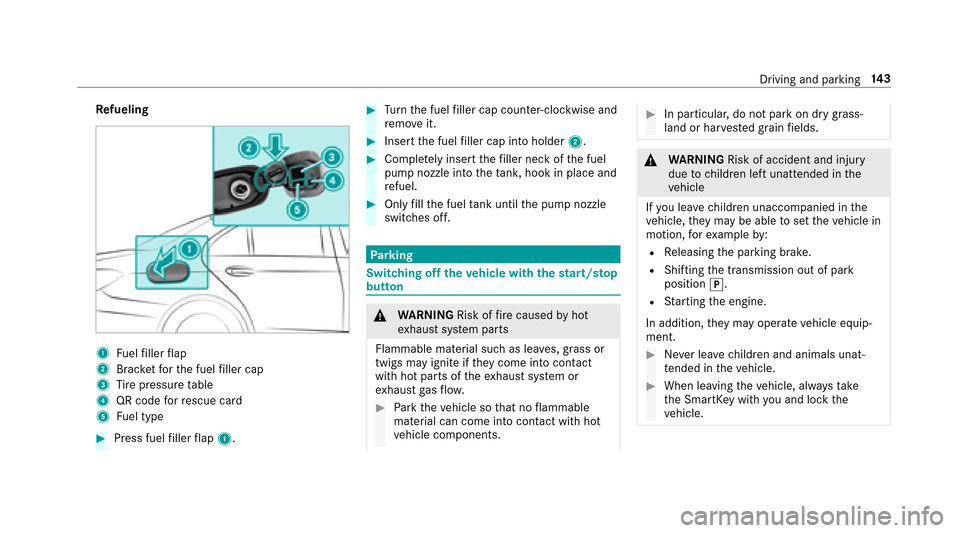
Refueling
1Fuelfiller flap
2Brac ketfo rth e fuel filler cap
3Ti re pressure table
4QR code forre scue card
5Fu el type
#Press fuel filler flap 1.
#Turn the fuel filler cap coun ter-clockwise and
re mo veit.
#Insert the fuel filler cap into holder 2.
#Completely inse rtthefiller neck of the fuel
pump nozzle into theta nk, hook in place and
re fuel.
#Only fill th e fuel tank until the pump nozzle
switches off.
Pa rking
Switching off theve hicle with thest art/s top
button
& WARNING Risk offire caused byhot
ex haust sy stem parts
Flammable material such as lea ves, grass or
twigs may ignite if they come into contact
wi th hot parts of theex haust sy stem or
ex haust gasflow .
#Park theve hicle so that no flammable
material can come into con tact wi thhot
ve hicle components.
#In particular, do not park on dry grass‐
land or har vested grain fields.
&
WARNING Risk of accident and injury
due tochildren left unatte nded inthe
ve hicle
If yo u lea vechildren unaccompanied in the
ve hicle, they may be able toset theve hicle in
motion, forex ample by:
RRe leasing the parking brake.
RShifting the transmission out of park
position j.
RStarting the engine.
In addition, they may operate vehicle equip‐
ment.
#Ne ver lea vechildren and animals unat‐
te nded in theve hicle.
#When leaving theve hicle, alw aysta ke
th e SmartK eywith you and lock the
ve hicle.
Driving and parking 14
3
Page 150 of 482
RTurkey :not requ ired
RUn ited Arab Emirates: ER41849/15
RUn ited States: NZLMUAHL5
Electric parking brake
Automatically applying the electric parking
brake
& WARNING Risk of accident and injury
due tochildren left unatte nded inthe
ve hicle
If yo u lea vechildren unaccompanied in the
ve hicle, they may be able toset theve hicle in
motion, forex ample by:
RRe leasing the parking brake.
RShifting the transmission out of park
position j.
RStarting the engine.
In addition, they may operate vehicle equip‐
ment.
#Ne ver lea vechildren and animals unat‐
te nded in theve hicle.
#When leaving theve hicle, alw aysta ke
th e SmartK eywith you and lock the
ve hicle.
The electric parking brake is applied if the trans‐
mission is in position jand one of thefo llow‐
ing conditions is fulfilled:
RThe engine is switched off.
RThe seat belt tongue is not inser ted in the
seat belt buckle of the driver's seat and the
driver's door is opened.
% Toprev ent application: pull the handle of the
electric parking brake.
In thefo llowing situations, the electric parking
brake is also engaged:
RThe Dis tance Pilot DISTRONIC brings the
ve hicle toast andstill.
RThe HOLD function is keeping theve hicle sta‐
tionar y.
RParking Pilot is keeping theve hicle station‐
ar y. This is only
the case if one of thefo llowing con‐
ditions is also fulfilled:
RThe engine is switched off.
RThe seat belt tongue is not inser ted in the
seat belt buckle of the driver's seat and the
driver's door is opened.
RThere is a sy stem malfunction.
RThe po wer supply is insuf ficient.
RThe vehicle is stationary for a lengt hyperiod.
When the electric parking brake is applied, the
F (USA) or !(Canada) indicator lamp
lights up in the instrument clus ter.
The electric parking brake is not automatically
applied if the engine is switched off bythe ECO
st art/ stop function.
Re leasing the electric pa rking brake auto‐
matically
The elect ric park ing brake is released when the
fo llo wing c
onditions are fulfilled:
RThe engine is
running.
RThe seat belt tongue is inser ted into the seat
belt buckle of the driver's seat.
14 8
Driving and pa rking