Page 56 of 482
Activating/deactivating the child saf ety lock
fo r the rear side windo ws
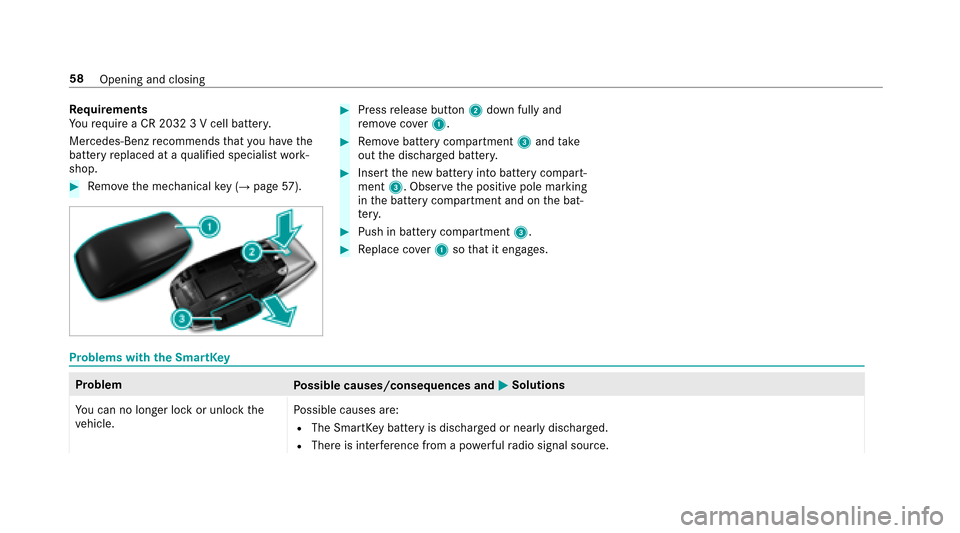
#Toactivate/deacti vate:press button 2.
Opening/closing there ar side wind owsis
possible:
RWi th indicator lamp 1lit: via the switch
on the driver's door.
RWi th indicator lamp 1off: via the switch
on the cor responding rear door or driv‐
er's door.
Pe ts in the vehicle
&
WARNING Risk of accident and injury
due toanimals left unsecured or unat‐
te nded in theve hicle
If yo u lea veanimals in theve hicle unatten‐
ded or unsecured, they could possib lypress
down buttons or switches.
Thereby an animal may:
Ractivate vehicle equipment and become
trapped, forex ample
Rswitch systems on or off and endanger
ot her road users
Uns ecured animals may be throw n around in
th eve hicle in theeve nt of an accident or
sudden steering and braking maneuver and
injure vehicle occupants in the process.
#Ne ver lea veanimals in theve hicle unat‐
te nded.
#Alw ays cor rectly secure animals while
driving, forex ample using a suitable
animal car rier.
54
Occupant saf ety
Page 57 of 482

SmartKey
Overview of SmartK eyfunctions
&
WARNING ‑ Danger of accident or injury
if ch ildren are left unatte nded intheve hi‐
cle
If ch ildren are left unatte nded intheve hicle,
th ey could:
Ropen doo rs,th ereby endangering other
persons or road users.
Rge t out of theve hicle and be hit by
oncoming traf fic.
Rope rate ve hicle equipment.
Moreo ver,ch ildren could also set theve hicle
in motion by,fo rex ample:
Rreleasing the parking brake.
Rshifting the automatic transmission out of
park position P jor shifting manual
transmission into idle position.
Rst arting the engine.
#Ne ver lea vechildren and animals unat‐
te nded in theve hicle.
#When leaving theve hicle, alw aysta ke
th eke ywit hyo u and lock theve hicle.
#Ke ep theve hicle keyout of there ach of
ch ildren.
* NO
TEDama getotheke ycaused by
magnetic fields
#Ke ep theke yaw ay from strong mag‐
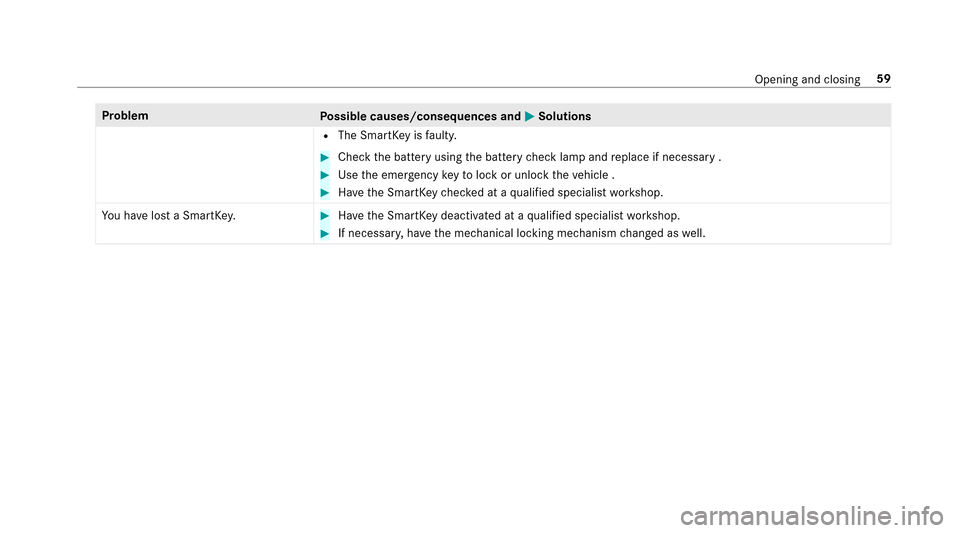
netic fields.1Loc ks
2Battery check lamp
3Unloc ks
4Opens/closes the trunk lid
5Pa nic alarm
The Smart Keyloc ksand unlo cksth efo llowing
components:
RThe doors
RThe trunk lid
RThe fuel filler flap
Opening and closing 55
Page 58 of 482

Ifyo udo not open theve hicle within appr ox‐
imately 40 seconds af ter unlocking:
RThe vehicle is loc ked again.
RAnti- theft pr otection is reactivated.
Do not keep the SmartK eytoget her with elec‐
tronic devices or me tal objects. This can af fect
th e SmartK ey's functionality.
% If battery check lamp 2does not light up
af te r pressing the% or& button, the
battery is dischar ged.
Ac tivating/deactivating the acoustic lo cking
ve rification signal
Multimedia sy stem:
,9HKLFOH.î 9HKLFOH 6HW�
WLQJV.$FRXVWLF /RFN
#Ac tivate Oor deacti vate ª the function.
Priming/deactivating the panic ala rm
PrerequisitesRIgnition switched off.
#Toprime: press button 1for app roxima tely
one second .
A visu al and audible alarm is triggered.
#Todeactivate: briefly press but ton1 again.
or
#Press thest art/ stop button on the cockpit
(the SmartK eyis inside theve hicle).
Changing the unlocking settings
Po ssible unlocking functions of theke y:
RCentral unlocking
RUnlocking the driver's door and fuel filler flap
#To switch between settings: pressthe
% and& buttons simultaneously for
appr oximately six seconds until the battery
ch eck lamp flashes twice.
If th e unlocking function forth e driver's door
and fuel filler flap has been selecte d:
RPressingthe% button a second time cen‐
trally unloc kstheve hicle.
RVe hicles with KEYLESS-GO: Ifyo uto uch
th e inner sur face of the door handle on the
driver's door, only the driver's door and fuel
fi ller flap are unlo cked.
Re ducing the energy consu mption of the
SmartK ey
Ifyo u do not intend touse theve hicle for an
ex tended pe riod of time, you can deactivate the
fo llowing functions on the SmartK ey.
RKEYLESS-GO starting function
RKEYLESS-GO
56
Opening and closing
Page 60 of 482
Requirements
Yo ure qu ire a CR 2032 3 V cell batter y.
Mercedes-Benz recommends that you ha vethe
battery replaced at a qualified specialist work‐
shop.
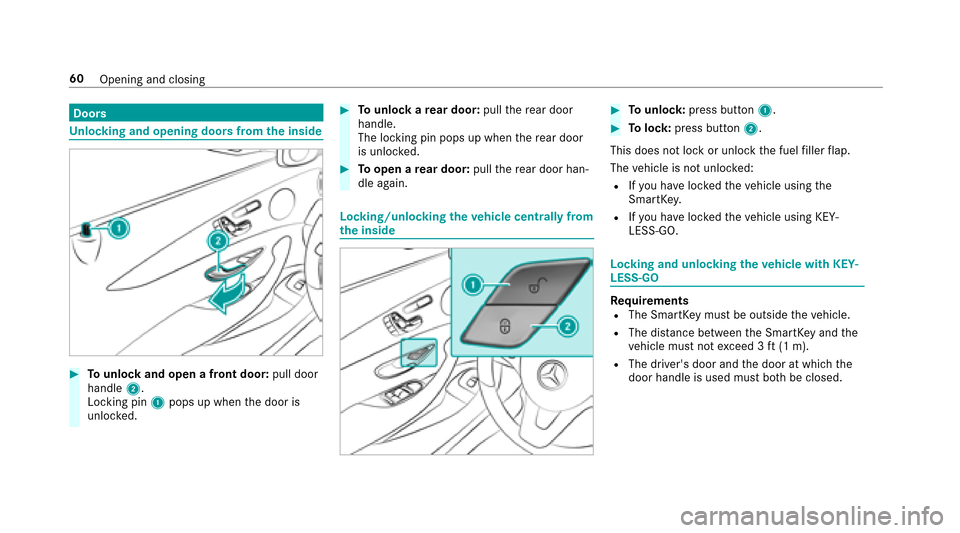
#Re mo vethe mechanical key (→pag e57 ).
#Press release button 2down fully and
re mo vecover1.
#Re mo vebattery compartment 3and take
out the dischar ged batter y.
#Insertthe new battery into battery compart‐
ment 3. Obser vethe positive pole marking
in the battery compartment and on the bat‐
te ry.
#Push in battery compartment 3.
#Replace co ver1 sothat it engages.
Problems with the SmartK ey
Problem
Possible causes/consequences and MSolutions
Yo u can no longe r lock or unlock the
ve hicle. Po
ssible causes are:
RThe SmartK eybattery is dischar ged or nearly dischar ged.
RThere is inter fere nce from a po werful radio signal source.
58
Opening and closing
Page 61 of 482
ProblemPossible causes/consequences and MSolutions
RThe SmartKeyisfaulty.
#Check the battery using the battery check lamp and replace if necessary .
#Use the emer gency keyto lock or unlock theve hicle .
#Ha ve the SmartK eychecked at a qualified specialist workshop.
Yo u ha velost a SmartK ey.
#Ha ve the SmartK eydeactivated at a qualified specialist workshop.
#If necessar y,ha ve the mechanical locking mechanism changed as well.
Opening and closing 59
Page 62 of 482
Doors
Unlocking and opening doors from the inside
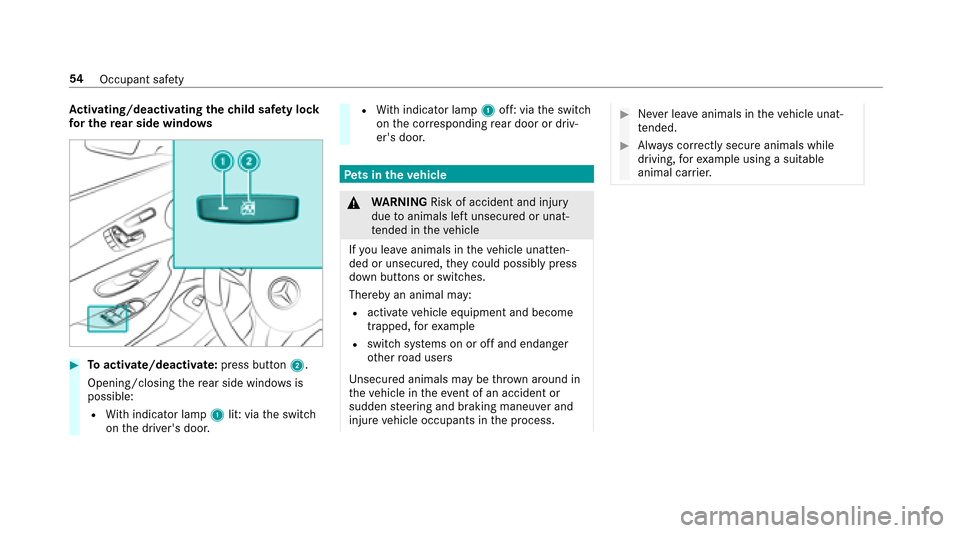
#To unlock and open a front door: pull door
handle 2.
Locking pin 1pops up when the door is
unloc ked.
#To unlock are ar door: pullthere ar door
handle.
The locking pin pops up when there ar door
is unlo cked.
#To open a rear door: pullthere ar door han‐
dle again.
Locking/unlo cking theve hicle centrally from
th e inside
#To unlock :press button 1.
#Tolock: press button 2.
This does not lock or unlock the fuel filler flap.
The vehicle is not unloc ked:
RIfyo u ha veloc kedth eve hicle using the
SmartK ey.
RIfyo u ha veloc kedth eve hicle using KEY‐
LESS-GO.
Locking and unlocking theve hicle with KEY‐
LESS-GO
Requ irementsRThe SmartK eymust be outside theve hicle.
RThe dis tance between the SmartK eyand the
ve hicle must not exceed 3 ft(1 m).
RThe driver's door and the door at which the
door handle is used must bo thbe closed.
60
Opening and closing
Page 63 of 482
#Tounlock theve hicle: touch the inner sur‐
fa ce of the door handle.
#To lock theve hicle: touch sensor sur face
1 or2.
#Co nvenience closing: touch recessed sen‐
sor surf ace2for an extended pe riod.
% For fur ther information on con venience clos‐
ing (
→pa ge 72).
If yo u open the trunk lid from outside, the trunk
lid is automatically unloc ked.
Problems with KEYLESS-GO
Problem
Possible causes/consequences and MSolutions
Yo u can no longe r lock or unlock the
ve hicle using KEYLESS-GO. Po
ssible causes are:
RKEYLESS-GO has been deactivated .
RThe SmartK eybattery is dischar ged or near lydischar ged.
RThere is inter fere nce from a po werful radio signal source.
Opening and closing 61
Page 64 of 482
ProblemPossible causes/consequences and MSolutions
RThe SmartKeyis malfunctioning.
#Activate KEYLESS-GO .
#Check the battery using the battery check lamp and replace if necessary .
#Use the mechanical keyto lock or unlock theve hicle .
#Ha ve theve hicle and SmartK eychecked at a qualified specialist workshop.
Switching the automatic locking feature
on/off
The vehicle is loc ked automatically when the
ignition is switched on and the wheels are turn‐
ing fast erthan walking pace.
#To deactivate: press and hold button 1for
appr oximately five seconds until an acoustic
signal sounds.
#To activate: press and hold button 2for
appr oximately five seconds until an acoustic
signal sounds.
Danger of being loc ked out when the function is
activated:
RIf th eve hicle is being tow star ted/pushed.
ROn a roller dynamome ter.
62
Opening and closing