2017 MERCEDES-BENZ E-CLASS SALOON change time
[x] Cancel search: change timePage 307 of 497
Displaying
the artist and track Multimedia sy
stem:
, Radio .
Options #
Select Display artist and track. #
Switch on Oa function. Switching traf
fic announcements on/off Multimedia sy
stem:
, Radio .
Options .
TA #
Activate Oor deacti vate ª the function.
or #
Press and hold the8 button on the mul‐
tifunction steering wheel until theTA display
in thest atus line lights up or goes out. Displ
aying station information Re
quirements:
R Radio stations pr ovide there leva nt informa‐
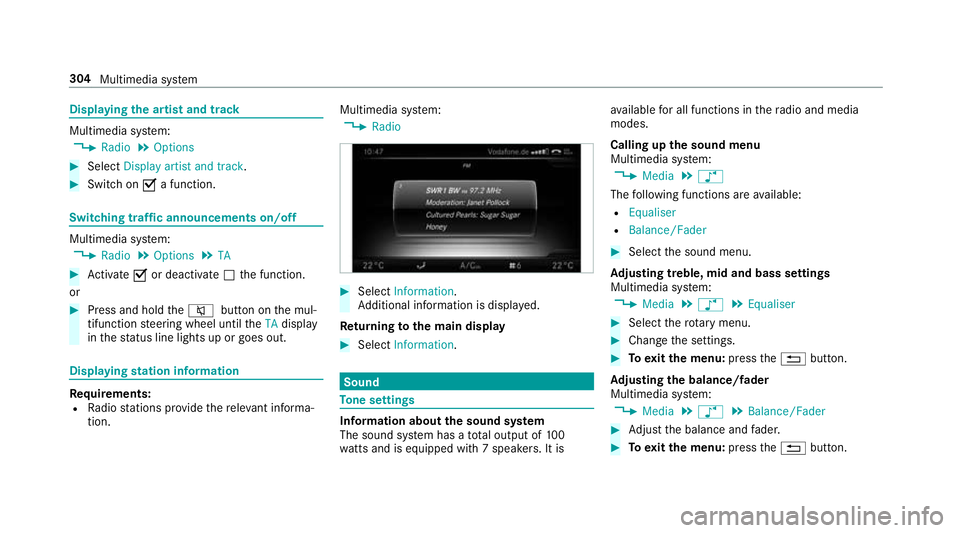
tion. Multimedia sy
stem:
, Radio #
Select Information.
Ad ditional information is displa yed.
Re turning tothe main display #
Select Information. Sound
To
ne settings Information about
the sound sy stem
The sound sy stem has a total output of 100
wa tts and is equipped wi th7 spea kers. It is av
ailable for all functions in thera dio and media
modes.
Calling up the sound menu
Multimedia sy stem:
, Media .
à
The following functions are available:
R Equaliser
R Balance/Fader #
Select the sound menu.
Ad justing treble, mid and bass settings
Multimedia sy stem:
, Media .
à .
Equaliser #
Select thero tary menu. #
Change the settings. #
Toexitth e menu: pressthe% button.
Ad justing the balance/ fader
Multimedia sy stem:
, Media .
à .
Balance/Fader #
Adjust the balance and fader. #
Toexitth e menu: pressthe% button. 304
Multimedia sy stem
Page 308 of 497
Burmes
ter®
sur round sound sy stem Information about
the Bu rmester ®
sur round
sound sy stem
The Burmes ter®
sur round sound sy stem has a
to ta l output of 590 watts and is equipped wi th
13 speakers. It is available for all functions in the
ra dio and media modes.
Calling up the sound menu in the
Bu rm ester ®
sur round sound sy stem
Multimedia sy stem:
, Media .
à
The following functions are available:
R Equaliser
R Balance/Fader
R Surround sound #
Select the sound menu. Ad
justing the treble, mid and bass settings
on the Burmes ter®
sur round sound sy stem
Multimedia sy stem:
, Media .
à .
Equaliser #
Select thero tary menu. #
Change the settings. #
Toexitth e menu: pressthe% button.
Ad justing the balance/ fader in the
Burmes ter®
sur round sound sy stem
Multimedia sy stem:
, Media .
à .
Balance/Fader #
Adjust the balance and fader. #
Toexitth e menu: pressthe% button.
Switching sur round sound on/off in the
Burmes ter®
sur round sound sy stem
Multimedia sy stem:
, Media .
à .
Surround sound #
Switch the function on/off in the left rotary
menu. #
Toexitth e menu: pressthe% button. Ad
justing the sound optimisation in the
Burmes ter®
sur round sound sy stem
Multimedia sy stem:
, Media .
à .
Surround sound #
Adjust thefo cus in theright-hand carousel
menu. #
Toexitth e menu: pressthe% button. Multimedia sy
stem 305
Page 309 of 497

ASS
YST PLUS se rvice inter val display Fu
nction of the ASS YST PLUS se rvice inter val
displ ay The ASS
YST PLUS service inter val display in the
instrument display pr ovides information on the
re maining time or dis tance be fore the next
service due date.
Yo u can hide this service message using the
back button on the left-hand side of thesteering
wheel.
Yo u can obtain fur ther information concerning
th e servicing of your vehicle from a qualified
specialist workshop, e.g. a Mercedes-Benz
Service Centre. Displaying
the service due da teOn-board computer:
, Service .
ASSYST PLUS
The next service due date is displa yed. #
Toexitth e displa y:press the back button
on the left-hand side of thesteering wheel. Make sure
toobser vethefo llowing fur ther rela‐
te d subjec t:
R Operating the on-board computer
(→ page 253). Car
rying out maintenance workatregular
inter vals *
NO
TEPremature wearthro ugh failure to
obser veservice due dates Service
workwhich is not car ried out at the
ri ght time or incomple tely can lead to
inc reased wear and damage totheve hicle. #
Alw ays obser vethe prescribed service
inter vals. #
Alw ays ha vethe prescribed service
wo rkcar ried out at a qualified specialist
wo rkshop. Special service
requ irements The prescribed service inter
val is based on nor‐
mal operation of theve hicle. Maintenance work will need
tobe per form ed more of tenth an
specified if theve hicle is operated under ardu‐
ous conditions or increased loads, forex ample:
R regular city driving with frequent intermedi‐
ate stops.
R ifth eve hicle is primarily used for short-dis‐
ta nce driving.
R for frequent operation in mountainous terrain
or on poor road sur faces.
R ifth e engine is of ten le ftidling for long peri‐
ods.
R in particula rly dusty conditions and/or if air-
re circulation mode is frequently used.
In these or similar operating conditions, ha vethe
interior filter, engine air cleaner, engine oil, oil fil‐
te ret c. changed more frequent ly. The tyres must
be checked more frequently if theve hicle is
operated under increased loads. Further infor‐
mation can be obtained at a qualified specialist
wo rkshop. 306
Maintenance and care
Page 327 of 497

Re
moving the fire extinguisher #
Left-hand-drive vehicle: Pulltab1
upwards. #
Right-hand-d rive ve hicle: Pulltab1 down‐
wa rds. #
Remo vefire extinguisher 2. Flat tyre
Note
s onflat tyres &
WARNING Risk of accident due toaflat
tyre
A flat tyre se verely affects the driving charac‐
te rist ics as well as thesteering and braking
of theve hicle.
Ty res without run-flat characteristics: #
Do not drive on with a flat tyre. #
Chan getheflat tyre immediately with
th e emer gency spa rewheel or spare
wheel. Alternativel y,consult a qualified
specialist workshop.
Ty res with run-flat characteristics: #
Obse rveth e information and warning
no tes on MOExtended tyres (run-flat
tyres). In
theeve nt of a flat tyre, thefo llowing options
are available depending on your vehicle's equip‐
ment:
R Vehicles with MOExtended tyres: it is pos‐
sible tocontinue the journey for a short
period of time. Make sure you obse rvethe
no tes on MOExtended tyres (run-flat tyres)
(→ page 325).
R Vehicles with a TIREFIT kit: you can repair
th e tyre so that it is possible tocontinue the
jou rney for a short period of time. Todo this,
use the TIREFIT kit (→ page 326).
R Vehicles with Mercedes me connect: you
can make a call for breakdown assi stance via
th eove rhead control panel in the case of a
breakdown (→ page 288).
R Allvehicles: change the wheel
(→ page 357).
% The emer gency spa rewheel is only available
in cer tain countries. 324
Breakdown assis tance
Page 350 of 497

The tyre pressure
table sho ws there commended
tyre pressure for all tyres appro vedfo rth is vehi‐
cle. The recommended tyre pressures apply for
cold tyres under various operating conditions,
i.e. loading and/or speed of theve hicle.
If one or more tyre sizes precede a tyre pres‐
sure, the tyre pressure information following is
only valid forth ose tyre sizes. If
th e preceding tyre sizes are complemented by
th e+ symbol, the tyre pressure information
fo llowing sho wsalternative tyre pressures.
These tyre pressures may impr oveyour vehicle's
ri de comfort. Fuel consum ption may then
increase slightl y.
The load conditions "partially laden" and "fully
laden" are defined in theta ble for dif fere nt num‐
be rs of passengers and amounts of luggage. The
actual number of seats may dif fer from this.
Be sure toalso obse rveth efo llowing fur ther
re lated subjects:
R Notes on tyre pressure (→ page 345) Ty
re pressure moni toring sy stem Fu
nction of the ty repressure moni toring sys‐
tem
The sy stem checks the tyre pressure and the
tyre temp erature of the tyres fitted totheve hicle
by means of a tyre pressu resensor.
New tyre pressure sensors, e.g. in winter tyres,
are automatically taught-in thefirs t time they are
driven. The tyre pressure and
the tyre temp erature
appear in the multifunction display
(→ page 255).
If th ere is a subs tantial pressure loss or if the
tyre temp erature is excessive, a warning will be
given:
R Via display messages (→ page417).
R Viath eh warning lamp in the instrument
clus ter (→ page 454).
It is the driver's responsibility toset the tyre
pressure tothere commended cold tyre pressure
suitable forth e operating situation. Set the tyre
pressure for cold tyres using a tyre pressu re
ga uge. Notethat the cor rect tyre pressure for
th e cur rent operating situation mu stfirs t be
ta ught-in tothe tyre pressure monitoring sys‐
te m.
In most cases, the tyre pressure monitoring sys‐
te m will auto maticallyupdate the new refere nce
va lues af teryo u ha vechanged the tyre pressure.
Yo u can, ho wever,also update there fere nce val‐
ues byrestarting the tyre pressure monitoring
sy stem manually (→ page 348). Wheels and tyres
347
Page 361 of 497

Aluminium hub cap
#
Toremo ve:position soc ket2 on hub cap
1.
% The soc ket can be found in the tyre-change
to ol kit. #
Position wheel spanner 3on soc ket2. #
Using wheel spanner 3, turn hub cap1
anti-clo ckwise and remo veit. #
Tofit: position hub cap 1and turn until it is
comple tely flush with the wheel. #
Position soc ket2 on hub cap 1. #
Attach wheel spanner 3tosoc ket2 and
tighten the hub cap clockwise.
Specified tightening torq ue: 25 Nm. #
Raise theve hicle (→ page 358). Ra
ising theve hicle when changing a wheel Re
quirements:
R There are no persons in theve hicle.
R The vehicle has been prepared for a wheel
ch ange (→ page 357).
R The hub caps ha vebeen remo ved
( → page 357).
Impor tant no tes on using the jack:
R only use theve hicle-specific jack that has
been tested and appr ovedby Mercedes-Benz
to raise theve hicle.
R the jack is only designed forra ising and hold‐
ing theve hicle for a short time while a wheel
is being changed and not for maintenance
wo rkunder theve hicle. R
the jack must be placed on a firm ,fl at and
non-slip sur face. If necessar y,use a lar ge,
load-bearing, non-slip underla y.
R thefo ot ofthe jack must be positioned verti‐
cally under the jacking point. Ru
les of conduct when theve hicle is raised:
R Never place your hands or feet under the
ve hicle.
R Do not lie under theve hicle.
R Do not start the engine and do not release
th e electric parking brake.
R Do not open or close any doors or the boot
lid. 358
Wheels and tyres
Page 376 of 497
*
NO
TEDama geand malfunctions due to
impurities in AdBlue ® Impu
rities in AdBlue ®
lead to:
R Increased emissions values
R Damage tothe catalytic con verter
R Engine damage
R BlueTEC exhaust gas af tertre atment mal‐
functions #
Avoid impurities in AdBlue ®
. +
ENVI
RONMENTAL NOTEContamination
caused byAdBlue ® Ad
Blue ®
re sidues cr ystallise af ter a period of
time, and contamina tethe sur faces wi th
which they come into contact. #
Surfaces that ha vecome into contact
wi th Ad Blue®
while refilling must be
immediately rinsed wi thwa ter,or
Ad Blue ®
must be remo ved with a damp
clo thand cold water. If
Ad Blue ®
has al ready cr ystallised, clean it
with a spon geand cold water. When
you open theAd Blue ®
tank, small
amounts of ammonia vapour may escape. Do
not inhale any ammonia vapours that may be
re leased. Only fill th eAd Blue ®
tank in well-venti‐
lated areas.
Ad Blue ®
filling capacity
To tal capacity of AdBlue ®
tank Mode
lT otal capacity
All models 23.5 l Engine oil
Note
s on engine oil
Obser vethe no tes on service products
(→ page 368). *
NO
TEEngine dama gecaused byan
incor rect oil filter, incor rect oil or addi‐
tives #
Do not use engine oils or oil filters
which do not cor respond tothe specifi‐
cations explicitly prescribed forthe
service inter vals. #
Do not alter the engine oil or oil filter in
order toachie velonger change inter vals
th an presc ribed. #
Do not use additives. #
Have the engine oil rene we d at regular
inter vals. Te
ch nical da ta373