2017 MERCEDES-BENZ E-CLASS SALOON steering wheel
[x] Cancel search: steering wheelPage 177 of 497
Manual
gearshifting &
WARNING Risk of skidding and of an
accident due toshifting down on slippery
ro ad sur faces
If yo u shift down on slippery road sur faces to
inc rease the engine braking ef fect, the drive
wheels may lose traction. #
Do not shift down on slippery road sur‐
fa ces toinc rease the engine braking
ef fect. #
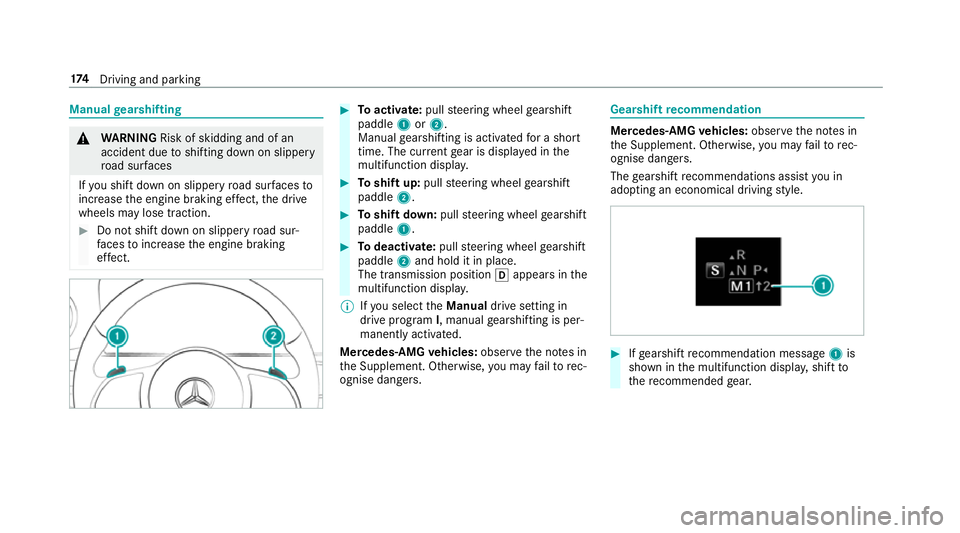
Toactivate: pullsteering wheel gearshift
paddle 1or2.
Manual gearshifting is activated for a short
time. The cur rent gear is displa yed in the
multifunction displa y. #
Toshift up: pullsteering wheel gearshift
paddle 2. #
Toshift down: pullsteering wheel gearshift
paddle 1. #
Todeactivate: pullsteering wheel gearshift
paddle 2and hold it in place.
The transmission position happears in the
multifunction displa y.
% Ifyo u select theManual drive setting in
drive prog ram I, manual gearshifting is per‐
manent lyactivated.
Mercedes -AMG vehicles: observeth e no tes in
th e Supplement. Otherwise, you may failto rec‐
ognise dangers. Gearshi
ftrecommendation Mercedes
-AMG vehicles: observeth e no tes in
th e Supplement. Otherwise, you may failto rec‐
ognise dangers.
The gearshift recommendations assist you in
adopting an economical driving style. #
Ifge arshift recommendation message 1is
shown in the multifunction displa y,shift to
th ere commended gear. 174
Driving and pa rking
Page 178 of 497
Using kickdown
Mercedes-AMG
vehicles: observeth e no tes in
th e Supplement. Otherwise, you may failto rec‐
ognise dangers. #
Maximum acceleration: depress the accel‐
erator pedal be yond the pressure point.
During kickdown, you cannot shift gears using
th esteering wheel gearshift paddles. The auto‐
matic transmission shifts up tothe next gear
when the maximum engine speed is reached to
pr otect the engine from overrev ving. #
Ease off the accelera tor pedal once the
desired speed is reached. Glide mode function
Mercedes
-AMG vehicles: observeth e no tes in
th e Supplement. Otherwise, you may failto rec‐
ognise dangers.
Wi th an anticipatory driving style, glide mode
helps youto reduce fuel consum ption. Glide mode is
characterised bythefo llowing:
R the combustion engine is disconnected from
th e drive train and theve hicle continues to
ro ll in neut ral.
R the transmission position his displa yed in
green in the multifunction displa y.
R Vehicles with a 48 V electrical sy stem
(EQ-Boost tech nology): the combustion
engine is switched off depending on the driv‐
ing situation. All of theve hicle functions
re main active.
Glide mode is activated if thefo llowing condi‐
tions are me t:
R drive program Eis selected.
R the speed is within a suitable range.
R the course of thero ad is suitable, e.g. no
st eep uphill or downhill gradients or tight
bends.
R there is no trailer coupled tothe ball coupling
of the trailer tow hit ch, and no bicycle rack
fi tted.
R you are no lon ger depressing the accelerator
or brake pedal. %
Glide mode can also be activated if you ha ve
selected the "Eco" setting forth e drive
(engine management) when in drive program
I.
Glide mode is deactivated again if one of the
conditions is no longer met.
Ve hicles with Driving Assistance Package,
Ac tive Di stance Assist DISTRO NIC orActive
Brake Assi st:Glide mode is also deacti vated
depending on the traf fic situation and theve hi‐
cle then switches to overru n mode. This fur ther
re duces fuel consum ption.
Glide mode can also be pr evented bythefo llow‐
ing parame ters:
R uphill gradient
R downhill gradient
R temp erature
R height
R speed
R obstruction de tection
R ope rating conditions of the engine Driving and parking
175
Page 194 of 497
Overview of driving sy
stems and driving
saf ety sy stems In
this section, you will find information about
th efo llowing driving sy stems and driving saf ety
sy stems:
R 360° Camera (→ page 223)
R ABS (A nti-lock Braking System) (→ page191)
R Active Dis tance Assi stDISTRONIC
(→ page 205)
R Adaptive brake lights (→ page 201)
R AIR BODY CONTROL (→ page213)
R Active Brake Assi st (→page 196)
R Active Lane Keeping Assist (→ page241)
R ATTENTION ASSIST (→ page 237)
R BAS (Brak eAssist System) (→ page191)
R DYNA MIC BODY CONT ROL (→ page 213)
R EBD ( Electronic Brakeforc eDistribution)
(→ page 196)
R ESP ®
(E lectronic Stability Program)
(→ page 192)
R Hill Start Assist R
HOLD function (→ page212)
R STEER CONTROL (→ page 196)
R Active Steering Assist (→ page210)
R Limi ter (→ page 202)
R Active Parking Assist (→ page 226)
R Parking Assist PARKTRONIC (→ page216)
R Reversing camera (→ page 220)
R Cruise control (→ page 201)
R Blind Spot Assist and Active Blind Spot Assi st
( → page 239) Fu
nctions of ABS (anti-lock braking sy stem) ABS
regulates the brake pressure in critical driv‐
ing situations:
R During braking, e.g. at maximum full-s top
braking or insuf ficient traction of the tyres,
th e wheels are pr evented from blocking.
R Vehicle steerability while braking is ensured.
If ABS inter venes when braking, you will feel a
pulsing in the brake pedal. The pulsating brake
pedal can be an indication of hazardous road conditions and can ser
veas a reminder totake
ex tra care while driving.
Sy stem limitations
R ABS is active from speeds of appr ox.
8 km/h.
R ABS may be impai red or may not function if a
malfunction has occur red and theye l‐
low ! ABSwarning lamp lights up contin‐
uously in the instrument clus ter af terthe
engine is star ted. Fu
nction of BAS (Brake Assist Sy stem) &
WARNING Risk of an accident caused by
a malfunction in BAS (Brake Assi stSys‐
te m)
If BA S is malfunctioning, the braking dis tance
in an emergency braking situation is
increased. #
Dep ress the brake pedal with full force
in emer gency braking situations. ABS
pr eve nts the wheels from locking. Driving and parking
191
Page 199 of 497
Fu
nction of EBD (Electronic Brake forc e Dis‐
tribution) EBD is
characterised bythefo llowing:
R Monitoring and regulating the brake pressure
on there ar wheels.
R Impr oved driving stability when braking,
especially on bends. ST
EER CONT ROL function ST
EER CONT ROL helps youby transmitting a
noticeable steering forc eto thesteering wheel in
th e direction requiredforve hicle stabilisation.
This steering recommendation is given pa rticu‐
lar lyin thefo llowing situations:
R Both right wheels or bo thleft wheels are on
a we t or slippe ryroad sur face when you
brake.
R The vehicle starts toskid. Sy
stem limitations
ST EER CONTROL may be impaired or may not
function in thefo llowing situations:
R ESP ®
is deactivated.
R ESP ®
is malfunctioning.
R The steering is malfunctioning.
If ESP ®
is malfunctioning, you will be assis ted
fur ther by the electric po werst eering. Fu
nction of Active Brake Assi st Ac
tive Brake Assi stconsi sts of:
R Distance warning function
R Autonomous braking function
R Situation-dependent braking assi stance
R Vehicles with Driving Assistance Pack‐
age: Evasi veSteering Assist
Ac tive Brake Assi stcan help youto minimise the
ri sk of a collision with vehicles or pedestrians or
to reduce the ef fects of su cha collision. If
Ac tive Brake Assi sthas de tected a risk of colli‐
sion, you will be warned visually and acousti‐
call y.
If yo u do not react tothe visual or acoustic warn‐
ing, autonomous braking can be initiated in criti‐
cal situations.
In especially critical situations, Active Brake
Assi stcan initia teautonomous braking direct ly.
In this case, the visual and acoustic warning
occurs simultaneously with the braking applica‐
tion.
If yo u apply the brake yourself in a critical situa‐
tion or apply the brake during autonomous brak‐
ing, situation-dependent braking assis tance
occu rs. The brake pressure increases up tomax‐
imum full-s top braking if necessar y.
If th e autonomous braking function or the situa‐
tion-dependent braking assis tance is trig gered,
additional pr eventive measu resfo r occupant
pr otection (PRE-SAFE ®
) may also be initiated, if
th eve hicle is equipped with these. 19 6
Driving and pa rking
Page 213 of 497
#
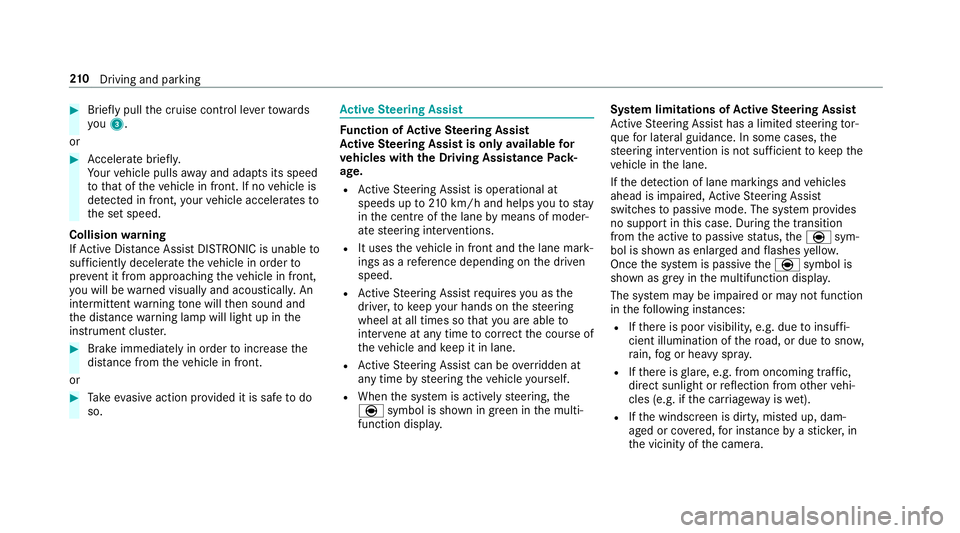
Brief lypull the cruise control le verto wa rds
yo u3.
or #
Accelerate brie fly.
Yo ur vehicle pulls away and adapts its speed
to that of theve hicle in front. If no vehicle is
de tected in front, your vehicle accelerates to
th e set speed.
Collision warning
If Ac tive Dis tance Assi stDISTRONIC is unable to
suf ficiently decele rate theve hicle in order to
pr eve nt it from approa ching theve hicle in front,
yo u will be warned visually and acousticall y.An
intermittent warning tone will then sound and
th e dis tance warning lamp will light up in the
instrument clus ter. #
Brake immediately in order toinc rease the
dis tance from theve hicle in front.
or #
Take evasive action pr ovided it is safe todo
so. Ac
tive Steering Assist Fu
nction of Active Steering Assist
Ac tive Steering Assist is only available for
ve hicles with the Driving Assistance Pack‐
age.
R Active Steering Assist is operational at
speeds up to210 km/h and helps youto stay
in the cent reofthe lane bymeans of moder‐
ate steering inter ventions.
R It uses theve hicle in front and the lane mark‐
ings as a refere nce depending on the driven
speed.
R Active Steering Assist requ ires you as the
driver, tokeep your hands on thesteering
wheel at all times so that you are able to
inter vene at any time tocor rect the course of
th eve hicle and keep it in lane.
R Active Steering Assist can be overridden at
any time bysteering theve hicle yourself.
R When the sy stem is actively steering, the
è symbol is shown in green in the multi‐
function displa y. Sy
stem limitations of Active Steering Assist
Ac tive Steering Assist has a limited steering tor‐
qu efo r lateral guidance. In some cases, the
st eering inter vention is not su fficient tokeep the
ve hicle in the lane.
If th e de tection of lane markings and vehicles
ahead is impaired, Active Steering Assist
switches topassive mode. The sy stem pr ovides
no support in this case. During the transition
from the active topassive status, theè sym‐
bol is shown as enlar ged and flashes yello w.
Once the sy stem is passive theè symbol is
shown as gr eyinthe multifunction displa y.
The sy stem may be impaired or may not function
in thefo llowing ins tances:
R Ifth ere is poor visibility, e.g. due toinsuf fi‐
cient illumination of thero ad, or due tosno w,
ra in, fog or heavy spr ay.
R Ifth ere is glare, e.g. from oncoming traf fic,
di re ct sunlight or reflection from other vehi‐
cles (e.g. if the car riag ewa y is wet).
R Ifth e windscreen is dirty, mis ted up, dam‐
aged or co vered, for ins tance byast icke r,in
th e vicinity of the camera. 210
Driving and pa rking
Page 218 of 497
Setting
theve hicle le vel &
WARNING Risk of accident because
ve hicle le vel is too high
If yo u drive at a higher vehicle le vel,th e driv‐
ing characteristics may be impaired due to
th e higher vehicle centre of gravity.
The vehicle can drift outwards, forex ample,
when steering or cornering. #
Alw aysch oose a vehicle le vel which is
suited tothe driving style and thero ad
sur face conditions. &
WARNING Risk of entrapment from vehi‐
cle lo wering
When lo wering theve hicle, other people
could become trapped if their limbs are
between theve hicle body and the tyres or
underneath theve hicle. #
Make sure no one is underneath the
ve hicle or in the immediate vicinity of
th e wheel ar ches when you lo werthe
ve hicle. &
WARNING Risk of entrapment from vehi‐
cle lo wering
Ve hicles with AIR BODY CONT ROL or
le ve l control sy stem: When you unload lug‐
ga ge or lea vetheve hicle, theve hicle first
ri ses slightly and then returns tothe set le vel
shortly af terw ards.
Yo u or an yone else in the vicinity of the
wheel ar ches or the underbody could thus
become trapped.
The vehicle can also be lo wered af ter being
loc ked. #
When leaving theve hicle, make sure
th at nobody is in the vicinity of the
wheel ar ches or the underbody. Re
quirements:
R The vehicle has been star ted.
R The vehicle must not be moving fasterthan
60 km/h. Ra
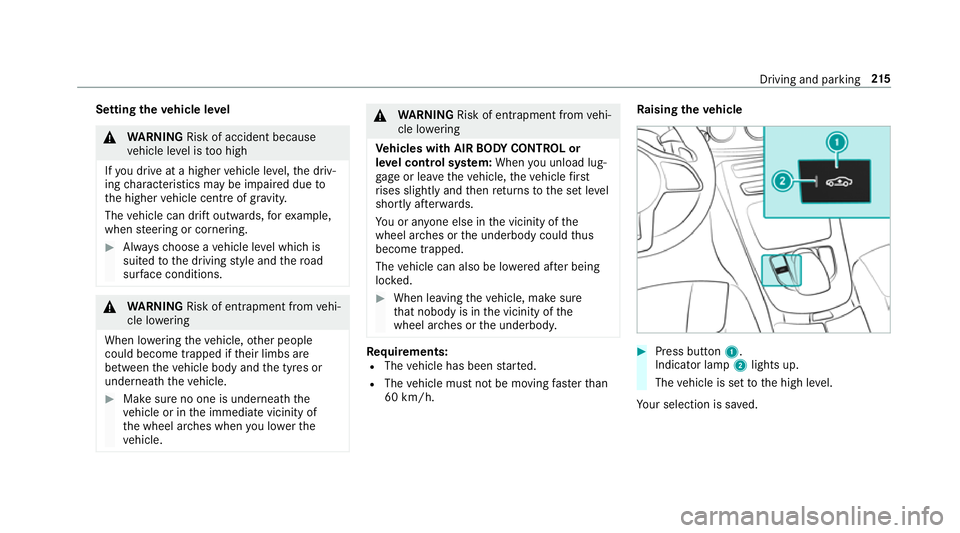
ising theve hicle #
Press button 1.
Indica tor lamp 2lights up.
The vehicle is set tothe high le vel.
Yo ur selection is sa ved. Driving and parking
215
Page 224 of 497

Normal view
1 Yellow guide line, vehicle width (driven sur‐
fa ce) depending on the cur rent steering
wheel angle (dynamic)
2 Yellow lane marking the course the tyres will
ta ke atthe cur rent steering wheel angle
(dynamic)
3 Yellow guide line at a dis tance of appr ox‐
imately 1.0 m from there ar area
4 Bumper
5 Red guide line at a dis tance of appr oximately
0.3 m from there ar area Wi
de-angle view Vi
ew of trailer (if trailer hitch is fitted)
1 Yellow guide line, locating aid 2
Red guide line at a dis tance of appr oximately
0.3 m tothe ball head of the trailer hitch
3 Ball head of the trailer hitch
Ve hicles with Active Parking Assist
The following camera vie wsare available in the
multimedia sy stem: Normal view
1 Yellow lane marking the course the tyres will
ta ke atthe cur rent steering wheel angle
(dynamic)
2 Yellow guide line, vehicle width (driven sur‐
fa ce) depending on the cur rent steering
wheel angle (dynamic) Driving and parking
221
Page 227 of 497

To
p view 1
Lane indicating thero ute theve hicle will
ta ke with thesteering wheel in its cur rent
position
2 Yellow warning display of Parking Assist
PA RKTRONIC: obstacles at a dis tance of
appr oximately 1.0 m or less
3 Your vehicle from abo ve
If th e dis tance tothe object lessens, the colour
of thewa rning display changes 2.From a dis‐
ta nce of appr oximately 0.6 m thewa rning dis‐
play is shown in orange. From a dis tance of
appr oximately 0.3 m thewa rning display is
shown in red. When
Parking Assist PARKTRONIC is operational
and no object is de tected, the segments of the
wa rning display are shown in grey.
% Ifth e entire sy stem fails, the segments of
th ewa rning display are shown in red. The
indicator lamp on thePA RKTRONIC but ton
lights up and theé symbol appears in
th e multifunction displa y.
If th e sy stem fails at there ar, the display of
th e segments changes as follo ws:
R The rear segments are shown in red
when reve rsing.
R The rear segments are hidden when driv‐
ing forw ards.
If Pa rking Assist PARKTRONIC is deacti vated,
th ewa rning display fades out. Guide lines 1
Yellow lane marking the course the tyres will
ta ke atthe cur rent steering wheel angle
(dynamic)
2 Yellow guide line, vehicle width (driven sur‐
fa ce) depending on the cur rent steering
wheel angle (dynamic)
3 Red guide line at a dis tance of appr oximately
0.3 m from there ar area
4 Mark at a distance of appr ox.1. 0 m
% When Active Parking Assist is active, the
lanes are displa yed in green. 224
Driving and parking