2017 MERCEDES-BENZ E-CLASS SALOON weight
[x] Cancel search: weightPage 247 of 497
#
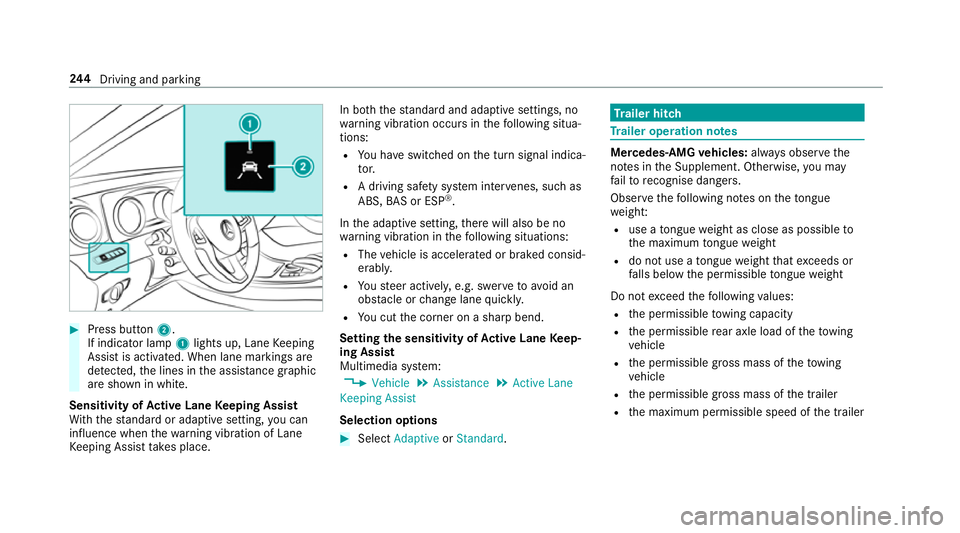
Press button 2.
If indicator lamp 1lights up, Lane Keeping
Assist is activated. When lane markings are
de tected, the lines in the assis tance graphic
are shown in white.
Sensitivity of Active Lane Keeping Assist
Wi th th est andard or adaptive setting, you can
influence when thewa rning vibration of Lane
Ke eping Assist take s place. In bo
th thest andard and adaptive settings, no
wa rning vibration occurs in thefo llowing situa‐
tions:
R You ha veswitched on the turn signal indica‐
to r.
R A driving sa fety sy stem inter venes, su chas
ABS, BAS or ESP ®
.
In the adaptive setting, there will also be no
wa rning vibration in thefo llowing situations:
R The vehicle is accelerated or braked consid‐
erably.
R Yousteer actively, e.g. swer vetoavo id an
obs tacle or change lane quickl y.
R You cut the corner on a sharp bend.
Setting the sensitivity of Active Lane Keep‐
ing Assist
Multimedia sy stem:
, Vehicle .
Assistance .
Active Lane
Keeping Assist
Selection options #
Select Adaptive orStandard. Tr
ailer hitch Tr
ailer operation no tes Mercedes‑AMG
vehicles: always obser vethe
no tes in the Supplement. Otherwise, you may
fa ilto recognise dangers.
Obser vethefo llowing no tes on theto ngue
we ight:
R use a tongue weight as close as possible to
th e maximum tongue weight
R do not use a tongue weight that exc eeds or
fa lls below the permissible tongue weight
Do not exceed thefo llowing values:
R the permissible towing capacity
R the permissible rear axle load of theto wing
ve hicle
R the permissible gross mass of theto wing
ve hicle
R the permissible gross mass of the trailer
R the maximum permissible speed of the trailer 244
Driving and pa rking
Page 340 of 497
%
vehicles with automatic transmission: if
th e automatic transmission cann otbe shif‐
te dto position i, orthe multifunction dis‐
play in the instrument clus ter does not show
anything, ha vetheve hicle transpor ted
aw ay( →page 338). A towing vehicle with lift‐
ing equipment is requiredforve hicle trans‐
por tation.
* NO
TEDama gedue to to wing away at
exc essively high speeds or over long dis‐
ta nces The driv
etra in could be damaged when tow‐
ing at excessively high speeds or over long
dis tances. #
Atowing speed of 50 km/h must not
be exc eeded. #
Atowing dis tance of 50 km must not be
exc eeded. &
WARNING Risk of accident when towing
a ve hicle which is too heavy
If th eve hicle being tow- star ted or towed
aw ay is heavier than the permissible gross
mass, thefo llowing situations can occur:
R theto wing eye may become de tach ed.
R the car/t railer combination may swer ve
or eve nove rturn. #
If ano ther vehicle is tow- star ted or
to we daw ay, its weight must not exceed
th e permissible gross mass of your own
ve hicle. If a
vehicle must be tow- star ted or towe daw ay,
its weight must not exceed the permissible gross
mass of theto wing vehicle. #
Information on the permissible gross weight
of theve hicle can be found on theve hicle
identification plate . #
Vehicles with automatic transmission: do
not open the driver's door or front passenger
door, otherwise the automatic transmission
automatically shifts toposition j. #
Fittheto wing eye (→ page 340). #
Attach theto w bar.
* NO
TEDama gedue toincor rect connec‐
tion #
Only connect theto w rope or tow bar to
th eto wing eyes. #
Deactivate the automatic locking mechanism
(→ page 75). #
Do not activate the HOLD function. #
Deactivate theto w- aw ay protection
(→ page 93). #
Deactivate Active Brake Assi st (→page 201). #
Vehicles with automatic transmission:
shift the automatic transmission toposition
i. #
Vehicles with manual transmission: shift
to neutral i. #
Release the electric parking brake. Breakdown assis
tance 337
Page 370 of 497
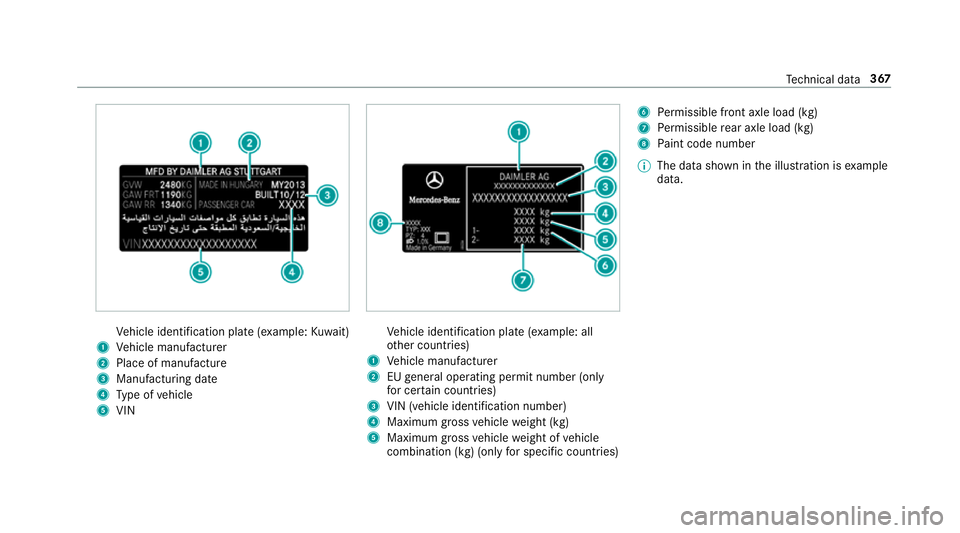
Ve
hicle identification plate (e xample:Kuwa it)
1 Vehicle manufacturer
2 Place of manufacture
3 Manufacturing date
4 Type of vehicle
5 VIN Ve
hicle identification plate (e xample: all
ot her countries)
1 Vehicle manufacturer
2 EUgeneral operating pe rmit number (only
fo r cer tain countries)
3 VIN (vehicle identification number)
4 Maximum gross vehicle weight (kg)
5 Maximum gross vehicle weight of vehicle
combination (kg) (only for specific countries) 6
Perm issible front axle load (kg)
7 Perm issible rear axle load (kg)
8 Paint code number
% The data shown in the illustration is example
data. Te
ch nical da ta367
Page 381 of 497

We
ights and loads Please no
tethat forth e specified vehicle data:
R items of optional equipment increase the
unladen weight and reduce the maximum
pa yload.
R vehicle-specific weight information can be
fo und on theve hicle identification plate .
Ro of load All models
Maximum
roof load 100kg Tr
ailer hitch Gene
ral no tes on the trailer hit ch Not all models can be used
to tow a trailer
(→ page 244).
Modi fications tothe engine cooling sy stem may
be necessar y,depending on theve hicle model.
The retrofitting of a trailer hitch is only pe rmissi‐
ble if a towing capacity is specified in your vehi‐
cle documents. Fu
rther information can be obtained at a quali‐
fi ed specialist workshop. Mounting dimensions
1
Fastening point
2 Overhang dimension
3 Rear axle centre line 378
Tech nical da ta
Page 382 of 497
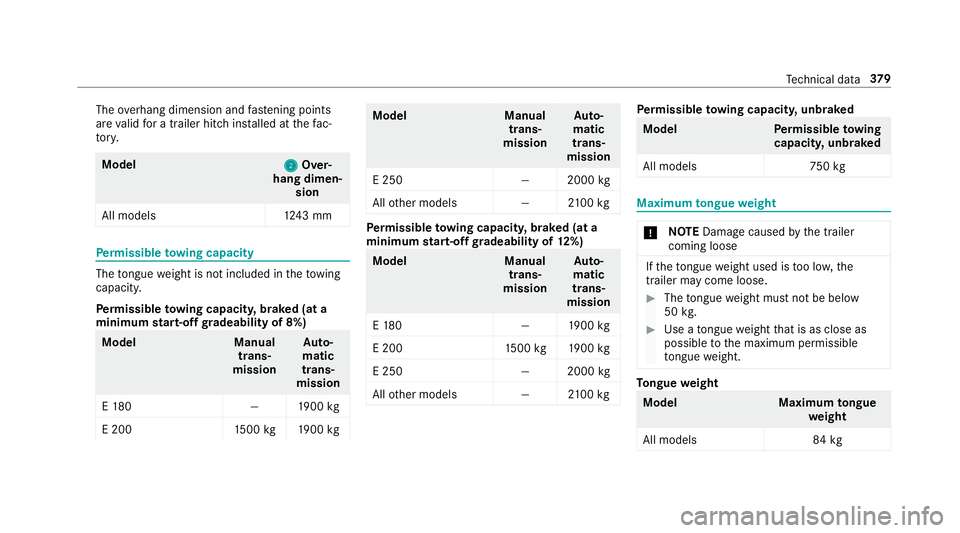
The
overhang dimension and fastening points
are valid for a trailer hitch ins talled at thefa c‐
to ry. Model
2 2Over‐
hang dimen‐ sion
All model s1 243 mm Pe
rm issible towing capacity The
tongue weight is not included in theto wing
capacity.
Pe rm issible towing capacit y,braked (at a
minimum start-off gradeability of 8%) Model
Manual
trans‐
mission Au
to‐
matic
trans‐
mission
E 18 0— 1900 kg
E 200 1500 kg 1900 kg Model
Manual
trans‐
mission Au
to‐
matic
trans‐
mission
E 250 —2000kg
All other models —2100kg Pe
rm issible towing capacit y,braked (at a
minimum start-off gradeability of 12%) Model
Manual
trans‐
mission Au
to‐
matic
trans‐
mission
E 18 0— 1900 kg
E 200 1500 kg 1900 kg
E 250 —2000kg
All other models —2100kg Pe
rm issible towing capacit y,unbraked Model
Perm issible towing
capacit y,unbraked
All model s7 50kg Maximum
tongue weight *
NO
TEDama gecaused bythe trailer
coming loose If
th eto ngue weight used is too lo w,the
trailer may come loose. #
The tongue weight must not be below
50 kg. #
Use a tongue weight that is as close as
possible tothe maximum permissible
to ngue weight. To
ngue weight Model
Maximumtongue
we ight
All models 84 kg Te
ch nical da ta37 9
Page 401 of 497
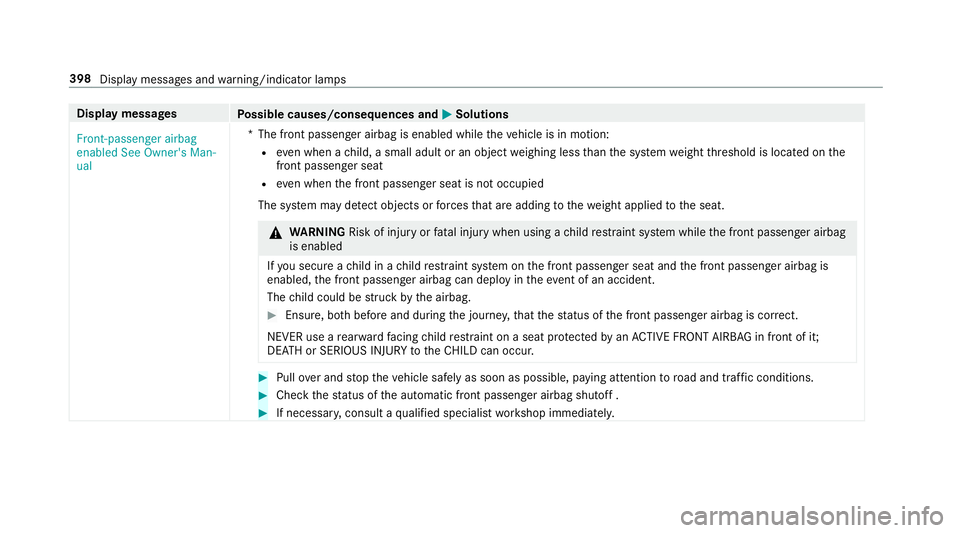
Display messages
Possible causes/consequences and M
MSolutions
Front-passenger airbag
enabled See Owner's Man-
ual *T
he front passenger airbag is enabled while theve hicle is in motion:
R even when a child, a small adult or an object weighing less than the sy stem weight thre shold is located on the
front passenger seat
R even when the front passenger seat is not occupied
The sy stem may de tect objects or forc es that are adding tothewe ight applied tothe seat. &
WARNING Risk of inju ryor fata l injury when using a child restra int sy stem while the front passenger airbag
is enabled
If yo u secure a child in a child restra int sy stem on the front passenger seat and the front passenger airbag is
enabled, the front passenger airbag can deploy in theev ent of an accident.
The child could be stru ck bythe airbag. #
Ensure, bo thbefore and during the journe y,that thest atus of the front passenger airbag is cor rect.
NEVER use a rear wa rdfacing child restra int on a seat pr otected byan ACTIVE FRONT AIRB AGin front of it;
DE ATH or SERIOUS INJU RYtotheCH ILD can occur. #
Pull over and stop theve hicle safely as soon as possible, paying attention toroad and traf fic conditions. #
Check thest atus of the automatic front passenger airbag shutoff . #
If necessar y,consult a qualified specialist workshop immediatel y.398
Display messages and warning/indicator lamps
Page 475 of 497
Gearshift paddles
see Steering wheel gearshift paddles
Gea rshift recommendation .............171,174
Genera l operating permit number
(EU) .......................................................... .366
Genuine parts ............................................ 22
Genuine wood (Care) .............................. .319
Glide mode ............................................... 175
Glo vebox
Air vent ................................................ 15 8
Locking/unlocking .............................. 109
Gross weight .......................................... .366 H
Handbrake see Electric parking brake
Handling characteristics (unusual) ....... 344
HANDS-FREE ACCESS ................................ 79
Haza rdwa rning lights ............................ .130
Head restra int .......................................... .99
Fr ont (adjusting manually) ..................... 99
Fr ont (luxury head restra int) ................ 100Re
ar (adjusting) .................................. .101
Re ar (fitting/removing) ........................ 101
Head-up display ....................................... 261
Ad justing brightness (on-board com‐
pu ter) ................................................... 261
Ad justing display elements (on-board
compu ter) ............................................ 261
Fu nction .............................................. 262
Menu (on-board compu ter) .................. 261
Setting the position (on-board com‐
puter) ................................................... 261
Switching on/off ................................. 263
Using the memory function ................. 106
Headlamp flasher ................................... .129
Heating see Clima tecontrol
High-pressure cleaner (care) ..................314
Hill Start Assist ........................................ 211
HOLD function ......................................... 212
Ac tivating/deactivating ...................... .212
Fu nction/no tes .................................... 212
Hooking the luggage net .........................114 I
i-Size child seat securing sy stem ............ 49
Fitting .................................................... 50
No tes ..................................................... 49
Seats suitable for attaching ................... 60
Identification plate Engine ................................................. 366
Vehicle ................................................ 366
Ignition Switching on (S tart/S top button) ........ 15 9
Ignition key
see Key
Immobiliser ................................................ 91
Implied warranty
Ve hicle ................................................... 27
Inat tentiveness assistant
see ATTENTION ASSIST
Indicator lamp see Warning/indicator lamps
Individual drive prog ram
Con figuring .......................................... 17 0
Selecting ............................................. 17 0472
Index
Page 478 of 497
Loads
Securing .............................................. 107
Locator lighting Swit ching on/off ................................ .135
Lock ing/unlocking
Ad ditional door lock ...............................71
Digital Car Keyst icke r ........................... 72
KEYLESS-GO .......................................... 73
Mobile phone ......................................... 72
Smartphone ........................................... 72
Un locking/opening the doors from
th e inside ............................................... 71
Lu bricant additives
see Additives
Lu ggage
Lu ggage net ......................................... 11 4
Secu ring .............................................. 107
Lu mbar support
see Lumbar support (4-w ay)
Lu mbar support (4-w ay).......................... .99 M
Main beam Activating/deactivating ...................... .129
Ad aptive Highbeam Assist .................. .132
Ad aptive Highbeam Assist Plus .......... .134
Changing bulbs ................................... .138
Maintenance see ASS YST PLUS
Malfunction Restra int sy stem ................................... 32
Manual transmission Operating thege arshift le ver ............... 17 0
Matt finish (cleaning instructions) .........316
Maximum gross vehicle weight ............ .366
Maximum speed see Limi ter
MB Info call see Service call
Media Menu (on-boa rdcompu ter) .................. 260
Sear ching ............................................ 298 Media Inter
face
In fo rm ation .......................................... 298
Overview ............................................ .299
Switching on ....................................... 299
Media mode Activating ............................................ 296
Media playba ck
Operating (on-board computer) ........... 260
Media sear ch
St arting .............................................. .298
Media source Dialling (on-boa rdcompu ter) ............... 260
Memory function Head-up display — Calling up sa ved
settings ............................................... 106
Head-up Display — Saving settings ...... 106
Operating ............................................ 106
Outside mir ror — Calling up sa ved
settings ............................................... 106
Outside mir ror — Saving settings ......... 106
Seat — Calling up sa ved settings .........1 06
Seat — Saving settings ......................... 106
St eering wheel — Calling up sa ved
settings ............................................... 106 Index
475