Page 201 of 589
4115
Features of your vehicle
Automatic heating and air con-
ditioning
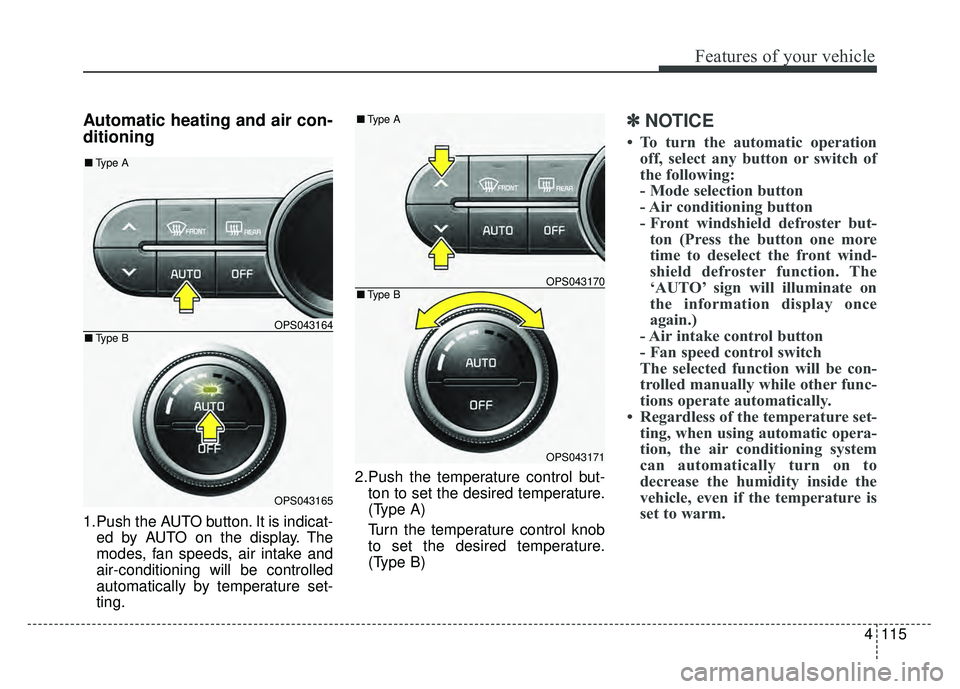
1.Push the AUTO button. It is indicat-ed by AUTO on the display. The
modes, fan speeds, air intake and
air-conditioning will be controlled
automatically by temperature set-
ting. 2.Push the temperature control but-
ton to set the desired temperature.
(Type A)
Turn the temperature control knob
to set the desired temperature.
(Type B)
✽ ✽ NOTICE
• To turn the automatic operation
off, select any button or switch of
the following:
- Mode selection button
- Air conditioning button
- Front windshield defroster but-ton (Press the button one more
time to deselect the front wind-
shield defroster function. The
‘AUTO’ sign will illuminate on
the information display once
again.)
- Air intake control button
- Fan speed control switch
The selected function will be con-
trolled manually while other func-
tions operate automatically.
• Regardless of the temperature set- ting, when using automatic opera-
tion, the air conditioning system
can automatically turn on to
decrease the humidity inside the
vehicle, even if the temperature is
set to warm.
OPS043164
OPS043165
■ Type B
■Type A
OPS043170
OPS043171
■Type B
■Type A
Page 205 of 589
4119
Features of your vehicle
The temperature will decrease to the
minimum (Lo) by pushing the button
().
When pushing the button, the tem-
perature will increase or decrease by
0.5°C/1°F. When set to the lowest
temperature setting, the air condi-
tioning will operate continuously.
B
The temperature will increase to the
maximum (HI) by turning the knob to
the right extremely.
The temperature will decrease to the
minimum (Lo) by turning the knob to
the left extremely.
When turning the knob, the tempera-
ture will increase or decrease by
0.5°C/1°F. When set to the lowest
temperature setting, the air condi-
tioning will operate continuously.Temperature scale conversion
If the battery has been discharged or
disconnected, the temperature mode
display will reset to Centigrade.
This is normal condition. You can
switch the temperature scale as fol-
lows;
While pressing the AUTO button,
press the OFF button for 3 seconds
or more. The temperature scale will
change from Centigrade to
Fahrenheit, or from Fahrenheit to
Centigrade.
The temperature unit (from °C to °F
or from °F to °C) can be changed by
using the “User Settings” mode of the
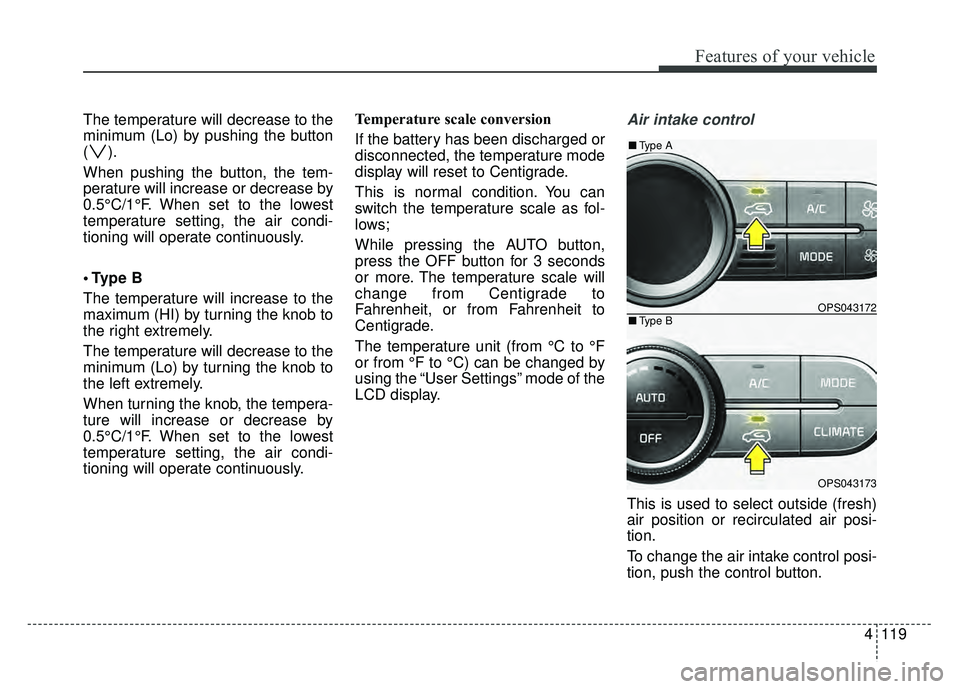
LCD display.Air intake control
This is used to select outside (fresh)
air position or recirculated air posi-
tion.
To change the air intake control posi-
tion, push the control button.
OPS043172
OPS043173
■
Type B
■Type A
Page 246 of 589
Audio system
511
Feature of Your Audio
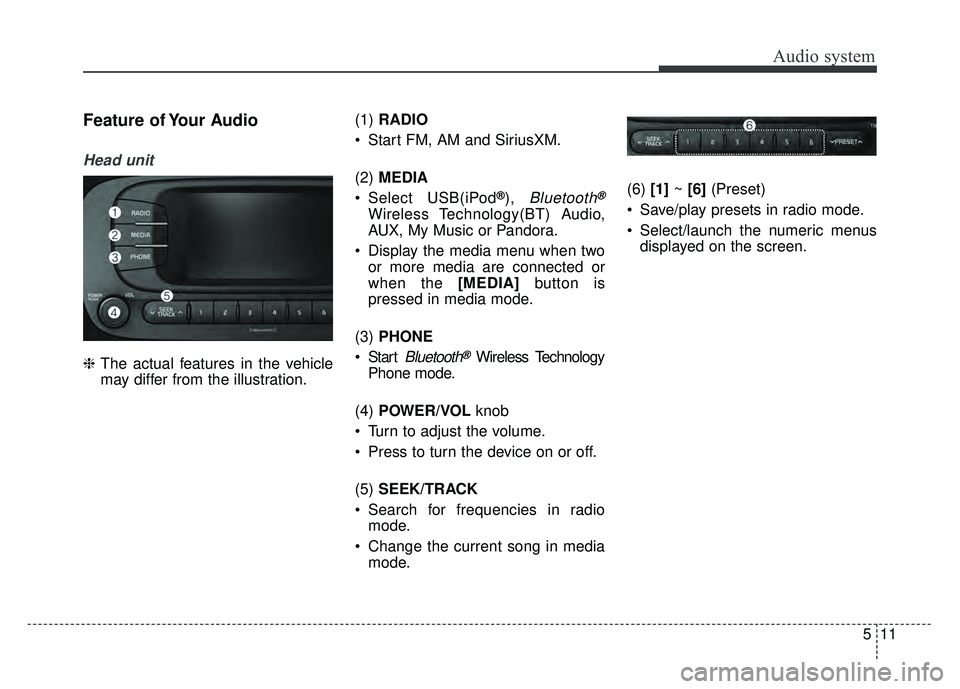
Head unit
❈The actual features in the vehicle
may differ from the illustration. (1)
RADIO
Start FM, AM and SiriusXM.
(2) MEDIA
Select USB(iPod
®), Bluetooth®
Wireless Technology(BT) Audio,
AUX, My Music or Pandora.
Display the media menu when two or more media are connected or
when the [MEDIA] button is
pressed in media mode.
(3) PHONE
Start
Bluetooth®Wireless Technology
Phone mode.
(4) POWER/VOL knob
Turn to adjust the volume.
Press to turn the device on or off.
(5) SEEK/TRACK
Search for frequencies in radio mode.
Change the current song in media mode. (6)
[1]~ [6] (Preset)
Save/play presets in radio mode.
Select/launch the numeric menus displayed on the screen.
Page 247 of 589
Audio system
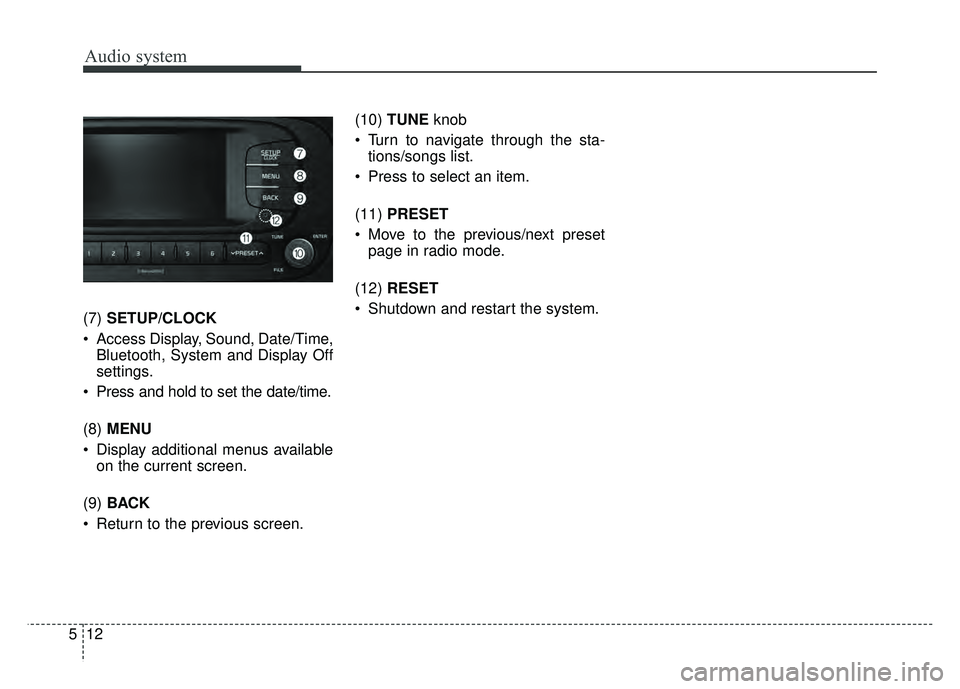
(7)SETUP/CLOCK
Access Display, Sound, Date/Time, Bluetooth, System and Display Off
settings.
Press and hold to set the date/time.
(8) MENU
Display additional menus available on the current screen.
(9) BACK
Return to the previous screen. (10)
TUNE knob
Turn to navigate through the sta- tions/songs list.
Press to select an item.
(11) PRESET
Move to the previous/next preset page in radio mode.
(12) RESET
Shutdown and restart the system.
12
5
Page 248 of 589

Audio system
Steering wheel remote control
❈The actual features in the vehicle
may differ from the illustration.
(1) MODE
Press the button to change the mode in the following order: Radio
➟ Media.
Press and hold the button to turn off.
(2) VOLUME
Press to adjust the volume. (3)
UP/DOWN
Press the button in radio mode to search Presets.
Press and hold the button in radio mode to search frequencies.
Press the button in media mode to change the current song.
Press and hold the button in media mode to quick search through
songs.
(4) VOICE
Pressing the button - If Siri is not active: Starts Siri.
- If Siri is active: Re-starts Siri.
Pressing and holding the button: Siri is deactivated.
(5) CALL
Pressing the button - If not in
Bluetooth®Wireless
Technology Handsfree mode or
receiving a phone call.
First press: Display Dial Number
screen.
Second press: Automatically dis-
play the most recently Dialed call
number. Third press: Dial the phone num-
ber entered.
- Press in the Incoming Call notifi- cation screen to accept the
phone call.
- Press in
Bluetooth®Wireless
Technology Handsfree mode to
switch to the waiting call.
Pressing and holding the button - If not in
Bluetooth®Wireless
Technology Handsfree mode or
receiving a phone call, the most
recently Dialed Call number is
dialed.
- Press in
Bluetooth®Wireless
Technology Handsfree mode to
transfer the call to your cell
phone.
- Press in cell phone mode to switch to
Bluetooth®Wireless
Technology Handsfree mode.
(6) END
Press in
Bluetooth®Wireless
Technology Handsfree mode to
end the phone call.
Press in the incoming call screen to reject the call.
513
Page 250 of 589
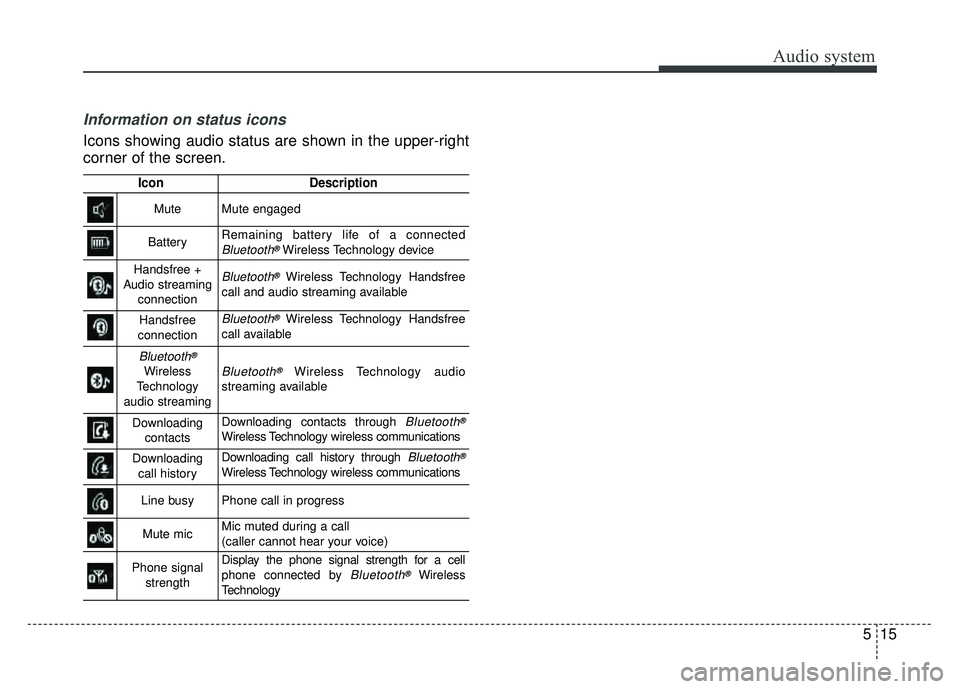
Information on status icons
Icons showing audio status are shown in the upper-right
corner of the screen.
IconDescription
MuteMute engaged
BatteryRemaining battery life of a connectedBluetooth®Wireless Technology device
Handsfree +
Audio streaming connectionBluetooth®Wireless Technology Handsfree
call and audio streaming available
Handsfree
connectionBluetooth®Wireless Technology Handsfree
call available
Bluetooth®
Wireless
Technology
audio streamingBluetooth®Wireless Technology audio
streaming available
Downloading contactsDownloading contacts through Bluetooth®
Wireless Technology wireless communications
Downloading call historyDownloading call history through Bluetooth®
Wireless Technology wireless communications
Line busyPhone call in progress
Mute micMic muted during a call
(caller cannot hear your voice)
Phone signal strengthDisplay the phone signal strength for a cell
phone connected by Bluetooth®Wireless
Technology
Audio system
515
Page 251 of 589
![KIA SOUL 2017 Owners Manual Audio system
16
5
Radio
Switching between FM, AM and
SiriusXM
Press the [RADIO] button on the
audio system to switch between FM,
AM and SiriusXM.
Searching frequencies
Search frequencies by pressing](/manual-img/2/54636/w960_54636-250.png "KIA SOUL 2017 Owners Manual Audio system
16
5
Radio
Switching between FM, AM and
SiriusXM
Press the [RADIO] button on the
audio system to switch between FM,
AM and SiriusXM.
Searching frequencies
Search frequencies by pressing")
Audio system
16
5
Radio
Switching between FM, AM and
SiriusXM
Press the [RADIO] button on the
audio system to switch between FM,
AM and SiriusXM.
Searching frequencies
Search frequencies by pressing the
[SEEK/TRACK] button on the prod-
uct. Presets
Save up to 36 frequently used sta-
tions.
1. Press and hold the desired slot
from 1 through 36. This saves the
current station in the selected slot.
If the slot is empty, simply press-
ing saves the station to the slot.
2. To save in slots numbered 7 or higher, press the [PRESET] but-
ton to move to the previous/next
page and save.
To listen to a preset station, press
the desired station in the list. Menu
Press the [MENU]
button, and select
the desired function.
List: A list of all stations available in the current location of the vehicle is
displayed. Press the desired sta-
tion. Press the [Refresh] to update
the list of available stations.
Scan: All stations available in the current location of the vehicle are
played for five seconds each.
Information: View detailed station information. Station Info should be
enabled if information wants to be
shown.
Sound Settings: Audio sound set- tings can be changed.
Station Info: Set whether to receive station information such as Station
Name, Program Type or Information.
Page 253 of 589
![KIA SOUL 2017 Owners Manual Audio system
18
5
SiriusXM
Switching between FM, AM and
SiriusXM
Press the [RADIO] button on the
audio system to switch between FM,
AM and SiriusXM.
Searching channels
Search channels by pressing the](/manual-img/2/54636/w960_54636-252.png "KIA SOUL 2017 Owners Manual Audio system
18
5
SiriusXM
Switching between FM, AM and
SiriusXM
Press the [RADIO] button on the
audio system to switch between FM,
AM and SiriusXM.
Searching channels
Search channels by pressing the")
Audio system
18
5
SiriusXM
Switching between FM, AM and
SiriusXM
Press the [RADIO] button on the
audio system to switch between FM,
AM and SiriusXM.
Searching channels
Search channels by pressing the
[SEEK/TRACK] button on the prod-
uct. Replay
Press the TUNE
knob to play a
replay.
Presets
Save up to 36 frequently used sta-
tions.
1. Press and hold the desired slot from 1 through 36. This saves the
current station in the selected slot.
2. To save in slots numbered 7 or higher, press the [PRESET] but-
ton to move to the previous/next
page and save.
To listen to a preset station, press
the desired station in the list. Menu
Press the [MENU]
button, and select
the desired function.
List: A list of all stations available in the current location of the vehicle is
displayed. Press the desired sta-
tion.
Categories: Channels can be searched by category.
Direct Tune: The desired channel can be selected by entering num-
bers.
Sound Settings: Audio sound set- tings can be changed.
Tag Song: Tag the current song information.
When an Apple device (iPhone
®,
iPod®) is connected, tagged song
information is sent automatically to
the connected device.
✽ ✽ NOTICE
Up to 50 songs can be tagged.
Scan: All stations available in the
vehicle’s current location are
played for ten seconds each.
Program Schedule: View the pro- gram schedule.