Page 155 of 589
469
Features of your vehicle
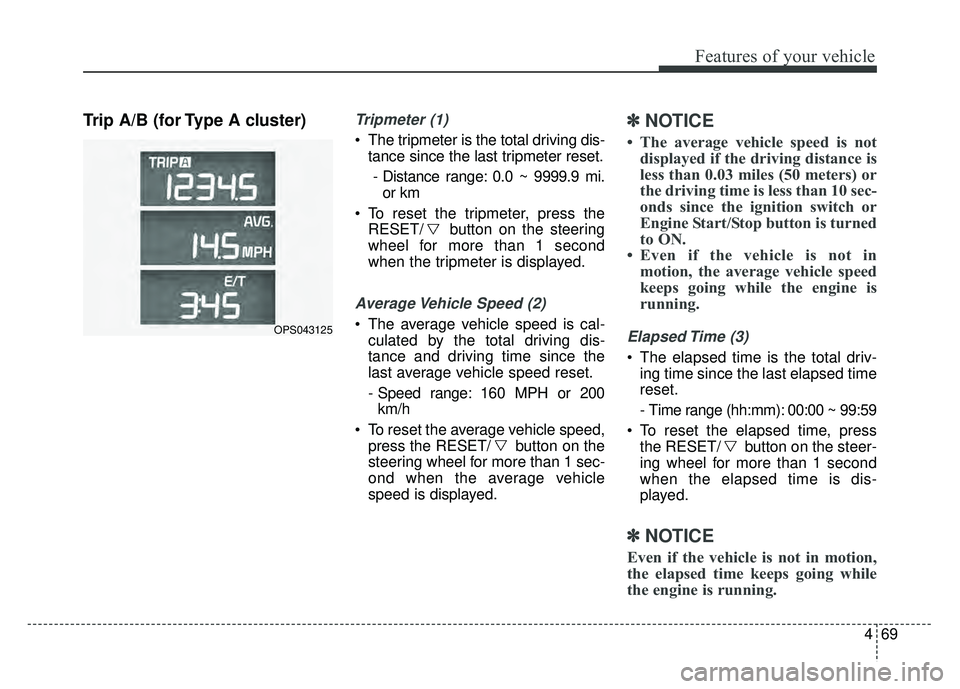
Trip A/B (for Type A cluster)Tripmeter (1)
The tripmeter is the total driving dis-tance since the last tripmeter reset.
- Distance range: 0.0 ~ 9999.9 mi. or km
To reset the tripmeter, press the RESET/ button on the steering
wheel for more than 1 second
when the tripmeter is displayed.
Average Vehicle Speed (2)
The average vehicle speed is cal-culated by the total driving dis-
tance and driving time since the
last average vehicle speed reset.
- Speed range: 160 MPH or 200km/h
To reset the average vehicle speed, press the RESET/ button on the
steering wheel for more than 1 sec-
ond when the average vehicle
speed is displayed.
✽ ✽ NOTICE
• The average vehicle speed is not
displayed if the driving distance is
less than 0.03 miles (50 meters) or
the driving time is less than 10 sec-
onds since the ignition switch or
Engine Start/Stop button is turned
to ON.
• Even if the vehicle is not in motion, the average vehicle speed
keeps going while the engine is
running.
Elapsed Time (3)
The elapsed time is the total driv-
ing time since the last elapsed time
reset.
- Time range (hh:mm): 00:00 ~ 99:59
To reset the elapsed time, press the RESET/ button on the steer-
ing wheel for more than 1 second
when the elapsed time is dis-
played.
✽ ✽ NOTICE
Even if the vehicle is not in motion,
the elapsed time keeps going while
the engine is running.
OPS043125
Page 156 of 589
Features of your vehicle
70
4
Fuel Economy
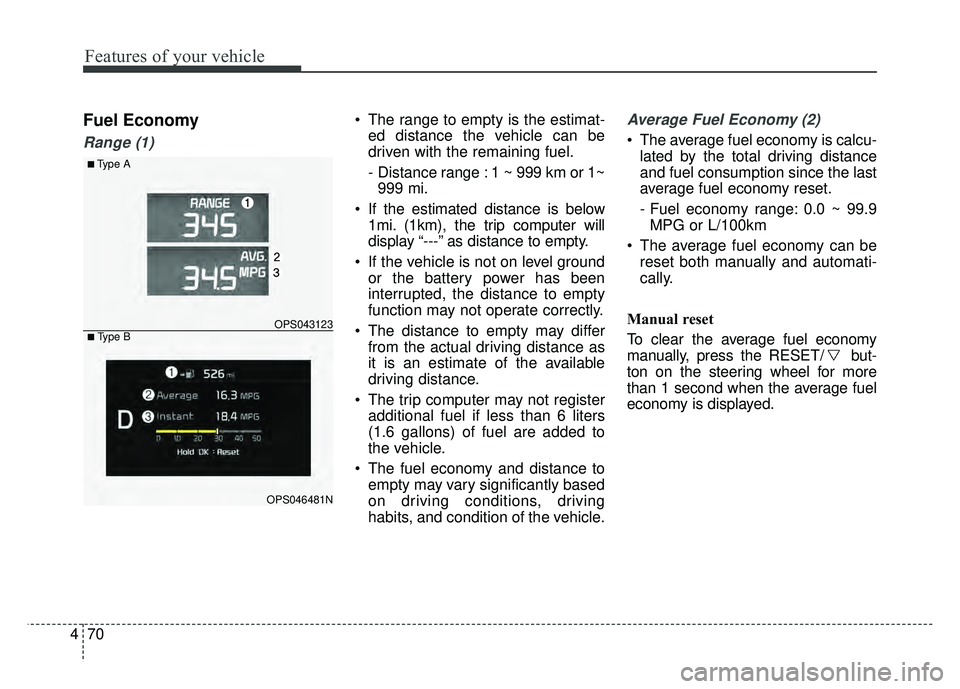
Range (1)
The range to empty is the estimat-
ed distance the vehicle can be
driven with the remaining fuel.
- Distance range : 1 ~ 999 km or 1~999 mi.
If the estimated distance is below 1mi. (1km), the trip computer will
display “---” as distance to empty.
If the vehicle is not on level ground or the battery power has been
interrupted, the distance to empty
function may not operate correctly.
The distance to empty may differ from the actual driving distance as
it is an estimate of the available
driving distance.
The trip computer may not register additional fuel if less than 6 liters
(1.6 gallons) of fuel are added to
the vehicle.
The fuel economy and distance to empty may vary significantly based
on driving conditions, driving
habits, and condition of the vehicle.Average Fuel Economy (2)
The average fuel economy is calcu-lated by the total driving distance
and fuel consumption since the last
average fuel economy reset.
- Fuel economy range: 0.0 ~ 99.9MPG or L/100km
The average fuel economy can be reset both manually and automati-
cally.
Manual reset
To clear the average fuel economy
manually, press the RESET/ but-
ton on the steering wheel for more
than 1 second when the average fuel
economy is displayed.
■Type A
OPS043123
OPS046481N
■ Type B
Page 157 of 589
471
Features of your vehicle
Automatic reset
- Off : The average fuel economy willnot reset automatically whenever
refueling.
- After Ignition (Auto Reset) : The average fuel economy will reset
automatically when after 4 hours
ignition Off.
- After Refueling (Auto Reset) : The average fuel economy will reset
automatically when refueling more
than 1.6 gallons (6 liters).
✽ ✽ NOTICE
The average fuel economy is not dis-
played for more accurate calculation
if the vehicle does not drive more
than 10 seconds or 0.03 miles (50
meters) since the ignition switch or
Engine Start/Stop button is turned
to ON.
Instant Fuel Economy (3)
This mode displays the instant fuel
economy during the last few sec-
onds when the vehicle speed is
more than 6.2 MPH (10 km/h).
- Fuel economy range: 0 ~ 99.9MPG or L/100km
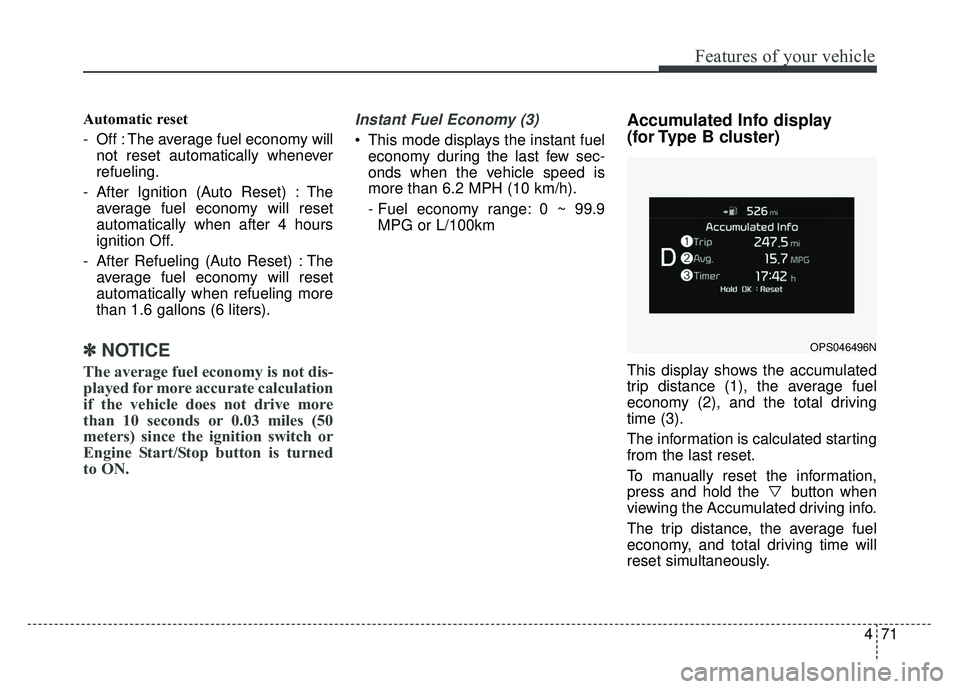
Accumulated Info display
(for Type B cluster)
This display shows the accumulated
trip distance (1), the average fuel
economy (2), and the total driving
time (3).
The information is calculated starting
from the last reset.
To manually reset the information,
press and hold the button when
viewing the Accumulated driving info.
The trip distance, the average fuel
economy, and total driving time will
reset simultaneously.
OPS046496N
Page 158 of 589
Features of your vehicle
72
4
The accumulated driving information
will continue to be counted while the
engine is still running (for example,
when the vehicle is in traffic or
stopped at a stop light.
✽ ✽
NOTICE
The vehicle must be driven for a min
imum of 0.19 miles (300 meters)
since the last ignition key cycle
before the average fuel economy will
be recalcu lated.
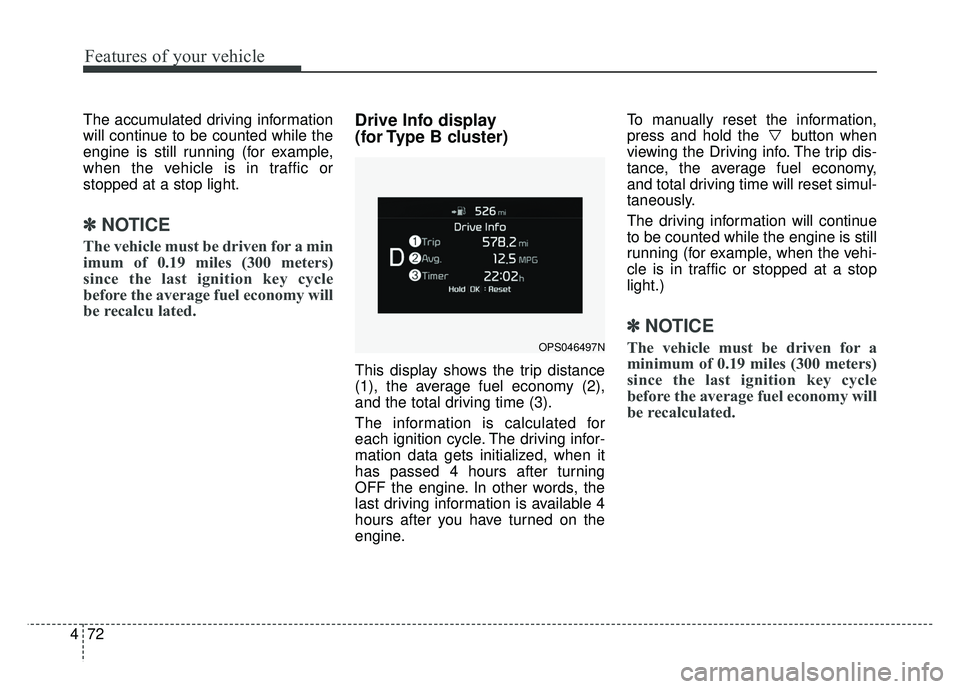
Drive Info display
(for Type B cluster)
This display shows the trip distance
(1), the average fuel economy (2),
and the total driving time (3).
The information is calculated for
each ignition cycle. The driving infor-
mation data gets initialized, when it
has passed 4 hours after turning
OFF the engine. In other words, the
last driving information is available 4
hours after you have turned on the
engine. To manually reset the information,
press and hold the button when
viewing the Driving info. The trip dis-
tance, the average fuel economy,
and total driving time will reset simul-
taneously.
The driving information will continue
to be counted while the engine is still
running (for example, when the vehi-
cle is in traffic or stopped at a stop
light.)
✽ ✽
NOTICE
The vehicle must be driven for a
minimum of 0.19 miles (300 meters)
since the last ignition key cycle
before the average fuel economy will
be recalculated.OPS046497N
Page 159 of 589
473
Features of your vehicle
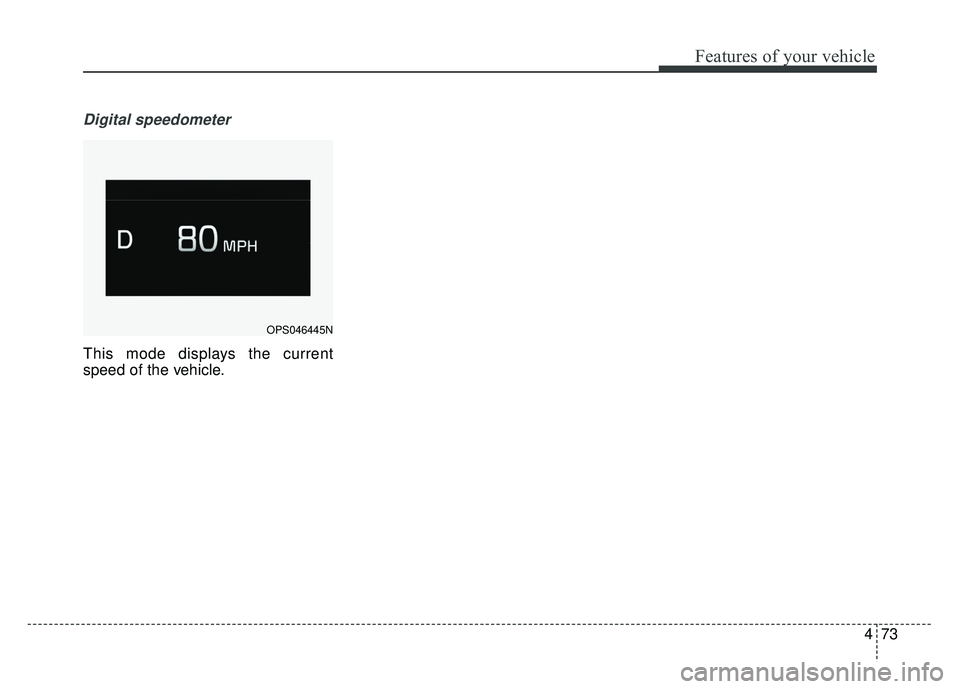
Digital speedometer
This mode displays the current
speed of the vehicle.
OPS046445N
Page 167 of 589
481
Features of your vehicle
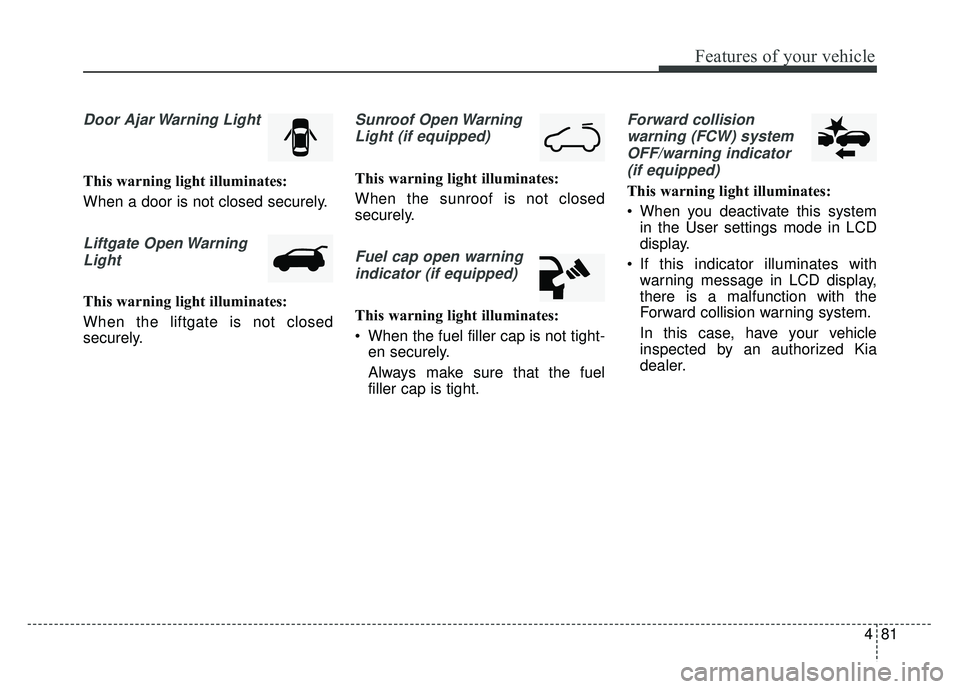
Door Ajar Warning Light
This warning light illuminates:
When a door is not closed securely.
Liftgate Open WarningLight
This warning light illuminates:
When the liftgate is not closed
securely.
Sunroof Open WarningLight (if equipped)
This warning light illuminates:
When the sunroof is not closed
securely.
Fuel cap open warningindicator (if equipped)
This warning light illuminates:
When the fuel filler cap is not tight- en securely.
Always make sure that the fuel
filler cap is tight.
Forward collision
warning (FCW) systemOFF/warning indicator (if equipped)
This warning light illuminates:
When you deactivate this system in the User settings mode in LCD
display.
If this indicator illuminates with warning message in LCD display,
there is a malfunction with the
Forward collision warning system.
In this case, have your vehicle
inspected by an authorized Kia
dealer.
Page 173 of 589
487
Features of your vehicle
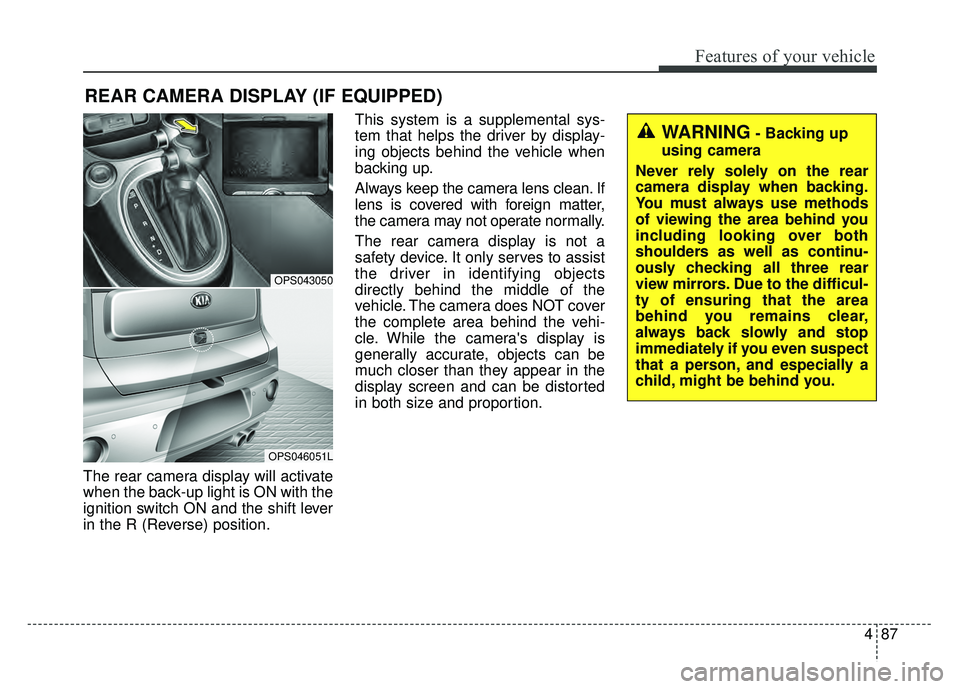
The rear camera display will activate
when the back-up light is ON with the
ignition switch ON and the shift lever
in the R (Reverse) position.This system is a supplemental sys-
tem that helps the driver by display-
ing objects behind the vehicle when
backing up.
Always keep the camera lens clean. If
lens is covered with foreign matter,
the camera may not operate normally.
The rear camera display is not a
safety device. It only serves to assist
the driver in identifying objects
directly behind the middle of the
vehicle. The camera does NOT cover
the complete area behind the vehi-
cle. While the camera's display is
generally accurate, objects can be
much closer than they appear in the
display screen and can be distorted
in both size and proportion.
REAR CAMERA DISPLAY (IF EQUIPPED)
OPS043050
OPS046051L
WARNING- Backing up
using camera
Never rely solely on the rear
camera display when backing.
You must always use methods
of viewing the area behind you
including looking over both
shoulders as well as continu-
ously checking all three rear
view mirrors. Due to the difficul-
ty of ensuring that the area
behind you remains clear,
always back slowly and stop
immediately if you even suspect
that a person, and especially a
child, might be behind you.
Page 200 of 589
Features of your vehicle
114
4
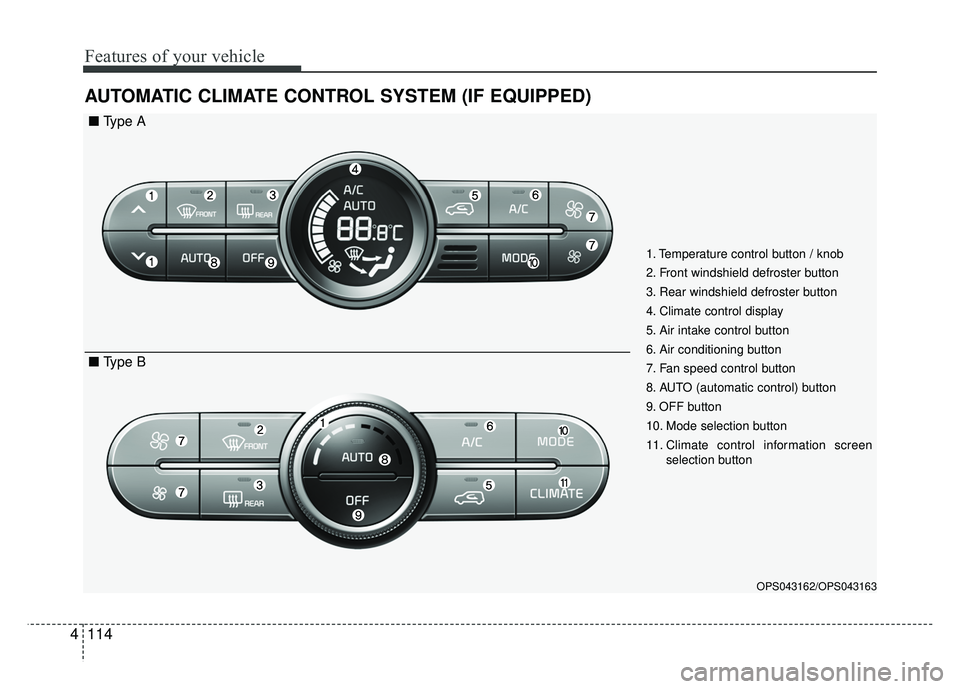
AUTOMATIC CLIMATE CONTROL SYSTEM (IF EQUIPPED)
OPS043162/OPS043163
1. Temperature control button / knob
2. Front windshield defroster button
3. Rear windshield defroster button
4. Climate control display
5. Air intake control button
6. Air conditioning button
7. Fan speed control button
8. AUTO (automatic control) button
9. OFF button
10. Mode selection button
11. Climate control information screen
selection button
■ Type A
■ Type B