2017 Hyundai Ioniq Electric lights
[x] Cancel search: lightsPage 346 of 582
5-7
Driving your vehicle
5
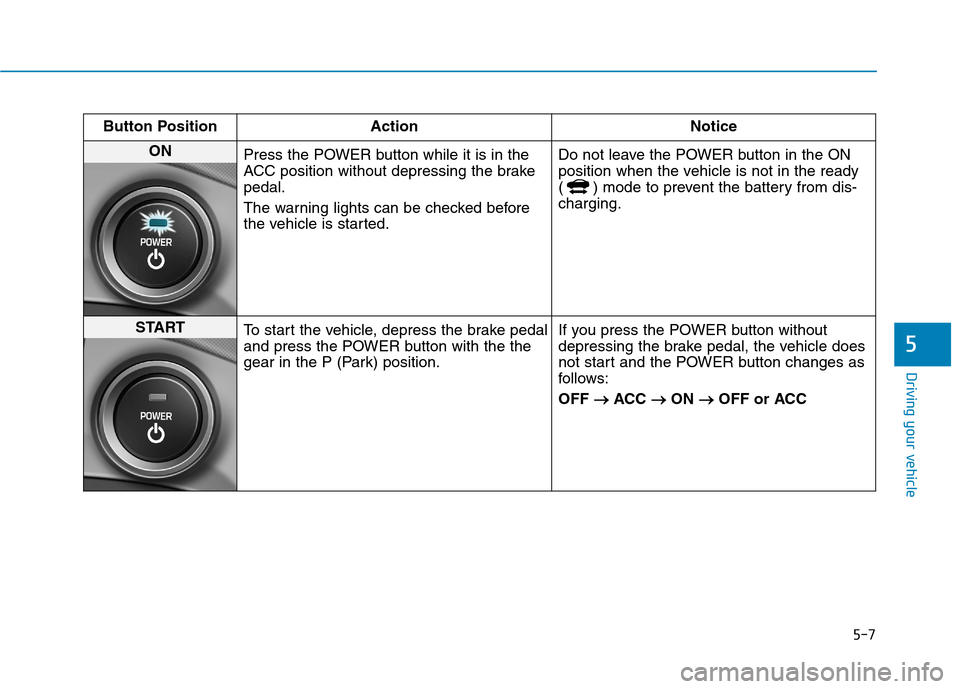
Button Position ActionNotice
ON
Press the POWER button while it is in the
ACC position without depressing the brakepedal.
The warning lights can be checked before
the vehicle is started. Do not leave the POWER button in the ON
position when the vehicle is not in the ready
( ) mode to prevent the battery from dis-charging.
START
To start the vehicle, depress the brake pedal
and press the POWER button with the the
gear in the P (Park) position. If you press the POWER button without
depressing the brake pedal, the vehicle does
not start and the POWER button changes as
follows: OFF
ACC
ON
OFF or ACC
Page 366 of 582
![Hyundai Ioniq Electric 2017 Owners Manual 5-27
Driving your vehicle
5
Cancel
To cancel the Auto Hold operation,
press the [AUTO HOLD] switch. The
AUTO HOLD indicator will turn off.
To cancel the Auto Hold operation
when the vehicle is at a](/manual-img/35/14909/w960_14909-365.png "Hyundai Ioniq Electric 2017 Owners Manual 5-27
Driving your vehicle
5
Cancel
To cancel the Auto Hold operation,
press the [AUTO HOLD] switch. The
AUTO HOLD indicator will turn off.
To cancel the Auto Hold operation
when the vehicle is at a")
5-27
Driving your vehicle
5
Cancel
To cancel the Auto Hold operation,
press the [AUTO HOLD] switch. The
AUTO HOLD indicator will turn off.
To cancel the Auto Hold operation
when the vehicle is at a standstill,
press the [AUTO HOLD] switch while
depressing the brake pedal.Information
The Auto Hold does not operate when:
- The driver's seat belt is unfastenedand driver's door is opened
- The hood is opened
- The gear is in P (Park) or R (Reverse)
- The EPB is applied
For your safety, the Auto Hold auto- matically switches to EPB in such
cases:
- The driver's seat belt is unfastenedand driver's door is opened
- The hood is opened while the gear is in D (Drive)
- The vehicle is in a standstill for more than 10 minutes
- The vehicle is standing on a steep slope
- The vehicle moved several times (Continued)(Continued)
In these cases, the parking brake
warning light comes on, the AUTO
HOLD indicator changes from green
to white, and a warning sounds and
a message will appear to inform you
that EPB has been automatically
engaged. Before driving again,
depress the brake pedal, check the
surrounding area near your vehicle
and release the parking brake man-
ually with the EPB switch.
If the AUTO HOLD indicator lights up yellow, the Auto Hold is not
working properly. We recommend
that you contact an authorized
HYUNDAI dealer.
While operating Auto Hold, you may hear mechanical noise. However, it is
normal operating noise.
i
OAEE056007
LLLLiiiigggghhhhtttt ooooffffffff
Page 371 of 582
5-32
Driving your vehicle
ESC checks where you are steering
and where the vehicle is actually
going. ESC applies braking pressure
to any one of the vehicle's brakes
and intervenes in the electric vehicle
control system to assist the driver
with keeping the vehicle on the
intended path. It is not a substitute
for safe driving practices. Always
adjust your speed and driving to the
road conditions.ESC operation
ESC ON condition
When the POWER button is in the ON position, the ESC and the ESC
OFF indicator lights illuminate for
approximately three seconds. After
both lights go off, the ESC is
enabled.
When operating
When the ESC is in opera- tion, the ESC indicator light
blinks:
conditions which may lock the
wheels, you may hear sounds from
the brakes, or feel a corresponding
sensation in the brake pedal. This is
normal and it means your ESC is
active.
cle may not respond to the acceler-ator as it does under routine condi-
tions.
when the ESC activates, the Cruise
Control automatically disengages.
The Cruise Control can be reen-
gaged when the road conditions
allow. See "Cruise Control System"
later in this chapter. (if equipped)
Never drive too fast for the road
conditions or too quickly when
cornering. The ESC system will
not prevent accidents. Excessive speed in turns,
abrupt maneuvers, and
hydroplaning on wet surfaces
can result in severe accidents.
WARNING
Page 372 of 582
5-33
Driving your vehicle
5
ESC OFF condition
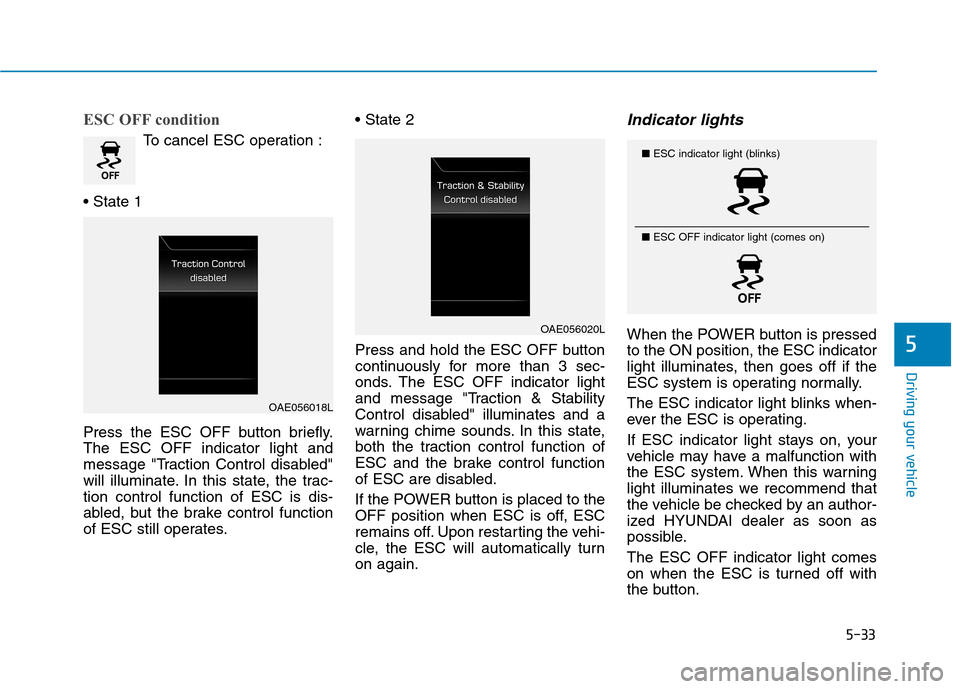
To cancel ESC operation :
Press the ESC OFF button briefly. The ESC OFF indicator light and
message "Traction Control disabled"
will illuminate. In this state, the trac-tion control function of ESC is dis-
abled, but the brake control function
of ESC still operates.
Press and hold the ESC OFF button
continuously for more than 3 sec-
onds. The ESC OFF indicator light
and message "Traction & Stability
Control disabled" illuminates and a
warning chime sounds. In this state,
both the traction control function of
ESC and the brake control function
of ESC are disabled.
If the POWER button is placed to the
OFF position when ESC is off, ESC
remains off. Upon restarting the vehi-
cle, the ESC will automatically turnon again.
Indicator lights
When the POWER button is pressedto the ON position, the ESC indicator
light illuminates, then goes off if the
ESC system is operating normally.
The ESC indicator light blinks when-
ever the ESC is operating.
If ESC indicator light stays on, your
vehicle may have a malfunction with
the ESC system. When this warning
light illuminates we recommend that
the vehicle be checked by an author-
ized HYUNDAI dealer as soon as
possible. The ESC OFF indicator light comes
on when the ESC is turned off with
the button.
OAE056018L
OAE056020L
■
ESC indicator light (blinks)
■ ESC OFF indicator light (comes on)
Page 373 of 582
5-34
Driving your vehicle
Driving with wheels and tires with
different sizes may cause the ESC
system to malfunction. Before
replacing tires, make sure all fourtires and wheels are the same
size. Never drive the vehicle with
different sized wheels and tiresinstalled.
ESC OFF usage
When Driving
The ESC OFF mode should only be
used briefly to help free the vehicle if
stuck in snow or mud by temporarily
stopping operation of the ESC to
maintain wheel torque.
To turn ESC off while driving, press
the ESC OFF button while driving on
a flat road surface. Do not allow wheel(s) of one
axle to spin excessively while
the ESC, ABS, and parking brake
warning lights are displayed.
The repairs would not be cov-
ered by the vehicle warranty.
Reduce vehicle power and do
not spin the wheel(s) excessive-
ly while these lights are dis-
played.
When operating the vehicle on a dynamometer, make sure theESC is turned off (ESC OFF lightilluminated).
Information
Turning the ESC off does not affect
ABS or standard brake system opera-
tion.
i
NOTICE
NOTICE
When the ESC is blinking, this indicates the ESC is active:
Drive slowly and NEVER attempt
to accelerate. NEVER turn theESC off while the ESC indicator
light is blinking or you may lose
control of the vehicle resulting inan accident.
WARNING
Page 395 of 582
5-56
Driving your vehicle
Limitations of the system
The Autonomous Emergency Braking (AEB) system is designed to monitor
the vehicle ahead or a pedestrian in
the roadway through radar signals
and camera recognition to warn the
driver that a collision is imminent, and
if necessary, apply emergency brak-ing.
In certain situations, the radar sen-
sor or the camera may not be able to
detect the vehicle or pedestrian
ahead. In these cases, the AEB sys-
tem may not operate normally. The
driver must pay careful attention in
the following situations where the
AEB operation may be limited.
Detecting vehicles
The sensor may be limited when:
The radar sensor or camera isblocked with a foreign object or
debris
Inclement weather such as heavy rain or snow obscures the field of
view of the radar sensor or camera
There is interference by electro- magnetic waves
There is severe irregular reflection from the radar sensor
The radar/camera sensor recogni- tion is limited
The vehicle in front is too small to be detected by the camera recog-
nition system (for example a motor-
cycle or a bicycle, etc.)
The vehicle in front is an oversize vehicle or trailer that is too big to
be detected by the camera recog-
nition system (for example a tractor
trailer, etc.)
The driver's field of view is not well illuminated (either too dark or too
much reflection or too much back-
light that obscures the field of view) The vehicle in front does not have
their rear lights properly turned ON
The outside brightness changes suddenly, for example when enter-
ing or exiting a tunnel
The vehicle in front is driving errat- ically
The vehicle is on unpaved or uneven rough surfaces, or roads
with sudden gradient changes
The vehicle is moving under ground level or inside a building
The vehicle is driven near areas containing metal substances such
as a construction zone, railroad,etc.
Page 433 of 582
5-94
Driving your vehicle
Information
The ESC system (if equipped) must be
turned OFF before rocking the vehi-
cle.
If you are still stuck after rocking
the vehicle a few times, have the
vehicle pulled out by a tow vehicle
to avoid vehicle overheating, pos-
sible damage to the reduction
gear and tire damage. See
"Towing" in chapter 6.Smooth cornering
Avoid braking or gear changing in
corners, especially when roads are
wet. Ideally, corners should always
be taken under gentle acceleration.
Driving at night
Night driving presents more hazards
than driving in the daylight. Here are
some important tips to remember:
Slow down and keep more dis- tance between you and other vehi-
cles, as it may be more difficult tosee at night, especially in areas
where there may not be any street
lights.
Adjust your mirrors to reduce the glare from other driver's head-
lamps.
Keep your headlamps clean and properly aimed. Dirty or improperly
aimed headlamps will make it
much more difficult to see at night.
Avoid staring directly at the head- lamps of oncoming vehicles. You
could be temporarily blinded, and it
will take several seconds for your
eyes to readjust to the darkness.
Driving in the rain
Rain and wet roads can make driving
dangerous. Here are a few things to
consider when driving in the rain or
on slick pavement:
Slow down and allow extra follow-ing distance. A heavy rainfall
makes it harder to see and increas-es the distance needed to stop
your vehicle.
Turn OFF your Cruise Control. (if equipped)
Replace your windshield wiper blades when they show signs ofstreaking or missing areas on thewindshield.
Be sure your tires have enough tread. If your tires do not have
enough tread, making a quick stop
on wet pavement can cause a skid
and possibly lead to an accident.
See "Tire Tread" in chapter 7 .
Turn on your headlamps to make it easier for others to see you.
Driving too fast through large pud- dles can affect your brakes. If you
must go through puddles, try to
drive through them slowly.
NOTICE
i
Page 443 of 582
6-2
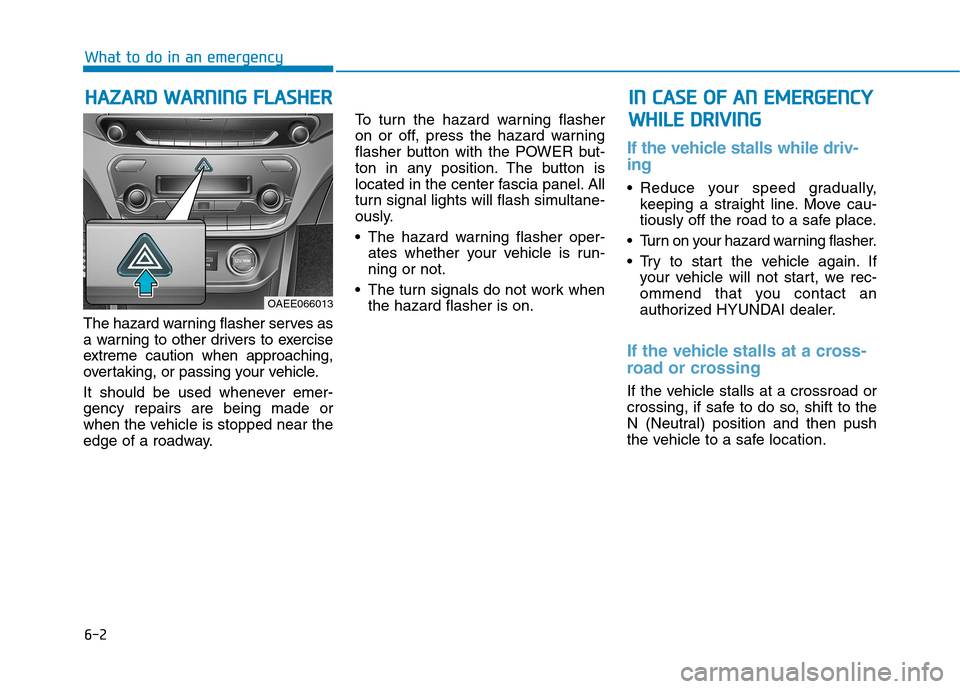
The hazard warning flasher serves as
a warning to other drivers to exercise
extreme caution when approaching,
overtaking, or passing your vehicle.
It should be used whenever emer- gency repairs are being made or
when the vehicle is stopped near the
edge of a roadway. To turn the hazard warning flasher
on or off, press the hazard warning
flasher button with the POWER but-
ton in any position. The button is
located in the center fascia panel. All
turn signal lights will flash simultane-
ously.
• The hazard warning flasher oper-
ates whether your vehicle is run- ning or not.
The turn signals do not work when the hazard flasher is on.
If the vehicle stalls while driv- ing
Reduce your speed gradually,keeping a straight line. Move cau-
tiously off the road to a safe place.
Turn on your hazard warning flasher.
Try to start the vehicle again. If your vehicle will not start, we rec-
ommend that you contact an
authorized HYUNDAI dealer.
If the vehicle stalls at a cross-
road or crossing
If the vehicle stalls at a crossroad or
crossing, if safe to do so, shift to the
N (Neutral) position and then push
the vehicle to a safe location.
HH AAZZAA RRDD WW AARRNN IINN GG FF LLAA SSHH EERR
What to do in an emergency
IINN CC AA SSEE OO FF AA NN EE MM EERR GG EENN CCYY
W
W HHIILL EE DD RRIIVV IINN GG
OAEE066013