Page 226 of 582
3-57
Convenient features of your vehicle
3
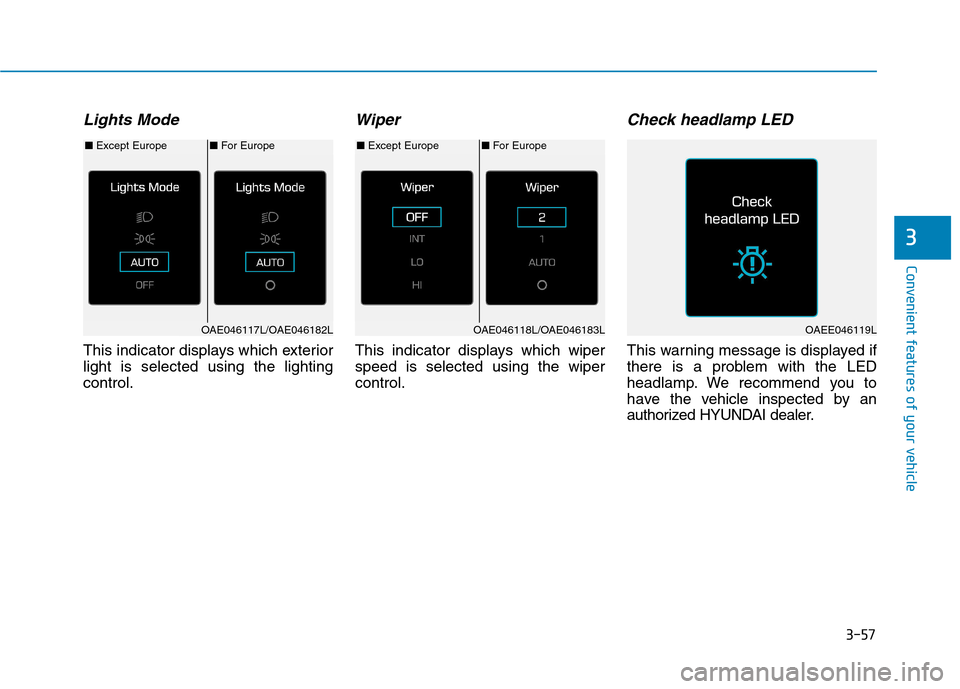
Lights Mode
This indicator displays which exterior light is selected using the lightingcontrol.
Wiper
This indicator displays which wiperspeed is selected using the wipercontrol.
Check headlamp LED
This warning message is displayed if
there is a problem with the LED
headlamp. We recommend you to
have the vehicle inspected by an
authorized HYUNDAI dealer.
■For Europe
■ Except Europe■For Europe
■ Except Europe
OAE046117L/OAE046182LOAE046118L/OAE046183LOAEE046119L
Page 238 of 582
3-69
Convenient features of your vehicle
3
Warning mode
If one of followings occurs, warning
messages will be displayed in the
information mode for several seconds.
- Lower washer fluid ((if equipped)
- Blind Spot Detection (BSD) mal-function (if equipped)
- Autonomous Emergency Braking (AEB) malfunction
- Advanced smart cruise control malfunction
- Tire Pressure Monitoring System (TPMS) malfunction (if equipped)
User settings mode
In this mode, you can change the
setting of the instrument cluster,
doors, lamps, etc.
1. Driving Assist
2. Door
3. Lights
4. Sound
5. Convenience
6. Service Interval
7. Other Features
8. Reset
The information provided differs
according to the items applied to your
vehicle. 1. Driving Assist
- Lane Departure Warning/Standard
LKA/Active LKA
To adjust the sensitivity of the Lane
Keeping Assist System.
For more information, refer to the
"Lane Keeping Assist System" in
chapter 5.
- Slow/Normal/Fast To adjust the sensitivity of the
Smart Cruise Control system.
For more information, refer to the
"Smart Cruise Control" in chapter5.
To activate or deactivate the Autonomous
Emergency Braking (AEB).
For more information, refer to
"Autonomous Emergency Braking
(AEB)" in chapter 5.
Page 240 of 582
3-71
Convenient features of your vehicle
3
3. Lights
- Off: The one touch turn signal func-tion will be deactivated.
- 3, 5, 7 Flashes: The turn signal indi- cator will blink 3, 5, or 7 times when
the turn signal lever is moved slightly.
For more information, refer to
"Light" in this chapter.
To activate or deactivate the head-
lamp delay function.
For more information, refer to
"Light" in this chapter 4. Sound
- Softer/Louder
To adjust the Park Assist System
volume.
5. Convenience
- Off: The seat easy access function is deactivated.
- Normal/Extended: When you turn off the vehicle, the driver's seat will
automatically move rearward short
(Normal) or long (Extended) for you
to enter or exit the vehicle more
comfortably.
For more information, refer to
"Driver Position Memory System"
in this chapter.
To activate or deactivate the wireless charging system in the front seat.
For more information, refer to
"Wireless Charging System" in
this chapter.
To activate or deactivate the Wiper/
Light mode.
When activated, the LCD display
shows the selected Wiper/Light
mode whenever you change the
mode.
To activate or deactivate the gear
position pop-up.
When activated, the gear position
will be displayed on the LCD display.
6. Service Interval
To activate or deactivate the service
interval function.
If the service interval menu is acti-
vated, you may adjust the time and
distance.
Information
To use the service interval menu, con-
sult an authorized HYUNDAI dealer.
i
Page 246 of 582
3-77
Convenient features of your vehicle
3
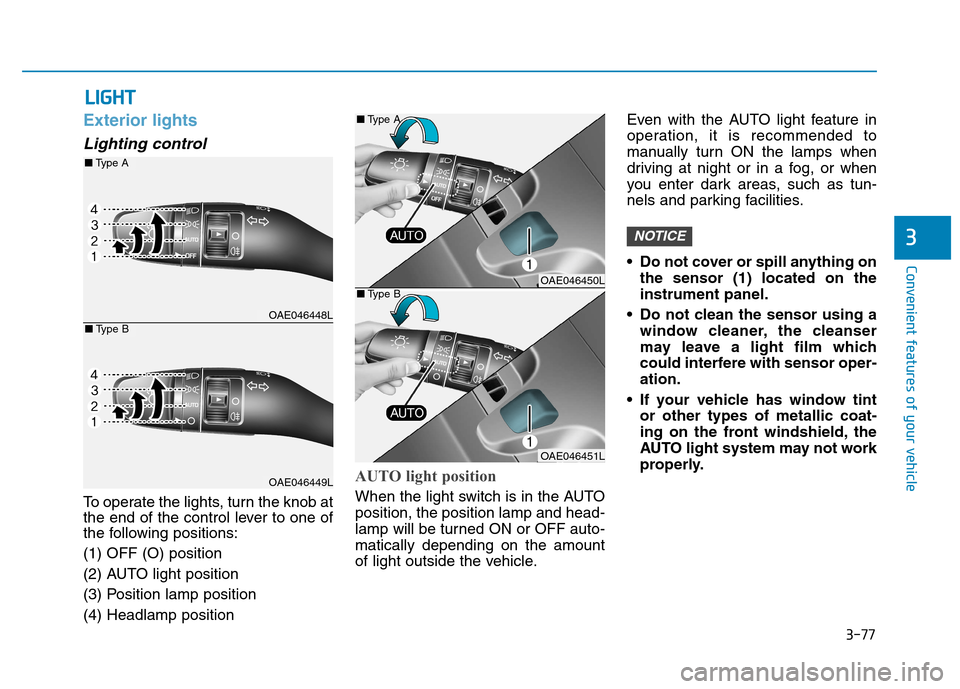
Exterior lights
Lighting control
To operate the lights, turn the knob at
the end of the control lever to one of
the following positions: (1) OFF (O) position
(2) AUTO light position
(3) Position lamp position(4) Headlamp position
AUTO light position
When the light switch is in the AUTO position, the position lamp and head-
lamp will be turned ON or OFF auto-matically depending on the amount
of light outside the vehicle.Even with the AUTO light feature in
operation, it is recommended to
manually turn ON the lamps when
driving at night or in a fog, or when
you enter dark areas, such as tun-
nels and parking facilities.
• Do not cover or spill anything on
the sensor (1) located on the instrument panel.
Do not clean the sensor using a window cleaner, the cleanser
may leave a light film which
could interfere with sensor oper-ation.
If your vehicle has window tint or other types of metallic coat-
ing on the front windshield, the
AUTO light system may not work
properly.
NOTICE
LLIIGG HH TT
OAE046448L
OAE046449L
■Type A
■Type B
OAE046450L
OAE046451L
■
Type A
■ Type B
Page 250 of 582
3-81
Convenient features of your vehicle
3
Battery saver function
The purpose of this feature is to pre-
vent the battery from being dis-
charged. The system automatically
turns off the position lamp when the
driver turns the vehicle off and opens
the driver-side door.
With this feature , the position lamps
will turn off automatically if the driver
parks on the side of road at night.
If necessary, to keep the lamps on
when the vehicle is turned off, perform
the following:
1) Open the driver-side door.
2) Turn the position lamps OFF and
ON again using the light switch on
the steering column.
Headlamp delay function
(if equipped)
If you place the POWER button to
the ACC or OFF position with theheadlamps ON, the headlamps(and/or position lamps) remain on for
about 5 minutes. However, with the
vehicle off if the driver’s door isopened and closed, the headlamps(and/or position lam ps) are turned off
after 15 seconds. The headlamps (and/or position
lamps) can be turned off by pressing
the lock button on the smart key
twice or turning the light switch to the
OFF or AUTO position. However, if
you turn the light switch to the AUTO
position when it is dark outside, the
headlamps will not be turned off.
You can activate or deactivate the
Headlamp Delay function from theUser Settings Mode on the LCD dis-
play. For more details, refer to
"LCD Display" in this chapter. If the driver gets out of the vehicle
through other doors (except dri-
ver's door), the battery saver func-tion does not operate and the
headlamp delay function does not
turn off automatically. Therefore, It
causes the battery to be dis-
charged. In this case, make sure to
turn off the lamp before getting out
of the vehicle.
Daytime running light (DRL)
The Daytime Running Lights (DRL)
can make it easier for others to see
the front of your vehicle during the
day, especially after dawn and beforesunset.
The DRL system will turn the dedi- cated lamp OFF when:
1. The headlights are in the ON posi-
tion.
2. The vehicle is turned off.
NOTICE
Page 251 of 582
3-82
Convenient features of your vehicle
Headlight leveling device
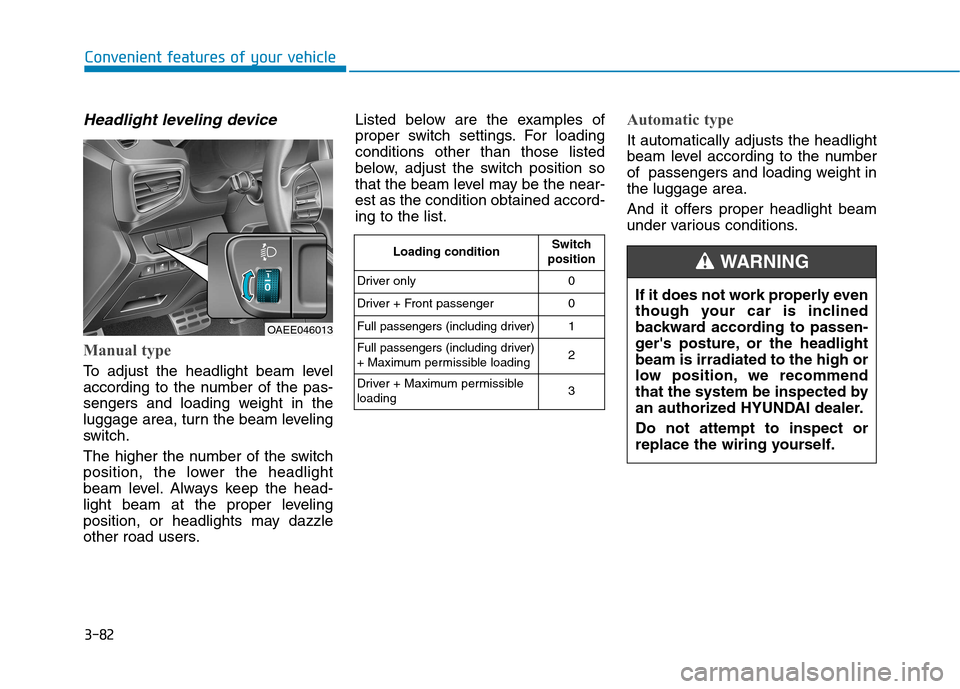
Manual type
To adjust the headlight beam level
according to the number of the pas-
sengers and loading weight in the
luggage area, turn the beam leveling
switch.
The higher the number of the switch
position, the lower the headlight
beam level. Always keep the head-
light beam at the proper leveling
position, or headlights may dazzle
other road users.Listed below are the examples of
proper switch settings. For loadingconditions other than those listed
below, adjust the switch position so
that the beam level may be the near-est as the condition obtained accord-ing to the list.
Automatic type
It automatically adjusts the headlight
beam level according to the number
of passengers and loading weight inthe luggage area.
And it offers proper headlight beam
under various conditions.
OAEE046013
Loading condition
Switch
position
Driver only 0
Driver + Front passenger 0
Full passengers (including driver) 1
Full passengers (including driver)
+ Maximum permissible loading 2
Driver + Maximum permissibleloading 3
If it does not work properly even
though your car is inclined
backward according to passen-
ger's posture, or the headlightbeam is irradiated to the high or
low position, we recommend
that the system be inspected by
an authorized HYUNDAI dealer. Do not attempt to inspect or
replace the wiring yourself.
WARNING
Page 253 of 582
3-84
Convenient features of your vehicle
Interior lights
Do not use the interior lights for
extended periods when the vehi-
cle is turned off or the battery will
discharge.
Interior lamp AUTO cut
The interior lamps will automatically
go off approximately 20 minutes after
the vehicle is turned off and the
doors closed. If a door is opened, the
lamp will go off 40 minutes after the
vehicle is turned off. If the doors are
locked by the smart key and the vehi-
cle enters the armed stage of the
theft alarm system, the lamps will go
off five seconds later.
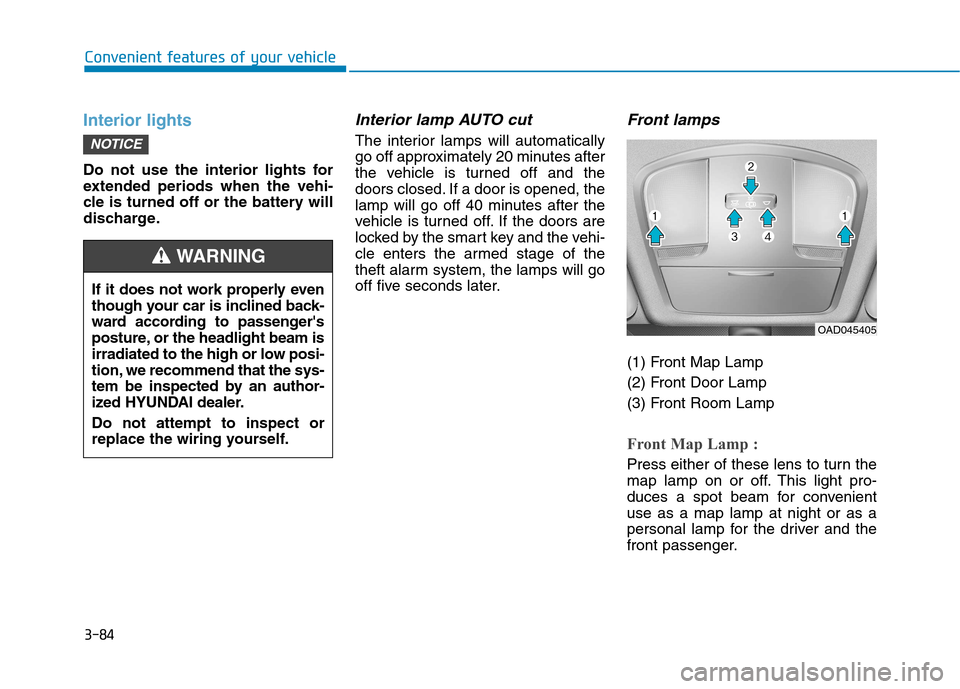
Front lamps
(1) Front Map Lamp
(2) Front Door Lamp
(3) Front Room Lamp
Front Map Lamp :
Press either of these lens to turn the
map lamp on or off. This light pro-
duces a spot beam for convenientuse as a map lamp at night or as a
personal lamp for the driver and the
front passenger.
NOTICE
If it does not work properly even
though your car is inclined back-
ward according to passenger's
posture, or the headlight beam is
irradiated to the high or low posi-
tion, we recommend that the sys-
tem be inspected by an author-
ized HYUNDAI dealer. Do not attempt to inspect or
replace the wiring yourself.
WARNING
OAD045405
Page 342 of 582
5-3
Driving your vehicle
5
Before entering the vehicle
• Be sure all windows, outside mir-ror(s), and outside lights are clean
and unobstructed.
Remove frost, snow, or ice.
Visually check the tires for uneven wear and damage.
Check under the vehicle for any sign of leaks.
Be sure there are no obstacles behind you if you intend to back up.
Before starting
Make sure the hood, the tailgate,and the doors are securely closed
and locked.
Adjust the position of the seat and steering wheel.
Adjust the inside and outside rearview mirrors.
Verify all the lights work.
Fasten your seatbelt. Check that all passengers have fastened their
seatbelts.
Check the gauges and indicators in the instrument panel and the mes-
sages on the instrument display
when the POWER button is in theON position.
Check that any items you are car- rying are stored properly or fas-
tened down securely.
BBEEFFOO RREE DD RRIIVV IINN GG
To reduce the risk of SERIOUS
INJURY or DEATH, take the fol-
lowing precautions:
•ALWAYS wear your seat belt.
All passengers must be prop-
erly belted whenever the vehi-
cle is moving. For more infor-
mation, refer to "Seat Belts" in
chapter 2.
Always drive defensively.
Assume other drivers or pedes-
trians may be careless andmake mistakes.
Stay focused on the task of
driving. Driver distraction cancause accidents.
Leave plenty of space between
you and the vehicle in front of
you.
WARNING