Page 156 of 565
155
uuOperating the Switches Around the Steering Wheel uDriving Position Memory System*
Continued
Controls
Driving Position Memory System*
You can store two driver’s seat and outside mirrors position with the driving position
memory system.
When you unlock and open the driver’s door with a remote, the seat and outside
mirrors adjust automatically to on e of the two preset positions.
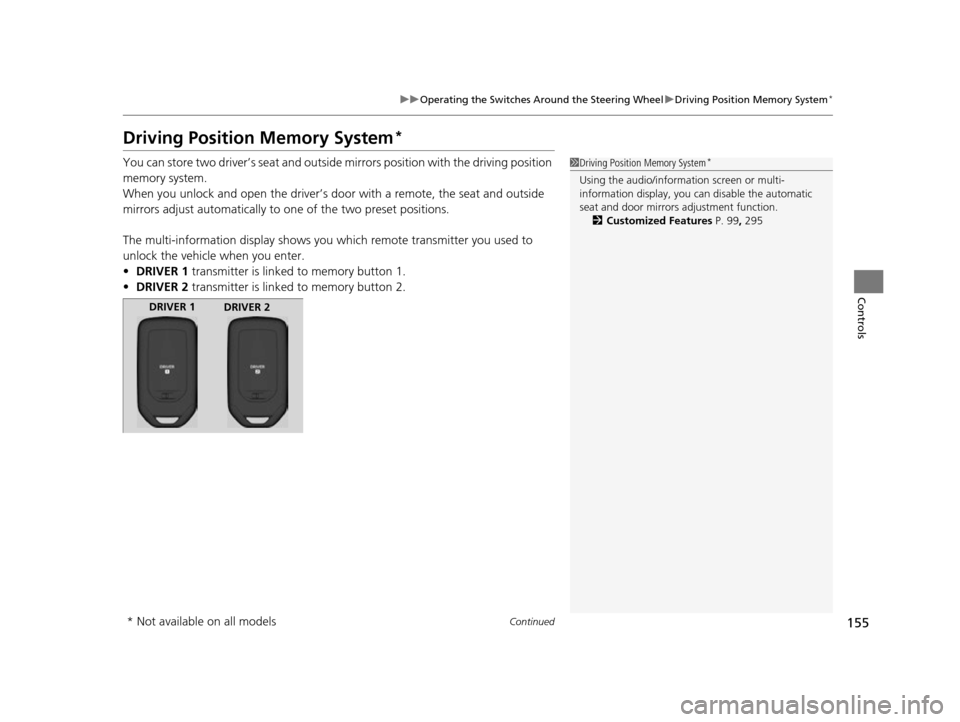
The multi-information display shows you which remote transmitter you used to
unlock the vehicle when you enter.
• DRIVER 1 transmitter is linked to memory button 1.
• DRIVER 2 transmitter is linked to memory button 2.1Driving Position Memory System*
Using the audio/information screen or multi-
information display, you can disable the automatic
seat and door mirrors adjustment function. 2 Customized Features P. 99, 295
DRIVER 1
DRIVER 2
* Not available on all models
17 US ODYSSEY (KA KC)-31TK86600.book 155 ページ 2016年10月24日 月曜日 午後4時2分
Page 157 of 565

uuOperating the Switches Around the Steering Wheel uDriving Position Memory System*
156
Controls
1. Adjust the driver’s seat and the door mirrors
to the desired positi on, and set the power
mode to ON.
2. Press the SET button.
u You will hear the beeper, and the
memory button indicator light will blink.
3. Press and hold memory button
(1 or (2
within five seconds of pressing the SET
button.
u Once the seat and the outside mirrors
position has been memorized, the
indicator light on the button you pressed
stays on.
1. Move the shift lever to
(P.
2. Apply the parking brake.
3. Press a memory button (
(1 or (2).
u You will hear the beeper, and the
indicator light will blink.
The seat and the door mirrors will
automatically move to the memorized
position. When it has finished moving, you
will hear the beeper, and the indicator light
stays on.
■Storing a Position in Memory1 Storing a Position in Memory
After you press the SET button, the storing operation
will be canceled when:
•You do not press the memory button within five
seconds.
•You readjust the seat position before the double-
beep.
•You readjust the door mirrors.
•You set the power mode to any position except
ON.
Memory
Button 1
Memory
Button 2
SET Button
■Recalling the Stored Position1Recalling the Stored Position
The seat and the door mirror s will stop moving if you:
•Press the SET button, or a memory button ((1 or (2).
•Adjust the seat position.
•Adjust the door mirrors.•Shift into any position except ( P.
Memory
Button 1
Memory
Button 2
SET Button
17 US ODYSSEY (KA KC)-31TK86600.book 156 ページ 2016年10月24日 月曜日 午後4時2分
Page 158 of 565
157
uuOperating the Switches Around the Steering Wheel uAdjusting the Steering Wheel
Controls
Adjusting the Steering Wheel
The steering wheel height and distance from your body can be adjusted so that you
can comfortably grip the steering wheel in an appropriate driving posture.
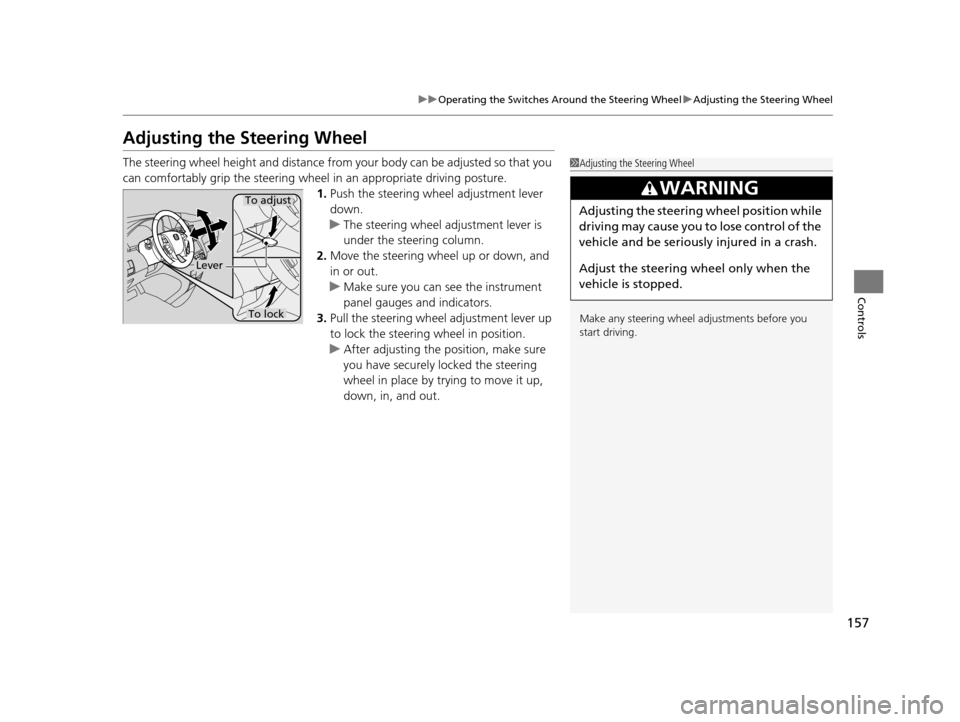
1. Push the steering wheel adjustment lever
down.
u The steering wheel adjustment lever is
under the steering column.
2. Move the steering wheel up or down, and
in or out.
u Make sure you can see the instrument
panel gauges and indicators.
3. Pull the steering wheel adjustment lever up
to lock the steering wheel in position.
u After adjusting the position, make sure
you have securely locked the steering
wheel in place by trying to move it up,
down, in, and out.1Adjusting the Steering Wheel
Make any steering wheel adjustments before you
start driving.
3WARNING
Adjusting the steering wheel position while
driving may cause you to lose control of the
vehicle and be seriously injured in a crash.
Adjust the steering wh eel only when the
vehicle is stopped.To adjust
To lock
Lever
17 US ODYSSEY (KA KC)-31TK86600.book 157 ページ 2016年10月24日 月曜日 午後4時2分
Page 159 of 565

158
Controls
Adjusting the Mirrors
Interior Rearview Mirror
Adjust the angle of the rearview mirror when you are sitting in the correct driving
position.
Flip the tab to switch the position.
The night position will help to reduce the glare
from headlights behind you when driving
after dark.
When driving after dark, the automatic
dimming rearview mirror reduces the glare
from headlights behind you, based in inputs
from the mirror sensor. This feature is always
active.
■Rearview Mirror with Day and Night Positions*
1Adjusting the Mirrors
Keep the inside and out side mirrors clean and
adjusted for best visibility.
Adjust the mirrors befo re you start driving.
2 Adjusting the Seat Positions P. 161
Tab
Daytime
Position
Night PositionUp
Down
■Automatic Dimming Rearview Mirror*1 Automatic Dimming Rearview Mirror*
The auto dimming function cancels when the shift
position is in
(R.
Sensor
* Not available on all models
17 US ODYSSEY (KA KC)-31TK86600.book 158 ページ 2016年10月24日 月曜日 午後4時2分
Page 160 of 565
159
uuAdjusting the Mirrors uPower Door Mirrors
Continued
Controls
Power Door Mirrors
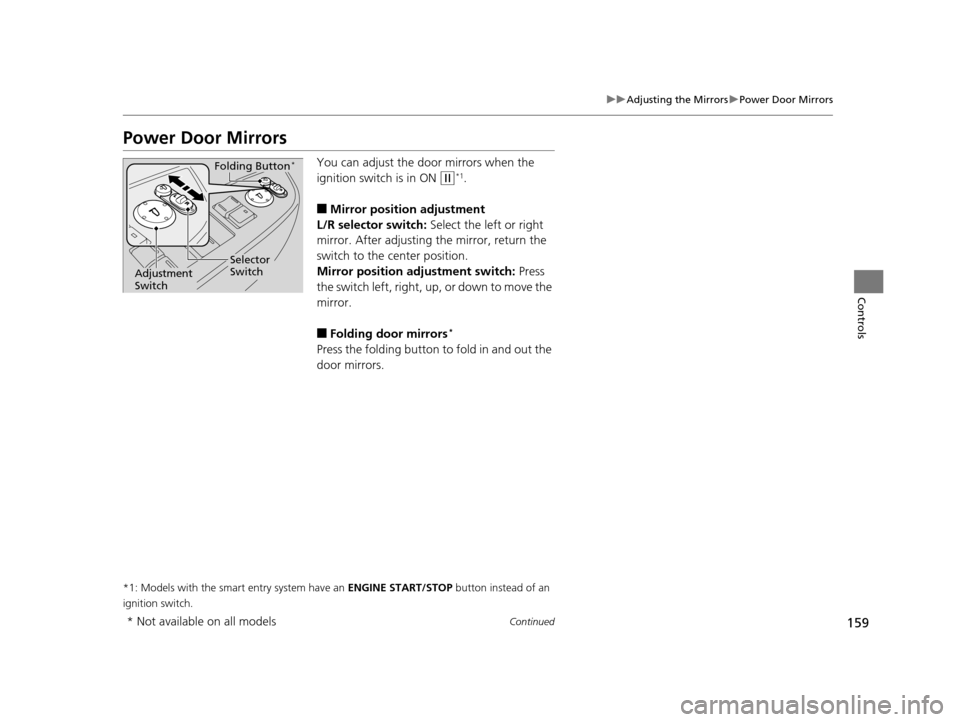
You can adjust the door mirrors when the
ignition switch is in ON
(w*1.
■Mirror position adjustment
L/R selector switch: Select the left or right
mirror. After adjusting the mirror, return the
switch to the center position.
Mirror positi on adjustment switch: Press
the switch left, right, up , or down to move the
mirror.
■Folding door mirrors*
Press the folding button to fold in and out the
door mirrors.
*1: Models with the smart entry system have an ENGINE START/STOP button instead of an
ignition switch.
Selector
Switch
Adjustment
Switch
Folding Button*
* Not available on all models
17 US ODYSSEY (KA KC)-31TK86600.book 159 ページ 2016年10月24日 月曜日 午後4時2分
Page 161 of 565

uuAdjusting the Mirrors uPower Door Mirrors
160
Controls
If activated, either side door mirror
automatically tilts do wnward when you put
the shift lever in
(R; this improves close-in
visibility on the selected side of the vehicle
when backing up. The mirror automatically
returns to its original position when you shift
out of
(R.
To activate this feature, set the power mode
to ON and slide the selector switch to the left
or right side.
The driver side door mirror has outer and inner
segments.
The outer segment is slig htly curved to provide
a wider angle view than a standard flat mirror.
This wider view may help you check areas that
are not visible using a standard door mirror.
■Reverse Tilt Door Mirror*
Slide the selector switch to left or
right to tilt down either side
door mirror.
■Expanded View Driver's Mirror1 Expanded View Driver's Mirror
Objects visible in the outer segment of the driver side
door mirror appear smaller than objects in the rest of
the mirror. But in fact, they are closer than they
appear.
Do not rely on your mirrors. Always look to the side
and behind your vehicle before changing lanes.
Inner Segment
Outer Segment
* Not available on all models
17 US ODYSSEY (KA KC)-31TK86600.book 160 ページ 2016年10月24日 月曜日
午後4時2分
Page 177 of 565
176
Controls
Interior Lights/Interior Convenience Items
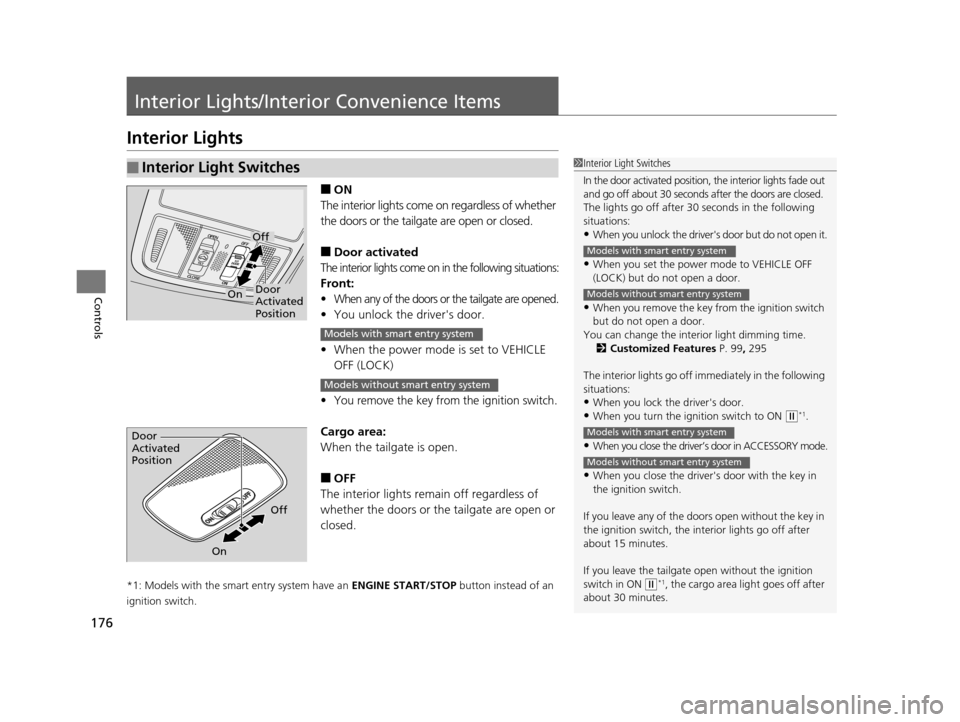
Interior Lights
■ON
The interior lights come on regardless of whether
the doors or the tailgat e are open or closed.
■Door activated
The interior lights come on in the following situations:
Front:
•When any of the doors or the tailgate are opened.
•You unlock the driver's door.
• When the power mode is set to VEHICLE
OFF (LOCK)
•You remove the key from the ignition switch.
Cargo area:
When the tailg ate is open.
■OFF
The interior lights remain off regardless of
whether the doors or the tailgate are open or
closed.
*1: Models with the smart entry system have an ENGINE START/STOP button instead of an
ignition switch.
■Interior Light Switches1 Interior Light Switches
In the door activated position, the interior lights fade out
and go off about 30 seconds after the doors are closed.
The lights go off after 30 seconds in the following
situations:
•When you unlock the driver's door but do not open it.
•When you set the power mode to VEHICLE OFF
(LOCK) but do not open a door.
•When you remove the key from the ignition switch
but do not open a door.
You can change the inte rior light dimming time.
2 Customized Features P. 99, 295
The interior lights go off i mmediately in the following
situations:
•When you lock the driver's door.
•When you turn the ignition switch to ON ( w*1.
•When you close the driver’s door in ACCESSORY mode.
•When you close the driver's door with the key in
the ignition switch.
If you leave any of the doors open without the key in
the ignition switch, the interior lights go off after
about 15 minutes.
If you leave the tailgate open without the ignition
switch in ON
( w*1, the cargo area light goes off after
about 30 minutes.
Models with smart entry system
Models without smart entry system
Models with smart entry system
Models without smart entry system
Door
Activated
Position
Off
On
Models with smart entry system
Models without smart entry system
Door
Activated
Position
Off
On
17 US ODYSSEY (KA KC)-31TK86600.book 176 ページ 2016年10月24日 月曜日 午後4時2分
Page 178 of 565
177
uuInterior Lights/Interior Convenience Items uInterior Lights
Controls
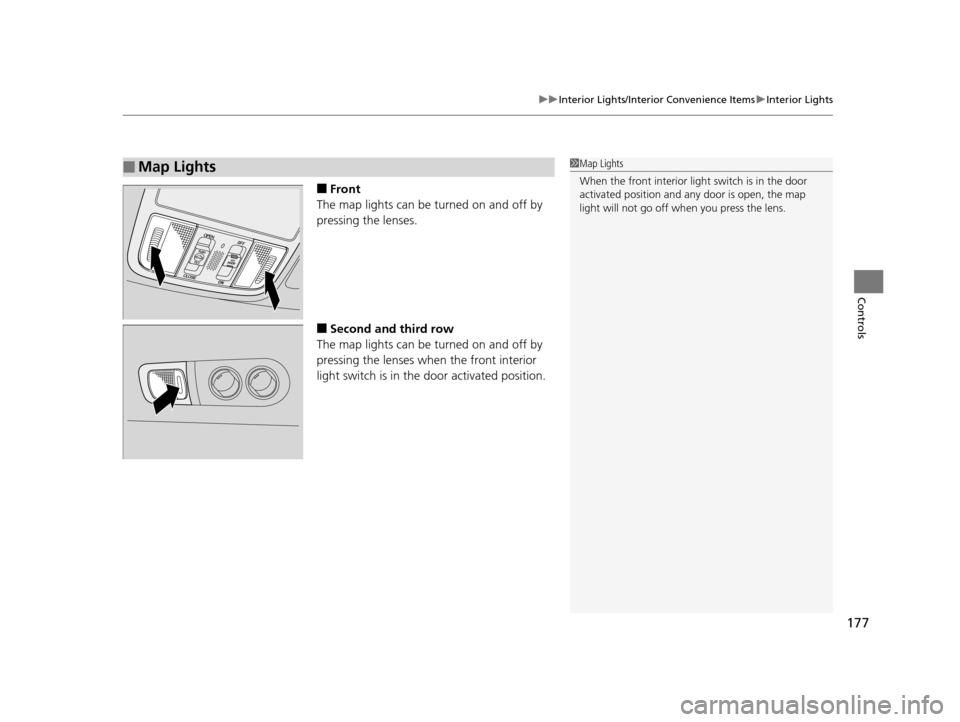
■Front
The map lights can be turned on and off by
pressing the lenses.
■Second and third row
The map lights can be turned on and off by
pressing the lenses when the front interior
light switch is in the door activated position.
■Map Lights1 Map Lights
When the front interior li ght switch is in the door
activated position and any door is open, the map
light will not go off when you press the lens.
17 US ODYSSEY (KA KC)-31TK86600.book 177 ページ 2016年10月24日 月曜日 午後4時2分