Page 278 of 565
Continued277
uuRear Entertainment System*uOperating the System
Features
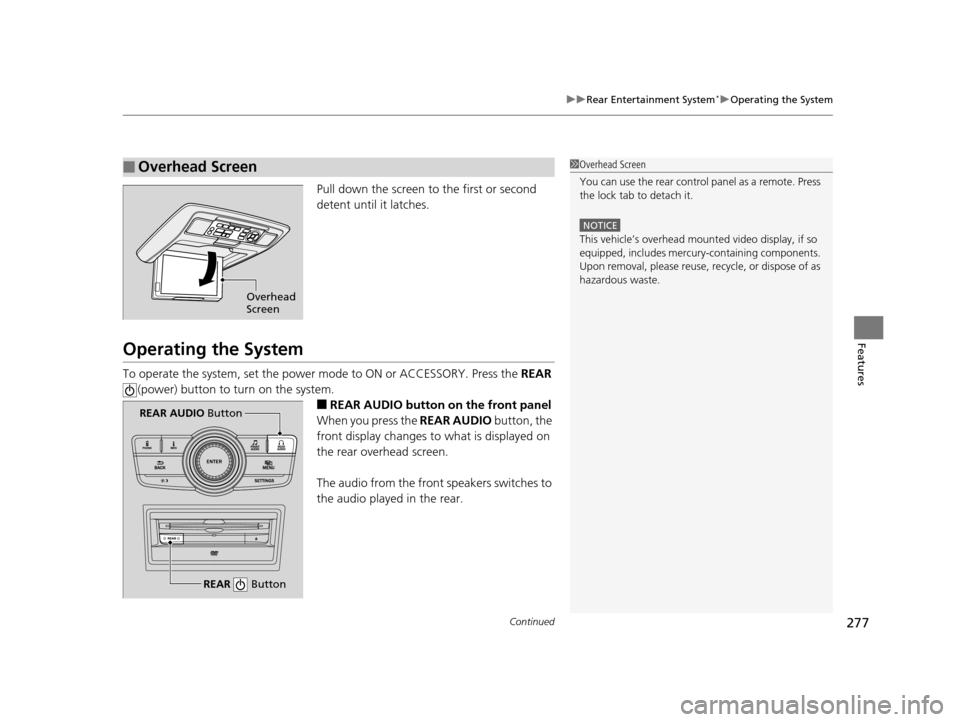
Pull down the screen to the first or second
detent until it latches.
Operating the System
To operate the system, set the power mode to ON or ACCESSORY. Press the REAR
(power) button to turn on the system.
■REAR AUDIO button on the front panel
When you press the REAR AUDIO button, the
front display changes to what is displayed on
the rear overhead screen.
The audio from the front speakers switches to
the audio played in the rear.
■Overhead Screen1 Overhead Screen
You can use the rear control panel as a remote. Press
the lock tab to detach it.
NOTICE
This vehicle’s overhead mount ed video display, if so
equipped, includes mercur y-containing components.
Upon removal, please reuse, recycle, or dispose of as
hazardous waste.
Overhead
Screen
REAR Button
REAR AUDIO Button
17 US ODYSSEY (KA KC)-31TK86600.book 277 ページ 2016年10月24日 月曜日 午後4時2分
Page 289 of 565
288
uuRear Entertainment System*uOperating the System
Features
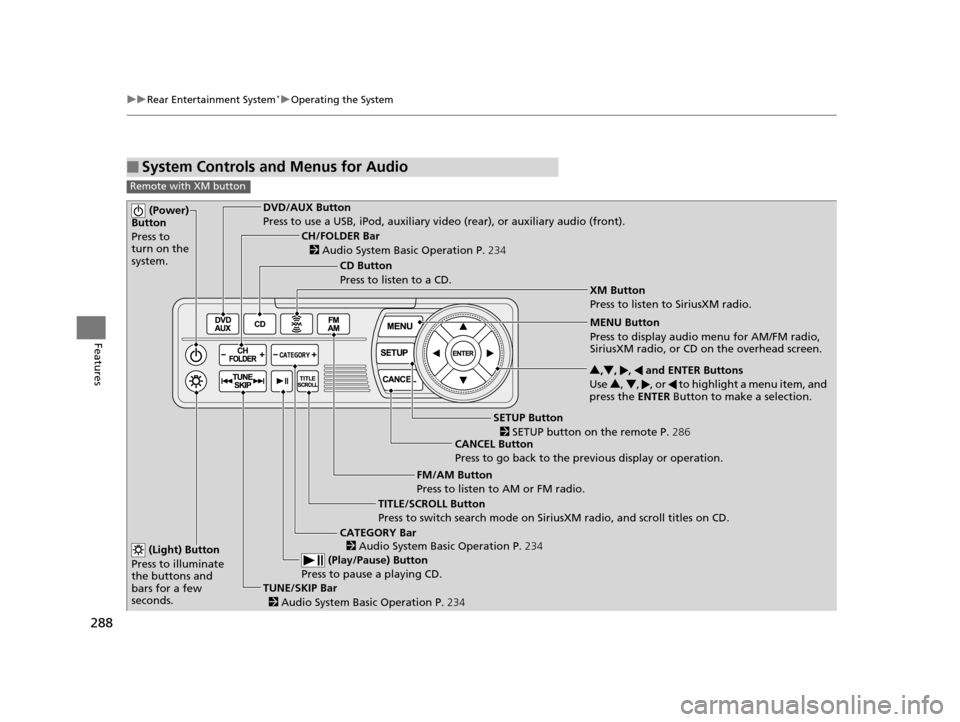
■System Controls and Menus for Audio
Remote with XM button
(Power)
Button
Press to
turn on the
system.DVD/AUX Button
Press to use a USB, iPod, auxiliary vi deo (rear), or auxiliary audio (front).
(Light) Button
Press to illuminate
the buttons and
bars for a few
seconds.
TUNE/SKIP Bar (Play/Pause) Button
Press to pause a playing CD.
TITLE/SCROLL Button
Press to switch search mode on Siri usXM radio, and scroll titles on CD.
CANCEL Button
Press to go back to the previous display or operation. 3
,4 , , and ENTER Buttons
Use 3, 4 , , or to highlight a menu item, and
press the ENTER Button to make a selection.
CATEGORY Bar
CH/FOLDER Bar
CD Button
Press to listen to a CD.
FM/AM Button
Press to listen to AM or FM radio.
SETUP Button XM Button
Press to listen to SiriusXM radio.
MENU Button
Press to display audio menu for AM/FM radio,
SiriusXM radio, or CD on the overhead screen.
2
Audio System Basic Operation P. 234
2
Audio System Basic Operation P. 234
2 SETUP button on the remote P. 286
2 Audio System Basic Operation P. 234
17 US ODYSSEY (KA KC)-31TK86600.book 288 ページ 2016年10月24日 月曜日 午後4時2分
Page 296 of 565
295Continued
Features
Customized Features
See the Navigation System Manual for the customized features except for the
Vehicle Settings .
Use the audio/information screen to customize certain features.
■How to customize
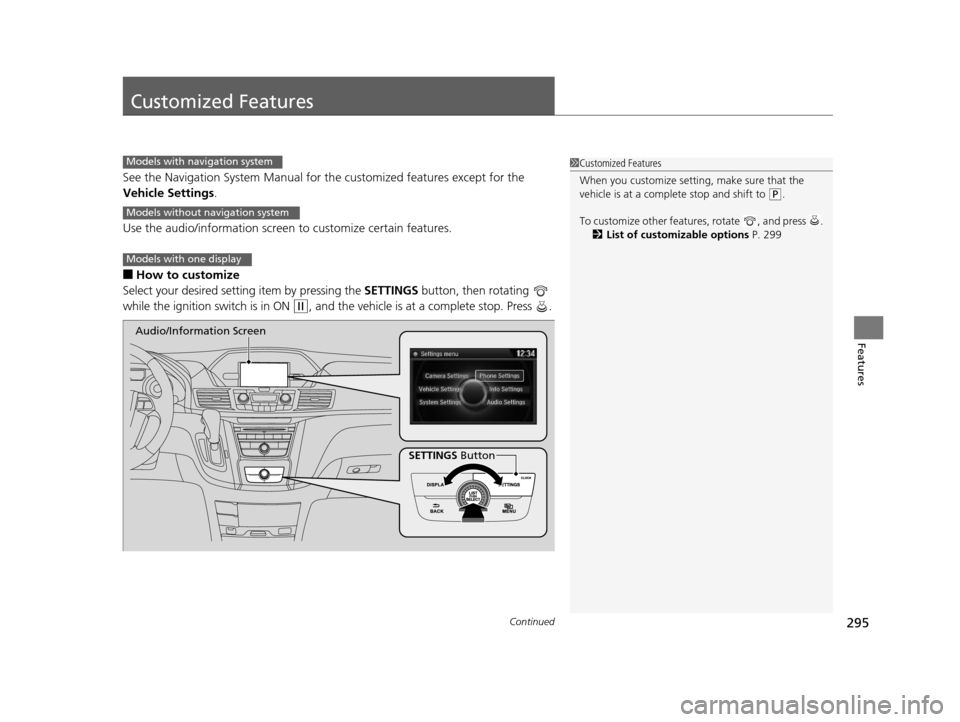
Select your desired setting item by pressing the SETTINGS button, then rotating
while the ignition switch is in ON
(w, and the vehicle is at a complete stop. Press .
1 Customized Features
When you customize setting, make sure that the
vehicle is at a complete stop and shift to
(P.
To customize other featur es, rotate , and press .
2 List of customizable options P. 299
Models with navigation system
Models without navigation system
Models with one display
SETTINGS Button
Audio/Information Screen
17 US ODYSSEY (KA KC)-31TK86600.book 295 ページ 2016年10月24日 月曜日
午後4時2分
Page 330 of 565
329
uuBluetooth ® HandsFreeLink ®u HFL Menus
Continued
Features
HFL Menus
The ignition switch mu st be in ACCESSORY (q or ON (w to use HFL.
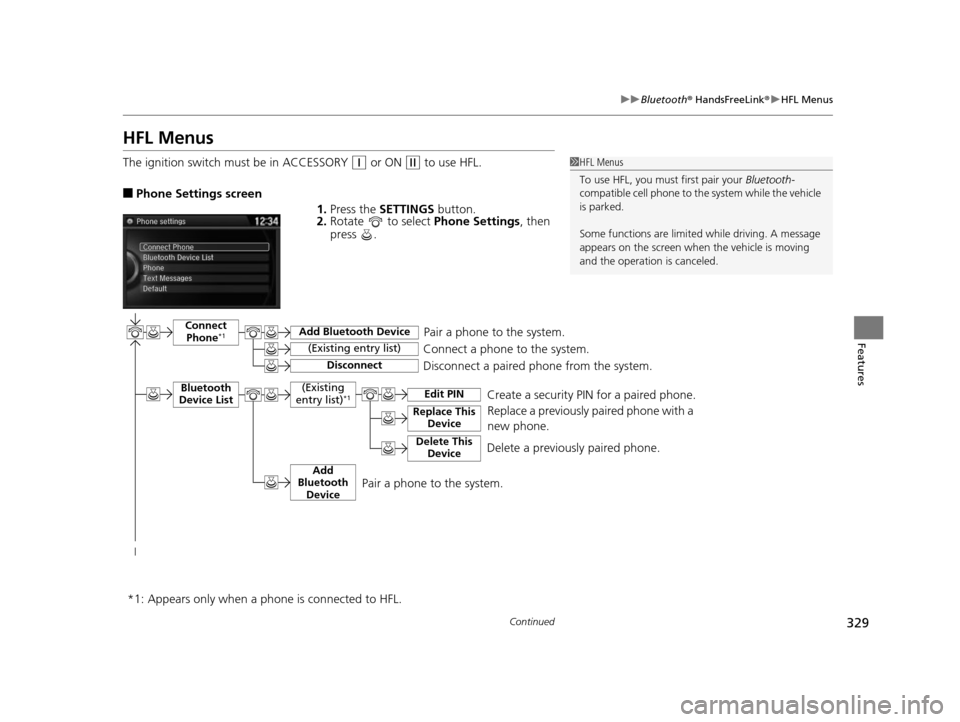
■Phone Settings screen
1.Press the SETTINGS button.
2. Rotate to select Phone Settings, then
press .
1 HFL Menus
To use HFL, you must first pair your Bluetooth-
compatible cell phone to th e system while the vehicle
is parked.
Some functions are limited while driving. A message
appears on the screen when the vehicle is moving
and the operation is canceled.
Pair a phone to the system.
Replace a previously paired phone with a
new phone.Connect Phone*1
Bluetooth
Device List
Add Bluetooth Device
Edit PIN
(Existing entry list)
Disconnect
Connect a phone to the system.
Disconnect a paired phone from the system.
*1:
(Existing
entry list)*1
Replace This Device
Delete This DeviceDelete a previously paired phone.Create a security PIN for a paired phone.
Add
Bluetooth Device
Appears only when a phon e is connected to HFL.
Pair a phone to the system.
17 US ODYSSEY (KA KC)-31TK86600.book 329 ページ 2016年10月24日 月曜日 午後4時2分
Page 393 of 565
392
Features
Compass*
When you set the power mode to ON, the compass self-calibrates, and the compass
display appears.
Compass Calibration
If the compass indicates the wrong direction, or the CAL indicator blinks, you need
to manually calibrate the system.
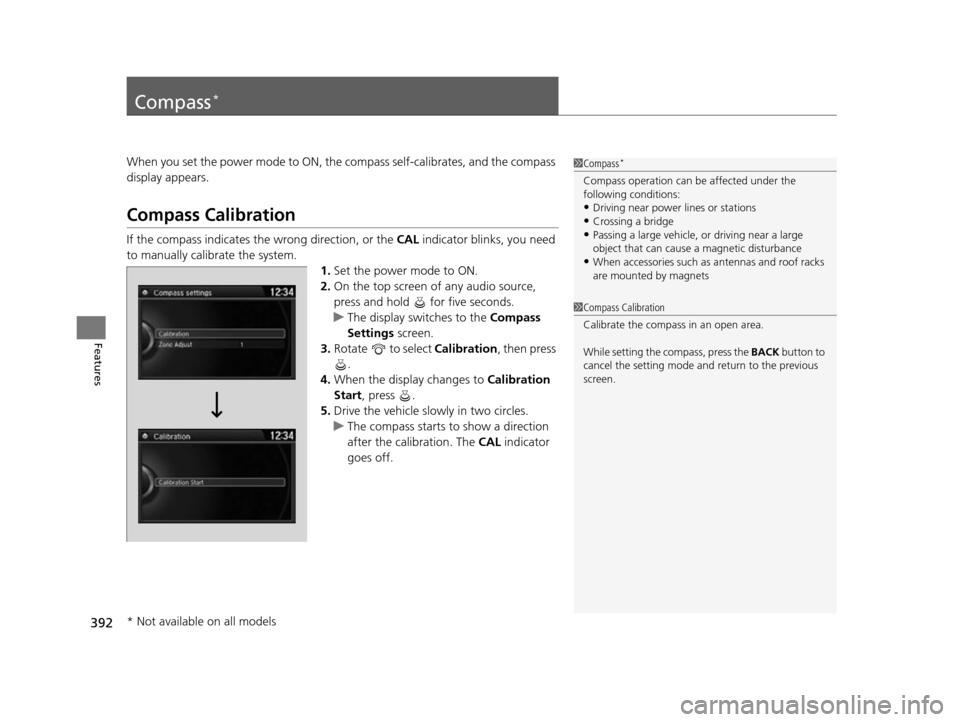
1.Set the power mode to ON.
2. On the top screen of any audio source,
press and hold for five seconds.
u The display switches to the Compass
Settings screen.
3. Rotate to select Calibration , then press
.
4. When the display changes to Calibration
Start, press .
5. Drive the vehicle slowly in two circles.
u The compass starts to show a direction
after the calibration. The CAL indicator
goes off.
1 Compass*
Compass operation can be affected under the
following conditions:
•Driving near power lines or stations•Crossing a bridge
•Passing a large vehicle, or driving near a large
object that can cause a magnetic disturbance
•When accessories such as antennas and roof racks
are mounted by magnets
1 Compass Calibration
Calibrate the compass in an open area.
While setting the compass, press the BACK button to
cancel the setting mode a nd return to the previous
screen.
* Not available on all models
17 US ODYSSEY (KA KC)-31TK86600.book 392 ページ 2016年10月24日 月曜日 午後4時2分
Page 409 of 565

uuWhen Driving uStarting the Engine
408
Driving
3. Turn the ignition switch to START (e
without depressing the accelerator pedal.
1. Keeping your right foot on the brake peda l, release the parking brake. Check that
the parking brake indicator has gone off.
2 Parking Brake P. 436
2.Put the shift lever in (D. Select (R when reversing.
3. Gradually release the brake pedal and gently depress the accelerator pedal to pull
away.
1Starting the Engine
Do not hold the key in START
(e for more than 15
seconds.
•If the engine does not sta rt right away, wait for at
least 10 seconds before trying again.
•If the engine starts, but then immediately stops,
wait at least 10 seconds before repeating step 3
while gently depressing the accelerator pedal.
Release the accelerator pedal once the engine
starts.
The immobilizer system pr otects your vehicle from
theft. If an improperly code d key (or other device) is
used, the engine's fuel system is disabled.
2 Immobilizer System P. 135
■Starting to Drive
17 US ODYSSEY (KA KC)-31TK86600.book 408 ページ 2016年10月24日 月曜日 午後4時2分
Page 412 of 565
411
uuWhen Driving uPrecautions While Driving
Driving
Precautions While Driving
Avoid driving in deep water and on flooded roads. This can damage the engine or
driveline, or cause electrical component failure.
If there is a strong impact with something under the vehicle, stop in a safe location.
Check the underside of the vehicle for damage or any fluid leaks.
*1: Models with the smart entry system have an ENGINE START/STOP button instead of an
ignition switch.
■In Rain
■Other Precautions
1 Precautions While Driving
NOTICE
Do not operate the shift lever while pressing the
accelerator pedal. You could damage the
transmission.
If the ignition switch is turned to ACCESSORY
( q *1
while driving, the engine will shut down and all
steering and brake power a ssist functions will stop,
making it difficult to control the vehicle.
Do not put the shift lever in
( N, as you will lose
engine braking (and acce leration) performance.
During the first 600 miles (1,000 km) of operation,
avoid sudden acceleration or full throttle operation so
as to not damage the engine or powertrain.
Avoid hard braking for the first 200 miles (300 km).
You should also follow this when the brake pads are
replaced.
17 US ODYSSEY (KA KC)-31TK86600.book 411 ページ 2016年10月24日 月曜日 午後4時2分
Page 414 of 565
413
uuWhen Driving uShifting
Continued
Driving
Shifting
Change the shift position in accordance with your driving needs.
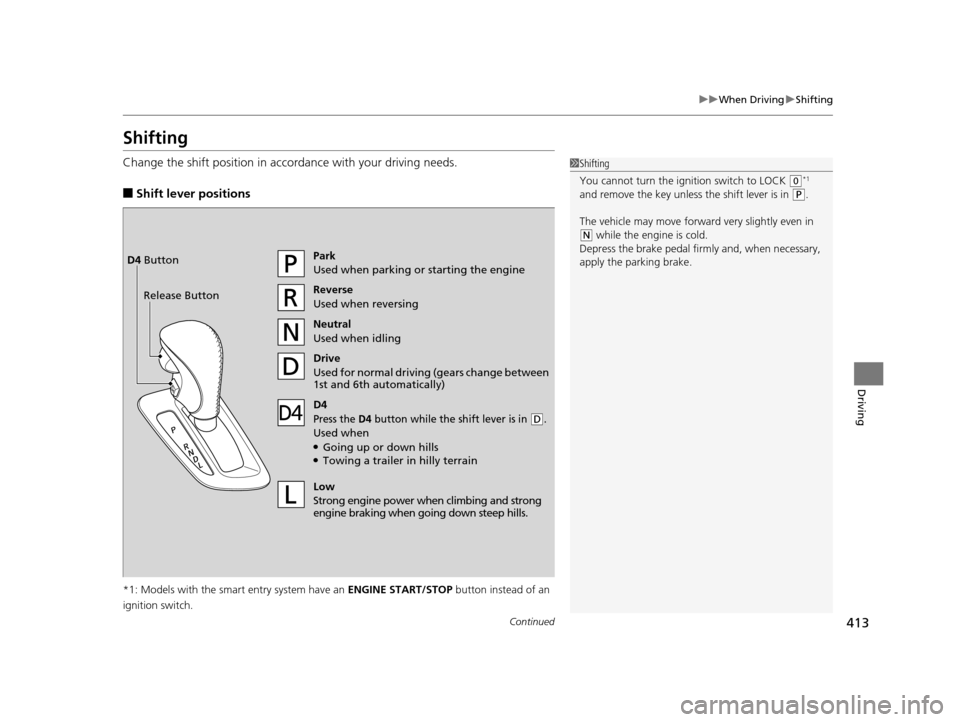
■Shift lever positions
*1: Models with the smart entry system have an ENGINE START/STOP button instead of an
ignition switch.
1 Shifting
You cannot turn the ignition switch to LOCK
(0*1
and remove the key unless the shift lever is in
( P.
The vehicle may move forward very slightly even in
(N while the engine is cold.
Depress the brake pe dal firmly and, when necessary,
apply the parking brake.
Park
Used when parking or starting the engine
Reverse
Used when reversing
Neutral
Used when idling
Drive
Used for normal drivin g (gears change between
1st and 6th automatically)
Low
Strong engine power wh en climbing and strong
engine braking when going down steep hills.
Release ButtonD4 Button
D4
Press the D4 button while the sh
ift lever is in (D.
Used when●Going up or down hills●Towing a trailer in hilly terrain
17 US ODYSSEY (KA KC)-31TK86600.book 413 ページ 2016年10月24日 月曜日 午後4時2分