Page 201 of 565
200
uuClimate Control System*uSynchronized Mode
Controls
Synchronized Mode
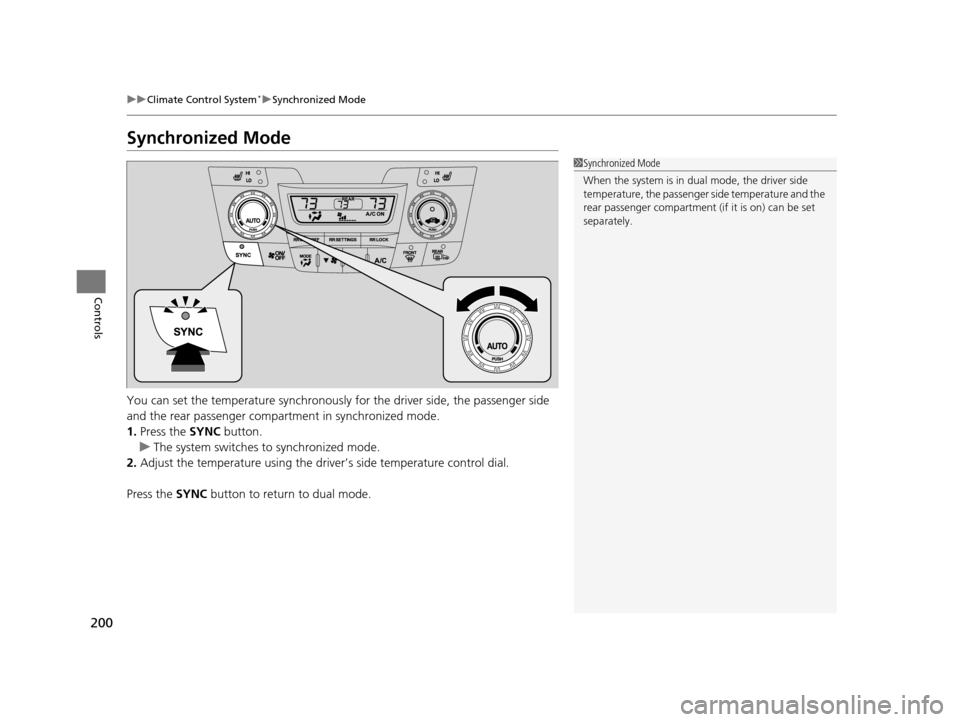
You can set the temperature synchronously for the driver side, the passenger side
and the rear passenger compartment in synchronized mode.
1. Press the SYNC button.
u The system switches to synchronized mode.
2. Adjust the temperature using the driv er’s side temperature control dial.
Press the SYNC button to return to dual mode.
1Synchronized Mode
When the system is in dua l mode, the driver side
temperature, the passenger side temperature and the
rear passenger compartment (if it is on) can be set
separately.
17 US ODYSSEY (KA KC)-31TK86600.book 200 ページ 2016年10月24日 月曜日 午後4時2分
Page 202 of 565
201
uuClimate Control System*uRear Climate Control System
Continued
Controls
Rear Climate Control System
Use the system when the engine is running.
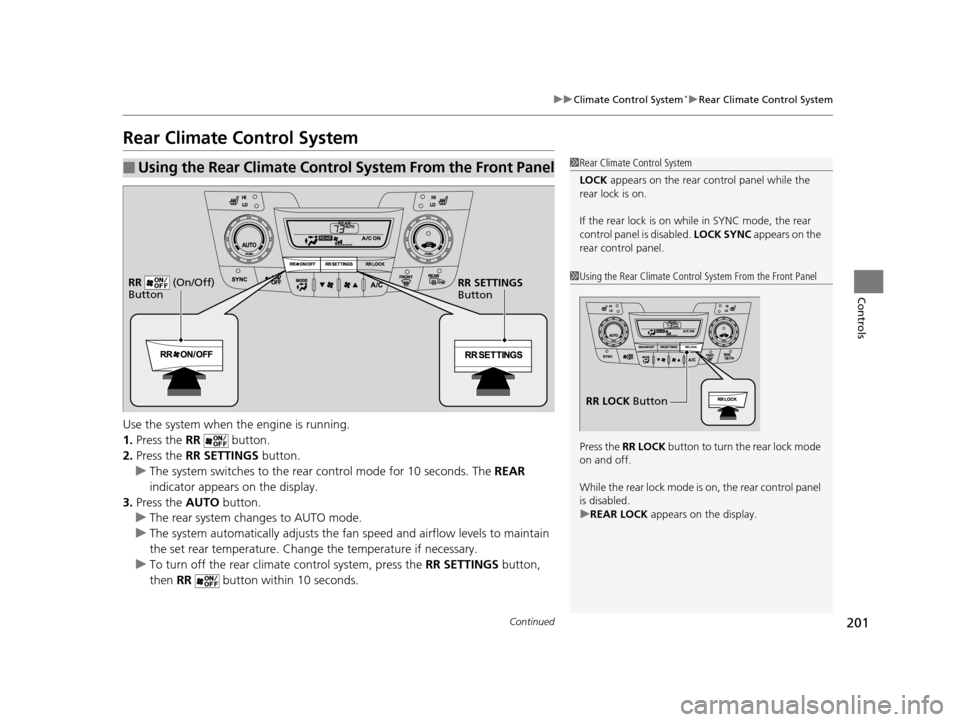
1. Press the RR button.
2. Press the RR SETTINGS button.
u The system switches to the rear control mode for 10 seconds. The REAR
indicator appears on the display.
3. Press the AUTO button.
u The rear system changes to AUTO mode.
u The system automatically adjusts the fan speed and airfl ow levels to maintain
the set rear temperature. Change the temperature if necessary.
u To turn off the rear climat e control system, press the RR SETTINGS button,
then RR button within 10 seconds.
■Using the Rear Climate Control System From the Front Panel1Rear Climate Control System
LOCK appears on the rear control panel while the
rear lock is on.
If the rear lock is on while in SYNC mode, the rear
control panel is disabled. LOCK SYNC appears on the
rear control panel.
1 Using the Rear Climate Control System From the Front Panel
Press the RR LOCK button to turn the rear lock mode
on and off.
While the rear lock mode is on, the rear control panel
is disabled.
u REAR LOCK appears on the display.
RR LOCK Button
RR SETTINGS
Button
RR (On/Off)
Button
17 US ODYSSEY (KA KC)-31TK86600.book 201 ページ 2016年10月24日 月曜日
午後4時2分
Page 207 of 565
206
Features
Audio System
About Your Audio System
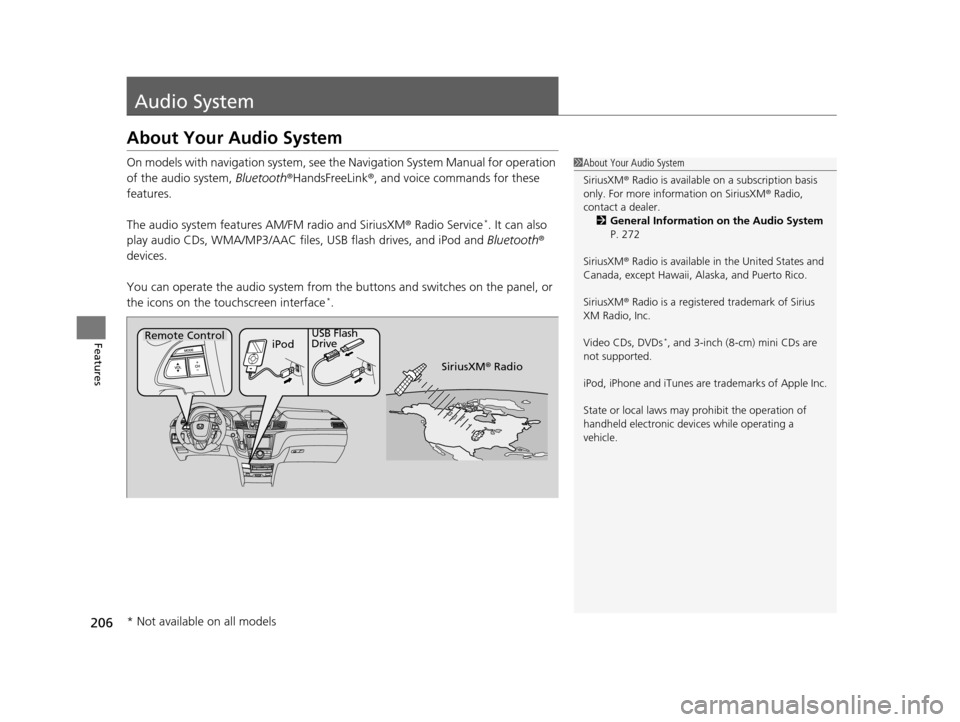
On models with navigation system, see the Navigation System Manual for operation
of the audio system, Bluetooth®HandsFreeLink ®, and voice commands for these
features.
The audio system features AM/FM radio and SiriusXM ® Radio Service
*. It can also
play audio CDs, WMA/MP3/AAC files, USB flash drives, and iPod and Bluetooth®
devices.
You can operate the audio system from the buttons and switches on the panel, or
the icons on the touchscreen interface
*.
1 About Your Audio System
SiriusXM ® Radio is available on a subscription basis
only. For more information on SiriusXM ® Radio,
contact a dealer.
2 General Information on the Audio System
P. 272
SiriusXM ® Radio is available in the United States and
Canada, except Ha waii, Alaska, and Puerto Rico.
SiriusXM ® Radio is a registered trademark of Sirius
XM Radio, Inc.
Video CDs, DVDs
*, and 3-inch (8-cm) mini CDs are
not supported.
iPod, iPhone and iTunes are trademarks of Apple Inc.
State or local laws may pr ohibit the operation of
handheld electronic devi ces while operating a
vehicle.Remote Control iPodUSB Flash
Drive
SiriusXM® Radio
* Not available on all models
17 US ODYSSEY (KA KC)-31TK86600.book 206 ページ 2016年10月24日 月曜日 午後4時2分
Page 208 of 565
207
uuAudio System uUSB Port
Features
USB Port
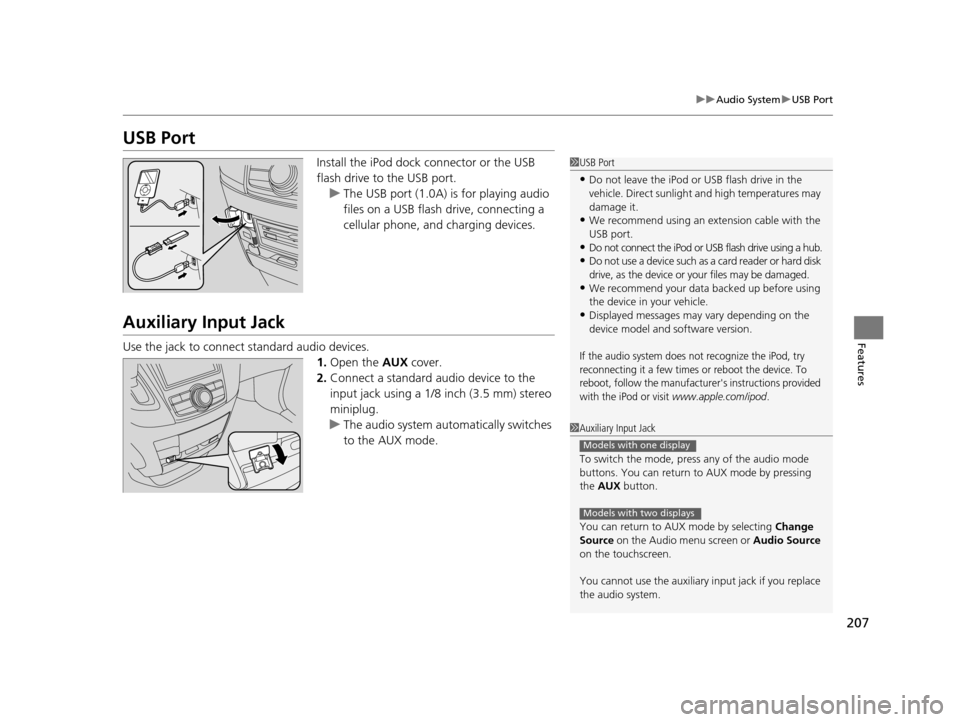
Install the iPod dock connector or the USB
flash drive to the USB port.
u The USB port (1.0A) is for playing audio
files on a USB flash drive, connecting a
cellular phone, and charging devices.
Auxiliary Input Jack
Use the jack to connect standard audio devices.
1.Open the AUX cover.
2. Connect a standard audio device to the
input jack using a 1/8 inch (3.5 mm) stereo
miniplug.
u The audio system auto matically switches
to the AUX mode.
1 USB Port
•Do not leave the iPod or USB flash drive in the
vehicle. Direct sunlight and high temperatures may
damage it.
•We recommend using an extension cable with the
USB port.
•Do not connect the iPod or USB flash drive using a hub.
•Do not use a device such as a card reader or hard disk
drive, as the device or your files may be damaged.
•We recommend your data backed up before using
the device in your vehicle.
•Displayed messages may vary depending on the
device model and software version.
If the audio system does not recognize the iPod, try
reconnecting it a few times or reboot the device. To
reboot, follow the manufacturer's instructions provided
with the iPod or visit
www.apple.com/ipod.
1 Auxiliary Input Jack
To switch the mode, pres s any of the audio mode
buttons. You can return to AUX mode by pressing
the AUX button.
You can return to AUX mode by selecting Change
Source on the Audio menu screen or Audio Source
on the touchscreen.
You cannot use the auxiliary input jack if you replace
the audio system.
Models with one display
Models with two displays
17 US ODYSSEY (KA KC)-31TK86600.book 207 ページ 2016年10月24日 月曜日 午後4時2分
Page 212 of 565
211
Features
Audio System Basic Operation
To use the audio system function, the ignition swit ch must be in ACCESSORY (q or
ON
(w.
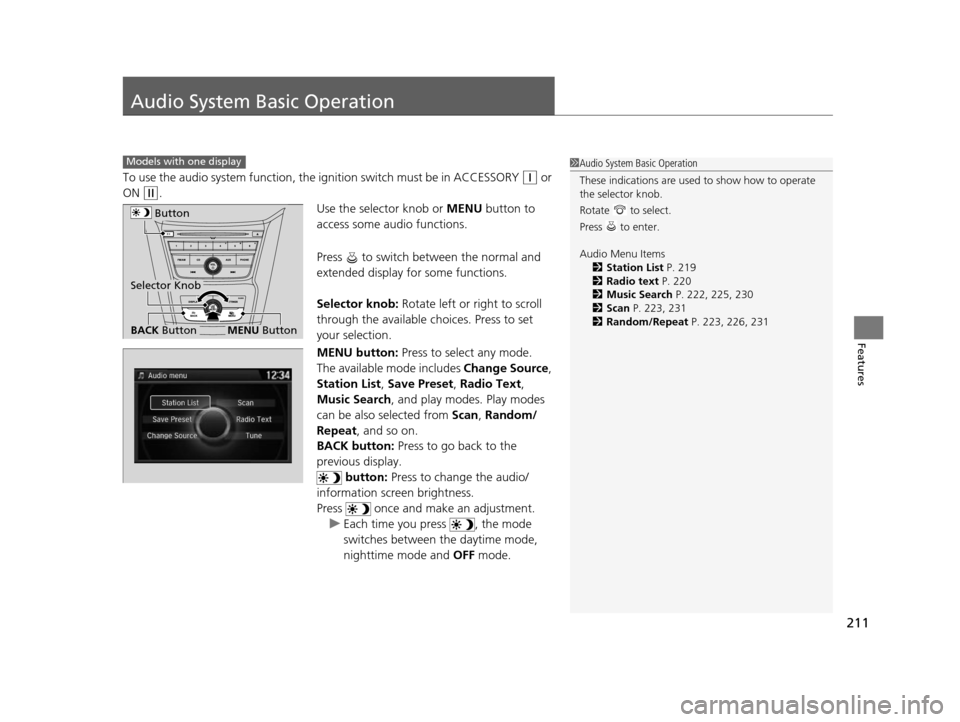
Use the selector knob or MENU button to
access some audio functions.
Press to switch between the normal and
extended display fo r some functions.
Selector knob: Rotate left or right to scroll
through the available ch oices. Press to set
your selection.
MENU button: Press to select any mode.
The available mode includes Change Source,
Station List , Save Preset , Radio Text,
Music Search , and play mode s. Play modes
can be also selected from Scan, Random/
Repeat , and so on.
BACK button: Press to go back to the
previous display. button: Press to change the audio/
information screen brightness.
Press once and make an adjustment. u Each time you press , the mode
switches between the daytime mode,
nighttime mode and OFF mode.
Models with one display1Audio System Basic Operation
These indications are used to show how to operate
the selector knob.
Rotate to select.
Press to enter.
Audio Menu Items
2 Station List P. 219
2 Radio text P. 220
2 Music Search P. 222, 225, 230
2 Scan P. 223, 231
2 Random/Repeat P. 223, 226, 231
Button
BACK ButtonMENU Button
Selector Knob
17 US ODYSSEY (KA KC)-31TK86600.book 211 ページ 2016年10月24日 月曜日 午後4時2分
Page 213 of 565
212
uuAudio System Basic Operation uAudio/Information Screen
Features
Audio/Information Screen
Displays the audio status and wallpaper. From this screen, you can go to various
setup options.
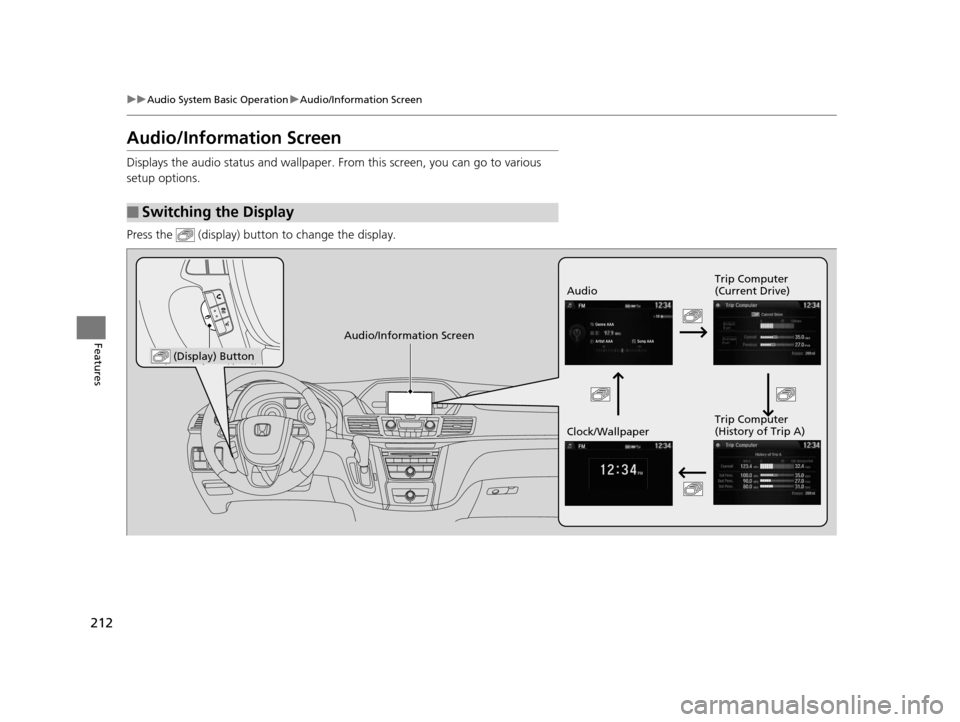
Press the (display) butto n to change the display.
■Switching the Display
Audio Trip Computer
(Current Drive)
Clock/Wallpaper Trip Computer
(History of Trip A)
Audio/Information Screen
(Display) Button
17 US ODYSSEY (KA KC)-31TK86600.book 212 ページ 2016年10月24日 月曜日
午後4時2分
Page 220 of 565
Continued219
uuAudio System Basic Operation uPlaying AM/FM Radio
Features
Provides text data information related to your selected RDS-capable FM station.
■To find an RDS station from Station List
1. Press while listening to an FM station.
2. Rotate to select the station, then press .
■Manual update
Updates your available st ation list at any time.
1. Press while listening to an FM station.
2. Rotate to select Refresh, then press .
■Radio Data System (RDS)1Playing AM/FM Radio
The ST indicator appears on the display indicating
stereo FM broadcasts.
Stereo reproduction in AM is not available.
Switching the Audio Mode
Press the SOURCE button on the steering wheel.
2 Audio Remote Controls P. 210
You can also switch the mode by pressing the MENU
button and selecting Change Source on the MENU
screen.
You can store 6 AM stations and 12 FM stations into
the preset button memory. FM1 and FM2 let you
store 6 stations each.
1 Radio Data System (RDS)
When you select an RDS-capable FM station, the RDS
automatically turns on, and the frequency display
changes to the station name. However, when the
signals of that station become weak, the display
changes from the statio n name to the frequency.
17 US ODYSSEY (KA KC)-31TK86600.book 219 ページ 2016年10月24日 月曜日 午後4時2分
Page 228 of 565
227
uuAudio System Basic Operation uPlaying Internet Radio
Continued
Features
Playing Internet Radio
Connect a compatible phone through Bluetooth®.
You can also connect the phone using your dock connector to the USB port.
Press the AUX button to select Pandora mode.
U.S. models
Compatible phones only
1Playing Internet Radio
Pandora ®, the Pandora logo, and the Pandora trade
dress are trademarks or registered trademarks of
Pandora Media, Inc., used with permission. Pandora
is currently available exclusively in the United States.
iPhone
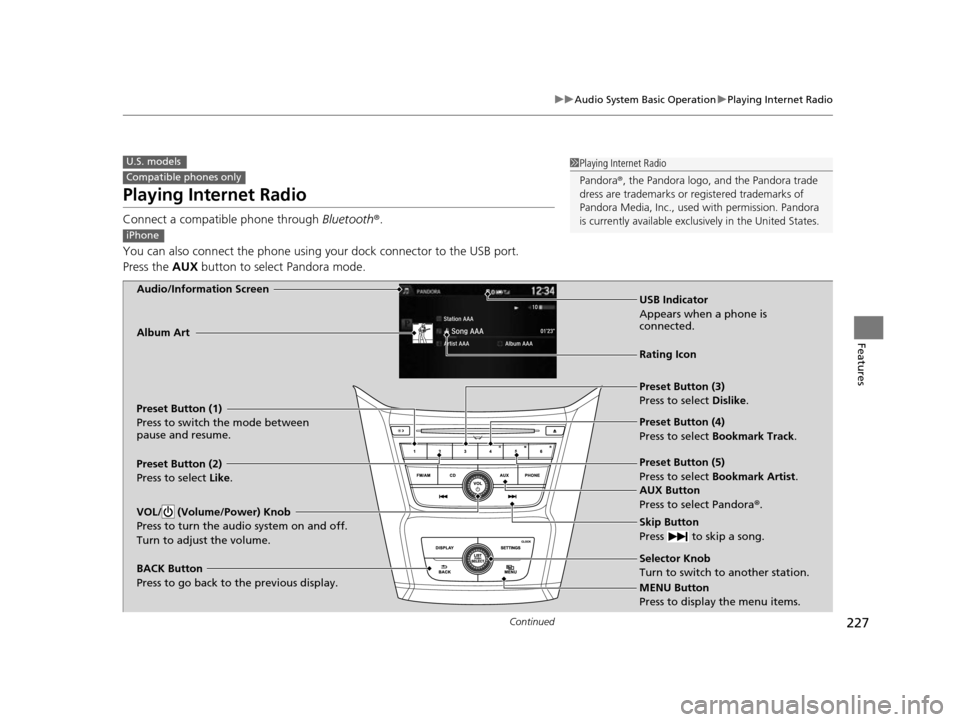
Audio/Information Screen
AUX Button
Press to select Pandora®.
Skip Button
Press to skip a song.
MENU Button
Press to display the menu items. Selector Knob
Turn to switch to another station.
VOL/ (Volume/Power) Knob
Press to turn the audio system on and off.
Turn to adjust the volume.
BACK Button
Press to go back to the previous display.
Album Art
USB Indicator
Appears when a phone is
connected.
Rating Icon
Preset Button (1)
Press to switch the mode between
pause and resume.
Preset Button (2)
Press to select Like.
Preset Button (3)
Press to select Dislike.
Preset Button (4)
Press to select Bookmark Track
.
Preset Button (5)
Press to select Bookmark Artist .
17 US ODYSSEY (KA KC)-31TK86600.book 227 ページ 2016年10月24日 月曜日 午後4時2分