2017 FORD TAURUS light
[x] Cancel search: lightPage 93 of 504
Trip 1 & 2
You can access the menu using theinformation display control.
Note:Some options may appear slightlydifferent or not at all if the items areoptional.
Trip 1 & 2
Digital Speedometer
Hold OK to ResetTrip Odometer
Trip Timer
Average Fuel
•Digital Speedometer - Shows a digitaldisplay of your vehicle speed.
•Trip Odometer — Registers thedistance of individual journeys.
•Trip Timer — The timer stops when youturn your vehicle off and restarts whenyou restart your vehicle.
•Average Fuel — Shows the average fueleconomy for a given trip.
Note:Press and hold OK on the currentscreen to reset the respective trip, distance,time and fuel information.
Fuel Economy
Fuel Economy
Dist to empty
Inst Fuel Econ
Average Fuel
•Distance to Empty - Shows theapproximate distance your vehicle cantravel before running out of fuel.
•Instantaneous Fuel Economy - Showsa visual graph of your instantaneousfuel economy along with your Avg MPGsince the function was last reset.
•Average MPG — Shows the averagefuel economy since last reset.
Note:You can reset your average fueleconomy by pressing and holding the OKbutton on the left hand steering wheelcontrols.
90
Taurus (CPH) Canada/United States of America, enUSA, First Printing
Information Displays
Page 96 of 504
Settings
Volume Limiter
Always On or User SelectableDo NotDisturb
Hold OK to Clear All MyKeysClearMyKeys
Note:Some MyKey items only appear if aMyKey is set.
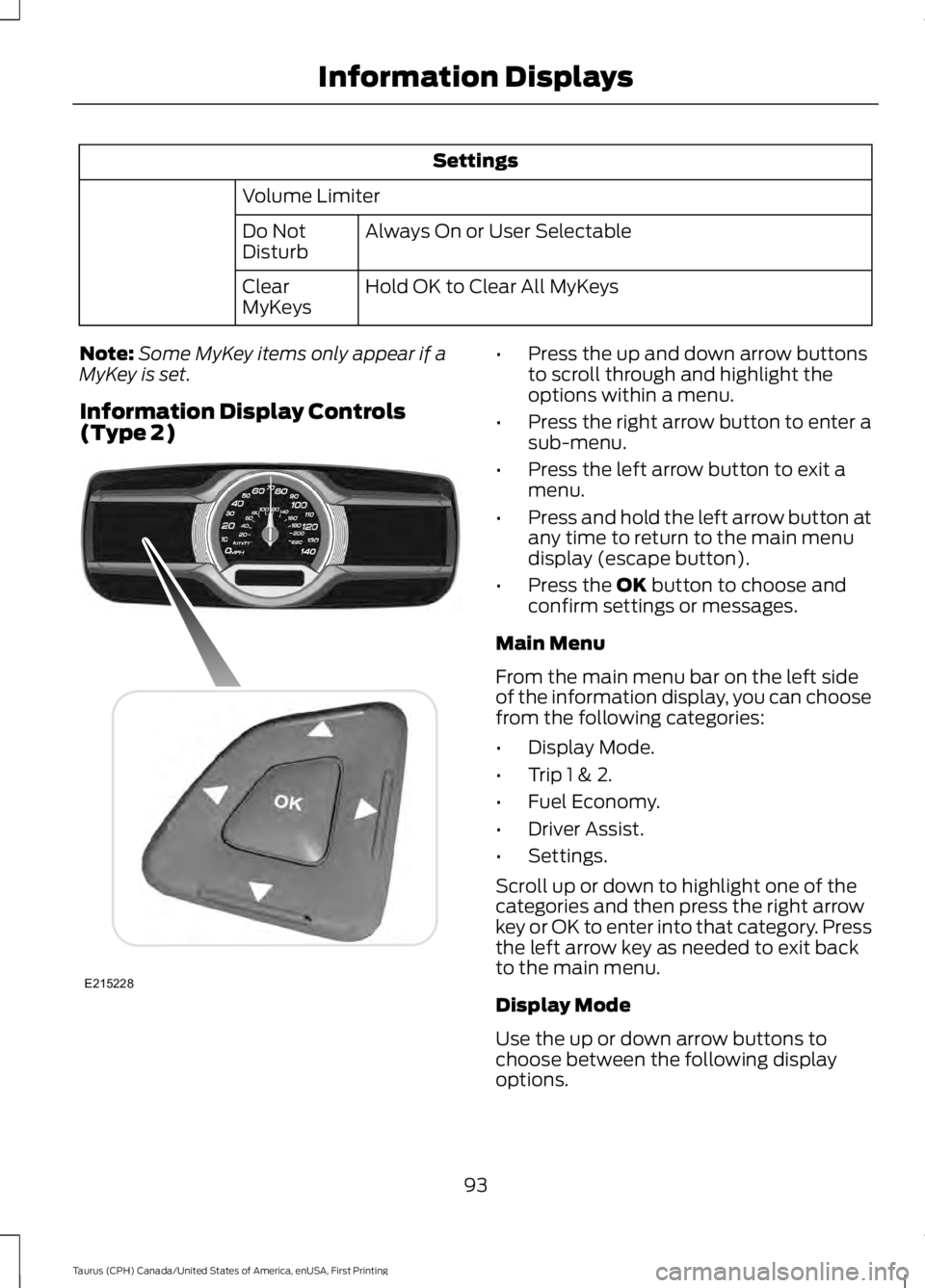
Information Display Controls(Type 2)
•Press the up and down arrow buttonsto scroll through and highlight theoptions within a menu.
•Press the right arrow button to enter asub-menu.
•Press the left arrow button to exit amenu.
•Press and hold the left arrow button atany time to return to the main menudisplay (escape button).
•Press the OK button to choose andconfirm settings or messages.
Main Menu
From the main menu bar on the left sideof the information display, you can choosefrom the following categories:
•Display Mode.
•Trip 1 & 2.
•Fuel Economy.
•Driver Assist.
•Settings.
Scroll up or down to highlight one of thecategories and then press the right arrowkey or OK to enter into that category. Pressthe left arrow key as needed to exit backto the main menu.
Display Mode
Use the up or down arrow buttons tochoose between the following displayoptions.
93
Taurus (CPH) Canada/United States of America, enUSA, First Printing
Information DisplaysE215228
Page 97 of 504
Display Mode
XXX mi (km) to empty, Fuel gauge and Total odometerOption 1
Round tachometer, Fuel gauge and Total odometerOption 2
Round tachometer, Engine coolant temp gauge, Fuel gauge and TotalodometerOption 3
Digital speedometer, Fuel gauge and Total odometerOption 4
Regardless of display mode chosen, when you use the SelectShift Automatic™ trans-mission (SST), the cluster will change to the round tachometer if not already selected.
XXX mi (km) to empty
Shows approximate fuel level before thefuel tank reaches empty. The value isdynamic and can change (raise or lower)depending on driving style.
Fuel gauge
Switch the ignition on. The fuel gaugeindicates approximately how much fuel isin the fuel tank. The arrow next to the fuelpump symbol shows the fuel filler doorside of your vehicle. When the fuel levelbecomes low, the level indicator changesto amber. When the fuel level becomescritically low, the level indicator changesto red.
Note:The fuel gauge level may vary slightlywhen your vehicle is moving or when drivingon a slope.
Note:When a MyKey is in use, low fuelwarnings display earlier.
Round tachometer
Indicates the engine speed in revolutionsper minute. Driving with your tachometerpointer continuously at the top of the scalemay damage the engine. During SelectShiftAutomatic™ transmission (SST) use, thecurrently selected gear appears in thedisplay.
Engine coolant temperature gauge
Indicates engine coolant temperature. Atnormal operating temperature, the levelindicator is in the normal range. If theengine coolant temperature exceeds thenormal range, stop your vehicle as soon assafely possible, switch off the engine andlet the engine cool.
Trip 1 & 2
You can access the menu using theinformation display control.
Note:Some options may appear slightlydifferent or not at all if the items areoptional.
94
Taurus (CPH) Canada/United States of America, enUSA, First Printing
Information Displays
Page 99 of 504
Driver Assist
Traction Control
Blindspot
High, Normal or LowSensitivityCollision Warn
Cross Traffic Alert
Adaptive or NormalCruise Control
Driver AlertDriver Alert
Driver Alert Disp.
Front Park Aid
Alert, Aid or BothModeLane Keeping
High, Normal or LowIntensity
Rear Park Aid
Settings
In this mode, you can configure differentdriver setting choices.
Note:Some items are optional and maynot appear.
Settings
Auto Engine Off
Normal or TowingDTE Calcula-tion
Easy Entry/Exit
Auto HighbeamLighting
Off or number of secondsAutolamp Delay
AutolockLocksVehicle
Autounlock
All Doors or Driver's DoorRemote unlock
Remaining Life XXX% - Hold OK to ResetOil LifeReset
96
Taurus (CPH) Canada/United States of America, enUSA, First Printing
Information Displays
Page 103 of 504
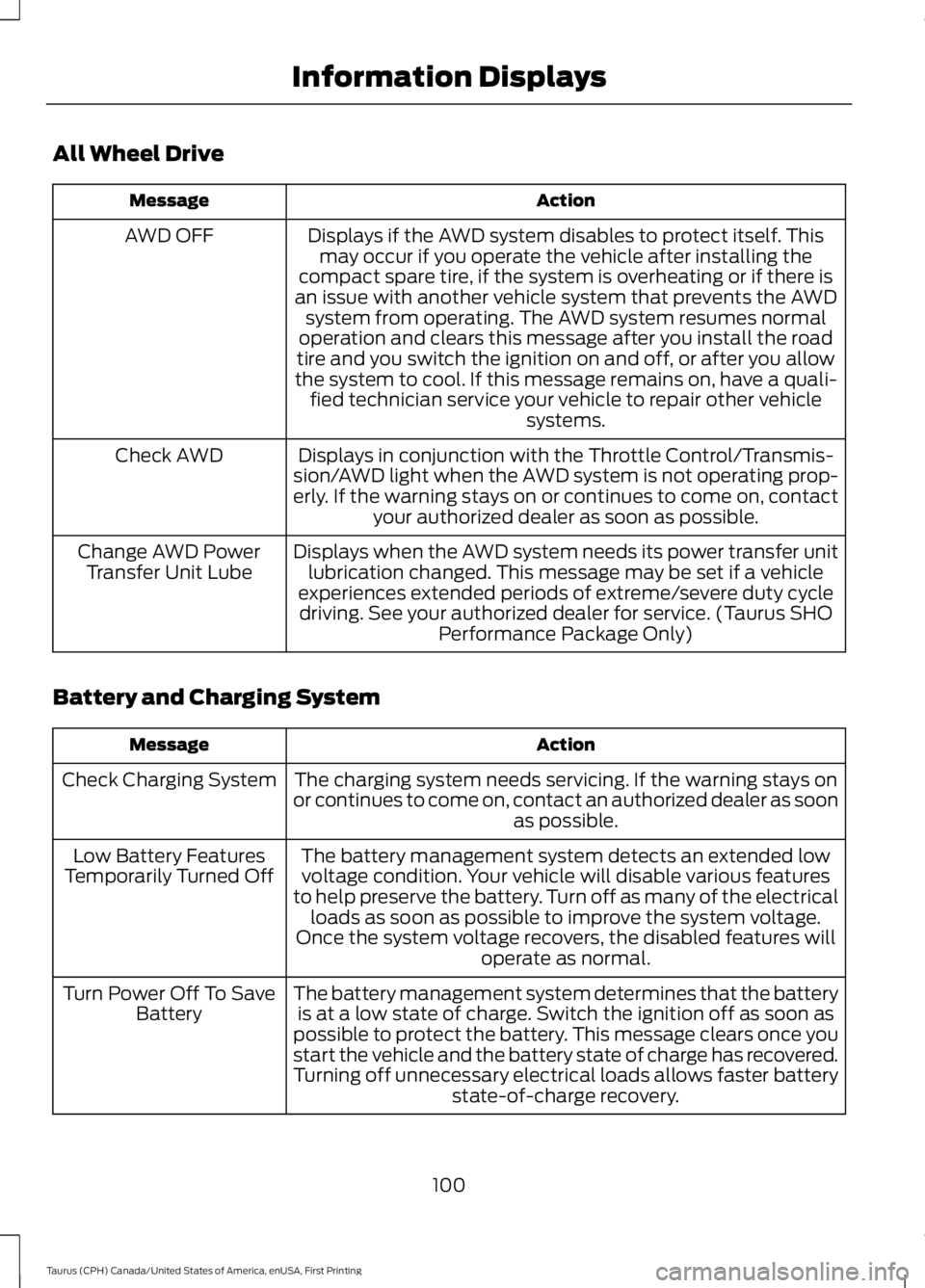
All Wheel Drive
ActionMessage
Displays if the AWD system disables to protect itself. Thismay occur if you operate the vehicle after installing thecompact spare tire, if the system is overheating or if there isan issue with another vehicle system that prevents the AWDsystem from operating. The AWD system resumes normaloperation and clears this message after you install the roadtire and you switch the ignition on and off, or after you allowthe system to cool. If this message remains on, have a quali-fied technician service your vehicle to repair other vehiclesystems.
AWD OFF
Displays in conjunction with the Throttle Control/Transmis-sion/AWD light when the AWD system is not operating prop-erly. If the warning stays on or continues to come on, contactyour authorized dealer as soon as possible.
Check AWD
Displays when the AWD system needs its power transfer unitlubrication changed. This message may be set if a vehicleexperiences extended periods of extreme/severe duty cycledriving. See your authorized dealer for service. (Taurus SHOPerformance Package Only)
Change AWD PowerTransfer Unit Lube
Battery and Charging System
ActionMessage
The charging system needs servicing. If the warning stays onor continues to come on, contact an authorized dealer as soonas possible.
Check Charging System
The battery management system detects an extended lowvoltage condition. Your vehicle will disable various featuresto help preserve the battery. Turn off as many of the electricalloads as soon as possible to improve the system voltage.Once the system voltage recovers, the disabled features willoperate as normal.
Low Battery FeaturesTemporarily Turned Off
The battery management system determines that the batteryis at a low state of charge. Switch the ignition off as soon aspossible to protect the battery. This message clears once youstart the vehicle and the battery state of charge has recovered.Turning off unnecessary electrical loads allows faster batterystate-of-charge recovery.
Turn Power Off To SaveBattery
100
Taurus (CPH) Canada/United States of America, enUSA, First Printing
Information Displays
Page 122 of 504
SITTING IN THE CORRECT
POSITION
WARNINGS
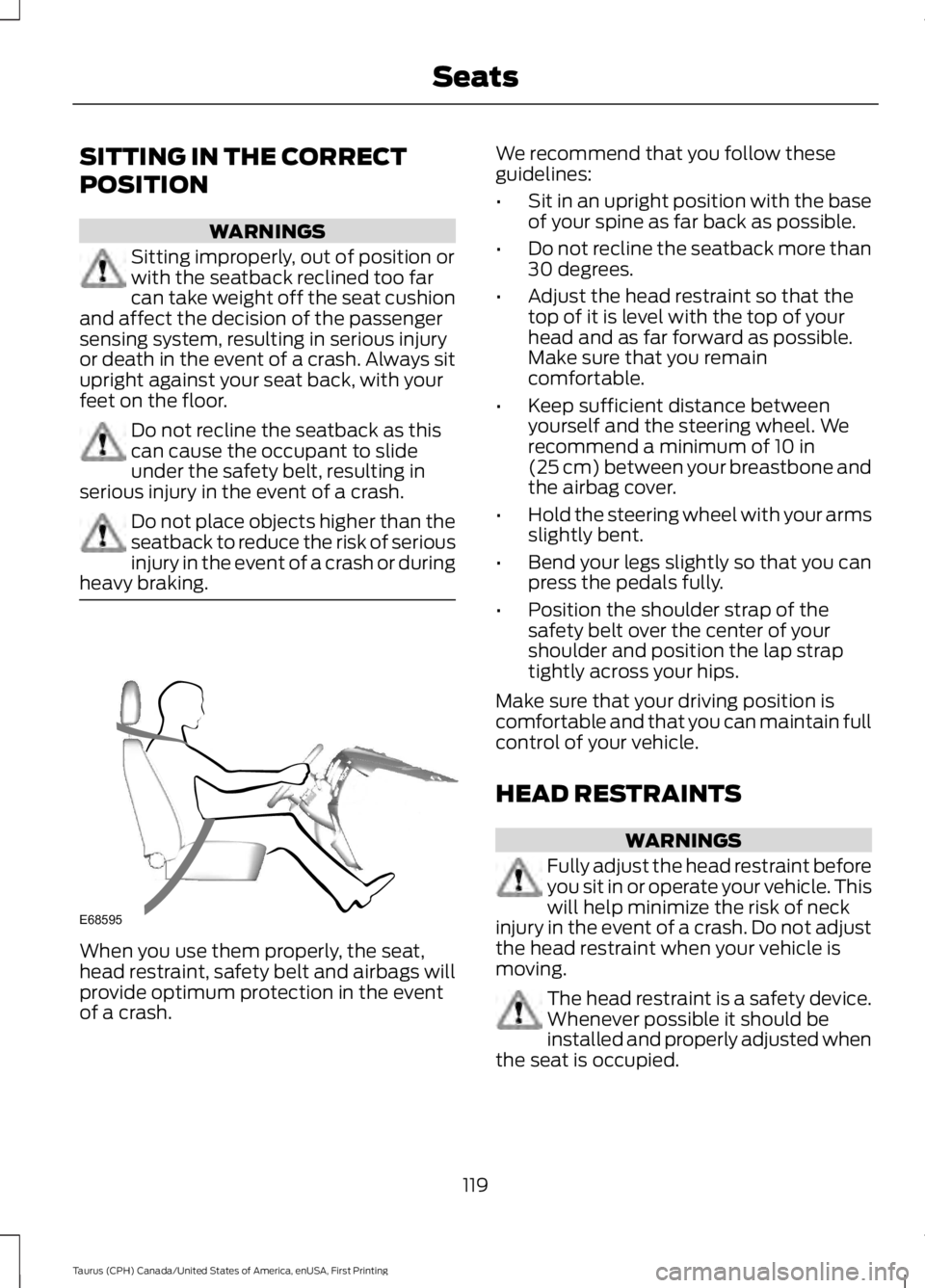
Sitting improperly, out of position orwith the seatback reclined too farcan take weight off the seat cushionand affect the decision of the passengersensing system, resulting in serious injuryor death in the event of a crash. Always situpright against your seat back, with yourfeet on the floor.
Do not recline the seatback as thiscan cause the occupant to slideunder the safety belt, resulting inserious injury in the event of a crash.
Do not place objects higher than theseatback to reduce the risk of seriousinjury in the event of a crash or duringheavy braking.
When you use them properly, the seat,head restraint, safety belt and airbags willprovide optimum protection in the eventof a crash.
We recommend that you follow theseguidelines:
•Sit in an upright position with the baseof your spine as far back as possible.
•Do not recline the seatback more than30 degrees.
•Adjust the head restraint so that thetop of it is level with the top of yourhead and as far forward as possible.Make sure that you remaincomfortable.
•Keep sufficient distance betweenyourself and the steering wheel. Werecommend a minimum of 10 in(25 cm) between your breastbone andthe airbag cover.
•Hold the steering wheel with your armsslightly bent.
•Bend your legs slightly so that you canpress the pedals fully.
•Position the shoulder strap of thesafety belt over the center of yourshoulder and position the lap straptightly across your hips.
Make sure that your driving position iscomfortable and that you can maintain fullcontrol of your vehicle.
HEAD RESTRAINTS
WARNINGS
Fully adjust the head restraint beforeyou sit in or operate your vehicle. Thiswill help minimize the risk of neckinjury in the event of a crash. Do not adjustthe head restraint when your vehicle ismoving.
The head restraint is a safety device.Whenever possible it should beinstalled and properly adjusted whenthe seat is occupied.
119
Taurus (CPH) Canada/United States of America, enUSA, First Printing
SeatsE68595
Page 126 of 504
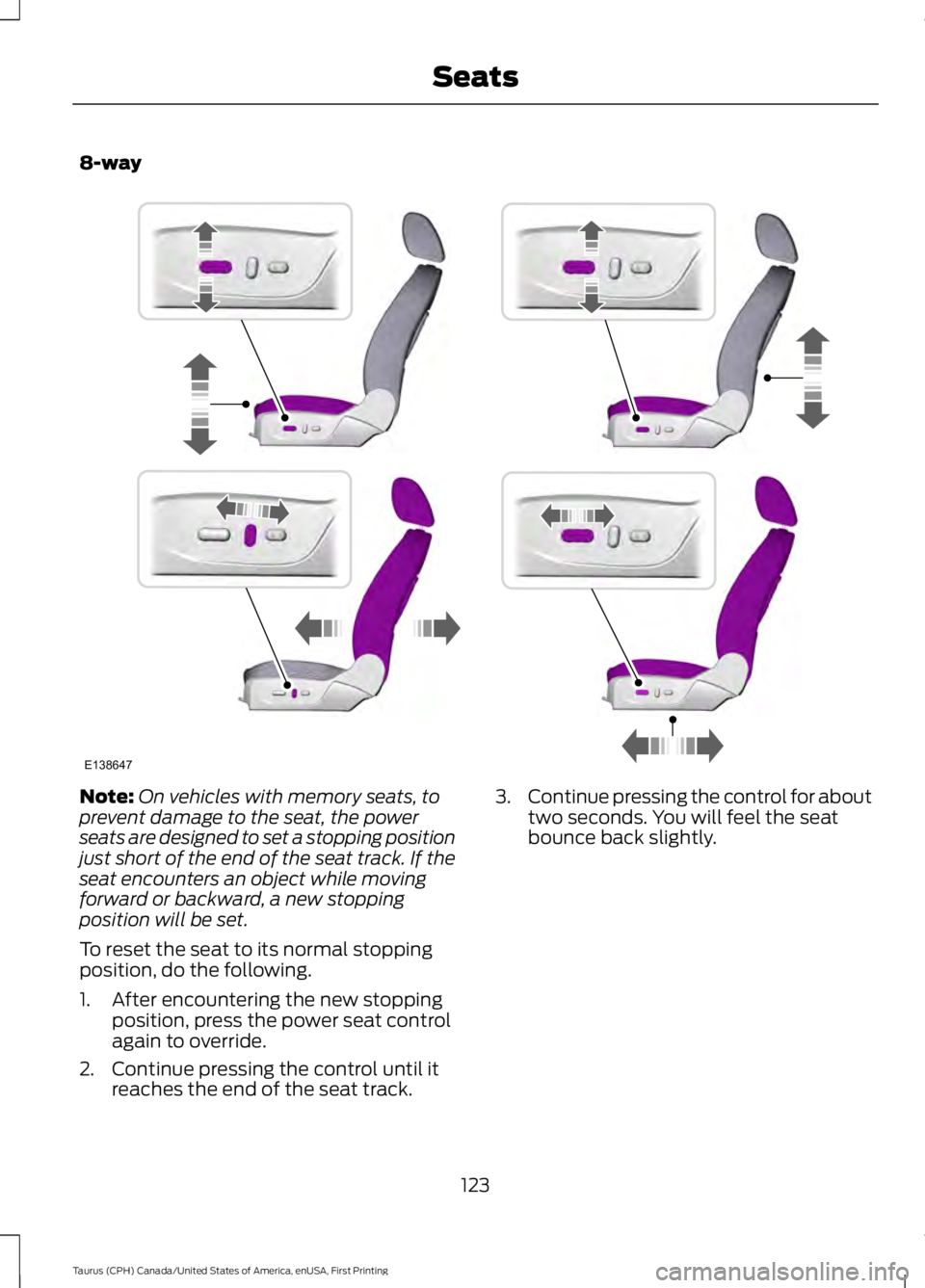
8-way
Note:On vehicles with memory seats, toprevent damage to the seat, the powerseats are designed to set a stopping positionjust short of the end of the seat track. If theseat encounters an object while movingforward or backward, a new stoppingposition will be set.
To reset the seat to its normal stoppingposition, do the following.
1. After encountering the new stoppingposition, press the power seat controlagain to override.
2. Continue pressing the control until itreaches the end of the seat track.
3.Continue pressing the control for abouttwo seconds. You will feel the seatbounce back slightly.
123
Taurus (CPH) Canada/United States of America, enUSA, First Printing
SeatsE138647
Page 130 of 504
HEATED SEATS (If Equipped)
WARNING
People who are unable to feel painto their skin because of advancedage, chronic illness, diabetes, spinalcord injury, medication, alcohol use,exhaustion or other physical conditions,must use caution when using the heatedseat. The heated seat may cause burnseven at low temperatures, especially ifused for long periods of time. Do not placeanything on the seat that may block theheat, such as a blanket or cushion. This cancause the heated seat to overheat. Do notpuncture the seat with pins, needles orother pointed objects. This damages theheating element and can cause the heatedseat to overheat. An overheated seat maycause serious personal injury.
Do not do the following:
•Place heavy objects on the seat.
•Operate the heated seat if water or anyother liquid spills on the seat. Allow theseat to dry thoroughly.
Note:You must switch the ignition on touse this feature.
Press the heated seat symbol to cyclethrough the various heat settings and off.More indicator lights indicate warmersettings.
Rear Heated Seats (If Equipped)
WARNING
People who are unable to feel painto their skin because of advancedage, chronic illness, diabetes, spinalcord injury, medication, alcohol use,exhaustion or other physical conditions,must use caution when using the heatedseat. The heated seat may cause burnseven at low temperatures, especially ifused for long periods of time. Do not placeanything on the seat that may block theheat, such as a blanket or cushion. This cancause the heated seat to overheat. Do notpuncture the seat with pins, needles orother pointed objects. This damages theheating element and can cause the heatedseat to overheat. An overheated seat maycause serious personal injury.
Do not do the following:
•Place heavy objects on the seat.
•Operate the heated seat if water or anyother liquid spills on the seat. Allow theseat to dry thoroughly.
Note:You must switch the ignition on touse this feature.
The rear seat heat controls are on the rearof the center console.
Press the heated seat symbol to cyclethrough the various heat settings and off.More indicator lights indicate warmersettings.
127
Taurus (CPH) Canada/United States of America, enUSA, First Printing
SeatsE146322 E146322