2017 FORD TAURUS traction control
[x] Cancel search: traction controlPage 6 of 504
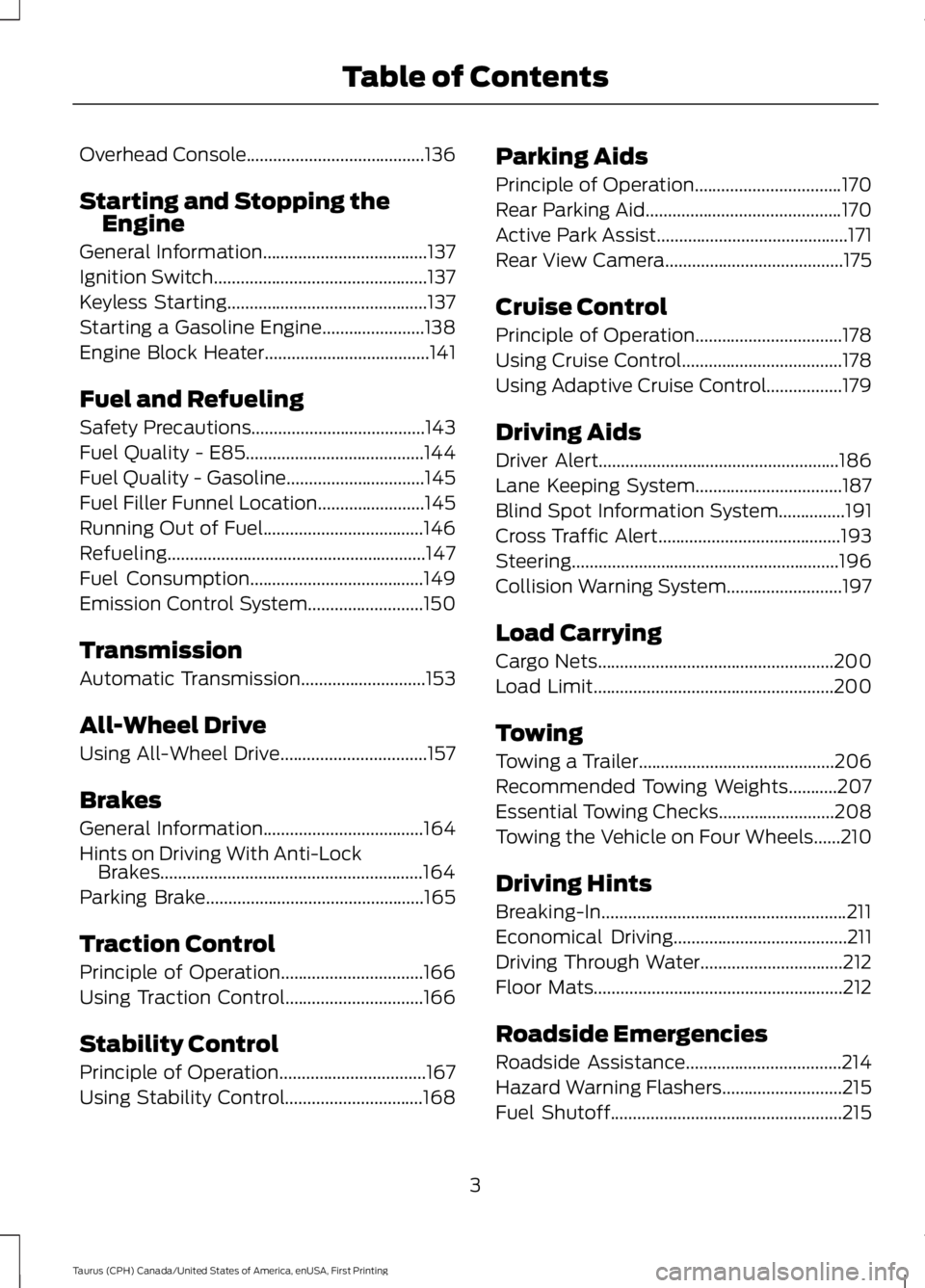
Overhead Console........................................136
Starting and Stopping theEngine
General Information.....................................137
Ignition Switch................................................137
Keyless Starting.............................................137
Starting a Gasoline Engine.......................138
Engine Block Heater.....................................141
Fuel and Refueling
Safety Precautions.......................................143
Fuel Quality - E85........................................144
Fuel Quality - Gasoline...............................145
Fuel Filler Funnel Location........................145
Running Out of Fuel....................................146
Refueling..........................................................147
Fuel Consumption.......................................149
Emission Control System..........................150
Transmission
Automatic Transmission............................153
All-Wheel Drive
Using All-Wheel Drive.................................157
Brakes
General Information....................................164
Hints on Driving With Anti-LockBrakes...........................................................164
Parking Brake.................................................165
Traction Control
Principle of Operation................................166
Using Traction Control...............................166
Stability Control
Principle of Operation.................................167
Using Stability Control...............................168
Parking Aids
Principle of Operation.................................170
Rear Parking Aid............................................170
Active Park Assist...........................................171
Rear View Camera........................................175
Cruise Control
Principle of Operation.................................178
Using Cruise Control....................................178
Using Adaptive Cruise Control.................179
Driving Aids
Driver Alert......................................................186
Lane Keeping System.................................187
Blind Spot Information System...............191
Cross Traffic Alert.........................................193
Steering............................................................196
Collision Warning System..........................197
Load Carrying
Cargo Nets.....................................................200
Load Limit......................................................200
Towing
Towing a Trailer............................................206
Recommended Towing Weights...........207
Essential Towing Checks..........................208
Towing the Vehicle on Four Wheels......210
Driving Hints
Breaking-In.......................................................211
Economical Driving.......................................211
Driving Through Water................................212
Floor Mats........................................................212
Roadside Emergencies
Roadside Assistance...................................214
Hazard Warning Flashers...........................215
Fuel Shutoff....................................................215
3
Taurus (CPH) Canada/United States of America, enUSA, First Printing
Table of Contents
Page 55 of 504
•Various vehicle speed reminders so youknow when your vehicle approachesthe limits. Warnings appear in theinformation display and an audiblewarning sounds when you exceed thelimit.
•Audio system maximum volume of45%. A message will be shown in thedisplay when you attempt to exceedthe limited volume. Also, thespeed-sensitive or compensatedautomatic volume control will bedisabled.
•Always on setting. When this isselected, you will not be able to turnoff Advance Trac or traction control,911 Assist or Emergency Assistance, orDo Not Disturb (if your vehicle is
equipped with these features).
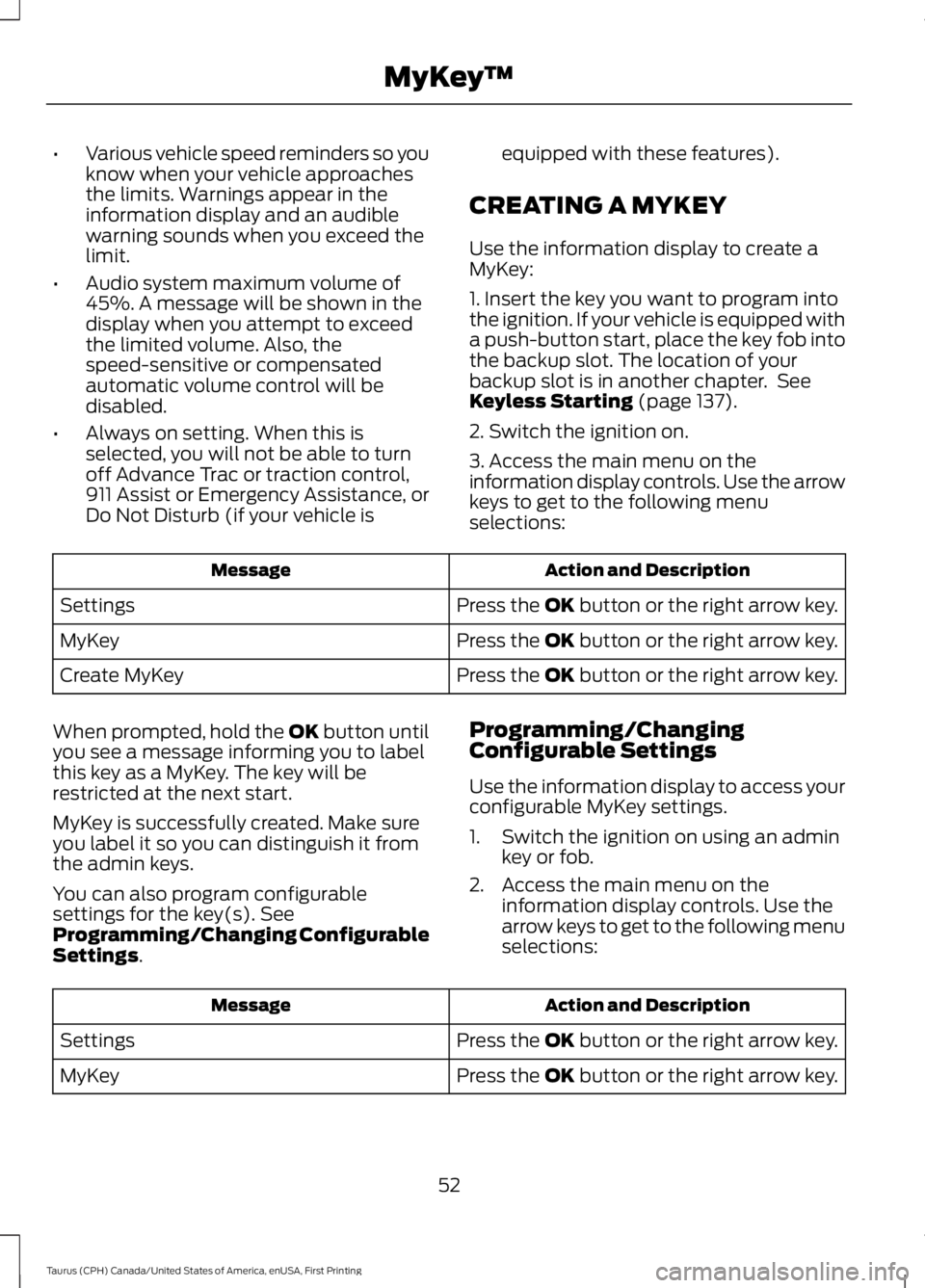
CREATING A MYKEY
Use the information display to create aMyKey:
1. Insert the key you want to program intothe ignition. If your vehicle is equipped witha push-button start, place the key fob intothe backup slot. The location of yourbackup slot is in another chapter. SeeKeyless Starting (page 137).
2. Switch the ignition on.
3. Access the main menu on theinformation display controls. Use the arrowkeys to get to the following menuselections:
Action and DescriptionMessage
Press the OK button or the right arrow key.Settings
Press the OK button or the right arrow key.MyKey
Press the OK button or the right arrow key.Create MyKey
When prompted, hold the OK button untilyou see a message informing you to labelthis key as a MyKey. The key will berestricted at the next start.
MyKey is successfully created. Make sureyou label it so you can distinguish it fromthe admin keys.
You can also program configurablesettings for the key(s). SeeProgramming/Changing ConfigurableSettings.
Programming/ChangingConfigurable Settings
Use the information display to access yourconfigurable MyKey settings.
1. Switch the ignition on using an adminkey or fob.
2. Access the main menu on theinformation display controls. Use thearrow keys to get to the following menuselections:
Action and DescriptionMessage
Press the OK button or the right arrow key.Settings
Press the OK button or the right arrow key.MyKey
52
Taurus (CPH) Canada/United States of America, enUSA, First Printing
MyKey™
Page 94 of 504
Information
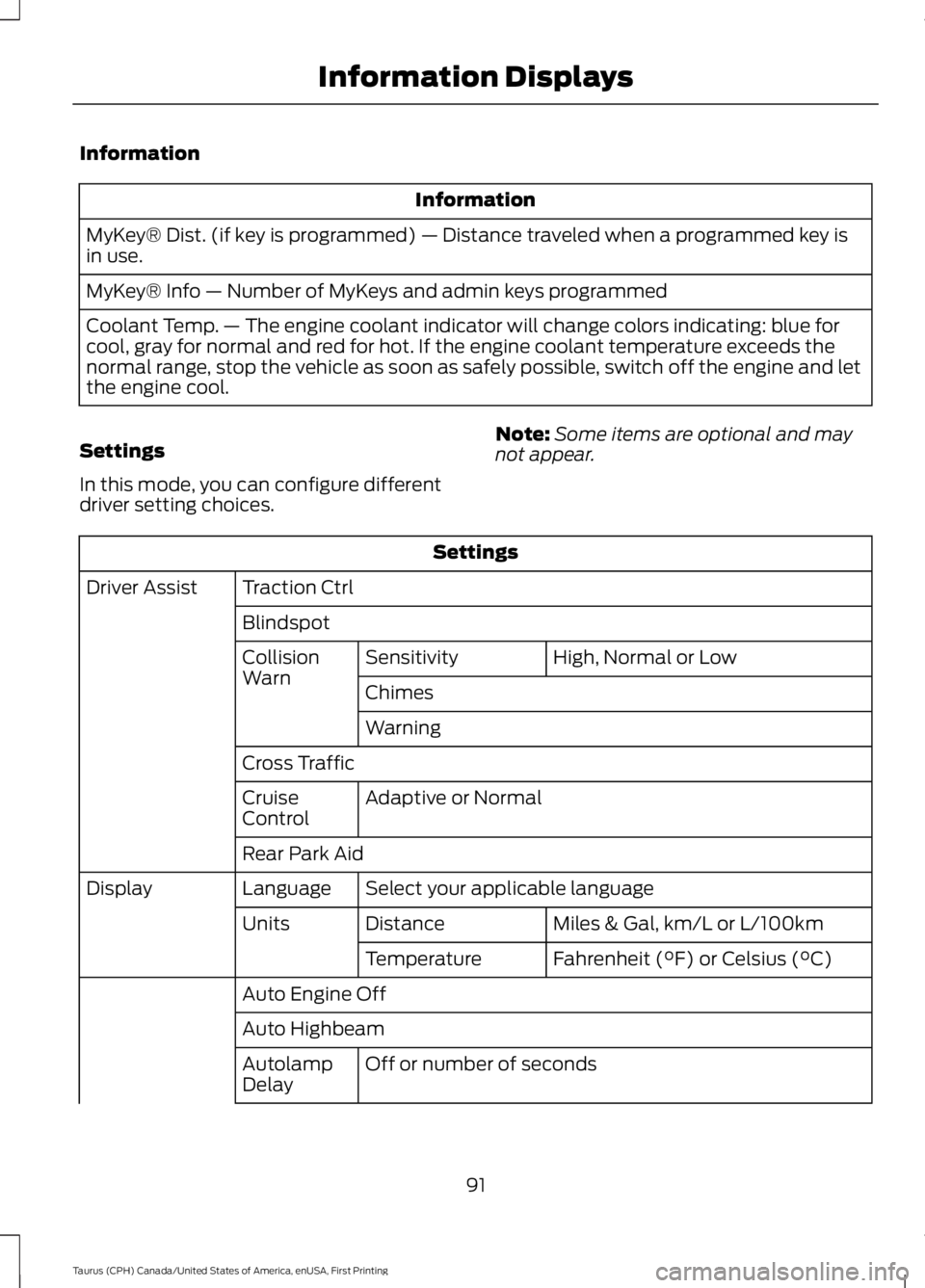
Information
MyKey® Dist. (if key is programmed) — Distance traveled when a programmed key isin use.
MyKey® Info — Number of MyKeys and admin keys programmed
Coolant Temp. — The engine coolant indicator will change colors indicating: blue forcool, gray for normal and red for hot. If the engine coolant temperature exceeds thenormal range, stop the vehicle as soon as safely possible, switch off the engine and letthe engine cool.
Settings
In this mode, you can configure differentdriver setting choices.
Note:Some items are optional and maynot appear.
Settings
Traction CtrlDriver Assist
Blindspot
High, Normal or LowSensitivityCollisionWarnChimes
Warning
Cross Traffic
Adaptive or NormalCruiseControl
Rear Park Aid
Select your applicable languageLanguageDisplay
Miles & Gal, km/L or L/100kmDistanceUnits
Fahrenheit (°F) or Celsius (°C)Temperature
Auto Engine Off
Auto Highbeam
Off or number of secondsAutolampDelay
91
Taurus (CPH) Canada/United States of America, enUSA, First Printing
Information Displays
Page 95 of 504
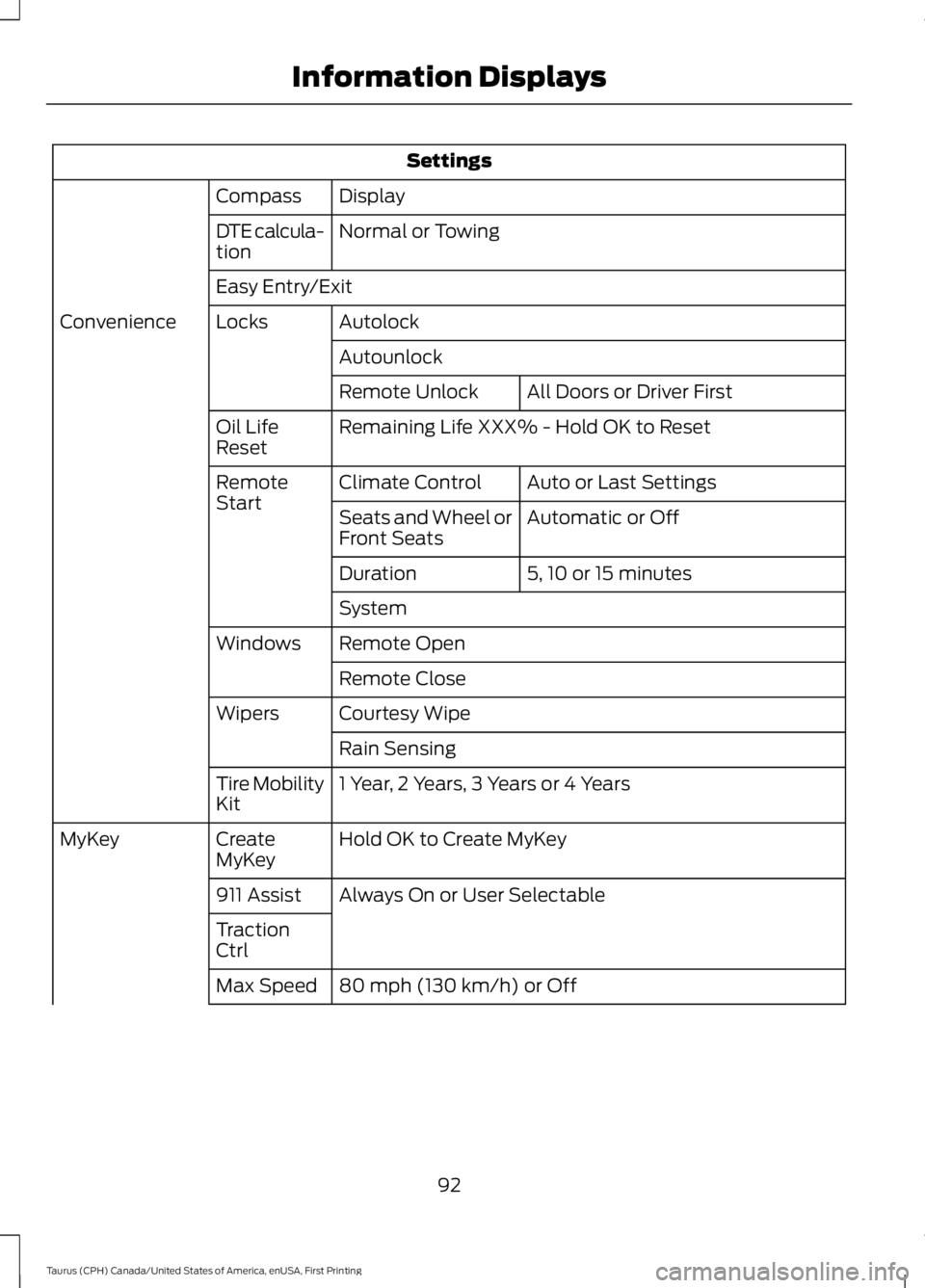
Settings
DisplayCompass
Normal or TowingDTE calcula-tion
Easy Entry/Exit
AutolockLocksConvenience
Autounlock
All Doors or Driver FirstRemote Unlock
Remaining Life XXX% - Hold OK to ResetOil LifeReset
Auto or Last SettingsClimate ControlRemoteStartAutomatic or OffSeats and Wheel orFront Seats
5, 10 or 15 minutesDuration
System
Remote OpenWindows
Remote Close
Courtesy WipeWipers
Rain Sensing
1 Year, 2 Years, 3 Years or 4 YearsTire MobilityKit
Hold OK to Create MyKeyCreateMyKeyMyKey
Always On or User Selectable911 Assist
TractionCtrl
80 mph (130 km/h) or OffMax Speed
92
Taurus (CPH) Canada/United States of America, enUSA, First Printing
Information Displays
Page 99 of 504
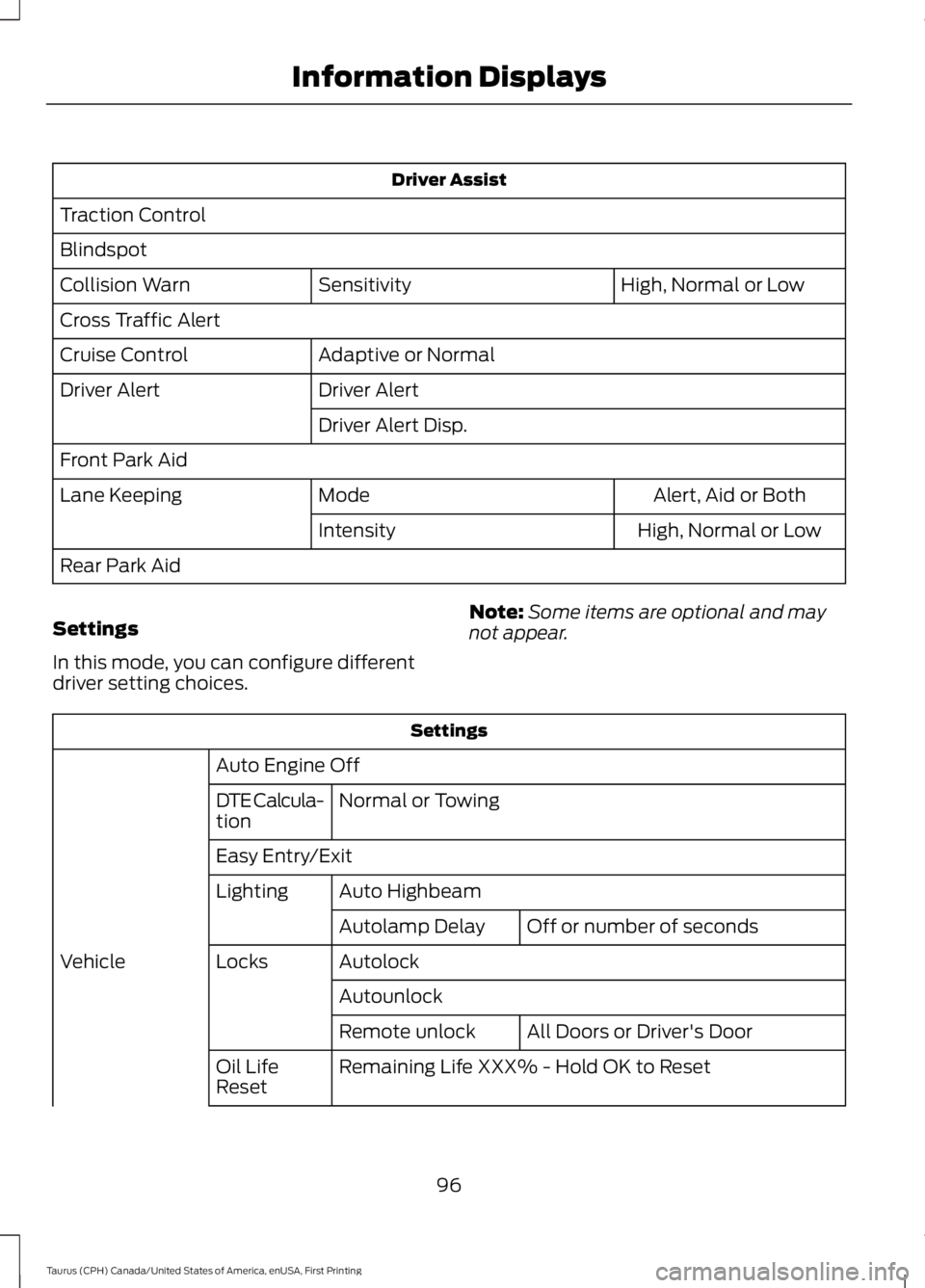
Driver Assist
Traction Control
Blindspot
High, Normal or LowSensitivityCollision Warn
Cross Traffic Alert
Adaptive or NormalCruise Control
Driver AlertDriver Alert
Driver Alert Disp.
Front Park Aid
Alert, Aid or BothModeLane Keeping
High, Normal or LowIntensity
Rear Park Aid
Settings
In this mode, you can configure differentdriver setting choices.
Note:Some items are optional and maynot appear.
Settings
Auto Engine Off
Normal or TowingDTE Calcula-tion
Easy Entry/Exit
Auto HighbeamLighting
Off or number of secondsAutolamp Delay
AutolockLocksVehicle
Autounlock
All Doors or Driver's DoorRemote unlock
Remaining Life XXX% - Hold OK to ResetOil LifeReset
96
Taurus (CPH) Canada/United States of America, enUSA, First Printing
Information Displays
Page 100 of 504
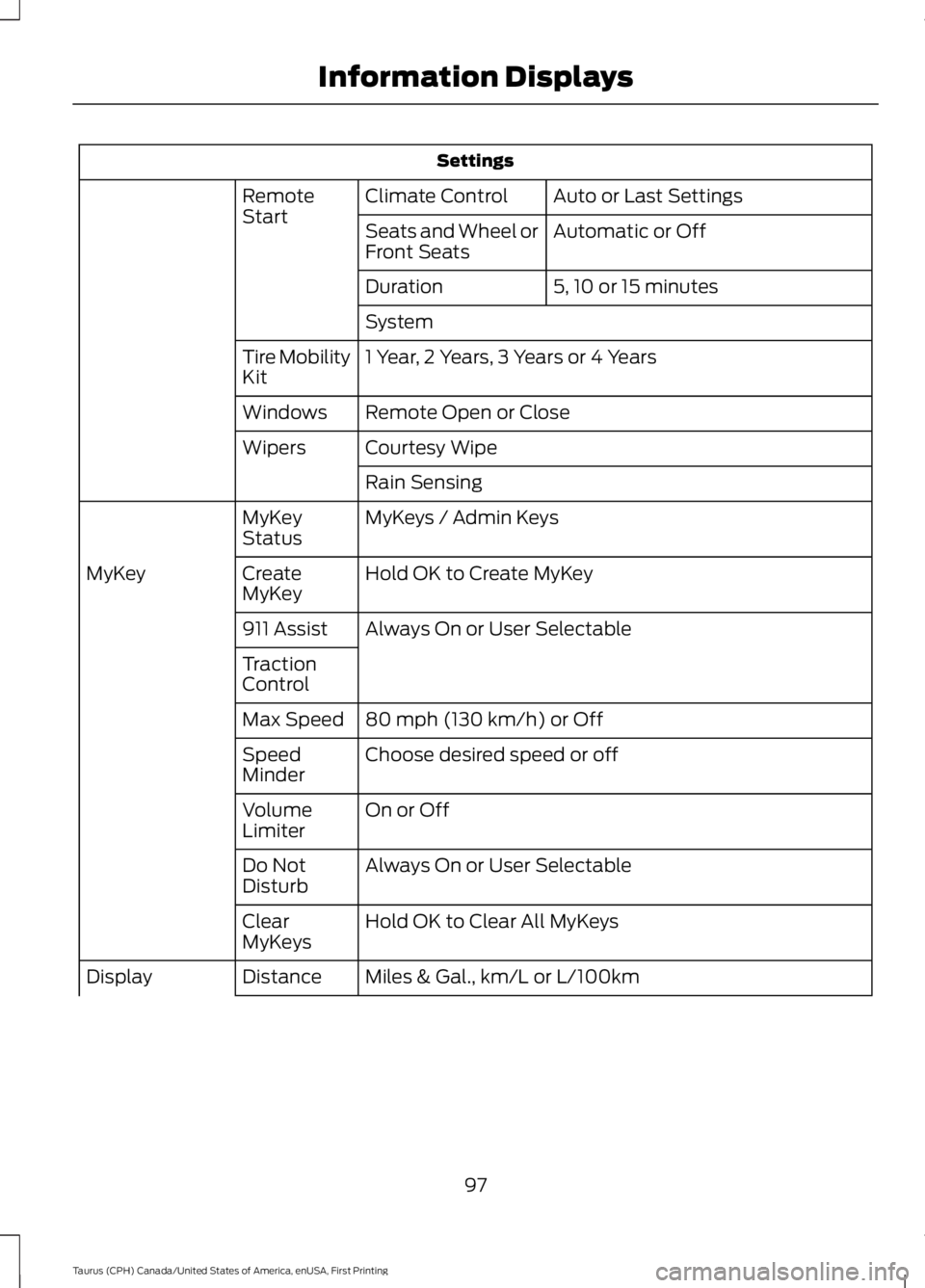
Settings
Auto or Last SettingsClimate ControlRemoteStartAutomatic or OffSeats and Wheel orFront Seats
5, 10 or 15 minutesDuration
System
1 Year, 2 Years, 3 Years or 4 YearsTire MobilityKit
Remote Open or CloseWindows
Courtesy WipeWipers
Rain Sensing
MyKeys / Admin KeysMyKeyStatus
Hold OK to Create MyKeyCreateMyKeyMyKey
Always On or User Selectable911 Assist
TractionControl
80 mph (130 km/h) or OffMax Speed
Choose desired speed or offSpeedMinder
On or OffVolumeLimiter
Always On or User SelectableDo NotDisturb
Hold OK to Clear All MyKeysClearMyKeys
Miles & Gal., km/L or L/100kmDistanceDisplay
97
Taurus (CPH) Canada/United States of America, enUSA, First Printing
Information Displays
Page 102 of 504

AdvanceTrac™
ActionMessage
The system detects a malfunction due to a blocked sensor.Service AdvanceTrac
The driver has disabled or enabled the traction control.AdvanceTrac Off On
Alarm
ActionMessage
Unauthorized entry triggered the alarm. See Anti-TheftAlarm (page 65).Vehicle Alarm To StopAlarm, Start Vehicle.
Automatic Engine Shutdown
ActionMessage
The engine is preparing to shutdown.Engine Shuts Off In{seconds to shut off:#0}Seconds
The engine has shutdown to help increase fuel economy.Engine Shut Off For FuelEconomy
The engine is preparing to shutdown. You can press OK onthe left steering wheel button to override the shutdown.Engine Shuts Off in{seconds to shut off:#0}Seconds Press Ok toOverride
Automatic High Beam Control
ActionMessage
The front camera sensor has reduced visibility. Clean thewindshield.Front Camera Low Visib-ility Clean Screen
The system requires service due to a malfunction. Contact anauthorized dealer.Front Camera Malfunc-tion Service Required
The front camera sensor has malfunctioned. Wait a shortperiod of time for the sensor to cool down.Front Camera Tempor-arily Not Available
99
Taurus (CPH) Canada/United States of America, enUSA, First Printing
Information Displays
Page 110 of 504
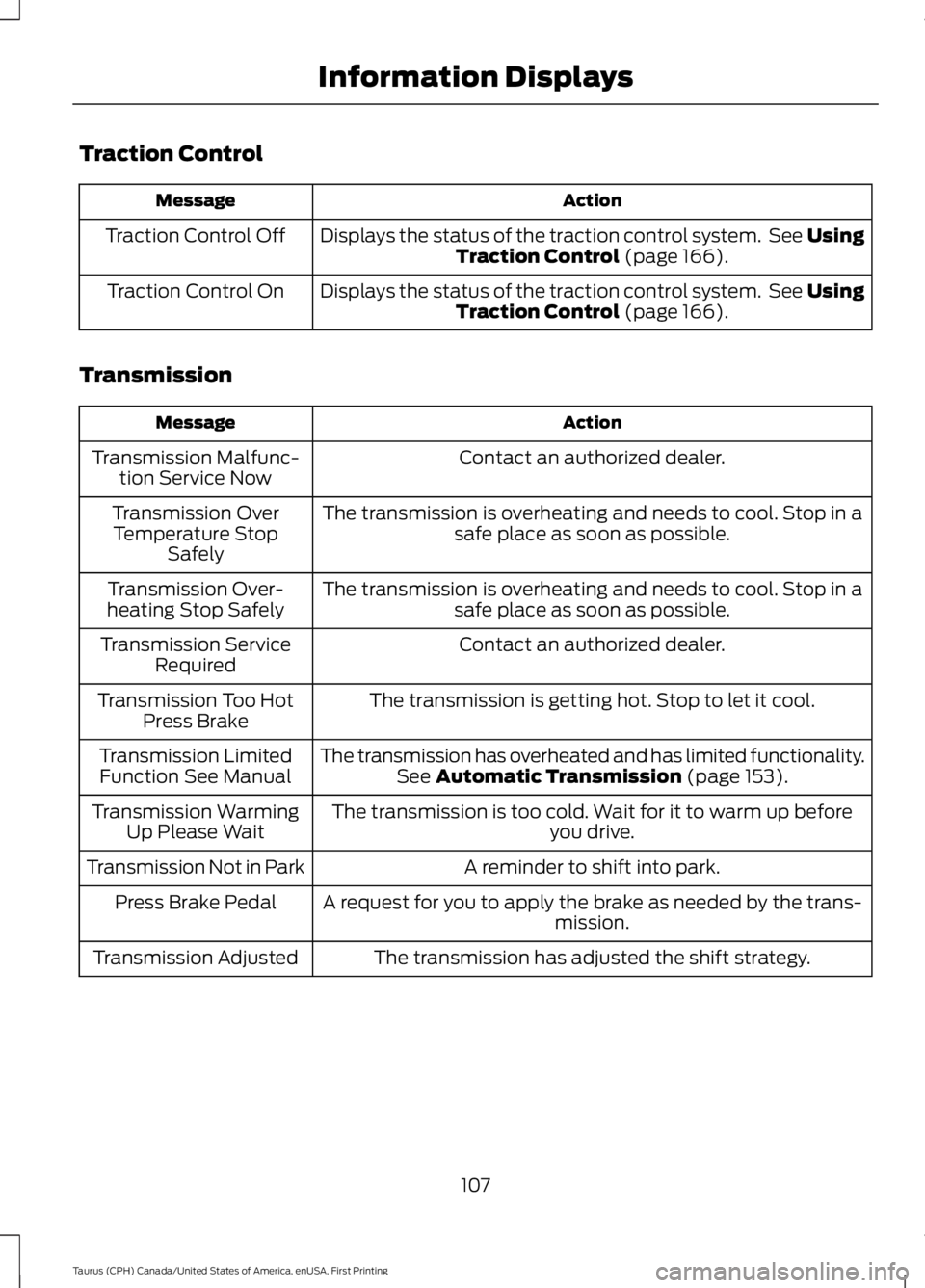
Traction Control
ActionMessage
Displays the status of the traction control system. See UsingTraction Control (page 166).Traction Control Off
Displays the status of the traction control system. See UsingTraction Control (page 166).Traction Control On
Transmission
ActionMessage
Contact an authorized dealer.Transmission Malfunc-tion Service Now
The transmission is overheating and needs to cool. Stop in asafe place as soon as possible.Transmission OverTemperature StopSafely
The transmission is overheating and needs to cool. Stop in asafe place as soon as possible.Transmission Over-heating Stop Safely
Contact an authorized dealer.Transmission ServiceRequired
The transmission is getting hot. Stop to let it cool.Transmission Too HotPress Brake
The transmission has overheated and has limited functionality.See Automatic Transmission (page 153).Transmission LimitedFunction See Manual
The transmission is too cold. Wait for it to warm up beforeyou drive.Transmission WarmingUp Please Wait
A reminder to shift into park.Transmission Not in Park
A request for you to apply the brake as needed by the trans-mission.Press Brake Pedal
The transmission has adjusted the shift strategy.Transmission Adjusted
107
Taurus (CPH) Canada/United States of America, enUSA, First Printing
Information Displays