2017 FORD TAURUS ABS
[x] Cancel search: ABSPage 88 of 504
•It may take a short time for the needleto reach full after leaving the gasstation. This is normal and dependsupon the slope of pavement at the gasstation.
•The fuel amount dispensed into thetank is a little less or more than thegauge indicated. This is normal anddepends upon the slope of pavementat the gas station.
•If the gas station nozzle shuts offbefore the tank is full, try a differentgas pump nozzle.
•There is a small reserve left in the tankwhen the fuel gauge reaches empty.
Low Fuel Reminder
A low fuel reminder triggers when thedistance to empty reaches 75 miles (120km), 50 miles (80 km), 25 miles (40 km),10 miles (20 km) and 0 miles (0 km) .
Variations:
Note:The low fuel warning anddistance-to-empty warning can appear atdifferent fuel gauge positions depending onfuel economy conditions. This variation isnormal.
WARNING LAMPS AND
INDICATORS
The following warning lamps andindicators alert you to a vehicle conditionthat may become serious. Some lampsilluminate when you start your vehicle tomake sure they work. If any lamps remainon after starting your vehicle, refer to therespective system warning lamp for furtherinformation.
Note:Some warning indicators appear inthe information display and function thesame as a warning lamp, but do not displaywhen you start your vehicle.
Adaptive Cruise Control (If Equipped)
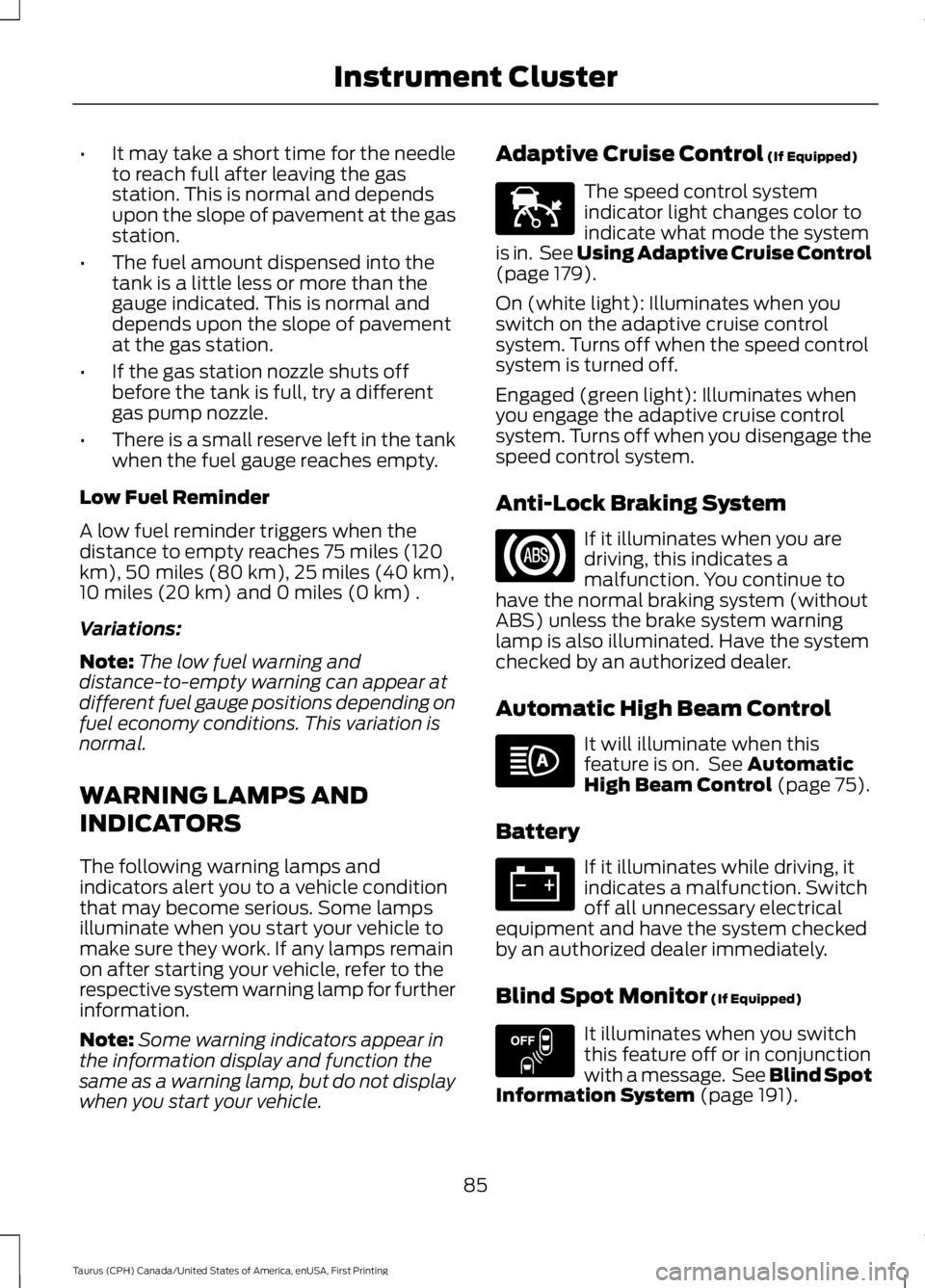
The speed control systemindicator light changes color toindicate what mode the systemis in. See Using Adaptive Cruise Control(page 179).
On (white light): Illuminates when youswitch on the adaptive cruise controlsystem. Turns off when the speed controlsystem is turned off.
Engaged (green light): Illuminates whenyou engage the adaptive cruise controlsystem. Turns off when you disengage thespeed control system.
Anti-Lock Braking System
If it illuminates when you aredriving, this indicates amalfunction. You continue tohave the normal braking system (withoutABS) unless the brake system warninglamp is also illuminated. Have the systemchecked by an authorized dealer.
Automatic High Beam Control
It will illuminate when thisfeature is on. See AutomaticHigh Beam Control (page 75).
Battery
If it illuminates while driving, itindicates a malfunction. Switchoff all unnecessary electricalequipment and have the system checkedby an authorized dealer immediately.
Blind Spot Monitor (If Equipped)
It illuminates when you switchthis feature off or in conjunctionwith a message. See Blind SpotInformation System (page 191).
85
Taurus (CPH) Canada/United States of America, enUSA, First Printing
Instrument ClusterE144524 E151262
Page 123 of 504
WARNINGS
Install the head restraint properly tohelp minimize the risk of neck injuryin the event of a crash.
Note:Adjust the seatback to an uprightdriving position before adjusting the headrestraint. Adjust the head restraint so thatthe top of it is level with the top of your headand as far forward as possible. Make surethat you remain comfortable. If you areextremely tall, adjust the head restraint toits highest position.
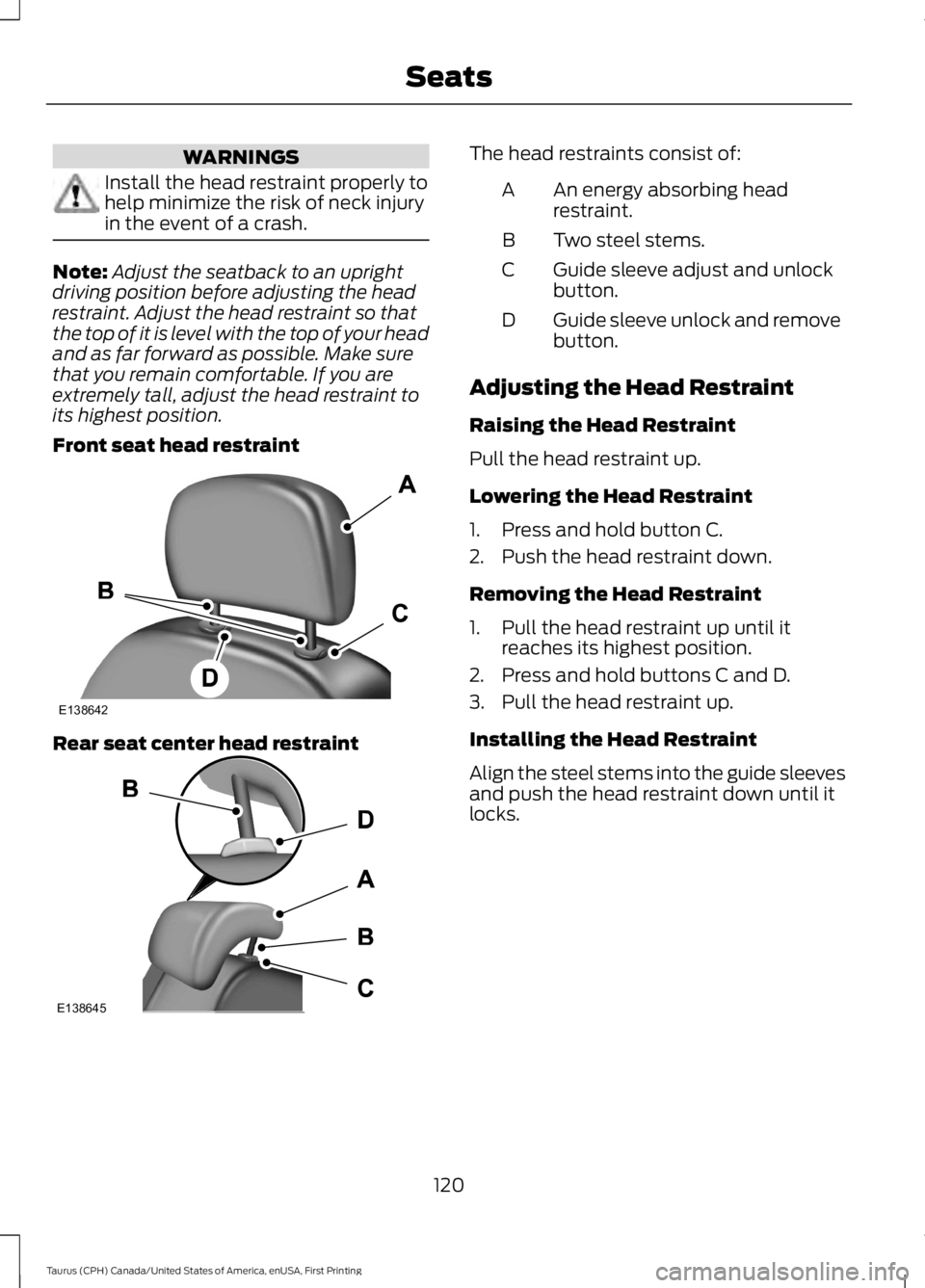
Front seat head restraint
Rear seat center head restraint
The head restraints consist of:
An energy absorbing headrestraint.A
Two steel stems.B
Guide sleeve adjust and unlockbutton.C
Guide sleeve unlock and removebutton.D
Adjusting the Head Restraint
Raising the Head Restraint
Pull the head restraint up.
Lowering the Head Restraint
1. Press and hold button C.
2. Push the head restraint down.
Removing the Head Restraint
1. Pull the head restraint up until itreaches its highest position.
2. Press and hold buttons C and D.
3. Pull the head restraint up.
Installing the Head Restraint
Align the steel stems into the guide sleevesand push the head restraint down until itlocks.
120
Taurus (CPH) Canada/United States of America, enUSA, First Printing
SeatsE138642 E138645
Page 124 of 504
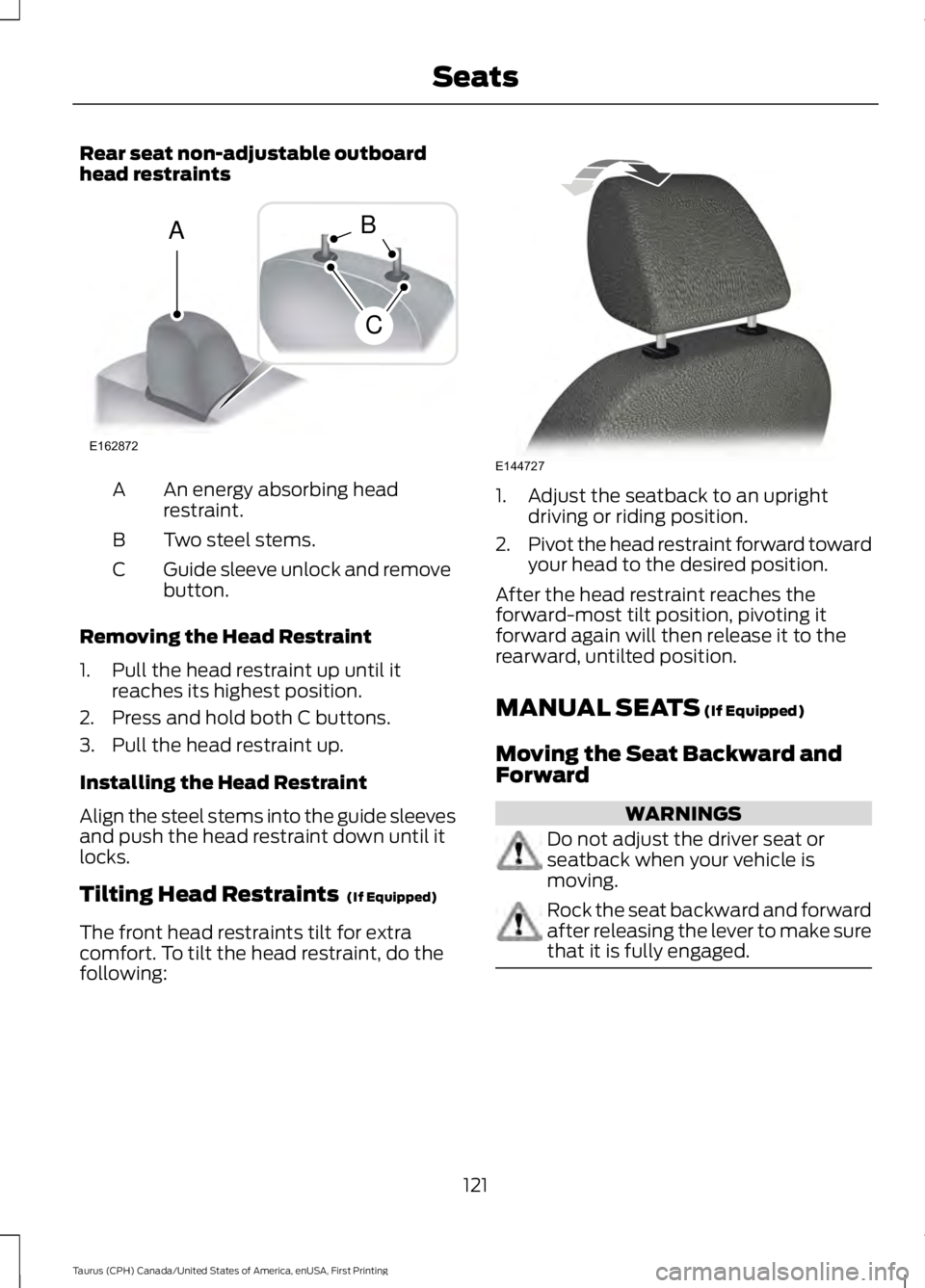
Rear seat non-adjustable outboardhead restraints
An energy absorbing headrestraint.A
Two steel stems.B
Guide sleeve unlock and removebutton.C
Removing the Head Restraint
1. Pull the head restraint up until itreaches its highest position.
2. Press and hold both C buttons.
3. Pull the head restraint up.
Installing the Head Restraint
Align the steel stems into the guide sleevesand push the head restraint down until itlocks.
Tilting Head Restraints (If Equipped)
The front head restraints tilt for extracomfort. To tilt the head restraint, do thefollowing:
1. Adjust the seatback to an uprightdriving or riding position.
2.Pivot the head restraint forward towardyour head to the desired position.
After the head restraint reaches theforward-most tilt position, pivoting itforward again will then release it to therearward, untilted position.
MANUAL SEATS (If Equipped)
Moving the Seat Backward andForward
WARNINGS
Do not adjust the driver seat orseatback when your vehicle ismoving.
Rock the seat backward and forwardafter releasing the lever to make surethat it is fully engaged.
121
Taurus (CPH) Canada/United States of America, enUSA, First Printing
SeatsE162872
A
C
B E144727
Page 146 of 504
SAFETY PRECAUTIONS
WARNINGS
Do not overfill the fuel tank. Thepressure in an overfilled tank maycause leakage and lead to fuel sprayand fire.
The fuel system may be underpressure. If you hear a hissing soundnear the fuel filler inlet, do not refueluntil the sound stops. Otherwise, fuel mayspray out, which could cause seriouspersonal injury.
Fuels can cause serious injury ordeath if misused or mishandled.
Flow of fuel through a fuel pumpnozzle can produce static electricity.This can cause a fire if you are fillingan ungrounded fuel container.
Fuel may contain benzene, which isa cancer-causing agent.
When refueling always shut theengine off and never allow sparks oropen flames near the fuel tank fillervalve. Never smoke or use a cell phonewhile refueling. Fuel vapor is extremelyhazardous under certain conditions. Avoidinhaling excess fumes.
Observe the following guidelines whenhandling automotive fuel:
•Extinguish all smoking materials andany open flames before refueling yourvehicle.
•Always turn off the vehicle beforerefueling.
•Automotive fuels can be harmful orfatal if swallowed. Fuel such asgasoline is highly toxic and ifswallowed can cause death orpermanent injury. If fuel is swallowed,call a physician immediately, even if nosymptoms are immediately apparent.The toxic effects of fuel may not bevisible for hours.
•Avoid inhaling fuel vapors. Inhaling toomuch fuel vapor of any kind can leadto eye and respiratory tract irritation.In severe cases, excessive or prolongedbreathing of fuel vapor can causeserious illness and permanent injury.
•Avoid getting fuel liquid in your eyes. Iffuel is splashed in the eyes, removecontact lenses (if worn), flush withwater for 15 minutes and seek medicalattention. Failure to seek propermedical attention could lead topermanent injury.
•Fuels can also be harmful if absorbedthrough the skin. If fuel is splashed onthe skin, clothing or both, promptlyremove contaminated clothing andwash skin thoroughly with soap andwater. Repeated or prolonged skincontact with fuel liquid or vapor causesskin irritation.
•Be particularly careful if you are takingAntabuse or other forms of Disulfiramfor the treatment of alcoholism.Breathing gasoline vapors could causean adverse reaction, serious personalinjury or sickness. If fuel is splashed onthe skin, wash the affected areasimmediately with plenty of soap andwater. Consult a physician immediatelyif you experience any adverse reactions.
143
Taurus (CPH) Canada/United States of America, enUSA, First Printing
Fuel and Refueling
Page 166 of 504
Should you start to slide while driving onsnowy or icy roads, turn the steering wheelin the direction of the slide until you regaincontrol.
Avoid sudden applications of power andquick changes of direction on snow andice. Apply the accelerator slowly andsteadily when starting from a full stop.
Avoid sudden braking as well. Although anAWD vehicle may accelerate better thana two-wheel drive vehicle in snow and ice,it won’t stop any faster, because as in othervehicles, braking occurs at all four wheels.Do not become overconfident as to roadconditions.
Make sure you allow sufficient distancebetween you and other vehicles forstopping. Drive slower than usual andconsider using one of the lower gears. Inemergency stopping situations, apply thebrake steadily. Since your vehicle isequipped with a four wheel (ABS), do not“pump” the brakes. See Hints on DrivingWith Anti-Lock Brakes (page 164).
Maintenance and Modifications
The suspension and steering systems onyour vehicle have been designed andtested to provide predictable performancewhether loaded or empty and durable loadcarrying capability. For this reason, FordMotor Company strongly recommends thatyou do not make modifications such asadding or removing parts (such as loweringkits or stabilizer bars) or by usingreplacement parts not equivalent to theoriginal factory equipment.
Any modifications to a vehicle that raisethe center of gravity can make it more likelythe vehicle will rollover as a result of a lossof control. Ford Motor Companyrecommends that caution be used withany vehicle equipped with a high load ordevice (such as ladder or luggage racks).
Failure to maintain your vehicle properlymay void the warranty, increase your repaircost, reduce vehicle performance andoperational capabilities and adverselyaffect driver and passenger safety.Frequent inspection of vehicle chassiscomponents is recommended if the vehicleis subjected to off-highway usage.
163
Taurus (CPH) Canada/United States of America, enUSA, First Printing
All-Wheel Drive (If Equipped)
Page 173 of 504

PRINCIPLE OF OPERATION
WARNINGS
To help avoid personal injury, pleaseread and understand the limitationsof the system as contained in thissection. Sensing is only an aid for some(generally large and fixed) objects whenmoving on a flat surface at parking speeds.Certain objects with surfaces that absorbultrasonic waves, surrounding vehicle'sparking aid systems, traffic controlsystems, fluorescent lamps, inclementweather, air brakes, and external motorsand fans may also affect the function ofthe sensing system; this may includereduced performance or a false activation.
To help avoid personal injury, alwaysuse caution when in reverse (R) andwhen using the sensing system.
This system is not designed toprevent contact with small or movingobjects. The system is designed toprovide a warning to assist the driver indetecting large stationary objects to avoiddamaging your vehicle. The system maynot detect smaller objects, particularlythose close to the ground.
Certain add-on devices such as largetrailer hitches, bike or surfboard racksand any device that may block thenormal detection zone of the system, maycreate false beeps.
Note:Keep the sensors, located on thebumper or fascia, free from snow, ice andlarge accumulations of dirt. If the sensorsare covered, the system’s accuracy can beaffected. Do not clean the sensors withsharp objects.
Note:If your vehicle sustains damage tothe bumper or fascia, leaving it misalignedor bent, the sensing zone may be alteredcausing inaccurate measurement ofobstacles or false alarms.
Note:The sensing system cannot be turnedoff when a MyKey is present. See Principleof Operation (page 51).
Note:If you attach certain add-on devicessuch as a trailer or bike rack, the rear sensingsystem may detect that add-on device andtherefore provide warnings. It is suggestedthat you disable the rear sensing systemwhen you attach an add-on device to yourvehicle to prevent these warnings.
The sensing system warns the driver ofobstacles within a certain range of yourvehicle. The system turns on automaticallywhenever you switch the ignition on.
You can turn the system on oroff by pressing the parking aidbutton. If your vehicle does nothave a parking aid button, the system canbe switched off through the informationdisplay menu or from the pop-up messagethat appears once you shift thetransmission into reverse (R). See GeneralInformation (page 89).
If a fault is present in the system, a warningmessage appears in the informationdisplay. See Information Messages(page 98).
REAR PARKING AID
The rear sensors are only active when thetransmission is in reverse (R). As yourvehicle moves closer to the obstacle, therate of the audible warning increases.When the obstacle is less than 12 in(30 cm) away, the warning soundscontinuously. If the system detects astationary or receding object farther than12 in (30 cm) from the corners of thebumper, the tone sounds for only threeseconds. Once the system detects anobject approaching, the warning soundsagain.
170
Taurus (CPH) Canada/United States of America, enUSA, First Printing
Parking AidsE139213
Page 174 of 504

Coverage area of up to 6 ft (1.8 m) fromthe rear bumper. There may be decreasedcoverage area at the outer corners of thebumper.
The system detects certain objects whilethe transmission is in reverse (R) :
•Your vehicle is moving toward astationary object at a speed of 3 mph(5 km/h) or less.
•Your vehicle is not moving, but amoving object is approaching the rearof your vehicle at a speed of 3 mph(5 km/h) or less.
•Your vehicle is moving at a speed ofless than 3 mph (5 km/h) and a movingobject is approaching the rear of yourvehicle at a speed of less than 3 mph(5 km/h).
The system provides audio warnings onlywhen your vehicle is moving or when yourvehicle is stationary and the detectedobstacle is less than 12 in (30 cm) awayfrom the bumper.
ACTIVE PARK ASSIST
WARNINGS
The system is designed to aid thedriver. It is not intended to replaceyour attention and judgment. You arestill responsible to drive with due care andattention.
At all times, you are responsible forcontrolling your vehicle, supervisingthe system and intervening, ifrequired. Failure to take care may result inthe loss of control of your vehicle, seriouspersonal injury or death.
The sensors may not detect objectsin heavy rain or other conditions thatcause interference.
Active park assist does not apply thebrakes under any circumstances.
Note:Keep the sensors, located on thebumper or fascia, free from snow, ice andlarge accumulations of dirt. Covered sensorscan affect the systems accuracy. Do notclean the sensors with sharp objects.
Note:The sensors may not detect objectswith surfaces that absorb ultrasonic waves.
Active Park Assist is an electric parking aidthat uses ultrasonic sensors. The systemdetects an available parallel parking spaceand automatically steers your vehicle intothe space (hands-free) while you controlthe accelerator, gearshift and brakes. Thesystem visually and audibly instructs youto park your vehicle.
The system may not function correctly ifsomething passes between the frontbumper and the parking space (apedestrian or cyclist) or if the edge of theneighboring parked vehicle is high off theground (for example, a bus, tow truck orflatbed truck). If you are uncomfortablewith the proximity to any vehicle or object,you may choose to override the system.
171
Taurus (CPH) Canada/United States of America, enUSA, First Printing
Parking AidsE130178
Page 193 of 504
•The road has no or poor lane markingsin the camera field-of-view.
•The camera is obscured or unable todetect the lane markings due toenvironmental conditions (significantsun angles, shadows, snow, heavy rainor fog), traffic conditions (following alarge vehicle that is blocking orshadowing the lane), or vehicleconditions (poor headlampillumination).
See Troubleshooting for additionalinformation.
Green: Indicates that the system isavailable or ready to provide a warning orintervention, on the indicated side(s).
Yellow: Indicates that the system isproviding or has just provided a lanekeeping aid intervention.
Red: Indicates that the system is providingor has just provided a lane keeping alertwarning.
The system can be temporarily suppressedat any time by the following:
•Quick braking.
•Fast acceleration.
•Using the turn signal indicator.
•Evasive steering maneuver.
Troubleshooting
Why is the feature not available (line markings are gray) when I can see the lane markingson the road?
Vehicle speed is outside the operational range of the feature
Sun is shining directly into the camera lens
Quick intentional lane change
Staying too close to the lane marking
Driving at high speeds in curves
The last Alert warning or Aid intervention occurred a short time ago
Ambiguous lane markings (mainly in construction zones)
Rapid transition from light to dark or vice versa
Sudden offset in lane markings
ABS or AdvanceTrac activation
Camera blockage due to dirt, grime, fog, frost or water on the windshield
Driving too close to the vehicle in front of you
Transitioning between no lane markings to lane markings or vice versa
Standing water on the road
Faint lane markings (partial yellow lane markings on concrete roads)
190
Taurus (CPH) Canada/United States of America, enUSA, First Printing
Driving Aids