2017 FORD TAURUS reset
[x] Cancel search: resetPage 126 of 504
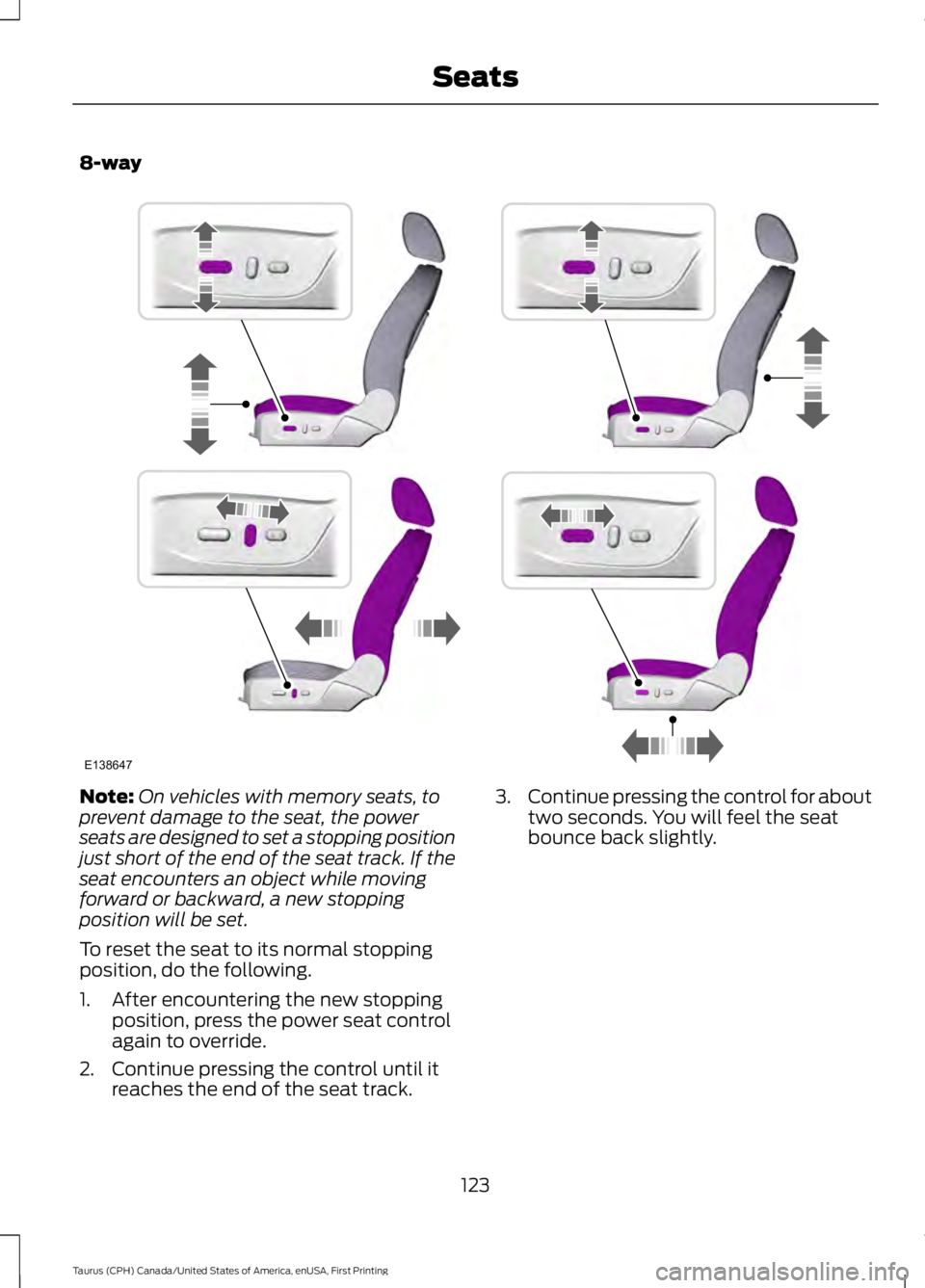
8-way
Note:On vehicles with memory seats, toprevent damage to the seat, the powerseats are designed to set a stopping positionjust short of the end of the seat track. If theseat encounters an object while movingforward or backward, a new stoppingposition will be set.
To reset the seat to its normal stoppingposition, do the following.
1. After encountering the new stoppingposition, press the power seat controlagain to override.
2. Continue pressing the control until itreaches the end of the seat track.
3.Continue pressing the control for abouttwo seconds. You will feel the seatbounce back slightly.
123
Taurus (CPH) Canada/United States of America, enUSA, First Printing
SeatsE138647
Page 128 of 504
MEMORY FUNCTION (If Equipped)
WARNINGS
Before activating the memory seat,make sure that the area immediatelysurrounding the seat is clear ofobstructions and that all occupants areclear of moving parts.
Do not use the memory functionwhen your vehicle is moving.
This function automatically recalls theposition of these features.
•Driver seat.
•Power mirrors.
•Optional power adjustable pedals.
•Optional power steering column.
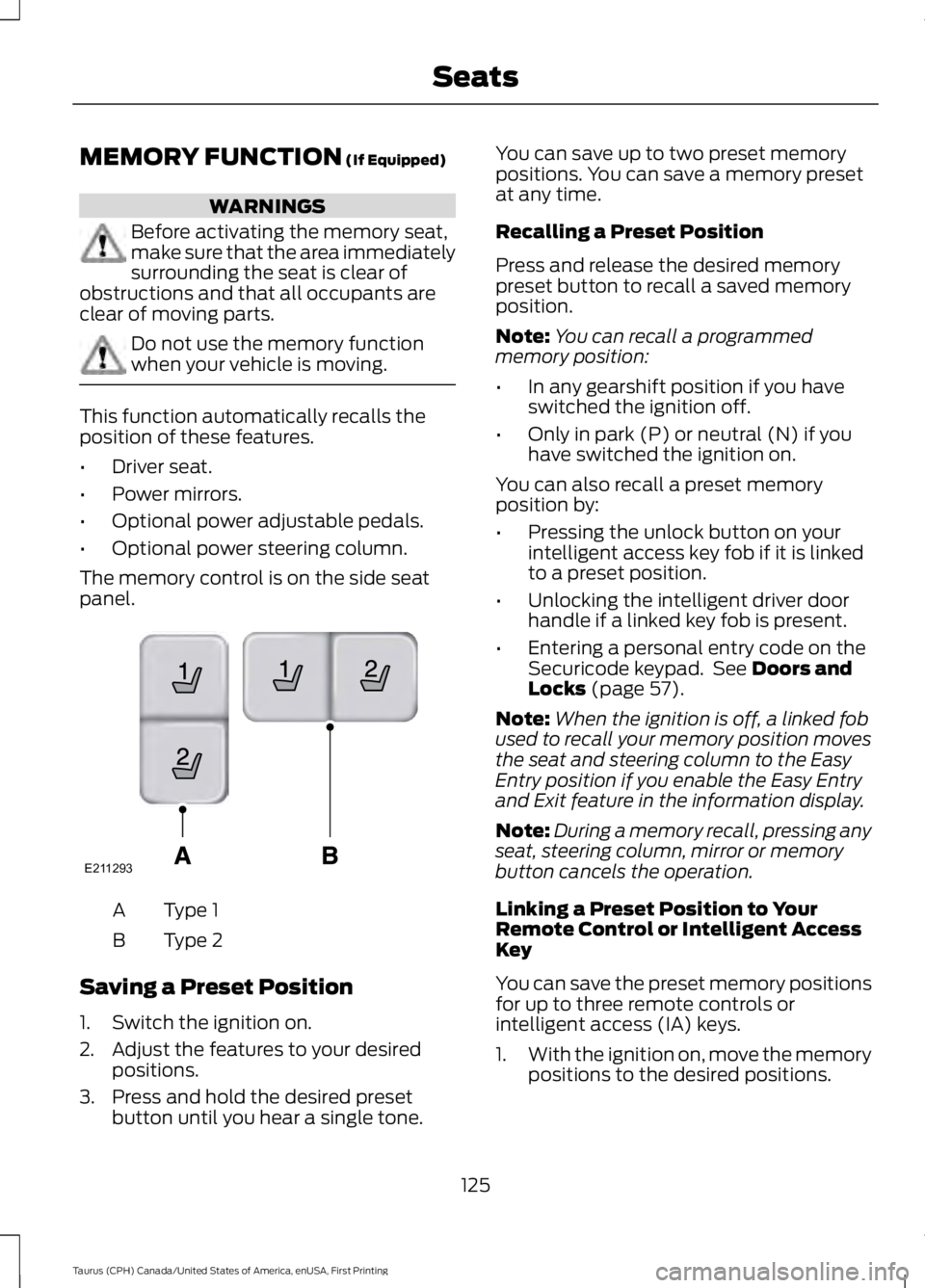
The memory control is on the side seatpanel.
Type 1A
Type 2B
Saving a Preset Position
1. Switch the ignition on.
2. Adjust the features to your desiredpositions.
3. Press and hold the desired presetbutton until you hear a single tone.
You can save up to two preset memorypositions. You can save a memory presetat any time.
Recalling a Preset Position
Press and release the desired memorypreset button to recall a saved memoryposition.
Note:You can recall a programmedmemory position:
•In any gearshift position if you haveswitched the ignition off.
•Only in park (P) or neutral (N) if youhave switched the ignition on.
You can also recall a preset memoryposition by:
•Pressing the unlock button on yourintelligent access key fob if it is linkedto a preset position.
•Unlocking the intelligent driver doorhandle if a linked key fob is present.
•Entering a personal entry code on theSecuricode keypad. See Doors andLocks (page 57).
Note:When the ignition is off, a linked fobused to recall your memory position movesthe seat and steering column to the EasyEntry position if you enable the Easy Entryand Exit feature in the information display.
Note:During a memory recall, pressing anyseat, steering column, mirror or memorybutton cancels the operation.
Linking a Preset Position to YourRemote Control or Intelligent AccessKey
You can save the preset memory positionsfor up to three remote controls orintelligent access (IA) keys.
1.With the ignition on, move the memorypositions to the desired positions.
125
Taurus (CPH) Canada/United States of America, enUSA, First Printing
SeatsE211293
Page 129 of 504
2. Press and hold the desired presetbutton for five seconds. A tone soundsafter about two seconds. Continueholding until you hear a second tone.
3. Within three seconds, press the lockbutton on the remote control you arelinking.
To unlink a remote control, follow thesame procedure – except in Step 3, pressthe unlock button on the remote control.
Easy Entry and Exit Feature (If
Equipped)
If you enable the easy entry and exitfeature, it automatically moves the driverseat position rearward up to 2 in (5 cm)and the steering column up and forwardwhen you switch the ignition off.
When you switch the ignition on, the driverseat and steering column return to theprevious position.
You can enable or disable this feature inthe information display. See InformationDisplays (page 89).
REAR SEATS
Split-folding Rear Seat
WARNING
Before returning the seatback to itsoriginal position, make sure thatcargo or any objects are not trappedbehind the seatback. After returning theseatback to its original position, pull on theseatback to make sure that it has fullylatched. An unlatched seat may becomedangerous in the event of a sudden stopor crash.
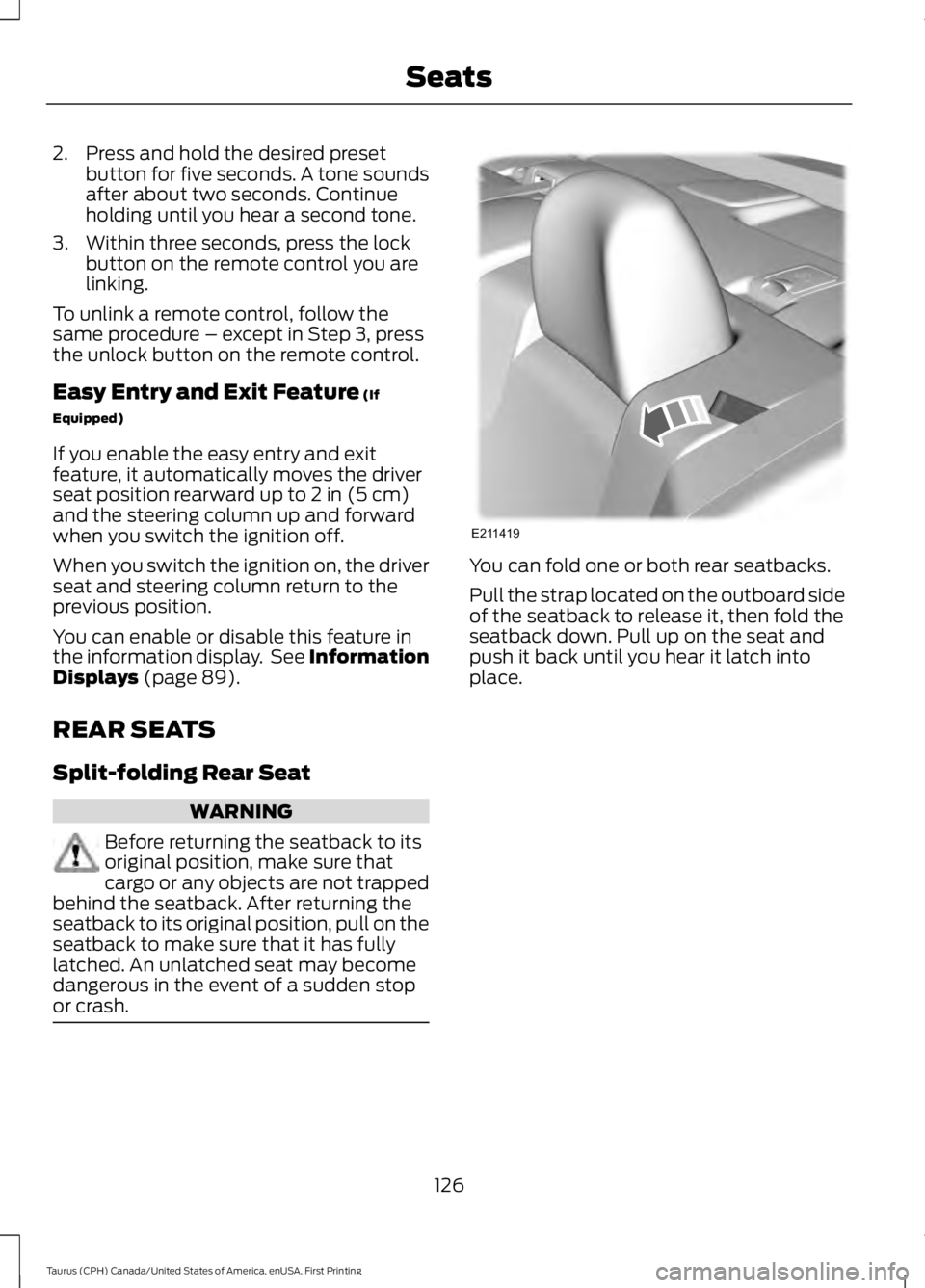
You can fold one or both rear seatbacks.
Pull the strap located on the outboard sideof the seatback to release it, then fold theseatback down. Pull up on the seat andpush it back until you hear it latch intoplace.
126
Taurus (CPH) Canada/United States of America, enUSA, First Printing
SeatsE211419
Page 143 of 504
Within 20 seconds of switching the engineoff, press the brake pedal and press thepush button ignition switch. After 20seconds, you can no longer start yourvehicle if it does not detect a valid passivekey.
Once your vehicle starts, it remains runninguntil you press the push button ignitionswitch, even if your vehicle does not detecta valid passive key. If you open and closea door while your vehicle is running, thesystem searches for a valid passive key.You cannot start your vehicle if the systemdoes not detect a valid passive key within20 seconds.
Failure to Start
If you cannot start the engine after threeattempts, wait 10 seconds and follow thisprocedure:
1. Fully depress the brake pedal.
2. Shift into park (P).
3.Fully depress the accelerator pedal andhold it there.
4. Start the engine.
Automatic Engine Shutdown
For vehicles with a keyless ignition, thisfeature automatically shuts down theengine if it has been idling for an extendedperiod. The ignition also turns off in orderto save battery power. Before your vehicleshuts down, a message appears in theinformation display showing a timercounting down from 30 seconds. If you donot intervene within 30 seconds, yourvehicle shuts down. Another messageappears in the information display toinform you that your vehicle has shut downto save fuel. Start your vehicle as younormally do.
Automatic Engine Shutdown Override
Note:You cannot permanently switch offthe automatic shutdown feature. When youswitch it off temporarily, it turns on at thenext ignition cycle.
You can stop the shutdown, or reset thetimer, at any point before the 30-secondcountdown has expired by doing any of thefollowing:
•You can reset the timer by interactingwith your vehicle, for example pressingthe brake or accelerator pedal.
•You can temporarily switch off theshutdown feature any time the ignitionis on using the information display. SeeInformation Displays (page 89). Thefeature only remains off for the currentignition cycle.
•During the 30-second countdown, thesystem prompts you to press OK orRESET to temporarily switch thefeature off for the current ignition cycleonly.
Stopping the Engine When YourVehicle is Stationary
Vehicles with an Ignition Key
1. Shift into park (P).
2. Switch the ignition off.
3. Apply the parking brake.
Vehicles with Keyless Start
1. Shift into park (P).
2. Press the push button ignition switch.
3. Apply the parking brake.
Note:The ignition, all electrical circuits andall warning lamps and indicators will beturned off.
Note:If the engine is idling for 30 minutes,the ignition and engine automatically shutdown.
140
Taurus (CPH) Canada/United States of America, enUSA, First Printing
Starting and Stopping the Engine
Page 152 of 504
5. Insert a fuel pump nozzle or the fuelfiller funnel provided with your vehiclein to the fuel tank filler pipe opening.This action should dislodge any debristhat may be preventing the fuel fillerinlet from fully closing.
Note: If this action corrects the problemthe message may not reset immediately. Ifthe message remains and the service enginesoon warning lamp appears in theinformation display, have your vehiclechecked as soon as possible.
FUEL CONSUMPTION
The advertised capacity is the indicatedcapacity and the empty reserve combined.In addition, the fuel tank contains an emptyreserve. Empty reserve is the amount offuel in the fuel tank after the fuel gaugeindicates empty.
Note:The amount of fuel in the emptyreserve varies and should not be relied uponto increase driving range.
•The usable capacity of the fuel tank isthe amount of fuel that you can add tothe fuel tank when the fuel gaugeindicates empty, before the first fuelfiller nozzle automatic shutoff event.
•The advertised capacity is equal to thevolumetric difference between actualfuel fill before the first fuel filler nozzleautomatic shutoff event and the fuelquantity when the fuel gauge indicatesempty. See Capacities andSpecifications (page 297). It is theusable capacity minus the emptyreserve.
•Due to the empty reserve, you may beable to add more fuel than theadvertised capacity of the fuel tankwhen the fuel gauge indicates empty.
Filling the Fuel Tank
For consistent results when refueling:
•Turn the ignition off before fueling; aninaccurate reading results if the engineis left running.
•Use the same fill rate(low-medium-high) each time the tankis filled.
•Allow no more than one automaticshut-off when refueling.
Results are most accurate when the fillingmethod is consistent.
Calculating Fuel Economy
Do not measure fuel economy during thefirst 1,000 mi (1,600 km) of driving (this isyour engine’s break-in period). A moreaccurate measurement is obtained after2,000 mi (3,200 km) to 3,000 mi(4,800 km). Also, fuel expense, frequencyof fill ups or fuel gauge readings are notaccurate ways to measure fuel economy.
1.Fill the fuel tank completely and recordthe initial odometer reading.
2. Each time you fill the fuel tank, recordthe amount of fuel added.
3. After at least three fill ups, fill the fueltank and record the current odometerreading.
4. Subtract your initial odometer readingfrom the current odometer reading.
To calculate L/100 km (liters per 100kilometers) fuel consumption, multiply theliters used by 100, then divide by kilometerstraveled. To calculate MPG (miles pergallon) fuel consumption, divide milestraveled by gallons used.
149
Taurus (CPH) Canada/United States of America, enUSA, First Printing
Fuel and Refueling
Page 160 of 504
USING ALL-WHEEL DRIVE (If
Equipped)
All-wheel drive uses all four wheels topower the vehicle. This increases traction,enabling you to drive over terrain and roadconditions that a conventional two-wheeldrive vehicle cannot. The AWD system isactive all the time and requires no inputfrom the operator.
Note:Your AWD vehicle is not intended foroff-road use. The AWD feature gives yourvehicle some limited off-road capabilitiesin which driving surfaces are relatively level,obstruction-free and otherwise similar tonormal on-road driving conditions.Operating your vehicle under other thanthose conditions could subject the vehicleto excessive stress which might result indamage which is not covered under yourwarranty.
Note: The Power Transfer Unit (PTU) inTaurus SHO™ performance packagevehicles does not require any normalscheduled maintenance. The system iselectronically monitored and notifies thedriver of required service by displaying themessage Change AWD Power TransferUnit Lube in the information display. ThePTU lubricant will be more likely to requirea fluid change if the vehicle has experiencedextended periods of extreme or severe dutycycle driving. Do not check or change thePTU lubricant unless the unit shows signsof leakage or a message indicating requiredservice is displayed. Contact an authorizeddealer for service if the PTU was submergedin water and to reset the PTU lube lifemonitor.
Note:When an AWD system fault ispresent, the warning Check AWD displaysin the information display. The AWD systemis not functioning correctly and defaultedto front-wheel drive. When this warningdisplays, have your vehicle serviced at anauthorized dealer.
Note: The AWD OFF message may alsoappear in the information display if the AWDsystem overheats and defaults tofront-wheel drive. This may occur if thevehicle is operated in extreme conditionswith excessive wheel slip, such as deepsand. To resume normal AWD function assoon as possible, stop the vehicle in a safelocation and stop the engine for at least 10minutes. After the engine has beenrestarted and the AWD system hasadequately cooled, the AWD OFF messagewill turn off and normal AWD functionreturns. If the engine is not stopped, theAWD OFF message turns off when thesystem cools and normal AWD functionreturns.
157
Taurus (CPH) Canada/United States of America, enUSA, First Printing
All-Wheel Drive (If Equipped)
Page 183 of 504

The indicator appears in theinformation display.
The current gap setting and SET alsoappears in the instrument cluster.
Setting the Adaptive Cruise Speed
1. Drive to desired speed.
2. Press and release SET+ or SET-.
3. Take your foot off the acceleratorpedal.
4. The information display will show agreen indicator light, current gapsetting and desired set speed.
5. A vehicle graphic illuminates if there isa vehicle detected in front of you.
Note:When adaptive cruise control isactive, the speedometer may vary slightlyfrom the set speed displayed in theinformation display.
Following a Vehicle
WARNINGS
When following a vehicle, yourvehicle does not decelerateautomatically to a stop, nor doesyour vehicle always decelerate quicklyenough to avoid a crash without driverintervention. Always apply the brakes whennecessary. Failing to do so may result in acrash, serious injury or death.
Adaptive cruise control only warnsof vehicles detected by the radarsensor. In some cases there may beno warning or a delayed warning. Alwaysapply the brakes when necessary. Failureto do so may result in a crash, serious injuryor death.
Note:The brakes may emit a sound whenmodulated by the adaptive cruise controlsystem.
When a vehicle ahead of you enters thesame lane or a slower vehicle is ahead inthe same lane, the vehicle speed adjuststo maintain a preset gap distance. Thedistance setting is adjustable.
The lead vehicle graphic will illuminate.
To help you pass a vehicle in front of you,the adaptive cruise control system mayprovide a small temporary accelerationwhen you switch on your left turn signalwhile following a lead car.
Your vehicle maintains a consistent gapfrom the vehicle ahead until:
•The vehicle in front of you acceleratesto a speed above the set speed.
•The vehicle in front of you moves outof your lane or out of view.
•The vehicle speed falls below 12 mph(20 km/h).
•A new gap distance is set.
180
Taurus (CPH) Canada/United States of America, enUSA, First Printing
Cruise ControlE144529 E173594 E173595
Page 190 of 504

System Display
When active the system will runautomatically in the background and onlyissue a warning if required. You can viewthe status at any time using theinformation display. See GeneralInformation (page 89).
The alertness level is shown by six stepsin a colored bar.
The current assessment of your alertnessis within a typical range.
The current assessment of your alertnessindicates that you should rest as soon assafely possible.
The status bar will travel from left to rightas the calculated alertness leveldecreases. As the rest icon is approachedthe color turns from green to yellow to red.
The yellow position indicates the firstwarning is active and the red positionindicates the second warning is active.
Note:If you have recently received awarning; you should consider resting, evenif the current assessment is within thetypical range.
Note:If the camera sensor cannot track theroad lane markings or if your vehicle speeddrops below approximately 40 mph(64 km/h), the alertness level will changeto grey for a short time and the informationdisplay will inform you that the system isunavailable.
Resetting the System
You can reset the system by either:
•Switching the ignition off and on.
•Stopping the vehicle and then openingand closing the driver’s door.
LANE KEEPING SYSTEM (If
Equipped)
WARNINGS
The system is designed to aid thedriver. It is not intended to replaceyour attention and judgment. You arestill responsible to drive with due care andattention.
At all times, you are responsible forcontrolling your vehicle, supervisingthe system and intervening, ifrequired. Failure to take care may result inthe loss of control of your vehicle, seriouspersonal injury or death.
The system is designed to aid thedriver. It is not intended to replaceyour attention and judgment. You arestill responsible to drive with due care andattention.
In cold and severe weatherconditions the system may notfunction. Rain, snow and spray canall limit sensor performance.
If damage occurs in the immediatearea surrounding the sensor, haveyour vehicle checked as soon aspossible.
187
Taurus (CPH) Canada/United States of America, enUSA, First Printing
Driving AidsE131358 E131359