2017 FORD FUSION ENERGI ECU
[x] Cancel search: ECUPage 26 of 526

WARNINGS
Depending on where you secure achild restraint, and depending on thechild restraint design, you may blockaccess to certain safety belt buckleassemblies or LATCH lower anchors,rendering those features potentiallyunusable. To avoid risk of injury, occupantsshould only use seating positions wherethey are able to be properly restrained.
The LATCH system is composed of threevehicle anchor points: two lower anchorslocated where seat back and seat cushionmeet (called the seat bight) and one toptether anchor located behind that seatingposition.
LATCH compatible child safety seats havetwo rigid or webbing mountedattachments that connect to the two loweranchors at the LATCH equipped seatingpositions in your vehicle. This type ofattachment method eliminates the needto use safety belts to attach the child seat,however the safety belt can still be usedto attach the child seat. For forward-facingchild seats, the top tether strap must alsobe attached to the proper top tetheranchor, if a top tether strap has beenprovided with your child seat.
Your vehicle has LATCH lower anchors forchild seat installation at the seatingpositions marked with the child seatsymbol.
The LATCH anchors are located at the rearsection of the rear seat between thecushion and seat back below the symbolsas shown. Follow the child seatmanufacturer's instructions to properlyinstall a child seat with LATCHattachments. Follow the instructions onattaching child safety seats with tetherstraps.
Attach LATCH lower attachments of thechild seat only to the anchors shown.
Use of Inboard Lower Anchors from theOutboard Seating Positions (CenterSeating Use)
WARNING
The standardized spacing for LATCHlower anchors is 11 inches (28centimeters) center to center. Do notuse LATCH lower anchors for the centerseating position unless the child seatmanufacturer's instructions permit andspecify using anchors spaced at least asfar apart as those in this vehicle.
23
Fusion Energi / Fusion Hybrid (CC7) Hybrid Electric Vehicle (HEV)/Plug-In Hybrid Electric Vehicle (PHEV), Canada/United States of America, enUSA, Edition date: 201602, Second Printing
Child SafetyE142535 E144054
Page 27 of 526
The lower anchors at the center of thesecond row rear seat are spaced 18 inches(46 centimeters) apart. A child seat withrigid LATCH attachments cannot beinstalled at the center seating position.LATCH compatible child seats (withattachments on belt webbing) can only beused at this seating position provided thatthe child seat manufacturer's instructionspermit use with the anchor spacing stated.Do not attach a child seat to any loweranchor if an adjacent child seat is attachedto that anchor.
Each time you use the safety seat, checkthat the seat is properly attached to thelower anchors and tether anchor, ifapplicable. Tug the child seat from side toside and forward and back where it issecured to your vehicle. The seat shouldmove less than one inch when you do thisfor a proper installation.
If the safety seat is not anchored properly,the risk of a child being injured in a crashgreatly increases.
Combining Safety Belt and LATCHLower Anchors for Attaching ChildSafety Seats
When used in combination, either thesafety belt or the LATCH lower anchorsmay be attached first, provided a properinstallation is achieved. Attach the tetherstrap afterward, if included with the childseat.
Using Tether Straps
Many forward-facing child safetyseats include a tether strapwhich extends from the back ofthe child safety seat and hooks to ananchoring point called the top tetheranchor. Tether straps are available as anaccessory for many older safety seats.
Contact the manufacturer of your childseat for information about ordering atether strap, or to obtain a longer tetherstrap if the tether strap on your safety seatdoes not reach the appropriate top tetheranchor in your vehicle.
Once the child safety seat has beeninstalled using either the safety belt, thelower anchors of the LATCH system, orboth, you can attach the top tether strap.
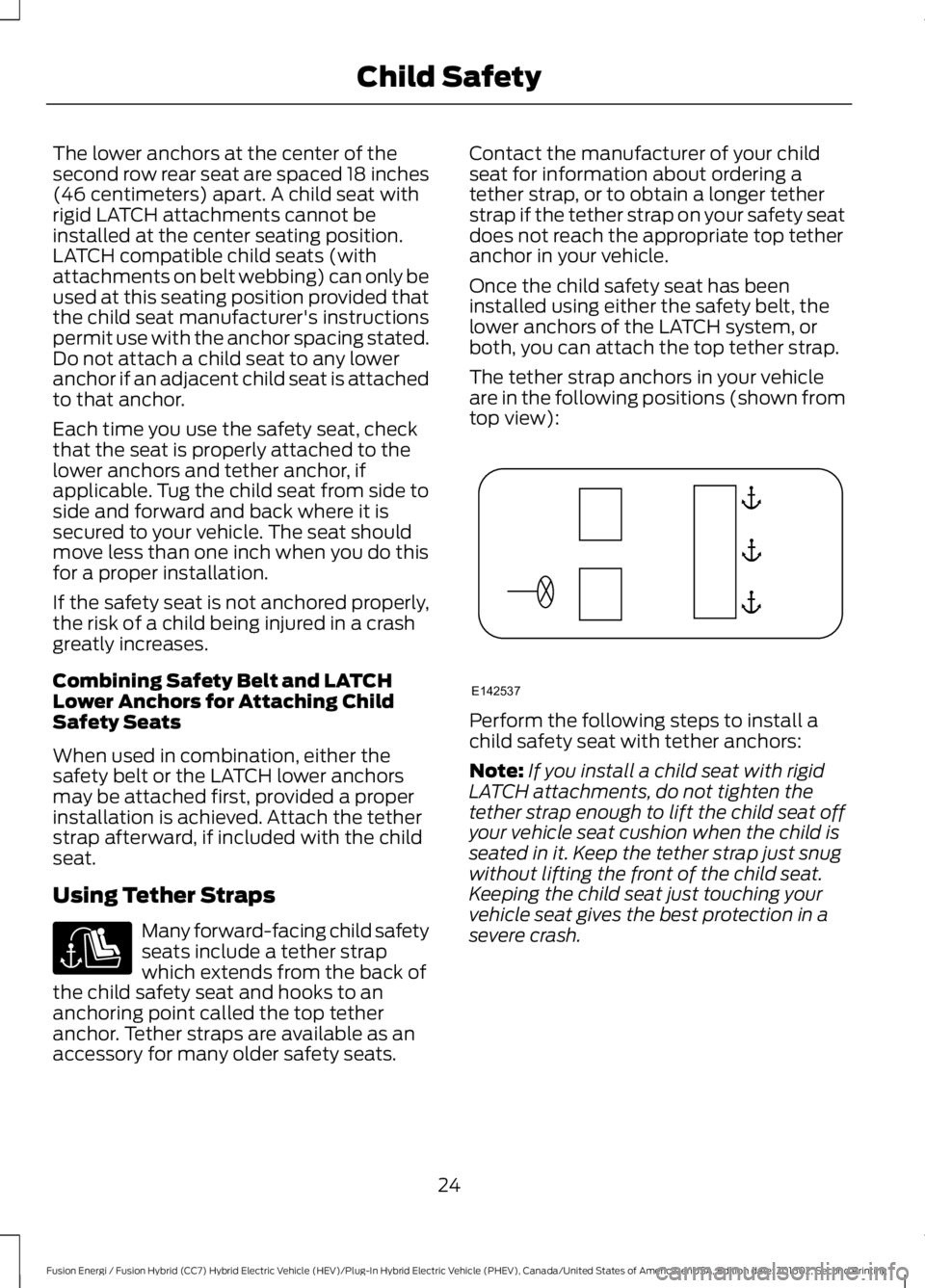
The tether strap anchors in your vehicleare in the following positions (shown fromtop view):
Perform the following steps to install achild safety seat with tether anchors:
Note:If you install a child seat with rigidLATCH attachments, do not tighten thetether strap enough to lift the child seat offyour vehicle seat cushion when the child isseated in it. Keep the tether strap just snugwithout lifting the front of the child seat.Keeping the child seat just touching yourvehicle seat gives the best protection in asevere crash.
24
Fusion Energi / Fusion Hybrid (CC7) Hybrid Electric Vehicle (HEV)/Plug-In Hybrid Electric Vehicle (PHEV), Canada/United States of America, enUSA, Edition date: 201602, Second Printing
Child Safety E142537
Page 34 of 526
The seatbelt pretensioners at the frontseating positions are designed to tightenthe seatbelts when activated. In frontaland near-frontal crashes, the seatbeltpretensioners may be activated alone or,if the crash is of sufficient severity, togetherwith the front airbags. The pretensionersmay also activate when the Safety Canopydeploys.
FASTENING THE SEATBELTS
Standard belts shown, inflatable beltssimilar
The front outboard and rear safetyrestraints in the vehicle are combinationlap and shoulder belts.
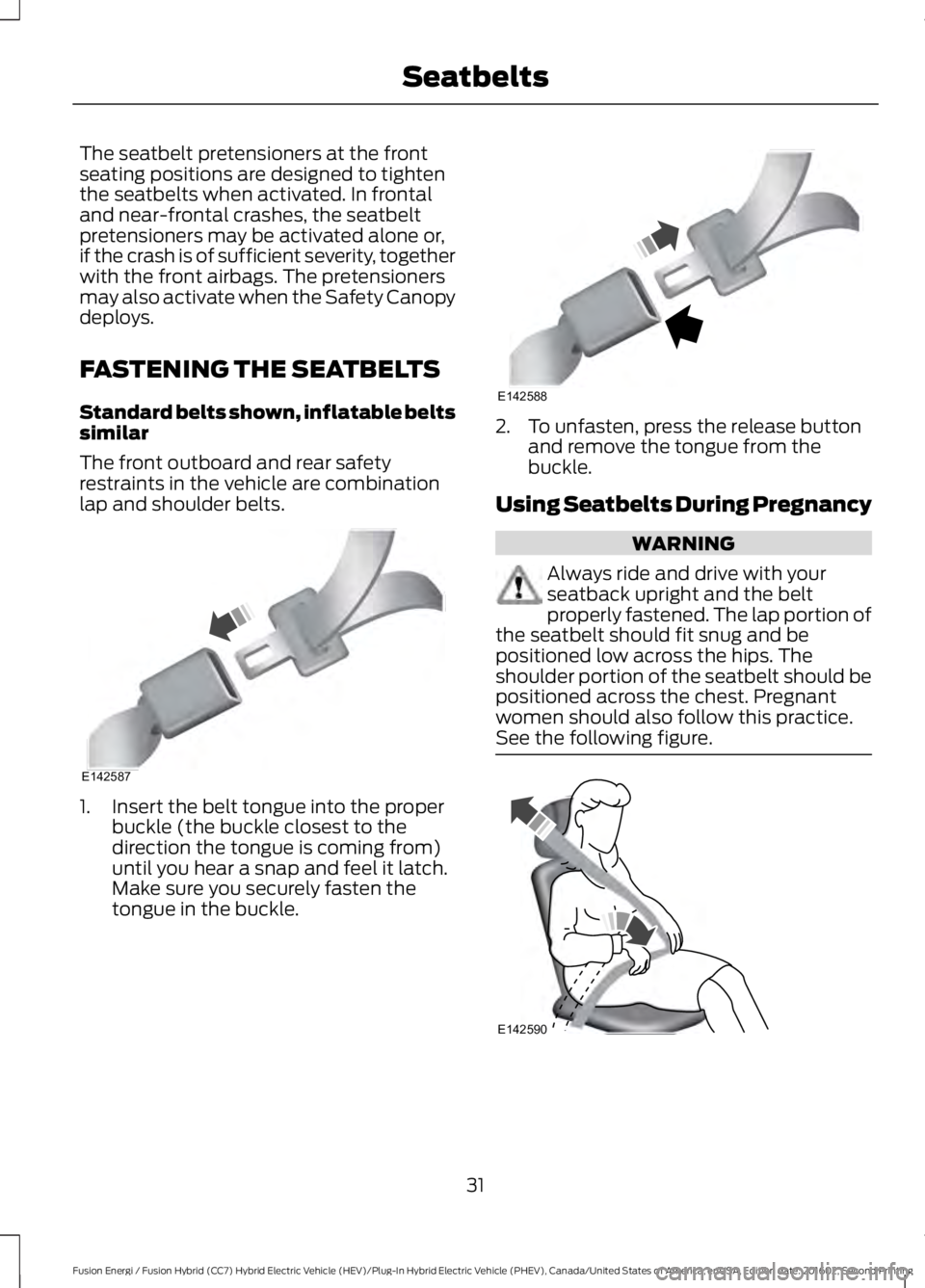
1. Insert the belt tongue into the properbuckle (the buckle closest to thedirection the tongue is coming from)until you hear a snap and feel it latch.Make sure you securely fasten thetongue in the buckle.
2. To unfasten, press the release buttonand remove the tongue from thebuckle.
Using Seatbelts During Pregnancy
WARNING
Always ride and drive with yourseatback upright and the beltproperly fastened. The lap portion ofthe seatbelt should fit snug and bepositioned low across the hips. Theshoulder portion of the seatbelt should bepositioned across the chest. Pregnantwomen should also follow this practice.See the following figure.
31
Fusion Energi / Fusion Hybrid (CC7) Hybrid Electric Vehicle (HEV)/Plug-In Hybrid Electric Vehicle (PHEV), Canada/United States of America, enUSA, Edition date: 201602, Second Printing
SeatbeltsE142587 E142588 E142590
Page 52 of 526

The intelligent access keys operate thepower locks and the remote start system.The key must be in your vehicle to use thepush button start.
Removable Key Blade
The intelligent access key also contains aremovable key blade that you can use tounlock your vehicle.
Push the release button and pull the keyblade out.
Note: Your vehicle keys came with asecurity label that provides important keycut information. Keep the label in a safeplace for future reference.
Using the Key Blade
The key cylinder is under a cap on the driverdoor handle.
To remove the cap:
1.Insert the key blade into the slot on thebottom of the handle and applyupward pressure.
2. While maintaining upward pressure,move the cap rearward to release it.Gently remove the key while doing so.
To install the cap:
49
Fusion Energi / Fusion Hybrid (CC7) Hybrid Electric Vehicle (HEV)/Plug-In Hybrid Electric Vehicle (PHEV), Canada/United States of America, enUSA, Edition date: 201602, Second Printing
Keys and Remote ControlsE218400 E151795 E151956 E151957
Page 60 of 526

USING MYKEY WITH REMOTE
START SYSTEMS
MyKey is not compatible with non
Ford-approved, aftermarket remote startsystems. If you choose to install a remotestart system, see an authorized dealer fora Ford-approved remote start system.
MYKEY TROUBLESHOOTING
Potential causesCondition
· The key or transmitter used to start thevehicle does not have admin privileges.I cannot create a MyKey.
· Vehicles with keyless start: Make sure youplace the transmitter into the backup posi-tion. See Starting a Gasoline Engine(page 142).· The key or transmitter used to start thevehicle is the only admin key. There alwayshas to be at least one admin key.· SecuriLock passive anti-theft system isdisabled or in unlimited mode.
· The key or transmitter used to start thevehicle does not have admin privileges.I cannot program the configurable settings.
· There are no MyKeys programmed to thevehicle. See Creating a MyKey (page 55).
· An admin transmitter is present when youstarted your vehicle.For vehicles with keyless start: No MyKeyrestrictions are available when starting thevehicle.· There are no MyKeys programmed to thevehicle. See Creating a MyKey (page 55).
· The key or transmitter used to start thevehicle does not have admin privileges.I cannot clear the MyKeys.
· No MyKeys are created. See Creating aMyKey (page 55).
· Purchase a new key or transmitter fromyour authorized dealer.I lost the only admin key.
· Program a spare key or transmitter. Youmay need to see your authorized dealer.See Passive Anti-Theft System (page65).
I lost a key.
· The MyKey user is not using the MyKey.MyKey distances do not accumulate.· An admin key holder cleared the MyKeysand created new MyKeys.· The key system has been reset.
57
Fusion Energi / Fusion Hybrid (CC7) Hybrid Electric Vehicle (HEV)/Plug-In Hybrid Electric Vehicle (PHEV), Canada/United States of America, enUSA, Edition date: 201602, Second Printing
MyKey™
Page 64 of 526

Autounlock
Autounlock unlocks all the doors when allof the following occur:
•The ignition is on, all the doors areclosed, and your vehicle has beenmoving at a speed greater than 12 mph(20 km/h).
•Your vehicle comes to a stop and youswitch the ignition off or to theaccessory position.
•You open the driver door within 10minutes of switching the ignition off orto accessory.
Note:If you electronically lock your vehicleafter you switch the ignition off with thedriver door closed, the doors will notautounlock.
Enabling or Disabling Autolock andAutounlock
Note:You can switch autounlock andautolock on or off independently of eachother.
Autolock is not configurable in all markets.If the autolock settings are not availablein your information display, then thesystem is not configurable. See GeneralInformation (page 94).
Illuminated Entry
The interior lamps and some exteriorlamps illuminate when you unlock thedoors with the remote control.
The illuminated entry system will turn offthe lights if:
•The ignition is on.
•You press the remote control lockbutton.
•After 25 seconds of illumination.
The lights will not turn off if:
•You turn them on with the lampcontrol.
•Any door is open.
Illuminated Exit
The interior lamps and some exteriorlamps illuminate when all doors are closedand you switch the ignition off.
The lamps will turn off if all the doorsremain closed and:
•25 seconds have elapsed.
•You press the push button ignitionswitch.
Battery Saver
If you leave the courtesy lamps, interiorlamps or headlamps on, the battery savershuts them off 10 minutes after you switchthe ignition off.
Battery Saver for Intelligent AccessKeys
If you leave the ignition switched on, itshuts off when it detects a certain amountof battery drain, or after 45 minutes.
KEYLESS ENTRY (If Equipped)
SECURICODE™ Keyless EntryKeypad
The keypad is near the driver window. Itilluminates when touched.
Note: If you enter your entry code too faston the keypad, the unlock function may notwork. Enter your entry code again moreslowly.
61
Fusion Energi / Fusion Hybrid (CC7) Hybrid Electric Vehicle (HEV)/Plug-In Hybrid Electric Vehicle (PHEV), Canada/United States of America, enUSA, Edition date: 201602, Second Printing
Doors and Locks
Page 68 of 526

PASSIVE ANTI-THEFT
SYSTEM
Note: The system is not compatible withnon-Ford aftermarket remote start systems.Use of these systems may result in enginestarting problems and a loss of securityprotection.
Note: Metallic objects, electronic devicesor a second coded key on the same keychain may result in vehicle startingproblems, especially if they are too close tothe key when starting your vehicle. Preventthese objects from touching the coded keywhen starting your vehicle. Switch theignition off, move all objects on the keychain away from the coded key and restartyour vehicle if a problem occurs.
Note: Do not leave a duplicate coded keyin your vehicle. Always take your keys andlock all doors when leaving your vehicle.
SecuriLock®
The system helps prevent the engine fromstarting unless you use a coded keyprogrammed to your vehicle. Using thewrong key may prevent your vehicle fromstarting. A message may appear in theinformation display.
If you are unable to start your vehicle witha coded key, it is not operating correctly.A message may appear in the informationdisplay.
Automatic Arming
The system arms when you switch theignition off.
Automatic Disarming
The system disarms when you switch theignition on with a coded key.
Replacement Keys
Note: Your vehicle comes with two keys.
The intelligent access key functions as aprogrammed key that operates the driverdoor lock and turns on the intelligentaccess with push button start system, aswell as a remote control.
If your programmed transmitters are lostor stolen and you do not have an extracoded key, you will need to have yourvehicle towed to an authorized dealer. Youneed to erase the key codes from yourvehicle and program new coded keys.
Store a spare intelligent access key awayfrom your vehicle in a safe place. You canpurchase replacement keys or remotecontrols from an authorized dealer.
Programming a Spare IntelligentAccess Key
Note:You can program a maximum of fourkeys to your vehicle.
You must have two previouslyprogrammed intelligent access keys insideyour vehicle and the new unprogrammedintelligent access key readily accessible.You can purchase replacement keys orremote controls from an authorized dealer.
Make sure that the ignition is switched offbefore beginning this procedure. Make surethat you close all the doors beforebeginning and that they remain closedthroughout the procedure. Carry out allsteps within 30 seconds of starting thesequence. Stop and wait for at least oneminute before starting again if you carryout any steps out of sequence.
Read and understand the entire procedurebefore you begin.
1. Remove the key blade from thetransmitter.
65
Fusion Energi / Fusion Hybrid (CC7) Hybrid Electric Vehicle (HEV)/Plug-In Hybrid Electric Vehicle (PHEV), Canada/United States of America, enUSA, Edition date: 201602, Second Printing
Security
Page 69 of 526

2. Remove the rubber covering (A) fromthe cup holder. With the buttons facingupward and the unlock button facingthe front of your vehicle, place the firstintelligent access key into the backupslot (B).
3. Press the push button ignition switch.
4. Wait five seconds and then press thepush button ignition switch again.
5. Remove the intelligent access key.
6. Within 10 seconds, place a secondprogrammed intelligent access key inthe backup slot and press the pushbutton ignition switch.
7. Wait five seconds and then press thepush button ignition switch again.
8. Remove the intelligent access key.
9. Wait five seconds, then place theunprogrammed intelligent access keyin the backup slot and press the pushbutton ignition switch.
Programming is now complete. Check thatthe remote control functions operate andyour vehicle starts with the new intelligentaccess key.
If programming was unsuccessful, wait 10seconds and repeat steps 1 through 7. If itstill does not work, take your vehicle to anauthorized dealer.
ANTI-THEFT ALARM
The system will warn you of anunauthorized entry to your vehicle. It willbe triggered if any door, the luggagecompartment or the hood is openedwithout using the key, remote control orkeyless entry keypad.
The direction indicators will flash and thehorn will sound if unauthorized entry isattempted while the alarm is armed.
Take all remote controls to an authorizeddealer if there is any potential alarmproblem with your vehicle.
Arming the Alarm
The alarm is ready to arm when there isnot a key in your vehicle. Electronically lockyour vehicle to arm the alarm.
Disarming the Alarm
Disarm the alarm by any of the followingactions:
•Unlock the doors or luggagecompartment with the remote controlor keyless entry keypad.
•Switch your vehicle on or start yourvehicle.
•Use a key in the driver door to unlockyour vehicle, then switch your vehicleon within 12 seconds.
Note:Pressing the panic button on theremote control will stop the horn and signalindicators, but will not disarm the system.
66
Fusion Energi / Fusion Hybrid (CC7) Hybrid Electric Vehicle (HEV)/Plug-In Hybrid Electric Vehicle (PHEV), Canada/United States of America, enUSA, Edition date: 201602, Second Printing
SecurityE155835