2017 FORD EXPEDITION EL instrument cluster
[x] Cancel search: instrument clusterPage 5 of 500

Adjusting the Steering Wheel - VehiclesWith: Power Adjustable SteeringColumn..........................................................66
Audio Control...................................................67
Voice Control...................................................68
Cruise Control.................................................69
Information Display Control......................69
Heated Steering Wheel...............................69
Pedals
Adjusting the Pedals.....................................70
Wipers and Washers
Windshield Wipers..........................................71
Autowipers.........................................................71
Windshield Washers......................................72
Rear Window Wiper and Washers...........72
Lighting
General Information......................................73
Lighting Control...............................................73
Autolamps........................................................74
Instrument Lighting Dimmer......................75
Daytime Running Lamps.............................75
Front Fog Lamps............................................76
Direction Indicators........................................76
Interior Lamps..................................................77
Ambient Lighting............................................78
Windows and Mirrors
Power Windows..............................................79
Exterior Mirrors...............................................80
Interior Mirror....................................................81
Childminder Mirror..........................................81
Rear Quarter Windows................................82
Sun Visors.........................................................82
Moonroof...........................................................82
Instrument Cluster
Gauges...............................................................84
Warning Lamps and Indicators.................87
Audible Warnings and Indicators............90
Information Displays
General Information.......................................91
Information Messages................................102
Climate Control
Manual Climate Control..............................112
Manual Climate Control - Vehicles With:Electronic Manual TemperatureControl (EMTC)..........................................113
Automatic Climate Control........................115
Hints on Controlling the InteriorClimate..........................................................116
Rear Passenger Climate Controls...........119
Heated Windows and Mirrors..................120
Remote Start.................................................120
Seats
Sitting in the Correct Position...................121
Head Restraints..............................................121
Manual Seats.................................................123
Power Seats....................................................124
Memory Function..........................................125
Rear Seats.......................................................126
Heated Seats..................................................133
Climate Controlled Seats..........................134
Universal Garage DoorOpener
Universal Garage Door Opener...............136
Auxiliary Power Points
Auxiliary Power Points.................................141
Storage Compartments
Center Console..............................................143
Overhead Console........................................143
2
Expedition (TB7) Canada/United States of America, enUSA, Edition date: 03/2016, First Printing
Table of Contents
Page 7 of 500

Economical Driving......................................218
Driving Through Water................................219
Floor Mats........................................................219
Roadside Emergencies
Roadside Assistance...................................221
Hazard Warning Flashers..........................222
Fuel Shutoff...................................................222
Jump Starting the Vehicle.........................223
Customer Assistance
Getting the Services You Need...............226
In California (U.S. Only).............................227
The Better Business Bureau (BBB) AutoLine Program (U.S. Only)......................228
Utilizing the Mediation/ArbitrationProgram (Canada Only).......................229
Getting Assistance Outside the U.S. andCanada........................................................229
Ordering Additional Owner'sLiterature....................................................230
Reporting Safety Defects (U.S.Only)..............................................................231
Reporting Safety Defects (CanadaOnly)..............................................................231
Fuses
Fuse Specification Chart...........................233
Changing a Fuse............................................241
Maintenance
General Information...................................243
Opening and Closing the Hood..............243
Under Hood Overview...............................244
Engine Oil Dipstick......................................245
Engine Oil Check..........................................245
Oil Change Indicator Reset......................246
Engine Coolant Check................................247
Automatic Transmission FluidCheck............................................................251
Transfer Case Fluid Check.........................251
Brake Fluid Check........................................252
Washer Fluid Check....................................252
Fuel Filter........................................................253
Changing the 12V Battery.........................253
Checking the Wiper Blades......................255
Changing the Wiper Blades.....................255
Adjusting the Headlamps........................256
Removing a Headlamp..............................257
Changing a Bulb...........................................257
Bulb Specification Chart..........................260
Changing the Engine Air Filter.................262
Vehicle Care
General Information...................................264
Cleaning Products.......................................264
Cleaning the Exterior..................................265
Waxing.............................................................266
Cleaning the Engine...................................266
Cleaning the Windows and WiperBlades..........................................................267
Cleaning the Interior...................................267
Cleaning the Instrument Panel andInstrument Cluster Lens.......................268
Cleaning Leather Seats.............................268
Repairing Minor Paint Damage...............270
Cleaning the Alloy Wheels.......................270
Vehicle Storage.............................................270
Wheels and Tires
General Information....................................273
Tire Care..........................................................276
Using Snow Chains......................................291
Tire Pressure Monitoring System...........292
Changing a Road Wheel............................297
Technical Specifications...........................302
Capacities and Specific-ations
Engine Specifications................................304
Motorcraft Parts..........................................304
4
Expedition (TB7) Canada/United States of America, enUSA, Edition date: 03/2016, First Printing
Table of Contents
Page 44 of 500

Your vehicle has a collection of crash andoccupant sensors which provideinformation to the restraints controlmodule which deploys (activates) thefront safety belt pretensioners, driverairbag, passenger airbag, seat mountedside airbags, and the Safety Canopy®.Based on the type of crash (frontal impact,side impact or rollover), the restraintscontrol module will deploy the appropriatesafety devices.
The restraints control module alsomonitors the readiness of the above safetydevices plus the crash and occupantsensors. The readiness of the safetysystem is indicated by a warning indicatorlight in the instrument cluster or by abackup tone if the warning light is notworking. See Instrument Cluster (page84). Routine maintenance of the airbag isnot required.
A difficulty with the system is indicated byone or more of the following:
The readiness light will notilluminate immediately after theignition is turned on.
•The readiness light will either flash orstay lit.
•A series of five beeps will be heard. Thetone pattern will repeat periodicallyuntil the problem, the light or both arerepaired.
If any of these things happen, evenintermittently, have the supplementalrestraint system serviced at an authorizeddealer immediately. Unless serviced, thesystem may not function properly in theevent of a crash.
The fact that the safety belt pretensionersor front airbags did not activate for bothfront seat occupants in a crash does notmean that something is wrong with thesystem. Rather, it means the restraintscontrol module determined the accidentconditions (crash severity, belt usage)were not appropriate to activate thesesafety devices.
•The design of the front airbags is toactivate only in frontal and near-frontalcrashes (not rollovers, side impacts orrear impacts) unless the crash causessufficient frontal deceleration.
•The design of the safety beltpretensioners is to activate in frontal,near-frontal and side crashes, and inrollovers.
•The design of the side airbags is toinflate in certain side impact crashes.Side airbags may activate in othertypes of crashes if the vehicleexperiences sufficient sideways motionor deformation.
•The design of the Safety Canopy is toinflate in certain side impact crashesor rollover events. The Safety Canopymay activate in other types of crashesif the vehicle experiences sufficientsideways motion or deformation, or acertain likelihood of rollover.
AIRBAG DISPOSAL
Contact your authorized dealer as soon aspossible. Airbags must be disposed of byqualified personnel.
41
Expedition (TB7) Canada/United States of America, enUSA, Edition date: 03/2016, First Printing
Supplementary Restraints System
Page 61 of 500

Press and release the button in the rearcargo area.
Stopping the Liftgate Movement
Note:Do not apply sudden excessive forceto the liftgate while it is in motion. Thiscould damage the power liftgate and itscomponents.
You can stop the liftgate movement bydoing any of the following:
•Pressing the liftgate control button.
•Pressing the liftgate button on theremote control twice.
•Pressing the liftgate button on theinstrument panel.
Obstacle Detection
When Closing
The system stops when it detects anobstacle. Three chimes sound and thesystem reverses to open. Once you removethe obstacle, you can power close theliftgate.
Note:Entering your vehicle while theliftgate is closing can cause your vehicle tobounce and activate obstacle detection. Toprevent this, let the power liftgate closecompletely before you enter your vehicle.Before driving off, check the instrumentcluster for a liftgate or door ajar message orwarning indicator. Failure to do this couldresult in unintentionally leaving the liftgateopen while driving.
When Opening
The system stops when it detects anobstacle and two short tones sound.Remove the obstacle to operate theliftgate.
KEYLESS ENTRY
SECURICODE™ KEYLESS ENTRYKEYPAD
The keypad is located near the driverwindow.
Note:If you enter your entry code too faston the keypad, the unlock function may notwork. Re-enter your entry code more slowly.
58
Expedition (TB7) Canada/United States of America, enUSA, Edition date: 03/2016, First Printing
Doors and LocksE209084 E163050
Page 87 of 500
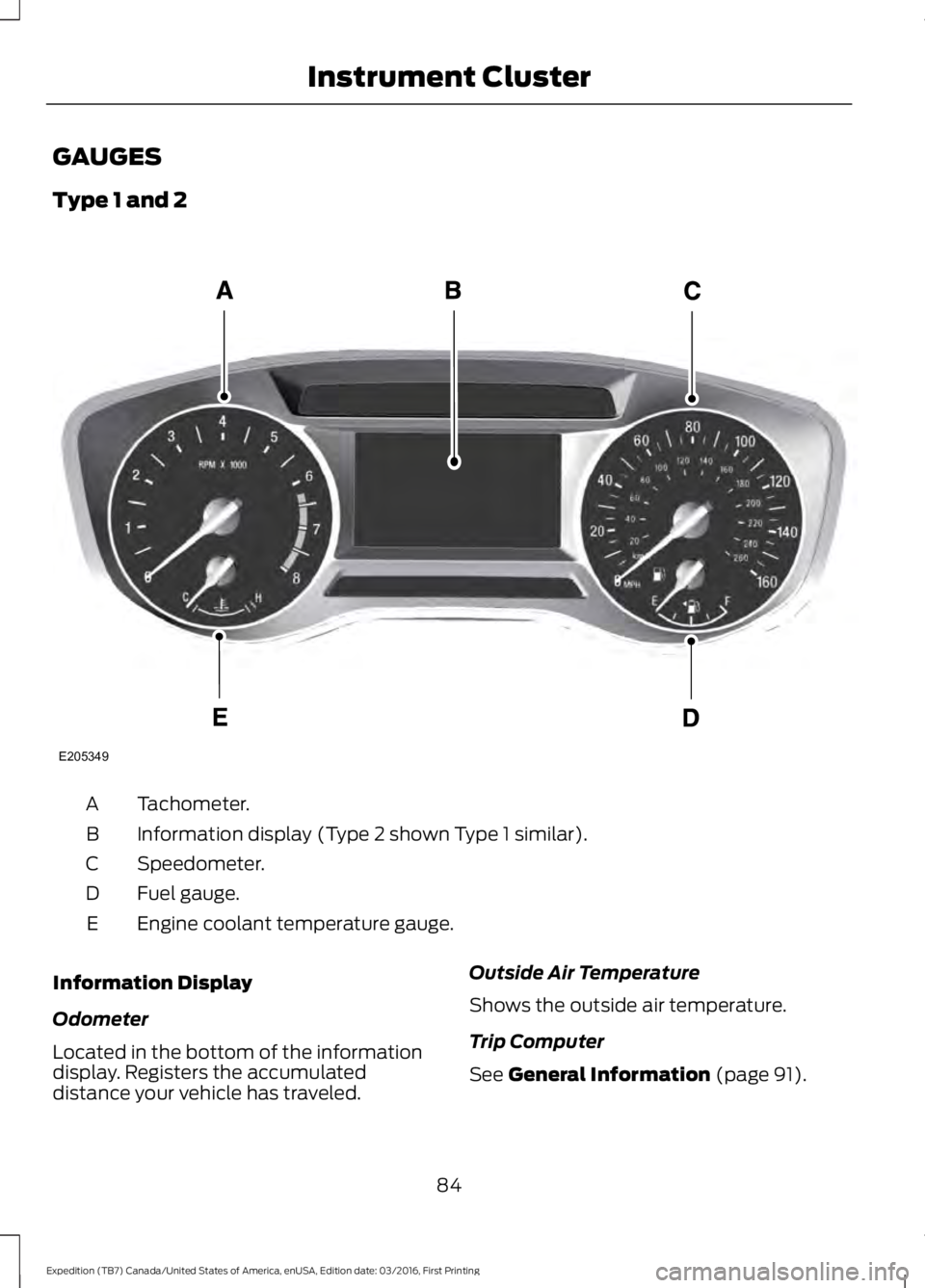
GAUGES
Type 1 and 2
Tachometer.A
Information display (Type 2 shown Type 1 similar).B
Speedometer.C
Fuel gauge.D
Engine coolant temperature gauge.E
Information Display
Odometer
Located in the bottom of the informationdisplay. Registers the accumulateddistance your vehicle has traveled.
Outside Air Temperature
Shows the outside air temperature.
Trip Computer
See General Information (page 91).
84
Expedition (TB7) Canada/United States of America, enUSA, Edition date: 03/2016, First Printing
Instrument ClusterE205349
Page 88 of 500
Vehicle Settings and Personalization
See General Information (page 91).
Fuel Gauge
Note:The fuel gauge may vary slightlywhen your vehicle is moving or on a gradient.
Switch the ignition on. The fuel gaugeindicates approximately how much fuelremains in the fuel tank. The arrowadjacent to the fuel pump symbolindicates on which side of your vehicle thefuel filler door is located.
The needle should move toward F whenyou refuel your vehicle. If the needle pointsto E after adding fuel, this indicates yourvehicle needs service soon.
After refueling, the needle may not alwaysreturn to the exact same position. This isnormal.
Note:It may take a short time for theneedle to reach F after leaving the gasstation. This is normal and depends uponthe slope of pavement at the gas station.
Note:The fuel amount dispensed into thetank is a little less or more than the gaugeindicated. This is normal and depends uponthe slope of pavement at the gas station.
Note:If the gas station nozzle shuts offbefore the tank is full, try a different gaspump nozzle.
Note:There is a small reserve left in thetank when the fuel gauge reaches empty.
Low Fuel Reminder
A low reminder displays when the distanceto empty reaches 50 miles (80 km) toempty.
Note:The low fuel reminder can appear atdifferent fuel gauge positions depending onfuel economy conditions. This variation isnormal.
Engine Coolant Temperature Gauge
Shows the temperature of the enginecoolant. At normal operating temperature,the needle remains in the center section.If the needle enters the red section, theengine is overheating. Stop the engine,switch the ignition off and determine thecause once the engine has cooled down.
Note:Do not restart the engine until youconclude the cause of overheating.
WARNING
Never remove the coolant reservoircap while the engine is running or hot.The hot coolant is under pressureand may cause serious burns.
85
Expedition (TB7) Canada/United States of America, enUSA, Edition date: 03/2016, First Printing
Instrument Cluster
Page 89 of 500
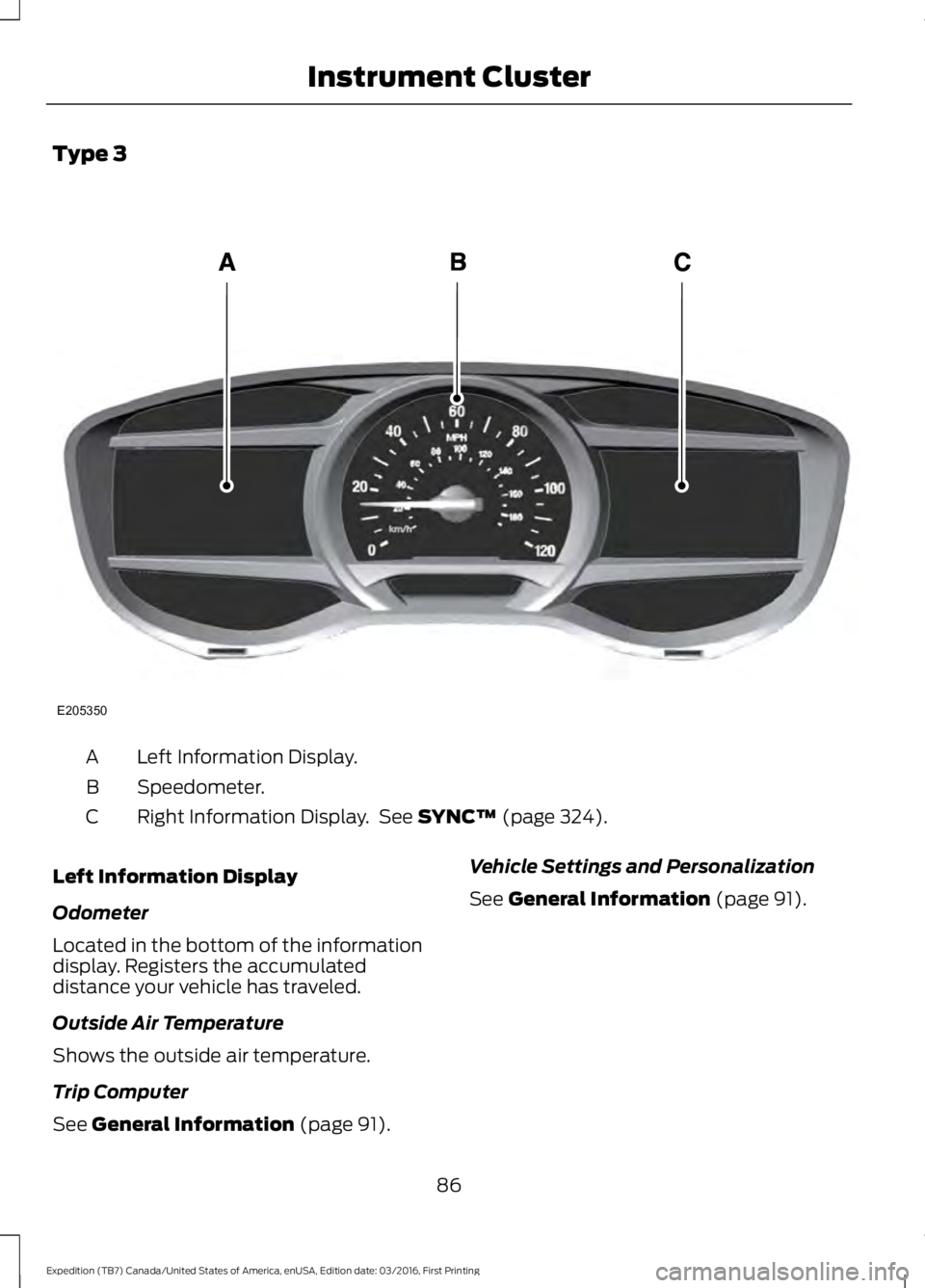
Type 3
Left Information Display.A
Speedometer.B
Right Information Display. See SYNC™ (page 324).C
Left Information Display
Odometer
Located in the bottom of the informationdisplay. Registers the accumulateddistance your vehicle has traveled.
Outside Air Temperature
Shows the outside air temperature.
Trip Computer
See General Information (page 91).
Vehicle Settings and Personalization
See General Information (page 91).
86
Expedition (TB7) Canada/United States of America, enUSA, Edition date: 03/2016, First Printing
Instrument ClusterE205350
Page 90 of 500
WARNING LAMPS AND
INDICATORS
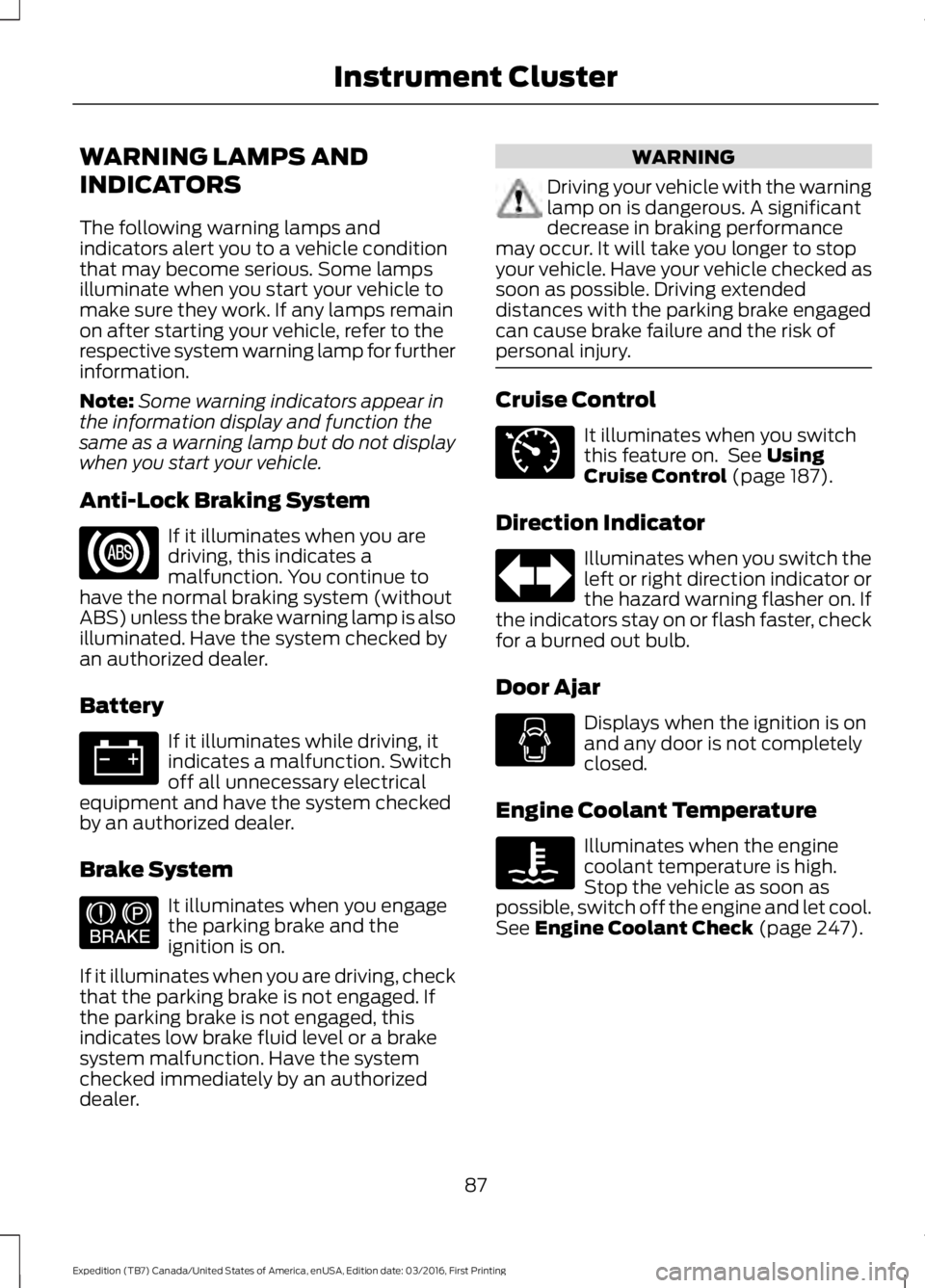
The following warning lamps andindicators alert you to a vehicle conditionthat may become serious. Some lampsilluminate when you start your vehicle tomake sure they work. If any lamps remainon after starting your vehicle, refer to therespective system warning lamp for furtherinformation.
Note:Some warning indicators appear inthe information display and function thesame as a warning lamp but do not displaywhen you start your vehicle.
Anti-Lock Braking System
If it illuminates when you aredriving, this indicates amalfunction. You continue tohave the normal braking system (withoutABS) unless the brake warning lamp is alsoilluminated. Have the system checked byan authorized dealer.
Battery
If it illuminates while driving, itindicates a malfunction. Switchoff all unnecessary electricalequipment and have the system checkedby an authorized dealer.
Brake System
It illuminates when you engagethe parking brake and theignition is on.
If it illuminates when you are driving, checkthat the parking brake is not engaged. Ifthe parking brake is not engaged, thisindicates low brake fluid level or a brakesystem malfunction. Have the systemchecked immediately by an authorizeddealer.
WARNING
Driving your vehicle with the warninglamp on is dangerous. A significantdecrease in braking performancemay occur. It will take you longer to stopyour vehicle. Have your vehicle checked assoon as possible. Driving extendeddistances with the parking brake engagedcan cause brake failure and the risk ofpersonal injury.
Cruise Control
It illuminates when you switchthis feature on. See UsingCruise Control (page 187).
Direction Indicator
Illuminates when you switch theleft or right direction indicator orthe hazard warning flasher on. Ifthe indicators stay on or flash faster, checkfor a burned out bulb.
Door Ajar
Displays when the ignition is onand any door is not completelyclosed.
Engine Coolant Temperature
Illuminates when the enginecoolant temperature is high.Stop the vehicle as soon aspossible, switch off the engine and let cool.See Engine Coolant Check (page 247).
87
Expedition (TB7) Canada/United States of America, enUSA, Edition date: 03/2016, First Printing
Instrument Cluster E144522 E71340