2017 CHEVROLET SS lock
[x] Cancel search: lockPage 83 of 400

Chevrolet SS Sedan Owner Manual (GMNA-Localizing-U.S.-10122752) -2017 - crc - 8/31/16
82 Seats and Restraints
If the child restraint has the LATCHsystem, seeLower Anchors andTe t h e r s f o r C h i l d r e n ( L AT C HSystem)076for how and where toinstall the child restraint usingLATCH. If a child restraint is securedin the vehicle using a safety beltand it uses a top tether, seeLowerAnchors and Tethers for Children(LATCH System)076for top tetheranchor locations.
Do not secure a child seat in aposition without a top tether anchorif a national or local law requiresthat the top tether be anchored, or ifthe instructions that come with thechild restraint say that the top strapmust be anchored.
If the child restraint or vehicle seatposition does not have the LATCHsystem, you will be using the safetybelt to secure the child restraint.Be sure to follow the instructionsthat came with the child restraint.
If more than one child restraintneeds to be installed in the rearseat, be sure to readWhere to Putthe Restraint075.
1. Put the child restraint onthe seat.
2. Pick up the latch plate, and runthe lap and shoulder portionsof the vehicle’ssafetybeltthrough or around the restraint.The child restraint instructionswill show you how.
3. Push the latch plate into thebuckle until it clicks.
Position the release button onthe buckle, away from the childrestraint system, so that thesafety belt could be quicklyunbuckled if necessary.
4. Pull the shoulder belt all theway out of the retractor to setthe lock. When the retractorlock is set, the belt can betightened but not pulled out ofthe retractor.
Page 84 of 400

Chevrolet SS Sedan Owner Manual (GMNA-Localizing-U.S.-10122752) -2017 - crc - 8/31/16
Seats and Restraints 83
5. To tighten the belt, push downon the child restraint, pull theshoulder portion of the belt totighten the lap portion of thebelt, and feed the shoulder beltback into the retractor. Wheninstalling a forward-facing childrestraint, it may be helpful touse your knee to push down onthe child restraint as youtighten the belt.
Try to pull the belt out of theretractor to make sure theretractor is locked. If theretractor is not locked, repeatSteps 4 and 5.
6. If the child restraint has a toptether, follow the child restraintmanufacturer's instructionsregarding the use of the toptether. SeeLower Anchors andTe t h e r s f o r C h i l d r e n ( L AT C HSystem)076.
7. Before placing a child in thechild restraint, make sure it issecurely held in place. Tocheck, grasp the child restraintat the safety belt path andattempt to move it side to sideand back and forth. When thechild restraint is properlyinstalled, there should be nomore than 2.5 cm (1 in) ofmovement.
To r e m o v e t h e c h i l d r e s t r a i n t ,unbuckle the vehicle safety belt andlet it return to the stowed position.If the top tether is attached to a toptether anchor, disconnect it.
Securing Child Restraints
(With the Safety Belt in
the Front Seat)
This vehicle has airbags. A rearseat is a safer place to secure aforward-facing child restraint. SeeWhere to Put the Restraint075.
In addition, the vehicle has apassenger sensing system which isdesigned to turn off the frontoutboard passenger frontal airbagand knee airbag under certainconditions. SeePassenger SensingSystem063andPassenger AirbagStatus Indicator099for moreinformation, including importantsafety information.
Never put a rear-facing child seat inthe front. This is because the risk tothe rear-facing child is so great,if the airbag deploys.
Page 86 of 400
Chevrolet SS Sedan Owner Manual (GMNA-Localizing-U.S.-10122752) -2017 - crc - 8/31/16
Seats and Restraints 85
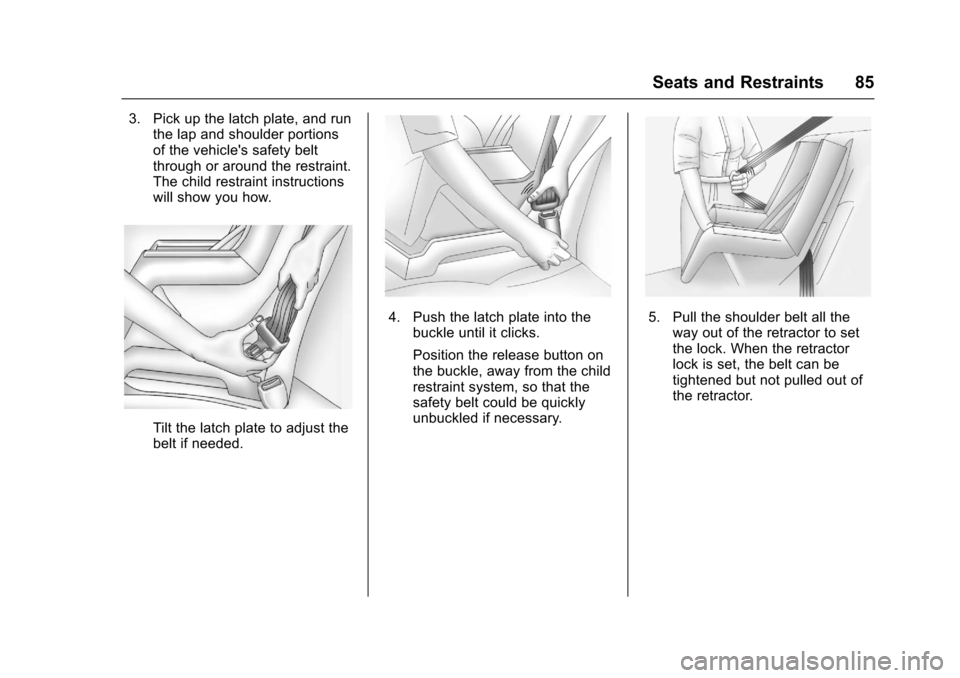
3. Pick up the latch plate, and runthe lap and shoulder portionsof the vehicle's safety beltthrough or around the restraint.The child restraint instructionswill show you how.
Tilt the latch plate to adjust thebelt if needed.
4. Push the latch plate into thebuckle until it clicks.
Position the release button onthe buckle, away from the childrestraint system, so that thesafety belt could be quicklyunbuckled if necessary.
5. Pull the shoulder belt all theway out of the retractor to setthe lock. When the retractorlock is set, the belt can betightened but not pulled out ofthe retractor.
Page 87 of 400

Chevrolet SS Sedan Owner Manual (GMNA-Localizing-U.S.-10122752) -2017 - crc - 8/31/16
86 Seats and Restraints
6. To tighten the belt, push downon the child restraint, pull theshoulder portion of the belt totighten the lap portion of thebelt, and feed the shoulder beltback into the retractor. Wheninstalling a forward-facing childrestraint, it may be helpful touse your knee to push down onthe child restraint as youtighten the belt.
Try to pull the belt out of theretractor to make sure theretractor is locked. If theretractor is not locked, repeatSteps 5 and 6.
7. Before placing a child in thechild restraint, make sure it issecurely held in place. Tocheck, grasp the child restraintat the safety belt path andattempt to move it side to sideand back and forth. When thechild restraint is properlyinstalled, there should be nomore than 2.5 cm (1 in) ofmovement.
If the airbags are off, the offindicator in the passenger airbagstatus indicator will come on andstay on when the vehicle is started.
If a child restraint has been installedand the on indicator is lit, see“If theOn Indicator Is Lit for a ChildRestraint”underPassenger SensingSystem063for more information.
To r e m o v e t h e c h i l d r e s t r a i n t ,unbuckle the vehicle safety belt andlet it return to the stowed position.
Page 91 of 400

Chevrolet SS Sedan Owner Manual (GMNA-Localizing-U.S.-10122752) -2017 - crc - 8/31/16
90 Instruments and Controls
Instruments and
Controls
Controls
Steering Wheel Adjustment . . . . 91Steering Wheel Controls . . . . . . . 91Horn . . . . . . . . . . . . . . . . . . . . . . . . . . . 92Windshield Wiper/Washer . . . . . . 92Clock . . . . . . . . . . . . . . . . . . . . . . . . . . 93Power Outlets . . . . . . . . . . . . . . . . . 94
Warning Lights, Gauges, and
Indicators
Warning Lights, Gauges, andIndicators . . . . . . . . . . . . . . . . . . . . 95Instrument Cluster . . . . . . . . . . . . . 96Speedometer . . . . . . . . . . . . . . . . . . 97Odometer . . . . . . . . . . . . . . . . . . . . . . 97Trip Odometer . . . . . . . . . . . . . . . . . 97Ta c h o m e t e r . . . . . . . . . . . . . . . . . . . . 9 7Fuel Gauge . . . . . . . . . . . . . . . . . . . . 97Engine Coolant TemperatureGauge . . . . . . . . . . . . . . . . . . . . . . . . 98Safety Belt Reminders . . . . . . . . . 98Airbag Readiness Light . . . . . . . . 99Passenger Airbag StatusIndicator . . . . . . . . . . . . . . . . . . . . . . 99Charging System Light . . . . . . . 100
Malfunction Indicator Lamp(Check Engine Light) . . . . . . . . 100Service Vehicle Soon Light . . . 102Brake System WarningLight . . . . . . . . . . . . . . . . . . . . . . . . 102Electric Parking BrakeLight . . . . . . . . . . . . . . . . . . . . . . . . 103Service Electric Parking BrakeLight . . . . . . . . . . . . . . . . . . . . . . . . 103Antilock Brake System (ABS)Warning Light . . . . . . . . . . . . . . . 104Lane Departure Warning(LDW) Light . . . . . . . . . . . . . . . . . 104Traction Off Light . . . . . . . . . . . . . 104StabiliTrak®OFF Light . . . . . . . . 105Traction Control System (TCS)/StabiliTrak®Light . . . . . . . . . . . 105Driver Mode Control Light . . . . 105Tire Pressure Light . . . . . . . . . . . 106Engine Oil Pressure Light . . . . 106Low Fuel Warning Light . . . . . . 106Security Light . . . . . . . . . . . . . . . . . 107High-Beam On Light . . . . . . . . . . 107Lamps On Reminder . . . . . . . . . 107Cruise Control Light . . . . . . . . . . 107Door Ajar Light . . . . . . . . . . . . . . . 108
Information Displays
Driver InformationCenter (DIC) . . . . . . . . . . . . . . . . 108Head-Up Display (HUD) . . . . . . 110
Vehicle Messages
Vehicle Messages . . . . . . . . . . . . 113Battery Voltage and ChargingMessages . . . . . . . . . . . . . . . . . . . 113Brake System Messages . . . . . 113Cruise Control Messages . . . . . 114Door Ajar Messages . . . . . . . . . . 114Engine Cooling SystemMessages . . . . . . . . . . . . . . . . . . . 114Engine Oil Messages . . . . . . . . . 115Engine Power Messages . . . . . 115Fuel System Messages . . . . . . . 115Key and Lock Messages . . . . . . 115Lamp Messages . . . . . . . . . . . . . . 116Object Detection SystemMessages . . . . . . . . . . . . . . . . . . . 116Ride Control SystemMessages . . . . . . . . . . . . . . . . . . . 117Security Messages . . . . . . . . . . . 117Service Vehicle Messages . . . . 118Starting the VehicleMessages . . . . . . . . . . . . . . . . . . . 118Tire Messages . . . . . . . . . . . . . . . . 118Transmission Messages . . . . . . 119Vehicle ReminderMessages . . . . . . . . . . . . . . . . . . . 120Vehicle Speed Messages . . . . . 120Washer Fluid Messages . . . . . . 120Window Messages . . . . . . . . . . . 120
Page 92 of 400

Chevrolet SS Sedan Owner Manual (GMNA-Localizing-U.S.-10122752) -2017 - crc - 8/31/16
Instruments and Controls 91
Vehicle Personalization
Vehicle Personalization . . . . . . . 120Controls
Steering Wheel
Adjustment
To a d j u s t t h e s t e e r i n g w h e e l :
1. Pull the lever down.
2. Move the steering wheel up ordown and in or out for acomfortable position.
3. Pull the lever up to lock thesteering wheel in place.
Do not adjust the tilt and telescopelever while driving.
Steering Wheel Controls
Some audio functions can becontrolled through the steeringwheel controls.
b/g:Press to interact withBluetooth or voice recognition.SeeBluetooth0195orVoiceRecognition0189.
$/i:Press to decline anincoming call, or to end a currentcall. Press to silence the vehiclespeakers while using theinfotainment system. Press again toturn the sound on. Press to cancelvoice recognition.
Page 94 of 400

Chevrolet SS Sedan Owner Manual (GMNA-Localizing-U.S.-10122752) -2017 - crc - 8/31/16
Instruments and Controls 93
INT :Move the windshield wiper
lever to INT. Turn thexINT band
on the wiper lever to adjust thesensitivity.
.Turn the band up for moresensitivity to moisture.
.Turn the band down for lesssensitivity to moisture.
.Move the windshield wiper leverout of the INT position todeactivate Rainsense.
Wiper Arm Assembly Protection
When using an automatic car wash,move the windshield wiper lever toOFF. This disables the automaticRainsense windshield wipers.
With Rainsense, if the transmissionis in N (Neutral) and the vehiclespeed is very slow, the wipers willautomatically stop at the base of thewindshield.
The wiper operations return tonormal when the transmission is nolonger in N (Neutral) or the vehiclespeed has increased.
nL:Pull the windshield wiperlever toward you to spray windshieldwasher fluid and activate the wipers.The wipers will continue until thelever is released or the maximumwash time is reached. When thewindshield wiper lever is released,additional wipes may occurdepending on how long thewindshield washer had beenactivated. SeeWasher Fluid0286for information on filling thewindshield washer fluid reservoir.
{Warning
In freezing weather, do not use
the washer until the windshield is
warmed. Otherwise the washer
fluid can form ice on the
windshield, blocking your vision.
Clock
Time and Date
1. Press HOME on the radiofaceplate.
2. Touch Config on theHome Page.
3. Select Time and Date.
4. Select the desired setting tochange.
Set Time :To u c h + o r✓to increaseor decrease the hours and minutes.
If auto timing is set, the timedisplayed on the clock may notupdate immediately when drivinginto a new time zone.
Set Date :To u c h + o r✓to increaseor decrease the year, month,and day.
12hr/24hr Format :To u c h t o s e l e c t12 hour or 24 hour time format.
Press Back to save.
Page 105 of 400
Chevrolet SS Sedan Owner Manual (GMNA-Localizing-U.S.-10122752) -2017 - crc - 8/31/16
104 Instruments and Controls
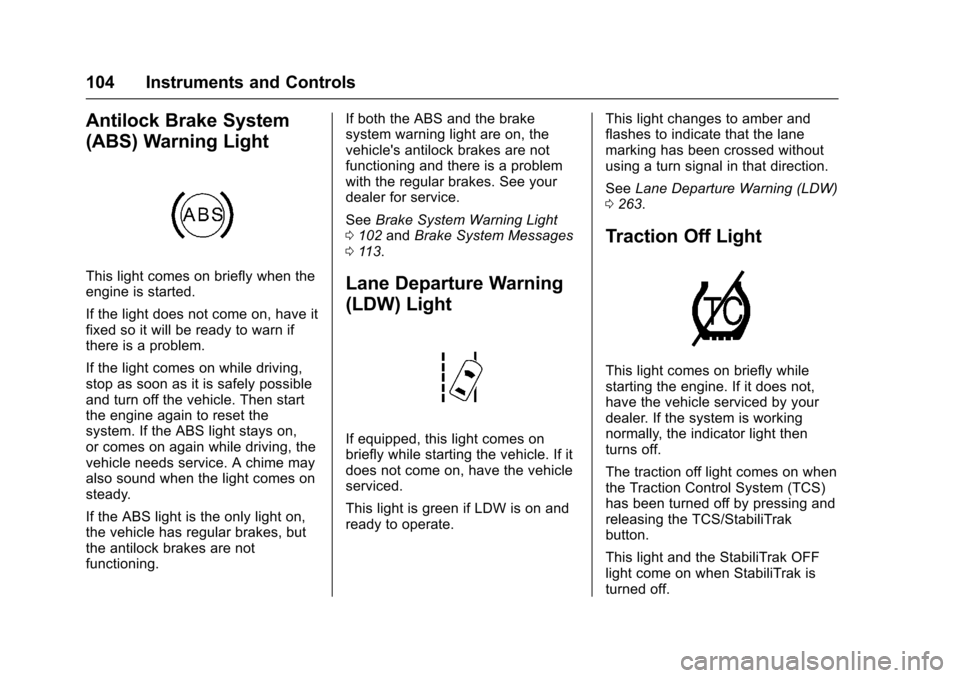
Antilock Brake System
(ABS) Warning Light
This light comes on briefly when theengine is started.
If the light does not come on, have itfixed so it will be ready to warn ifthere is a problem.
If the light comes on while driving,stop as soon as it is safely possibleand turn off the vehicle. Then startthe engine again to reset thesystem. If the ABS light stays on,or comes on again while driving, thevehicle needs service. A chime mayalso sound when the light comes onsteady.
If the ABS light is the only light on,the vehicle has regular brakes, butthe antilock brakes are notfunctioning.
If both the ABS and the brakesystem warning light are on, thevehicle's antilock brakes are notfunctioning and there is a problemwith the regular brakes. See yourdealer for service.
SeeBrake System Warning Light0102andBrake System Messages011 3.
Lane Departure Warning
(LDW) Light
If equipped, this light comes onbriefly while starting the vehicle. If itdoes not come on, have the vehicleserviced.
This light is green if LDW is on andready to operate.
This light changes to amber andflashes to indicate that the lanemarking has been crossed withoutusing a turn signal in that direction.
SeeLane Departure Warning (LDW)0263.
Traction Off Light
This light comes on briefly whilestarting the engine. If it does not,have the vehicle serviced by yourdealer. If the system is workingnormally, the indicator light thenturns off.
The traction off light comes on whenthe Traction Control System (TCS)has been turned off by pressing andreleasing the TCS/StabiliTrakbutton.
This light and the StabiliTrak OFFlight come on when StabiliTrak isturned off.