2017 CHEVROLET MALIBU mirror
[x] Cancel search: mirrorPage 219 of 419
Chevrolet Malibu Owner Manual (GMNA-Localizing-U.S./Canada/Mexico-10122664) - 2017 - crc - 5/23/16
218 Driving and Operating
3. Turn the steering wheel to gostraight down the roadway.
Loss of Control
Skidding
There are three types of skids thatcorrespond to the vehicle's threecontrol systems:
.Braking Skid—wheels are notrolling.
.Steering or Cornering Skid—too much speed or steering in acurve causes tires to slip andlose cornering force.
.Acceleration Skid—too muchthrottle causes the drivingwheels to spin.
Defensive drivers avoid most skidsby taking reasonable care suited toexisting conditions, and by notoverdriving those conditions. Butskids are always possible.
If the vehicle starts to slide, followthese suggestions:
.Ease your foot off theaccelerator pedal and steer theway you want the vehicle to go.
The vehicle may straighten out.Be ready for a second skid if itoccurs.
.Slow down and adjust yourdriving according to weatherconditions. Stopping distancecan be longer and vehiclecontrol can be affected whentraction is reduced by water,snow, ice, gravel, or othermaterial on the road. Learn torecognize warning clues—suchas enough water, ice, or packedsnow on the road to make amirrored surface—and slowdown when you have any doubt.
.Try to avoid sudden steering,acceleration, or braking,including reducing vehicle speedby shifting to a lower gear. Anysudden changes could causethe tires to slide.
Remember: Antilock brakes helpavoid only the braking skid.
Driving on Wet Roads
Rain and wet roads can reducevehicle traction and affect yourability to stop and accelerate.
Always drive slower in these typesof driving conditions and avoiddriving through large puddles anddeep-standing or flowing water.
{Warning
Wet brakes can cause crashes.
They might not work as well in a
quick stop and could cause
pulling to one side. You could
lose control of the vehicle.
After driving through a large
puddle of water or a car/vehicle
wash, lightly apply the brake
pedal until the brakes work
normally.
Flowing or rushing water creates
strong forces. Driving through
flowing water could cause the
vehicle to be carried away. If this
happens, you and other vehicle
occupants could drown. Do not
ignore police warnings and be
very cautious about trying to drive
through flowing water.
Page 221 of 419
Chevrolet Malibu Owner Manual (GMNA-Localizing-U.S./Canada/Mexico-10122664) - 2017 - crc - 5/23/16
220 Driving and Operating
Winter Driving
Driving on Snow or Ice
Snow or ice between the tires andthe road creates less traction orgrip, so drive carefully. Wet ice canoccur at about 0 °C (32 °F) whenfreezing rain begins to fall. Avoiddriving on wet ice or in freezing rainuntil roads can be treated.
For Slippery Road Driving:
.Accelerate gently. Acceleratingtoo quickly causes the wheels tospin and makes the surfaceunder the tires slick.
.Turn on Traction Control. SeeTr a c t i o n C o n t r o l / E l e c t r o n i cStability Control0241.
.The Antilock Brake System(ABS) improves vehicle stabilityduring hard stops, but thebrakes should be applied soonerthan when on dry pavement.SeeAntilock Brake System(ABS)0236.
.Allow greater following distanceand watch for slippery spots. Icypatches can occur on otherwise
clear roads in shaded areas.The surface of a curve or anoverpass can remain icy whenthe surrounding roads are clear.Avoid sudden steeringmaneuvers and braking whileon ice.
.Turn off cruise control.
Blizzard Conditions
Stop the vehicle in a safe place andsignal for help. Stay with the vehicleunless there is help nearby.If possible, use RoadsideAssistance. SeeRoadsideAssistance Program0387.Togethelp and keep everyone in thevehicle safe:
.Turn on the hazard warningflashers.
.Tie a red cloth to an outsidemirror.
{Warning
Snow can trap engine exhaust
under the vehicle. This may
cause exhaust gases to get
inside. Engine exhaust contains
carbon monoxide (CO), which
cannot be seen or smelled. It can
cause unconsciousness and even
death.
If the vehicle is stuck in snow:
.Clear snow from the base ofthe vehicle, especially anyblocking the exhaust pipe.
.Open a window about 5 cm(2 in) on the vehicle sidethat is away from the wind,to bring in fresh air.
.Fully open the air outlets onor under the instrumentpanel.
.Adjust the climate controlsystem to circulate the airinside the vehicle and set
(Continued)
Page 253 of 419
Chevrolet Malibu Owner Manual (GMNA-Localizing-U.S./Canada/Mexico-10122664) - 2017 - crc - 5/23/16
252 Driving and Operating
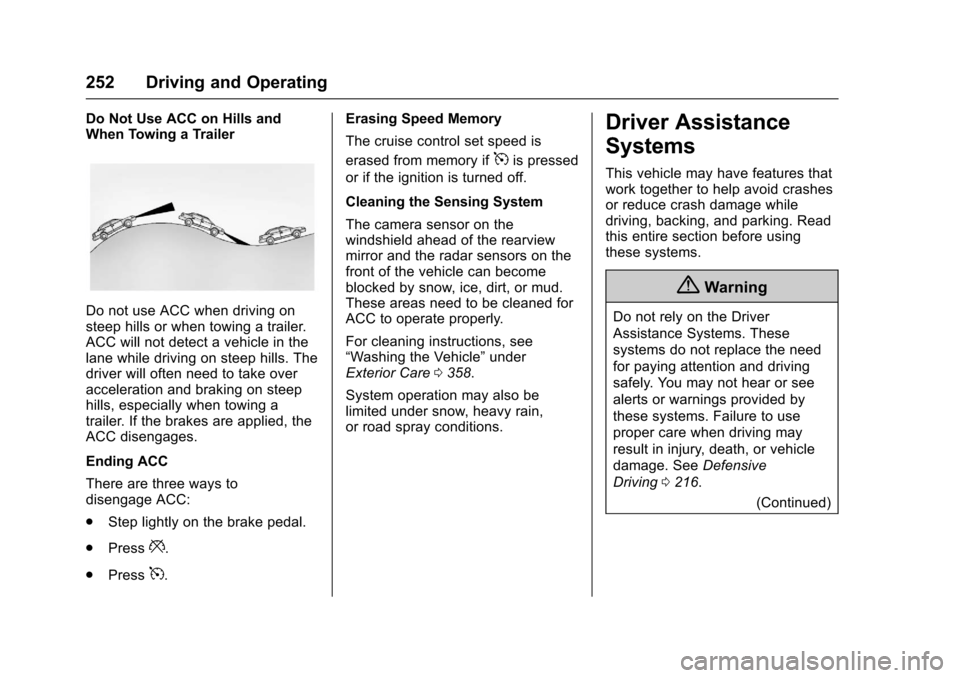
Do Not Use ACC on Hills andWhen Towing a Trailer
Do not use ACC when driving onsteep hills or when towing a trailer.ACC will not detect a vehicle in thelane while driving on steep hills. Thedriver will often need to take overacceleration and braking on steephills, especially when towing atrailer. If the brakes are applied, theACC disengages.
Ending ACC
There are three ways todisengage ACC:
.Step lightly on the brake pedal.
.Press*.
.Press5.
Erasing Speed Memory
The cruise control set speed is
erased from memory if5is pressed
or if the ignition is turned off.
Cleaning the Sensing System
The camera sensor on thewindshield ahead of the rearviewmirror and the radar sensors on thefront of the vehicle can becomeblocked by snow, ice, dirt, or mud.These areas need to be cleaned forACC to operate properly.
For cleaning instructions, see“Washing the Vehicle”underExterior Care0358.
System operation may also belimited under snow, heavy rain,or road spray conditions.
Driver Assistance
Systems
This vehicle may have features thatwork together to help avoid crashesor reduce crash damage whiledriving, backing, and parking. Readthis entire section before usingthese systems.
{Warning
Do not rely on the Driver
Assistance Systems. These
systems do not replace the need
for paying attention and driving
safely. You may not hear or see
alerts or warnings provided by
these systems. Failure to use
proper care when driving may
result in injury, death, or vehicle
damage. SeeDefensive
Driving0216.
(Continued)
Page 256 of 419
Chevrolet Malibu Owner Manual (GMNA-Localizing-U.S./Canada/Mexico-10122664) - 2017 - crc - 5/23/16
Driving and Operating 255
Warning (Continued)
(5 mph). To prevent injury, death,
or vehicle damage, even with
Parking Assist, always check the
area around the vehicle and
check all mirrors before moving
forward or backing.
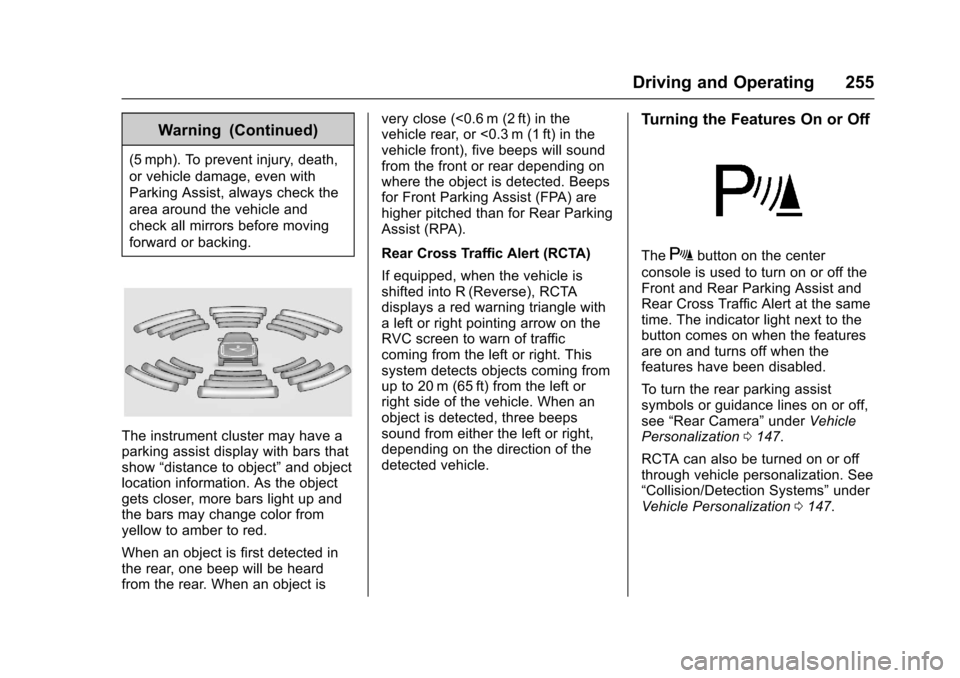
The instrument cluster may have aparking assist display with bars thatshow“distance to object”and objectlocation information. As the objectgets closer, more bars light up andthe bars may change color fromyellow to amber to red.
When an object is first detected inthe rear, one beep will be heardfrom the rear. When an object is
very close (<0.6 m (2 ft) in thevehicle rear, or <0.3 m (1 ft) in thevehicle front), five beeps will soundfrom the front or rear depending onwhere the object is detected. Beepsfor Front Parking Assist (FPA) arehigher pitched than for Rear ParkingAssist (RPA).
Rear Cross Traffic Alert (RCTA)
If equipped, when the vehicle isshifted into R (Reverse), RCTAdisplays a red warning triangle withaleftorrightpointingarrowontheRVC screen to warn of trafficcoming from the left or right. Thissystem detects objects coming fromup to 20 m (65 ft) from the left orright side of the vehicle. When anobject is detected, three beepssound from either the left or right,depending on the direction of thedetected vehicle.
Turning the Features On or Off
TheXbutton on the center
console is used to turn on or off theFront and Rear Parking Assist andRear Cross Traffic Alert at the sametime. The indicator light next to thebutton comes on when the featuresare on and turns off when thefeatures have been disabled.
To t u r n t h e r e a r p a r k i n g a s s i s tsymbols or guidance lines on or off,see“Rear Camera”underVehiclePersonalization0147.
RCTA can also be turned on or offthrough vehicle personalization. See“Collision/Detection Systems”underVehicle Personalization0147.
Page 264 of 419
Chevrolet Malibu Owner Manual (GMNA-Localizing-U.S./Canada/Mexico-10122664) - 2017 - crc - 5/23/16
Driving and Operating 263
more rapidly which can cause abrief, mild deceleration. Continue toapply the brake pedal as needed.Cruise control may be disengagedwhen the Front Pedestrian Alertoccurs.
Automatic Braking
If FPB detects it is about to crashinto a pedestrian directly ahead ofthe vehicle, and the brakes have notbeen applied, it may automaticallybrake moderately or brake hard.This can help to avoid some verylow-speed pedestrian crashes orreduce pedestrian injury. FPB canautomatically brake to detectedpedestrians between 8 km/h (5 mph)and 80 km/h (50 mph). Automaticbraking levels may be reducedunder certain conditions, such ashigher speeds.
If this happens, Automatic Brakingmay engage the Electric ParkingBrake (EPB) to hold the vehicle at astop. Release the EPB. A firm pressof the accelerator pedal will alsorelease Automatic Braking andthe EPB.
{Warning
FPB may alert or automatically
brake the vehicle suddenly in
situations where it is unexpected
and undesired. It could falsely
alert or brake for objects similar in
shape or size to pedestrians,
including shadows. This is normal
operation and the vehicle does
not need service. To override
Automatic Braking, firmly press
the accelerator pedal, if it is safe
to do so.
Automatic Braking can be disabledthrough vehicle personalization. See“Front Pedestrian Detection”in“Collision/Detection Systems”underVehicle Personalization0147.
{Warning
Using the Front Pedestrian
Braking system while towing a
trailer could cause you to lose
(Continued)
Warning (Continued)
control of the vehicle and crash.
Turn the system to Alert or Off
when towing a trailer.
Cleaning the System
If FPB does not seem to operateproperly, cleaning the outside of thewindshield in front of the rearviewmirror may correct the issue.
Side Blind Zone
Alert (SBZA)
If equipped, the SBZA system is alane-changing aid that assistsdrivers with avoiding crashes thatoccur with moving vehicles in theside blind zone (or spot) areas.When the vehicle is in a forwardgear, the left or right side mirrordisplay will light up if a movingvehicle is detected in that blindzone. If the turn signal is activatedand a vehicle is also detected onthe same side, the display will flashas an extra warning not to changelanes. Since this system is part of
Page 265 of 419
Chevrolet Malibu Owner Manual (GMNA-Localizing-U.S./Canada/Mexico-10122664) - 2017 - crc - 5/23/16
264 Driving and Operating
the Lane Change Alert (LCA)system, read the entire LCA sectionbefore using this feature.
Lane Change Alert (LCA)
If equipped, the LCA system is alane-changing aid that assistsdrivers with avoiding lane changecrashes that occur with movingvehicles in the side blind zone (orspot) areas or with vehicles rapidlyapproaching these areas frombehind. The LCA warning displaywill light up in the correspondingoutside side mirror and will flash ifthe turn signal is on.
{Warning
LCA does not alert the driver to
vehicles outside of the system
detection zones, pedestrians,
bicyclists, or animals. It may not
provide alerts when changing
lanes under all driving conditions.
Failure to use proper care when
changing lanes may result in
injury, death, or vehicle damage.
(Continued)
Warning (Continued)
Before making a lane change,
always check mirrors, glance over
your shoulder, and use the turn
signals.
LCA Detection Zones
1. SBZA Detection Zone
2. LCA Detection Zone
The LCA sensor covers a zone ofapproximately one lane over fromboth sides of the vehicle, or 3.5 m(11 ft). The height of the zone isapproximately between 0.5 m (1.5 ft)and 2 m (6 ft) off the ground. TheSide Blind Zone Alert (SBZA)warning area starts at approximately
the middle of the vehicle and goesback 5 m (16 ft). Drivers are alsowarned of vehicles rapidlyapproaching from up to 25 m (82 ft)behind the vehicle.
How the System Works
The LCA symbol lights up in theside mirrors when the systemdetects a moving vehicle in the nextlane over that is in the side blindzone or rapidly approaching thatzone from behind. A lit LCA symbolindicates it may be unsafe tochange lanes. Before making a lanechange, check the LCA display,check mirrors, glance over yourshoulder, and use the turn signals.
Left Side Mirror
Display
Right Side Mirror
Display
When the vehicle is started, bothoutside mirror LCA displays willbriefly come on to indicate the
Page 266 of 419
Chevrolet Malibu Owner Manual (GMNA-Localizing-U.S./Canada/Mexico-10122664) - 2017 - crc - 5/23/16
Driving and Operating 265
system is operating. When thevehicle is in a forward gear, the leftor right side mirror display will lightup if a moving vehicle is detected inthe next lane over in that blind zoneor rapidly approaching that zone.If the turn signal is activated in thesame direction as a detectedvehicle, this display will flash as anextra warning not to change lanes.
LCA can be disabled throughvehicle personalization. See“Collision/Detection Systems”underVehicle Personalization0147.If LCA is disabled by the driver, theLCA mirror displays will not light up.
When the System Does Not
Seem to Work Properly
The LCA system requires somedriving for the system to calibrate tomaximum performance. Thiscalibration may occur more quickly ifthe vehicle is driven on a straighthighway road with traffic androadside objects (e.g., guardrails,barriers). During a trip, the LCAsystem is not operational until thevehicle first reaches a speed of24 km/h (15 mph).
LCA displays may not come onwhen passing a vehicle quickly, forastoppedvehicle,orwhentowingatrailer. The LCA detection zonesthat extend back from the side ofthe vehicle do not move further backwhen a trailer is towed. Use cautionwhile changing lanes when towing atrailer. LCA may alert to objectsattached to the vehicle, such as atrailer, bicycle, or object extendingout to either side of the vehicle.Attached objects may also interferewith the detection of vehicles. Thisis normal system operation; thevehicle does not need service.
LCA may not always alert the driverto vehicles in the next lane over,especially in wet conditions or whendriving on sharp curves. The systemdoes not need to be serviced. Thesystem may light up due toguardrails, signs, trees, shrubs, andother non-moving objects. This isnormal system operation; thevehicle does not need service.
LCA may not operate when the LCAsensors in the left or right corners ofthe rear bumper are covered withmud, dirt, snow, ice, or slush, or in
heavy rainstorms. For cleaninginstructions, see "Washing theVehicle" underExterior Care0358.If the DIC still displays the systemunavailable message after cleaningboth sides of the vehicle toward therear corners of the vehicle, see yourdealer.
If the LCA displays do not light upwhen moving vehicles are in theside blind zone or rapidlyapproaching this zone and thesystem is clean, the system mayneed service. Take the vehicle toyour dealer.
When LCA is disabled for anyreason other than the driver turningit off, the Lane Change Alert Onoption will not be available on thepersonalization menu.
Radio Frequency Information
SeeRadio FrequencyStatement0393.
Page 268 of 419
Chevrolet Malibu Owner Manual (GMNA-Localizing-U.S./Canada/Mexico-10122664) - 2017 - crc - 5/23/16
Driving and Operating 267
{Warning
Using LKA while towing a trailer
or on slippery roads could cause
loss of control of the vehicle and
acrash.Turnthesystemoff.
How the System Works
The LKA camera sensor is on thewindshield ahead of the rearviewmirror.
To t u r n L K A o n a n d o f f , p r e s sA
on the steering wheel.
When on,Ais green if LKA is
available to assist and provide LDWalerts. It may assist by gentlyturning the steering wheel and
displayAas amber if the vehicle
approaches a detected lane markingwithout using a turn signal in thatdirection. It may also provide an
LDW alert by flashingAamber
as the lane marking is crossed.Additionally, there will be threebeeps on the right or left, dependingon the lane departure direction.
The LKA system does notcontinuously steer the vehicle.If LKA does not detect active driversteering, an alert and chime may beprovided. Move the steering wheelto dismiss.
When the System Does Not
Seem to Work Properly
The system performance may beaffected by:
.Close vehicles ahead.
.Sudden lighting changes, suchas when driving through tunnels.
.Banked roads.
.Roads with poor lane markings,such as two-lane roads.
If the LKA system is not functioningproperly when lane markings areclearly visible, cleaning thewindshield may help.
LKA assistance and/or LDW alertsmay occur due to tar marks,shadows, cracks in the road,temporary or construction lanemarkings, or other roadimperfections. This is normal systemoperation; the vehicle does not needservice. Turn LKA off if theseconditions continue.