2017 CHEVROLET MALIBU pg 141
[x] Cancel search: pg 141Page 30 of 419
Chevrolet Malibu Owner Manual (GMNA-Localizing-U.S./Canada/Mexico-10122664) - 2017 - crc - 6/1/16
In Brief 29
E85 or FlexFuel
No E85 or FlexFuel
Gasoline-ethanol fuel blends greaterthan E15 (15% ethanol by volume),such as E85, cannot be used in thisvehicle.
Engine Oil Life System
The engine oil life system calculatesengine oil life based on vehicle useand displays the CHANGE ENGINEOIL SOON message when it is timeto change the engine oil and filter.The oil life system should be resetto 100% only following an oilchange.
Resetting the Oil Life System
1. Using the DIC controls on theright side of the steering wheel,display REMAINING OIL LIFEon the DIC. SeeDriverInformation Center (DIC) (BaseLevel)0131orDriverInformation Center (DIC)(Uplevel)0134.Whenremaining oil life is low, theCHANGE ENGINE OIL SOONmessage will appear on thedisplay. SeeEngine OilMessages0141.
2. PressVon the DIC controls
and hold down for a fewseconds to clear the CHANGEENGINE OIL SOON messageand reset the oil life at 100%.
Be careful not to reset the oillife display accidentally at anytime other than after the oil ischanged. It cannot be resetaccurately until the next oilchange.
The system is reset when theCHANGE ENGINE OIL SOONmessage is off and the REMAININGOIL LIFE 100% message isdisplayed.
SeeEngine Oil Life System0291.
Driving for Better Fuel
Economy
Driving habits can affect fuelmileage. Here are some driving tipsto get the best fuel economypossible.
.Avoid fast starts and acceleratesmoothly.
.Brake gradually and avoidabrupt stops.
.Avoid idling the engine for longperiods of time.
.When road and weatherconditions are appropriate, usecruise control.
.Always follow posted speedlimits or drive more slowly whenconditions require.
.Keep vehicle tires properlyinflated.
Page 38 of 419
Chevrolet Malibu Owner Manual (GMNA-Localizing-U.S./Canada/Mexico-10122664) - 2017 - crc - 5/23/16
Keys, Doors, and Windows 37
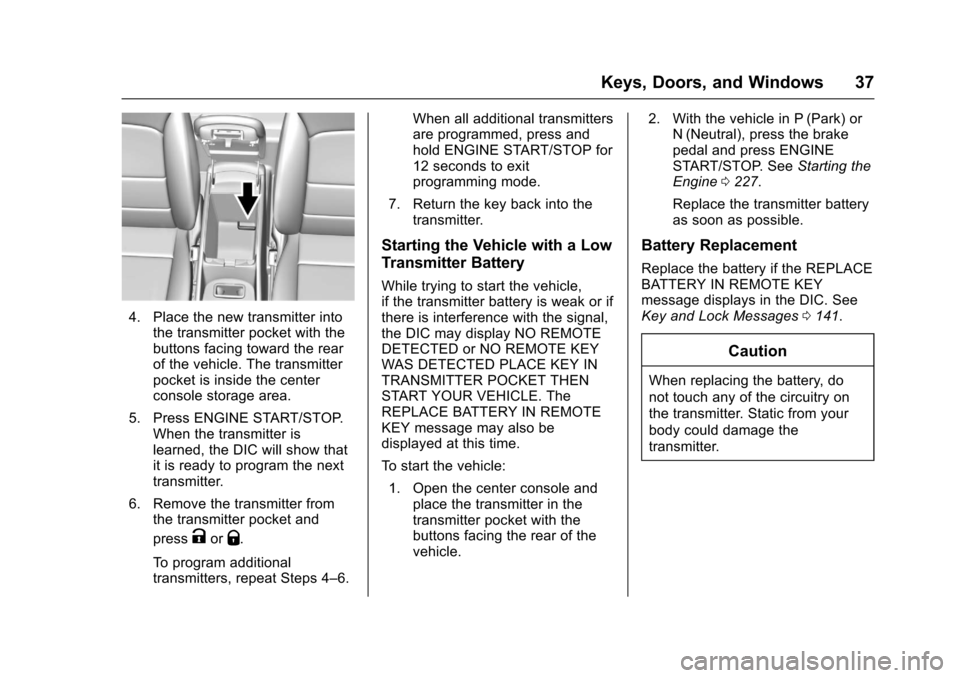
4. Place the new transmitter intothe transmitter pocket with thebuttons facing toward the rearof the vehicle. The transmitterpocket is inside the centerconsole storage area.
5. Press ENGINE START/STOP.When the transmitter islearned, the DIC will show thatit is ready to program the nexttransmitter.
6. Remove the transmitter fromthe transmitter pocket and
pressKorQ.
To p r o g r a m a d d i t i o n a ltransmitters, repeat Steps 4–6.
When all additional transmittersare programmed, press andhold ENGINE START/STOP for12 seconds to exitprogramming mode.
7. Return the key back into thetransmitter.
Starting the Vehicle with a Low
Transmitter Battery
While trying to start the vehicle,if the transmitter battery is weak or ifthere is interference with the signal,the DIC may display NO REMOTEDETECTED or NO REMOTE KEYWAS DETECTED PLACE KEY INTRANSMITTER POCKET THENSTART YOUR VEHICLE. TheREPLACE BATTERY IN REMOTEKEY message may also bedisplayed at this time.
To s t a r t t h e v e h i c l e :
1. Open the center console andplace the transmitter in thetransmitter pocket with thebuttons facing the rear of thevehicle.
2. With the vehicle in P (Park) orN(Neutral), press the brakepedal and press ENGINESTART/STOP. SeeStarting theEngine0227.
Replace the transmitter batteryas soon as possible.
Battery Replacement
Replace the battery if the REPLACEBATTERY IN REMOTE KEYmessage displays in the DIC. SeeKey and Lock Messages0141.
Caution
When replacing the battery, do
not touch any of the circuitry on
the transmitter. Static from your
body could damage the
transmitter.
Page 104 of 419
Chevrolet Malibu Owner Manual (GMNA-Localizing-U.S./Canada/Mexico-10122664) - 2017 - crc - 5/23/16
Instruments and Controls 103
Instruments and
Controls
Controls
Steering Wheel Adjustment . . . 104Steering Wheel Controls . . . . . . 104Heated Steering Wheel . . . . . . . 105Horn . . . . . . . . . . . . . . . . . . . . . . . . . . 105Windshield Wiper/Washer . . . . 105Compass . . . . . . . . . . . . . . . . . . . . . 106Clock . . . . . . . . . . . . . . . . . . . . . . . . . 107Power Outlets . . . . . . . . . . . . . . . . 108Wireless Charging . . . . . . . . . . . . 109
Warning Lights, Gauges, and
Indicators
Warning Lights, Gauges, andIndicators . . . . . . . . . . . . . . . . . . . . 111Instrument Cluster (BaseLevel) . . . . . . . . . . . . . . . . . . . . . . . 112Instrument Cluster(Uplevel) . . . . . . . . . . . . . . . . . . . . 114Speedometer . . . . . . . . . . . . . . . . . 117Odometer . . . . . . . . . . . . . . . . . . . . . 117Trip Odometer . . . . . . . . . . . . . . . . 117Ta c h o m e t e r ( N o n - H y b r i d ) . . . . . 11 7Fuel Gauge . . . . . . . . . . . . . . . . . . . 118Power Indicator Gauge(Hybrid) . . . . . . . . . . . . . . . . . . . . . 119
Engine Coolant TemperatureGauge . . . . . . . . . . . . . . . . . . . . . . 119Safety Belt Reminders . . . . . . . . 120Airbag Readiness Light . . . . . . . 120Passenger Airbag StatusIndicator . . . . . . . . . . . . . . . . . . . . 121Charging System Light . . . . . . . 122Malfunction Indicator Lamp(Check Engine Light) . . . . . . . . 122Brake System WarningLight . . . . . . . . . . . . . . . . . . . . . . . . 124Electric Parking BrakeLight . . . . . . . . . . . . . . . . . . . . . . . . 124Service Electric Parking BrakeLight . . . . . . . . . . . . . . . . . . . . . . . . 125Antilock Brake System (ABS)Warning Light . . . . . . . . . . . . . . . 125Lane Keep Assist (LKA)Light . . . . . . . . . . . . . . . . . . . . . . . . 125Vehicle Ahead Indicator . . . . . . 126Pedestrian Ahead Indicator . . . 126Traction Off Light . . . . . . . . . . . . . 126StabiliTrak®OFF Light . . . . . . . . 127Traction Control System (TCS)/StabiliTrak®Light . . . . . . . . . . . 127Tire Pressure Light . . . . . . . . . . . 127Engine Oil Pressure Light . . . . 128Low Fuel Warning Light(Uplevel) . . . . . . . . . . . . . . . . . . . . 128Low Fuel Warning Light (BaseLevel) . . . . . . . . . . . . . . . . . . . . . . . 129
Security Light . . . . . . . . . . . . . . . . . 129Vehicle Ready Light(Hybrid) . . . . . . . . . . . . . . . . . . . . . 129High-Beam On Light . . . . . . . . . . 129Lamps On Reminder . . . . . . . . . 130Cruise Control Light . . . . . . . . . . 130Door Ajar Light (Uplevel) . . . . . 130
Information Displays
Power Flows (Hybrid) . . . . . . . . . 131Energy Information(Hybrid) . . . . . . . . . . . . . . . . . . . . . 131Driver Information Center (DIC)(Base Level) . . . . . . . . . . . . . . . . 131Driver Information Center (DIC)(Uplevel) . . . . . . . . . . . . . . . . . . . . 134
Vehicle Messages
Vehicle Messages . . . . . . . . . . . . 138Battery Voltage and ChargingMessages . . . . . . . . . . . . . . . . . . . 138Brake System Messages . . . . . 138Compass Messages . . . . . . . . . . 139Cruise Control Messages . . . . . 139Door Ajar Messages . . . . . . . . . . 140Engine Cooling SystemMessages . . . . . . . . . . . . . . . . . . . 140Engine Oil Messages . . . . . . . . . 141Engine Power Messages . . . . . 141Fuel System Messages . . . . . . . 141Key and Lock Messages . . . . . 141
Page 134 of 419
Chevrolet Malibu Owner Manual (GMNA-Localizing-U.S./Canada/Mexico-10122664) - 2017 - crc - 5/23/16
Instruments and Controls 133
Remaining Oil Life :Displays anestimate of the oil's remaining usefullife. If REMAINING OIL LIFE 99% isdisplayed, that means 99% of thecurrent oil life remains.
When the remaining oil life is low,the CHANGE ENGINE OIL SOONmessage will appear on the display.SeeEngine Oil Messages0141.The oil should be changed as soonas possible. SeeEngine Oil0288.In addition to the engine oil lifesystem monitoring the oil life,additional maintenance isrecommended in the MaintenanceSchedule. SeeMaintenanceSchedule0369.
The Oil Life display must be resetafter each oil change. Do not resetthe Oil Life display accidentally atany time other than when the oil hasjust been changed. It cannot bereset accurately until the next oilchange. To reset the engine oil lifesystem, seeEngine Oil LifeSystem0291.
Oil Pressure :Oil pressure isdisplayed in either kilopascal (kPa)or in pounds per square inch (psi).
Oil pressure can vary with enginespeed, outside temperature, and oilviscosity. On some models, the oilpump will vary engine oil pressureaccording to engine needs. Oilpressure may change quickly as theengine speed or load varies. This isnormal. If the oil pressure warninglight or Driver Information Center(DIC) message indicates oilpressure outside the normaloperating range, check the vehicle'soil as soon as possible. SeeEngineOil Messages0141.
Tire Pressure :Displays a vehiclewith the approximate pressures ofall four tires. Tire pressure isdisplayed in either kilopascal (kPa)or in pounds per square inch (psi).SeeTire Pressure Monitor System0327andTire Pressure MonitorOperation0328.
Battery Voltage :Displays thecurrent battery voltage, if equipped.Battery voltage changes are normalwhile driving. SeeCharging SystemLight0122.Ifthereisaproblemwith the battery charging system,
the DIC will display a message. SeeBattery Voltage and ChargingMessages0138.
Coolant Temperature :Shows theengine coolant temperature in eitherdegrees Celsius (°C) or degreesFahrenheit (°F).
Speed Warning :This display isused to set the vehicle speed atwhich the speed warning chimesounds and the alert is displayed.The speed can be set by pressingVwhile the speed warning displayis showing.
Units :Movewxto change
between Metric or US when the Unit
display is active. PressVto confirm
the setting. This will change thedisplays on the DIC to the type ofmeasurements you select.
ECO Drive Assist Menu (ECO)
Items
Usewxto scroll through the
menu items. Not all items areavailable on every vehicle. Thefollowing is a list of all possiblemenu items:
Page 136 of 419
Chevrolet Malibu Owner Manual (GMNA-Localizing-U.S./Canada/Mexico-10122664) - 2017 - crc - 5/23/16
Instruments and Controls 135
DIC Info Page Options
The info pages on the DIC can beturned on or off through theSettings menu.
1. Pressoto access the cluster
applications.
2. Pressworxto scroll to the
Settings application.
3. PressVto enter the
Settings menu.
4. Scroll to Info Pages and
pressp.
5. Pressworxto move
through the list of possibleinformation displays.
6. PressVwhile an item is
highlighted to select ordeselect that item. When anitem is selected, a checkmarkwill appear next to it.
DIC Info Pages
The following is the list of allpossible DIC info page displays.Some may not be available for yourparticular vehicle. Some items may
not be turned on by default but canbe turned on through the Settingsapp. See“DIC Info Page Options”earlier in this section.
Speed :Shows the vehicle speed ineither kilometers per hour (km/h) ormiles per hour (mph).
Tr i p A o r Tr i p B :Shows thecurrent distance traveled, in eitherkilometers (km) or miles (mi), sincethe trip odometer was last reset.
This also shows the approximateaverage liters per 100 kilometers(L/100 km) or miles pergallon (mpg). This number iscalculated based on the number ofL/100 km (mpg) recorded since thelast time this menu item was reset.This number reflects only theapproximate average fuel economythat the vehicle has right now, andwill change as driving conditionschange.
Press and holdVwhile this display
is active to reset the trip odometerand the average fuel economy. TripAandTripBcanalsoberesetby
pressingpand choosing reset.
Fuel Range :Shows theapproximate distance the vehiclecan be driven without refueling.LOW will be displayed when thevehicle is low on fuel. The fuelrange estimate is based on anaverage of the vehicle's fueleconomy over recent driving historyand the amount of fuel remaining inthe fuel tank.
Oil Life :Shows an estimate of theoil's remaining useful life.If REMAINING OIL LIFE 99% isdisplayed, that means 99% of thecurrent oil life remains.
When the remaining oil life is low,the CHANGE ENGINE OIL SOONmessage will appear on the display.SeeEngine Oil Messages0141.The oil should be changed as soonas possible. SeeEngine Oil0288.In addition to the engine oil lifesystem monitoring the oil life,additional maintenance isrecommended in the MaintenanceSchedule. SeeMaintenanceSchedule0369.
Page 138 of 419
Chevrolet Malibu Owner Manual (GMNA-Localizing-U.S./Canada/Mexico-10122664) - 2017 - crc - 5/23/16
Instruments and Controls 137
Following Distance Indicator :When Adaptive Cruise Control(ACC) is not engaged, the currentfollow time to the vehicle ahead isdisplayed as a time value on thispage. When ACC has beenengaged, the display switches to thegap setting page. This page showsthe current gap setting along withthe vehicle ahead indicator.
Battery Voltage :Displays thecurrent battery voltage, if equipped.Battery voltage changes are normalwhile driving. SeeCharging SystemLight0122.Ifthereisaproblemwith the battery charging system,the DIC will display a message. SeeBattery Voltage and ChargingMessages0138.
Coolant Temperature :Shows theengine coolant temperature in eitherdegrees Celsius (°C) or degreesFahrenheit (°F).
Oil Pressure :Oil pressure isdisplayed in either kilopascal (kPa)or in pounds per square inch (psi).
Oil pressure can vary with enginespeed, outside temperature, and oilviscosity. On some models, the oil
pump will vary engine oil pressureaccording to engine needs. Oilpressure may change quickly as theengine speed or load varies. This isnormal. If the oil pressure warninglight or Driver Information Center(DIC) message indicates oilpressure outside the normaloperating range, check the vehicle'soil as soon as possible. SeeEngineOil Messages0141.
Drive Cycle Info (Hybrid) :Thisscreen displays the distancetraveled and average fuel economyfor the current trip. The screen willalso be shown when the vehicle isturned off displaying the previoustrip’sinformation.
Efficiency Gauge (Hybrid) :Thisgauge is a guide to driving in anefficient manner by keeping theindicator in the center of the gauge.
.Accel: If the indicator moves tothe right of the gauge,acceleration is too aggressive tooptimize efficiency.
.Brake: If the indicator moves tothe left side of the gauge,braking is too aggressive tooptimize efficiency.
To t a l P o w e r D i s p l a y ( H y b r i d ) :Provides a numeric display of thetotal power being used to propel orstop the vehicle. The display showsthe power being provided by thebattery or charging the battery aswell as the power provided by theengine.
EV Operation (Hybrid) :The barmoves from left to right as the driverrequests more power from thepropulsion system. While in EVmode, maintaining the bar in thegreen zone will allow the driver tomaximize EV operation.
Blank Page :Shows noinformation.
Page 142 of 419
Chevrolet Malibu Owner Manual (GMNA-Localizing-U.S./Canada/Mexico-10122664) - 2017 - crc - 5/23/16
Instruments and Controls 141
Engine Oil Messages
CHANGE ENGINE OIL SOON
This message displays when theengine oil needs to be changed.When the engine oil is changed, besure to reset the Oil Life System.SeeEngine Oil Life System0291,Driver Information Center (DIC)(Base Level)0131orDriverInformation Center (DIC) (Uplevel)0134,Engine Oil0288,andMaintenance Schedule0369.
ENGINE OIL HOT, IDLE
ENGINE
This message displays when theengine oil temperature is too hot.Stop and allow the vehicle to idleuntil it cools down.
OIL PRESSURE LOW—STOP
ENGINE
This message displays if low oilpressure levels occur. Stop thevehicle as soon as safely possibleand do not operate it until the causeof the low oil pressure has been
corrected. Check the oil as soon aspossible and have the vehicleserviced by your dealer.
Engine Power Messages
ENGINE POWER IS REDUCED
This message displays when thevehicle's engine power is reduced.Reduced engine power can affectthe vehicle's ability to accelerate.If this message is on, but there is noreduction in performance, proceedto your destination. Theperformance may be reduced thenext time the vehicle is driven. Thevehicle may be driven at a reducedspeed while this message is on, butmaximum acceleration and speedmay be reduced. Anytime thismessage stays on, or displaysrepeatedly, the vehicle should betaken to your dealer for service assoon as possible.
Fuel System Messages
FUEL LEVEL LOW
This message displays when thevehicle is low on fuel. Refuel assoon as possible.
TIGHTEN GAS CAP
This message displays when thefuel cap is not on tight. Tighten thefuel cap.
Key and Lock Messages
NO REMOTE KEY WAS
DETECTED PLACE KEY IN
TRANSMITTER POCKET THEN
START YOUR VEHICLE
This message displays when tryingto start the vehicle if an RKEtransmitter is not detected. Thetransmitter battery may be weak.See“Starting the Vehicle with a LowTransmitter Battery”underRemoteKeyless Entry (RKE) SystemOperation032.
Page 292 of 419
Chevrolet Malibu Owner Manual (GMNA-Localizing-U.S./Canada/Mexico-10122664) - 2017 - crc - 5/23/16
Vehicle Care 291
Engine Oil Life System
When to Change Engine Oil
This vehicle has a computer systemthat indicates when to change theengine oil and filter. This is basedon a combination of factors whichinclude engine revolutions, enginetemperature, and miles driven.Based on driving conditions, themileage at which an oil change isindicated can vary considerably. Forthe oil life system to work properly,the system must be reset every timethe oil is changed.
When the system has calculatedthat oil life has been diminished, itindicates that an oil change isnecessary. A CHANGE ENGINEOIL SOON message comes on. SeeEngine Oil Messages0141.Change the oil as soon as possiblewithin the next 1 000 km (600 mi).It is possible that, if driving underthe best conditions, the oil lifesystem might indicate that an oilchange is not necessary for up to ayear. The engine oil and filter mustbe changed at least once a yearand, at this time, the system must
be reset. Your dealer has trainedservice people who will perform thiswork and reset the system. It is alsoimportant to check the oil regularlyover the course of an oil draininterval and keep it at the properlevel.
If the system is ever resetaccidentally, the oil must bechanged at 5 000 km (3,000 mi)since the last oil change.Remember to reset the oil lifesystem whenever the oil is changed.
How to Reset the Engine Oil
Life System
1. Using the DIC controls on theright side of the steering wheel,display REMAINING OIL LIFEon the DIC. SeeDriverInformation Center (DIC) (BaseLevel)0131orDriverInformation Center (DIC)(Uplevel)0134.Whenremaining oil life is low, theCHANGE ENGINE OIL SOONmessage will appear on thedisplay. SeeEngine OilMessages0141.
2. PressVon the DIC controls
and hold down for a fewseconds to clear the CHANGEENGINE OIL SOON messageand reset the oil life at 100%.
Be careful not to reset the oillife display accidentally at anytime other than after the oil ischanged. It cannot be resetaccurately until the next oilchange.
The system is reset when theCHANGE ENGINE OIL SOONmessage is off and the REMAININGOIL LIFE message is displayed.
If the CHANGE ENGINE OIL SOONmessage comes back on when thevehicle is started, the engine oil lifesystem has not been reset. Repeatthe procedure.