2017 CHEVROLET MALIBU mirror
[x] Cancel search: mirrorPage 60 of 419
Chevrolet Malibu Owner Manual (GMNA-Localizing-U.S./Canada/Mexico-10122664) - 2017 - crc - 5/23/16
Seats and Restraints 59
Memory Seats
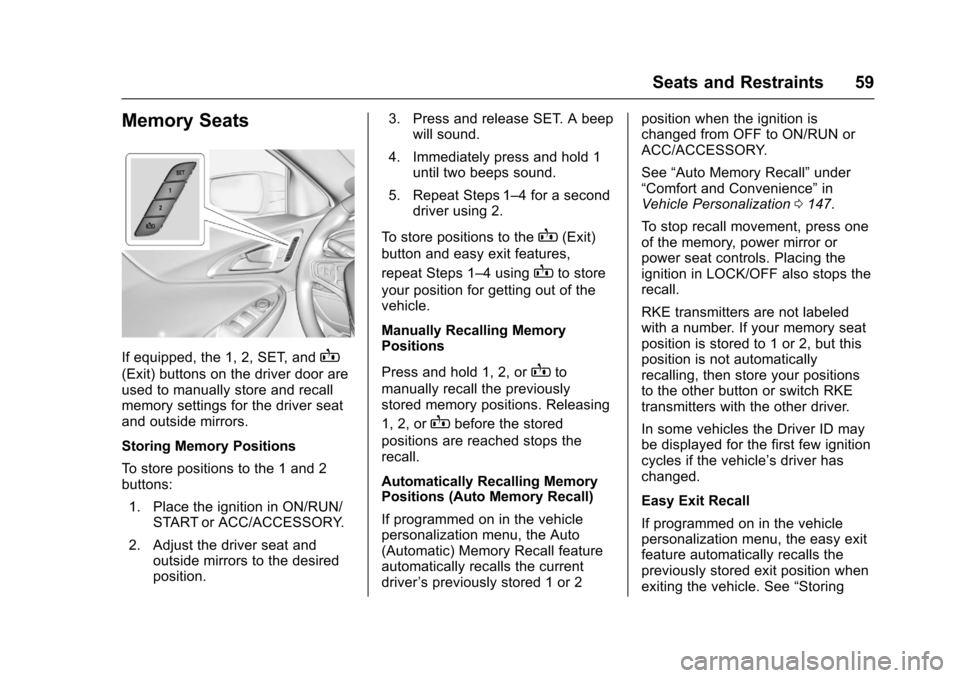
If equipped, the 1, 2, SET, andB
(Exit) buttons on the driver door areused to manually store and recallmemory settings for the driver seatand outside mirrors.
Storing Memory Positions
To s t o r e p o s i t i o n s t o t h e 1 a n d 2buttons:
1. Place the ignition in ON/RUN/START or ACC/ACCESSORY.
2. Adjust the driver seat andoutside mirrors to the desiredposition.
3. Press and release SET. A beepwill sound.
4. Immediately press and hold 1until two beeps sound.
5. Repeat Steps 1–4foraseconddriver using 2.
To s t o r e p o s i t i o n s t o t h eB(Exit)
button and easy exit features,
repeat Steps 1–4usingBto store
your position for getting out of thevehicle.
Manually Recalling MemoryPositions
Press and hold 1, 2, orBto
manually recall the previouslystored memory positions. Releasing
1, 2, orBbefore the stored
positions are reached stops therecall.
Automatically Recalling MemoryPositions (Auto Memory Recall)
If programmed on in the vehiclepersonalization menu, the Auto(Automatic) Memory Recall featureautomatically recalls the currentdriver’spreviouslystored1or2
position when the ignition ischanged from OFF to ON/RUN orACC/ACCESSORY.
See“Auto Memory Recall”under“Comfort and Convenience”inVehicle Personalization0147.
To s t o p r e c a l l m o v e m e n t , p r e s s o n eof the memory, power mirror orpower seat controls. Placing theignition in LOCK/OFF also stops therecall.
RKE transmitters are not labeledwith a number. If your memory seatposition is stored to 1 or 2, but thisposition is not automaticallyrecalling, then store your positionsto the other button or switch RKEtransmitters with the other driver.
In some vehicles the Driver ID maybe displayed for the first few ignitioncycles if the vehicle’sdriverhaschanged.
Easy Exit Recall
If programmed on in the vehiclepersonalization menu, the easy exitfeature automatically recalls thepreviously stored exit position whenexiting the vehicle. See“Storing
Page 61 of 419
Chevrolet Malibu Owner Manual (GMNA-Localizing-U.S./Canada/Mexico-10122664) - 2017 - crc - 5/23/16
60 Seats and Restraints
Memory Positions”previously in thissection. See alsoVehiclePersonalization0147.
Easy exit recall automaticallyactivates when one of the followingoccurs:
.The vehicle is turned off and thedriver door is opened within ashort time.
.The vehicle is turned off with thedriver door open.
To s t o p r e c a l l m o v e m e n t , p r e s s o n eof the memory, driver seat oroutside mirror.
Obstructions
If something has blocked the driverseat while recalling a memoryposition, the recall may stop.Remove the obstruction. Then doone of the following:
.If automatically or manuallyrecalling the stored memoryposition, press and hold theappropriate manual control fortwo seconds. Try recalling againby pressing the appropriatememory button.
.If automatically recalling theposition, press and hold theappropriate manual control forthe memory item that is notrecalling for two seconds. Tryrecalling again by opening the
driver door and pressingKon
the RKE transmitter.
.If recalling the exit position,press and hold the appropriatemanual control for the exitfeature not recalling fortwo seconds. Then try recallingthe exit position again.
If the memory position is still notrecalling, see your dealer forservice.
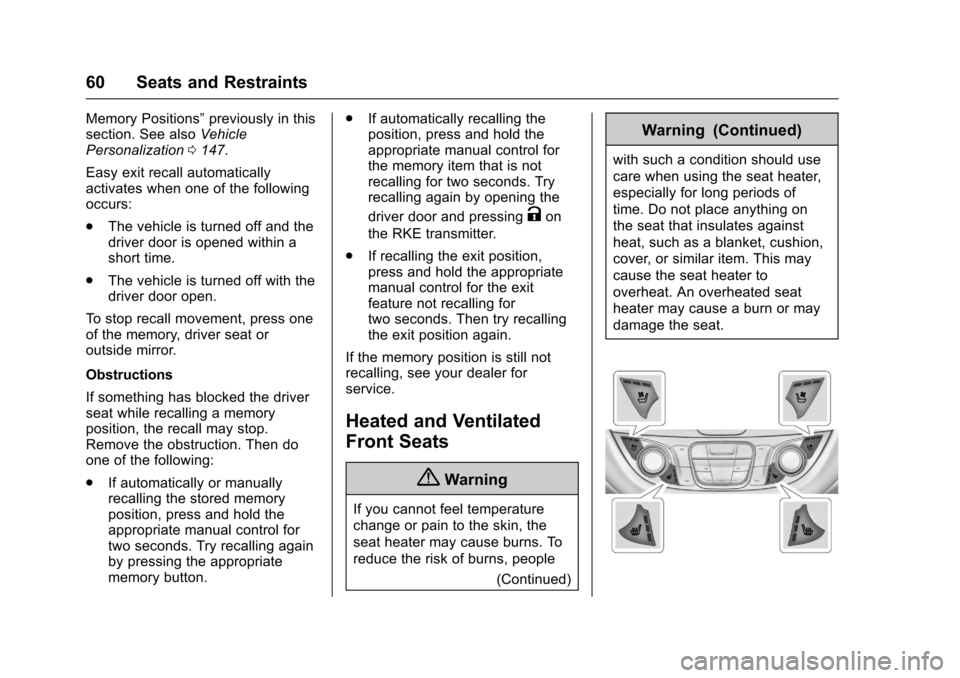
Heated and Ventilated
Front Seats
{Warning
If you cannot feel temperature
change or pain to the skin, the
seat heater may cause burns. To
reduce the risk of burns, people
(Continued)
Warning (Continued)
with such a condition should use
care when using the seat heater,
especially for long periods of
time. Do not place anything on
the seat that insulates against
heat, such as a blanket, cushion,
cover, or similar item. This may
cause the seat heater to
overheat. An overheated seat
heater may cause a burn or may
damage the seat.
Page 144 of 419
Chevrolet Malibu Owner Manual (GMNA-Localizing-U.S./Canada/Mexico-10122664) - 2017 - crc - 5/23/16
Instruments and Controls 143
FORWARD COLLISION
SYSTEM UNAVAILABLE
This message displays when theForward Automatic Braking (FAB)has been unavailable for some time.The FAB System does not needservice.
This can occur under the followingconditions:
.The front of the vehicle orwindshield is not clean. Keepthese areas clean and free ofmud, dirt, snow, ice, and slush.For cleaning instructions, seeExterior Care0358.
.Heavy rain or snow is interferingwith the object detectionperformance.
This message may also bedisplayed if there is a problem withthe StabiliTrak system. SeeTr a c t i o nControl/Electronic StabilityControl0241
FORWARD COLLISION
ALERT OFF
This message displays when theForward Collision Alert has beenturned off.
FRONT CAMERA BLOCKED
CLEAN WINDSHIELD
This message displays when thecamera is blocked. Cleaning theoutside of the windshield behind therearview mirror may correct theissue. The Front Pedestrian Braking(FPB), Lane Keep Assist (LKA), andLane Departure Warning (LDW) willnot operate. Adaptive Cruise Control(ACC), Forward Collision Alert(FCA), and the Forward AutomaticBraking (FAB) may not work or maynot work as well.
LANE CHANGE ALERT OFF
This message indicates that thedriver has turned the Side BlindZone Alert (SBZA) and LaneChange Alert (LCA) systems off.
LANE KEEPING ASSIST
UNAVAILABLE
This message displays when theLane Keep Assist (LKA) and LaneDeparture Warning (LDW) system istemporarily unavailable. The LKAsystem does not need service.
This message could be due to thecamera being blocked. Cleaning theoutside of the windshield behind therearview mirror may correct theissue.
PARK ASSIST OFF
This message displays when theParking Assist system has beenturned off or when there is atemporary condition causing thesystem to be disabled.
SERVICE FORWARD
COLLISION SYSTEM
If this message displays, take thevehicle to your dealer to repair thesystem.
Page 150 of 419
Chevrolet Malibu Owner Manual (GMNA-Localizing-U.S./Canada/Mexico-10122664) - 2017 - crc - 5/23/16
Instruments and Controls 149
Climate and Air Quality
Select and the following maydisplay:
.Auto Fan Speed
.Air Quality Sensor
.Auto Defog
.Auto Rear Defog
Auto Fan Speed
This adjusts the blower level duringautomatic operation.
Select Low, Medium, or High.
Air Quality Sensor
This automatically selectsrecirculate when certain gases aredetected.
Select Off, Low Sensitivity, or HighSensitivity.
Auto Defog
This allows the climate controlsystem to prevent fog on the insideof the windows. See“Auto Defog”inDual Automatic Climate ControlSystem0208.
Select Off or On.
Auto Rear Defog
This allows the rear windowdefogger to turn on automaticallywhen the interior temperature is coldand the outside temperature isabout 7 °C (44 °F) and below. See“Rear Window Defogger”inDualAutomatic Climate ControlSystem0208.
Select Off or On.
Comfort and Convenience
Select and the following maydisplay:
.Auto Memory Recall
.Easy Exit Options
.Chime Volume
.Reverse Tilt Mirror
.Extended Hill Start Assist
Auto Memory Recall
This feature automatically recallsthe current driver’spreviouslystored1or2positionswhentheignitionischanged from OFF to ON/RUN/START or ACCESSORY. SeeMemory Seats059.
Select Off or On.
Easy Exit Options
This feature automatically recallsthe current driver’spreviouslystoredExit button position when exiting thevehicle. SeeMemory Seats059.
Select Off or On.
Chime Volume
Select to set the chime volumelevel.
Reverse Tilt Mirror
When on, both the driver andpassenger, driver, or passengermirrors will tilt downward when thevehicle is shifted to R (Reverse) toimprove visibility of the ground nearthe rear wheels. They will return totheir previous driving position whenthe vehicle is shifted out ofR(Reverse)ortheignitionisturnedto OFF.
Select Off, On - Driver andPassenger, On - Driver, or On -Passenger.
Page 156 of 419
Chevrolet Malibu Owner Manual (GMNA-Localizing-U.S./Canada/Mexico-10122664) - 2017 - crc - 5/23/16
Instruments and Controls 155
stopping vehicle, and then thatvehicle drives on. SeeAdaptiveCruise Control0245.
Select Off or On.
Lane Change Alert
This allows the feature to be turnedon or off. SeeLane Change Alert(LCA)0264.
Select Off or On.
Comfort and Convenience
Select and the following maydisplay:
.Auto Memory Recall
.Easy Exit Options
.Chime Volume
.Reverse Tilt Mirror
.Extended Hill Start Assist
Auto Memory Recall
This feature automatically recallsthe current driver’spreviouslystored1or2buttonpositionswhentheignition is changed from off to ON/RUN or ACC/ACCESSORY. SeeMemory Seats059.
Select Off or On.
Easy Exit Options
This feature automatically recallsthe current driver’spreviouslystoredexit button position when exiting thevehicle. SeeMemory Seats059.
Select Off or On.
Chime Volume
Select to set the chime volumelevel.
Select Normal or High.
Reverse Tilt Mirror
When on, both the driver andpassenger outside mirrors will tiltdownward when the vehicle isshifted to R (Reverse) to improvevisibility of the ground near the rearwheels. They will return to theirprevious driving position when thevehicle is shifted out of R (Reverse)or the engine is turned off. SeeReverse Tilt Mirrors049.
Select Off, On - Driver andPassenger, On - Driver, or On -Passenger.
Extended Hill Start Assist
This allows the duration of the HillStart Assist to be changed. See“Extended Hill Start Assist (EHSA)”inHill Start Assist (HSA)0240.
Select Extended Hold orStandard Hold.
Lighting
Select and the following maydisplay:
.Vehicle Locator Lights
.Exit Lighting
Vehicle Locator Lights
This feature will flash the exteriorlamps and allows the headlamps,parking lamps, taillamps, and mostof the interior lamps to turn on
briefly whenKon the Remote
Keyless Entry (RKE) transmitter ispressed to locate the vehicle.
Select Off or On.
Page 208 of 419
Chevrolet Malibu Owner Manual (GMNA-Localizing-U.S./Canada/Mexico-10122664) - 2017 - crc - 5/23/16
Climate Controls 207
Rear Window Defogger
K:Press to turn the rear windowdefogger on or off. An indicator lighton the button comes on to show thatthe rear window defogger is on. Thedefogger turns off when the ignitionis placed in the ACC/ACCESSORYor LOCK/OFF position.
The upper lines on the rear windoware antenna grids and are notintended to defrost the glass.
The rear window defogger can beset to automatic operation. See“Climate and Air Quality”underVehicle Personalization0147.When Auto Rear Defog is selected,the rear window defogger turns onautomatically when the interiortemperature is cold and the outsidetemperature is about 7 °C (44 °F)and below. The auto rear defoggerturns off automatically.
If the vehicle is equipped withheated outside mirrors, they turn onwhen the rear window defoggerbutton is on and help to clear fog orfrost from the surface of the mirror.SeeHeated Mirrors049.
Caution
Do not try to clear frost or other
material from the inside of the
front windshield and rear window
with a razor blade or anything
else that is sharp. This may
damage the rear window
defogger grid and affect the
radio's ability to pick up stations
clearly. The repairs would not be
covered by the vehicle warranty.
LorM:If equipped, pressLorMto heat the driver or passenger seat.SeeHeated and Ventilated FrontSeats060.
Remote Start Climate ControlOperation :If equipped with remotestart, the climate control systemmay run when the vehicle is startedremotely. The system uses thedriver’sprevioussettingstoheatorcool the inside of the vehicle. Therear defog may come on duringremote start based on cold ambientconditions. The rear defog indicatorlight does not come on during aremote start. The front heated seatswill turn on if it is cold outside. Theheated seat indicator lights do notcome on during a remote start.
Page 211 of 419
Chevrolet Malibu Owner Manual (GMNA-Localizing-U.S./Canada/Mexico-10122664) - 2017 - crc - 5/23/16
210 Climate Controls
A/C (Max/Eco A/C For Stop/StartVehicles) :Press to cycle betweenthe max, eco, and off airconditioning modes. The indicatorwill be lit in max and eco modes andturns off when there is no A/Cfunction. If the fan is turned off, theair conditioner will not run and theindicator light will turn off.
Press AUTO to return to automaticoperation and the air conditionerruns automatically as needed. WithStop/Start vehicles, the A/C willreturn to eco a/c operation.
For max a/c, press A/C. Theindicator will turn amber. Auto stopswill occur less frequently, be shorter,and will not occur in extremely warmweather.
For eco a/c, press A/C again. Theindicator will turn green. This settingbalances fuel economy and airconditioning comfort. In warmweather conditions, auto stops mayoccur more frequently, last longer,and the vehicle interior may bewarmer during auto stops ascompared to the max a/c setting.This setting allows higher humidity
inside the vehicle and windowfogging may occur before theengine restarts.
@:Press to turn on recirculation.An indicator light comes on. Air isrecirculated to quickly cool theinside of the vehicle or to reduce theentry of outside air and odors.
If selected during cool or coldweather, the windshield andwindows may fog. Turn offrecirculation to help clear thewindshield and windows.
Auto Defog :The climate controlsystem may have a sensor toautomatically detect high humidityinside the vehicle. When highhumidity is detected, the climatecontrol system may adjust tooutside air supply and turn on theair conditioner. The fan speed mayslightly increase to help preventfogging. If the climate controlsystem does not detect possiblewindow fogging, it returns to normaloperation.
To t u r n A u t o D e f o g o f f o r o n , s e e“Climate and Air Quality”underVehicle Personalization0147.
Rear Window Defogger
K:Press to turn the rear windowdefogger on or off. An indicator lighton the button comes on to show thatthe rear window defogger is on. Therear window defogger only workswhen the ignition is in ON/RUN. Thedefogger turns off when the ignitionis placed in the ACC/ACCESSORYor LOCK/OFF position.
The upper lines on the rear windoware antenna grids and are notintended to defrost the glass.
The rear window defogger can beset to automatic operation. See“Climate and Air Quality”underVehicle Personalization0147.When Auto Rear Defog is selected,the rear window defogger turns onautomatically when the interiortemperature is cold and the outsidetemperature is about 7 °C (44 °F)and below. The auto rear defoggerturns off automatically.
If the vehicle is equipped withheated outside rearview mirrors,they turn on when the rear window
Page 212 of 419
Chevrolet Malibu Owner Manual (GMNA-Localizing-U.S./Canada/Mexico-10122664) - 2017 - crc - 5/23/16
Climate Controls 211
defogger button is on and help toclear fog or frost from the surface ofthe mirror. SeeHeated Mirrors049.
Caution
Do not try to clear frost or other
material from the inside of the
front windshield and rear window
with a razor blade or anything
else that is sharp. This may
damage the rear window
defogger grid and affect the
radio's ability to pick up stations
clearly. The repairs would not be
covered by the vehicle warranty.
Driver and Passenger Heated andVentilated Seats :If equipped,
pressLorMto heat the driver or
passenger seat.
If equipped, press{orCto
ventilate the driver or passengerseat. SeeHeated and VentilatedFront Seats060.
Remote Start Climate ControlOperation :If equipped with remotestart, the climate control systemmay run when the vehicle is startedremotely. The system will use thedefrost setting if it is cold outside orturn on using the coldest settings ifit is hot outside. The rear defog maycome on during remote start basedon cold ambient conditions. Therear defog indicator light does notcome on during a remote start. Thefront heated seats will turn on if it iscold outside. The heated seatindicator lights do not come onduring a remote start.
Sensor
The solar sensor, on top of theinstrument panel near thewindshield, monitors the solar heat.
The climate control system uses thesensor information to adjust thetemperature, fan speed,recirculation, and air delivery modefor best comfort.
Do not cover the sensor; otherwisethe automatic climate control systemmay not work properly.
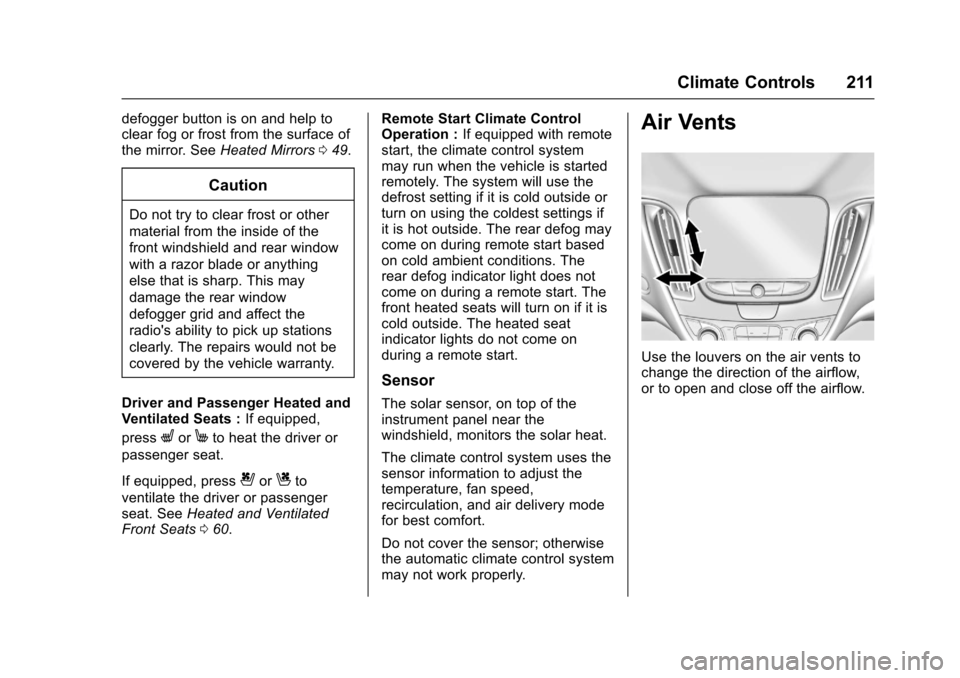
Air Vents
Use the louvers on the air vents tochange the direction of the airflow,or to open and close off the airflow.