2017 CHEVROLET MALIBU ESP
[x] Cancel search: ESPPage 182 of 419
Chevrolet Malibu Owner Manual (GMNA-Localizing-U.S./Canada/Mexico-10122664) - 2017 - crc - 5/23/16
Infotainment System 181
Storing a Station as a Favorite
Stations from all bands can bestored in any order in the favoritepages.
Up to 25 stations can be stored.
Storing Stations
To s t o r e t h e s t a t i o n t o a p o s i t i o n i nthe list, touch the correspondingbutton 1✓5untilabeepisheard.
1. Select the desired station.
2. TouchSorTto select the
desired page of savedfavorites.
3. Touch and hold any of thepreset buttons to save thecurrent radio station to thatbutton of the selectedfavorites page.
To c h a n g e a p r e s e t b u t t o n , t u n e t othe new desired radio station andtouch and hold the preset button.
Satellite Radio
If equipped, vehicles with anSiriusXM®Satellite Radio tuner andavalidSiriusXMSatelliteRadiosubscription can receive SiriusXMprogramming.
SiriusXM Satellite Radio
Service
SiriusXM is a satellite radio servicebased in the 48 contiguous UnitedStates and 10 Canadian provinces.SiriusXM Satellite Radio has a widevariety of programming andcommercial-free music, coast tocoast, and in digital-quality sound.During your trial or when yousubscribe, you will get unlimitedaccess to SiriusXM Radio Online forwhen you are not in the vehicle.Aservicefeeisrequiredtoreceivethe SiriusXM service. If SiriusXMservice needs to be reactivated, theradio will display "No SubscriptionPlease Renew" on channel SXM1.For more information, contactSiriusXM at www.siriusxm.com or1-888-601-6296 (U.S.), andwww.siriusxm.ca or 1-877-438-9677(Canada).
Listening to SiriusXM Radio
1. Press{.
2. Touch AUDIO.
3. Touch Source.
4. Touch SXM and the mostrecent listened to SiriusXMchannel will display.
Selecting a Category
From Menu, touch Categories, thentouch the desired category or from
Categories, touchQorRto find the
desired channel. Touch the channelto select it.
Selecting a Channel
Pressgordto seek the previous
or next channel.
Using the Preset Buttons
Up to five favorites pages can besaved, and each page can store upto five channels.
To c h a n g e a p r e s e t b u t t o n , t u n e t othe new desired channel and holdthe button.
Page 183 of 419
Chevrolet Malibu Owner Manual (GMNA-Localizing-U.S./Canada/Mexico-10122664) - 2017 - crc - 5/23/16
182 Infotainment System
Listening to Preset Channels
1. TouchSorTrepeatedly to
select the desiredfavorites page.
2. Touch the preset button tolisten to the channel.
Using the SiriusXM Menu
Operation
1. Touch MENU on the SXM radioscreen.
2. Touch the menu to select thedesired item or to display thedetail menu item.
3. Touch0to return to the
previous menu.
Channel List
1. Touch Channel List from theSXM menu. The channel list isdisplayed.
2. TouchQorRto find the
desired channel. Touch thechannel to select it.
Tone Settings
1. Touch Tone Settings. See“To n e S e t t i n g s”underOperation0176.
2. Touch0.
Auto Volume
1. Touch Auto Volume. See“AutoVolume”underOperation0176.
2. Touch0.
Categories
1. Touch Categories.
2. TouchQorRto find the
desired category. Touch thecategory to select it.
Explicit Content Filter
When on, only a filtered list ofchannels will be received. When off,all regular SXM programmingsubscribed to will be received.
1. Touch SXM Explicit Filter.
2. Select to enable or disable.
Radio Reception
Frequency interference and staticcan occur during normal radioreception if items such as cell phonechargers, vehicle convenienceaccessories, and external electronicdevices are plugged into theaccessory power outlet. If there isinterference or static, unplug theitem from the accessory poweroutlet.
FM
FM signals only reach about 16 to65 km (10 to 40 mi). Although theradio has a built-in electronic circuitthat automatically works to reduceinterference, some static can occur,especially around tall buildings orhills, causing the sound to fade inand out.
AM
The range for most AM stations isgreater than for FM, especially atnight. The longer range can causestation frequencies to interfere witheach other. Static can occur whenthings like storms and power lines
Page 192 of 419
Chevrolet Malibu Owner Manual (GMNA-Localizing-U.S./Canada/Mexico-10122664) - 2017 - crc - 5/23/16
Infotainment System 191
There may be restrictions on usingBluetooth wireless technology insome locations.
Due to the variety of Bluetoothdevices and their firmware versions,the device may respond differentlywhen performing over Bluetooth.
On a current phone call, an imageof the current contact from thephone's contact list may bedisplayed. Not all phones arecompatible with this feature.
Refer to the cell phonemanufacturer’suserguideforquestions about the phone'sBluetooth functionality.
Bluetooth Controls
If equipped with Bluetooth capability,use the buttons on the infotainmentsystem and the steering wheel tooperate the system.
Steering Wheel Controls
g:Press to interact with Bluetoothor OnStar, if equipped. SeeBluetooth (Overview)0190orBluetooth (Infotainment ControlsRadio with Touchscreen)0195orBluetooth (Infotainment ControlsRadio without Touchscreen)0191orOnStar Overview0397.
c:Press to silence the vehiclespeakers only. Press again to turnthe sound on. Press to reject anincoming call or end a current call.
Bluetooth (Infotainment
Controls Radio without
Touchscreen)
To u s e i n f o t a i n m e n t c o n t r o l s t oaccess the menu system, seeOverview0173.
Pairing
ABluetooth-enabledcellphonemust be paired to the Bluetoothsystem and then connected to thevehicle before it can be used. Seeyour cell phone manufacturer's userguide for Bluetooth functions beforepairing the cell phone. If a Bluetoothphone is not connected, calls will bemade using OnStar Hands-FreeCalling, if available. SeeOnStarOverview0397.
Pairing Information
.ABluetoothphonewithMP3capability cannot be paired tothe vehicle as a phone and anMP3 player at the same time.
.Up to five cell phones can bepaired to the Bluetooth system.
Page 203 of 419
Chevrolet Malibu Owner Manual (GMNA-Localizing-U.S./Canada/Mexico-10122664) - 2017 - crc - 5/23/16
202 Infotainment System
Searching for a Name
Select characters by using thekeypad on the phone book screen.As characters are selected, thenames that include those characterswill display on the phone bookscreen. As more characters of thename are entered, the list ofpossible names is shortened.
To s e a r c h f o r t h e n a m e A l e x :
1. Touch (abc) to select the firstcharacter.
2. Touch (jkl) three times to selectthe second character.
3. Touch (def) two times to selectthe third character.
4. Touch (wxy) two times to selectthe fourth character.
Making a Call from Call History
1. Touch Call History on thephone screen.
2. Touch one of the following for:
.WAll calls history.
.[Dialed calls.
.YMissed calls.
.XReceived calls.
3. Select the contact entry to call.
Making a Call with Speed DialNumbers
To u c h a n d h o l d t h e s p e e d d i a lnumber using the keypad on thephone screen.
Only speed dial numbers alreadystored on the cell phone can beused for speed dial calls. Up totwo-digit speed dial numbers aresupported.
For two-digit speed dial numbers,touch and hold the second digit tomake a call to the speed dialnumber.
Trademarks and
License Agreements
FCC Information
SeeRadio FrequencyStatement0393.
Bluetooth®
The Bluetooth word mark and logosare owned by the Bluetooth®SIG,Inc. and any use of such marks byGeneral Motors is under license.Other trademarks and trade namesare those of their respective owners.
DivX Certified®to play DivX®video,including premium content.
Covered by one or more of thefollowing U.S. patents: 7,295,673;7,460,668; 7,515,710; 7,519,274.
Page 218 of 419
Chevrolet Malibu Owner Manual (GMNA-Localizing-U.S./Canada/Mexico-10122664) - 2017 - crc - 5/23/16
Driving and Operating 217
Steering
Electric Power Steering
The vehicle has electric powersteering. It does not have powersteering fluid. Regular maintenanceis not required.
If power steering assist is lost dueto a system malfunction, the vehiclecan be steered, but may requireincreased effort.
See your dealer if there is aproblem.
If the steering wheel is turned until itreaches the end of its travel and isheld against that position for anextended period of time, powersteering assist may be reduced.
If the steering assist is used for anextended period of time, powerassist may be reduced.
Normal use of the power steeringassist should return when thesystem cools down.
See specific vehicle steeringmessages underService VehicleMessages0145.Seeyourdealerifthere is a problem.
Curve Tips
.Ta k e c u r v e s a t a r e a s o n a b l espeed.
.Reduce speed before entering acurve.
.Maintain a reasonable steadyspeed through the curve.
.Wait until the vehicle is out ofthe curve before acceleratinggently into the straightaway.
Steering in Emergencies
.There are some situations whensteering around a problem maybe more effective than braking.
.Holding both sides of thesteering wheel allows you to turn180 degrees without removingahand.
.The Antilock Brake System(ABS) allows steering whilebraking.
Off-Road Recovery
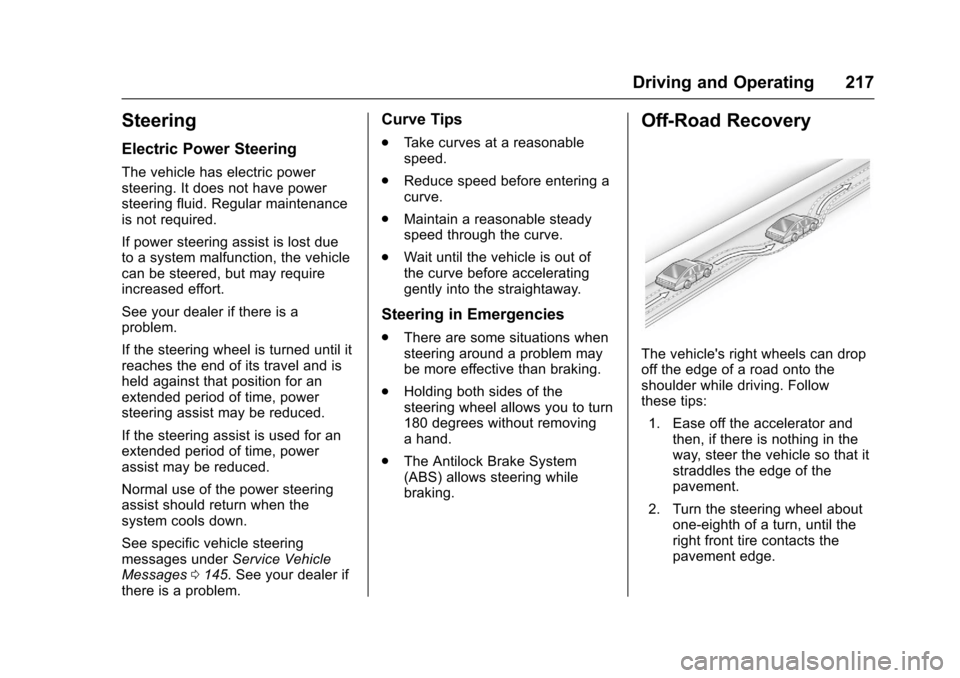
The vehicle's right wheels can dropoff the edge of a road onto theshoulder while driving. Followthese tips:
1. Ease off the accelerator andthen, if there is nothing in theway, steer the vehicle so that itstraddles the edge of thepavement.
2. Turn the steering wheel aboutone-eighth of a turn, until theright front tire contacts thepavement edge.
Page 219 of 419
Chevrolet Malibu Owner Manual (GMNA-Localizing-U.S./Canada/Mexico-10122664) - 2017 - crc - 5/23/16
218 Driving and Operating
3. Turn the steering wheel to gostraight down the roadway.
Loss of Control
Skidding
There are three types of skids thatcorrespond to the vehicle's threecontrol systems:
.Braking Skid—wheels are notrolling.
.Steering or Cornering Skid—too much speed or steering in acurve causes tires to slip andlose cornering force.
.Acceleration Skid—too muchthrottle causes the drivingwheels to spin.
Defensive drivers avoid most skidsby taking reasonable care suited toexisting conditions, and by notoverdriving those conditions. Butskids are always possible.
If the vehicle starts to slide, followthese suggestions:
.Ease your foot off theaccelerator pedal and steer theway you want the vehicle to go.
The vehicle may straighten out.Be ready for a second skid if itoccurs.
.Slow down and adjust yourdriving according to weatherconditions. Stopping distancecan be longer and vehiclecontrol can be affected whentraction is reduced by water,snow, ice, gravel, or othermaterial on the road. Learn torecognize warning clues—suchas enough water, ice, or packedsnow on the road to make amirrored surface—and slowdown when you have any doubt.
.Try to avoid sudden steering,acceleration, or braking,including reducing vehicle speedby shifting to a lower gear. Anysudden changes could causethe tires to slide.
Remember: Antilock brakes helpavoid only the braking skid.
Driving on Wet Roads
Rain and wet roads can reducevehicle traction and affect yourability to stop and accelerate.
Always drive slower in these typesof driving conditions and avoiddriving through large puddles anddeep-standing or flowing water.
{Warning
Wet brakes can cause crashes.
They might not work as well in a
quick stop and could cause
pulling to one side. You could
lose control of the vehicle.
After driving through a large
puddle of water or a car/vehicle
wash, lightly apply the brake
pedal until the brakes work
normally.
Flowing or rushing water creates
strong forces. Driving through
flowing water could cause the
vehicle to be carried away. If this
happens, you and other vehicle
occupants could drown. Do not
ignore police warnings and be
very cautious about trying to drive
through flowing water.
Page 221 of 419
Chevrolet Malibu Owner Manual (GMNA-Localizing-U.S./Canada/Mexico-10122664) - 2017 - crc - 5/23/16
220 Driving and Operating
Winter Driving
Driving on Snow or Ice
Snow or ice between the tires andthe road creates less traction orgrip, so drive carefully. Wet ice canoccur at about 0 °C (32 °F) whenfreezing rain begins to fall. Avoiddriving on wet ice or in freezing rainuntil roads can be treated.
For Slippery Road Driving:
.Accelerate gently. Acceleratingtoo quickly causes the wheels tospin and makes the surfaceunder the tires slick.
.Turn on Traction Control. SeeTr a c t i o n C o n t r o l / E l e c t r o n i cStability Control0241.
.The Antilock Brake System(ABS) improves vehicle stabilityduring hard stops, but thebrakes should be applied soonerthan when on dry pavement.SeeAntilock Brake System(ABS)0236.
.Allow greater following distanceand watch for slippery spots. Icypatches can occur on otherwise
clear roads in shaded areas.The surface of a curve or anoverpass can remain icy whenthe surrounding roads are clear.Avoid sudden steeringmaneuvers and braking whileon ice.
.Turn off cruise control.
Blizzard Conditions
Stop the vehicle in a safe place andsignal for help. Stay with the vehicleunless there is help nearby.If possible, use RoadsideAssistance. SeeRoadsideAssistance Program0387.Togethelp and keep everyone in thevehicle safe:
.Turn on the hazard warningflashers.
.Tie a red cloth to an outsidemirror.
{Warning
Snow can trap engine exhaust
under the vehicle. This may
cause exhaust gases to get
inside. Engine exhaust contains
carbon monoxide (CO), which
cannot be seen or smelled. It can
cause unconsciousness and even
death.
If the vehicle is stuck in snow:
.Clear snow from the base ofthe vehicle, especially anyblocking the exhaust pipe.
.Open a window about 5 cm(2 in) on the vehicle sidethat is away from the wind,to bring in fresh air.
.Fully open the air outlets onor under the instrumentpanel.
.Adjust the climate controlsystem to circulate the airinside the vehicle and set
(Continued)
Page 222 of 419
Chevrolet Malibu Owner Manual (GMNA-Localizing-U.S./Canada/Mexico-10122664) - 2017 - crc - 5/23/16
Driving and Operating 221
Warning (Continued)
the fan speed to the highestsetting. See“ClimateControl Systems.”
For more information about CO,
seeEngine Exhaust0232.
To s a v e f u e l , r u n t h e e n g i n e f o rshort periods to warm the vehicleand then shut the engine off andpartially close the window. Movingabout to keep warm also helps.
If it takes time for help to arrive,when running the engine, push theaccelerator pedal slightly so theengine runs faster than the idlespeed. This keeps the batterycharged to restart the vehicle and tosignal for help with the headlamps.Do this as little as possible, tosave fuel.
If the Vehicle Is Stuck
Slowly and cautiously spin thewheels to free the vehicle whenstuck in sand, mud, ice, or snow.
If stuck too severely for the tractionsystem to free the vehicle, turn thetraction system off and use therocking method. SeeTr a c t i o nControl/Electronic StabilityControl0241.
{Warning
If the vehicle's tires spin at high
speed, they can explode, and you
or others could be injured. The
vehicle can overheat, causing an
engine compartment fire or other
damage. Spin the wheels as little
as possible and avoid going
above 56 km/h (35 mph).
Rocking the Vehicle to Get
it Out
Turn the steering wheel left andright to clear the area around thefront wheels. Turn off any tractionsystem. Shift back and forthbetween R (Reverse) and a lowforward gear, spinning the wheelsas little as possible. To preventtransmission wear, wait until thewheels stop spinning before shiftinggears. Release the acceleratorpedal while shifting, and presslightly on the accelerator pedalwhen the transmission is in gear.Slowly spinning the wheels in theforward and reverse directionscauses a rocking motion that couldfree the vehicle. If that does not getthe vehicle out after a few tries, itmight need to be towed out. If thevehicle does need to be towed out,seeTo w i n g t h e V e h i c l e0355.